

Introduction
About a year ago in Do Extended-range WLAN technologies deliver? I looked at three products representing three technologies that claimed to deliver higher speed and extended range to folks putting together home wireless LANs. Among those technologies was Airgo Networks’ True MIMO, which was represented by Belkin’s “Pre-N” router and card and which beat the other two products hands-down.
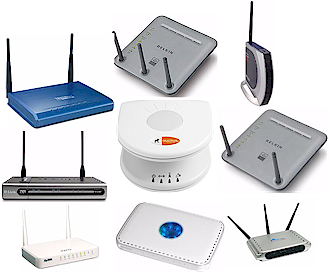
The objects of our attention
Since then, a flurry of products with the apparently alluring “MIMO” (Multiple Input Multiple Output) term somehow incorporated into their names has hit retail shelves. Yes, folks, MIMO has become the “new black” (at least in the consumer WLAN world) and purveyors of consumer WLAN gear hope that you’ll once again dig deep into your wallets to drink the latest Kool-Aid, that really, really, this-time-for-sure, honest-and-truly, will cure those wireless dead spots that we all have around our homes.
This time I assembled eight sets of wireless routers and adapters that are marketed as using some form of MIMO, and one non-MIMO product that promises improved wireless performance and extended range and set out to compare their performance. But instead of using outdoor testing to simiply see which product goes the farthest, this time I used indoor testing – since that’s how most buyers use wireless gear.
I also developed a new scoring system that takes into account both speed and variation in throughput, since wireless LANs are being increasingly used for time-sensitive gaming and multimedia streaming chores in addition to less time-critical web browsing, email and file transfer applications. The change in location, test methodology and scoring produced some interesting, and in some cases, unexpected results. Let’s first meet the products.
The Products
The products I rounded up for the test are an interesting cross-section of the current MIMO market including names you’ll know and some you may not. By the way, I invited Linksys to participate in this competition, but they declined to supply product.
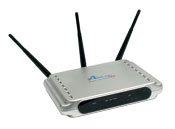
Airlink101 is a relatively small networking gear supplier, known primarily to customers of Fry’s and Outpost.com. I included them in the face-off because their products use chipsets from RaLink, a Taiwanese Wi-Fi chipmaker whose products are helping to put even more of a squeeze on the already virtually non-existent margins suffered by WLAN chipmakers. The router is also the only MIMO product in this competition to have upgradable antennas and also has the distinction of having the lowest price (at time of review).
|
Airlink101
|
AR525W MIMO XR 802.11g Wireless Router |
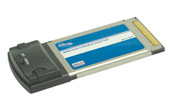
|
AWLC5025 MIMO XR 802.11g Wireless Cardbus Adapter |
I included two sets of gear from Belkin, both of which use chipsets from Airgo Networks. I wanted to measure the performance difference between the original 2 X 3 (two transmit, three receive channels) TrueMIMO chipset used in the Pre-N gear and newer, less-expensive 2 X 2 TrueG chipset. If you use the “Check Latest Price” links below, however, you’ll see that pricing of the Pre-N router has been reduced to pretty much erase any price advantage that the G Plus product was intended to have. Go figure…
|
Belkin
|
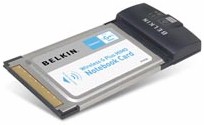
F5D9230-4 Wireless G Plus MIMO Router |
|
F5D9010 Wireless G Plus MIMO Notebook Card |
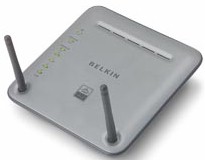
|
Belkin
|
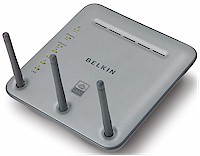
F5D8230-4 Wireless Pre-N Router |
|
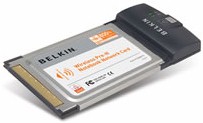
F5D8010 Wireless Pre-N Notebook Network Card |
The Products – more
Buffalo Technology’s Turbo G High Power products don’t use MIMO at all, instead being based on Broadcom chipsets supporting “125 High Speed Mode” (originally Speedbooster) and “BroadRange” technologies. While Buffalo also has a higher-priced Airgo-based product, they are pushing their High Power line as a low cost alternative to MIMO. Unfortunately, price erosion of MIMO products is putting heavy pricing pressure on Buffalo’s strategy, although they seem determined to maintain pricing enough below MIMO products to be alluring to prospective buyers.
|
Buffalo Technology
|
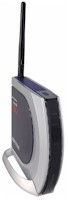
WHR-HP-G54 AirStation Turbo G High Power Wireless Smart Router |
|
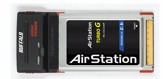
WLI-CB-G54HP AirStation Turbo G High Power Wireless Notebook Adapter |
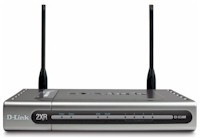
D-Link‘s first attempt at MIMO with its DI-624M Super G with MIMO Wireless Router didn’t exactly bring raves from reviewers and they wouldn’t even provide product for me to test. But they got Atheros, which supplies its VLocity chipset, to go back to the drawing board, with the result being the DI-634M product they were happy to send for review.
Apparently most of the problems with D-Link’s first MIMO attempt were in the router end, since the DWL-G650M card was also paired with the previous product.
|
D-Link
|
DI-634M Wireless 108G MIMO Router |
|
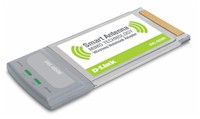
DWL-G650M Super G with MIMO Wireless Notebook Adapter |
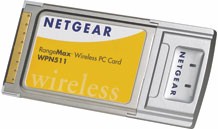
NETGEAR‘s RangeMax products represent yet another twist on the MIMO theme, using Atheros Super-G chipsets and beam-forming antenna technology from Video54 (recently rebirthed as Ruckus Wireless). Of course, any product relying on Super-G’s channel-bonding Turbo mode for high throughput won’t produce peak speeds if any non Super-G gear is anywhere within range.
|
NETGEAR
|
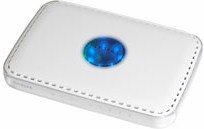
WPN824 RangeMax Wireless Router |
|
WPN511 RangeMax Wireless PC Card |
The Products – even more
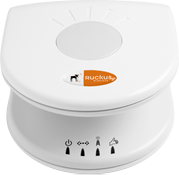
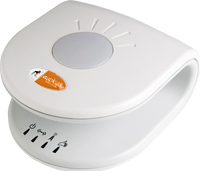
Speaking of Ruckus, in addition to supplying the “BeamFlex” antenna technology for NETGEAR’s RangeMax router, the company has decided to field its own products. The multimedia AP and client adapter also use Atheros chipsets, but don’t appear to use Super G’s Turbo (channel-bonding) mode. This means the products don’t produce the high peak speeds found in both MIMO and non-MIMO products that use Super G Turbo, but they also don’t drop down in throughput if normal 802.11b/g gear is in-range.
Ruckus’ focus is on glitch-free wireless video and audio distribution, so the products include their patent-pending SmartCast QoS technology. I included Ruckus in this competition, however, to gauge differences between their implementation of BeamFlex and that in the NETGEAR RangeMax line. I also wanted to see the difference that a significantly better antenna on the client end of things would make.
|
Ruckus Wireless
|
MF2900 802.11b/g multimedia access point |
|
MF2501 802.11b/g multimedia wireless adapter |
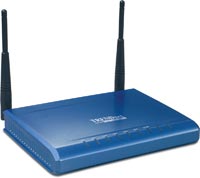
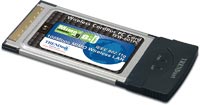
TRENDnet (also previously known as TRENDware) recently seems to be making a push for increased share in the U.S. consumer networking product market with a focus on value-priced gear. Its MIMO entries have dual-antenna Atheros-based designs, similar to the D-Link and ZyXEL products.
|
TRENDnet
|
TEW-611BRP 108Mbps 802.11g MIMO Wireless Router |
|
TEW-601PC 108Mbps 802.11g MIMO Wireless PC Card |
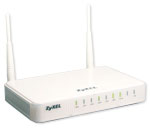
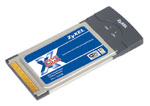
ZyXEL‘s XtremeMIMO is yet-another dual-antenna Atheros-based MIMO design. Like the D-Link DI-634M, the X-550 router contains Ubicom’s StreamEngine QoS technology. The QoS technology doesn’t do anything for wireless performance, but helps make the most of the limited Internet upstream bandwidth that most of us have.
|
ZyXEL
|
X-550 XtremeMIMO Broadband Router |
|
M-102 XtremeMIMO Cardbus Adapter |
The Technologies – Atheros VLocity
Table 1 summarizes information on the chip technologies used in the products tested, which was gathered using a combination of internal product photos from the FCC ID documents and driver information reported by WinXP. A glance at the table shows that while Airgo may lead in terms of MIMO technology (my opinion), Atheros appears to be selling more chipsets for MIMO products, or at least they’re in more manufacturers’ products.
| Company | Technology Name | Chipset |
|
Airlink101
|
MIMO XR
|
|
|
Belkin
|
Wireless G Plus MIMO
|
Airgo Gplus
|
|
Belkin
|
Pre-N
|
Airgo TrueMIMO
|
|
Buffalo Technology
|
High Power Turbo G
|
|
|
D-Link
|
Double XR (2XR)
|
|
|
NETGEAR
|
RangeMax Smart MIMO
|
Atheros 5005 series (?) + VIDEO54 antenna
|
|
Ruckus Wireless
|
Smart-MIMO
|
Atheros 5005 series (?) + VIDEO54 antenna
|
|
TRENDnet
|
108Mbps MIMO
|
|
|
ZyXEL
|
XtremeMIMO
|
|
| Table 1: The Products and Technologies | ||
To ease comparison, I’ve grouped pictures of similarly-designed products together. The most similar are the TRENDnet and ZyXEL designs, which have virtually identical FCC ID filings. The test reports even have the same exact data, with only the product names changed. The report for the TRENDnet products lists TRENDware as the applicant, but the reports for the ZyXEL products list U-Media Communications as the applicant, which makes sense since the FCC ID number prefix is U-Media’s. At any rate, the cards are the same and are shown in Figure 1 and use Atheros’ 5005VL VLocity chipset.
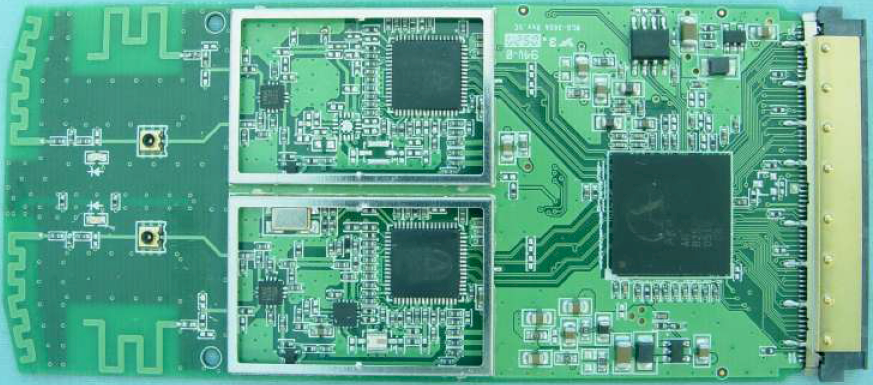
Figure 1: TRENDnet and ZyXEL card
(Click image to enlarge)
From Figure 2, it appears that D-Link’s DWL-G650M card also uses Atheros’ VLocity chipset, but with a slightly different board design.
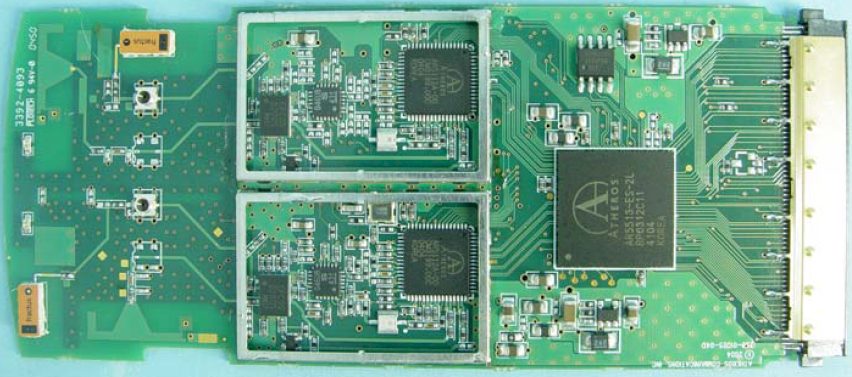
Figure 2: D-Link 2XR card
(Click image to enlarge)
Things are the same for the routers for these three products. Figure 3 shows the identical mini-PCI radios used in the TRENDNet and ZyXEL routers and Figure 4 the slightly different mini-PCI used in the D-Link DI-634M.
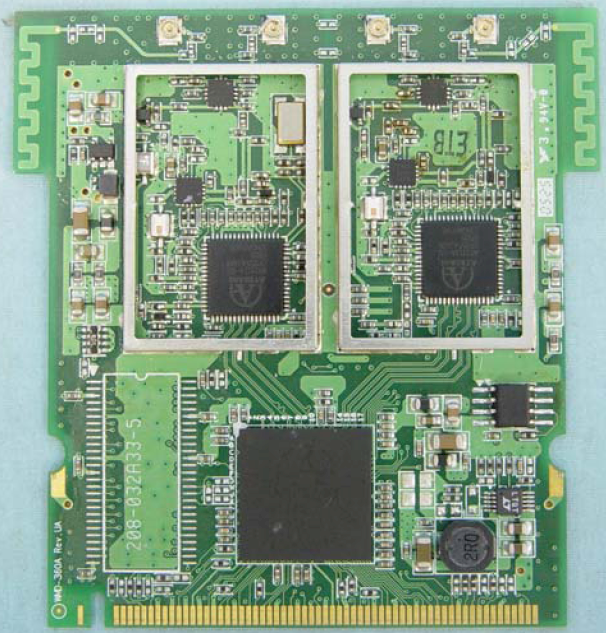
Figure 3: ZyXEL and TRENDnet router mini-PCI radio
(Click image to enlarge)
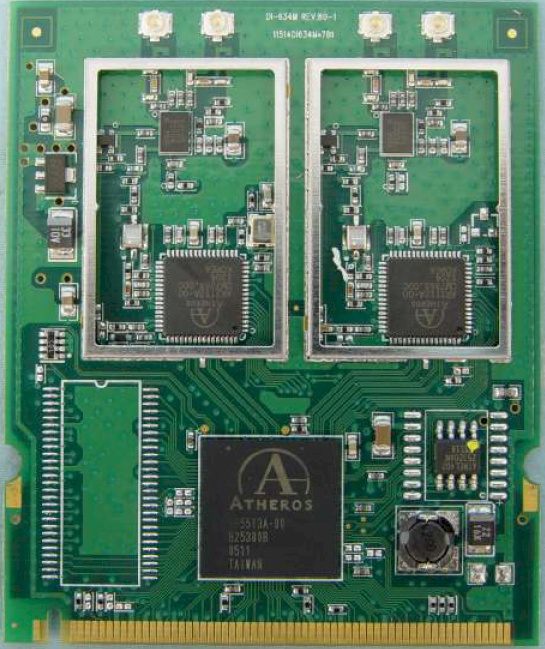
Figure 4: D-Link DI-634M mini-PCI radio
(Click image to enlarge)
The Technologies – Atheros other
Figures 5 and 6 show the innards of the NETGEAR RangeMax router and card, which don’t appear to use the VLocity chipset.
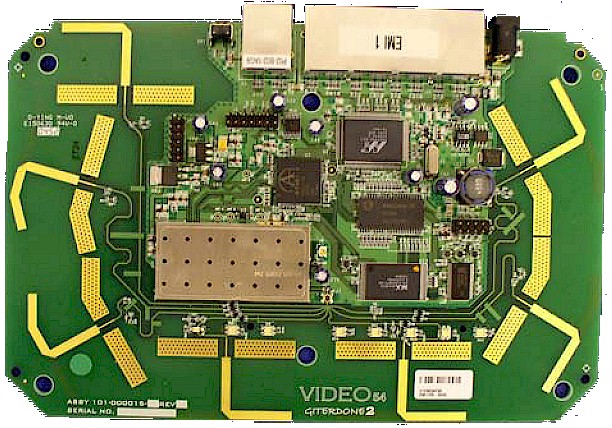
Figure 5: NETGEAR RangeMax router board
(Click image to enlarge)
I can’t say for sure what’s used in the router, since the FCC ID pictures aren’t clear enough. But by using the pictures from the WPN311 PCI version of the RangeMax client, it looks like the RangeMax client uses Atheros’ AR5005GS single-chip Super G solution, which hopefully is giving them some nice margins from a lower manufacturing cost and relatively high product price.
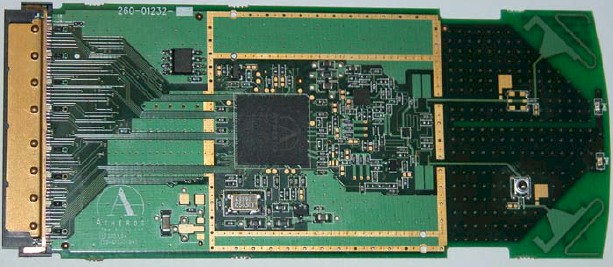
Figure 6: NETGEAR RangeMax card
(Click image to enlarge)
Figures 7 and 8 show the board and unique six element antenna used by the Ruckus Wireless AP and client. Once again, the pictures aren’t clear enough for me to be certain as to which Atheros chipset is used, but I’m guessing that it’s something in the same 5005 series used by the NETGEAR RangeMax.
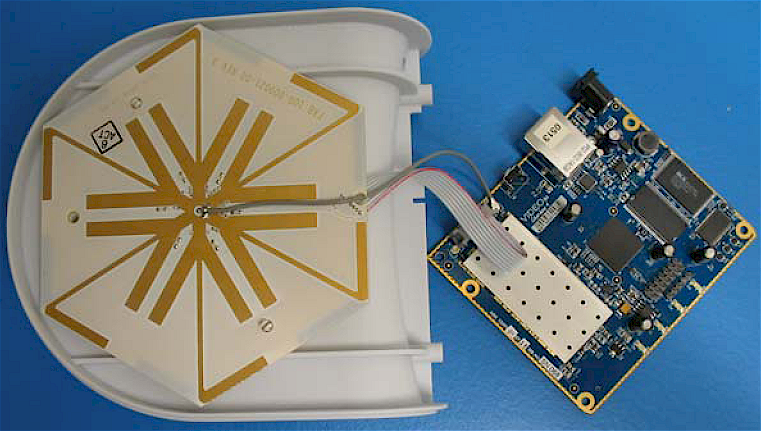
Figure 7: Ruckus Wireless board and antenna
(Click image to enlarge)
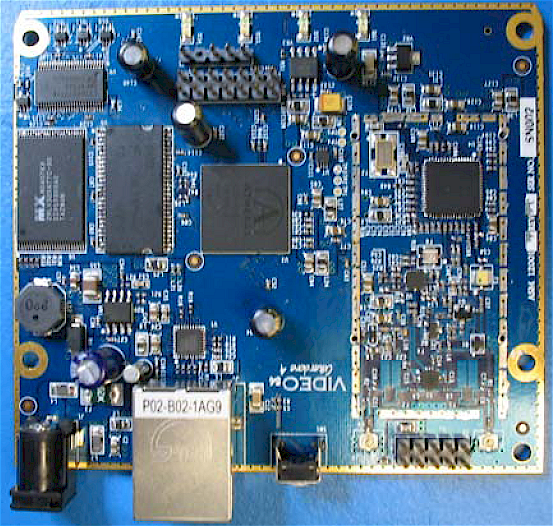
Figure 8: Ruckus Wireless board
(Click image to enlarge)
The Technologies – Airgo
Airgo doesn’t have product information on their website for anything other than their recently-announced 240Mbps chipset. But Figures 9 and 10 show the mini-PCI radio used in the Belkin G Plus and Pre-N routers respectively.
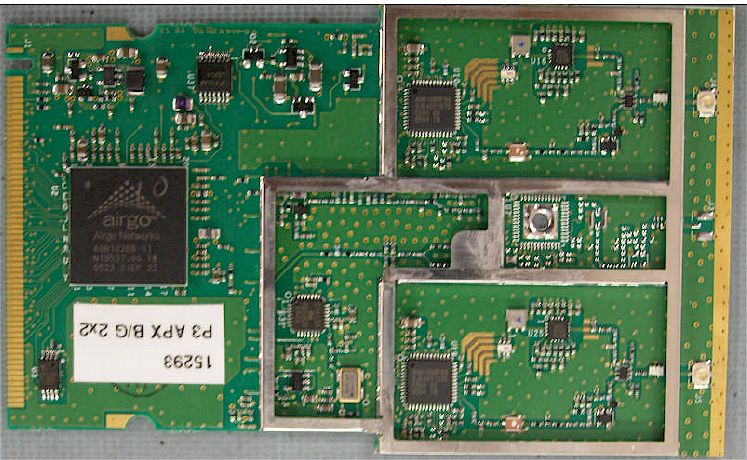
Figure 9: Belkin G Plus router mini-PCI radio
(Click image to enlarge)
Once again, the FCC pictures aren’t the clearest, but it’s clear that two different baseband / MAC chips are used (the large chip to the left). You can also see in Figure 9 that the board is actually laid out to accept a third RF chip, which isn’t loaded.
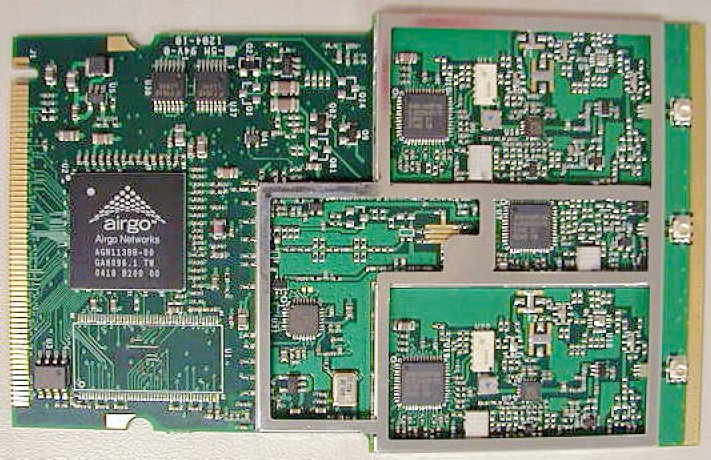
Figure 10: Belkin Pre-N router mini-PCI radio
(Click image to enlarge)
Figure 11 shows the CardBus client card, which is the same for both the Belkin Pre-N and G Plus products. Of note are the three antennas on the right, which appear to incorporate some sort of raised circular element.
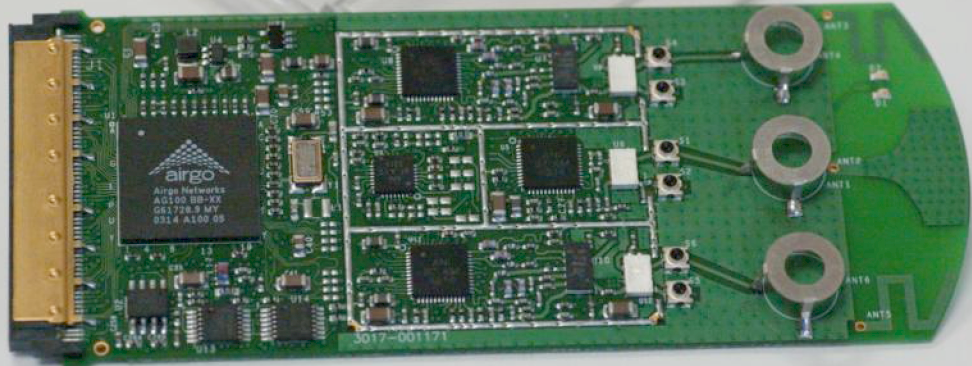
Figure 11: Belkin Pre-N and G Plus card
(Click image to enlarge)
The Technologies – Other
The last two technologies represented in this round-up include yet a different twist on MIMO and a strictly non-MIMO approach to range improvement. RaLink’s RT2600 chipset is used in the Airlink101 router and client card and Figure 12 captures the details of the mini-PCI board used in the router, and Figure 13 shows the naked CardBus client.
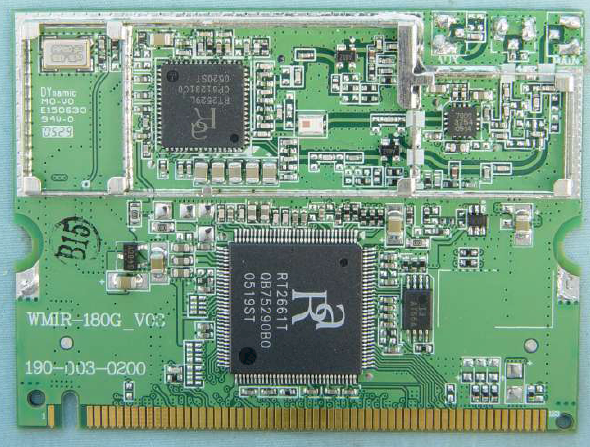
Figure 12: Airlink101 AR525W router mini-PCI radio
(Click image to enlarge)
It’s a bit hard to see the pads to connect to three antennas at the top right of Figure 12, but they’re there. The RT2600 chipset supports a flavor of MIMO using one transmit channel and two receivers, that can operate with either three (as in the router) or two (as in the client) antennas.
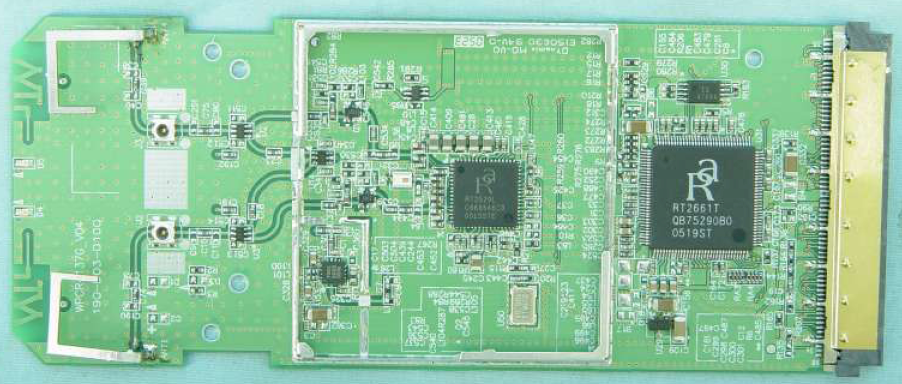
Figure 13: AirLink AWLC5025 card
(Click image to enlarge)
The last technology represented by Buffalo Technology’s Turbo G High Power products doesn’t use MIMO at all. Instead it relies on a combination of Broadcom’s BroadRange range-extension, 125 High Speed Mode (formerly “SpeedBooster”) and a beefier transmit amp to get your signal where it’s goin’.
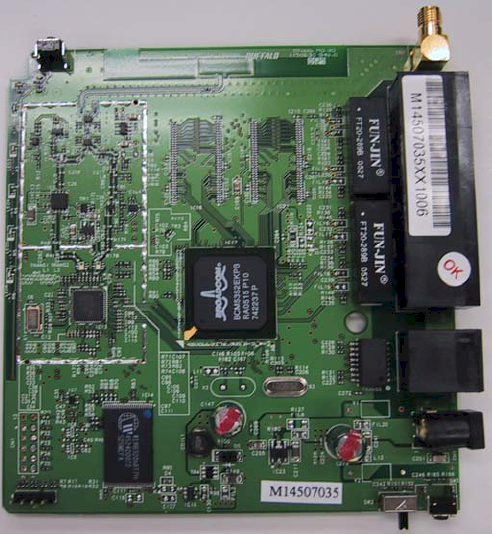
Figure 14: Buffalo Hi Power router
(Click image to enlarge)
You can see the BCM5352E AirForce 802.11g Router System-on-Chip with BroadRange Technology used in the Buffalo router in Figure 14, while the CardBus client board pictured in Figure 15 relies on a BCM4318E single-chip transceiver to implement its end of the BroadRange pairing.
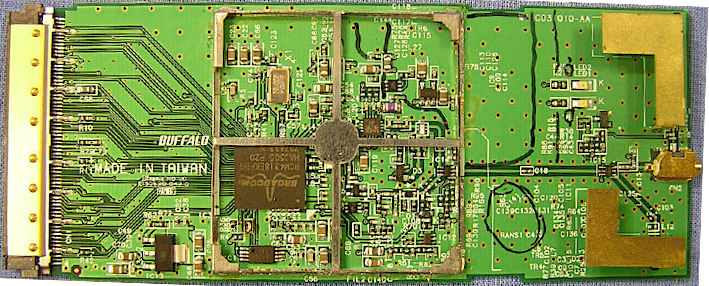
Figure 15: Buffalo Hi Power card
(Click image to enlarge)
Test Setup
As mentioned earlier, I recently moved into a new home and had to establish new test locations. Since this essentially wipes the slate clean in terms of being able to compare wireless test results going forward to those from my previous reviews, I also decided to establish new test methodology and add a scoring system.
My 3300 square foot two-level home is built on a hillside lot with 2×6 wood-frame exterior walls, 2×4 wood-frame sheetrock interior walls, and metal and metalized plastic ducting for the heating and air conditioning system. The Access Point (AP) or wireless router is placed on a four foot high non-metallic shelf away from metal cabinets and RF sources.
Figure 16 shows a simplified layout of the lower level and two of the five test locations.
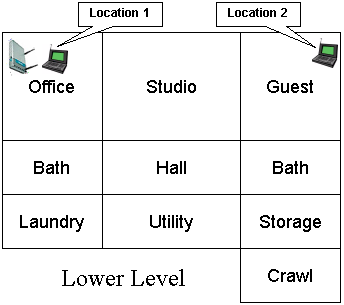
Figure 16: Lower Level Test Locations
Note that the Laundry, Utility, Storage and Crawl(space) areas are below grade, but the rest of the rooms on the lower level have daylight access. Figure 17 shows the upper level layout and the other three test locations.
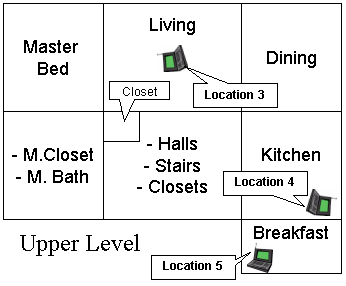
Figure 17: Upper Level Test Locations
The lower-level corner office is not the best location for placing a wireless router or access point for whole-house coverage, but serves the purpose well for pushing products to their limits. Note that the orientations of the icons for the AP and notebooks in Figures 16 and 17 are significant. Unlike the previous test methodology that always pointed the client adapter antenna toward the AP under test, the notebook carrying the client adapter under test is now oriented as a user would naturally do in each location. Here are descriptions of the five test locations:
- Location #1: AP and wireless client in same room, approximately 6 feet apart.
- Location #2: Client in room on same level, approximately 45 feet away from AP. Two sheetrock walls between AP and Client.
- Location #3: Client in upper level, approximately 25 feet away (direct path) from AP. One wood floor, sheetrock ceiling, no walls between AP and Client.
- Location #4: Client on upper level, approximately 55 feet away (direct path) from AP. Two to three interior walls, one wood floor, one sheetrock ceiling and stainless-steel refrigerator, between AP and Client.
- Location #5: Client on upper level, approximately 65 feet away (direct path) from AP. Four to five interior walls, one wood floor, one sheetrock ceiling, between AP and Client.
While you might think that Location 5 was the most difficult, Location 4 turned out to be the toughest. I suspect this is due to the combination of antenna orientation, stainless-steel clad appliances close by, and the desktop test location being sunken about 6 inches below an adjoining quartz-composite countertop.
Test Description
Ixia‘s IxChariot network peformance evaluation program was used with the test configuration shown in Figure 18 to run tests in each of the five locations. The test notebook was a Dell Insprion 4100 with a 1GHz Celeron processor, 576MB of memory, and running WinXP Home SP2 with the latest updates. The Ethernet client machine was an HP Pavilion 716n with a 2.4GHz Pentium 4 processor, 504MB of memory, also running WinXP Home SP2 with the latest updates. The test machines have no other applications running during testing.
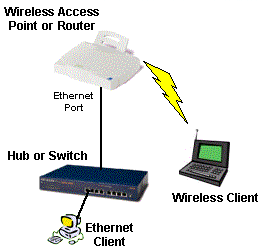
Figure 18: Wireless test setup
All routers / APs were reset to factory defaults, with the one exception being the ZyXEL router, which defaulted to SuperG off. So I set it to Super G with Dynamic Turbo enabled in order to match the settings of the other products that used that technology. I also configured each router to act as an an Access Point, so the test results are in no way effected by the router portion of the products.
At each test location, the IxChariot Throughput.scr script (which is an adaptation of the Filesndl.scr long file send script) was run for 1 minute in real-time mode using TCP/IP in both uplink (client to AP) and downlink (AP to client) directions. The only modification made to the IxChariot script was to change the file size from its default of 100,000 Bytes to 300,000 Bytes of data for each file send.
Although manufacturers continue to push throughput as the way they’d like you to compare products, the increasing use of wireless for time-sensitive applications like gaming, VoIP and audio and video streaming now means low throughput variation is becoming just as important, especially for streaming video applications. Fortunately, IxChariot provides a metric called Relative Precision that can be used to compare throughput variation. Here is an excerpt from Ixia’s Relative Precision description:
The Relative Precision is a gauge of how reliable the results are for a particular endpoint pair. Regardless of what type of script was run, you can compare relative precision values. The relative precision is obtained by calculating the 95% confidence interval of the Measured Time for each timing record, and dividing it by the average Measured Time. This number is then converted to a percentage by multiplying it by 100. The lower the Relative Precision value, the more reliable the result.
Here is a formal definition of a confidence interval, using statistical terms:
A confidence interval is an estimated range of values with a given high probability of covering the true population value. To state the definition another way, there is a 95% chance that the actual average lies between the lower and upper bound indicated by the 95% Confidence Interval.
While QoS techniques such as WMM (Wi-Fi Multimedia) and the recently-ratified 802.11e IEEE standard are intended to compensate for wide swings in wireless throughput, they can only do so much if adequate, steady bandwidth isn’t available. And if the time it took for manufacturers to incorporate WPA and WPA2 improved wireless security is any indication, it could be years before WMM and 802.11e are supported by enough vendors to be useful.
My new Wireless Quality Score (WQS) is intended to do essentially the same thing as showing IxChariot wireless throughput vs. time plots, but in a more quantifiable and easier-to-compare way. For each test location, the WQS is calculated by adding together the Average Throughput divided by the Relative Precision for each test location or:
WQS = (Loc1 AT/Loc1 RP)+(Loc2 AT/Loc2 RP)+(Loc3 AT/Loc3 RP)+(Loc3 AT/Loc3 RP)+(Loc5 AT/Loc5 RP)
where AT = Average Throughput and RP = Relative Precision. This simple score incorporates both throughput and variation in a simple way that moves the WQS up for products with higher throughput and lower variation and down for those with lower throughput and higher variation.
But since there are those for whom (high) speed is the only thing that matters, I’ve also calculated total throughput of all locations, so that you can compare products on that basis if you prefer. So let’s get to the results already!
WQS Results
Figure 19 shows the total WQS for both uplink and downlink tests. I’m not surprised that the Airgo-based Belkin products turn in the best WQS numbers, since they don’t rely on channel-bonding to achieve high throughput. No channel-bonding means no periodic throughput down-shift, resulting in lower Relative Precision numbers and therefore higher WQS (for approximately equal throughput values).
But I was surprised to see that the new G Plus 2 X 2 MIMO product slightly beat out the original 2 X 3 MIMO Pre-N. Since only the router is different (the F5D8010 Pre-N and F5D9010 G Plus cards have the same FCC ID), I’m guessing that newer Airgo code for the two-channel radio in the router holds the key.
The products using Super G to boost throughput (TRENDNet, D-Link and ZyXEL) have very similar scores, but almost half those of the Airgo-based Belkins due to the effect of the periodic downshift out of channel-bonding that all this group showed at some point during testing.
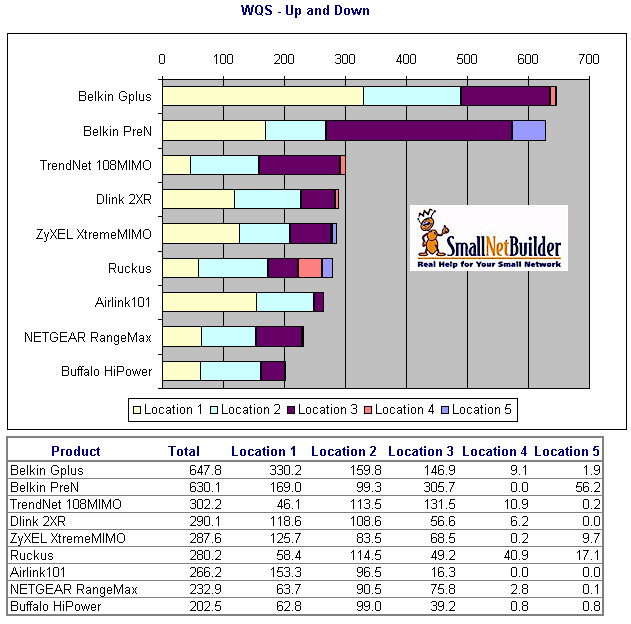
Figure 19: WQS – uplink and downlink
(click image to enlarge)
Although the Ruckus Wireless product uses an Atheros chipset, it doesn’t appear to use Super G Turbo mode. I verified this using Cognio’s ISMS Mobile 1.0 spectrum analyzer, which showed that only 20MHz of bandwidth was being used. Still, the Ruckus’ WQS was comparable to the Super-G Turbo boosted products, and Figure 20 shows the reason why.
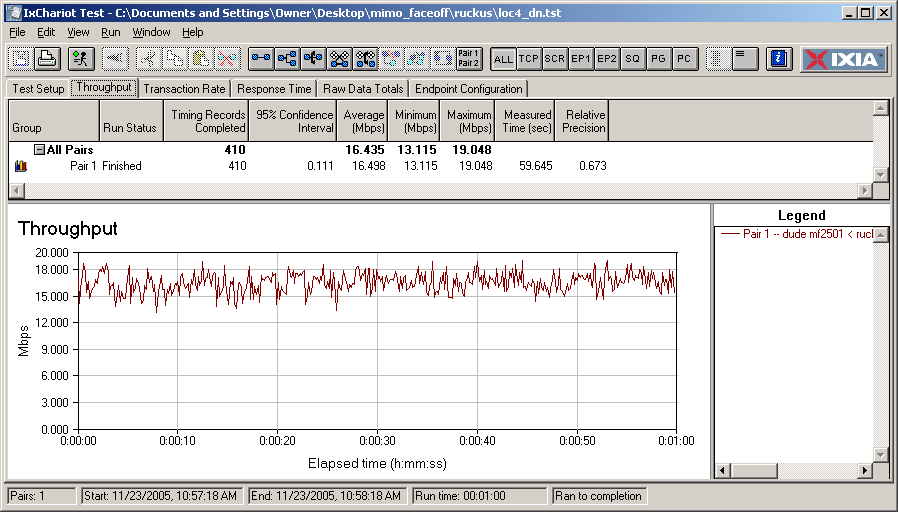
Figure 20: Ruckus Wireless Location 4 downlink throughput
(click image to enlarge)
Even in the toughest test location (Location 4), the Ruckus still has respectable throughput and more significantly, low throughput variation, a combination unmatched by any of the other products. The difference is probably partly due to Ruckus’ BeamFlex antenna, but more likely due to its use in both the AP and client. All other clients use antenna designs constrained by the significantly limited space allowed by the CardBus form factor.
I was also surprised to see the NETGEAR RangeMax do so poorly with Figure 21 showing an example of the behavior that held it back in WQS ranking. First, there is a delay at the start of the downlink test for Location 1 that also appears to some extent in other locations. But the test also caught the RangeMax in one of its periodic down-shifts out of Super G Turbo mode. Since both of these represent large throughput variations, the Relative Precision score jumped up to double-digits and significantly drove down the WQS.
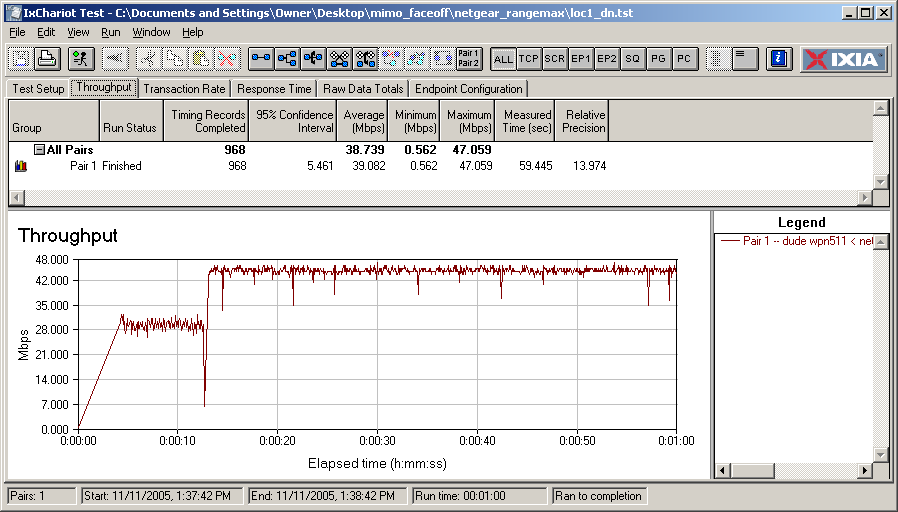
Figure 21: NETGEAR RangeMax Location 1 downlink throughput
(click image to enlarge)
WQS Results – more
Throughput variation also forced the Buffalo Technology Hi Power pair down toward the bottom of the WQS pile. This time, however, it wasn’t downshifting out of channel-bonding that did it, since the Broadcom-based products don’t use that technique to pump up their throughput numbers. Instead, Figure 22 shows the throughput “dropouts” that are characteristic of the Hi Power products. Even though they are very brief, the large downward swings in throughput result in large throughput variation that pushes up the Relative Precision value.
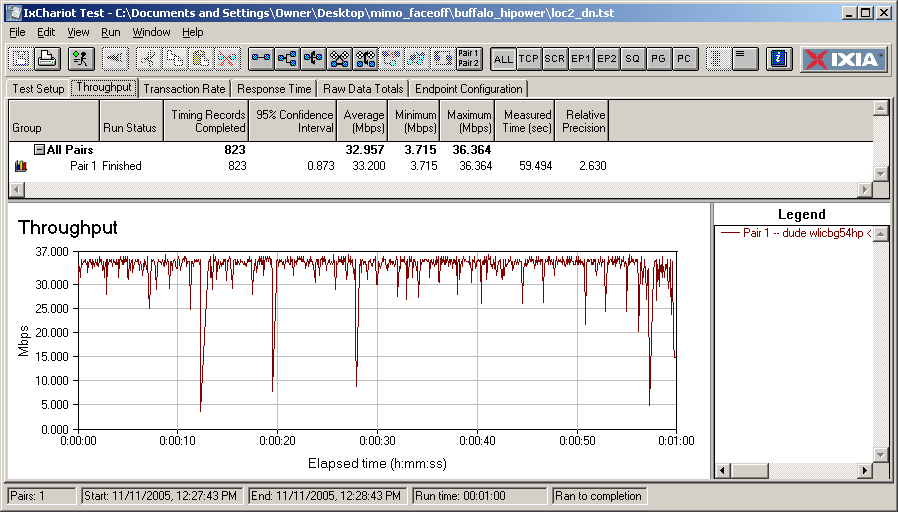
Figure 22: Buffalo Hi Power Location 2 downlink throughput
(click image to enlarge)
A look at Figures 23 and 24, which show WQS numbers for uplink and downlink separately, reveal distintively different rankings for some products.
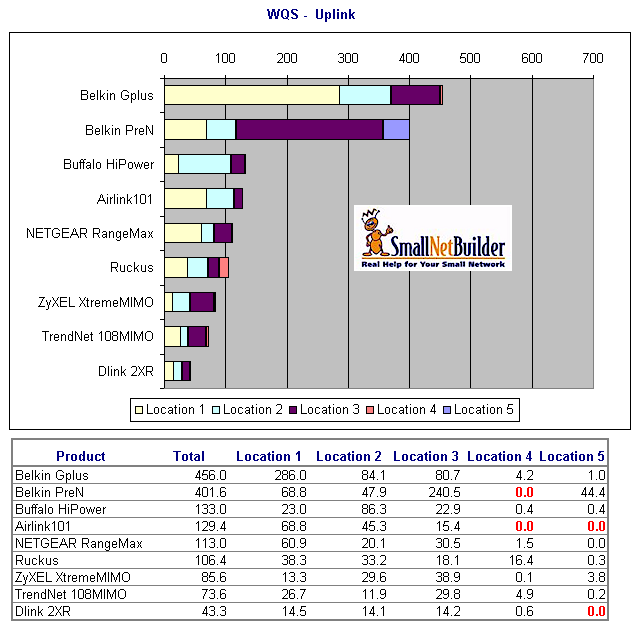
Figure 23: WQS – uplink
(click image to enlarge)
The D-Link pair shows the most dramatic difference ranking dead last for uplink, yet number one for downlink.
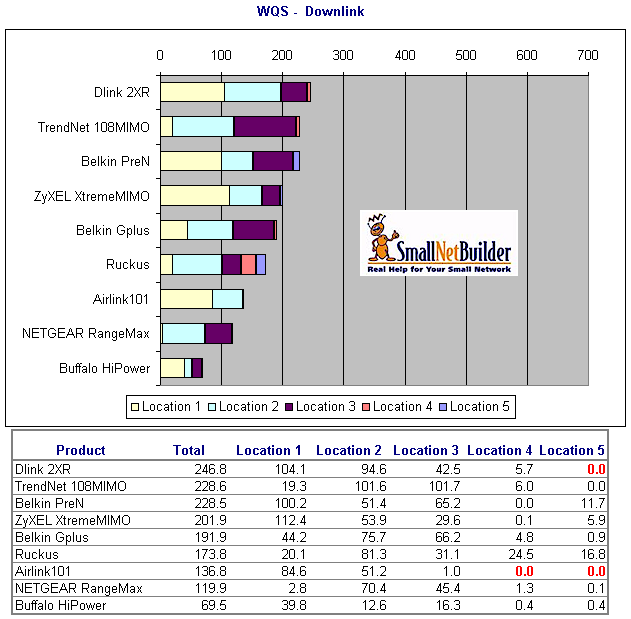
Figure 24: WQS – downlink
(click image to enlarge)
A look at the Relative Precision values in Figures 25 and 26 once again shows the reason for the difference.
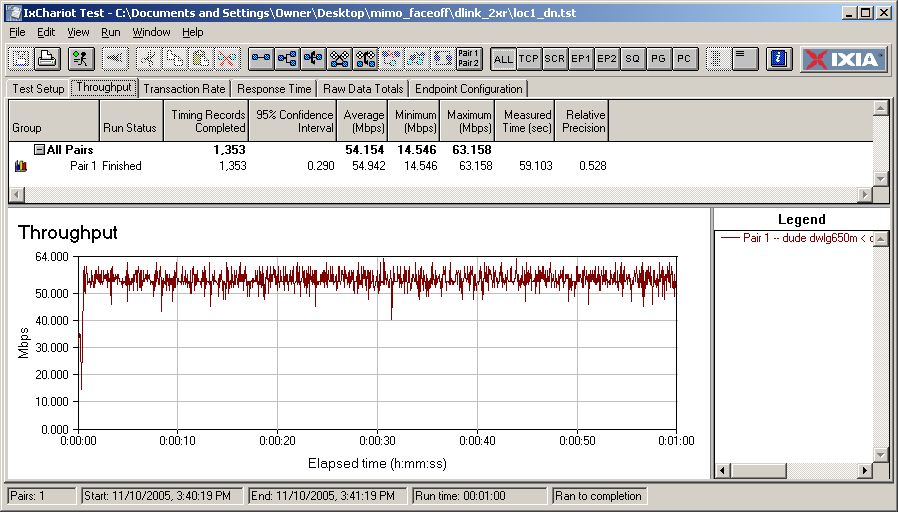
Figure 25: D-Link 2XR Location 1 downlink throughput
(click image to enlarge)
The throughput Super-G Turbo related throughput shift at the beginning of both plots may not look significant, but causes a 7X difference in Relative Precision between the downlink and uplink runs. So even though the Turbo-mode throughput is among the highest recorded for the products tested (averaging between 52 and 53 Mbps!), once again, throughput variation makes the difference.
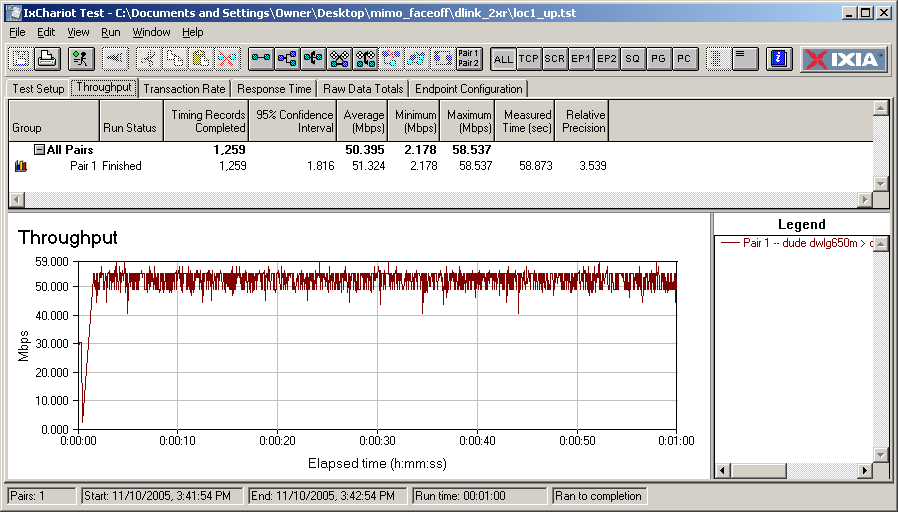
Figure 26: D-Link 2XR Location 1 uplink throughput
(click image to enlarge)
Throughput Results
As promised for those to whom throughput is everything, I’ve also ranked the products according to total uplink and downlink throughput (Figure 27) as well as for uplink (Figure 28) and downlink (Figure 29) separately. Not surprisingly, the products using Super G Turbo rank the highest, with the ZyXEL XtremeMIMO taking top place for total average throughput in all three cases. The ZyXEL did a little better than the similarly-designed D-Link and TRENDnet products, but with only around 7% difference between highest and lowest WQS, most users probably wouldn’t notice the difference.
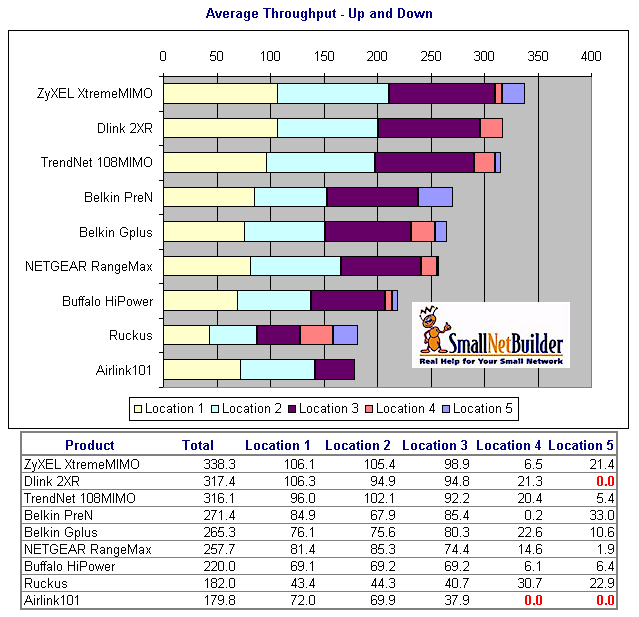
Figure 27: Throughput – uplink and downlink, Mbps
(click image to enlarge)
The second tier of products with similar total throughput include the two Belkin Airgo-based products and the NETGEAR RangeMax. Highest to lowest total throughput in this group has only a 5% difference, with a 15% step down between the top-throughput group and this one. The Buffalo Hi Power pair is in its own group, followed by the Ruckus and Airlink101 products bringing up the rear of the total throughput ranking.
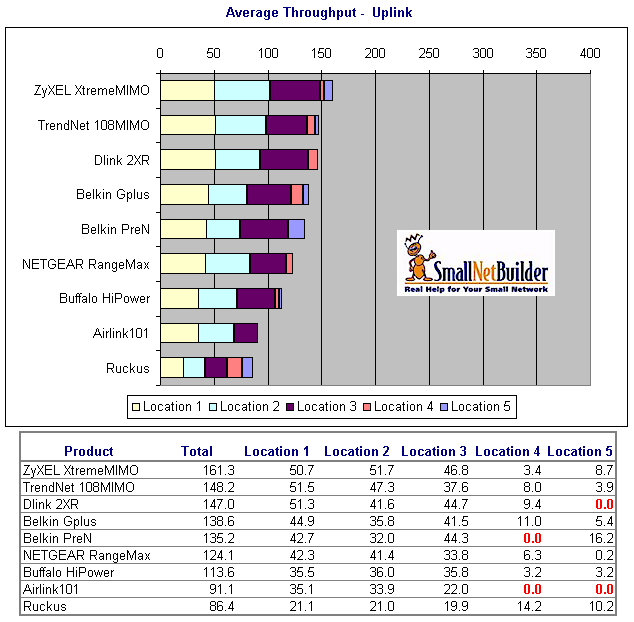
Figure 28: Throughput – uplink, Mbps
(click image to enlarge)
It’s interesting to note that the throughput rankings don’t change around as much as the WQS rankings when you look at uplink and downlink numbers separately. But it’s safe to say that the Atheros VLocity-based products (ZyXEL, TRENDnet and D-Link) all have better downlink than uplink throughput, while there’s not much difference between up and down for the other products.
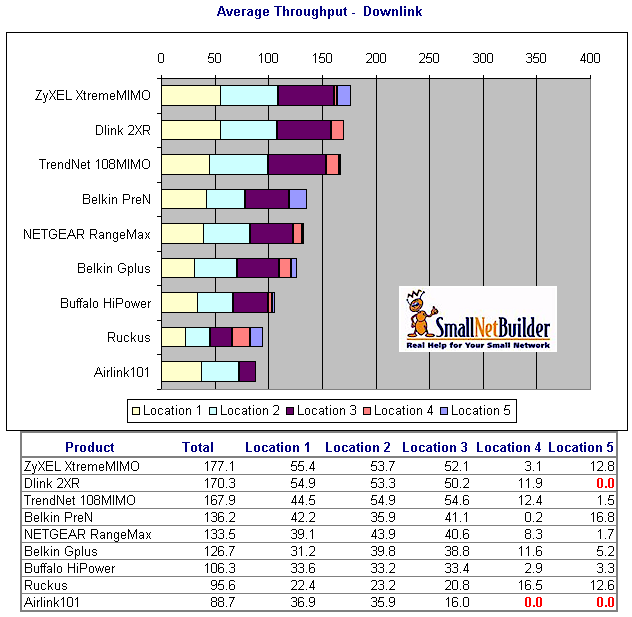
Figure 29: Throughput – downlink, Mbps
(click image to enlarge)
Analysis and Caveats
The conclusions that I reach from sifting through all this data are not as clear as I thought they would be when I started this project. But conclusions are why you read this stuff, so here goes.
First, let’s talk about whether there is risk in buying MIMO gear, since there is no such thing as a “MIMO” standard and the 802.11n high speed wireless standard that it is emulating is at least a year away from ratification. Since none of the current MIMO technologies are 802.11n, or can even be considered “pre-802.11n”, forget any possibility of an upgrade to 802.11n compatibility when that standard is finally released.
The good news, however, is that Airgo and Atheros-based MIMO products are interoperable with existing 802.11b and g gear, although both will experience a throughput drop when non-MIMO gear is mixed into their wireless LANs. I previously examined mixed WLAN behavior for NETGEAR’s RangeMax and a Linksys Airgo-based product in detail. And while I didn’t verify the interoperability of any of the Atheros VLocity-based products, since Super-G is an important core VLocity technology, I don’t think it’s a big leap to assume that those products will handle mixed WLANs similarly to RangeMax.
But I didn’t test the RaLink products for mixed WLAN behavior,so can’t vouch for what happens. However, I’d expect behavior similar to the other technologies, with the only question being the extent of throughput drop.
Second, if wireless bridging and repeating or ability to attach higher-gain antennas is important, you generally will get neither from MIMO products. The one exception in this round-up is the Airlink101 router, which has its antennas attached via RP-SMA connectors (but no WDS bridging / repeating).
So as far as risk is concerned, my conclusion is that there is no more obsolescence or interoperability risk from buying “MIMO” products than any other WLAN products using non-standard throughput and range-enhancement technologies.
Next, let’s consider price. More competition has lead to lower prices, with ZyXEL being the most notable exception among the products reviewed. But now that you know that you can get the same performance and features from the much more reasonably priced TRENDnet pair, perhaps we’ll see ZyXEL come down in price.
Tip: Like parent Cisco, Linksys would like you to believe that their name on the box justifies higher prices for products that are essentially copies of Airgo’s reference designs. But Belkin’s Pre-N and G Plus are also Airgo reference clones and cost up to 30% less.
But most manufacturers are slugging it out and slashing prices with the result being that as I write this you can pick up a “MIMO” router for under $60 (the Airlink101). But given the Airlink101’s inability to connect in either of my difficult test locations 4 and 5, you’ll probably should expect to spend more like $80 – $90 for one of the better-ranked products.
You should note that finding a deal on MIMO client cards is more difficult, since that’s where manufacturers are trying to squeeze out some margin so that they can live to fight another day. As noted previously, I suspect that NETGEAR may be doing the best at this game, given the single chip design of its WPN511 RangeMax client and its comparatively high price.
Product Recommendations
But enough with the navel-gazing! What the heck should you buy? If you want the best combination of high throughput and low throughput variation, then your choice should be products using Airgo’s TrueMIMO technology. The Belkin G Plus actually turned in better WQS numbers than the Pre-N gear, but the Pre-N seems to be more widely available. At least in my testing, the results were not generally clear enough to categorically recommend one over the other, so buy on price.
If high throughput is what matters most to you, then choose any of the products using Atheros VLocity technology, i.e. the D-Link, ZyXEL or TRENDnet gear. Since all three also include routing sections with Ubicom’s StreamEngine Internet upstream optimization technology, you can buy again on price, with TRENDnet getting the nod as low-price leader.
But keep in mind that you’ll achieve this highest throughput only if your WLAN contains only Super-G clients and more likely only if the clients are from the same manufacturer and product family. You’ll also need to make sure your hopefully speed WLAN isn’t within range of any neighboring non Super-G wireless networks, since Super G products must shift down out of channel-bonding “turbo” mode if any are detected – even if you force “Static Turbo” mode.
So what about the other products? The Ruckus Wireless products command the highest price and may end up being mainly sourced via IPTV service providers (although the company says you can purchase them directly by emailing them). They don’t provide the highest peak throughput, but earn the distinction of having both the highest total up and down throughput and WQS numbers in my most difficult test locations 4 and 5.
The non-MIMO Buffalo Turbo G Hi Power pair actually held its own among the sexier MIMO gear and managed to maintain 2-3Mbps of usable (although not with low variation) in the location 4 and 5 tests. Wireless bridging / repeating, upgradable antennas on both router and client, and pricing below all but the Airlink101 could make it an attractive alternative if you’re willing to accept higher throughput variation for a lower price.
And what about the NETGEAR RangeMax, which ranked next-to-last for up and down WQS and behind both the Atheros and Airgo-based products for total up and down throughput? Actually, that about sums it up for this pair that seems to suffer from its earlier-generation Atheros technology and client that doesn’t use the multi-element BeamFlex antenna. While it may be a top-selling MIMO product now, its technology and features are getting long in the tooth and the VLocity and TrueMIMO based products provide better value.
This brings me to the Airlink101, which bears the distinction of being the only product that I can’t recommend because of its bottom total throughput ranking, low WQS and especially its inability to establish a connection in both difficult test locations 4 and 5.