

Introduction
This article has been superceeded by How to Crack WEP…Reloaded.
Hundreds, perhaps thousands of articles have been written about the vulnerability of WEP (W ired E quivalent P rivacy), but how many people can actually break WEP encryption? Beginners to WEP cracking have often been frustrated by the many wireless cards available and their distribution-specific commands. And things are further complicated when the beginner is not familiar with Linux.
In this three part series, we will give you a step by step approach to breaking a WEP key. The approach taken will be to standardize as many variables as possible so that you can concentrate on the mechanics of WEP cracking without being hindered by hardware and software bugs. The entire attack is done with publicly available software and doesn’t require special hardware – just a few laptops and wireless cards.

Figure 1: Gotcha!
This first article will help you set up your wireless lab and guide you through the scanning portion of WEP cracking. After all, you will need to find and document the wireless networks before you can crack them. The second article will describe the stimulation of the target WLAN to generate traffic and the actual process of capturing data and cracking the WEP key. After reading these two articles, you should be able to break WEP keys in a matter of minutes. A third article will turn things around and describe how to defend against multiple skill levels of wireless intruders
 NOTES:
-
A description of the basic approach and techniques used in this How To can be found in The Feds can own your WLAN too.
-
You don’t need to be a networking expert to successfully follow this How To, but you need basic familiarity with networking terminology and principles. You should know how to ping, open a Windows Command Prompt, enter command lines and know your way around the Windows networking properties screens.
What you Need
Although WEP cracking can be done from a single laptop, ideally you should have two. One laptop performs an active attack to stimulate data flow so that a sufficient number of packets can be captured in a relatively short amount of time, while the other laptop “sniffs” or captures the traffic produced by the attacking laptop. Figure 2 shows the basic idea.
You can actually run a WEP crack using one notebook equipped with a single wireless LAN card, but we don’t recommend this configuration as a starting point. With only one notebook, its easy to get confused about what you’re doing and we’ve found that the Auditor programs can get a bit unstable when used in this way.
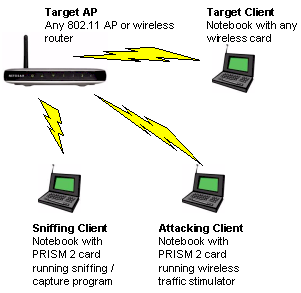
Figure 2: Two Notebook WEP cracking setup
Note that using an active attack vs. passively capturing traffic increases your chances of detection. But it can significantly speed a WEP key crack by forcing the generation of more packets than you would normally capture in a short time from a lightly-used WLAN.
Tip: Although we refer to laptops / notebooks throughout this series, you can also use desktop computers or a mixture of laptops and desktops. However, you may find using notebooks easier due their portability and the wider range of compatible PC Card wireless adapters available.
Here is a list of required hardware:
-
Wireless Access Point – This will be the “target” access point and can be any brand. We used a Netgear WGT624 v2
-
A laptop or computer with wireless capability – This will be the “target” computer and it doesn’t matter which wireless chipset or card the computer uses. Our lab had a surplus Dell laptop with built-in wireless that worked just fine
- Two 802.11b PC Cards based on the PRISM 2 chipset – Some of the programs (such as Kismet) we use in this series can support a wide variety of wireless cards. But we suggest you stick to using cards based on the PRISM 2 chipset, which are supported by all the programs we will use.
Tip: We used two 2511CD PLUS EXT2 cards. The 2511-CD PLUS EXT2 has two MMCX connectors for external antennas and does not have an internal antenna.These cards are typically found under the Senao, Engenius or Wireless LAN brand names (Figure 3).You can also search this list compiled by Absolute Value Systems to find other PRISM 2-based cards.
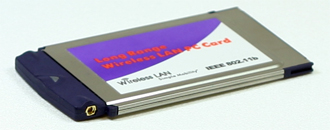
Figure 3: Senao 2511 802.11 PC Card
If you purchase a wireless card that has an external antenna connector, you may want to buy an antenna and appropriate “pigtail”. (The pigtail is a short cable, that connects the end of the antenna cable to your Wi-Fi card.) This isn’t always necessary since some cards with external antenna connectors also have internal antennas. But note that the 2511CD PLUS EXT2 series of cards, do not have an internal antenna, so you must purchase an antenna if you’re using that card.
What you Need – more
You are welcome to use any type of external antenna you want (or none at all), but we purchased the Mobile Patch antenna pictured in Figure 4. The suction cup bottom of the patch antenna makes it wonderful for wardriving, as you can temporarily attach it to your car windows.
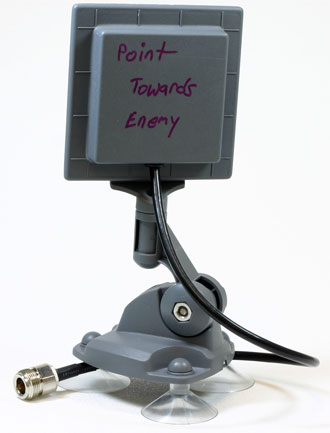
Figure 4: Mobile Patch Antenna
This antenna has 8dBi of gain and, like many antennas, has a short cable that terminates in an N-Female connector. For the Senao / Engenius cards, you will need to buy a pigtail with MMCX connector on one end. The connector is about 1 mm in diameter, with a very small pin in the middle (Figure 5).
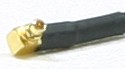
Figure 5: MMCX connector on pigtail cable
As a side note, pigtail connectors are disliked by many people. It’s an extra cable to carry around, and sometimes the connector breaks off. In addition, it is a pain to disconnect the pigtail from the Wi-Fi card, as it takes a decent amount of force to pull the connector off.
The Software
While cracking WEP requires several open source tools, all of these tools are thankfully pre-installed, on the free Auditor Security Collection LIVE CD. The CD boots a modified Kanotix Linux distribution into RAM (it doesn’t touch your hard-drive) and auto-detects and configures many wireless cards.
Updated 6/1/2007: The Auditor Security Collection is no longer available. Use Backtrack instead.
Lab Setup – Preparing the Target WLAN
Proper set up of your lab is important, because you want a controlled environment to practice in. You will also want to prevent collateral damage to neighboring APs that are not yours because some of the attacks described in Part 2 will forcibly knock clients off an AP. This could possibly wreak havoc with other wireless users in the area. So if you are in an office complex, apartment building or any other area with many wireless networks, it may be prudent to wait until night hours when the networks are less busy. Please practice safely and responsibly!
The first step is to connect and configure a “target” wireless LAN comprised of an Access Point or wireless router and a single wireless client. This WLAN will be secured with the WEP key that you will be cracking. Give your AP an SSID of your choosing – we called ours “starbucks”. Configure a 64 bit WEP key on the WAP to start – after you successfully break a 64 bit key, you can try a 128 bit key.
You’ll need to record the following information for later use:
- MAC Address of the AP – This is usually displayed in the web configuration menu. It also may be found on a label on the bottom or side of the AP
- SSID of the AP
- Wireless channel of the AP – by default will probably be Channel 6, but make sure
- WEP key – If your AP displays the key as 0xFFFFFFFFFF (replace the F’s with whatever your key is), write down only everything past the 0x
With the AP configured, we now need to get a client associated with it. (The following example uses Windows XP.) Right-click on the My Network Places icon on your desktop, or in your Start Menu. Then left-click Properties.
Double-click the entry called Wireless Network Connection and a window similar to Figure 6 will open. Figure 6 shows that multiple WLANs are available, but your window may show only the “starbucks” AP that you just configured. Connect to your AP by double-clicking the corresponding SSID.
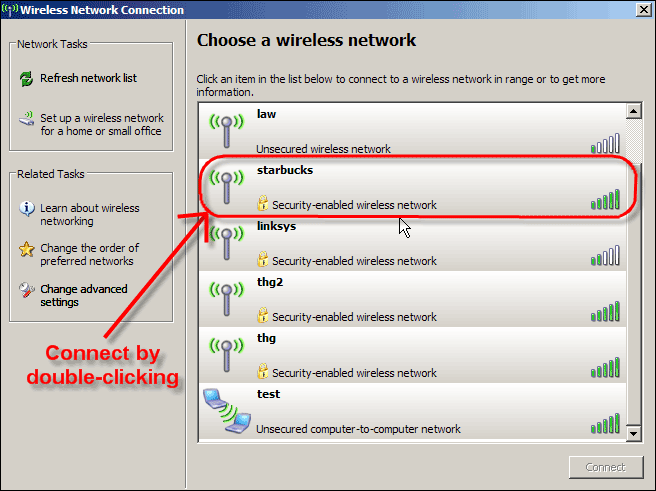
Figure 6: Connecting to your WAP
(click image to enlarge)
Because the AP has WEP enabled, Windows will ask for the network key in order to connect (Figure 7). Type in your WEP key (or cut and paste it from a Notepad or Wordpad document) and after a short wait Windows should report that you are connected to the network. Make sure that you are really connected by pinging a known computer on your wired LAN or opening your browser and checking your favorite website if your WLAN is connected to the Internet.
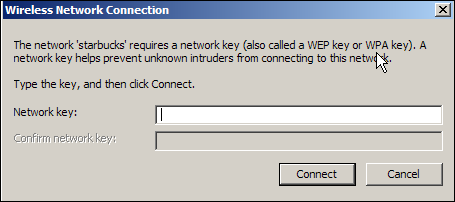
Figure 7: Entering WEP Key
(click image to enlarge)
If you can’t get a successful ping or browse the web, open your wireless adapter’s Network properties, click on the Support tab and check that you have valid IP address information. If you don’t, check that your LAN’s DHCP server is enabled and also check that the wireless adapter’s TCP/IP properties are set to “Obtain an IP address automatically”. You may also need to run a Repair on the connection.
Lab Setup – AP
Once you are successfully connected, record the MAC Address of target computer. You can do this by opening a command prompt window and entering the ipconfig /all command. You should get a screen similar to Figure 8, in which I’ve highlighted the wireless network adapter MAC address information.
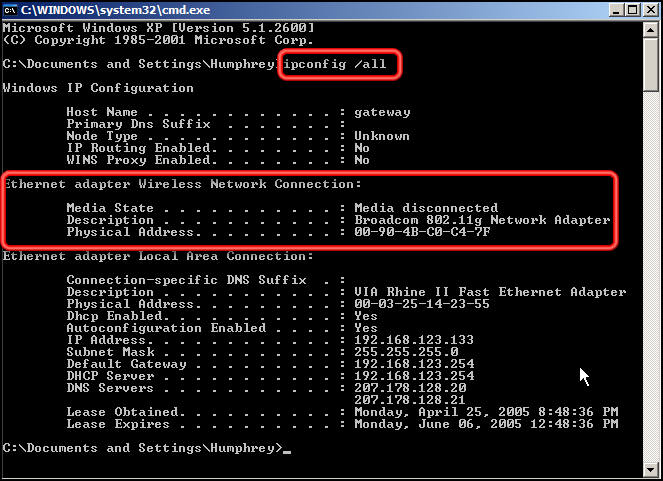
Figure 8: Type in ipconfig /all to find the MAC Address
(click image to enlarge)
Since your client machine is running Windows XP, you can also get the MAC address from the Wireless Connection Status window. Click on the Support tab, then the Details button and the MAC address is right at the top (Figure 9), but of course called something different, i.e. “Physical Address”.
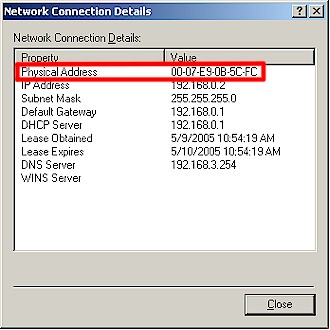
Figure 9: MAC address in Network Connection Details
You will notice that in Windows, the MAC address numbers and letters are separated by dashes. The dashes make the characters more readable, but the actual MAC address doesn’t have dashes.
At this point, our target WLAN is configured and working, so shut down the target client.
Lab Setup – Preparing the Notebooks
Now that the target computer has been set up, it’s time to set up the notebooks that will scan for target WLANs and sniff traffic and run attacks to stimulate network traffic. First set your notebook to boot from its CD drive. It may be set this way by default, or you may have to change the boot order by changing BIOS settings.
Next, shut down the notebook, insert a wireless card and Auditor Security Collection CD into the notebook and turn it on. After you pick the appropriate screen resolution from the Auditor boot menu, it will install to RAM and you will be presented with the Auditor start screen (Figure 10).
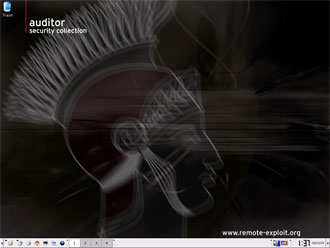
Figure 10: Auditor start screen
The two most important icons will be the Programs and Command Line icons, which are located at the bottom left side of the screen (Figure 11).
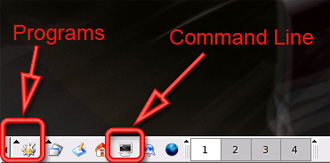
Figure 11: Programs and Command Line locations
Before you do anything else, you must make sure that your wireless network card has been recognized and configured by Auditor. Click on the command line icon to open a command line window, then type iwconfig. Among the other information that Audior spews out, you should see wlan0, which is the designation that Auditor gives to PRISM-based cards. If your screen looks similar to Figure 12, then Auditor has correctly detected your wireless card. You can now close out of the command line screen.
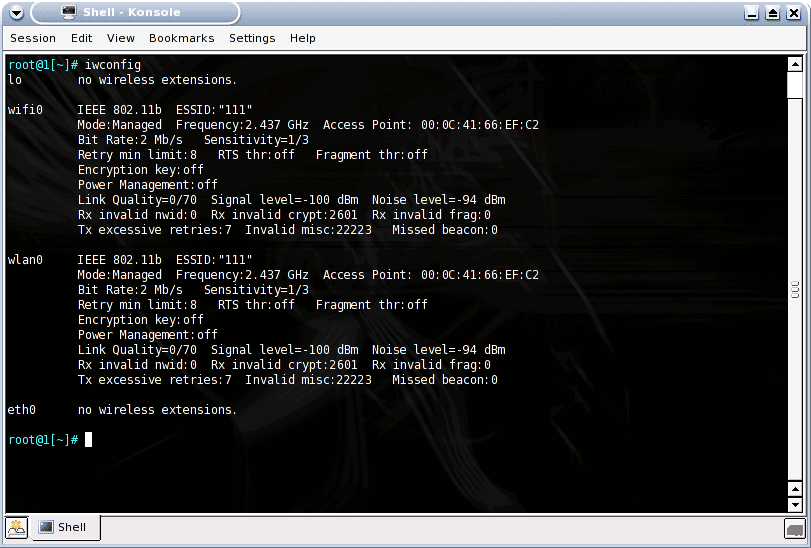
Figure 12: iwconfig to verify that the wireless card works
(click image to enlarge)
Repeat these same steps for your second notebook, then shut it down. You won’t be needing it until Part 2, where you’ll learn how to use it to stimulate WLAN traffic that will be captured by your first notebook.
Network Recon with Kismet
You’re now ready to start Kismet, which is a Linux-based wireless scanner. It’s a handy tool for surveying the wireless airwaves around you to find target wireless LANs to crack. Kismet also captures traffic, but there are other tools such as airodump (part of Aircrack) that do a better job in the context of cracking WEP. So we’ll be using it to make sure our wireless card is working and for scanning for wireless networks. Then we will switch to different tools in Part 2 to actually sniff and capture traffic.
You get to Kismet by clicking on the Programs icon, then Auditor, then Wireless, then Scanner/Analyzer, and finally Kismet (Figure 13).
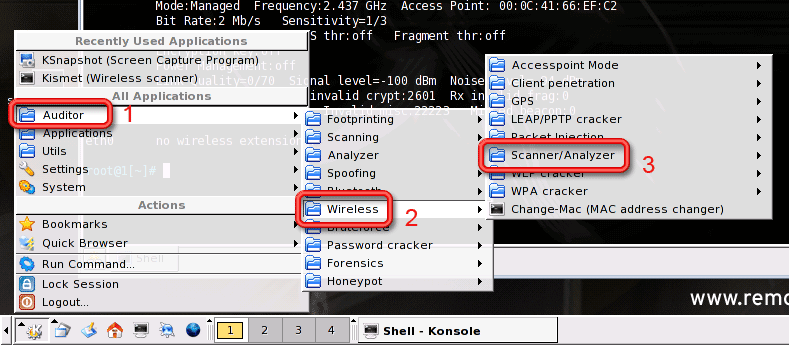
Figure 13: Getting to Kismet
(click image to enlarge)
In addition to scanning wireless networks, Kismet captures packets into a file for later analysis. So Kismet will ask for the directory to save the captured files in. Click Desktop and then OK (Figure 14).
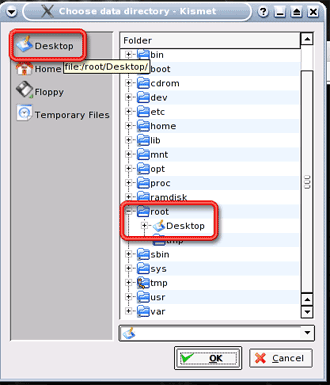
Figure 14: Specifying the Save Location
Kismet will then ask for a prefix for the captured files (Figure 15). Change the default name to capture and then click OK.

Figure 15: Specifying the file prefix
(click image to enlarge)
As Kismet starts, it will display all the wireless networks in range (Figure 16), which should hopefully include the target WLAN you set up. The channel number, under the Ch column, should match what you have written down. If Kismet has found many nearby access points, you may want to move the lab farther away from the Access Points, or disconnect any high-gain antennas you have connected.
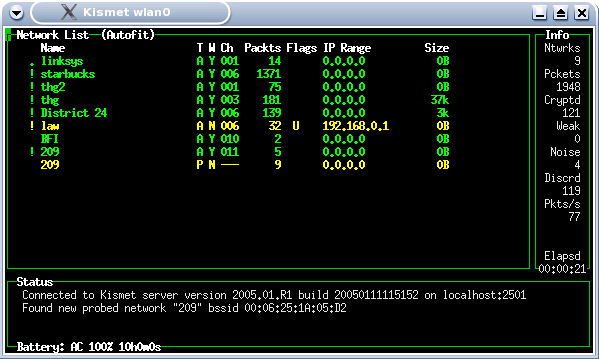
Figure 16: Kismet at work
(click image to enlarge)
While Kismet is jumping through all the channels and SSIDs looking for interesting information, you will see the number of packets changing for all the access points. In the column at the right side of the screen, Kismet displays the total number of networks found, the number of packets captured and the number of encrypted packets seen.
Even with the target computer off, Kismet is detecting packets from our AP. This is because APs send out “beacons”, which tell wireless computers that an AP is in range. You can think of it as the AP announcing, “My name is XXXXX, please connect to me.”
Network Recon with Kismet – more
Kismet starts in “autofit” mode, which doesn’t list APs in any meaningful order. Press “s” to get to the Sort menu (Figure 17). Here you can specify sort orders, which will organize the APs better.
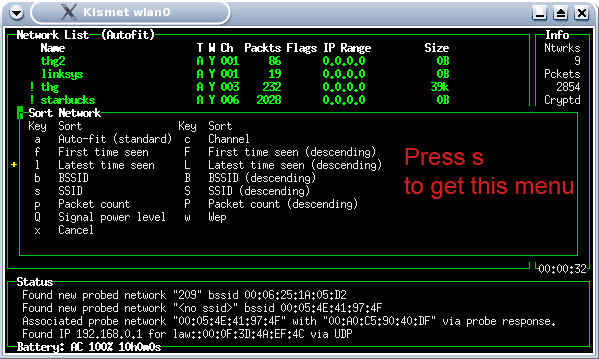
Figure 17: Sort options in Kismet
(click image to enlarge)
Press “c” and the access points will be ordered by channel. (Figure 18)
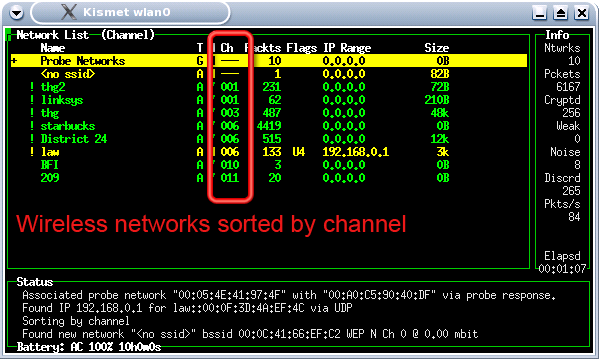
Figure 18: Sorting WAPs by channel
(click image to enlarge)
Kismet will by default hop through channels 1 to 11. Use the cursor keys to move the highlight bar to your SSID and press “L” (note capital “L”) and Kismet will lock on the SSID’s channel (Figure 19). You will notice that the packet numbers of other APs may still continue to increase. This is because many channels overlap each other in frequency.
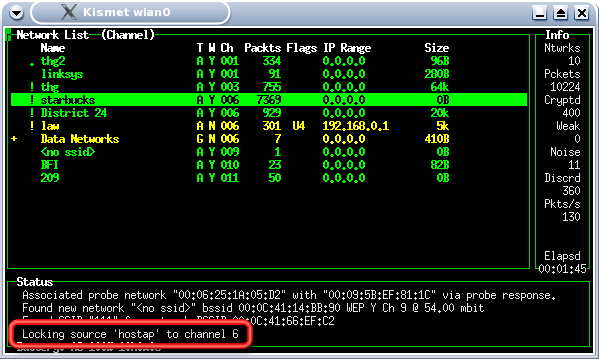
Figure 19: Locking the channel scanning in Kismet
(click image to enlarge)
Now that we are reasonably sure that Kismet is working, let’s see what happens when the target computer on the network starts transmitting information. In most cases, this will be receiving / sending of email or web surfing. Start the target computer, while keeping the scanning laptop in Kismet.
As the target computer boots into Windows and connects to the target AP, you will notice a surge in regular and encrypted packets being captured by Kismet. You’ll be using these packets in the attacks described in Part 2 of this series.
Conclusion
At this point, you know the basic approach to WEP cracking, have a target WLAN configured and have both sniffing and attack computers configured and working. You also have gained a basic familiarity with Auditor and used Kismet to find in-range wireless LANs.
In Part 2, we will use the second notebook to stimulate the target LAN to generate wireless traffic that we will capture and perform the actual WEP key crack. Until then, you can familiarize yourself with Kismet, go WLAN hunting and explore some of the other tools on the Auditor CD.