

Introduction
There are times when having two separate networks – both sharing the same Internet connection – can come in handy. For example, I recently helped a community center with its network setup. They needed to provide Internet connection to tenants who were renting space, in addition to their own shared Internet. They also shared a number of folders on the network, but weren’t too careful about password protecting the shares.
Rather than trying to (unsuccessfully) enforce good file-sharing practices among users who didn’t really have the inclination to learn them, I took a more pragmatic approach and separated the tenant and community center computers into their own private LANs.
Separate LANs can also keep your computer(s) safe from worm and malware infestation from your children’s (or employees’) machines. Let’s see how it’s done.
The Approach
This approach is essentially an extension of the technique described in the Setting up File and Printer sharing between two routers Problem Solver and has the same effect of blocking file and printer sharing traffic entering the WAN side of each router. The difference in this setup is that we’ve separated clients into two groups, each behind its own firewall that blocks any data not requested by a client behind the firewall trying to come into the WAN side of its router.
File and Printer sharing doesn’t work between the two groups because although data passes through the originating computer’s firewall just fine, it’s blocked from entering the firewall of the computer in the other group. However, all clients can freely connect to the Internet as long as they initiate the data request, even through the request has to pass through two firewalls to get there.
Setting Up
Figure 1 shows the basic network configuration, which is based on the setup I used for my community center project. It uses three routers – one to share the Internet, and two more to form two firewall-protected private networks.
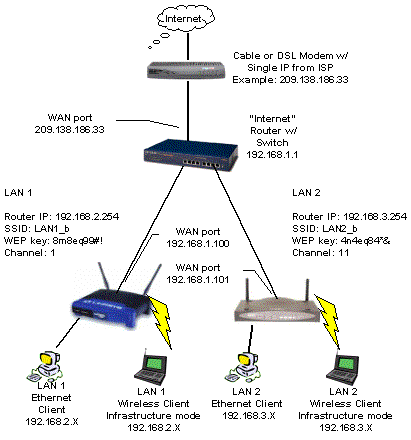
Figure 1: Two private LANs with shared Internet
The key requirement for setup is that each router must be set to a different Class C subnet.
TIP: Class C subnets have a maximum of 254 IP addresses, have the same first three “octets” in their addresses (ex. 192.168.3.X) and use a subnet mask of 255.255.255.0.
The top router (“Internet”) takes the single Internet connection and shares it with everything connected to its LAN-side ports. But where you’d normally connect computers, we connect the WAN ports of two more routers – labeled “LAN 1” and “LAN 2” in Figure 1.
WAN setup for the “Internet” router depends on your ISP’s requirements, but you have two options for the “LAN 1” and “LAN 2” router setups. You can either enable the “Internet” router’s DHCP server and let it assign IP addresses to the other routers’ WAN ports, or disable it and assign the IP addresses manually.
You should be able to use normal UTP cables to connect the routers together. Connect any normal LAN port (don’t use an “Uplink” port) on the “Internet” router to the WAN port of each of the two other routers. Illuminated Link lights at both ends of the connection should tell you when you’ve successfully connected.
LAN clients can all be set to obtain their IP address information automatically, or if you’d rather, you can set the addresses manually. Once everything’s connected, you might have to Repair the connection on WinXP systems or use winipcfg or ipconfig to perform a manual DHCP release and renew, if you don’t get a successful Internet connection on the first try. That’s all there is to it!
Variations and Limitations
Although the example shows one wired and two wireless routers, you can use any combination of router flavors. If you need more private networks, just add more routers, connecting each one’s WAN port to an “Internet” router LAN port.
If you use multiple wireless routers, set each one to a different channel (1, 6, or 11 for up to three and 1,4,8 and 11 for four router setups) and use different SSIDs so that clients can tell the LANs apart. To control access, use different WEP keys for each WLAN and you may want to enable MAC address association control too.
Dedicated servers are easy to handle by just connecting them to the “Internet” router and forwarding the appropriate port(s) to the server’s IP address. This is also where you would put computers used for file and printer sharing, since they can be reached by computers on either private LAN (but not vice versa). If you don’t want to share files from computers connected to the “Internet” router, be sure to disable File and Printer sharing on these machines, or password-protect the shares if you want to do selective sharing.
Everything comes at a price and the trade-off in this setup is the difficulty in handling Internet services where requests originate from machines someplace else on the Internet. Allowing inbound traffic means opening holes in two firewalls, which gets a little tricky due to the way that NAT-based firewalls work.
Depending on the application you’re trying to use, you might be successful opening only the ports you need on the “Internet” router and the “LAN” router that connects to the computer that’s running the Internet-accessible application. Note that when you configure port forwarding on the “Internet” router, you’ll use the WAN IP address of the corresponding “LAN” router because all data that comes out of that router is made to look like it’s coming from the WAN IP address – not the IP address of the client itself. The port forwarding rule on the “LAN” router will use the IP address of the specific client machine.
Unfortunately, this “feature” or NAT also means that you can establish port forwarding to only one computer per private LAN because each port forwarding rule must specify a single IP address that the rule applies to. Using the DMZ or “exposed computer” function on the routers doesn’t help either, because, again, you can specify only one IP address for the DMZ computer.