

Introduction
Wireless bridging, i.e. connecting two wired networks via a wireless link has gotten to be a very confusing subject. In this NTK, we’re going to try to untangle the mess that wireless networking companies have made of this product area, help you choose the right products for your application, and show you how to set them up properly.
Updated 15 April 2004 Tip: A newer bridging technology – Wireless Distribution System (WDS) – available on newer, usually 802.11g-based products has started to bring some standardization to this subject. See our ProblemSolver: Setting up WDS Bridging / Repeating for more info.
We’ve got a lot to do, so let’s get started.
The Name Game
Not too long ago, if you wanted to connect two wired networks together via a wireless link, you looked for a product called a wireless bridge. They tended to cost close to $500, and only talked to other bridge devices. Life was simple, but expensive.
In late 2001, consumer networking companies were looking to add features to their 802.11b APs in order to differentiate themselves in a market that was making their products pretty much a commodity. Up until then, Access Points had just one mode, which allowed client devices operating in Infrastructure mode to associate (connect) and access the wired LAN that the Access Point was connected to.
So to spice things up a bit, manufacturers started adding bridging features to their Access Points. The new features added the ability for Access Points to connect to other Access Points to form wireless bridges. Unfortunately, most companies continued to call these products “Access Points”, and therefore started down the path to consumer confusion. With prices of these improved Access Points dropping to around $100, life got a little more confusing, but much less expensive!
In late Summer / early Fall 2002, things got even more confusing (but not less expensive!) with the addition of a new class of products, also capable of wireless bridging. These products, such as Linksys’ WET11, and Hawking’s WB320, go by different names, but provide the ability to take any device with an Ethernet connector and connect it to a wireless network. If the manufacturers had stopped there, I probably wouldn’t be writing this article, since it would be clear that these products were basically a wireless client adapter that connected to a computing device via an Ethernet port instead of the USB, CardBus, PC Card, or PCI buses that previous adapters sported.
But manufacturers didn’t stop and instead gave these devices the ability to support multiple devices (typically up to 20) connected to their single Ethernet connector. But wait, isn’t that we could already do with the Access Point / Bridges? What do these new products do that can’t already be done?
Bridging the Gap with AP/Bridges
Let’s start by looking at combination AP/Bridges and the various ways they can be used.
NOTES:
1) Although manufacturers have somewhat standardized on the nomenclature they use to describe AP/Bridge modes, you may find that your particular product uses a different term.
2) When using the bridging functions of AP/Bridges, we recommend you use the same product at both ends of the bridge. Although you might luck out and get a wireless bridge working between two different manufacturers’ products, you won’t get any help if you call a vendor’s support line because most companies support bridging between their products only.
3) The connection diagrams use IP addresses to help you keep track of the network segment (subnet) that a device is part of. Your IP addresses may be different!
4) Unless otherwise noted, you should set each bridge device to the same SSID (or ESSID), same channel (if offered as an option), and same WEP mode (and WEP key if WEP is enabled).
Once you select a product, you’ll have to configure it. There are a number of wireless bridging modes, and as noted above, manufacturers don’t always use the same terminology. But most AP/Bridges offer three modes of operation, which are described in the next sections.
Point-to-Point
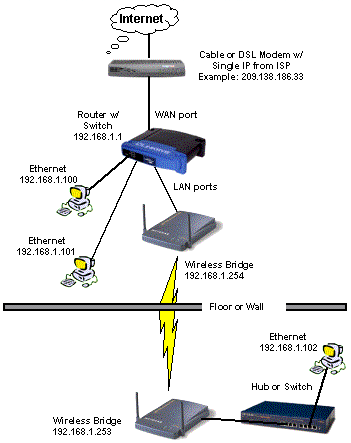
The simplest bridging mode is where two bridge units connect to each other. You usually enter the MAC address of the unit on the opposite end of the wireless bridge in each bridge’s configuration screen. Manufacturers are pretty consistent in describing this mode and the way it’s set up. Figure 1 illustrates a Point-to-Point bridge.
Figure 1: Point-to-Point bridge
Point-to-Multipoint
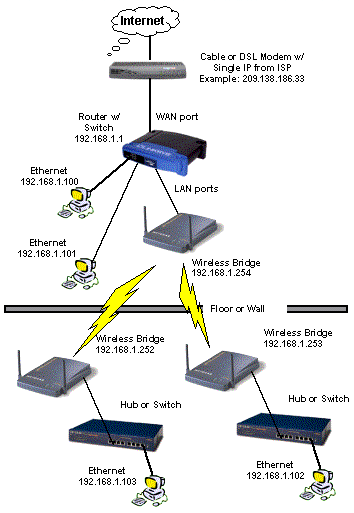
This mode allows multiple wired networks to be connected. The exact modes (and their names) used in the setup vary from manufacturer to manufacturer, but most all AP/Bridges also support this capability. For performance reasons, you should limit your multipoint network to three segments as shown in Figure 2. Again, you can have multiple wired clients in all network segments.
Figure 2: Multi-point bridge
AP Client
This mode sets the AP/Bridge so that it will work with a normal Access Point, Wireless router, or AP/Bridge set to normal Access Point mode. The unit that is set to AP Client mode will connect to the AP using the normal AP Infrastructure mode, instead of a special bridge mode. Figure 3 shows a setup using this mode, which at first glance may look exactly like Figure 1!

Figure 3: Bridge using AP Client
If you look closely, however, you’ll see that in this mode, the top (local) “bridge” device is just a normal Access Point, which also supports wireless clients. The bottom (remote) end uses an AP/Bridge set to AP Client mode, which can’t support wireless clients.
If you’ve followed us so far, hang on, because things are going to get a little more confusing as we next take a look at the newest class of device.
Wireless Ethernet Bridges
There are only so many ways you can combine the words “Ethernet”, “Wireless”, and “Bridge”, and marketers have tried them all! But we’re going to use the term “Wireless Ethernet Bridge” or “WEB” to differentiate the newest class of product from the AP/Bridges we’ve just described.
The most important thing you need to know about this class of devices is that they cannot act as an Access Point! This means that you can’t set them to a mode where wireless clients that are set to Infrastructure mode will be able to associate, or connect, to them.
The other, more subtle, point to know is that although WEBs can be substituted for the AP/Bridges in any of the network configurations shown so far, they make their wireless connection in a different way than AP/Bridges do. WEBs make their Point-to-Point or Point-to-Multipoint bridges by using AdHoc mode instead of a special bridging mode. This use of AdHoc mode allows WEBs to do one thing that AP/Bridges can’t do. Figure 4 tells the tale.
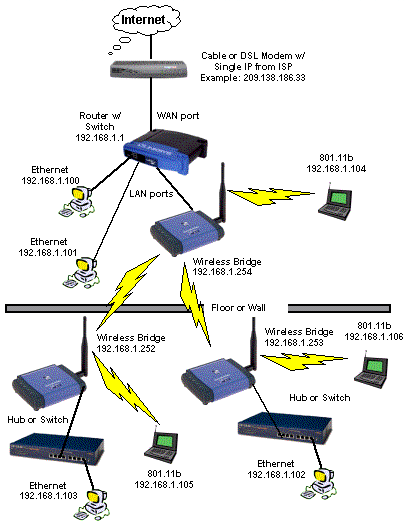
Figure 4: Wireless Network using AdHoc mode
If you compare Figure 4 with the previous illustrations, you’ll see that by using WEBs instead of AP/Bridges, wireless clients can connect at both the local and remote ends of your bridge. But since everthing has to be set to AdHoc mode, there are some disadvantages:
- Infrastructure mode clients will not be able to connect
- All stations must be set to the same ESSID and Channel
The first negative isn’t a problem if you’re running your own small network, because you can control the way that users configure their clients. But if you were setting up a “HotSpot” or wireless LAN (WLAN) intended to allow anyone to connect, you would pretty much have to stick to Infrastructure mode, because that’s what WLAN clients will be set to.
The second negative is more of a deal-breaker for all except the smallest networks. Because all wireless clients must use the same channel, all clients will be sharing the same bandwidth. It won’t take too many clients to bog down a WLAN, even if they’re only moderately busy.
Another advantage of WEBs over AP/Bridges is that when set to Infrastructure mode, they should be able to form a bridge to any 802.11b Access Point or wireless router, instead of only another copy of themselves. Of course, you may find that a particular combination of WEB and AP that doesn’t work, but that would fall into the category of “bug” vs. “by design”.
Why Won’t My Bridge Work?
I’ve described the intended operation of the two classes of WLAN bridging devices, i.e. the way that they should work by design. Actual implementation is usually a case of “your mileage may vary”, and from what I’ve heard from some wireless bridge builders… it does!
Most wireless bridging problems come from mixing products from different vendors, or enabling or changing settings that aren’t understood. Although the following isn’t intended to be a comprehensive troubleshooting guide to wireless bridges, here are some quick things to check if you can’t get your wireless bridge working:
-
Use the Right Stuff – Make sure that the products you buy support the modes of operation that you need. For example, wireless routers don’t have bridging capability per se, but can be used with WEBs set to Infrastructure mode to build a bridge. On the other hand, AP Client mode is a vendor-specific feature, so you’d better buy two of the same thing if you’re going to make this mode work.
-
Short Range First – Sure, you’re trying to get your bridge to work across the street, or out to your workshop. But before you go for the “long shot” set up all your bridge components in the same room and try to get it working.
-
Pay Attention! – If you’re setting up two copies of the same product, the setup screens are going to look the same. You may laugh, but I’ve lost track of which end of a bridge I was entering the settings on more than once! I usually write the IP address that I’ve set on each unit on a sticky note and always check the admin screen for the IP address of a unit before I start entering data.
-
Use Open System Authentication – Your product may give you the option of “Open System”, “Shared Key”, and “Closed System” authentication. The least restrictive is “Open System” and that’s where I recommend you start. Once you get things working, you can always experiment with changing the setting to tighten up your security.
-
Start with WEP disabled – Similar to Point 4, you don’t want to be wrestling with differences in WEP key implementation when you’re trying to find out whether the bridging modes on your products are compatible. Shut WEP off until you know for sure that your products’ bridging modes are compatible. Then, enable WEP.
-
Use Long Preamble – Some products use a mode referred to as Short Preamble. Most, however, use Long. Check for this setting and make sure you set it to Long.
-
Specify the (E)SSID – Don’t rely on setting the SSID or ESSID of your bridge components to “ANY” to make the connection. Set them to the same ESSID, and for good security, don’t use anything that identifies your location, and don’t use a manufacturer’s default ESSID.
Updated 15 April 2004 Using common SSIDs is not necessary when using WDS-based products and might not be necessary for bridging products even if they don’t specify that they are WDS-based. See our ProblemSolver: Setting up WDS Bridging / Repeating for more info. -
Enter the MAC addresses – Point-to-Point and Point-to-Multipoint AP/Bridge modes usually require that you enter the MAC address of the unit at the other end of the bridge. If you’re using these modes, be sure to follow the manufacturer’s instructions. Also be sure to double check that the MAC address(es) that you enter to be sure they’re correct (See Point 3).
Putting it All Together
Table 1 is an attempt to summarize and compare the features of the components that can be used in a wireless bridge.
|
Table 1:
Comparison of AP / AP/Bridges / Wireless Ethernet Bridges |
|||
|
Feature
|
AP
|
AP/Bridge
|
Wireless Ethernet Bridge (WEB)
|
| Supports Infrastructure Mode Wireless Clients |
Yes |
Yes |
No
|
| Supports multiple Wired Clients |
Yes
|
Yes
|
Yes
|
| Acts as Infrastructure Mode Wireless Client |
No
|
Yes (*)
|
Yes
|
| Supports AdHoc Mode |
No
|
No
|
Yes
|
| Supports Point-to-Point Bridging |
No
|
Yes
|
Yes
|
| Supports Point-to-Multipoint Bridging |
No
|
Yes
|
Yes
|
| Connects to AP/Bridge set to Bridging mode |
No
|
Yes
|
No
|
| Connects to WEB set to AdHoc mode |
No
|
No
|
Yes
|
The good news is that you can now do for a few hundred bucks what used to cost well over a thousand, and you have a number of ways to do it! The bad news is that consumer-level prices doesn’t mean consumer-friendly setup. But you now should be armed with the knowledge you need to build the wireless bridge you desire!