

Introduction
D-Link’s 2.20 firmware update for its DWL-900AP+ Access Point has finally brought wireless repeating to the masses! What used to cost about $500 can now be had for about $100!
A Wireless Repeater eliminates the need to use an Ethernet cable to connect multiple Access Points (APs) together in order to extend the range of your wireless LAN. Figure 1 shows an example setup of a Wireless LAN (WLAN) using a wireless repeater to extend its range.
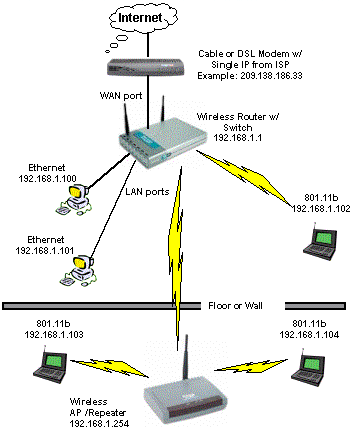
Figure 1: WLAN with wireless repeater
So is there any difference between what D-Link has done for $100 and other companies charge $500 for? I’ll answer that and more, so read on!
What’s the Catch?
Like any first-in-category product, the upgraded 900AP+ has its share of limitations and problems. But the first positive surprise that I discovered is that, contrary to the information in D-Link’s Press Release, the 900AP+ works with clients and Access Points other than those in D-Link’s AirPlus and AirPro product lines. (Of course, if you use anything other than what’s on D-Link’s list, don’t expect any help from them!)
Updated 10/28/02 Shortly after this article first appeared, a friend at Intersil wrote to tell me that the 900AP+ is actually implementing a feature called Wireless Distribution System (WDS). He included a nice Intersil Apps note (in PDF form), which has since been taken down from the net. He said the feature was originally implemented awhile ago by a company called Choice Microsystems which supplied MACs (Media Access Control) to Agere, Cisco, Symbol, and Harris (Intersil). Although Intersil bought Choice, the other companies retained the rights to the original technology, and the feature lives on in OEM reference designs, although D-Link is the first to bring it to market at this price point.
In my experiments, I was able to get the 900AP+ to successfully repeat using a D-Link DI-614+ wireless router, and SMC 2655W 802.11b Access Point. I also used both D-Link DWL-650+ and ORiNOCO Gold PC cards in my Dell Inspiron 4100 laptop running Windows XP Home, and smoothly roamed from the main AP to the 900AP+ without problems.
But so much for the good news. Figure 2 shows one of the prices that you’ll pay for using the 900AP+ to wirelessly extend your WLAN.
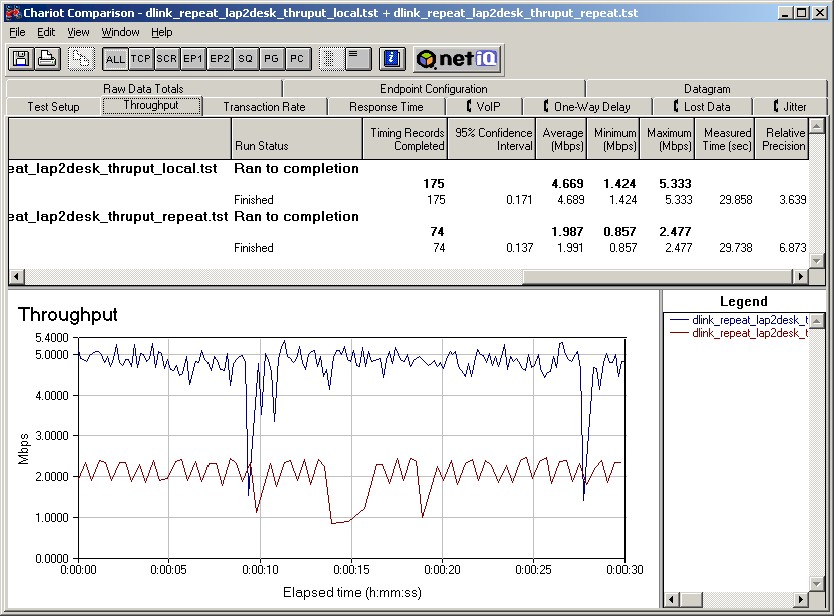
Figure 2: Comparison of direct and repeated throughput
(click on the image for a full-sized view)
The plot shows a test run with an ORiNOCO Gold client, 900AP+ in repeating mode, and SMC2665W as the main AP. The client was allowed to auto-adjust transmit rate, and WEP was disabled. I ran the IxChariot throughput.scr script, with TCP protocol and default settings. In both cases, my laptop was sitting about 3 feet away from the AP that it was associated with, so we shouldn’t be seeing any radio range effects. I used standard 802.11b (not the 22Mbps PBCC mode that the 900AP+ will support) for the tests.
The results show a significant (over 50%) throughput reduction when the test client is associated (connected) with the 900AP+ (bottom plot) vs. associated with the main WLAN Access Point (the one connected directly to the wired LAN). Most of the reduction comes from using the 900AP+’s single radio for two simultaneous tranfers, one from the client to 900AP+, the other from the 900AP+ to main AP. The rest is probably processing overhead.
The second limitation I found is the inability to set the 900AP+ to a separate channel when it’s in repeating mode. Since there’s only one radio, and it has to communicate back to the main AP, the 900AP+ will override its channel setting and automatically set itself to the main AP’s channel. This might be counter-intuitive to folks who are accustomed to setting up WLANs with multiple wired APs, since the rule for those installations is to avoid having adjacent AP’s set to the same channel. But once you understand how the 900AP+ works, the single channel makes sense.
The third “gotcha” is that you can’t chain 900AP+s together to even further extend your WLAN’s range. Although you can have multiple 900AP+’s repeating to a single main AP (I haven’t tried this), they all would use the same channel. I think you can see from Figure 2, that the performance from such a configuration wouldn’t be very satisfying!
The last limitation is that once you set the 900AP+ to repeating mode, you lose the ability to access its built-in admin function via wireless connection. If you have a problem or want to change a setting, you need to physically plug into the good ol’ Ethernet jack to do your business. So don’t put the 900AP+ anyplace where you can’t get at it easily for the inevitable reboot! Updated 10/28/02 Also note that while in Repeater mode, the only thing that a computer plugged into the 900AP+’s Ethernet jack will connect to is its built-in admin HTTP server. You won’t be able to run wireless clients via the Repeater and bridge to a wired computer or LAN. (Hey, whaddya want for under $100?!)
Despite all the above limitations, once I got things running, it was great to finally be able to take my laptop to spots in my home where I’ve never been able to get a decent wireless signal and be solidly connected to my LAN.
There’s actually one other problem, which is the lack of information from D-Link that describes how to configure and check out the new repeating function. Since it may not be obvious to you how to set it up (and to make sure it’s working) I’ll give that a shot in the next section.
Setting it Up
Setting the 900AP+ up for repeating mode is easy in concept, but there are a few things that you can do (or not do) to make things go more smoothly than they did for me!
-
Download the 2.20 firmware from here, but skip downloading the AirPlus Manager Windows application. Although I managed to use it find the 900AP+, connect to it, and update the firmware, I couldn’t get it to successfully change any settings (it doesn’t seem to use the same password as the built-in browser-based admin function), and it didn’t have the repeater mode setting either. So as much as it’s a pain going through the hassle of setting a client computer to connect to the 900AP+’s default IP address of 192.168.0.50, at least once you do it, you’ll be able to do everything you need to do via the built-in browser-based admin interface.
-
Connect the 900AP+ via Ethernet for the firmware upgrade and configuration. You don’t want to risk getting a data corruption during the firmware update process, and you’ll lose wireless connection with the AP as soon as you set it to Repeater mode anyway.
- D-Link has posted some simple instructions here for getting into Repeater mode. Note that you’ll also need to set the SSID, WEP mode, and WEP key (if you’ve enabled WEP) to match that of the main AP. Don’t worry about the Channel setting, since that will be overridden once you enable Repeater mode.
-
 Tip: You’ll need to find the MAC address of the Access Point or wireless router that you want the 900AP+ to connect to. You can sometimes find this printed on the bottom of the AP or router, but you should always be able to find it in your product’s admin screens or utility, usually in the Status section. The MAC address is a 12 character code that looks something like 0090DA4B9CFF (sometimes broken into two character groups like 00-90-DA-4B-9C-FF).
 - Do yourself a favor and manually (statically) set the 900AP+’s IP address information, then write it on a label and stick it on the AP. Choose an unused IP address in the same subnet, and choose one that will not conflict with the range of addresses handed out by your LAN’s DHCP server (if you use one). You may need to check or adjust the DHCP server to narrow the range of addresses it assigns. Since DHCP servers usually start low and go high, I usually assign static IP addresses starting high and working down.
Example: If your DHCP server is set to assign addresses from 192.168.1.1 to 192.168.1.50, assign address 192.168.1.254 (subnet 255.255.255.0) to your 900AP+. The gateway would be 192.168.1.1. I was able to leave the DNS blank, since I didn’t enable the 900AP+’s built-in DHCP server.
That about does it for the setup. Let’s see if it’s working…
Checking it Out
Once you have the 900AP+ programmed, you can unplug it from your LAN and move it to the desired location. Remember that the weakest link in the wireless chain will determine the overall throughput of the repeated connection. You don’t want to locate the repeater so far away from your main AP that it has to drop down to a lower speed to maintain connection. On the other hand, if you don’t move far enough away, your client may keep trying to hang onto the weak main AP signal, rather than switch to the stronger signal of the repeater.
The 900AP+ doesn’t help you much during this process, since its WLAN light constantly flashes wildly away, even with no data flowing through it. And since you can’t access the built-in Admin function via wireless connection, you can’t use the Site Survey tool that D-Link added in the new firmware.
I ended up using my ORiNOCO card and NetStumbler to tell whether I was associating with the main AP or the 900AP+, since XP’s built-in Wireless Network Connection status was no help. I did find that using XP’s Connect to Wireless Network function (via View Available Wireless Networks), selecting the network, and clicking the Connect button when I was closer to the 900AP+ than my main AP caused my client to switch over to the 900AP+. I confirmed this via NetStumbler and also by using the Signal Strength indicator in XP’s Connection Status window. You should be able to do the same thing using your adapter’s client software if you’re not running XP, or choose not to use its built-in wireless management functions.
Wrapping Up
So there you have it. Yes, D-Link really has made wireless repeating available for under $100! Sure, it has some compromises and limitations, but they won’t last long. If the same thing happens as when bridging features were first added to Access Points, I’d expect to see the other guys (Linksys, NETGEAR, and SMC) respond soon, hopefully with little tweaks and improvements.
So the days of Cisco and Symbol having a high-priced monopoly on wireless repeaters will soon draw to a close… at least as far as the non-enterprise wireless market is concerned. We can finally sit where we want to sit, make our wireless LANs come to us, and not break the bank doing it. Hallelujah!