

Updated December 29, 2008
The setup shown in the diagram below is used with one computer running an IxChariot endpoint connected to the router WAN port and a second computer running the IxChariot console and endpoint connected to a router LAN port.
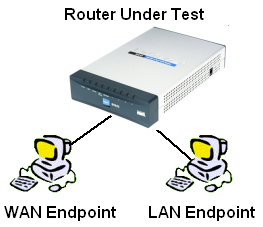
All routers are prepared for test as follows:
- Upgraded to latest firmware
- Reset to factory defaults
- QoS features disabled (if present)
- LAN client put into DMZ
- SPI disabled (optionally, if router allows)
The last two points require some explanation. The LAN client is put into DMZ because it is the fastest and easiest way to allow WAN to LAN traffic and test results from the WAN IxChariot endpoint to traverse the router under test’s NAT firewall. Alternatively, the specific ports used by IxChariot could be opened in the router under test’s firewall. Note that since the router DMZ function is just a special case of port mapping, i.e. all ports and protocols opened to the specified LAN IP address, this does not affect router performance.
SPI is disabled if the router provides this function as a work-around for problems encountered with some routers. Virtually all current routers use NAT with Stateful Packet Inspection (NAT+SPI) and the simple test configuration we use sometimes will not allow test results to be returned from the WAN endpoint.
The problem can be worked around by using a second network adapter on both endpoint machines connecting directly to the IxChariot console. But we have found that disabling SPI is simpler and in most cases does not affect router throughput.
Once the router is prepared, the following tests are performed:
Throughput
Throughput is a measure of how fast data flows through the router. The test sends data from computer to computer, measures how much time it takes, and calculates the result in Mbps (Megabits per second).
Our test uses IxChariot’s Throughput.scr IxChariot script with the defaut 100,000 Byte file size changed to 1,000,000 Bytes. Three tests are performed, each one minute in length:
- WAN to LAN – Data flows from the WAN-side IxChariot endpoint to the LAN-side endpoint. This is a test of router download speed.
- LAN to WAN – Data flows from the LAN-side IxChariot endpoint to the WAN-side endpoint. This is a test of router upload speed.
- Simultaneous – A combination of the previous two tests. This test is run to see how the router handles simultaneous traffic. Also, many current-generation routers have routing speeds in excess of 100Mbps, but do not have gigabit Ethernet ports. This test ensures that we find the limits of the routing engine without being limited by 100Mbps Ethernet.
Maximum Simultaneous Connections
This test measures the maximum number of connections or sessions that a router will concurrently support. It uses the IxChariot standard throughput.scr script with TCP/IP with the file_size parameter (the size of the transferred file) set to its default of 100,000.
The LAN side endpoint is put in DMZ and router SPI features are disabled if possible. One minute tests are then run, up to a maximum of 200 connections, evenly divided between up and downlink. A router is considered to have passed the test when all test pairs connect, pass data and return results. Multiple tests are run until the test fails three times or the maximum number of connections (200) is achieved.
Response Time
This test measures the delay (also known as lag, latency, or ping time) that the router introduces into a data stream, and is essentially what you’d measure by using the ping command.
We do not perform this test because all current products have response times below 1mS, which is lower than the latency of most (if not all) Internet connections.
UDP Streaming
This test measures how well a router can keep up with a continuous stream of data. In addition to giving an indication of whether you’ll have trouble listening to Internet audio or watching video program streams, it tends to show flaws in the router’s routing “engine”. It uses the connectionless UDP protocol, which has less overhead and fewer error recovery mechanisms than the TCP protocol (picture a fire hose being turned on vs. a water bucket brigade).
We currently do not perform UDP testing on routers. However, we are investigating test scenarios to assess router performance for handling video streaming.