

Introduction
Part 1 of this series showed that makers of draft 802.11n wireless gear have a long way to go to deliver on the technology’s promise of higher speed over longer distances. In this installment, I’ll be taking a detailed look at the embarrassingly low level of interoperability these products have. I’ll also be examining their behavior as “good neighbors”, i.e. whether they address the interference issue that I found with in-range legacy 802.11b/g wireless LANs.
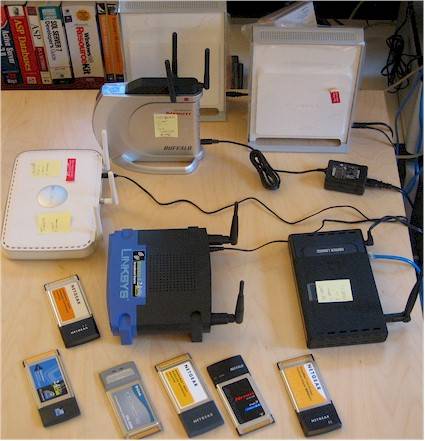
Figure 1: Most of these things do not like the other
My interoperability tests included the products from Part 1, plus another draft 11n contender using Broadcom’s Intensi-fi chipset: the Netgear RangeMax NEXT WNR834B. I wasn’t able to include the Linksys WRT-300N in the interoperability round, since I had only borrowed it for the previous tests and no longer had access to it. But two products based on Intensi-fi is probably plenty (the Buffalo products were the other). I should also note that the WNR834B and WN511B Cardbus card samples were provided by Netgear.
Finally, I included two sets of 802.11g products in the tests. Broadcom’s 54g chipset was represented by the Linksys WRT54G V5 router and WPC54G (V1) Notebook card, while Atheros’ Super-G was used in the D-Link DGL-4300 router and DWL-AG660 card (actually a dual-band card).
Product Details
Figure 2 shows that the WNR834B’s enclosure is identical to that of its WNR854T sibling, which uses Marvell’s TopDog chipset.
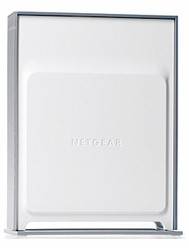
Figure 2: Netgear WNR854T RangeMax Next Wireless Router
Figure 3 shows that Netgear’s board design differs from bth Buffalo’s and Linksys‘, but also uses a Broadcom BCM4704 processor, BCM5325 10/100 switch, 4 MB of flash and 16 MB of RAM.
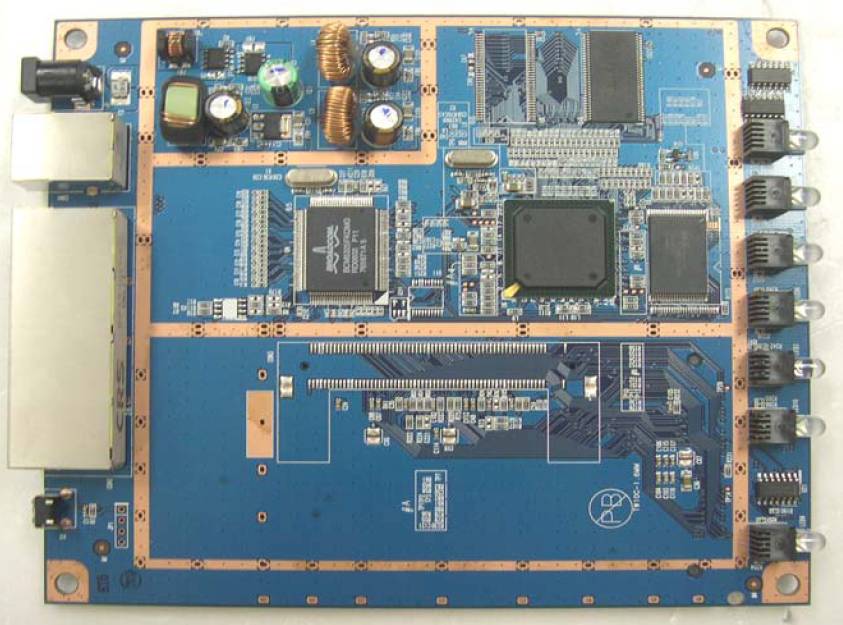
Figure 3: Netgear WNR834B board bottom view
Figure 4 shows that a CardBus radio is used, which is the same approach taken by Linksys. But the WNR834B uses only two internal antennas instead of the three external antennas used by the Linksys WRT-300N.
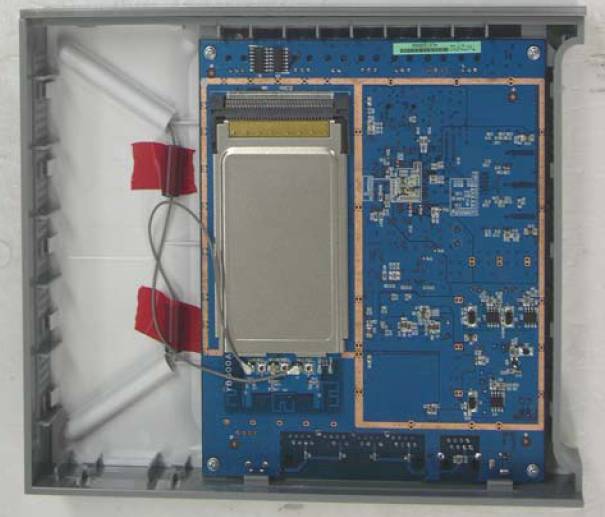
Figure 4: Netgear WNR834B board top view
How We Tested – Interoperability
I didn’t use the Azimuth system for the interoperability tests, but instead used my interference-free lab area and close-range open-air tests. The routers were placed on a tabletop in the arrangement shown in Figure 1, with the Dell Inspiron 4100 notebook that held the client cards sitting on the same table, about 1-3 feet away from the routers.
I first uninstalled any previously installed wireless card utilities and drivers from the notebook, and ran a Windows System Restore to the point before those cards were installed. I also checked for updated firmware for all routers and installed any that I found. I then proceeded as follows:
- Step 1: Checked for driver updates and installed any that I found, otherwise I ran the CD that came with the client card.
- Step 2: Powered on a router and associated the card (STA) using its client manager utility (except for WPC54G, which used XP Zero Config).
- Step 3: Used IxChariot with the throughput.scr and a file size = 1,000,000 bytes and TCP/IP protocol to simultaneously run one up and one downlink stream for one minute.
- Step 4: When the test was completed, power down the router
- Step 5: Repeat Steps 2 through 4 until the card had been tested with all routers.
- Step 6: Uninstalled the driver and client utility, ran a Windows System Restore to the point before the driver and client utility installation.
Steps 1 through 6 were repeated until all cards had been tested with all routers.
The results are presented in Tables 1 and 2 below (separated only due to page width restrictions), but here are the key take-aways:
- The good news is that all products that I tested were able to detect, associate and successfully transfer data both up and downstream. Beyond that, “mileage” definitely varied.
- Best results were obtained when running each router with its matching card, indicated in the tables by shaded cells.
- Next best speeds were measured when the Netgear and Buffalo products that both use Broadcom’s Intensi-fi chipsets, were mixed, which resulted in a throughput reduction of 5 to 8% over matched-set results.
- Many combinations produced unbalanced up and downlink throughput. When speeds were unbalanced, uplink usually dominated, sometimes as much as 3X downlink
The company with the messiest interoperability story is Netgear, since it has chosen to have two draft 11n products using different chipsets, as well as MIMO products using two generations of Airgo MIMO chipsets (which do not claim anything with regard to draft 11n). The short story here is that mixing any of the Netgear products, whether they used Broadcom, Marvell or Airgo chipsets, resulted in un-enhanced 802.11g speeds, i.e. around 20 Mbps best case.
A final note is that the Netgear WN511T client manager utility was particularly badly behaved. I had to reboot my notebook every time I changed wireless routers in order to have the card detect them.
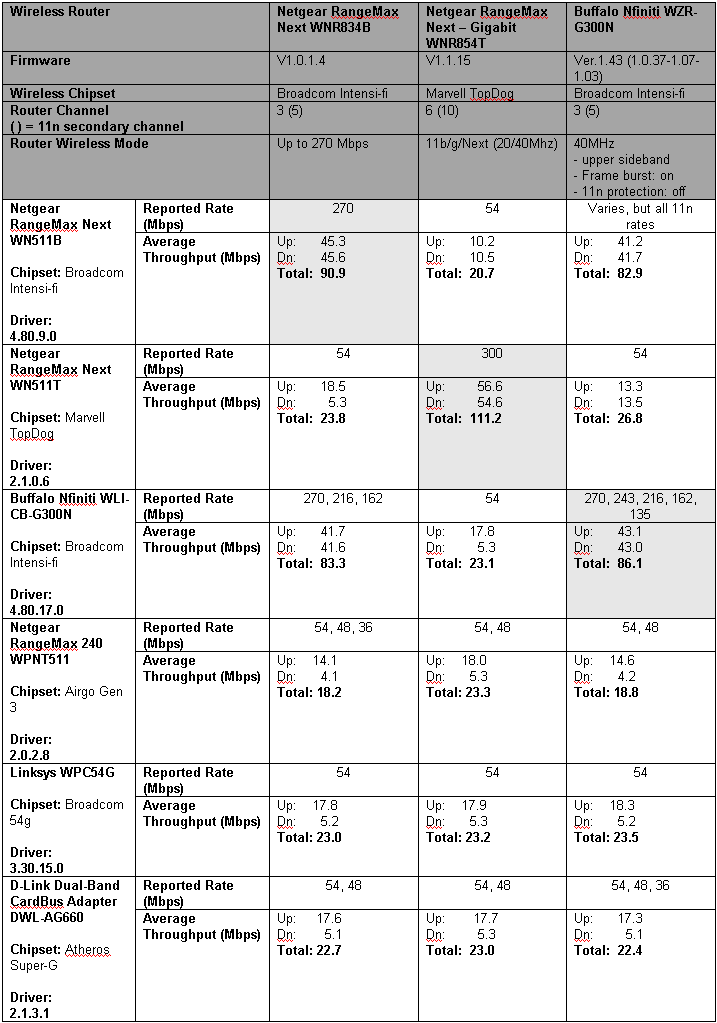
Table 1: Interoperability Matrix – Part 1
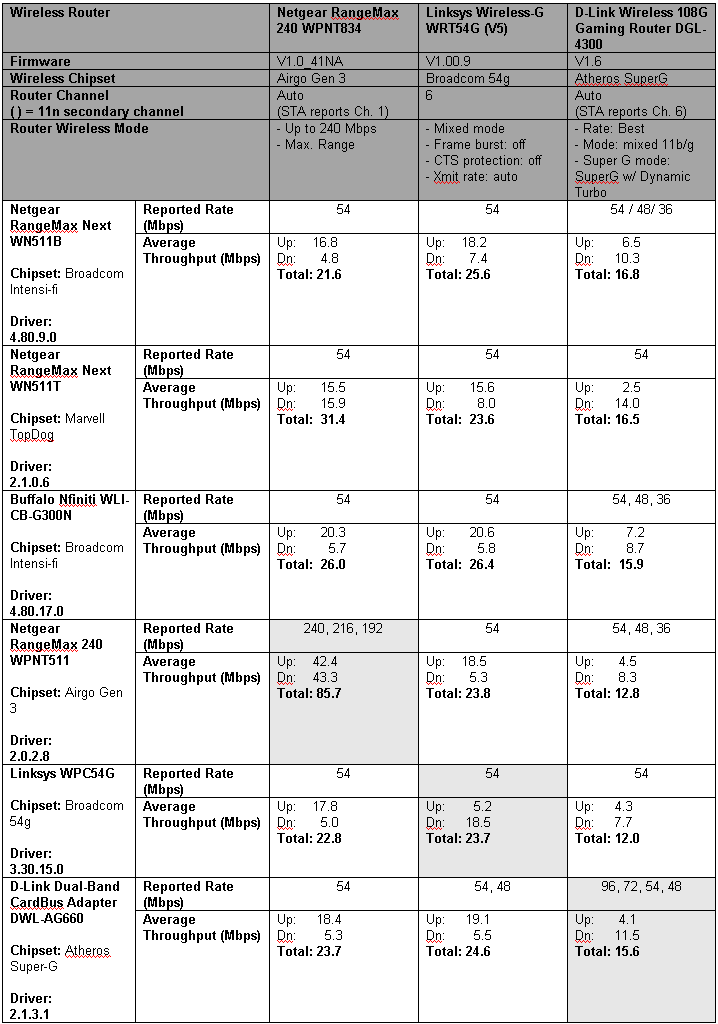
Table 2: Interoperability Matrix – Part 2
Neighboring WLAN
Test Setup
The other aspect of interoperability that I’m keeping an eye on is how draft 11n gear behaves when an 802.11b or 11g WLAN is in range and vice-versa. All 2.4 GHz draft 11n products default to using 40 MHz of contiguous bandwidth. This means that they occupy two of the non-overlapping channels in the 2.4 GHz band, i.e. 1, 6 or 11.
Figure 5, which is a spectral plot copied from the Netgear RangeMax 240 review, shows the spectrum produced by that product, which is based on Airgo’s Gen 3 chipset. While the Airgo Gen 3 doesn’t claim draft 11n compatibility or interoperability, it uses the same 40 MHz wide channel-bonding technique as draft 11n products do, when operating in its “240 Mbps” mode.
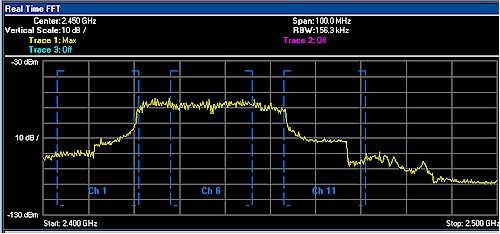
Figure 5: Netgear RangeMax 240 in 40MHz bandwidth mode, set to Channel 1
The main problem that the draft 11n spectral-hogging produces is that it will always interfere with 802.11b/g products using Channel 6. The only way draft 11n products won’t interfere is to switch back to using 20 MHz of bandwidth; something they are reluctant to do quickly because it cuts their throughput in half.
So I fired up my adjacent WLAN test setup shown in Figure 6 and put three sets of products through the test:
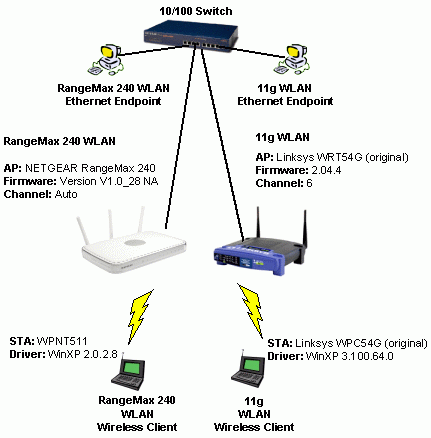
Figure 6: Neighboring WLAN test setup
The right-hand side of the setup was the same as shown in Figure 6, but the left-hand side was rotated through the following three sets of products:
- Netgear WPNT834 RangeMax 240 router and WPNT511 notebook card (based on Airgo Gen 3 chipsets)
- Netgear WNR834B RangeMax Next router and WN511B notebook card (based on Broadcom Intensi-fi chipsets)
- Netgear WNR854T RangeMax Next – Gigabit router and WN511T notebook card (based on Marvell TopDog chipsets)
The reason why I tested the RangeMax 240 again was to see if the firmware update that Netgear finally posted in April had any effect on its 802.11b/g squashing tendencies.
In all tests, the 11g WLAN was set to Channel 6 and each of the other WLANs was set to Channel 1 to try to minimize the spectral overlap. So as to not overload the gear under test, I moved the WRT54G router and notebook with client card to the same room that I used in my previous test (two rooms away from my office lab), but this time left the dual-dipoles on the router.
Airgo Gen 3 Redux
The short story is that Netgear’s new firmware had no effect and the RangeMax 240 is still a bad neighbor to nearby 802.11b and g WLANs using channel 6. Figures 7 and 8 show the results of uplink and downlink tests respectively.
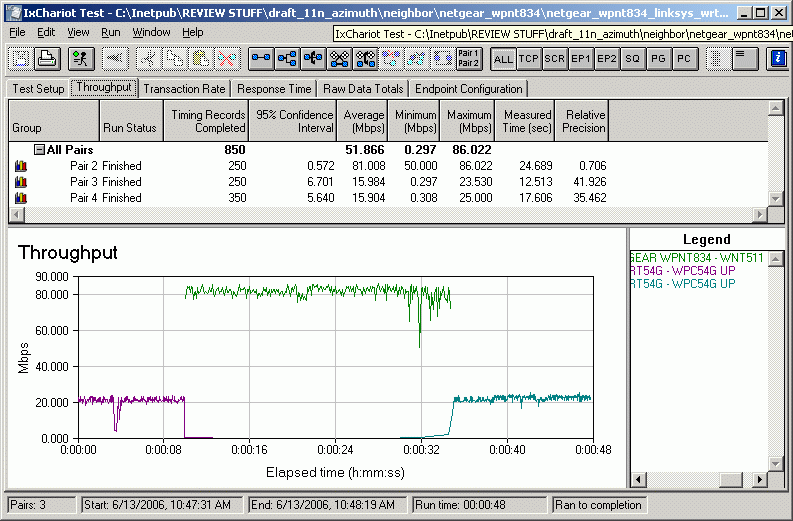
Figure 7: Neighboring WLAN Test – Netgear RangeMax 240 (Airgo Gen 3) – uplink
The first half of the test lets the 11g WLAN get on the air first, with the second half letting the RangeMax 240 WLAN start first. In both cases and in both the uplink and downlink tests, whenever the Airgo Gen 3 based products are transmitting, the 11g WLAN essentially grinds to a halt. I also monitored the reported link rate in the client utility during the test and didn’t see the rate drop to anything that indicated a shift down to 20 MHz operation.
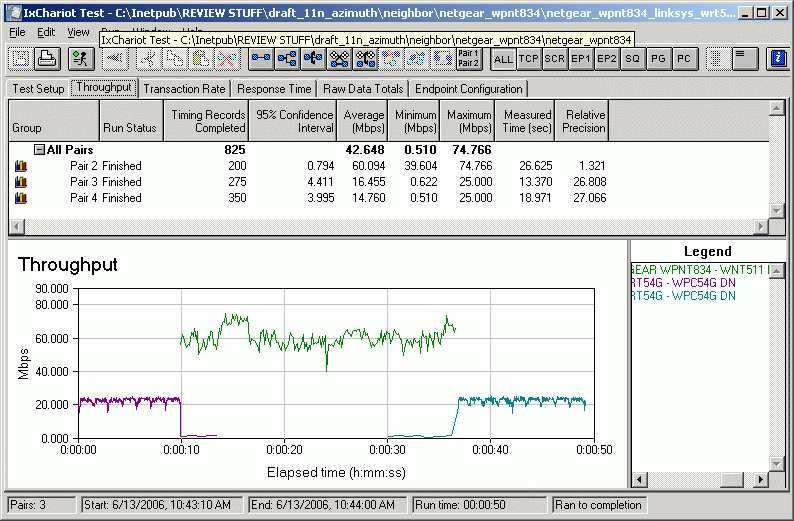
Figure 8: Neighboring WLAN Test – Netgear RangeMax 240 (Airgo Gen 3) – downlink
Broadcom Intensi-fi
I was hoping that the draft 11n folks would let Airgo take the “bad neighbor” rap all by itself for its Gen 3 chipset. After all, Airgo has consistently distanced itself from the draft 11n frenzy and what better way to really set its technology apart from the “mainstream” draft 11n activity.
Silly me! My testing showed that both Broadcom and Marvell haven’t cracked the code on being neighborly. Figures 9 and 10 show uplink and downlink test results for the Netgear WNR834B RangeMax Next router and WN511B notebook card.
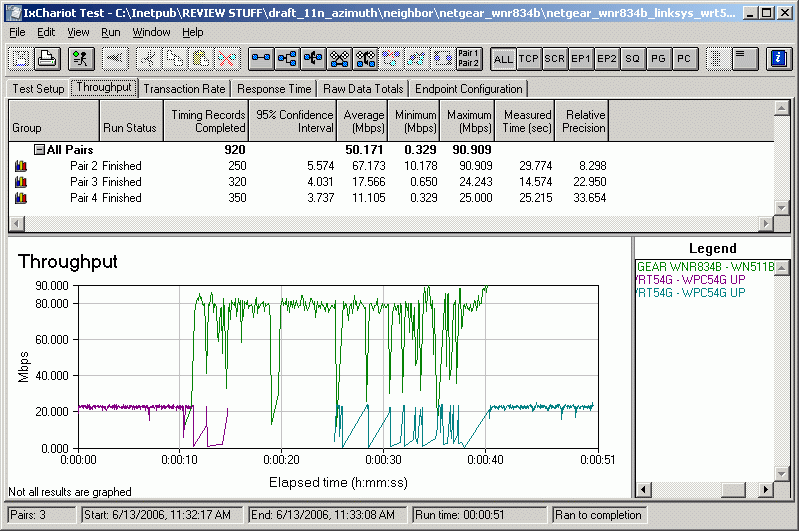
Figure 9: Neighboring WLAN Test – Netgear RangeMax Next (Broadcom Intensi-fi) – uplink
The results actually look hopeful, since the 11g WLAN seems to be getting a bit more air time and the Broadcom-powered pair seem to be trying to yield some throughput. But the plots actually look more like plain old competition for airtime, i.e. co-channel interference, that you see when two WLANs are trying to use the same channel.
I once again monitored the Netgear WN511B card’s client utility during the test and didn’t see any reported rates below 243 Mbps, i.e. channel bonded 40 MHz mode.
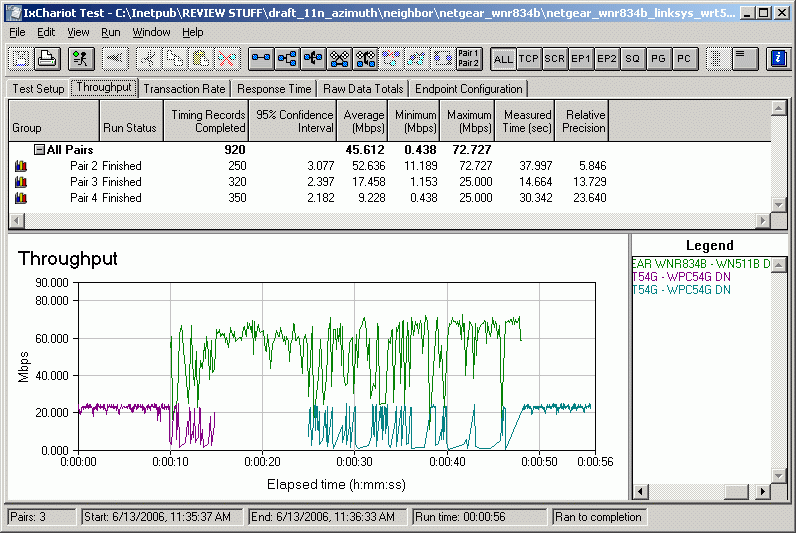
Figure 10: Neighboring WLAN Test – Netgear RangeMax Next (Broadcom Intensi-fi) – downlink
Marvell TopDog
Since Marvell had the highest throughput, I thought perhaps they’d also have the neighboring WLAN thing licked. I found that they don’t, but there is something different going on in Marvell’s rate adaptation algorithms.
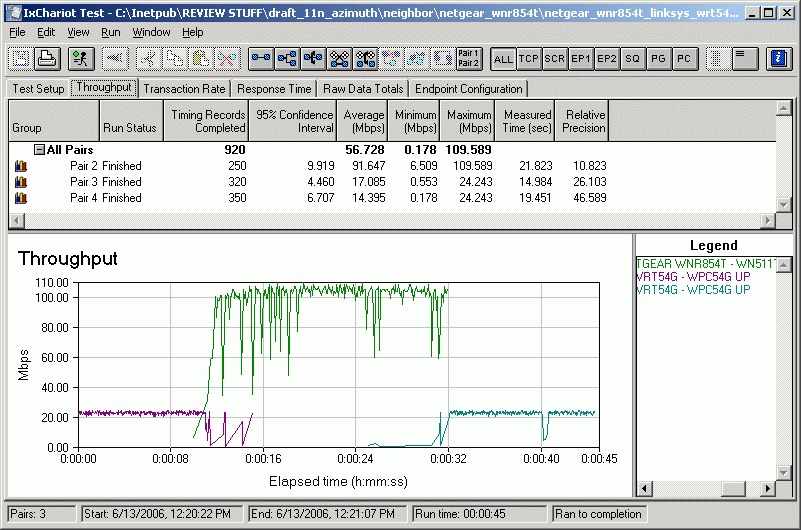
Figure 11: Neighboring WLAN Test – Netgear RangeMax Next – Gigabit (Marvell TopDog) – uplink
Uplink performance shown in Figure 11 looks like more of the same. But Figure 12’s downlink plot is the first evidence I’ve seen of draft 11n products actually downshifting out of channel-bonded speeds.
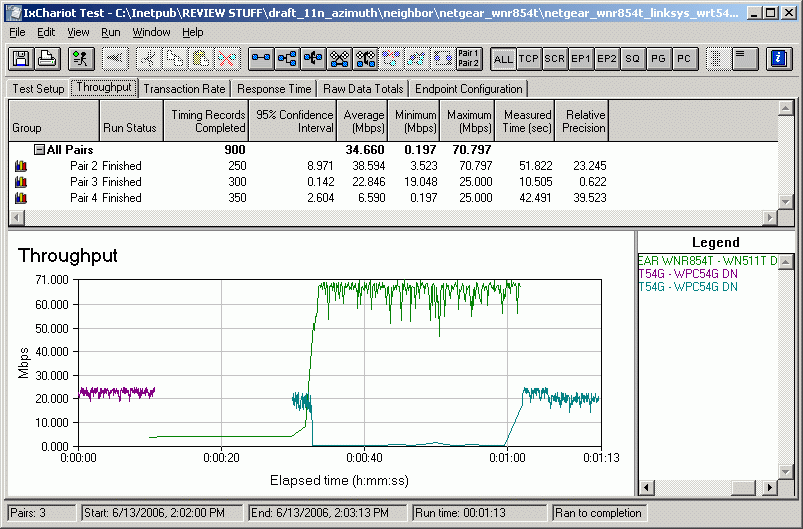
Figure 12: Neighboring WLAN Test – Netgear RangeMax Next – Gigabit (Marvell TopDog) – downlink
Figure 12 shows that the Netgear RM Next – Gigabit WLAN starts out at very low throughput at the tail end of the first 11g WLAN activity and continues at a very low rate even with the 11g WLAN off the air. But when the 11g WLAN starts up again, something kicks in and the Netgear WLAN finally shifts into 40 MHz mode and crushes the 11g WLAN.
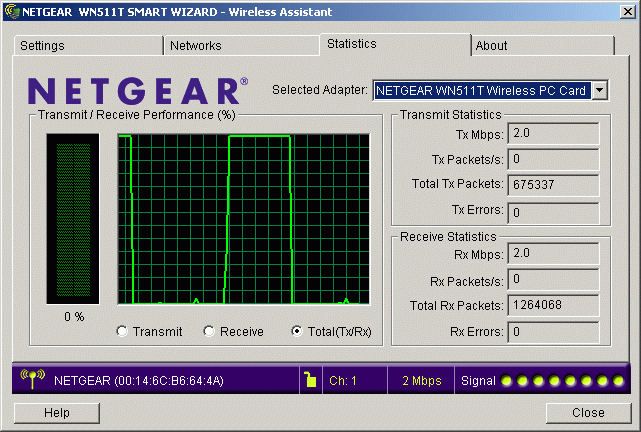
Figure 13: WN511T Client Utility – 11g WLAN active, draft 11n idle.
Figure 13 confirms that the Netgear client is reporting transmit and receive link rates of 2 Mbps (which is actually an 11b rate!) during the 11g WLAN’s initial transmission. I also found that for the run shown in Figure 12, the link rates remained at 2 Mbps when the 11g WLAN first went off the air. But when I repeated the test, I didn’t find consistent behavior.
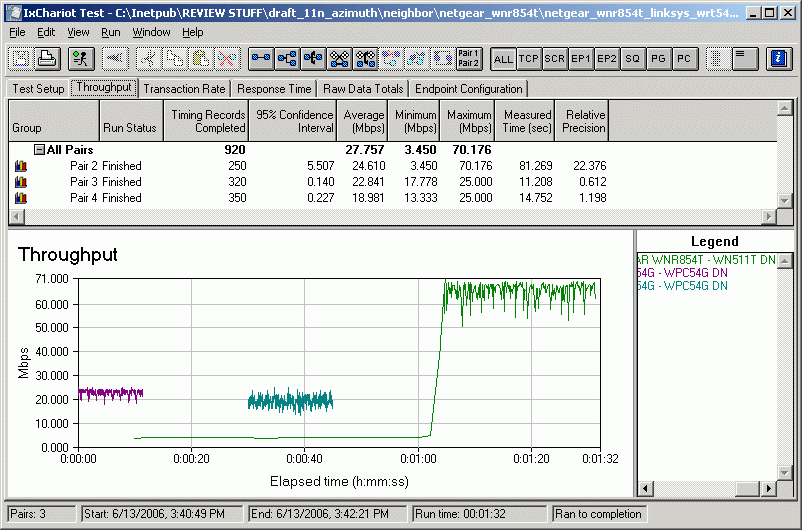
Figure 14: TopDog being a little too neighborly
Figure 14 shows another variation, this time with the Netgear pair using a 6.5 Mbps transmit rate (which is actually the lowest 802.11n 20 MHz link rate) during the low throughput period. Unfortunately, this behavior penalizes the Marvell TopDog fueled WLAN too heavily, which I’m sure is not the designers’ intent.
Closing Thoughts
So there you have the state of the draft 11n interoperability story, or as much of it as available at this point. Notably absent is gear using Atheros’ xspaN chipsets, which is expected to start appearing in stores sometime this month (June 2006). In the meantime, however, Atheros joined forces with Broadcom (now there’s an interesting alliance) to thump their collective chest about their draft 11n products actually being (gasp!) interoperable.
Imagine that. Products designed to the same standard actually being interoperable! The companies even issued a white paper describing the testing, which was conducted jointly by Broadcom and Atheros personnel. Too bad Atheros hasn’t made any product available (at least to this reviewer) for independent verification of their claims.
While all this makes for great theater, this pitifully low level of interoperability and backward-compatibility is an embarrassment to the consumer WLAN industry and should be a wake-up call to all consumers. The industry had better stop hyping and start fixing this crap…and fast. Or the “N” in 802.11n will soon stand for “No” as in “no good”, “no work”, “no way”, ahhh, you get the idea…I hope.