

Introduction
Updated: 11 July 2006
| At a Glance | |
|---|---|
| Product | Synology DS-106e Disk Station |
| Summary | High-performance BYOD single drive SATA NAS with gigabit Ethernet and many serving options |
| Pros | • LAMP web and UPnP AV media serving • Gigabit Ethernet with Jumbo Frame support • Good performance • Windows and MacOS installation and network protocol support |
| Cons | • Backup application provided for Windows only • Limited U.S. availability |
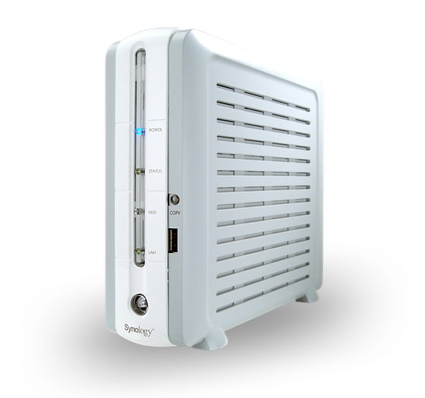
I’ve been working with consumer-level network attached storage (NAS) devices for a couple of years now. The first units I tried out had fairly minimal feature sets. But now that NAS devices are getting popular and new manufacturers are getting into the game, more full-featured devices are coming on-line. In this review,I look at a device with features its designers hope will enable it to break away from the crowd by packing an extensive set of capabilities into a box the size of a small toaster: Synology’s gigabit-capable, multi-function DS-106e Disk Station.
Figure 1 shows the back of the device, where along with the power and network connectors, you can see a fan vent, a reset button, two USB 2.0 ports and an external SATA port.
The USB ports are designed for storage expansion with up to three disks or for a printer that can be accessed via the internal print server. On the front of the device, along with a power button and status LEDs, there is an additional USB port below a USB Copy button that is designed to copy data from a device plugged into the front port to the internal drive.
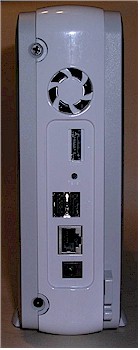
Figure 1: DS-106e Back Panel
Set Up
Since the DS-106e is a bring your own disk (BYOD) box, setting up the device includes opening up the case and plugging in your own SATA drive. I found the instructions provided by Synology straightforward and easy to follow. Once the drive was plugged in and the case put back together, all that was left to do was to hook up an Ethernet cable and plug the box in.
As the box booted up, I could hear the fan, but the noise level was minimal. Synology’s documentation states that the fan is thermostatically controlled and will only run when the internal temperature of the device is above 104 degrees Fahrenheit.
Synology provides setup software for both Windows and Apple systems, so once the unit was booted up on the LAN, I started down the configuration path with my iBook. Figure 2 shows the discovery screen from the setup software where the DS-106e was found along with a couple of other Synology boxes I have running on my LAN.
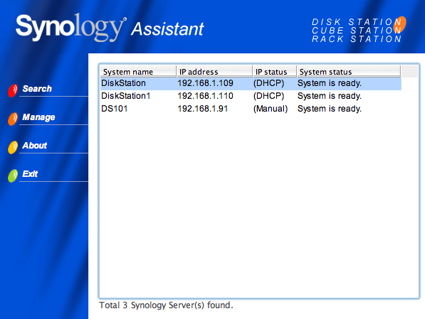
Figure 2: Setup Assistant
As is the case with almost all of these NAS devices, the real configuration is done through a Web browser. The setup software’s only job was to locate the device and spawn off your Web browser for setup. The first time you log into the device, a setup wizard runs and allows basic configuration such as admin password, network address, time, etc. Figure 3 shows the time setup window from the setup wizard.
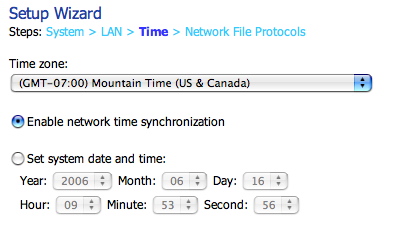
Figure 3: Wizard time setup
Figure 4 shows the main setup screen for the DS-106e once I had completed the initial setup and logged in.
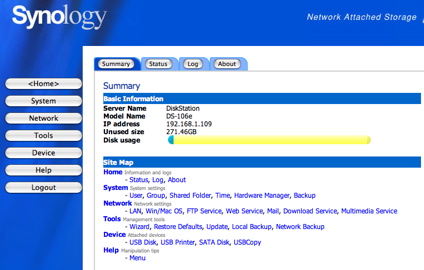
Figure 4: The summary screen
Along with a little disk-usage graph, you can see summary information and numerous configuration options. Figure 5, from the status menu, shows details of the current state of the device.
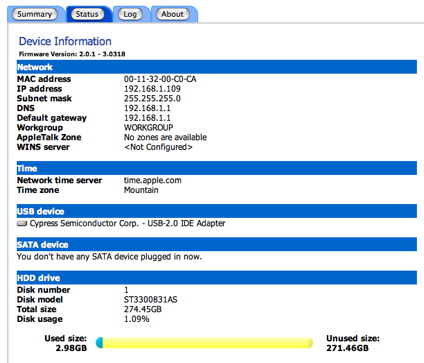
Figure 5: Detailed device information
In this screen you can see the firmware version, network info, timeserver, time zone, etc. You can also see that I also have an eternal USB drive plugged in. The DS-106e has the capability to use an external SATA drive, but since I don’t have one, I wasn’t able to test it out.
User Admin, Shares And Multimedia Features
This box has many features so I won’t be able to cover them all in this review, but I’ll go over some of the more interesting ones. First up is the capability to have individual user accounts with varying privileges. Figure 6 shows the menu that allows local users to be defined.
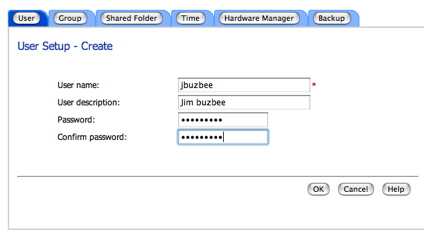
Figure 6: User setup screen
Users can be assigned to defined groups and then the network-shared folders can be restricted based on users and groups. Figure 7 shows the folder sharing setup screen.
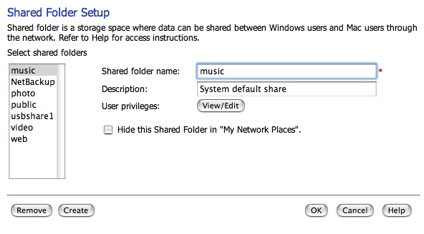
Figure 7: Shared setup folder
Shares setup on this screen will be exported to the LAN using both Windows SMB and Apple AFP file sharing protocols.
Synology advertises the DS-106e as an “all-in-one” server with support for a number of capabilities oftentimes not found in a consumer-grade NAS. These features, found in the Network menu, include a UPnP multi-media server, a download station, a MySQL database server, a personal Web server with PHP support and an ftp server with bandwidth limiting options. Figure 8 shows the UPnP AV setup menu.
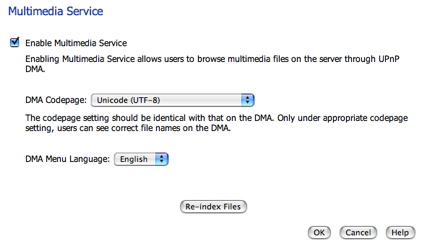
Figure 8: Multimedia setup
When this option is turned on, multimedia files stored in the pre-defined shares of photo, video and music will be served up to UPnP AV-enabled devices on your network. A quick test using a Buffalo LinkTheater and a D-Link DSM-520 showed the feature worked as advertised. Files I placed in the appropriate directories were made available for playing with my entertainment center.
Web Server And Photo Station
For use as a Web server, Synology provides a number of features. Figure 9 shows the Web Service setup screen.
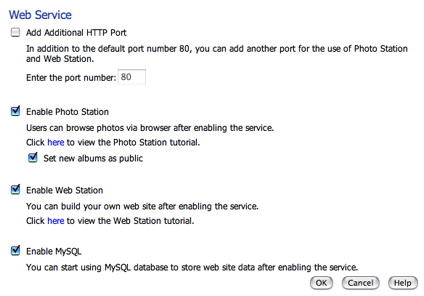
Figure 9: Web Service setup
Along with variable port control, you can see options for turning on the MySQL server and a built-in photo album program (Photo Station). Once MySQL is turned on, you’re pretty much on your own for management, but Synology provides a pointer to phpMyAdmin, a free PHP-based MySQL management program. Installation of the admin program was just a matter of downloading and unpacking into the Web server share and going through a little bit of configuration. Figure 10 shows execution of the program while being served up from the DS-106e.
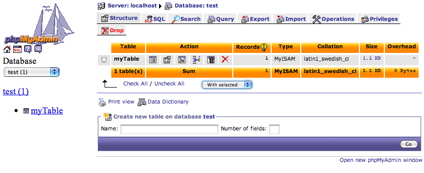
Figure 10: The PHP MySQLAdmin application
Using this tool, I was able to create and populate MySQL tables that could be accessed from PHP scripts. The combination of MySQL, PHP and a Web server brings an entire LAMP webserver to your network, which allows for sophisticated websites to be created.
Figure 11, a screen-shot of Synology’s included photo album application, is an example of what you can do with a PHP application running on the DS-106e.
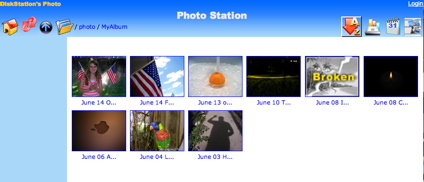
Figure 11: The photo station application
The photo-album application itself worked fairly well. Any photos deposited into the photo directory were automatically indexed and displayable thumbnails were generated. From there you could cycle through individual photos or run a nice automatic slide show. But the application did have some quirks, as shown in Figure 11 above. The “broken” thumbnail indicated a problem with one of my photos, but there was no other diagnosis to tell me what was wrong with this jpeg, which wasn’t much different from the others.
Another option available under the Network menu was email alert notification. After this is set up you’ll get email notifications when problems occur on the DS-106e. In my case the only notification I got was when I plugged in an external USB drive that was nearly full. Based on this warning, I would assume that I’d also get a warning when the main drive started to get full as well.
Download Service And Backup
The last interesting option available under the Network menu was the Download Service option shown in Figure 12.
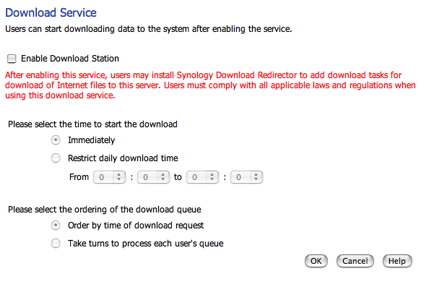
Figure 12: Download service setup
Once this is enabled, users on your LAN can submit URLs to be downloaded. Support is in place for http, ftp and BitTorrent downloads. This was a nice feature, but it had somewhat of a curious implementation. Submission of downloads could only be done via an external application running on your PC or Mac. Figure 13 shows the client running on my Mac.
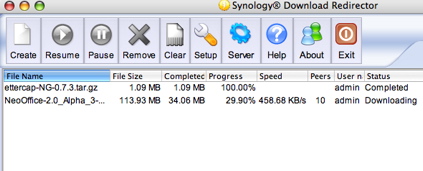
Figure 13: The Download Redirector application
I found it worked well when I tested both an HTTP and a torrent download. Submission was designed to be a fire-and-forget operation: Submit the URL for download, close out the application and wait for it to appear on the shared folder. But it wasn’t clear why a custom external application was needed. It seemed like it would be a lot easier to just submit the download via a form on the Web page of the DS-106e.
However, regardless of the client implementation, it seemed to work well. One thing missing was a way to throttle the bandwidth a torrent download would consume. There was also no indication of what ports were being used for the download. These peer-to-peer applications work much better when the proper ports are opened in the firewall.
Often times NAS devices are used to backup files from other computers on the LAN, and the DS-106e can be used this way, but Synology provides capabilities to backup the DS-106e as well. Under the Tools menu there are a couple of backup options. The local backup option provides means to periodically copy your data from the internal drive to either an external USB or SATA drive. The Network Backup is used to backup or restore your data from another Synology server on the LAN. Figure 14 shows the screen used to setup a backup job.
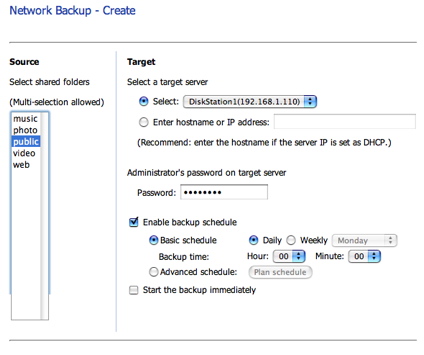
Figure 14: Network backup setup
Backing up to another Synology box on my LAN worked fine. To back up from a PC on the network to the DS-106e, Synology provided a sophisticated Windows-only application. Figure 15 shows the main screen of the application running on my Windows XP laptop.
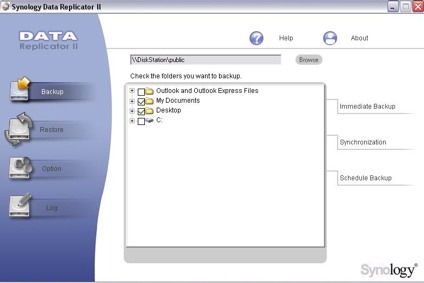
Figure 15: The data replicator application
Options were available for scheduling of backup jobs, source and destination directory selection, filtering by file type, etc.
Logging And Other Features
The last features I explored were logging and a few other miscellaneous functions. Figure 16 shows the menu where you can choose among several different log files.
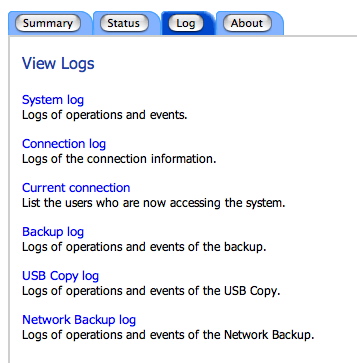
Figure 16: Log selection screen
Everything from system changes, to backup events, to logins, to currently logged in users can be viewed in the log file. Figure 17 shows an example log file, where among other things, you can see when I plugged in an external drive.
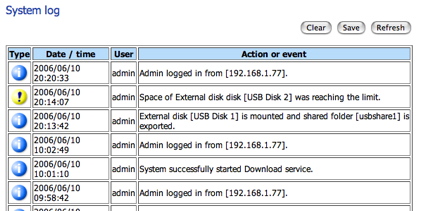
Figure 17: System log
And you can see that it flagged the fact that my external drive was getting full. I don’t think I’ve seen any consumer-level NAS device with more logging capabilities than the DS-106e.
The last interesting menu I checked out was the Hardware Manager, shown in Figure 18.
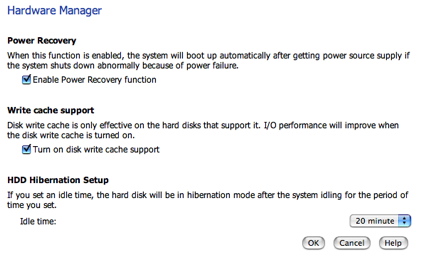
Figure 18: Hardware manager
In this menu, there were some useful options. The first allows the device to automatically boot back up after a power failure. This is the first time I’ve seen this in a consumer NAS device and it is appreciated. A number of times I’ve had a small power blip while I’m away from home, making my NAS drives inaccessible until I get back, realize what has happened, and power them back up. But with this feature, the device would come back up all on its own.
The second option allows you to turn on disk write-caching for disks that support it. The last option allows you to specify a drive spin-down time. With this turned on, your drive will spin down when idle lowering both your noise level and your power bill.
Performance – 100 Mbps
To see how well the DS-106e performed on the LAN, several Iozone runs were made using both a 100 Mbps connection and a 1,000 Mbps connection. (For the complete story on how we test NAS products and on the new test result format, go here.) The 1,000 Mbps tests were run once with 4 K jumbo frames enabled, and one with jumbo frames disabled.
Updated: 11 July 2006 The Write Caching option found in the Hardware Manager admin page was enabled for all tests.
For comparative purposes, test results from a Buffalo Gigabit Linkstation and Thecus YES box 2100 are included in the comparative plots. Note that the dashed line in the graph represents the theoretical maximum speed achievable on a 100 Mbps LAN. The drive used in the box was a 7200-RPM Seagate Barracuda.
The 100 Mbps read test (Figure 19) shows solid results with the DS-106e outperforming the Thecus box in all file sizes and outperforming the Linkstation with larger files.
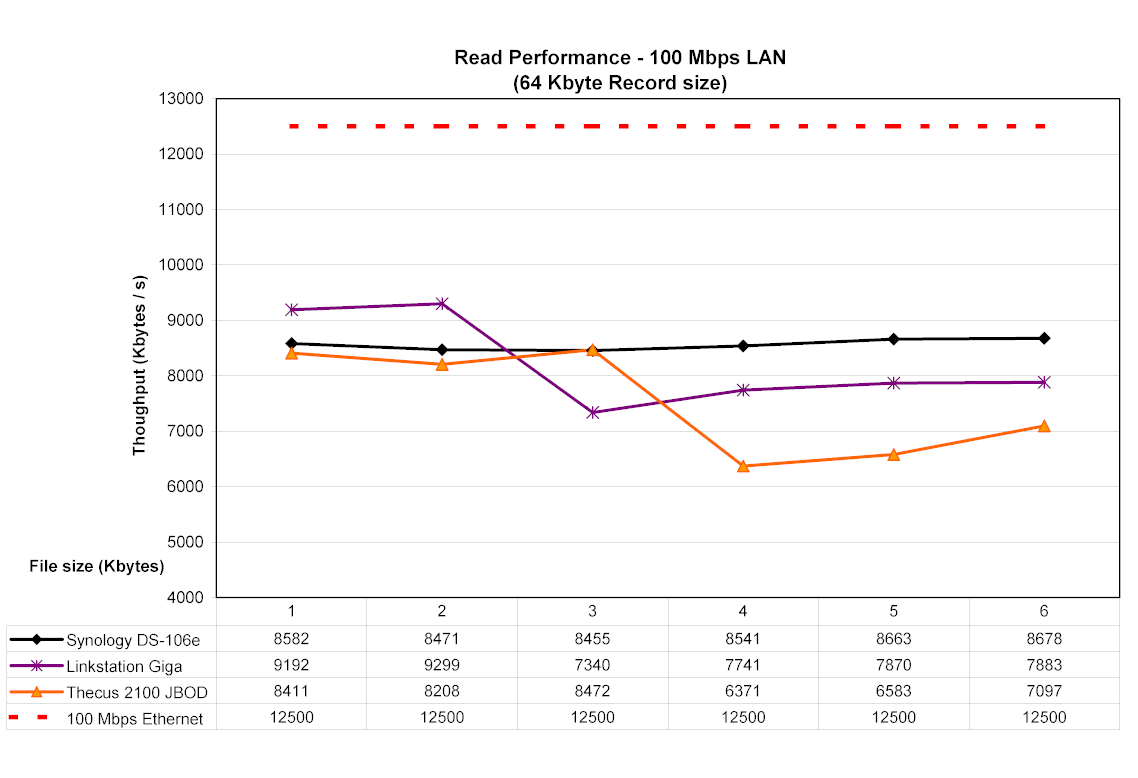
Figure 19: A 100 Mbps read comparison (click image to enlarge)
The 100 Mbps write test shown in Figure 20 also shows the DS-106e easily besting its competitors with rates often 50% higher than those of the Linkstation.
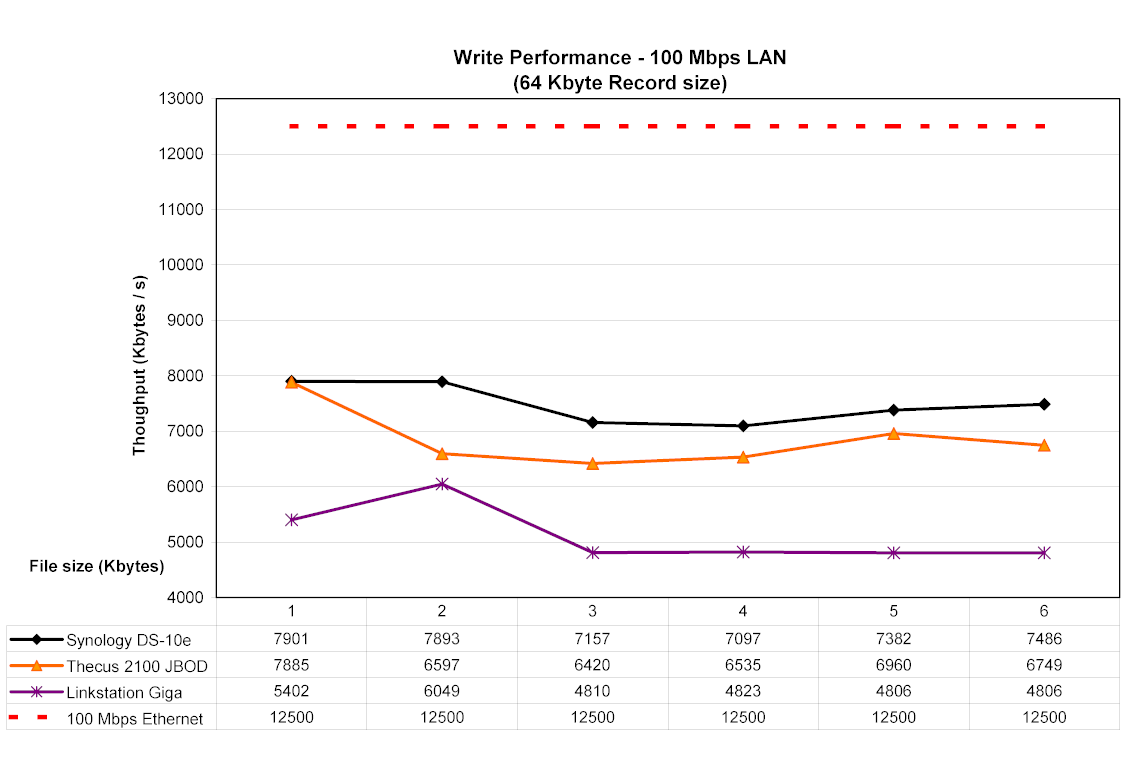
Figure 20: A 100 Mbps write comparison (click image to enlarge)
Performance – 1,000 Mbps
On the first 1,000 Mbps read test (Figure 21), we see similar results with the DS-106e besting the other two boxes in most cases.
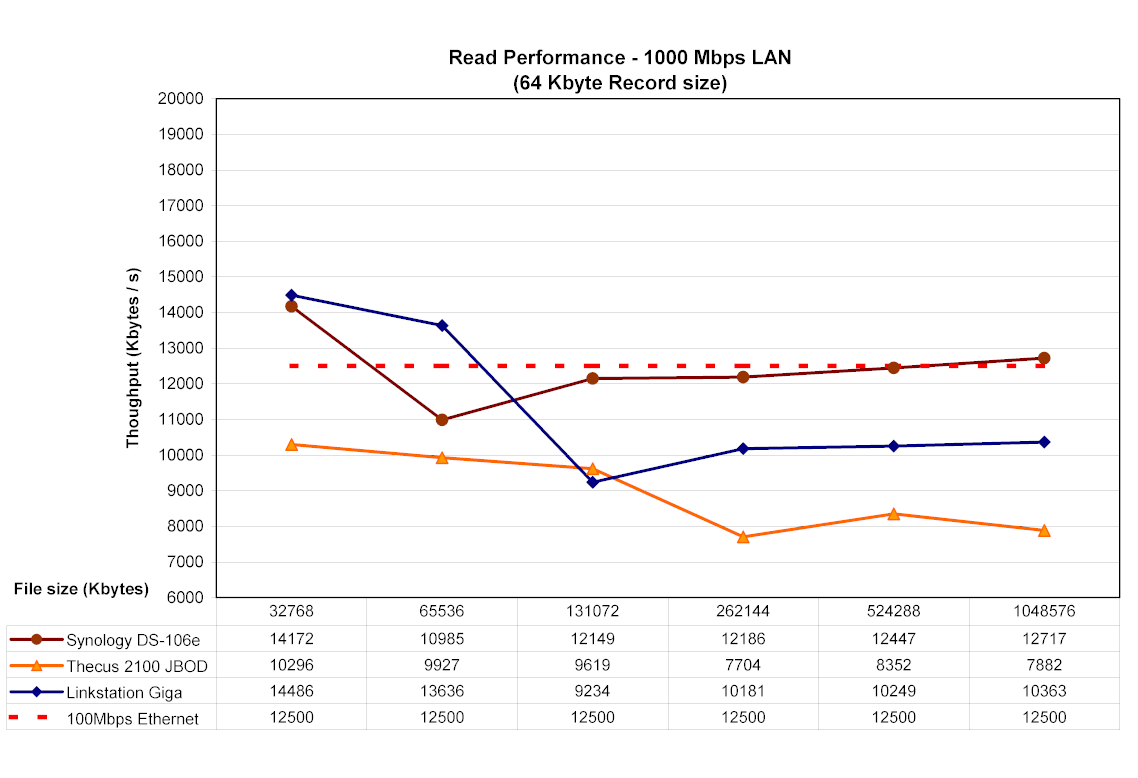
Figure 21: A 1,000 Mbps read comparison (click image to enlarge)
After turning on Jumbo frames (Figure 22), we see a slight increase in read performance for the DS-106e.
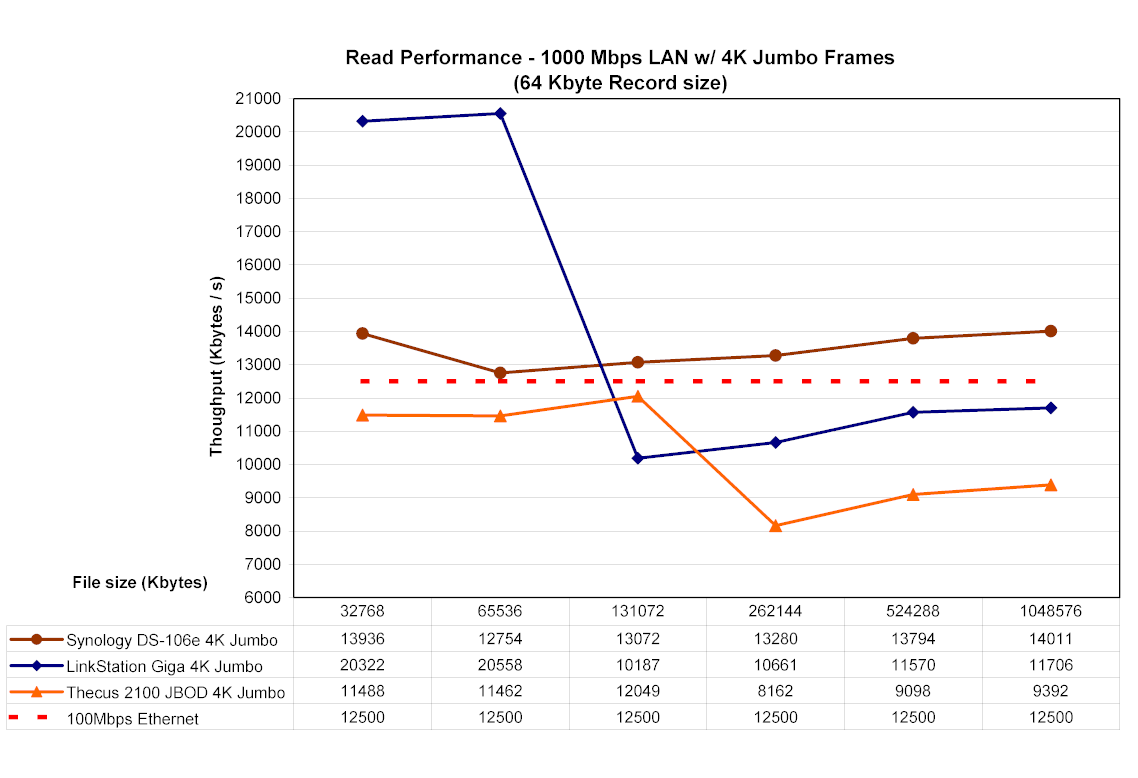
Figure 22: Read comparison at 1,000 Mbps with 4 K Jumbo frames (click image to enlarge)
The first 1,000 Mbps write test (Figure 23) continues the trend with the DS-106e easily outperforming the others by wide margins in all tests.
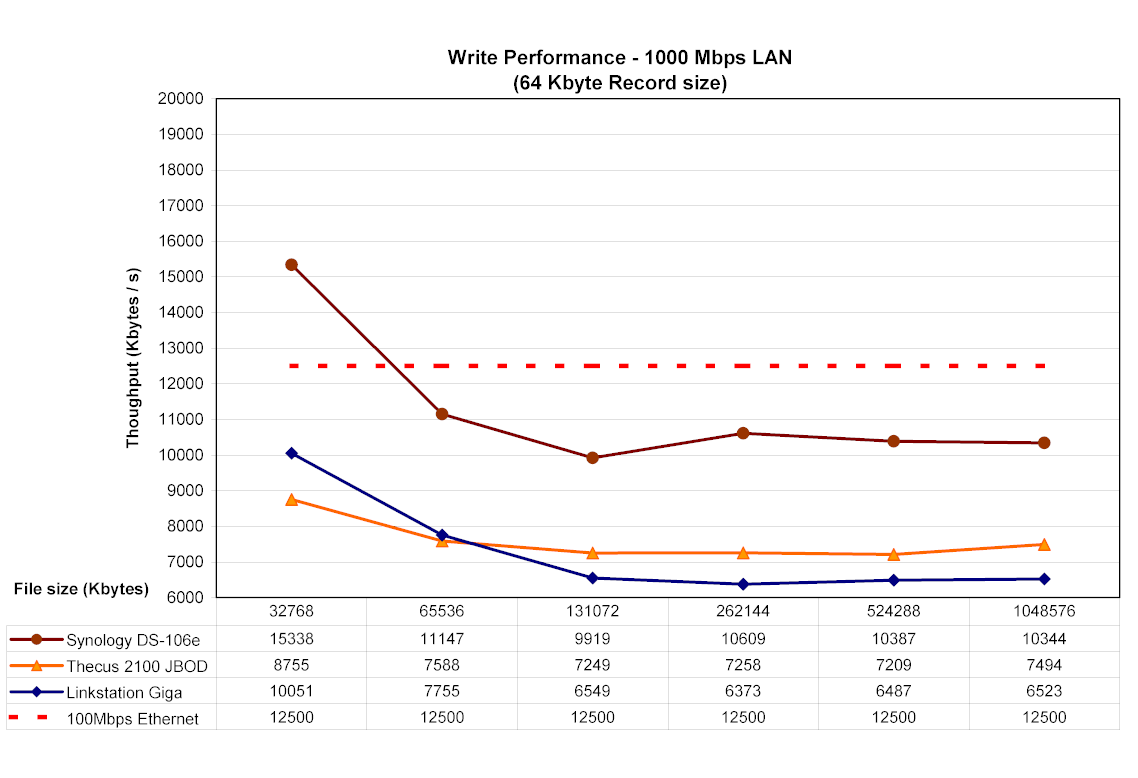
Figure 23: Write comparison at 1,000 Mbps (click image to enlarge)
The final write test with Jumbo frames enabled (Figure 24) shows a slight boost in performance, with the DS-106e winning again in most cases.
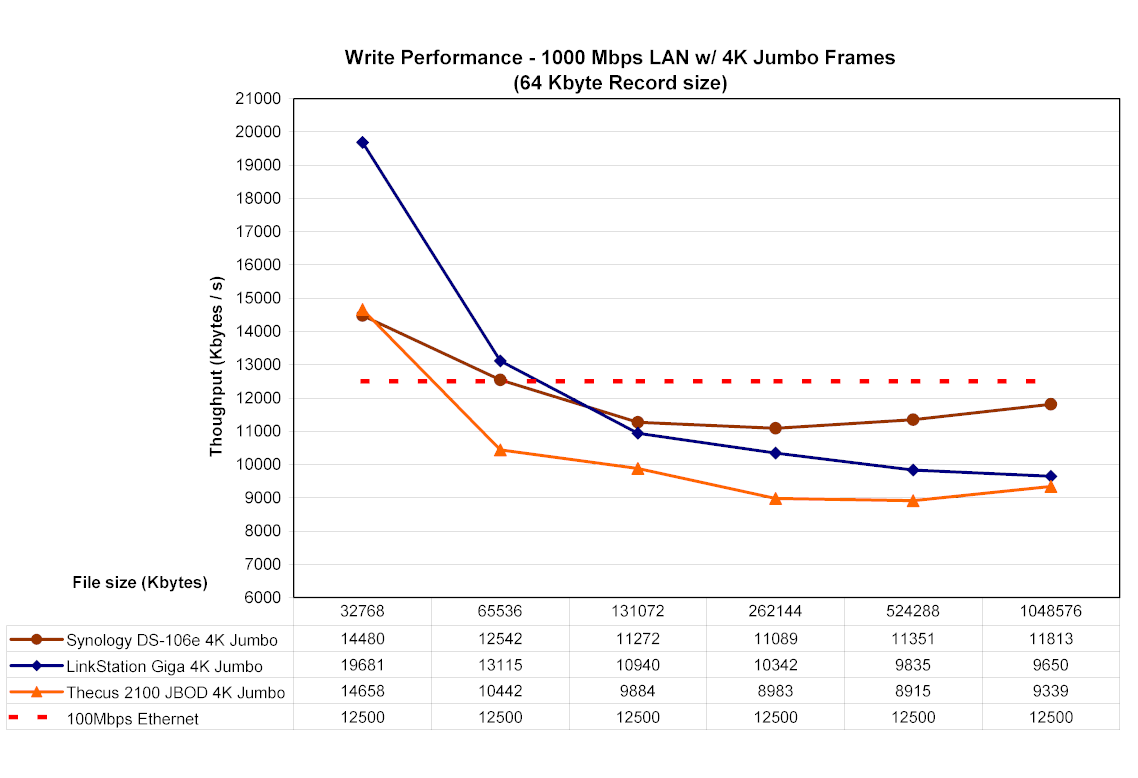
Figure 24: Write comparison at 1,000 Mbps with 4K Jumbo frames (click image to enlarge)
As a final experiment, I did a few drag-and-drop tests to give an idea how the box would perform in real-world type of use. In this case, the test was done from my Dell Inspiron 1000, 2.2-MHz Mobile Intel Celeron laptop with 320-MB RAM running Windows XP Home with a Seagate Barracuda 7200 RPM drive. The results below are averages of a couple of runs, which involved moving a directory tree containing just over a gigabyte of data.
| Test | 100 Mbps LAN | 1000 Mbps LAN | % change 100 to 1000 Mbps |
|---|---|---|---|
| Write to DS-106e | ~ 3 min. | ~ 2 min. | 67% |
| Read from DS-106e | ~ 2.5 min. | ~ 1.6 min. | 64% |
Under The Covers
Figure 25 shows the DS-106e’s motherboard.
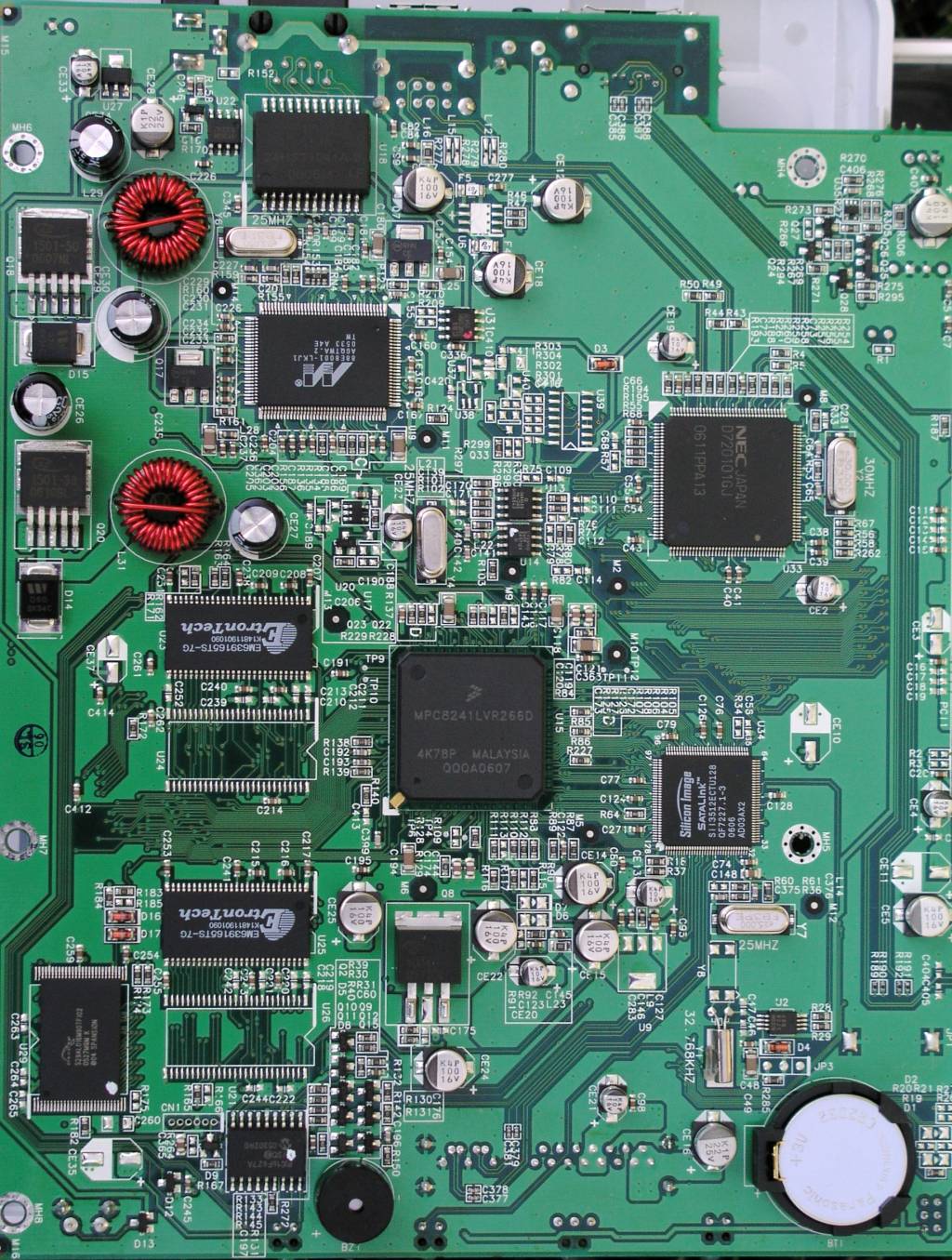
Figure 25: DS-106e Main Board (click image to enlarge)
As shown in the photo, the main processor is a 266 MHz Motorola Freescale MPC8241. The Ethernet support is provided by a Marvell Yukon 88E8001, the SATA controller is a Silicon Image SATALink 3512 and the USB controller is provided by NEC. As for the operating system used in the box, there was little question that the DS-106e was running Linux.
A development group has been around for a while and is working to add additional functionality to the whole line of Synology NAS boxes. There has been a ongoing back-and-forth between the group and Synology. A developer in the group finds a hole that lets them get internal access to the OS, Synology fixes the hole in a firmware update and then the group finds a new hole. Initially the holes found had to do with flaws in the PHP implementation, but then Synology locked that down. At the moment, the current flaw has to do with the way that Synology does firmware updates.
For firmware updates, a privileged process is run to verify the integrity of the firmware image. This privileged process is itself contained in the firmware package that gets uploaded to the device. It was found that it was easy enough to replace this process with an arbitrary script that can do whatever it wants with full privileges. Using this method, I wrote a simple script that enabled the existing telnet daemon and created a new root-level user. Then I packaged this up into a dummy firmware update image and used the standard DS-106e firmware update web page to load it. The update itself “failed” because it wasn’t really a firmware image, but before it failed, my script was executed. This execution of my script gave me full command-line access to the box with root privileges.
Poking around the box showed a typical Linux embedded system with heavy use of open source software. The box had 32 M of RAM and it made use of Busybox for utilities. It used Apache for the Web server, Netatalk for Apple file sharing and Samba for the SMB support. The internal drive was divided into three partitions: One ext3 partition for the OS, one ext3 partition for data and one swap partition. Interestingly enough, PostgreSQL was being used in some capacity, so since the box also supports MySQL, that makes two powerful database servers running on the DS-106e. The multimedia capabilities were based on an Intel UPnP Server. For network backups, an rsync daemon was used.
Conclusion
I found a lot to like about the DS-106e. It had more features than any other off-the-shelf NAS that I’ve worked with and also has multi-OS support. Its performance was top rate, both with and without the use of its gigabit Ethernet features with jumbo frame support. The user interface is also well thought out and executed.
Synology’s firmware support deserves special mention. The first Synology box I reviewed last February, the DS-101, has been discontinued. But Synology continues to release updates that add new features to this discontinued product. The next release, scheduled for this summer, will add MySQL, a Multimedia Server, the download station, etc. bringing it up to par with its newer siblings. This free software-upgrade support for discontinued products is a definite plus for Synology.
The main downsides are that the DS-106e has limited U.S. availability, perhaps because it is relatively new. But Synology says that the product will be available from TigerDirect in “mid-July”. Another negative is that for buyers who don’t need all of the 106e’s features, the same $250 or so will buy something like Buffalo’s Gigabit Linkstation, complete with 250GB of storage. Finally, the client backup application Synology supplies is Windows-only.
But if you’re in the market for a full-featured home or small-office NAS device, want an edge on performance and don’t mind paying a bit of a premium, you won’t go wrong with the DS-106e. Its performance and feature-set have raised the bar for other manufacturers.