

Introduction
| At a Glance | |
|---|---|
| Product | Maxtor Shared Storage II (N01R010) |
| Summary | High-performance dual drive RAID 1 NAS with gigabit Ethernet and multimedia serving |
| Pros | • Top-rate performance • Windows and Apple support • Media serving capabilities • RAID 1 support |
| Cons | • No logging or alerts • Failed RAID drives aren’t designed for consumer replacement • No Jumbo frame support |
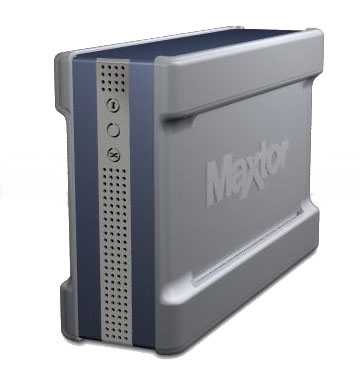
When I reviewed Maxtor’s Shared Storage last summer I found it to be a powerful, easy to use device. It was a little light on features compared to other Network Attached Storage products I had worked with, but it was still a well-designed device with solid performance. And it’s evident that others found it a top-notch device as well. It was voted “best NAS product” last year by readers of TomsHardware.
Maxtor hasn’t been content to rest on its laurels, however, and has added a second generation of the Shared Storage product to its lineup. While Maxtor didn’t do anything unique in the new products’ naming, they completely revamped the design with a resulting boost in performancde. In this review, I’ll look at the Shared Storage II 1 TB (Terabyte) model, which is the only of the SSII line to sport RAID capabilities. The other SSII models have single 300 and 500 GB drives and all of the other SSII features that I’ll describe.
The first thing I noticed when setting up the Shared Storage II (SSII) was its size. Since the SSII holds two internal drives, it is understandably roughly twice the width of the original Shared Storage. Along with the width change, the SSII also sported a different look. Instead of a long, sleek aluminum case, the SSII was shorter, with more of a chunky look in a plastic case with rubberized coating on the sides. The front of the box is vented with a row of LEDs and the back, shown in Figure 1, has two USB 2.0 ports, a 10/100/1000 Ethernet port, fan vent, power connector, recessed power button and locking slot.
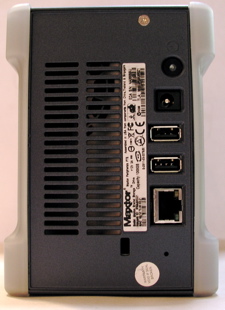
Figure 1: SS II Back Panel
Hooking the SSII up is as simple as connecting an Ethernet cable and a power cord. When I applied power, the front LED started blinking, so I thought it was immediately booting. But when I tried to locate it on my LAN, it was nowhere to be found. Only after a bit of head-scratching did I figure out that the active LED was just a LAN traffic indicator that blinked even when the device was off! To really bring the device up, you have to press the power button on the back panel. Oops!
When I finally got the device booting, I heard the fan spin up and noticed that it was a bit on the loud side. It was noisier than the original Shared Storage, but it wasn’t nearly as noisy as a lot of other units I have tested. Once the device was booted, I turned to the installation software. Maxtor proves support for both Windows and Apple, so I started with my preferred system, a MacBook Pro.
Installation of the management software was fairly simple, but there was one unusual behavior. After installation was complete, I was required to reboot. When I tried the installation on my Windows machine, the same was true. I don’t think I’ve ever seen this requirement when installing a NAS device. Once I rebooted and started up the management application, the SSII was found on my network, my web browser was spawned off and I was walked through some basic options such as setting up the network address, workgroup name, changing the default password, etc.
Features
After the initial configuration was complete, I returned to the main web configuration page of the SSII as shown in Figure 2 to see what additional options were available.
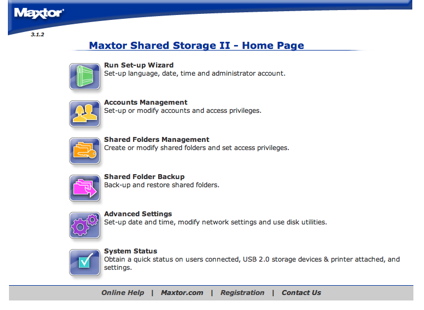
Figure 2: Main Web Interface
“Account Management” (Figure 3) held options for the creation and deletion of user accounts and for the specification of read-write privileges.
Many NAS devices on the market allow definition of user groups so that you can manage an entire set of users as a whole with read/write privilege, quotas, etc. but the SSII has no such capability. Maxtor is evidently aiming at the home market rather than SOHO / SMB buyers where such capabilities would be more appropriate.
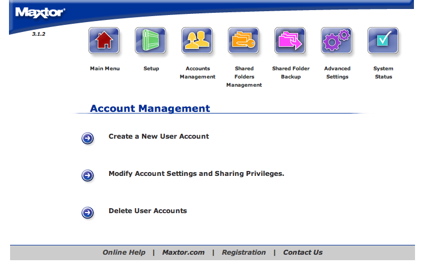
Figure 3: Account Management
When I started exploring the “Shared Folders Management” menu, I found standard options for the creation, suspension and deletion of shared network folders (Figure 4).
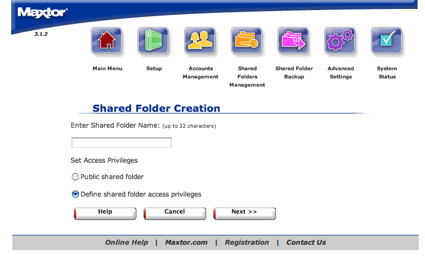
Figure 4: Shared Folder Creation
The SSII supports the SMB network file system protocol, so can be accessed by Windows XP, Mac OS X and Linux clients. If you’re looking for Apple File Protocol (AFP) or NFS support, however, you won’t find it.
Multimedia Serving
Also found under the Shared Folders Management menu is “Manage Digital Photos, Music, Video”, which really doesn’t have much to do with shared folder management. This menu, shown in Figure 5, controls the SSII’s multimedia serving features.
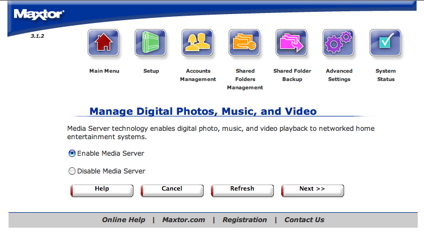
Figure 5: Multimedia Setup
The first capability (Figure 6) allows the device to act as a UPnP Media server. I tested this out with a Buffalo LinkTheater and it worked well. Movies, pictures and videos that I deposited in the proper directories were served up to the LinkTheater where I could view then on my TV or listen on my stereo.
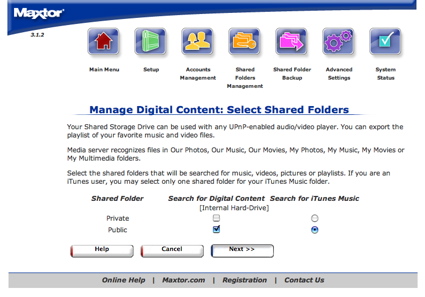
Figure 6: Multimedia Management
The other capability provided was “Search for iTunes Music”. Initially, I wasn’t quite sure what this meant. I thought maybe it would recognize iTunes libraries stored on the drive for export through UPnP. But what it really meant was that the SSII has a built-in iTunes daap server! This means that the music you store on your SSII will be made available to iTunes users on network under the iTunes “Shared Music” grouping.
Figure 7 is a partial screen-grab of my iTunes application where both the SSII server and a daap server running on my Kurobox server are shown. My tests of this capability also worked well, with music deposited on the SSII made available to all iTunes users on my network. Note that since the music is played through iTunes, this capability also works with Apple’s DRM restricted music purchased from the iTunes music store. However, this is not true for music served up through the UPnP server to a device like the LinkTheater.
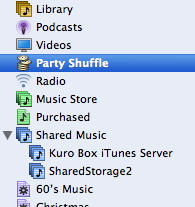
Figure 7: Shared Storage II iTunes server
Folder Backup, Advanced Menus
Moving back to the main menu, I found an option designed to back up the SSII’s internal shares to a properly formatted (ext3) external USB drive (Figure 8). However, I didn’t have a spare, empty drive to try it out with. I did find, however, that the Fat32 formatted drives I plugged in were automatically shared. I’ll note that the external drive I used was partitioned into four parts and all four were all properly exported. This is in contrast to every other NAS device I’ve tested that just exported the first partition.
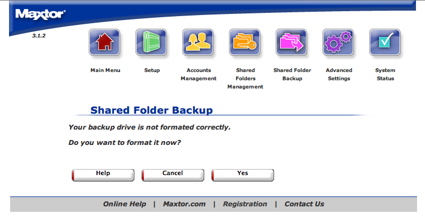
Figure 8: Shared Folder Backup
The external USB ports can also be used to share a USB printer. Of course, any computer that wants to use the printer will need to have the driver installed.
Other items found under the “Advanced” menu included Network Time Protocol server controls (Figure 9), changing the admin page language and network settings. Another feature that I’m always interested in lay under “Power Management”. This capability is supposed to allow the disk to spin down after a specified period of inactivity, but I couldn’t get it to work.
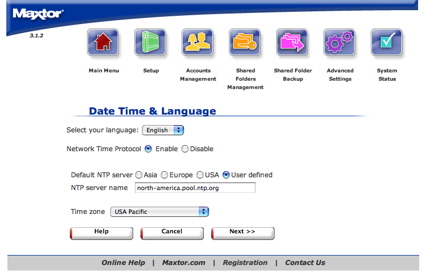
Figure 9: Time Setup
For the internal drive, the options were always grayed out and unselectable. For the external drive, I could make a selection, but would get an error when I tried to apply it.
A “USB” submenu under the advanced options allowed formatting USB drives, disabling the USB printer, etc. There was also a “System Maintenance” menu that among other things, allowed diagnostic operations on the disk. But each time I tried to run the test, I’d end up with an inconclusive result (Figure 10).
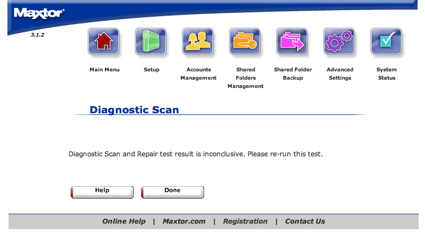
Figure 10: Diagnostics results
RAID and Feature Wrapup
RAID settings of the SSII (Figure 11) are also found under the Advanced menu. The spanning option is a form of RAID 0, which treats the two internal drives as one big drive. The second option, mirroring or RAID level 1, cuts the total capacity in half, but mirrors the data on both drives adding security in case of drive failure. Note that the SSII does not support JBOD (Just a Bunch Of Disks) mode, which would let you access individual drives.
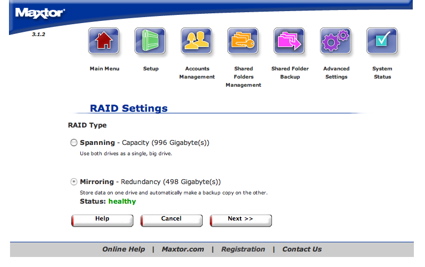
Figure 11: RAID Setup
One thing that confused me in this menu was the fact that the “next” button was selectable but it didn’t do anything. I saw this behavior under both my Safari and my Firefox web browsers. However, IE showed the button as grayed out. This tells me Maxtor has some work to do in the web coding for this function.
To test out the mirroring behavior under failure conditions, I intended to open up the case, unhook cables from one drive and bring it back up. But when I went to open the case, I found it wasn’t quite so easy. The case was evidently not intended to be opened by a consumer. The plastic sides and top were attached to an internal metal case with easily breakable plastic compression clips. After half an hour of trying to get it open, I gave up.
I think the only way I could have gotten into the case was by breaking the clips. This was a bit odd because besides increased read performance, one point of using RAID level 1 is being able to recover from disk failure. You open the case, replace the failed drive and let the RAID subsystem recover. But with the construction of the case the way it is, you’ll end up breaking the case in order to replace the broken disk.
The final capability from the web interface that I explored was the “System Status” menu. This menu, shown in Figure 12, lists various settings and status from the device.
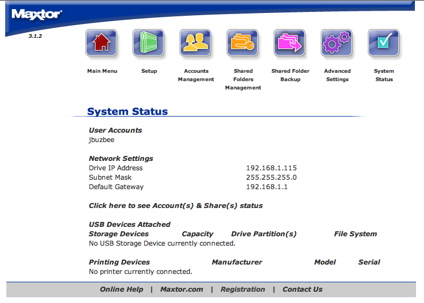
Figure 12: System Status
One thing I didn’t see in any of the menus was a logging, or a notification feature. Many NAS devices email out warnings when errors occur or when the disk starts filling up, but the SSII has neither logging or notification capabilities.
Backup Software
As I mentioned earlier, Maxtor provides software for both Windows and Apple systems. I’ve found that manufactures often provide Apple support as somewhat of an afterthought, but Maxtor’s support was first class. The Mac OS flavor of the bundled “EasyManage” application shown in Figure 13 had the same set of capabilities as found under the Windows version.
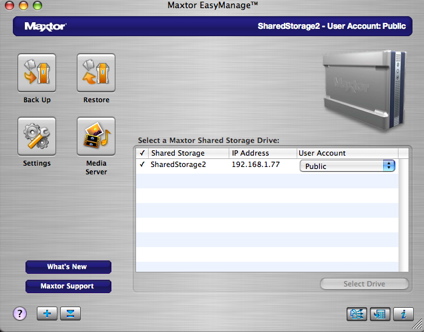
Figure 13: Configuration Application
The application can be used to back up selected client folders to the SSII on scheduled days and times, or initiated manually. Figure 14 shows that backups can be incremental or full. An advanced option for backup allows the application to wake the computer from sleep, back it up, and then put it back to sleep. Nice.
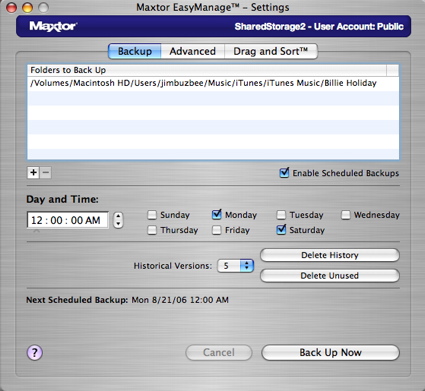
Figure 14: Backup settings
The other main feature that can be set up from the “Settings” menu is what Maxtor calls “Drag and Sort”. This capability is designed to automatically categorize files based on their file extension. For example, all “.jpg” files dragged onto the SSII network disk icon get automatically moved into the “My Photos” folder.
As far as I have seen, this is a unique capability and a quick test showed it worked as designed, but with some quirks. For example, Figure 15 shows a menu that allowed me to “Create a user account”, but eventually I figured out that what it really did was create a new shared folder, not a User account. However, the term “Shared Folders” is properly used on the web interface main menu to refer to network shared folders.
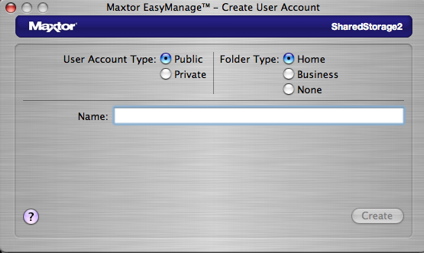
Figure 15: EasyManage “User Account” creation
Performance
In order to gauge performance, we ran our standard NAS test procedure using both 100 and 1000 Mbps connections. We couldn’t run the gigabit tests with Jumbo frames, because the SSII doesn’t support them, but we did run tests in tests in both Spanning and Mirroring modes. All tests were run using the version 3.1.2 firmware that came installed on the SSII.
Figures 16 and 17 show 100 Mbps write and read performance using a 64 kByte record size and file sizes from 32 MB to 1 GB, plotted along with comparable previously reviewed products.
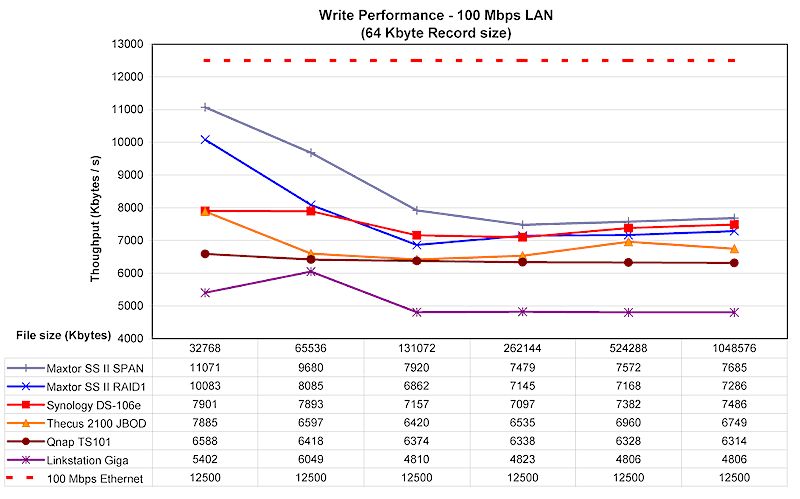
Figure 16: 100 Mbps Write test (click to enlarge)
100 Mbps write results show that both Span and Mirror (RAID 1) modes perform better with smaller file sizes with a fall-off in speed that flattens out at 128 MB and larger files. Read performance is flat across file sizes with no difference in span and mirror mode reads. The Synology DS-106e has essentially the same read performance profile.
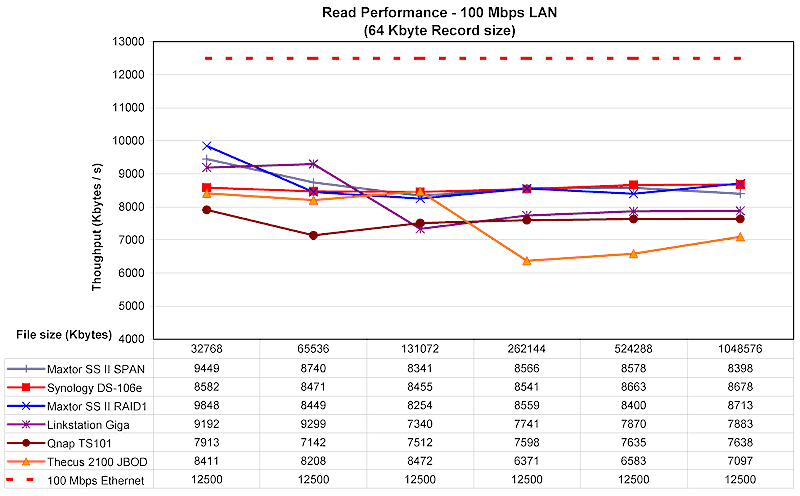
Figure 17: 100 Mbps Read test (click to enlarge)
Write performance with a gigabit LAN connection (Figure 18) shows the same performance falloff from small to large file sizes. But this time, read performance (Figure 19) shows a falloff between 32 and 64 MB files. The Synology is again the closest in performance for write, but is outpaced for read.
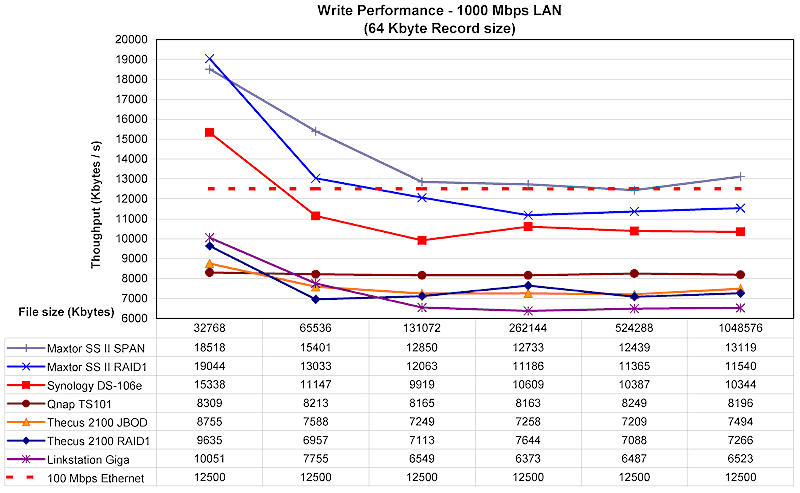
Figure 18: 1000 Mbps Write test (click to enlarge)
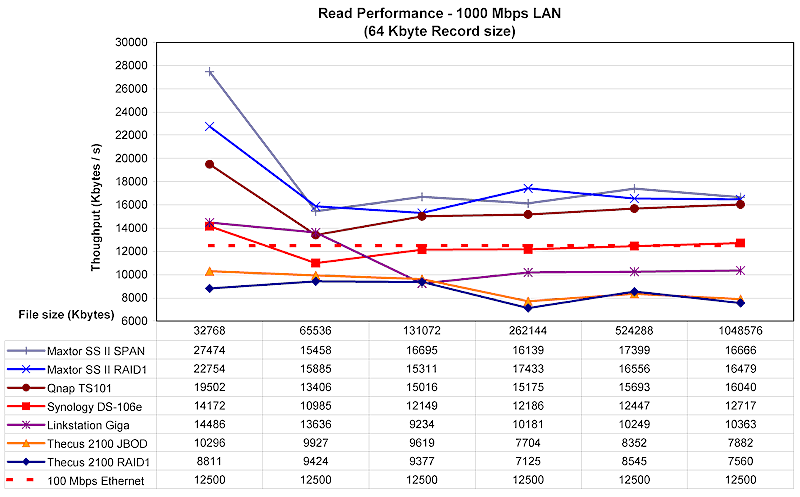
Figure 19: 1000 Mbps Read test (click to enlarge)
You can get a comparison of the SSII against our entire database of NAS products by using our NAS Charts.
To get a different perspective on performance, an interactive file-copy test was run in order to see how the SSII might perform in real-world use. These tests were done with a different computer than the iozone tests. I used Windows XP SP2 running natively on my MacBook Pro, a 2 GHz Intel Core Duo with 1.5 GB of RAM.
The results in Table 1 below are averages of multiple runs of moving a directory tree containing 4100 files using up just over a gigabyte. It’s interesting to note that the speed difference between read and write is negligible because normally I see read from a NAS performing much faster that the writes. This may be due to the fact that the NTFS partition I’m using on my MacBook Pro is fairly full. The test may have put some stress on my local filesystem when writing the 4100 files.
| 100 Mbps LAN | 1000 Mbps LAN | % change 100 to 1000 Mbps |
|
|---|---|---|---|
| Write to SSII | ~ 220 sec | ~ 143 sec | – 53% |
| Read from SSII | ~ 213 sec | ~ 168 sec | – 26% |
Table 1: File copy test results
Under the covers
In this section, I normally take the device under review apart and then photograph the main board, but as described earlier, I couldn’t get it apart without breaking it. I was also unable to get command-line access to the MSSII to poke around, so I had to dig up what information I could using other methods. A port-scan “fingerprint” of the device indicated it was based on a Linux Kernel. There were a number of network ports open, but only a couple were interesting. Manually connecting to the web server port told me it was an Apache 2.0.54 with php support. Manually connecting to the print-server port told me that it was supplied by CUPS.
But the best source of information on the software internals of the MSSII came from Maxtor’s web site. Maxtor has a Open Source Code Center where the GPL source for many of the included components can be downloaded. Maxtor even supplies a compilation tool-chain for those brave enough to try and build their own firmware.
Browsing through the SSII source tree, I found typical components such as busybox for utilities, Samba for SMB support, mt-daapd for iTunes support and a Linux 2.6 kernel. A copyright file indicated that Marvell held the copyright for portions of the firmware. “Googling” around indicated that the processor in use may be from the Media Vault family and that the software baseline came from Mediabolic.
Maxtor indicated that the device has 64 MB of RAM internally, no flash and the drives each have 16MB of cache. Maxtor also said the SSII uses a Marvell chipset but didn’t specify which one. However, given the SSII’s performance, the processor could be the same one used by the Buffalo LinkStation Pro.
Conclusion
Like the original Shared Storage, the Shared Storage II is a solid device with performance that tops our performance charts. The media serving capabilities are a nice feature, as is the RAID support and the bunded “EasyManage” application. Maxtor gets points for providing the the best Apple support I’ve seen yet in a consumer NAS both in bundled applications and built-in features.
But of course there is room for improvement. In general, the feature set of the SSII, like the original Shared Storage, is smaller than a lot of its competitors. For example, many support FTP and web serving as well as group level permissions. In addition to these capabilities, I would have liked to see better logging and notification features and the ability to spin down idle drives. And finally, for its RAID capabilities, I would have liked to see support for swapping out a failed drive.
But despite these shortcomings, the SSII is a solid product that raises the performance bar for consumer-level NAS devices.