

Introduction
| At a Glance | |
|---|---|
| Product | Netgear Digital Entertainer (EVA700) |
| Summary | Streaming 1080i HD media adapter with wide format support, but little visual pizazz. |
| Pros | • Supports large number of media formats • Wired and wireless support • Follows UPnP AV standard • Compatible with the open-source Wizd server |
| Cons | • Bland user interface • Inconsistently appearing screensaver • No DVI or HDMI output |
Update 10/25/2006: Product does support WPA2-PSK wireless security.
It has been about a year and a half since I reviewed Netgear’s MP115. The MP115 was a little networked media adapter that had some nice features, but was less than ideal for me because it also had a number of issues with my digital media collection. Since that review, I’ve had the chance to try out quite a few network media players. I’m finding that with many of the newer devices on the market, network protocols are being standardized and more of my media collection is being supported. In this review, I’ll take a look at the EVA700, which is the newest offering from Netgear.
The EVA700 plays a wide variety of media types, uses standard network protocols, and supports high-definition video. Figure 1, which is from Netgear’s manual, shows the EVA700’s back panel. As you can see, standard definition video is supported through either an S-Video connection or a composite connection. High definition video is provided via analog component (YPbPr) connectors in both 720p and 1080i formats, depending on the source material.
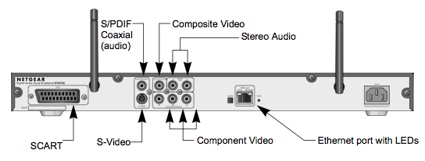
Figure 1: Back Panel
It was interesting to see a SCART connector on this box, since this technology is not commonly used on devices sold in the United States. What you don’t see on the back panel is any support for digital video using an HDMI or a DVI port. For networking, both wired and wireless support is provided via 10/100 Ethernet and 802.11b/g respectively.
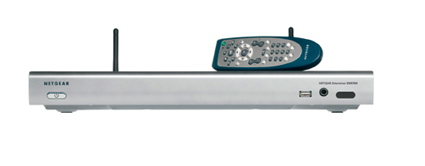
The front panel, shown in the illustration above, provides a headphone jack, a power button, and a USB 2.0 port. Netgear’s marketing material says the port can “play files saved on a USB storage device such as an iPOD , USB thumb drive, USB disk, and some digital cameras”. Note that any flash or disks attached must be FAT32-formatted or the EVA700 won’t be able to read them.
I verified this by attaching my Mac-formatted iPod, which was recognized, but unreadable. It would have been nice to also have a USB port in the rear so that you can permanently attach a drive, but the only port is on the front. So if you want to keep a drive attached, you’ll have to deal with the USB cord hanging off the front panel.
Since the EVA700 is designed with a 17″ home-entertainment form-factor, it fits right into my entertainment center. To set it up, I hooked up the component video cables, the analog audio cables, and an Ethernet connection to my network. But when I powered the unit up, the TV greeted me with a black screen, a familiar problem with a number of these devices. Usually by default, these devices only generate output on the S-Video or the composite video ports.
I did a quick check of the remote, shown in Figure 2, and found a “TV Mode” button. The remote is not backlit, so if you’re used to watching your movies in a dark room, you may have some issues. Pressing the “TV Mode” button a few times, I cycled through the possible output options and got a picture. Then, I started to go through the setup.
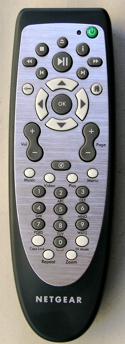
Figure 2: Remote
Setting Up
From the “Welcome to Network Setup” screen, shown in Figure 3, you will see that there are two different paths to choose from when setting up the box.
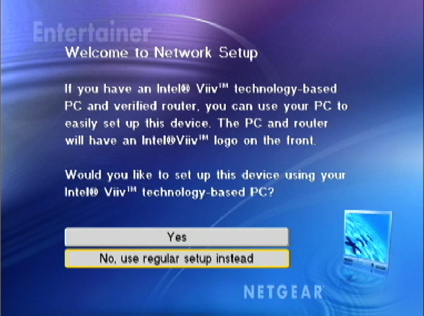
Figure 3: Initial Setup
The first path is for users that have an Intel Viiv certified computer. The Windows version I was using (XP Home) had no such certification, so I took the non-Viiv path. One of the first steps was to get networking configured, but when it came time to set up my wired connection, I only got errors indicating that I had no cable plugged in. This was a bit frustrating, since the box was plugged into a known-good Ethernet cable. But to move on, I opted instead for configuring the wireless connection.
I found later that my problem was that the Uplink button next to the Ethernet port was incorrectly set. Since auto MDI / MDI-X (also known as “auto-uplink”) ports are becoming pretty much standard on consumer networking products these days, it’s curious that Netgear didn’t design the EVA700 with one. These Ethernet ports automatically sense the type of connection needed and cable used and adjust accordingly until they properly connect. Given the target market of the EVA700, it’s odd that Netgear didn’t include this feature.
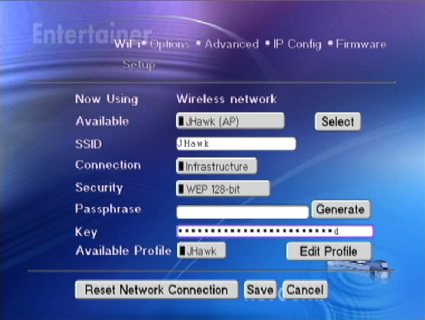
Figure 4: Wireless Setup
Update 10/25/2006
For wireless security (Figure 4), the EVA700 supports WEP encryption and WPA / WPA2-PSK security. Setup was straightforward for the most part, but it was a real pain to enter my 26-character encryption key with a remote that used the cell phone style character entry. Each character that you enter will be displayed as a “*” so you should keep track of which characters you’re on so you don’t lose track and have to start over.
Setting Up, Continued
Once I had the network up and running, I ran the Windows-only installation software provided by Netgear. Figure 5 shows the initial setup screen running on my XP system.
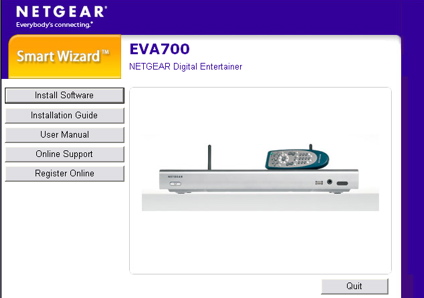
Figure 5: Software Installation
The Netgear portion of the installation was minimal. It really just starts an installation and setup of Microsoft’s UPnP-based Windows Media Connect package. Figure 6 shows the setup at a step where user-chosen media folders can be selected for exporting to network devices. Using this screen I picked the directories where I had content to share.
Two of the directories I chose were network shares from some of my Network Attached Storage (NAS) devices. The configuration menu allowed me to choose these network shares without giving me an error messages, but I found out later that none of the media from those shares were exported.
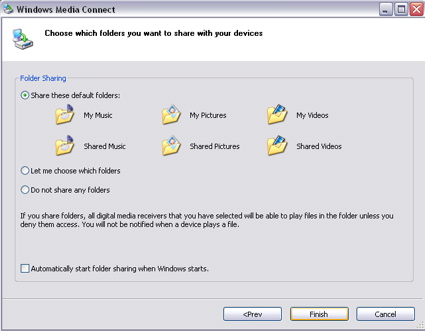
Figure 6: Media Connect Setup
Once the software was configured, and my XP firewall was updated to allow Windows Media Connect to access the network, I turned back to my TV. I found the new server listed as an available resource (shown in Figure 7). The name shown for the server was a bit verbose, but I couldn’t find a way to assign a new name.
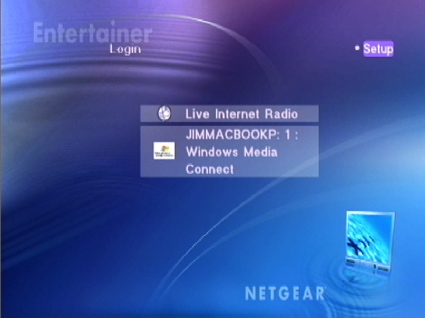
Figure 7: Top Level Menu
Using the software-based server worked fine with the EV700, but it means you’ll have to leave a computer running in order to play any files other than Internet radio stations. On my network, I tend to use a lot of Network Attached Storage (NAS) devices for my digital media. These devices are usually quiet, power-efficient and flexible and you don’t need a full-fledged computer running to make use of them. Fortunately, the EVA700 supports the UPnP AV standard, and UPnP servers are becoming common features on many NAS products on the market.
For my testing, I tried a Twonkyvision server on my NSLU2, a server on a Maxtor Shared Storage Media Server, and a server on a Synology DS-101. All worked fine and had nearly indistinguishable behavior from the EVA700’s bundled server. I did find that at least once, however, I had to unplug and re-plug the power cord on the EVA700 in order for new servers to show up in the top-level menu. Note that the Twonkyvision UPnP server is also available on the Macintosh, so if you’re a Mac-user, you’ll be able to use the EVA700.
I also found that the power button on the unit just turned the display output off, it didn’t really power the unit up and down so to really reset it, puling the power was required. And speaking of power, my power-meter showed the device drew about 4 watts, so it was pretty efficient.
Music, Pictures
Live Internet Radio, the first option shown in the Setup menu, allows you to stream Internet radio stations to your EVA700 without using a server on your computer. (I’ll come back to this in a bit.) The second option allows you to use the media exported from your newly installed server. I opted to explore the server-exported media first. Figure 8 shows the top-level media options: “Music,” “Pictures,” “Playlists,” and “Video.”
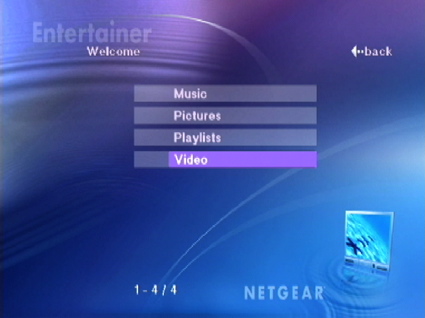
Figure 8: Media Selection
When I selected the Music menu, I obtained access to submenus where my music was automatically categorized by artist, album, genre, and so on. When I made a selection from the submenus, titles appeared, as shown in Figure 9.
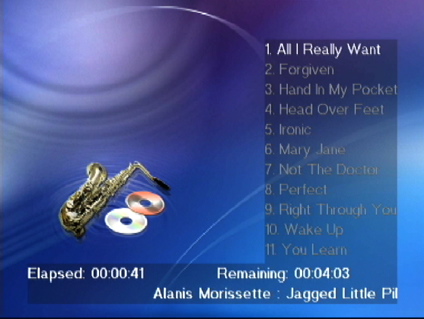
Figure 9: Music Playback
Several devices I’ve tested did not work with the MP3 files that included album art, but the EVA700 had no problem with them. That said, the album art was not displayed on the screen, however. This is in contrast to other devices such as Netgear’s previous model, the MP115, that had some capability to display the album art associated with a song.
Netgear advertises support for MP3, WAV, WMA, M3U, PLS, and ACC music files but encrypted files purchased through online stores such as the iTunes music store cannot be played. Also note that the screensaver did not start while the music played, which can be a problem for some TVs, like plasmas, which are susceptible to burn-in issues.
The next feature I tried out was the Pictures option, which allows you to display slide shows on your TV. The EVA700 can display JPEG, BMP, PNG, TIFF, and GIF files and my tests showed this feature worked as designed. After pressing the “Play” button on a directory of files, the pictures would cycle sequentially, one to the next. The amount of display time for each picture was an option in the initial setup screen, but there were no fade, dissolve or other transition effects available.
One feature common on these types of devices that the EVA700 did not offer, is the ability to play music while the slide show is being shown. Another feature the EVA700 didn’t offer is the option to show image thumbnails. Some multimedia devices display the menu of pictures as thumbnails so that it is easier to located the desired photo, but the EVA700 only displays the file names, as shown in Figure 10.
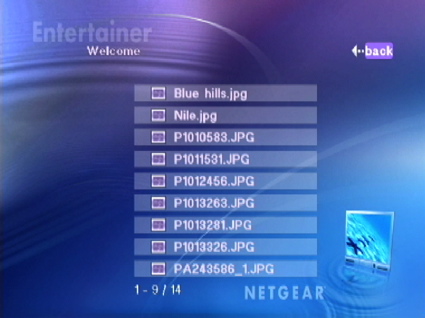
Figure 10: Photo Selection
The “Playlist” option from the top menu (shown in Figure 8) allows you to use a named list of songs or videos for playback. Using Microsoft Media Player, I created two lists, one with music and one with Internet radio stations. My music playlist worked fine, but my Internet radio playlist did not appear. Netgear supports playlists in either M3U or PLS format.
Video and Internet Radio
Next, I wanted to check out the Video option, which has been a tough capability for media adapters to get right. Netgear advertises that the EVA700 support videos in MPEG1, MPEG2, MPEG4, AVI, WMV, and Xvid. There are many different formats used for video files, and I’ve never seen a box that can handle all of the wide variety of file formats in my collection.
To see how well the EVA700 fared, I navigated to the Video menu and tried out a number of my videos. In general, I found that the box did as well or better with my collection as any of the other products I’ve tested. MPEG1 and MPEG2 files played properly, as did all of my XviD and DivX files (even though DivX is not on Netgear’s list of supported file types). I did have a problem with one “mp4” file that played with normal sound, but extremely jerky video. I also had a number of files labeled with an extension of “wmv”, but about half refused to play, giving an error of “wmv8 not supported”. The others identified as “wmv9” files played correctly.
To try out the EVA700’s high definition capabilities, I played a number of HD DivX movie trailers acquired from DivX.com. The trailers with the highest resolution I had on hand were 720p-format videos; they all played fine over the wireless connection. I have a pretty strong signal since my access point is in the basement, directly below where I had placed the unit. Note that the unit does not provide a signal-strength meter, so you may have to do some guesswork if you anticipate signal-strength issues.
As for me, a few quick wireless range checks showed typical problems at the far corners of my house. I recommend that you consider the placement of your access point if you are planning to use the wireless option. To troubleshoot and find out more about my wireless connection, I tested with an MPEG2, 1080i video that streams at around 15Mbit/sec. Not surprisingly like most of the boxes I’ve worked with, the EVA700 had trouble keeping up with this one on a wireless connection.
When I later got the wired connection to work by properly setting the “uplink” button, the box was able to play back this high bit-rate 1080i stream. The only oddity was the displayed “info” for the stream, which showed the playing resolution as 720 x 480, i.e. standard definition, whereas the real resolution of the file was 1920 x 1080. I couldn’t tell whether the box was doing down-conversion or if the information was just incorrect, so I checked with Netgear.
They said that the EVA700 plays and outputs up to 1080i and downconverts to whatever the display output is set to (either 480i/p, 720p or 1080i) and suggested that something in my setup might be transcoding the file. So I re-verified my display’s settings and tried streaming the file from two different servers, but with the same results.
The EVA700 supports fast-forward and fast-reverse for playing video streams, but don’t expect the same smooth playback as with your DVD player. It’s hard for these devices to increase the data rate across the network. Often, they jump a little forward or back in the stream instead of escalating the frame rate. The first time you try to fast forward a video file with the EVA700, a message appears on the screen, indicating that it is internally “searching” the file for indexing purposes so that it knows where to jump when you fast forward or reverse.
The last major media-playing feature of the EVA700 is the “Live Internet Radio” feature, which allows you to stream Internet radio stations to your entertainment center without having to use your computer. My test of this capability showed that it worked as designed. Of course, there are a lot of Internet Radio Stations out there and they have varying capability, availability, and quality. so Netgear has teamed with Vtuner to sort all of these variables out.
When you purchase the EVA700, you’ll have a free 2-month trial period with Vtuner. According to Vtuner, you’ll be given access to around 10,000 stations. After the trail period is over, you’ll either have to pay a one-time fee of $30 to access the 10,000 stations or you can elect to not pay the $30 and access only 50 stations.
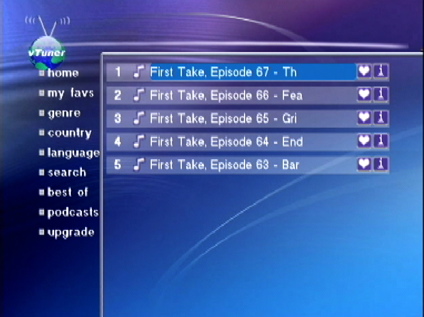
Figure 11: Podcast Selection
Along with radio, Vtuner also brings access to podcasts. Figure 11 shows a podcast selection screen. I found that, once again, when playing podcasts, the screensaver didn’t start. Note that one advantage of using a third-party UPnP AV server is that some allow you to add Internet radio stations, which could remove the need to purchase the optional vTuner.
Under the Covers
Figure 12 shows the cover off of the EVA700. As you can see from Figure 12, there’s a lot of unused space inside. Netgear evidently wanted it to fit in a 17″ form factor.
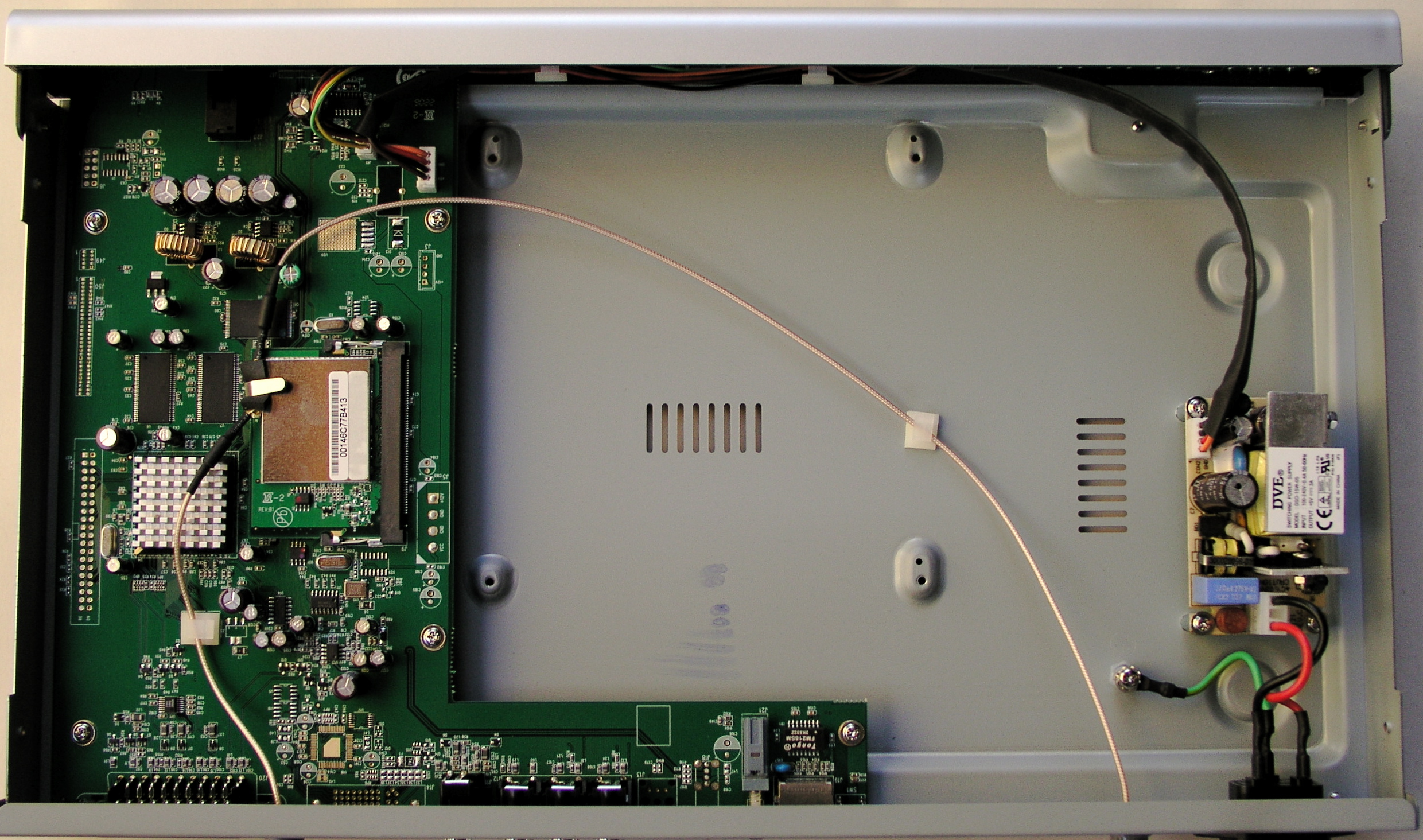
Figure 12: Inside the EVA700 (click image to enlarge)
Figure 13 shows a close-up of the main board.
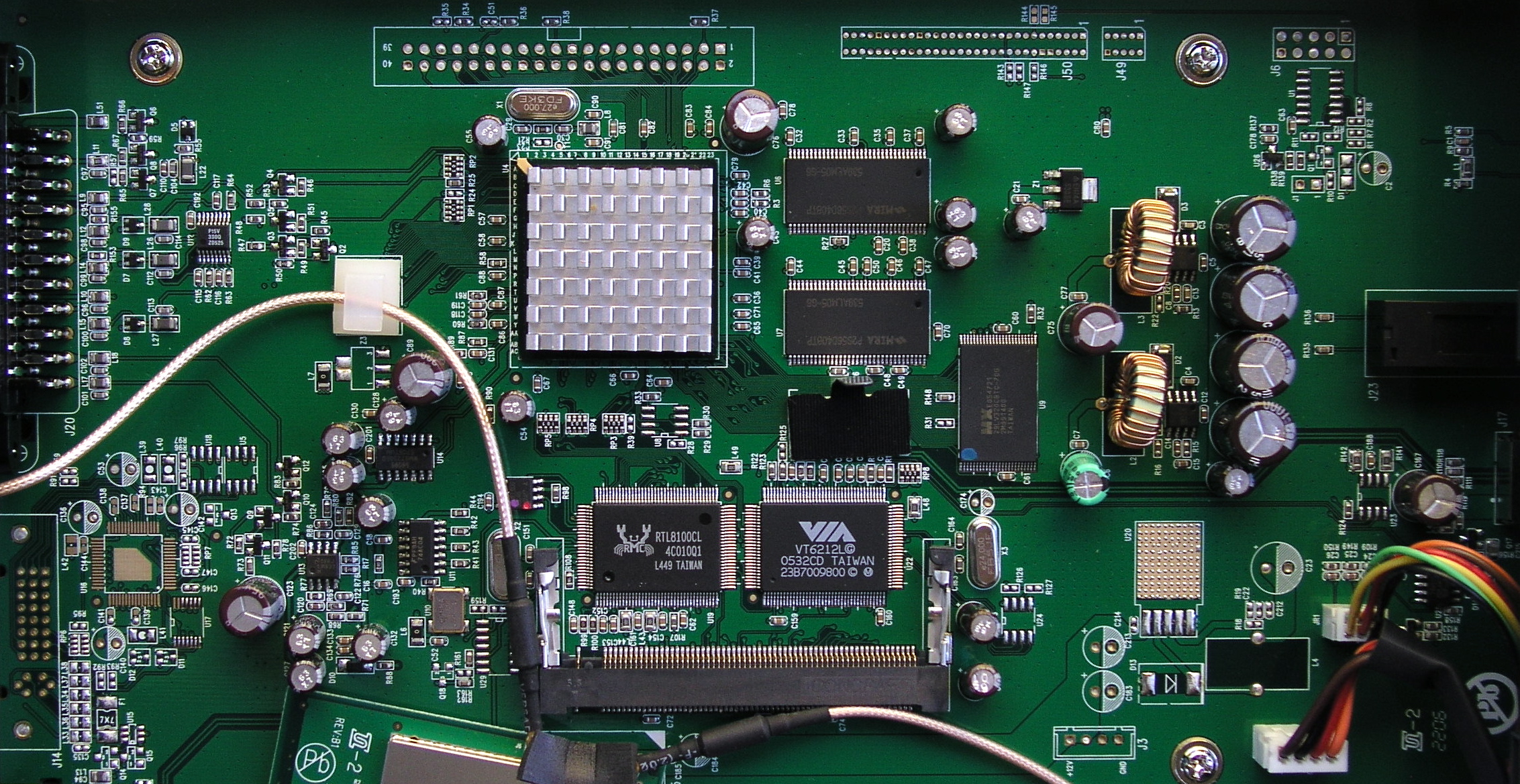
Figure 13: EVA700 Main Board (click image to enlarge)
The main CPU is completely covered by a heat sink, so I couldn’t identify it. Wireless support was provided by a mini-PCI card (shown unseated from its connector in Figure 13) with an unlabeled chip. Underneath the mini-PCI card, I found a Via VT6212 that provided the USB 2.0 capabilities, and a Realtek 8100 chip for the wired network support.
As far as the software on the box, I saw a lot of familiar signs as I was testing that told me that Syabas supplied the internal software. This meant that it should be compatible with the open-source Wizd media server. And when I started Wizd on one of my NAS devices, the EVA700 recognized it and offered it as a server option. Figure 14 shows the top-level menu when I used Wizd instead of a UPnP server.
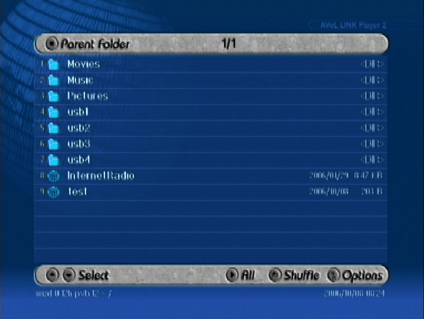
Figure 14: Wizd Display
Wizd brings a number of new capabilities with it that are not available when using standard UPnP servers. Among other features, it can play music along with a slide show, show image thumbnails, show album art while you’re playing music, and play your DVD images that have been ripped to a hard drive.
If you want to browse the Web on your TV, you can do that too. Figure 15 shows an example of a webpage rendered using the EVA700. It’s not that pretty, and browsing the Web using a remote is a pain, but you may find it fun and even useful to bring up a few Web sites on your TV.
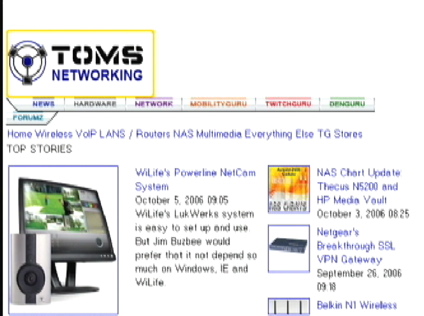
Figure 15: Browsing the Web on the EVA700
Conclusion
I found the EVA700 was able to handle a good deal of my media collection. The fact that it used the UPnP AV standard was a definite bonus for people like me that like to use NAS devices to handle their digital media libraries. I was also pleased to find that the device was compatible with the Wizd servers I run on my network. This compatibility meant that the EVA700 can play back ripped DVDs and provide music to go along with my picture slide shows.
The EVA700 fell a bit short in the standard user interface, however. Although everything worked, the interface was bland. Other boxes I’ve reviewed recently, like the D-Link DSM-520, have a much more modern-looking user interface and nice features such as photo thumbnails for its photo menu. On the other hand, the DSM-520 had its own problems including its failure to play my music files that included album art.
In general, it has been my experience with all networked media adapters is that none of them can flawlessly handle the huge range of media formats in use today. Each device has its advantages and disadvantages and the one that’s right for you depends on the files in your collection along with your personal preferences and needs.
In my case, I’d go for the EVA700 over D-Link’s DSM-520 due to the EVA’s support for the Wizd server and the additional features Wizd provides. The real deal-killer for the DSM, however, is that it failed to play the bulk of my mp3s due to the album-art issue. I’d rather be able to listen to my music without seeing the album cover than not be able to listen at all!