

Introduction
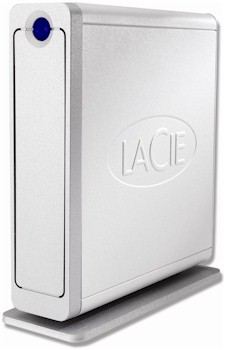
| At a Glance | |
|---|---|
| Product | LaCie Ethernet Disk mini V2 – 500 GB (301138U) |
| Summary | Updated version of single-drive NAS with new CPU, gigabit Ethernet and SATA drive. Available in 250GB/320GB/500GB capacities. |
| Pros | • Can be used as a NAS, external USB 2.0 drive or both • Easy to use and set up • AFP and Bonjour support for Mac users • Gigabit Ethernet with 4K and 8K Jumbo frames supported • Fast |
| Cons | • Windows network browsing problems • Relatively slow USB-connected performance • Sluggish admin interface |
The refreshed LaCie Ethernet Disk mini (I’ll call it the "V2" for brevity’s sake) may look the same as the one that’s been out for about a year. But LaCie appears to have taken stock of the increased competition in ths consumer NAS market and redesigned its least expensive NAS to address many of the shortcomings of its first version. Jim Buzbee covered the original EDmini pretty well in his review, so this review will just take a quick look at the updated product and concentrate on what’s new.
Physically, the V2 is essentially the same as its older sibling, with the only tell-tales being a "V2" suffix on its rear-panel serial number sticker and different rear-panel connector layout (Figure 1), which includes a USB 2.0 "expansion port" for external drive connection (more later).
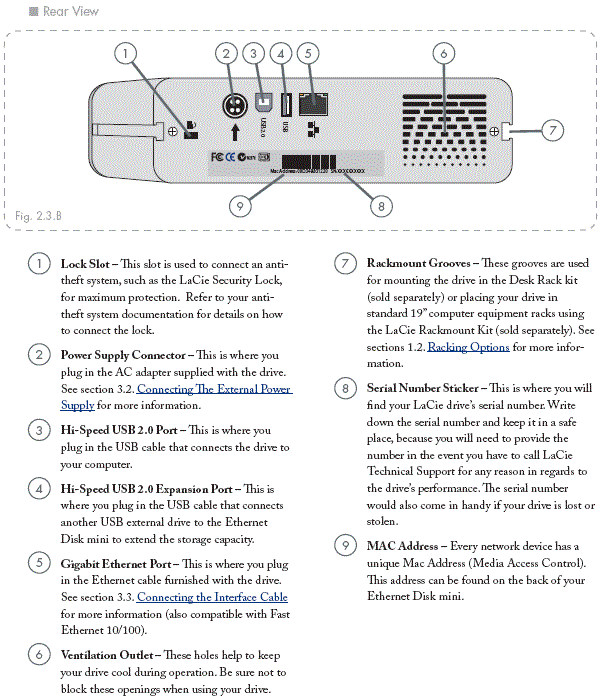
Figure 1: Rear panel (click image to enlarge)
Instead of a copy of the MacOS-only Silverkeeper backup utility, there are now Windows and Mac OS versions of LaCie’s ‘1-Click’ Backup freeware included on the utility / documentation CD.
Inside, the V2 has been completely redesigned (Figures 2 and 3). The original product had a Freescale MPC5200 CPU running at 266 MHz with 32 MB of RAM and USB support coming from a Texas Instruments TUSB6250. The drive in our 250 GB sample was an Western Digital 250 GB, 7200 RPM IDE drive with 8 MB of cache.
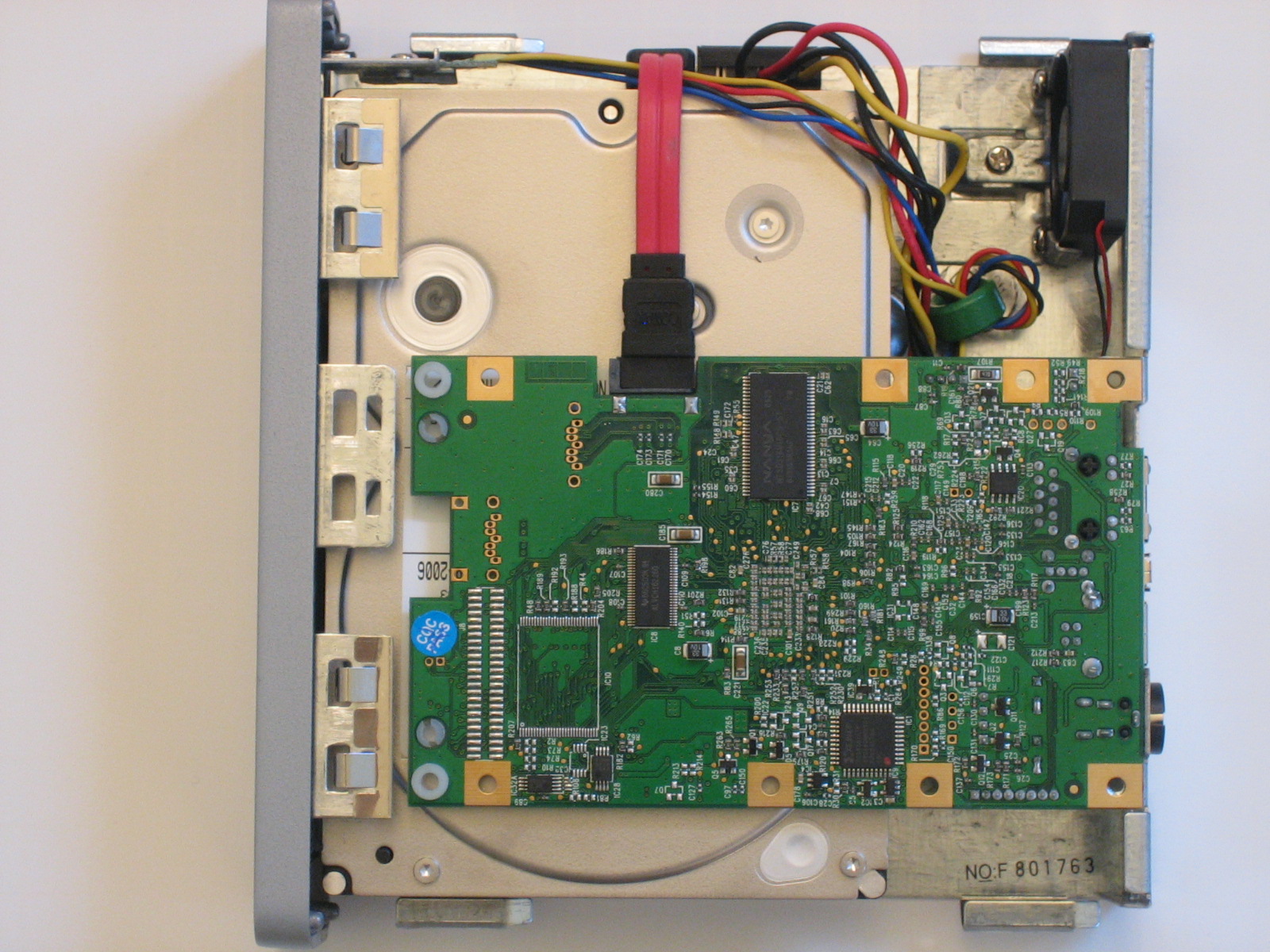
Figure 2: Inside view (click image to enlarge)
The V2 has switched to using a Marvell 88F5182 (ARM926 compatible) SOC running at 400MHz and upped memory to 64 MB (flash remains the same at 512 KB). The 88F5182 also handles both the SATA hard-drive and USB 2.0 interfaces. The Ethernet interface is provided by a Marvell 88E1116 "Alaska" single-port gigabit transceiver and the hard drive in the 500 GB sample LaCie sent is a Hitachi HDT725050VLA360, 500 GB 7200 RPM SATA 3.0 Gb/s drive with 16 MB of cache.
The system log available via the Status page is essentially a Linux system console dump, so contains a wealth of information for would-be hackers. The main drawback, however, is that new log entries are added at the bottom of the page. The log showed the Linux version as 2.6.12.6-arm1-lacie5a (root@lacie) (gcc version 3.4.4 (release) (CodeSourcery ARM 2005q3-2)) #1 Tue Oct 31 11:26:21 CET 2006.
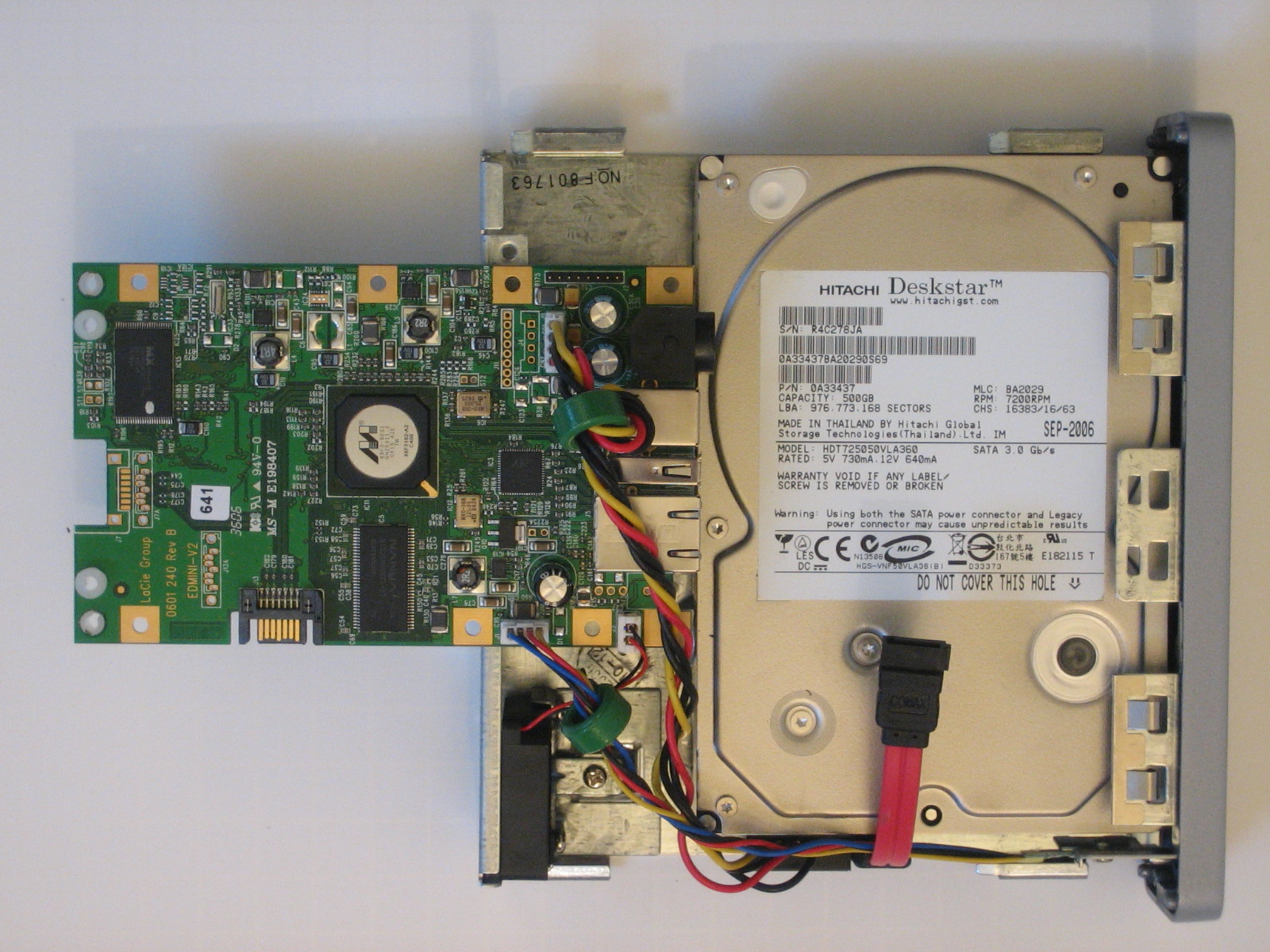
Figure 3: Inside view w/ board flipped (click image to enlarge)
 In a hurry? Check out the slideshow for a full set of performance plots.
New Tricks
Administration is still done via a web interface, which I found to be surprisingly poky, given the speedier processor and expanded RAM. The V2 comes set to grab its IP address info from a DHCP server and there is an "IP Configurator" utility included on the CD, which will locate the drive and let you reset its IP, or just get you connected to it.
LaCie has made a few improvements to the V2’s feature set, including the ability to add shares and enable a UPnP AV service for media serving, which I didn’t test (Figure 4).
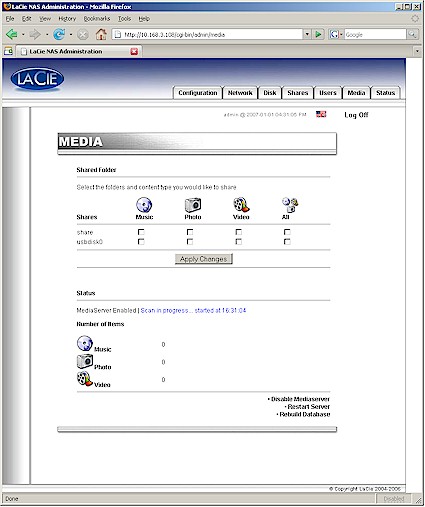
Figure 4: Media server screen
Figure 5 shows the other services including SMB/CIFS ("Windows file server"), AFP ("Apple file server"), FTP, HTTP and Bonjour.
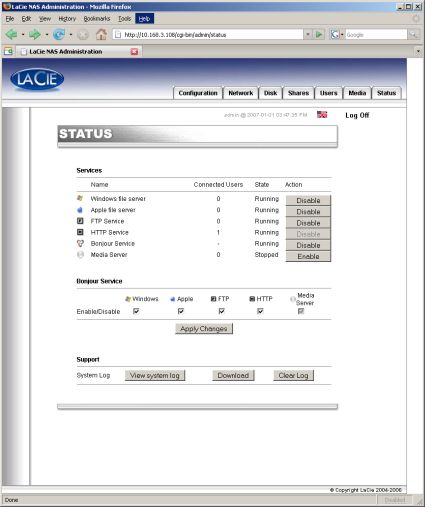
Figure 5: Status screen
A welcome addition is the ability to add additional drives via a single USB 2.0 connector on the rear panel. Drives formatted with MS-DOS/FAT 32, HFS+, ext2, ext3 and reiserfs file systems can be read and accessed through the V2’s FTP and HTTP servers as well as via networked share browsing. Note that with the help of a USB hub, I was able to get the V2 to recognize two USB flash drives.
One of the original Edmini’s claims to fame is that it can be used as either a NAS or as an external USB drive and the V2 retains that feature. However, the V2 kicks it up a notch and now supports connection to both interfaces simultaneously. Note that this doesn’t mean that you can combine the USB and Ethernet connections to get higher performance—only one data path per client is supported.
To accomplish this trick, LaCie runs an IP network connection over USB. This, plus changing the internal drive filesystem to XFS eliminates the need to reformat the drive to the FAT32 filesystem if you want to use it as an external USB drive. So once you connect the V2 via USB, you’ll find it in Network Connections, not My Computer.
On oddity that I found during testing that LaCie had not resolved by my posting deadline was that I could reach the V2 shares only when I used the unit’s IP address. If I browsed using Windows My Network Places, I could get only as far as seeing the drive in its Workgroup. Any attempt to access shares was met with a Windows "not accessible" message.
A few negatives worth pointing out is that the V2 doesn’t have built-in copy-from-attached-drive and drive-to-drive backup features that other similar products have. There’s also no idle time spindown/shutdown, but thankfully, the unit is quiet enough that you won’t notice it much when it’s on.
Performance and Closing Thoughts
As with all our NAS testing, iozone was used to check out the file system performance on the V2 (the full testing setup and methodology are described on this page). Tests were run with 100 and 1000 Mbps LAN connections and also with USB. The gigabit-connected tests were run with both jumbo frame capability disabled and with 4k jumbo frames.
To ensure connection at the intended speeds, the iozone test machine and the V2 were manually moved between a NETGEAR GS108 10/100/1000Mbps switch for gigabit-speed testing and a 10/100 switch for 100 Mbps testing.
NOTES:
- Firmware version tested was 1.0.6
- Keep in mind that the maximum raw data rate for 100Mbps Ethernet is 12500 Kbytes/sec and 125000 Kbytes/sec for gigabit
I generated comparison plots of the iozone test results including the Synology DS-106e, WD NetCenter, Buffalo Technology Gigabit Linkstation, Qnap TS101 and original EDmini.
What I found is that the V2’s performance is greatly improved over the original EDmini, even with a 100 Mbps LAN connection. The Marvell processor is also speedy enough to take advantage of jumbo frames—at least the 4k size that I tested—to provide an additional speed boost. Figures 6 and 7 show write and read performance, respectively, with a gigabit LAN connection.
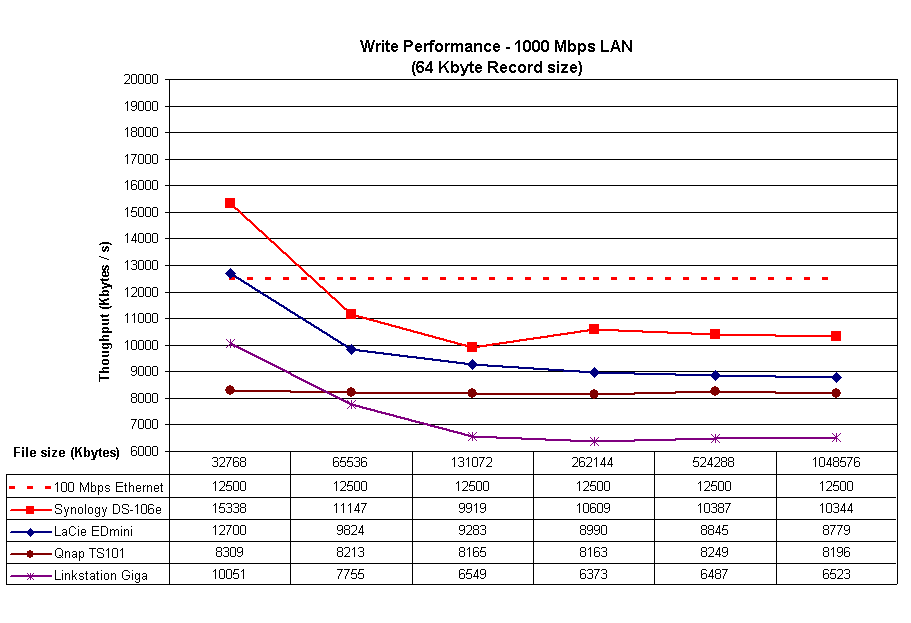
Figure 6: Write performance – gigabit LAN (click image to enlarge)
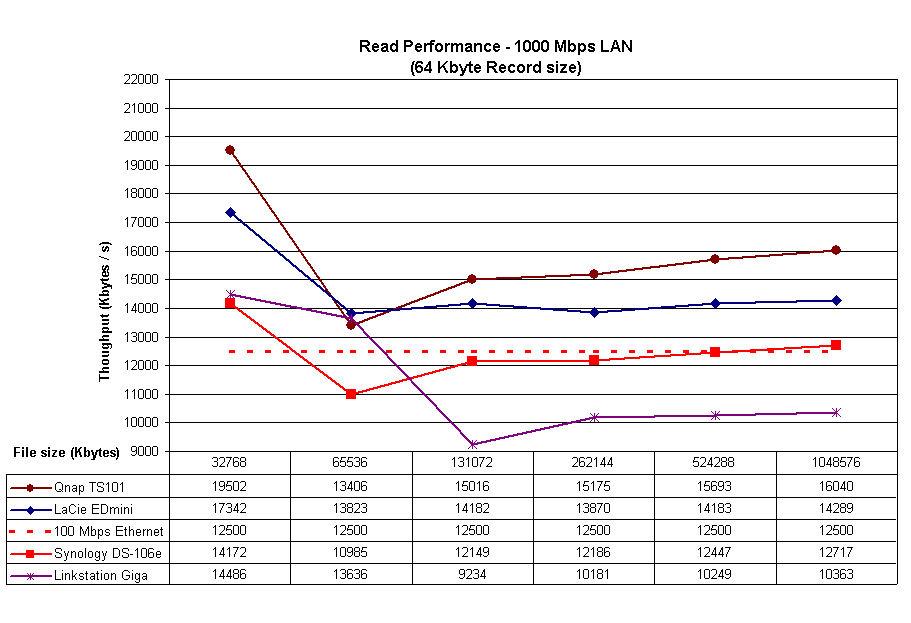
Figure 7: Read performance – gigabit LAN (click image to enlarge)
A negative surprise, however, was the performance when the V2 used a USB connection. Figure 8 shows a comparison of write performance using different operational modes. The original EDmini’s USB-connected speed is right up there with the V2’s when it is connected using gigabit Ethernet w/ 4k jumbo frames. But the V2’s USB-connected speed is only slightly better than the original EDmini’s using a 100 Mbps LAN connection.
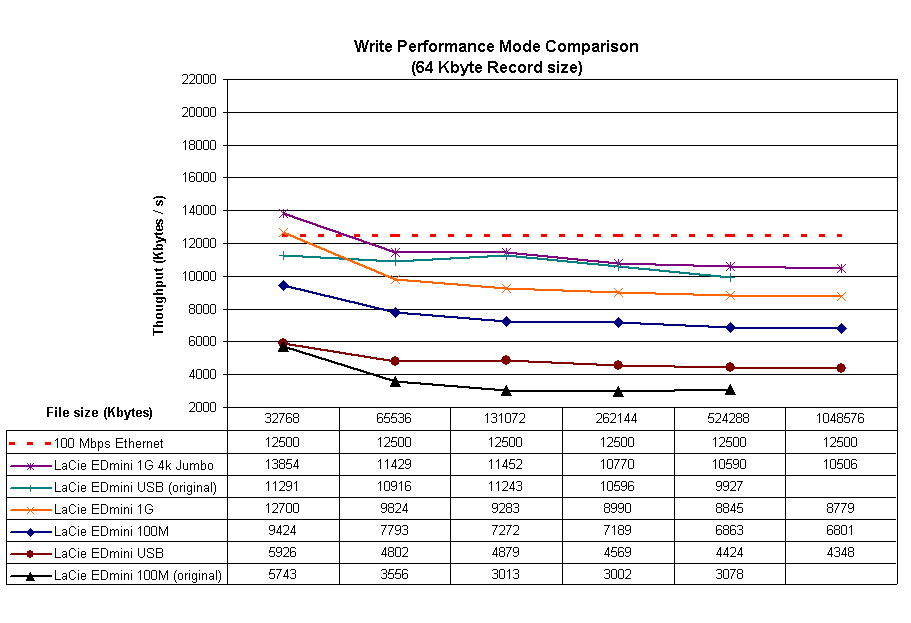
Figure 8: Write performance – mode comparison (click image to enlarge)
Figure 9 shows read performance, which is better across the board than write, but still has relatively slow USB-connected throughput. Note that I didn’t include the original EDmini data because its speeds indicated cached rather than from-the-NAS reads.
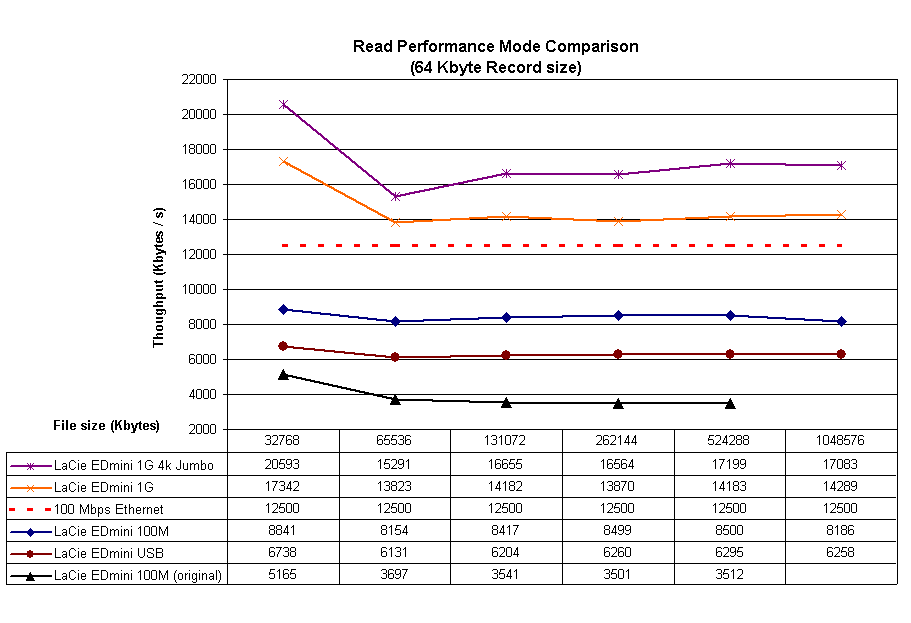
Figure 9: Read performance – mode comparison (click image to enlarge)
And don’t forget to use the NAS Charts to see how the V2 stacks up against all the NASes we’ve tested.
In all, LaCie has done a great job of updating the EDmini with greatly improved performance, support for attaching external USB drives, a UPnP AV server and the unique ability to support both Ethernet and USB network connections.
It’s too bad that the changes made to make it easier to switch between network and USB connection had such a negative effect on USB-attached performance. But given that the networked performance imiproved so much, the V2 is still worth considering if you’re in the market for a speedy single-drive NAS.
Note: The V2 won’t reach U.S. stores until next month (February 2007), although it’s been available outside the U.S. since October. In the meantime LaCie is clearing inventory of the original EDmini’s and NewEgg has the 250 GB model on sale for $100.