

Introduction
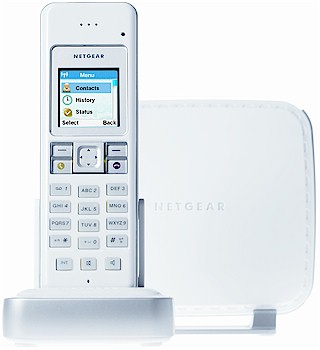
| At a Glance | |
|---|---|
| Product | NETGEAR Cordless Phone with Skype (SPH200D) |
| Summary | 1.9 GHz DECT cordless phone with built-in Skype client |
| Pros | – Doesn’t need a computer running Skype – Speakerphone in handset – Doesn’t interfere w/ 11b/g WLAN – Intuitive, attractive interface – Good range |
| Cons | – No landline caller ID or call record – Low mic volume with speakerphone |
Netgear introduced its latest Skype-enabled phone, the SPH200D, just over a week ago at the Consumer Electronics Show. I was able to get a pre-announcement copy and put it right to use both before and after the show.
There have been many Skype / PSTN (Public Switched Telephone Network, i.e. your local phone company) phones to hit the market since the original RTX / Olympia DualPhone. But the weakness of them all (with the exception of the Linksys CIT400 "iPhone" announced in December) is that they all had to be connected to a Windows PC running the Skype client in order to make and receive phone calls.
The latest crop of dual-mode Skype phones represented by the 200D, CIT400 and the Philips VoIP841 finally don’t require a PC of any sort and instead have the Skype client running in their own processor.
The base station shown in the product shot above and in Figure 1 below is about the size of a dual CD box, using Netgear’s white and silver plastic enclosure common to its consumer product line. Figure 1 needs little explanation and neither does installing the base station. You essentially insert power, network and phone line plugs into the appropriate sockets and you’re done.
Note that there is no indicator light to let you know that the base is powered and ready. But either the Skype or landline indicators will illuminate when in use and the handset shows a little antenna icon when it’s in touch with the base station.
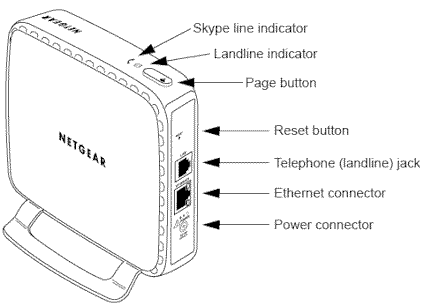
Figure 1: SPH200D base station features (click image to enlarge)
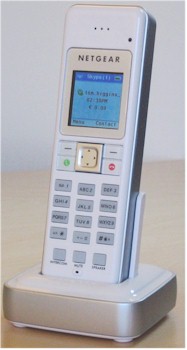
As for the handset, you insert the two standard AAA-sized 1.2V 750 mAH NiMH rechargeable batteries, plug the charging base and power wall-wart together and place the handset into the base to charge. Figure 2 shows the handset controls, which are familiar enough, but it doesn’t show the 2.5mm jack on the left side, which the user guide says handles a headset. Note that there is no dedicated volume control on the side of the handset; you adjust volume during a call with the 4-way navigation pad.
The handset won’t win any design awards for either ergonomics or looks. There is no indentation to help guide your ear into place and, while free of sharp edges, the phone is blocky and isn’t that comfortable to hold for long conversations.
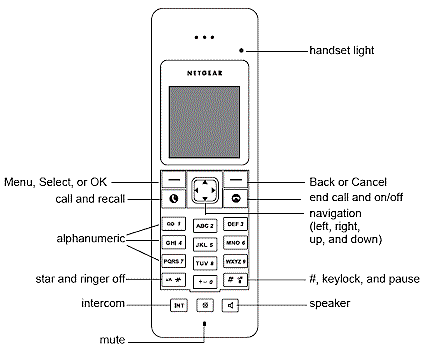
Figure 2: SPH200D handset controls (click image to enlarge)
Specs and Design Info
The 200D (and I suspect, other similar devices in the current crop) are manufactured by Ascalade Communications, a Canadian cordless phone OEM / ODM that is reponsible for many of the phones that you know by Ascalade’s customers’ names. Both the Netgear and Philips phones are made by Ascalade and, I suspect, so are at least some of GE / Thomson’s.
Opening up the base station, I found two boards cabled together. The board in Figure 3 holds the LAN interface. I didn’t remove the metal shield on this board and the FCC ID pictures don’t show this board at all, so I don’t know what’s under there. I suspect it may be the main processor that runs the Skype client.
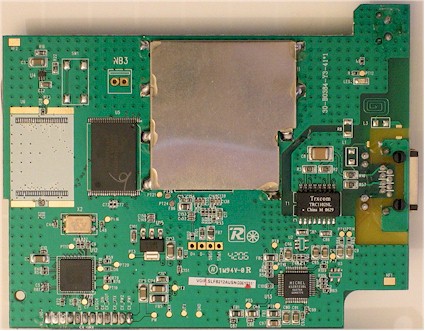
Figure 3: SPH200D base station board 1 (click image to enlarge)
Figure 4 shows the other board that has the radio (under the shield at the upper left, which I also didn’t remove) and PSTN line interface. The chip at lower left in Figure 4 is an SC14438, which I’m guessing is a variant of the National Semiconductor SC14428 Baseband Processor. The chip incorporates a National 16 bit CompactRISC CR16C Microprocessor, DSP, and four 32 kbit/sec ADPCM transcoders among other features. This processor is also used in Linksys’ CIT200 and most likely handles the cordless phone functions and landline A-to-D and D-to-A conversion.
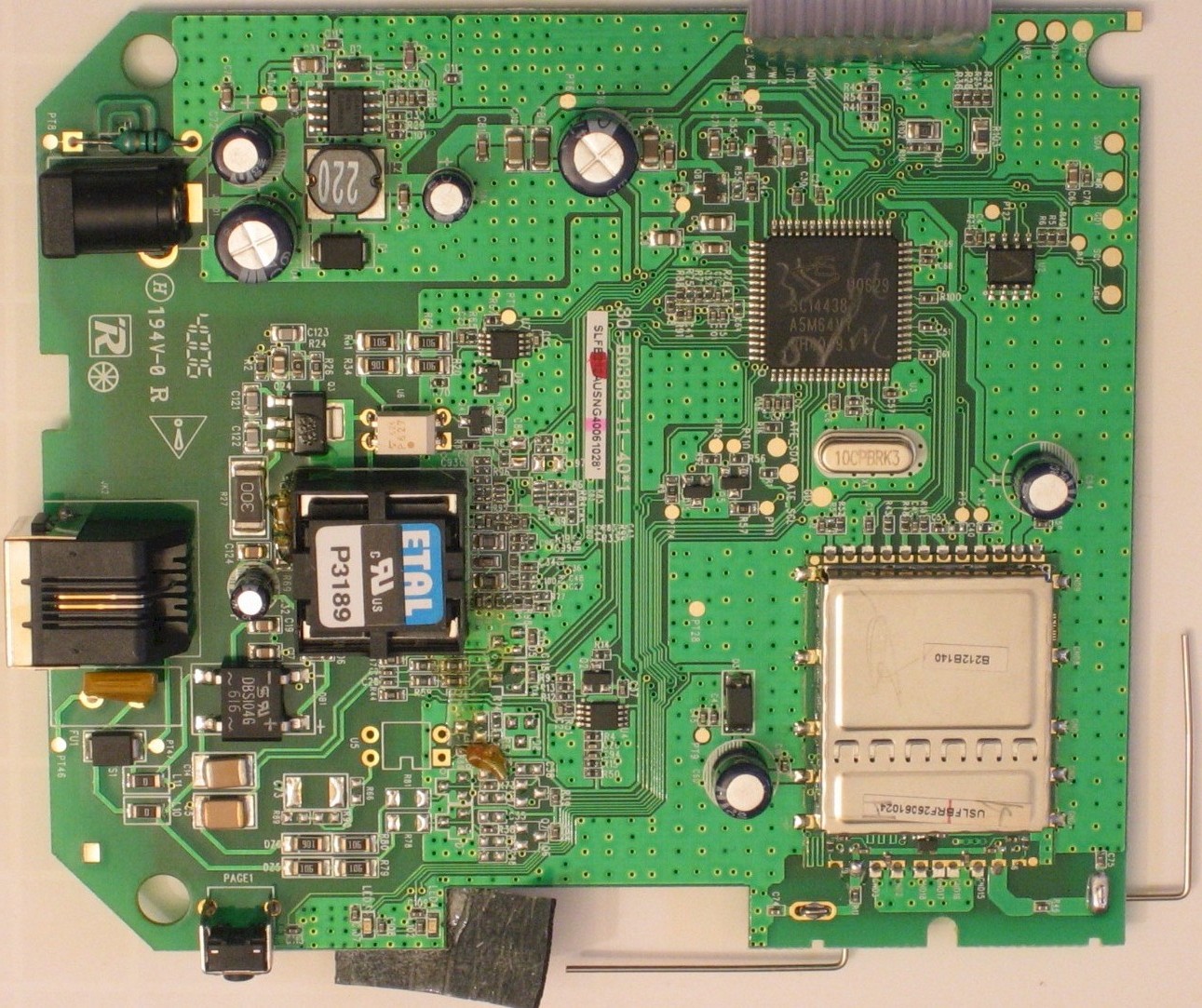
Figure 4: SPH200D base station board 2 (click image to enlarge)
The handset is shown in Figure 5 and appears to use the same SC14438 processor chip and radio module.

Figure 5: SPH200D handset board (click image to enlarge)
In Use
The phone’s user interface is very similar to that on the SMC, Netgear and Belkin Wi-Fi Skype phones that I’ve tested. Figure 6 shows a summary chart of the handset menus.
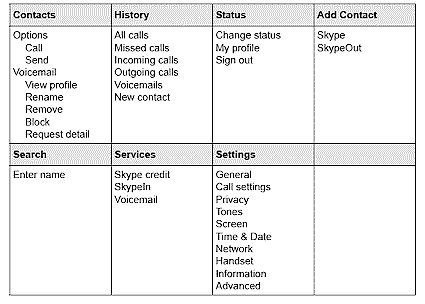
Figure 6: SPH200D handset menu summary (click image to enlarge)
You can access everything you need to set up the phone via the handset menus. There’s also a web interface for the base station (Figure 7), but you it doesn’t let you do much. The Network menu lets you select DHCP, PPPoE (with just login info) or Static IP for network connection. The Skype menu lets you create an account, sign in and out and shows your online status. The System menu is where you can upload a firmware upgrade file. And the Administration menu lets you change the admin interface password and restore the factory defaults.
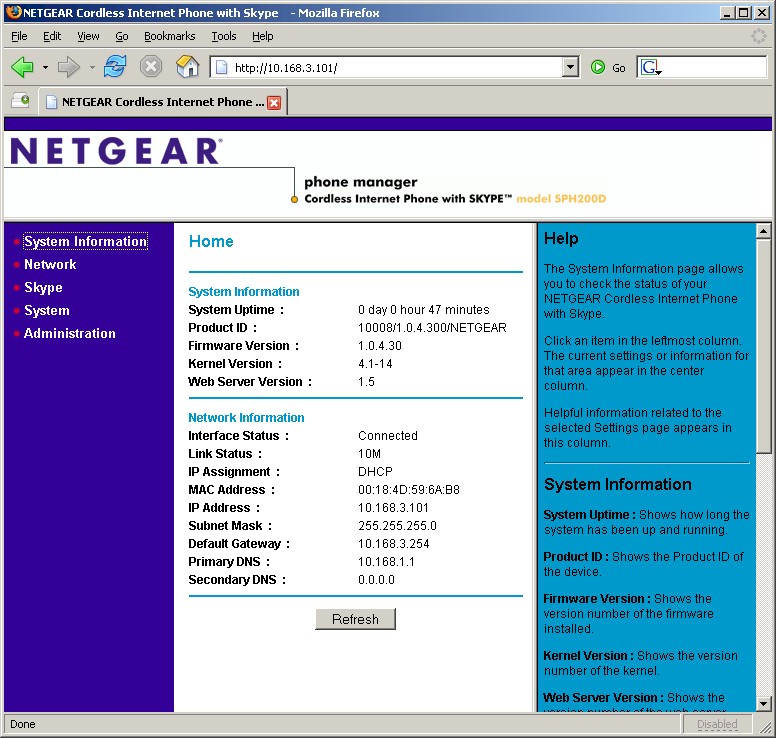
Figure 7: SPH200D web admin interface (click image to enlarge)
Using the phone was almost anticlimactic and very intuitive for both PSTN and Skype calling. When placing an outbound call, if you haven’t set a preference, you’ll be prompted to select either SkypeOut (if you’ve signed up for it) or landline. Receiving calls is easy, too. The phone will ring for either a Skype of PSTN / landline call and all you need to do is just answer the call.
Each base station can handle up to four handsets, but with only one active call (Skype or landline) at a time. Intercom connections are also supported, but between only two handsets at a time. You can, however, put an outside call on hold and make an Intercom call and then transfer the caller to the other handset. You can also make a 3-way "conference" call between an outside party and two handsets registered to the same base station.
But although Netgear’s documentation says that the phone supports PSTN caller ID (as well as call-waiting and voicemail), it didn’t appear to work for calls coming in to my landline number. It did work, however, for calls coming into my SkypeIn number and, of course, for incoming Skype calls. Note that the phone didn’t enter landline calls into its call history log either.
Al my calls were clear and called parties didn’t have any complaints about the phone’s sound. Speakerphone quality was also good, with no echo or feedback reported by the called party. But they did say that my voice level was rather low, indicating a lack of microphone sensitivity.
The phone’s design doesn’t really lend itself to being used as a speakerphone anyway. The speaker is on the back and the phone’s flat design effectively blocks it when the phone is laid down. I tried balancing the phone on its end, but that’s a little tricky given that its center of gravity tends to want to make the phone fall over backwards.
Netgear specs "typical" battery life of 12 hours talk and 120 hours standby. I didn’t formally test those numbers, but found battery lilfe comparable to the other standard cordless phones I use. After a full night’s charge, I used the phone like any other cordless during the day and didn’t return it to its charger at night. It went 2+ days and still had plenty of charge left.
One oddity is that the phone insists on being powered on during charging, even if you insert it into the charger powered off. There is no charge indicator on the charging stand either, but the phone plays a little tune when inserted and removed from the stand to indicate it is getting some juice.
Range was also comparable to other cordless phones I use and I didn’t have any problems with it anywhere in my 3200+ sq. ft home. I didn’t test interference with my 2.4 GHz WLAN, since the phone uses the 1.9 GHz band.
Closing Thoughts
So now you have two ways to go for computer-free Skype calling. Pricing for both options looks like it will end up in the $150 – $160 range in the near term and it’s anyone’s guess as to where pricing will eventually end up. (As I write this, the SPH200D is available only through Amazon.com for $179.99, but is listed as "out of stock" at other etailers at prices ranging from $148 to $204.)
Business users with established Wi-Fi networks who use Skype to save on long-distance calling may opt for the Wi-Fi models, since they can move (although not seamlessly roam) among access points. And the ability to be taken on the road might also be attractive—as long as you can get access to an authentication-free hotspot, or use Belkin’s phone on the Boingo network.
I think home-based users, however, will opt for the SPH200D and similar products because they are more like a product they know, i.e. a cordless phone and are much more of a plug-and-go product. The SPH200D doesn’t need a Wi-Fi network to operate, but also won’t interfere if one is already in use. It also offers the convenience of working with both a PSTN landline and Skype, supports handset-to-handset intercom and even conference calling features. And it can put in a full day of use like any other cordless phone with no worry of the battery going dead.
I can see this product (after being already set up, of course) being used by people who don’t even know what Skype is—my parents for instance—where I’d never try that with a Wi-Fi Skype phone. (I wouldn’t depend on this or any VoIP phone as the sole means of communication, and Netgear and Skype underline that point with multiple warnings—including one that comes up when you turn on the phone for the first time.)
Skype is putting a serious hurtin’ on both PSTN long-distance and even VoIP providers and the SPH200D is just another brick in what is becoming a pretty formidable wall between those companies and any hopes of profitability from voice calling. I still wish these phones would support Skype text chat, however, and the SPH200D is no exception.
But the bigger obstacle to the phone becoming my main office phone is its inability to log landline calls and display caller ID information. Hopefully, Netgear will fix those bugs with a firmware update and join the Polycom Communicator as my everyday workhorse Skype gear.