

Introduction
| At a Glance | |
|---|---|
| Product | Coolmax CN-570 |
| Summary | Flexible but slow NAS device that doubles as an external USB 2.0 drive |
| Pros | • Both a NAS and an external USB disk • Accepts IDE or SATA 3.5" drives • Built-in UPnP AV Server and BitTorrent download client • Inexpensive |
| Cons | • Slow • Poor Documentation • No Backup Software included |
I’ve been using Network Attached Storage (NAS) devices on my home network for a couple of years now and I really like them. I can stick one of these off in the basement or a closet where it’s out of the way. They give me the ability to add massive amounts of storage; they’re quiet, flexible and generally handy.
But what they are not is fast. Even the quickest consumer-level NAS pales in comparison to an external drive for raw speed. When you want to move tens of gigabytes around, a NAS gets old fast. Normally, you get a NAS or you get an external drive, but in this review, I’m going to try out an inexpensive NAS device from Coolmax that can be either. For casual use it can be used as a NAS, but when you need an extra burst of speed, you can hook it up as an external USB 2.0 drive.
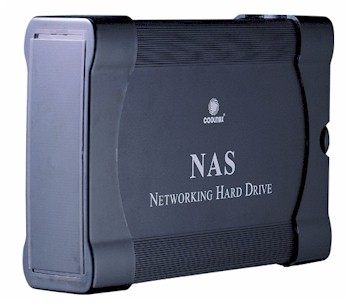
As consumer-level NAS devices go, Coolmax’s CN-570 has a fairly large and heavy case with a bit of a clunky feel. The body of the case is constructed of thick aluminum with plastic caps on the ends. The front of the unit is unadorned except for a status LED.
The CN-570 is a Bring-Your-Own disk box, so when I opened the case up to install my drive, I was a bit surprised to find no disk mounting brackets. Instead the drive gets screwed directly to a slide-in tray that contains the main circuit board. I also noted that there was a lot of dead space in the box as if it were originally designed for another purpose.
On the mainboard of the unit, there were connectors for installing either an IDE or a SATA
3.5" drive. This is the first unit I’ve tested that supports both and it’s a nice feature. In my case, I grabbed an IDE drive
I had on hand, screwed it in and slid the tray back into place. Figure 1, from the Coolmax manual, shows the back of the unit
with the various connectors labeled.
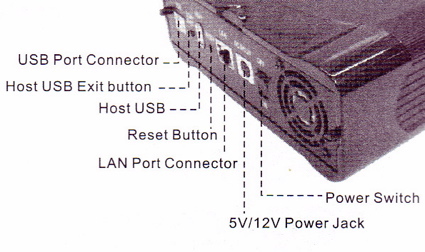
Figure 1: CN-570 Back Panel
Gigabit LAN ports are starting to become common on these units, but the 570 is 10/100 only. And to be fair, my tests have shown that a gigabit port is overkill for most consumer-level NAS boxes. Many times the internal CPU in these devices just can’t keep up with a gigabit LAN.
Also note the presence of host and device USB connectors. When the CN-570 is used as a network device, external USB disk, flash drives or a printer can be plugged in and made available across the network. Note also that there is a fan vent, but when I plugged everything in and powered it up, I found the unit to be fairly quiet. Perhaps one benefit of using a large case is that a larger fan can be used.
Setup & Feature Tour
When I turned to install the software for the box, I realized I had a problem. The included software was delivered on a mini-CD and my system has a slot-loading drive that only accepts standard-sized CDs. But after reviewing the documentation, it was clear that the installation software could be skipped and the box could be configured via a web browser.
So I used a broadcast ping: ping 192.168.1.255 to find the box. This turned up a new machine and I connected to it with my web browser. After logging in with the default username and password, I started exploring the configuration menus. The first operation I needed to perform was formatting the drive I had installed. Figure 2 shows the Formatting menu. As you can see, the disk can be formatted in either FAT32 or XFS mode.
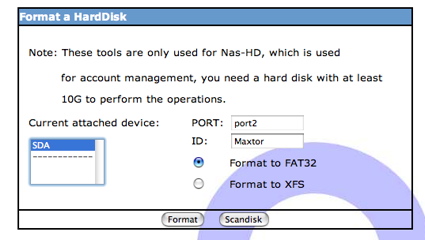
Figure 2: Formatting the Disk
FAT32 is often used as a least-common-denominator filesystem. It’s not fast, but most any computer can use it. XFS on the other hand is a bit of a curious option for a general-purpose device like this. Silicon Graphics originally developed XFS specifically for efficient handling of very large multimedia files. These days, XFS is mostly found in Linux systems. If you’re planning on using the USB feature of the device for connecting to a Windows or Mac OS computer, you’ll need to use FAT32 format.
After my drive was formatted, I explored the administration options. Figure 3 shows the Network Settings menu where standard network parameters can be defined.
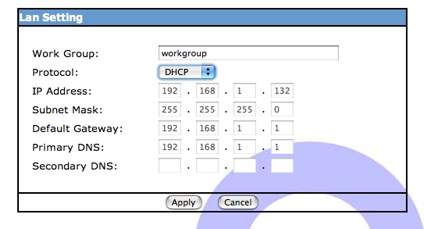
Figure 3: Network Setup
To share my newly installed drive on the network, I first created a user account. Figure 4 shows the user-creation menu where a new user can be defined and a default user share created.
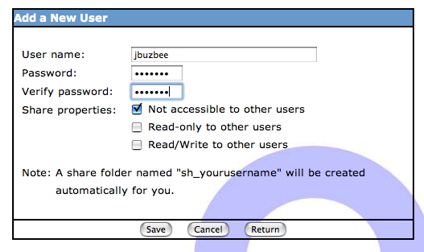
Figure 4: User Creation
Figure 5 shows the “Share” menu where the share for my newly created user appears.
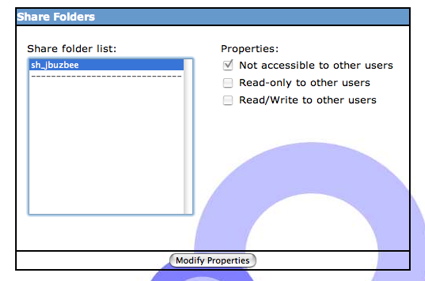
Figure 5: Share Setup
Note that there is no menu for defining a share that is not tied to a particular user account. The system predefined two other network shares that couldn’t be accessed from any of the configuration menus: An “admin” share I was never able to mount, and a “public” share that was open with read/write privileges for everyone. I was able to use the public and the user-specific share normally from both my Windows and my Macintosh systems.
More Features
In addition to being used as a NAS device, the CN-570 has the less common ability to also be used as an external USB 2.0 drive (but not at the same time). My tests showed this worked as designed. I powered the unit down, removed the Ethernet cable and plugged in a USB cable that was connected to my computer’s USB port. When I powered the unit back up, the device was accessible as a standard external drive.
This feature worked under my Windows, Mac OS X and Linux systems. This could come in handy for moving large files around, since a directly-connected drive will always outperform a network attached drive.
Figure 6 shows the “Device” menu where several options can be defined.
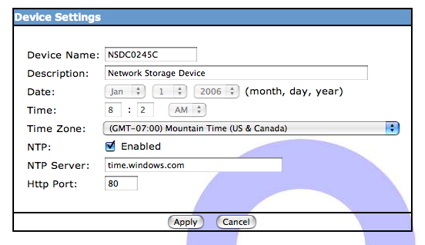
Figure 6: Device Setup
It was nice to see that the time on the box could be set via NTP, and that the default web configuration port could be changed from the standard 80. Note that secure configuration via HTTPS was not supported.
The CN-570 also includes an FTP server. Figure 7 shows the FTP configuration screen where the service can be set up, the port changed, and the default character set defined.
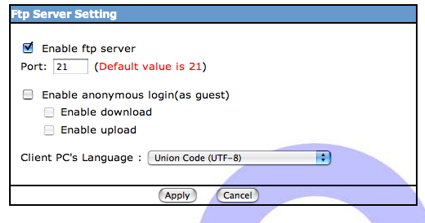
Figure 7: FTP Setup
When I selected the “USB” menu, I thought I would see the status of anything connected to the external USB port. So I was a bit surprised to see my internal drive listed (Figure 8).
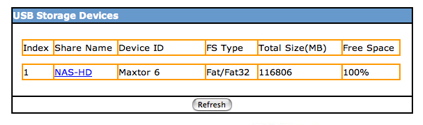
Figure 8: Disk Status
This was strong hint that the internal drive was actually connected via a USB to IDE bridge instead of being directly connected as an IDE device. This menu also showed the USB printer I had connected (Figure 9) in order to test out the print server feature.
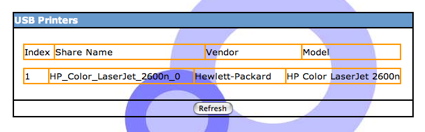
Figure 9: USB Printer
Unfortunately, when I went through the steps to try the printer out, I never got a printout. I tried printing from both my Windows and Mac OS systems and in both cases received neither a prinout nor error message.
Another interesting feature that the 570 includes is a UPnP AV media server. I’ve seen a few NAS devices with this capability, but it’s pretty rare in a low-end box like this one. Figure 10 shows the setup menu which allows you to specify which shares the server should supply media from.
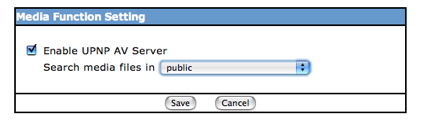
Figure 10: UPnP Configuration
As far as UPnP AV configuration goes, this menu was pretty sparse with no way to name the server, tell it how often to scan for new files, select more than one share, etc. Tests with a UPnP AV player on my network showed the capability worked well with my only complaint being that I had to disable and re-enable the server in order for it to recognize newly added files. I assume that if I had waited awhile, it would have picked them up on its own, but it would have been nice to have an option to tell the system to scan more frequently or immediately.
BitTorrent and Tools Menu
The final major capability that I wanted to check out was the built-in BitTorrent capability. This is also a fairly rare feature to have in a low-end NAS box, but it’s a bit of a natural for these types of devices. It seems most of the BitTorrent downloads I do take days to complete. So it’s very nice to just fire up a download and let it chug away on its own. Figure 11 shows the BitTorrent configuration screen where a number of parameters are defined.
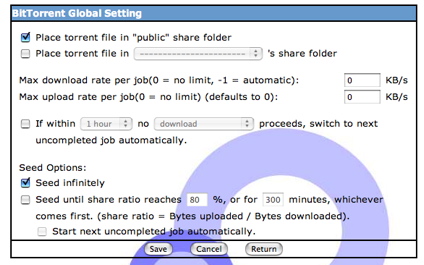
Figure 11: BitTorrent Settings
One thing not listed were the ports used. The BitTorrent protocol works better when you open up needed ports through your firewall. Figure 12 shows the status screen as a download is underway.
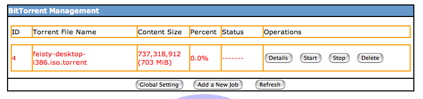
Figure 12: BitTorrent Status
The “details” button on this display reveals more information such as the current download rate, upload rate, number of peers, etc. My tests showed this functionality worked well. I submitted a few torrents and they all completed with a reasonable download rate.
Along with the administration options, the main menu of the CN-570 offers a number of features included under “Tools”. I found it somewhat revealing that there were two different items dealing with rebooting the box. You can either schedule a timed reboot, or you can reboot the box immediately. Having a “reboot now” button is common, but having the ability to schedule a reboot tells me that the box may have had stability issues that could be masked by a nightly reboot.
Other tools in this section provided the capability to back up and restore the configuration, upgrade the firmware, change the administration password etc. I was interested to see a “System Log” feature in this section. Figure 13 shows the information displayed from a log menu.
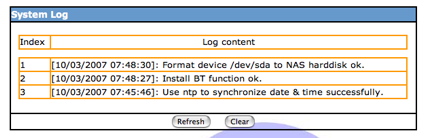
Figure 13: System Log
As I monitored the log during the time of this review, the only other information displayed was the NTP message shows above. Nothing was shown regarding my printing troubles, user creation, FTP access etc. So in this respect, the log was of little use.
The last interesting menu in the tools section was an “E-mail Sending” capability shown in Figure 14.
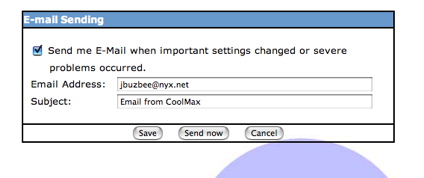
Figure 14: Email Configuration
This capability is designed to send an alert email when problems occur. The “Send now” button is used for testing purposes in order to make sure the address been set up properly. In my tests, I received email for one of my addresses, but not for another. I suspect the message failed to pass a SPAM filter somewhere along the way.
Note also that there is no option for setting a SMTP server for outbound email. This tells me that either the unit is using some unspecified SMTP server, or it is directly sending the email itself without first going through a central SMTP sever. Note also that there were no options for specifying what kind of events would warrant sending an email. During the time of this review, I got no email other than the test messages.
Performance
The CN-570 has a nice set of capabilities, but how well does it perform? To check it out, tests were run using our standard setup described here. Tests were run both with the device in NAS and USB modes. Although our newly revamped NAS charts allow you to produce your own throughput vs. filesize comparison plots, I’ve included a few here for your convenience.
As you can see in Figures 15 and 16 below, the network performance of the unit was stacked against similar low-cost BYOD NASes.
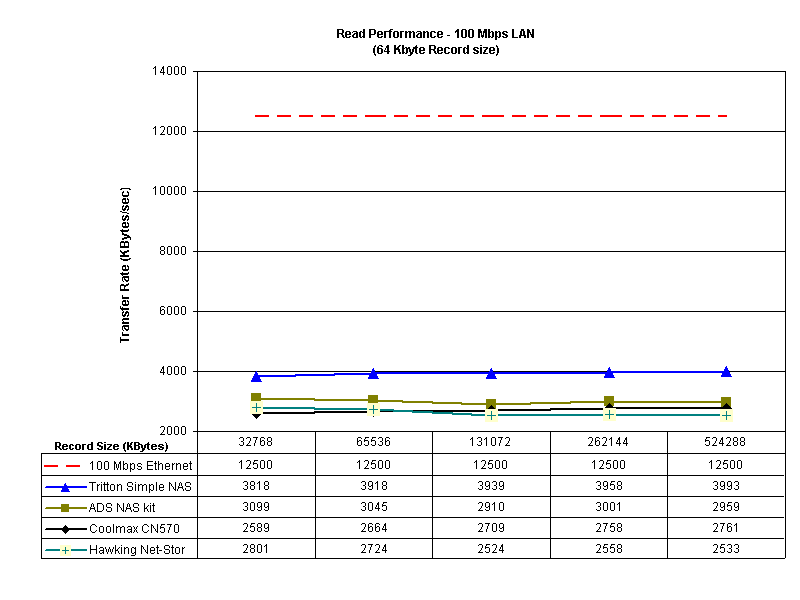
Figure 15: Network Read Comparison
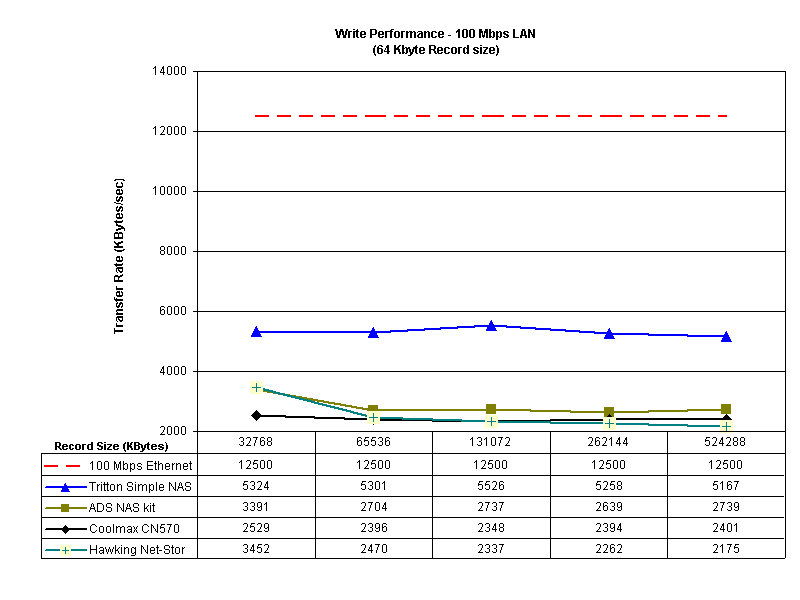
Figure 16: Network Write Comparison
The test shows the performance was poor, being near the bottom of the pack in all cases. This is likely partially due to a couple of factors. First, because of its dual-mode connectivity, the disk appears to be connected through the USB bus instead of directly to the IDE subsystem. And secondly, the FAT32 format trades off performance for portability.
When the tests were run with the device in USB mode, you can see much better performance in Figures 17 and 18. In both the read and the write tests, we see a cache-induced performance drop-off when the record size increases, but in both cases, throughput is far above the theoretical maximum one could get on a 100 Mbps network.
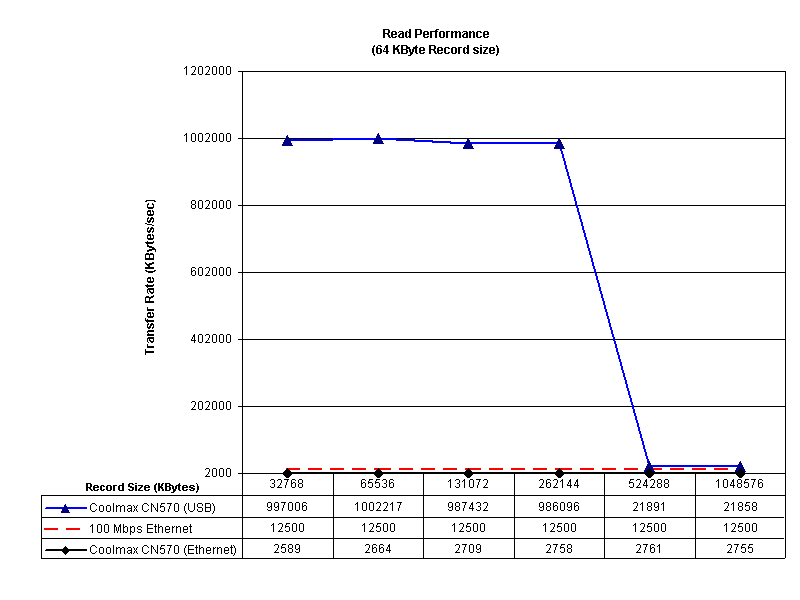
Figure 17: USB Read Performance
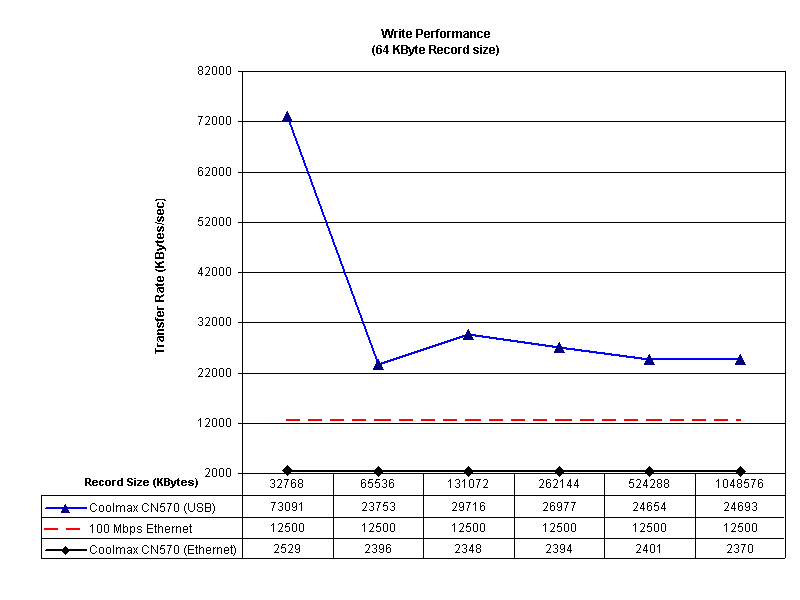
Figure 18: USB Write Performance
I also did a couple of drag-and-drop file copy tests to see how long it would take to move a directory tree back and forth to the CN-570. In this test, I used my MacBook Pro, 2 GHz Intel Core Duo with 1.5 GB of RAM running Windows XP SP2 natively. The directory tree I copied contained 4100 files using just over a gigabyte.
Moving from XP to the CN-570 (write) took (on average) around 10 and a half minutes on a 100 Mbit network and 2 minutes 50 seconds with a USB connection. Moving the same directory back to my XP system (read) one again averaged around 10 and a half minutes on a 100 Mbit network, and one and a half with a USB connection.
| 100 Mbps LAN | USB 2.0 | |
|---|---|---|
| Write to CN-570 | ~ 630 sec | ~ 170 sec |
| Read from CN-570 | ~ 630 sec | ~ 90 sec |
CN-570 Windows XP Drag-and-Drop Filecopy times
Under the Covers
Figure 19 shows the main circuit board of the CN-570. I couldn’t make out the markings on some of the chips, but you can see the main processor is a ARM-compatible STR9104 from Star Semiconductor Corporation and the Ethernet is provided by IP101A from IC Plus Corp.
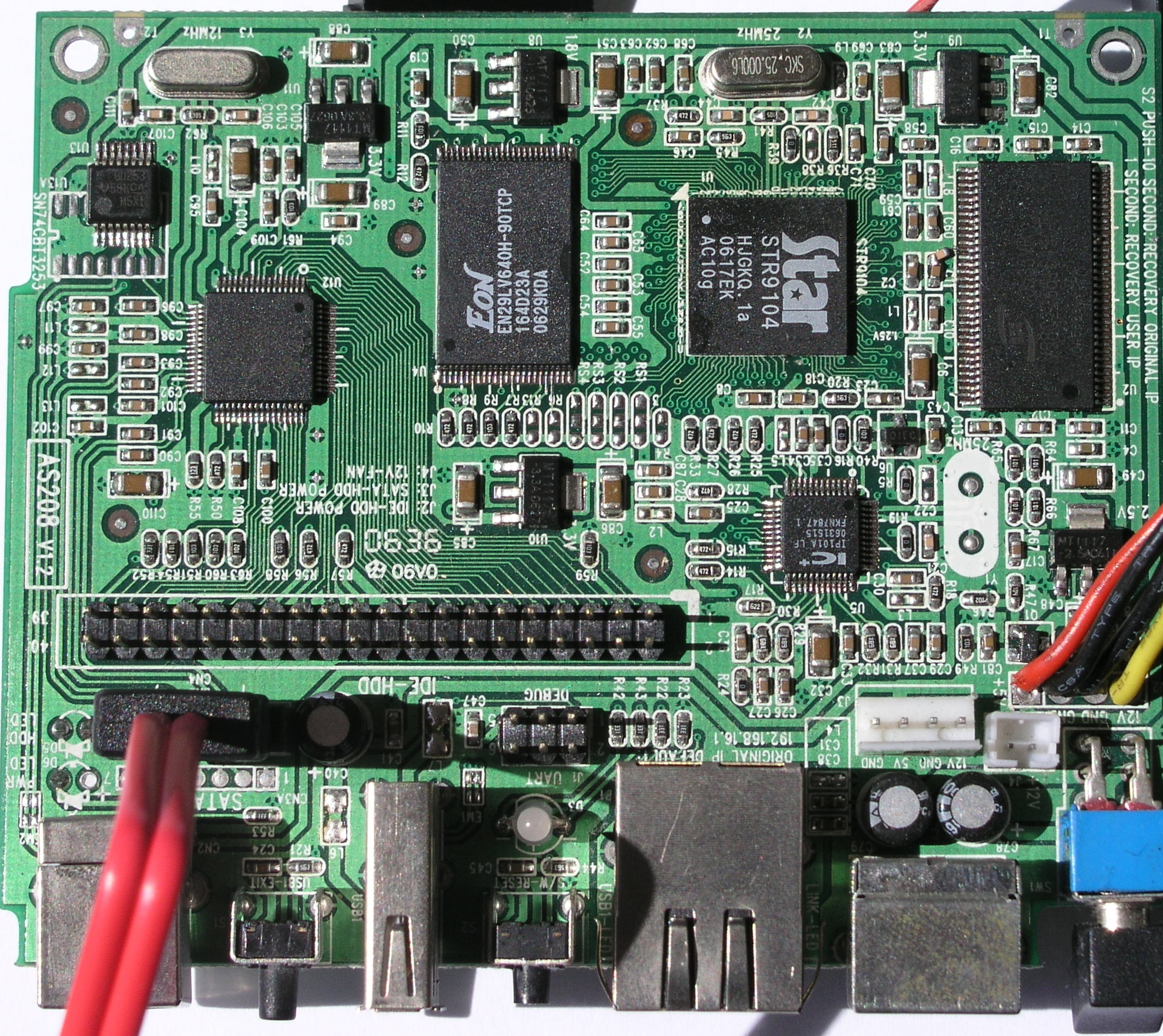
Figure 19: Main Board
It was pretty clear that the device, like almost every other consumer NAS out there, runs Linux internally, but to check it out further I did my usual poking around. When I used the device in USB mode on my Linux system, I noticed an additional XFS-formatted disk partition that didn’t show up under Windows or OSX.
In this partition, there were a number of administration-type files, the most interesting being a Linux-style password file. In this file, I could see the user accounts I had created and noticed their home directories were set to be on the disk I installed. This meant that when I FTP’d into the box, I would end up on the external drive and could go see nothing else. A quick edit to the file changed the home directory to the top level of the device (“/”). So when I put the device back into NAS mode, and FTP’d back in, presto! I had read-only access to the entire operating system structure.
From here, I could see implementation details of the box. The BitTorrent capability was provided by a python-based BitTornado, version 0.3.14. The web server was provided by thttpd and Busybox supplied most utilities. The FTP server was courtesy of proftpd. The Linux kernel was version 2.4.27.
For the UPnP AV support, a Twonkyvision server was present. The retail price of a Twonkyvision server alone is around $40, so this is a nice addition. Checking out the Twonkyvision configuration file revealed a hidden administration server running on port 9000 of the device. Connecting to it with my web browser revealed the menu shown in Figure 20.
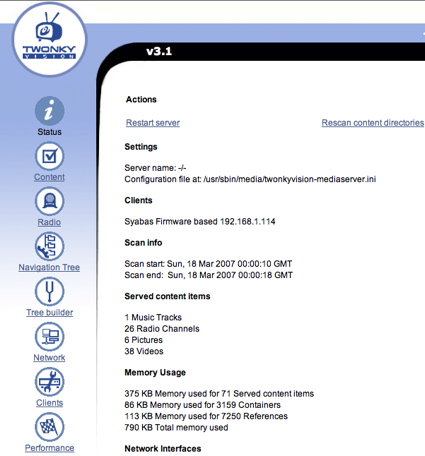
Figure 20: Twonkyvision Configuration
From this menu a number of additional features were present such as changing the media refresh rate, adding additional directories to scan, enabling Internet Radio support, etc.
A final note is that the CN-570 drew about 11 W in USB mode, and 13 in network mode.
Conclusion
In general, I liked the CN-570. The configuration menu structure was clear and easy to use and the box was very quiet in operation. The BitTorrent, UPnP AV and FTP features were a plus and the fact that it could be either a NAS device or a external USB device was a feature I’ve only ever seen in one other NAS on the market. And I’ve never seen a NAS device that could use either an IDE or a SATA drive. Not bad for a box with a street price of $85!
But of course, there are downsides including bugs and poor performance. As a result, you wouldn’t want to use this device for heavy-duty network use. And the documentation was worthless in many respects. Consider section 9, creatively entitled “Performance of the Question”:
	Q No sleep mode function?
	A No sleep mode function
Got that? Reading between the lines I’d guess that it’s impossible to put the drive to sleep when not in use, but that’s only my guess. And there were many other sections of the documentation that were equally as bad. Finally, for software, there was nothing included to do backups, which is one of the main uses of these types of devices. And if your setup machine has a slot-loading CD drive, you’ll need to forego using the setup utility, which is Windows only anyway.
If you’re willing to overlook its slow network speeds, bugs and generally worthless documentation, the CN-570 would be a handy device to have around for its Swiss Army knife-like collection of features.