

| At a Glance | |
|---|---|
| Product | LaCie Ethernet Big Disk – 1 TB (301156U) |
| Summary | Larger version (physically and disk capacity) of Ethernet Disk mini (V2). Also available in 640 GB. |
| Pros | • Can be used as a NAS, external USB 2.0 drive or both • Easy to use and set up • AFP and Bonjour support for Mac users • Gigabit Ethernet with 4K and 8K Jumbo frames supported |
| Cons | • Windows network browsing problems • Relatively slow USB-connected performance • Frustratingly slow admin interface |
Take a new version LaCie Ethernet Disk mini, stretch its case, add a second SATA port to its controller board and put in two 500 GB drives configured in JBOD mode and you have the Ethernet Big Disk (EBD).
Figure 1 shows the assembly slid out of its extruded aluminum shell, with two 500 GB Seagate 7200.10 ST3500630AS (7200 RPM SATA 3.0 Gb/s with 16 MB of cache) drives. These are hard-configured by the EBD firmware to be seen as a single drive with around 930 GB of available space.
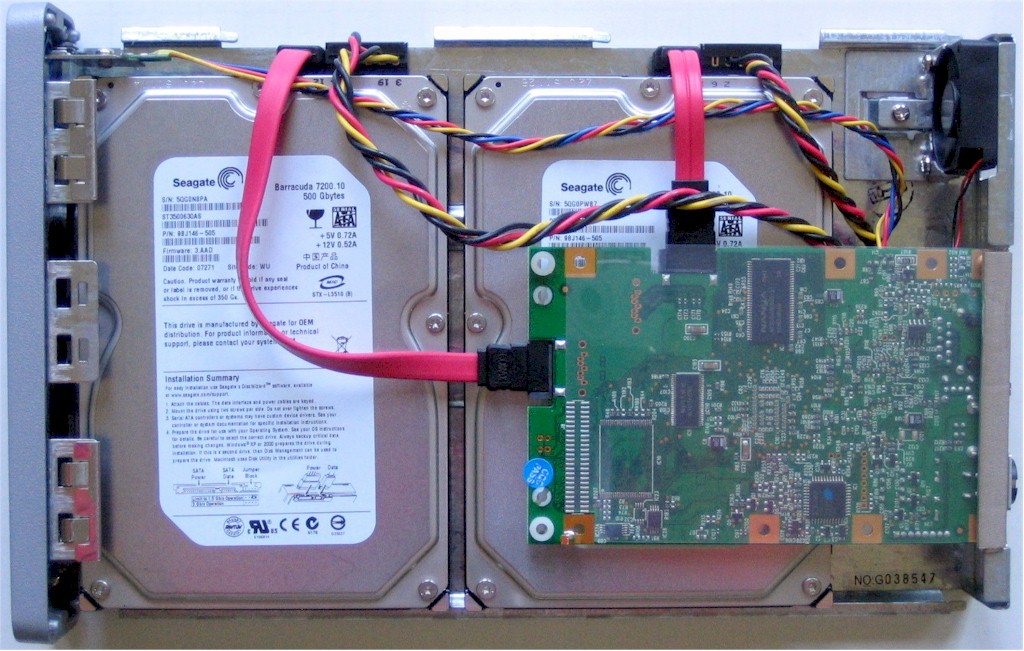
Figure 1: Inside view
Other than having a second SATA port, the board (Figure 2) is the same as that used in the Ethernet Disk mini V2. A Marvell 88F5182 handles both the SATA hard-drive and USB 2.0 interfaces, the Ethernet interface is provided by a Marvell 88E1116 "Alaska" single-port gigabit transceiver and there is 64 MB of DDR RAM and 512 KB of flash.
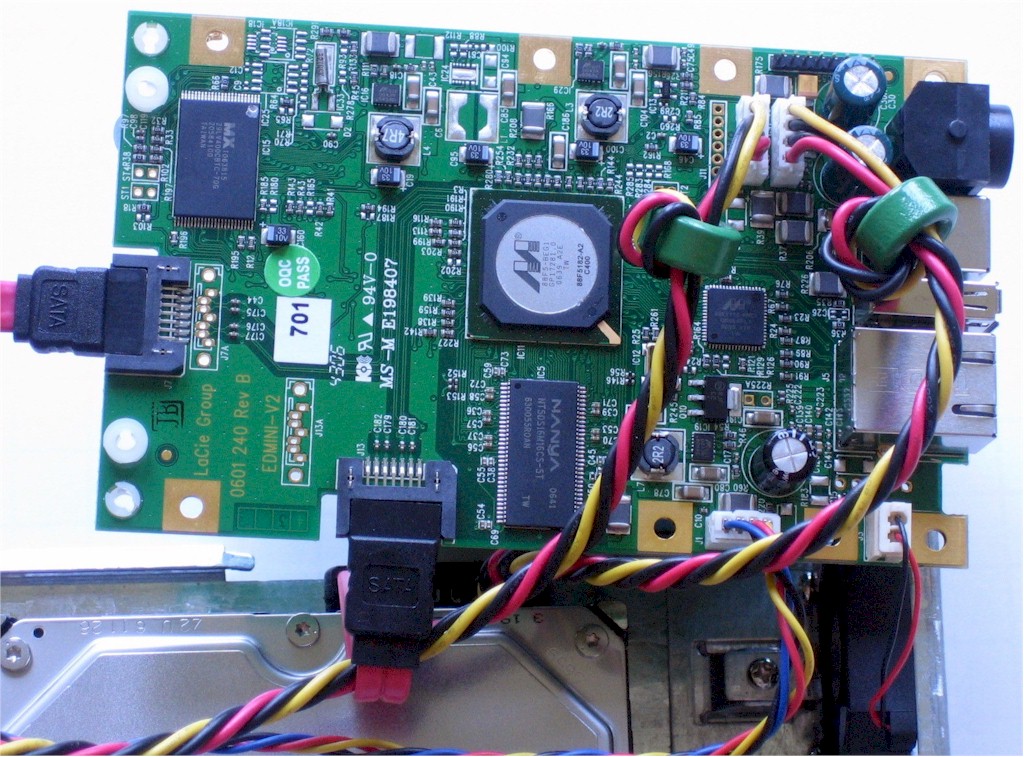
Figure 2: Detail view of board
The EBD gave me the same agita as the mini in getting access to it via normal Windows network browsing. But an additional quirk that I discovered this time around was that I lost Internet access on the machine that I plugged the EBD into to check its USB-attached operation. Not a good feature!
But after a check with LaCie, who verified that the drive was configuring itself as expected, I figured out the problem. LaCie runs an IP network connection over USB in order to provide simultaneous access via USB and Ethernet. The USB connection shows up in My Network Connections in Windows with an IP address of 10.208.75.101 (the drive itself is accessed at 10.208.75.100). The USB connection’s TCP/IP properties show only the IP address and netmask of 255.0.0.0 with neither gateway nor DNS specified.
With the more commonly-used private IP address range of 192.168.0.0 – 192.168.255.255 (or even the less common 172.16.0.0 – 172.31.255.255), the 255.0.0.0 netmask wouldn’t be a problem. But since my LAN runs on 10.168.3.X, the netmask was too broad. So once I entered the IP address statically and assigned a 255.255.255.0 netmask, my Internet connection came right back.
But Microsoft network browsing still remains a pain, with the only way I can find to reliably connect to the EBD is by IP address.
As far as performance is concerned, the EBD is similar enough to the mini that you would be hard-pressed to see a difference. With our newly-enhanced NAS Charts, you can plot throughput vs. filesize curves against whichever other products you like. But for a quick comparison I ran a gigabit 4K Jumbo write comparison of the mini, EBD and threw in Buffalo LinkStation Live and a 100 Mbps Ethernet LAN line for good measure (the EBD is the 301156U in Figure 3).
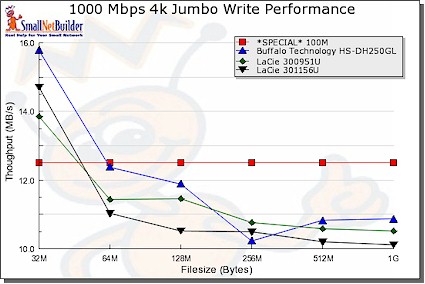
Figure 3: Gigabit 4K Jumbo Write performance comparison
NOTES:
- Firmware version tested was 1.0.8
- The full testing setup and methodology are described on this page
- To ensure connection at the intended speeds, the iozone test machine and NAS under test were manually moved between a NETGEAR GS108 10/100/1000Mbps switch for gigabit-speed testing and a 10/100 switch for 100 Mbps testing.
Since so few NASes double as direct-attached drives, we don’t include that data in the charts. So Figures 4 and 5 show USB write and read comparisons of the ED mini and EDB along with gigabit data for the EBD. You can see that, as with the mini, you won’t get a speedier connection with the EBD by using the USB direct connection.
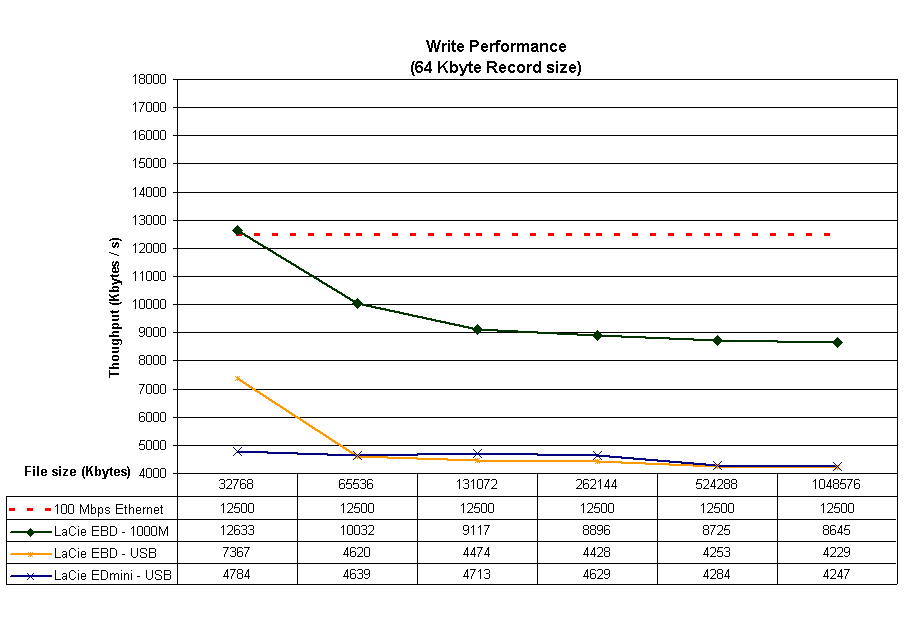
Figure 4: USB mode write performance comparison
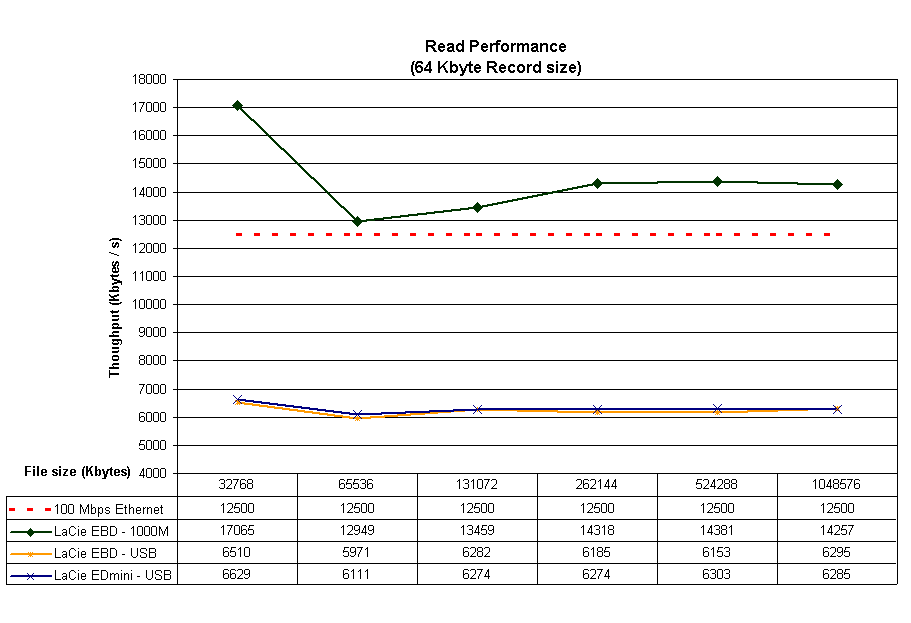
Figure 5: USB mode read performance comparison
So if you liked LaCie’s Ethernet Disk mini, but want it super-sized, you’ll love the Big Disk. Just make sure you’re not running your LAN in the 10.X.X.X range and you should have an easier time accessing the shares than I did.
 Want more info? Check out the slideshow for an admin interface tour.