

Introduction
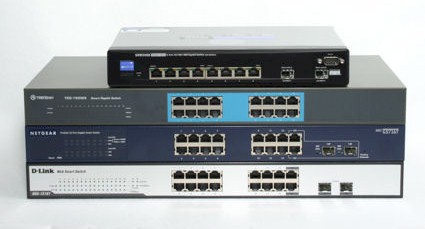
Once upon a time, gigabit Ethernet switches could be found only in data centers, and the high cost per port
made them impractical for all but the most demanding backbone applications. But times have changed,
and the price per port has dropped dramatically. Most desktop computers now have built-in gigabit Ethernet ports
and a number of consumer products are beginning to adopt gigabit as the default. And with the explosion of video and audio data that consumers are starting to move around their networks, gigabit starts to make a lot of sense.
There are three classes of gigabit Ethernet switches. The simplest, most cost-effective gigabit switch is an
unmanaged switch. D-Link, Linksys, NetGear and Trendnet all sell a five port unmanaged gigabit Ethernet switch for
less than $50. An unmanaged switch is a very simple device—you take it out of the box, plug it in and connect
your Ethernet cables. No configuration is required, or in most cases, even possible. These switches perform a basic switching function at prices that are starting to rival 100 Mbps switches and give you a significant boost in performance if the attached devices are also gigabit capable.
At the other end of the continuum, you’ll find fully managed switches. These switches offer the maximum amount of configurability and have a correspondingly higher price. These are the devices that you’d most likely find in a corporate data center. But be forewarned—fully managed switches are complicated devices that generally suited only for networking pros.
NOTE: Managed and smart switches come in Layer 2 and Layer 3 flavors—which refers to the OSI model layer. All of the switches in this roundup are Layer 2 devices. This means that they recognize and operate on packet MAC addresses, can implement functions based on data source and destination. Layer 3 devices operate at the protocol level and can perform functions based on packet port numbers (among other things).
Between unmanaged and fully managed switches, you’ll find a hybrid—the so-called “smart switches”. These switches offer a subset of the functions found on fully managed switches, but at a fraction of the price. For many small offices, these switches are the ideal solution.
For this roundup, we decided to see how far we could stretch our dollars. With a
target price of around $250, we contacted a number of vendors and requested their most fully-featured all-gigabit "smart" switch. D-Link, Netgear, and Trendnet each
sent a 16 port smart switch. Linksys, which says it makes only unmanaged and fully managed switches, sent an eight port managed switch.
All switches are supplied with rack mounting hardware and will install in a standard “1U”
rack space. To avoid redundancy and to facilitate comparison, we created a features chart to accompany the
reviews. We’ve also included a slide show of screen shots to give you a taste of the user interface for each product.
We’ll be looking at the following products in this roundup.
- D-Link DGS-1216T
- Linksys SWR2008
- Netgear GS716T
- Trendnet TEG-160WS
D-Link DGS-1216T
D-Link’s DGS1216T Web Smart 16-Port 10/100/1000+2 combo SFP Switch is one of three switches in our roundup that offers two slots for fiber optic interface
modules. These two slots can accommodate either D-Link’s single mode or multimode SFP (Small Form-factor
pluggable) GBICs (Gigabit Interface Converter). A fiber optic interface is important when you need to connect to
another switch that’s farther away than the 100 m Ethernet limitation for copper. Multimode fiber can extend that distance up to 550 m and single mode fiber can go up to 10 km.
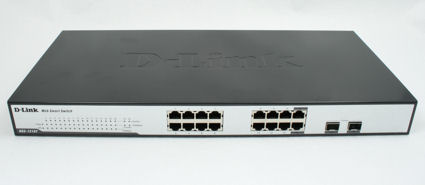
Figure 1: D-Link DGS-1216T Front view
As with the other two switches with SPF GBIC ports, these ports share ports on the switch. If you elect to use the optional fiber GBICs, you’ll lose wired ports 15 and/or 16.
Front Panel
There are 18 columns of LED indicators each with three rows of LEDs except for columns 17 and 18. For each
wired port, there is a combination link/activity LED, and a separate LED to indicate whether the link speed is 1000 or
100 Mbps. Of course, for the two columns for the fiber ports, you don’t need the 100 Mbps indicator. There’s
also a power light as well as a CPU LED that blinks to let you know that the switch is operating properly.
On the rear panel, you’ll find the power socket and the reset switch. There is no power switch. My personal preference would have been for the reset switch to be on the front panel. Should you rack mount the switch, it’s often difficult to access the back side of the rack.
Configuration
D-Link didn’t include a printed “quick start” guide. Both the quick start guide and the 63 page user manual are
included on a CD along with a Smart Console utility (Figure 2) that provides discovery, basic configuration and limited monitoring
capabilities. It’s interesting to note that virtually the same utility with the same user interface was also included with both the Trendnet and the Netgear switches.
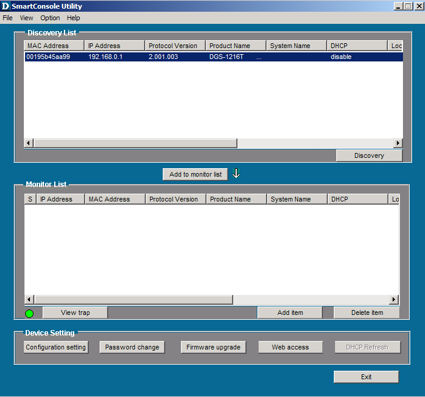
Figure 2: DGS-1216T Smart Console Utility
By default, the built-in DHCP client is disabled, and the switch defaults to 192.168.0.1. If you’re comfortable with changing the IP address on your system to match the subnet of the switch, you can bypass the discovery utility.
The opening page of the web management interface shows the device status. Arranged along the left side of the
screen is a explorer-like tree which, when expanded, shows you all of the configuration options available. In the
center of the status screen, there are links that also take you directly to configuration pages for major functions such as port mirroring, and spanning tree.
I was disappointed, however, that the D-Link management interface did not include any online help. There were no descriptions of any of the functions.
 Check out the slideshowfor a detailed admin interface tour of the DGS-1216T.
D-Link DGS-1216T – more
The D-Link switch has a unique feature called “Safeguard Engine“. It’s somewhat like McDonald’s “secret sauce”—you don’t know what’s in it, or in this case, what it does, but it’s enabled by default. D-Link provides the following description of the Safeguard Engine:
D-Link Safeguard Engine is a robust and innovative technology developed by D-Link, which will automatically throttle the impact of packet flooding into the switch’s CPU. It will keep D-Link Switches better protected from being too frequently interrupted by malicious viruses or worm attacks.
The DGS-1216T also had a few other features not found on the other smart switches from Netgear and Trendnet. First, while all switches support port mirroring, the D-Link switch provides the most granular per port control of data
mirrored to the target port. For each port mirrored, you can choose either transmit, receive or both. It
also supports 802.1x authentication against a RADIUS server—a feature generally only found on managed switches.
The D-Link switch supports 802.1Q VLANS and 802.1P QoS. For each port, you can configure QoS to one of four priority queues. It does support broadcast storm control, but the threshold is a global setting, not per port.
Construction Details
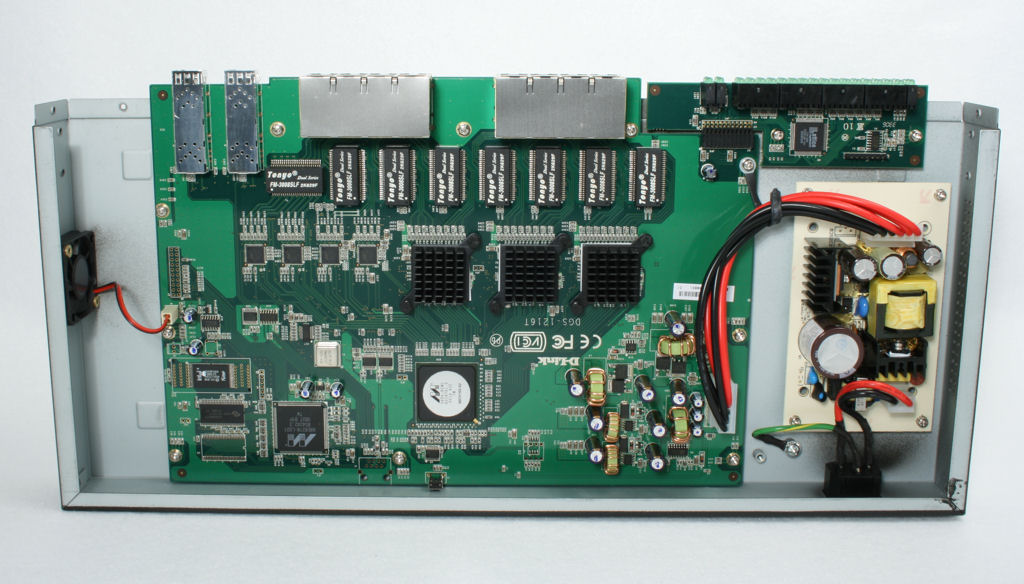
Figure 3: DGS-1216T Interior
The DGS-1216T is based on several Marvell chips: the 98DX-BCWI gigabit processor and the 88E6218-LG01 Gateway multi port QoS switch. Of particular note is that the switch operates with only one fan, resulting in the lowest noise measurements of the three smart switches reviewed.
Linksys SRW2008
Using Linksys’ terminology, the SRW2008 8-port 10/100/1000 Managed Gigabit Switch is the only "fully-managed" switch in our roundup. While the reluctance to use the term "smart" switch might be viewed as a form of marketing one-upsmanship, the Linksys product is a bit of a different animal. As shown in the features table, this
switch has far more configuration options than any of the other switches reviewed. This is a switch that
will appeal to a network engineer and has enough configuration options that it could easily fit into an enterprise environment.
The SRW2008 is an eight port switch, and, like the D-Link switch, shares two of its ports for optional SFP GBIC fiber modules.
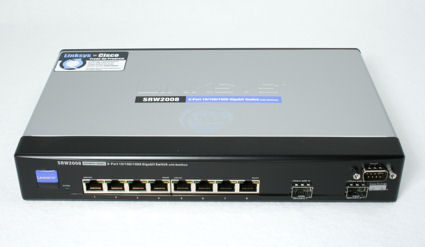
Figure 4: Linksys SRW2008 front view
Though not in the standard 19″ rack mount form factor, the SRW2008 is supplied with extended brackets so that you can mount it in a standard 1U rack space.
Front Panel
A glance of the front panel reveals that Linksys chose to use LED indicators that are integrated into the individual Ethernet ports. The green LEDs show link/port activity and the yellow indicate gigabit connection. The port numbers are printed on the case below the Ethernet ports.
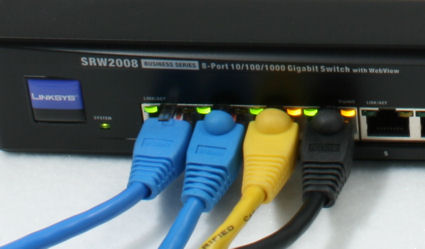
Figure 5: SRW2008 LEDs
The SWR2008 also has a console
port on the front panel—a feature often found on managed switches. The switch is supplied with a console cable
so that you can do basic configuration from the serial port of your notebook—if your notebook even has a serial port. Default port settings are 38400, N, 8, 1.
Configuration
The Linksys switch did not include a printed quick start guide or a setup/discovery utility. The 125 page user’s
guide was included on a CD. The switch has a built-in DHCP client, which by default, like the D-Link, is
disabled. The default IP address is 192.168.0.254. You can change your address to this subnet and connect with the web browser interface.
Alternatively, you connect the console cable to your serial port and either enable
the DHCP client, or configure a static IP address in the range of your network’s subnet. The CLI (command line
interface), also available via telnet or ssh, has only a subset of the robust configuration features available through the web browser-based interface (Figure 6).
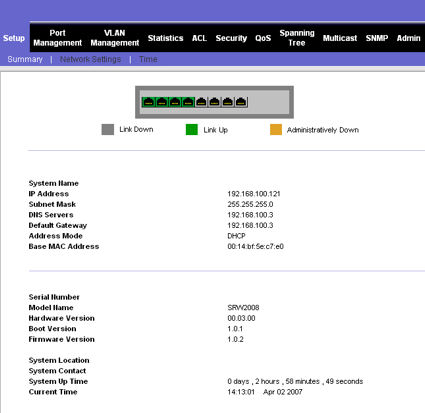
Figure 6: SRW2008 Admin interface
The web browser interface has a familiar Linksys look and feel. The home page shows port status at a glance along with summary information. Across the top of the screen, there’s a horizontal menu. As you click on each menu tab, a submenu of configuration options appears below the tab.
Of all of the switches in this round
up, Linksys did the best job of providing on-screen, context sensitive help. The help, which appears in a window
to the right of the configuration screen, summarizes the purpose of each screen, and then describes each of the options on that screen.
Check out the slideshowfor a detailed admin interface tour of the SRW2008.
Linksys SRW2008 – more
The SRW2008 is would appeal to the IT manager or network engineer who wants the maximum amount of control over a
switch. For example, all of the smart switches in this roundup give you some control over individual ports. But the SRW2008 lets you name individual ports so that it is easy to identify the attached clients. You can enable or
disable auto negotiation, force any port to any speed or duplex setting, enable/disable back pressure and flow control and even set each port for MDI/MDIX or Auto connection.
Each configuration tab has multiple submenus that provide extensive configuration options. For example, under the QoS tab, there are six tabs. Under CoS (Class of service, you can define each COs (range 0-7) to one of the four QoS queues. You can also set the default CoS for each port or LAG (link aggregation group).
The second
tab lets you select queue settings. You can select either strict priority or WRR (weighted round robin). The
SRW2008 also supports DSCP (differentiated service code point) and you can map each of the 64 values to one of the four queues.
Under bandwidth control, you can define the Ingress Rate Limit status, Egress shaping rate, Committed information rate and Committed Burst Size for each port or LAG. Trust mode lets you decide, per port or LAG, whether CoS or DSCP takes precedence if a packet’s tags are mapped to different queues.
Other advanced features on the SRW2008 include Spanning Tree Protocol, Rapid Spanning Tree Protocol, full RMON and
SMNP V3 support and GVRP (group VLAN registration protocol). Security features include both MAC and IP based
ACLs, and support for 802.1x and TACACS+. You can also enable broadcast storm thresholds for each port or LAG.
I’ve used a lot of networking acronyms in the last two paragraphs, in part, to demonstrate the richness of the
SRW2008’s feature set. If you’re interesting in exploring more of these features in depth, you can download the user’s
guide at the SRW2008 product page.
Construction details
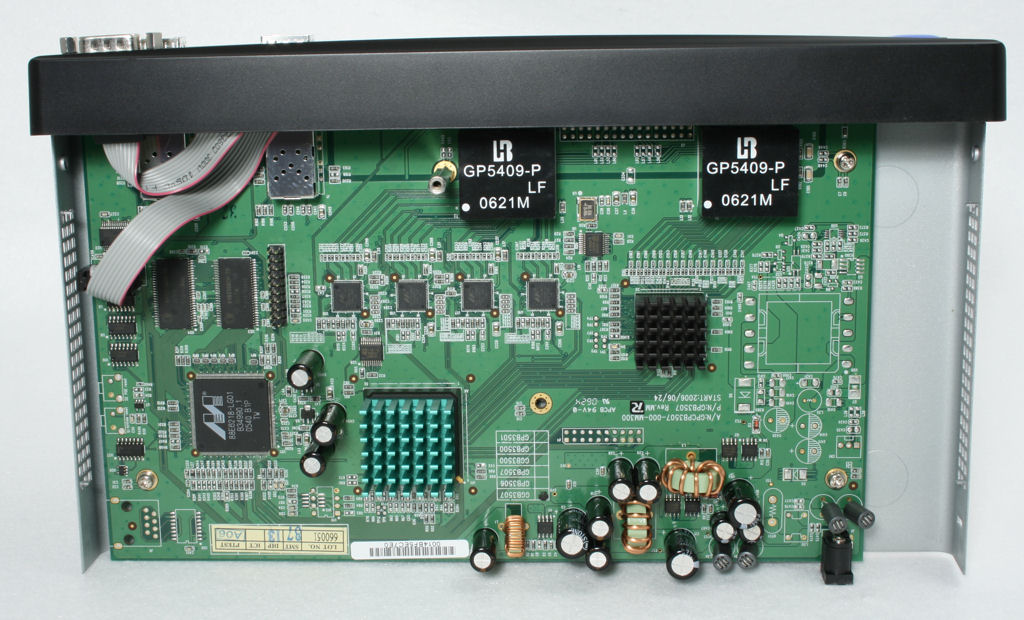
Figure 7: SRW2008 Interior
The SRW2008 is the only product in this roundup to not have an internal power supply. Instead, you’ll need to deal with a largish external power brick. Like the D-Link switch, it uses a Marvell 88E6218 Gateway multi port QoS switch chip. I was unable to determine the type of chip under the heatsinks, and Linksys doesn’t release component vendor names.
Worthy of special note, the SRW2008 doesn’t have a fan, so it’s no surprise that it was the quietest of our roundup. On the side of the case, Linksys also includes a slot for a cable lock.
Netgear GS716T
The Netgear GS716T ProSafe 16 Port Gigabit Smart Switch is very similar to the D-Link DGS-1216T, but I found that the GS716T had the richest set of features of all of the "smart" switches reviewed. (excluding the Linksys). Like the D-Link switch, the GS716T is a 16 port switch with two shared ports for SFP fiber optic GBICs.
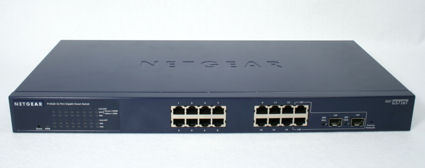
Figure 8: GS716T front
Front Panel
The arrangement of the LED indicators is unique, and the one that I preferred of all switches reviewed. For each port, there are three LEDs. Corresponding to the port layout, the LEDs for the odd numbered ports are the top three rows, and the LEDs for the even numbered ports are on the bottom rows. The individual LEDs are for Link/Activity, Speed, and Duplex.
The GS716T is the only switch in the roundup to have a front panel duplex indicator. I particularly like that the link/activity LEDs backlight the corresponding port number. The Speed LED is two color; green for 100 Mbps and yellow for 1000 Mbps.
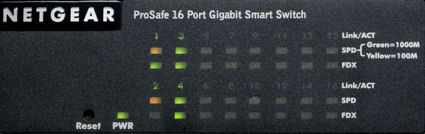
Figure 9: GS716T LED panel detail
The front panel also includes a soft reset button on the left—equivalent to power cycling the unit, and a factory reset switch on the right. These front panel resets are much more convenient than the rear panel resets found on the D-Link and Trendnet switches.
Configuration
Except for the name and the color scheme, the discovery wizard supplied with the GS716T is identical to those supplied with the D-Link and Trendnet switches. The quick start guide, the discovery wizard and the 23 page instruction manual are supplied on a CD. Note that while the instruction manual is relatively short, it does provide some useful examples on how to set up and use VLANs. This is a definite plus, since VLAN setup can be difficult for the first-timer.
Netgear was the only switch that enabled the DHCP client by default, so I plugged it in and it picked up an address from my network. Network Magic, running on several of my computers, picked up the new IP address allowing me to bypass the discovery wizard. In the absence of a DHCP server, the switch defaults to 192.168.0.239.
The home page of the web management utility gives a complete summary of the GS716T including port status, and the settings for VLAN, QoS, trunking, port mirroring, jumbo frames, SNMP, storm control, trusted MAC and spanning tree. Configuration options are arranged in a vertical menu along the left side of the screen.
The web-browser interface does include built in context sensitive help, but rather than putting the help in a scrollable window on the right side of the screen like the SRW2008, help opens in a separate browser window.
Check out the slideshow for a detailed admin interface tour of the GS716T.
Netgear GS716T – more
The port configuration screen shows you the status for each port. For each port, you can configure the speed and
duplex settings or leave them at the default “auto”. You can also enable/disable flow control on a per port
basis. Back pressure is a global setting. Port based statistics, including distribution of traffic by packet size is also available.
Of the three smart switches reviewed, the GS716T had the most complete set of configuration options for QoS. In addition to port-based QoS and 802.1p QoS, you could also select ToS or DSCP. As with the Linksys managed
switch, you could map DSCP values to any of the four QoS queues, but by default, all values were set to lowest. Unfortunately, neither the user guide nor the browser-based help provided any information on ToS or DSCP.
Like the D-Link switch, the GS716T supports mirroring of data from multiple ports to a target port. However,
the data type mirrored (TX, RX or Both) is a global setting that applies to all source ports. The GS716T also
supports broadcast storm control. You can select broadcast only or broadcast/multicast and set a threshold. (3000 pps is the default). Both the broadcast type and the threshold settings are global, but for each port you can enable or disable storm control.
While the Netgear lacks the robust security offered by the 802.1x capabilities of the D-Link, it does have a trusted MAC feature. You can limit access to ports by MAC address, but the bridge forwarding table isn’t available, so you really don’t know the MAC address of any attached device.
Construction details
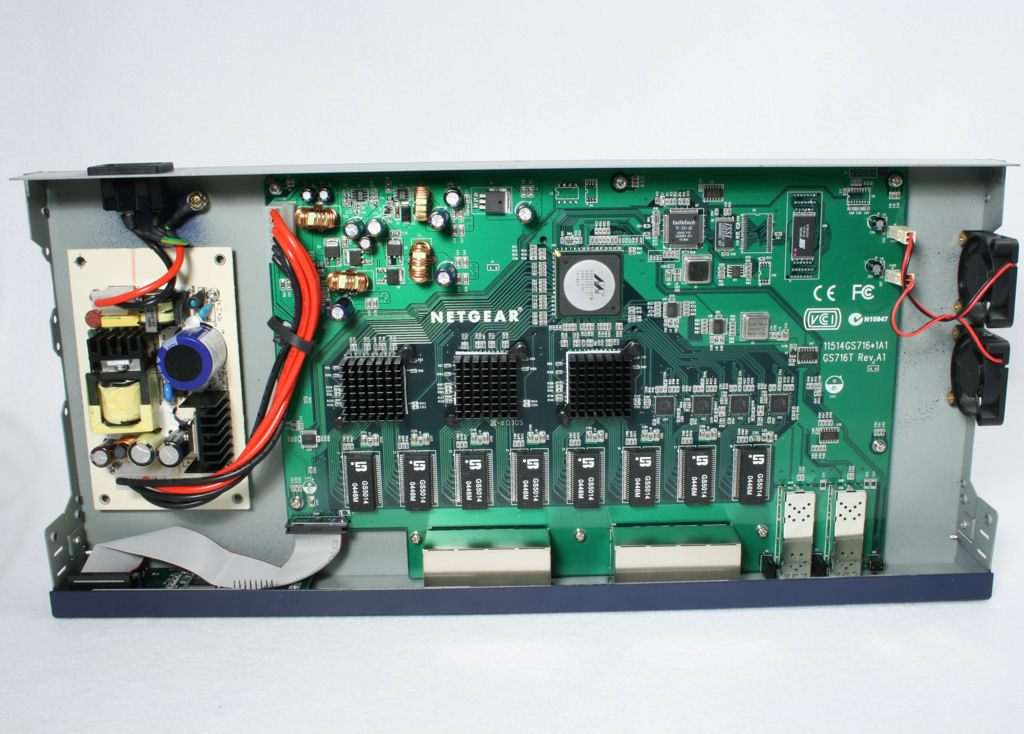
Figure 10: GS716T Interior
The interior of the GS716T is quite similar to the D-Link. It’s powered by the same Marvell 98DX series gigabit Ethernet controller, but we couldn’t determine the other chipsets used. Note that the GS716T has two fans that resulted in the highest noise level readings of any of the switches. The noise level isn’t a problem if you’re going to use this switch in a wiring closet, but it’s probably too loud to reside in an office where someone is seated nearby.
Trendnet TEG-160WS
Of the three smart switches reviewed, the Trendnet TEG-160WS 16-port 10/100/1000Mbps Gigabit Web Smart Switch has the most basic feature set. Though its features are
a subset of the other switches, it’s simple to configure, and as an entry-level smart switch, may be all that you
need. It has 16 gigabit Ethernet ports, but lacks slots for fiber optic GBICs found on all other switches reviewed here.
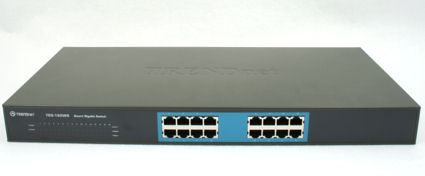
Figure 11: TEG-160WS front
Front Panel
The front panel of the TEG-160WS is fairly simple. There’s an LED to indicate power and a system status LED that blinks when the switch is operating normally. For each port, there are three LEDs: Link/Activity, 100 Mbps and 1000 Mbps.
Like the D-Link, the reset button is on the rear panel. This was the only switch that had a power switch, also located on the rear panel.
Configuration
Trendnet was the only manufacturer that provided a printed quick start guide. By default, the switch is
configured with a static IP address of 192.168.0.1. You can change the IP address through the discovery utility,
which, as noted, is identical for all three smart switches. Interestingly, the TEG-160WS does not have a built-in
DHCP client. That’s probably not a huge issue, since in most environments, switches are configured with a static address.
Like the Netgear switch, the home page of the web management displays the status of the major features of the
switch. This includes switch system details (IP address, name, uptime, etc.), and the status of ports, port-based
VLANS, trunking and mirroring. The configuration menu runs vertically along the left side of the screen.
Like the D-Link switch, there was no built-in browser-based help. I also found it interesting that the web interface lacked any branding that identified the switch as a Trendnet product. All other switches included product branding on the browser interface.
Check out the slideshow for a detailed admin interface tour of the TEG-160WS.
Trendnet TEG-160WS – more
For each port, you can configure speed, flow control and port-based QoS. The TEG-160WS does not support 802.1q VLANS or 802.1p QoS. Port-based QoS is limited to two queues: Normal or High.
You do get a traffic
summary screen showing traffic per port. You can also select an individual port and drill down on more detailed
statistics including distribution of traffic by packet size. Port mirroring, while supported, is limited to mirroring a single source port to a target port.
The TEW-160WS is almost completely lacking in reporting capabilities. It doesn’t have support for SNMP. About the only monitoring available are a limited number of traps that can be sent to a computer running the discovery
utility—a feature also available in both the Netgear and D-Link switches. You do have the ability to backup and restore switch settings, but firmware upgrades must be done through the configuration utility.
Construction details
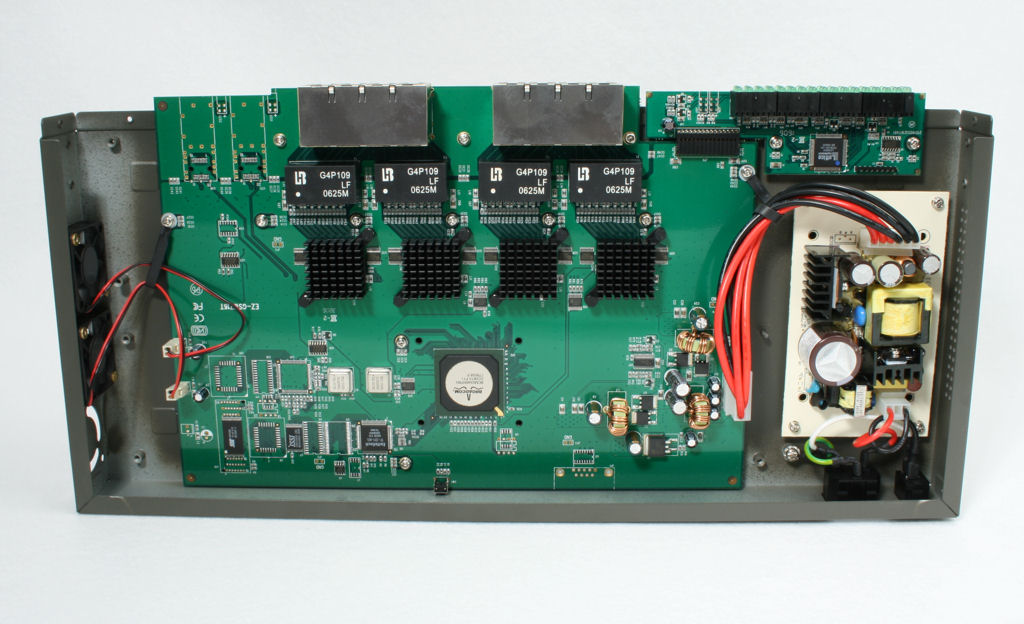
Figure 12: TEG-160WS Interior
The interior of the TEG-160WS looks remarkably similar to the D-Link—right down to the power supply, the LED
displays and the fans. The Trendnet switch, however, uses two fans and as expected, produced higher noise levels
when measured 3 feet from the unit. Still, it was significantly quieter than the Netgear switch that also used two fans.
Unlike any of the units in this roundup, Trendnet is using a Broadcom BCM5346 17 port gigabit Ethernet
controller. A review of the chip’s spec sheet indicates that it’s a fairly capable chip that supports a number of
features that are not enabled on the TEG-160WS including spanning tre/ rapid spanning tree, four hardware queues, per port rate controls and 802.1x access control. The chipset also supports jumbo frames, which are not enabled on their switch.
Recommendations and Features Matrix
It’s not really fair to include Linksys’ managed SRW2008 in a direct head to head comparison with the three other
"smart" switches. Based on the depth of configuration options, it would win hands down. The SWR2008 is a very
capable switch that could be a work group switch as part of a large enterprise network, or could be the core of a small
business network. And though it only has eight ports, I found it surprising that you could purchase such a feature-rich switch for under $200.
Though it has the highest street price, my choice between the three "smart" switches would be the Netgear GS716T largely because of its superior feature set relating to QoS. The only drawbacks with the Netgear switch are the relatively high noise level created by the fans and lack of 802.1x support.
If integration into a corporate
network requiring 802.1x authentication, the D-Link DGS-1216T would be an easy choice. It has many of the features
of the Netgear, runs significantly quieter, and is about $35 cheaper. Both have slots for fiber optic modules.
And finally, the Trendnet TEG-160WS wins the competition on the pricing front, but you sacrifice quite a few features (including jumbo frame support) as compared to the D-Link that has street pricing of only about $10 more.
Smart Switch Feature Comparison Table
(N/A = Not available)
See an updated Smart Switch Feature Comparison Table
| Product | D-Link DGS-1216T [Website]
|
Linksys SRW2008 [Website]
|
NetGear GS716T [Website]
|
TrendNet TEG-160WS [Website]
|
|---|---|---|---|---|
| Best Delivered Web Price(Pricegrabber) | $259 Check price |
$186.00 Check price |
$245 Check price |
$159 Check price |
| Chipset | Marvell | Marvell | Marvell | Broadcom |
| Power Supply | ||||
| Power Consumption | 30.3 Watts maximum | 24 Watts Maximum | 32 Watts Maximum | 23 Watts Maximum |
| Power | 100-240VAC /50-60 Hz | 100-240VAC /50-60 Hz | 100-240VAC /50-60 Hz | 100-240VAC /50-60 Hz |
| Power Switch | No | No | No | Yes |
| Network Ports | ||||
| Wired | 16 10/100 /1000 Mbps | 8 10/100 /1000 Mbps | 16 10/100 /1000 Mbps | 16 10/100 /1000 Mbps |
| Fiber Optic | 2 shared SFP ports for SFP GBIC Modules | 2 shared SFP ports for SFP GBIC Modules | 2 shared SFP ports for SFP GBIC Modules | None |
| Auto MDIX | Yes | Yes (configurable) | Yes | Yes |
| Physical Specifications | ||||
| Dimensions (W x D x H) | 440 x 210 x 44mm (17.3 x 8.3 x 1.73 in.) | 279 X 45 X 170 mm (11 X 1.75 X 6.69 in) | 440 x 205 x 43 mm (17.8 x 8.1 x 1.6 in.) | 440 x 210 x 44mm (17.3 x 8.3 x 1.73 in.) |
| Weight | 6 Lb (2.832 Kg) | 2.2 LB (1 Kg) | 6.03 lb (2.74 kg) | 6.6 Lb (3 Kg) |
| Certifications | ||||
| CE Mark | CE Mark, CE Class A | CE mark, commercial | CE mark, commercial | |
| FCC Part 15 Class A | FCC Part 15 Class A | FCC Part 15 Class A | FCC Part 15 Class A | |
| UL, cUL | VCCI Class A | VCCI Class A | ||
| CB | C-Tick | |||
| LEDs | ||||
| Per port | Link/Activity, 100, 1000 | Link/Activity, Gigabit | Link/Activity, Speed, FDX | Link/Activity, 100, 1000 |
| Per device | Power, CPU | System | Power | Power, System |
| Managed Functions | ||||
| IEEE 802.1Q Static VLAN | Up to 255 | (up to 256 active) | (Up to 64) | N/A |
| Port-based VLAN | Up to 16 | Up to 8 | (Up to 16) | (Up to 16) |
| IEEE 802.1p Class of Service (CoS) | Yes | Yes | Yes | N/A |
| Port-based QoS/queues | Yes/4 | Yes/4 | Yes/4 | Yes/2 |
| IEEE802.3ad (manual) Link Aggregation | Yes | Yes | Yes | Yes |
| IEEE 802.1d Spanning Tree Protocol | Yes | Yes | Yes | N/A |
| IEEE 802.1w Rapid Spanning Tree | N/A | Yes | N/A | N/A |
| IEEE 802.1s Multiple Spanning Tree | N/A | Yes | N/A | N/A |
| SNMP V1 | Yes | Yes | Yes | N/A |
| SNMP V2 | N/A | Yes | N/A | N/A |
| SNMP V3 | N/A | Yes | N/A | N/A |
| RMON support | N/A | Yes | N/A | N/A |
| IP/MAC ACL | N/A | Yes/Yes | N/A | N/A |
| 802.1x/RADIUS port control | Yes | Yes | N/A | N/A |
| Set time with SNTP server | N/A | Yes | N/A | N/A |
| IGMP Snooping | Yes | Yes | N/A | N/A |
| Per Port Broadcast threshold | N/A | Yes | Yes | N/A |
| Port Based web status | Yes | Yes | Yes | Yes |
| Port Based web statistics | Yes | Yes | Yes | Yes |
| DHCP client | Yes | Yes | Yes | N/A |
| Jumbo Frame Support (up to 9,600 bytes) | Yes | Yes | Yes | N/A |
| Private Enterprise MIB | N/A | Yes | Yes | N/A |
| Port Mirroring Support | Yes | Yes | Yes | Yes |
| Web-based configuration | Yes | Yes | Yes | Yes |
| Console port | N/A | Yes | N/A | N/A |
| Telnet | N/A | Yes | N/A | N/A |
| Web-based configuration – SSL | N/A | Yes | N/A | N/A |
| Configuration Backup/Restore | Yes | Yes | Yes | Yes |
| Password Access Control | Yes | Yes | Yes | Yes |
| Firmware upgradeable | Yes Web /utility | Yes – Web/TFTP | Yes – Web Based | Yes – through utility |
| Performance Specifications | ||||
| Forwarding modes | Store and forward | Store and forward | Store and forward | Store and forward |
| Bandwidth | 32 Gbps | 16 Gbps | 32 Gbps | 32 Gbps |
| Buffer memory | 512 KB | 1MB | 256 KB embedded memory per unit | 512 KB |
| Address database size: (MAC) addresses per system | 8000 | 8000 | 8,000 | 8,000 |
| Warranty | 5 Years | 5 Years | 5 Years | 5 Years |
| Noise Levels (dB) | ||||
| At fan | 84 | < 50 | 91 | 82 |
| 6" from fan | 57 | < 50 | 78 | 63 |
| 6" from front of unit | <50 | < 50 | 57 | 53 |
| 36" from front of unit | <50 | < 50 | 53 | < 50 |
| Number of fans/size | 1 / 1.5" | 0 | 2 / 1.5" | 2 / 1.5" |
