

History
Updated 5/3/2007 – Added cost data
When I started a project to make a collection of over 2000 CDs network-available, I was using a NETGEAR ND520 drive, but it turned out to be incredibly slow and rather unreliable. I was faced with a “buy-or-build” decision for a more reliable server with higher capacity. The lack of a good 1 RU (1.75″) OEM chassis that could hold four drives turned me toward pre-built solutions and I selected the Snap Server 4100. (Snap has gone through many incarnations, first as Meridian Data, then a part of Quantum, then an independent company again, and now they are owned by Adaptec. Maybe Quantum was upset that they wouldn’t use Quantum-branded drives in their products, instead preferring IBM drives.)
The 4100 is a 1 RU chassis which came with four drives of varying sizes – the smallest model I’ve seen with “factory” drives had 30GB drives, and the largest had 120GB drives. They can be used in a variety of RAID/JBOD configurations. In a RAID 5 configuration, usable capacity is about 3/4 of the total drive capacity, minus about 1GB for overhead.
Since then, I’ve upgraded the 4100’s to larger and larger drives, with the most
recent incarnation holding four 120GB drives, for about 350GB of usable storage. These units are quite common on the used market, particularly with smaller capacity drives installed. The Dell 705N is an OEM version of the 4100 which can also be upgraded.
Unfortunately, Snap decided not to support 48-bit addressing on the 4100, which means that drives larger than approximately 137GB can’t be used at their full capacity. Despite a number of negotiations to have this feature implemented on the 4100, Snap finally decided not to do so. I can’t really blame them—the 4100 is a nearly-discontinued product, and adding a feature to let customers put larger drives in “on the cheap” really isn’t in their best interest.
Snap’s decision meant that I would either need to add more 4100’s to my already large collection (I had 13 of the 4100 units now) or I would need to change to newer hardware which would support larger drives.
I decided to build my own servers this time, for a number of reasons:
- More Snap 4100 units would just take up more space, and I’d need to manually balance usage between the servers.
- Snap 4100 performance isn’t that great—about 35Mbit/sec when reading natively (Unix NFS) and about 12Mbit/sec when reading using Windows file sharing.
- Good OEM cases were now available in a variety of sizes.
- By building the system myself, I’d be aware of any hardware or software limitations and could address them myself.
- I could save money by building my own.
RAIDzilla
When I started planning for this project, the Western Digital WD2500 was the largest single drive available, at 250GB. Western Digital called these drives “Drivezilla”, so calling a chassis with 24 of them “RAIDzilla” was an obvious choice.
However, when I actually started pricing parts for the system, Seagate had just announced a 400GB drive with a 5-year warranty. So I changed my plans and decided to build a server with 16 of the 400GB Seagate Barracuda 7200.8 SATA drives (ST3400832AS) instead of 24 of the Western Digital 250GB drives.
I also planned on using FreeBSD as the operating system for the server, but I needed features which were only available in the 5.x release family, which was in testing at the time. Between these delays, the complete system didn’t get integrated (that’s computer geek for “put together”) until early January, 2005. Fortunately, pieces of it were up and running for six months or so by then, so I had a lot of experience with what would work and what wouldn’t when the time came to build the first production server.
Hardware
Once I made the decision to use a 16-bay chassis, I selected the Ci Design SR316 as the base of the system. It holds up to 16 hot-swap Serial ATA (SATA) drives, a floppy drive, CD-ROM, a triple-redundant power supply, and a variety of motherboards.
For the motherboard, I selected the Tyan Thunder i7501 Pro with the optional SCSI controller. I had used Tyan motherboards in the past and was mostly satisfied with them (anyone remember the Tomcat COAST fiasco?). The Tyan mobo supports 2 Intel Xeon processors and I selected the 3.06GHz / 533MHz models as the “sweet spot” on the price/performance curve. I used two processors so I could feel free to run local programs on the server without impacting its file-serving performance. I often do CPU-intensive tasks such as converting CD images to MP3s, checksumming files, etc.
The motherboard also has three on-board Ethernet ports, one which supports 10/100 Mbit and two that support 10/100/1000 Mbit. I felt that Gigabit Ethernet performance was necessary for this project, and this board had two ports already installed, which was ideal.
For memory, I use Kingston products exclusively and selected two of the KVR266X72RC25L/2G modules. This memory was on Tyan’s approved memory list and 4GB would give me lots of memory for disk buffers. While the motherboard supports up to 12GB of memory (6 of these 2GB modules), operating system support for more than 4GB was not common at the time.
One of the most important items for a file server is the disk controller. I picked the 3Ware/AMCC 9500S-8MI controllers. Each controller supports eight drives and connects to the chassis backplane via a Multilane Interconnect (MI) cable. This cable takes the place of four normal SATA cables, reducing the total disk cable count from 16 to four.
Finally, I added internal SCSI cables and external terminators from CS Electronics. The folks at CS are wonderful, building and shipping whatever custom cables I’ve needed in only a day or two.
The 16 drives in the system are split into two independent groups of eight, with
one group on one controller and the other group on the second controller. Within the groups of eight, seven drives are used as a RAID 5 set with the eighth drive being a “hot spare” in case any of the other seven drives fail.
Software
As I mentioned above, I’m using FreeBSD 6.x as the operating system. I also use Samba as my CIFS server software, and rdiff-backup for synchronizing my offsite backup RAIDzillas to the local units. There is a large variety of other software installed as well. One of the nice things about the RAIDzilla as opposed to a off-the-shelf NAS is that I can run a huge amount of software on them locally without needing to build a customized NAS OS (if the sources are even available) and cross-compiling the applications.
What I’d do differently this time (two years later – 2007)
If I were building these from scratch now, the major change I’d make would be
to use a single 16-channel RAID card, so I’d have one parity disk and one spare
drive in the chassis, instead of the two of each I have now.
I’d also use more modern hardware, such as a PCI Express motherboard and RAID card, and go with larger-capacity drives (750GB or 1TB).
Since support for systems with > 4GB of memory is now common, I might also experiment with a huge memory size. It should be possible to easily run 16GB or even 32GB on server-class motherboards today.
Construction Details
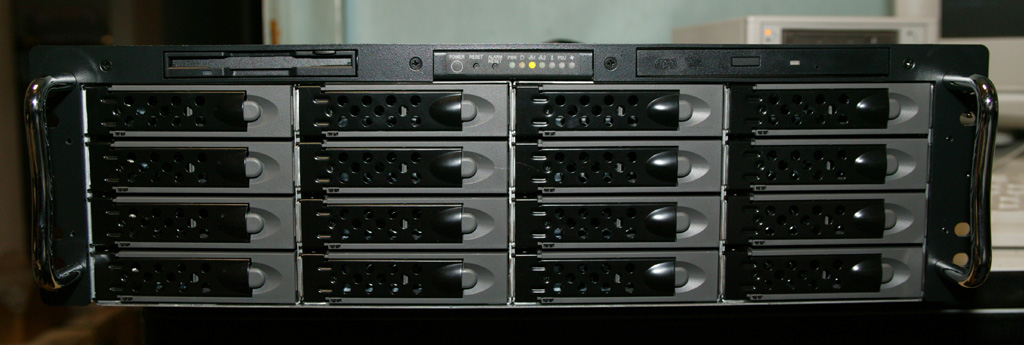
Figure 1: RAIDzilla front view
Figure 1 shows the front view of the server, which is the only part you’ll see
when it is installed in a rack. Most of the front is taken up by the 16 hot-swap drive bays, with a little space left on the top for the floppy, control panel, and CD-ROM.
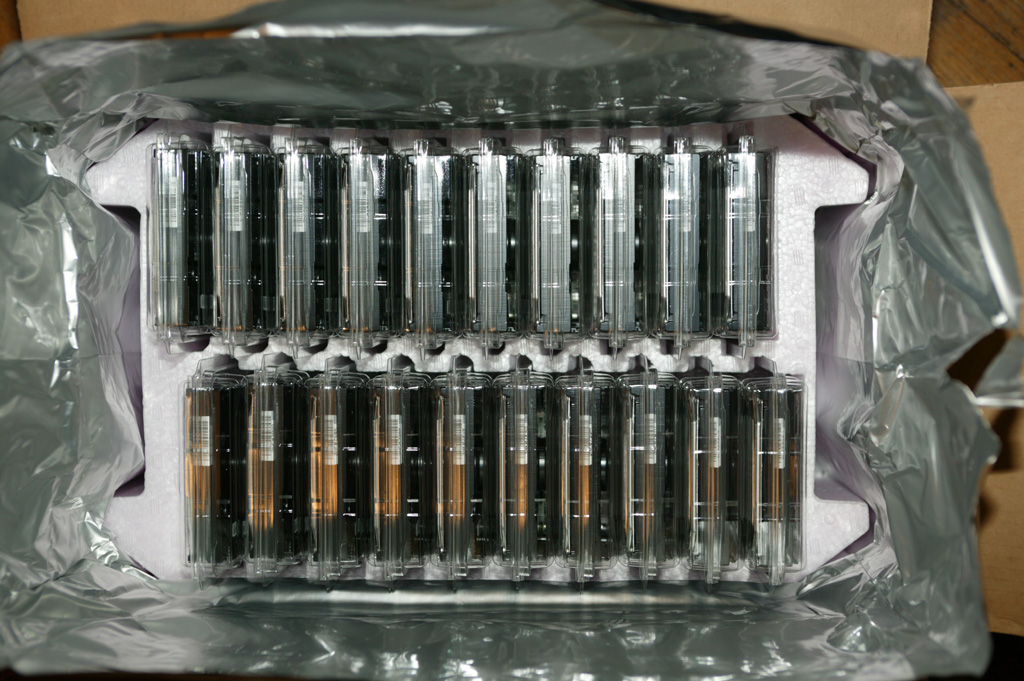
Figure 2: The carton of hard drives
Figure 2 shows a freshly-opened carton of 20 400GB Seagate Seagate Barracuda 7200.8 disk drives. It is important that all drives be identical, down to the revision of the drive and firmware, for the best RAID performance. The best way to ensure that is to purchase a case lot from the manufacturer.
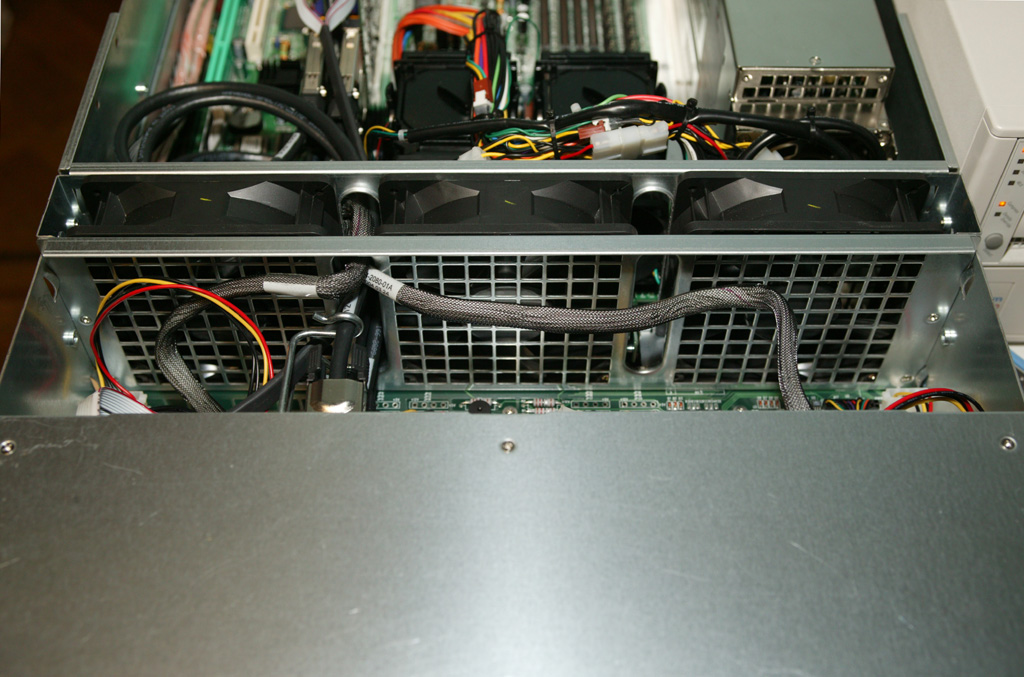
Figure 3: The hard drive cooling fans
In Figure 3, a view of the top of the chassis (with the cover removed), you can see the
three large cooling fans that pull air in across the disk drives and then exhaust it out the back of the case.
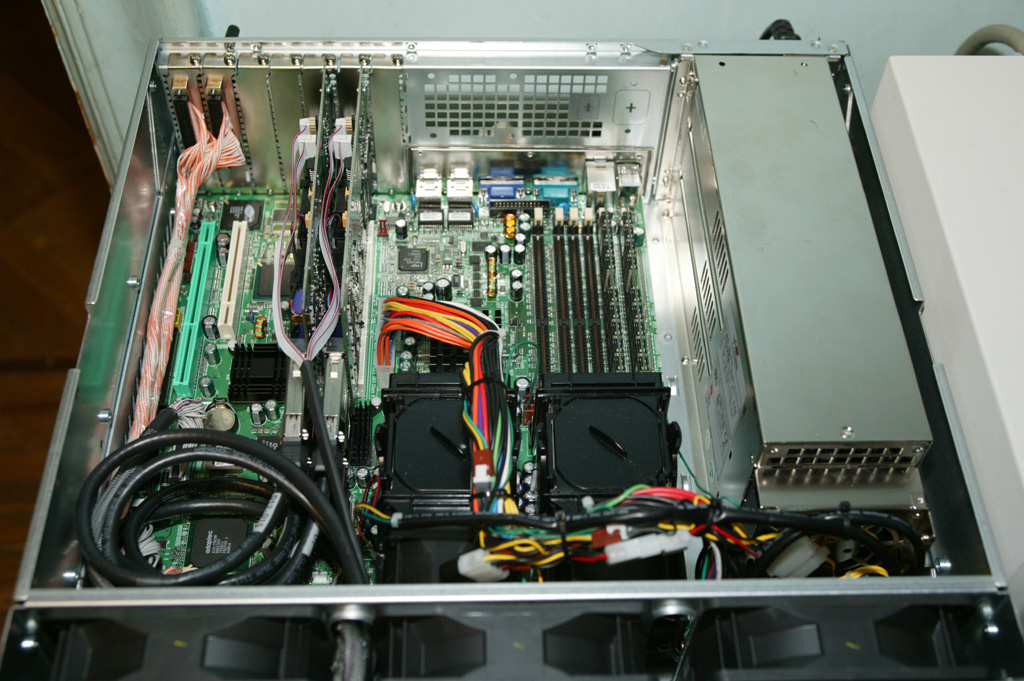
Figure 4: The motherboard, CPUs, and power supply
Figure 4 shows the back part of the case, where you can see the motherboard with two CPUs mounted (under the black plastic covers), and the triple redundant power supply on the right.
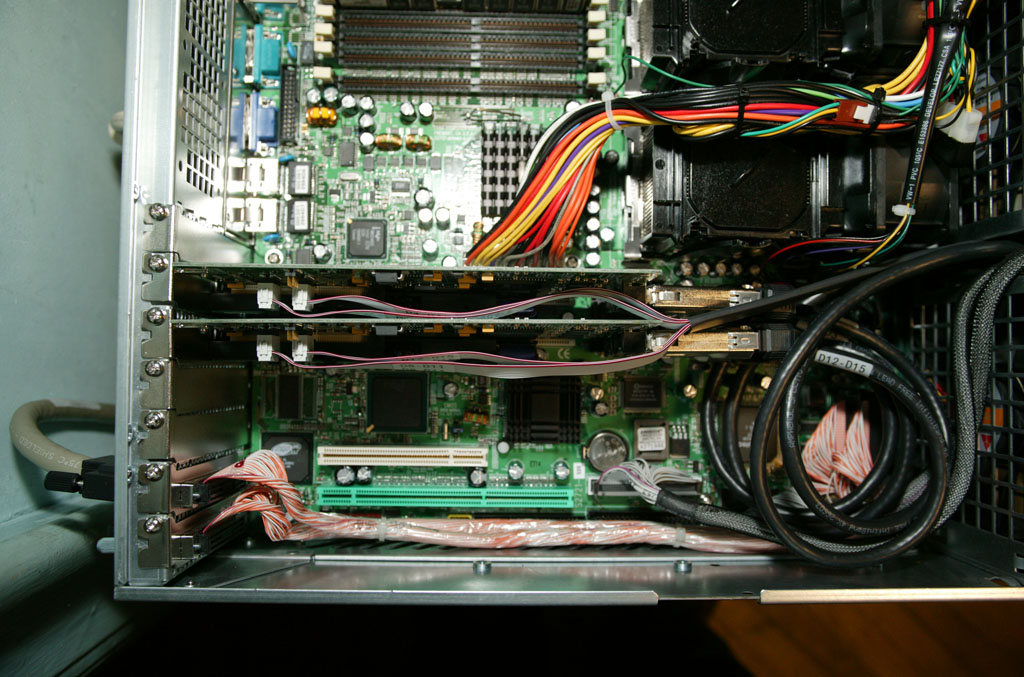
Figure 5: The expansion card area
In Figure 5, you can see a close-up picture of the expansion card area. The two 3Ware controllers are prominent in the center of the picture, with the disk cables exiting in a coil to the right. The wavy flat red and gray cables on the controllers connect to the 16 individual drive activity lights visible from the front.
At the bottom of the picture are the custom orange and white Ultra-320 SCSI cables which connect bulkheads on the back of the chassis to the two internal SCSI channels. These are used to attach devices such as DLT tape drives.
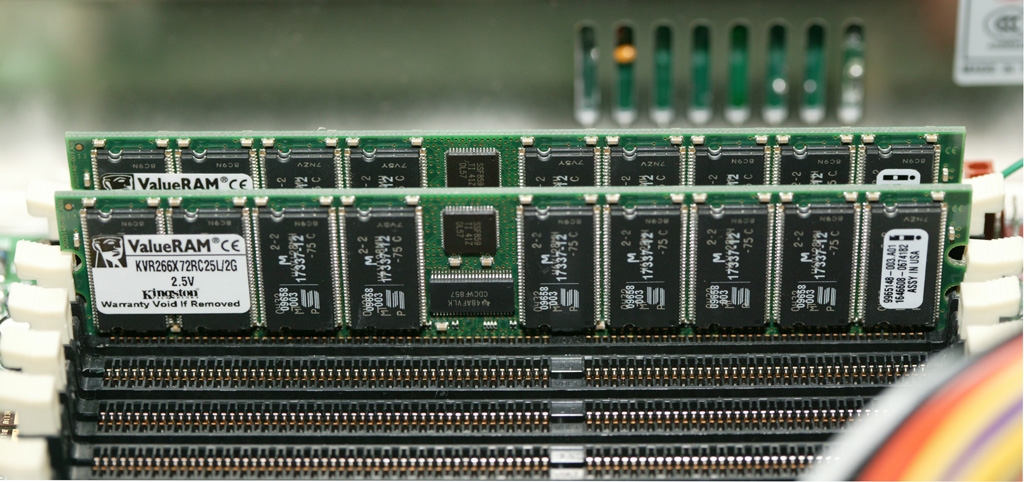
Figure 6: 4GB of memory
Figure 6 shows a close-up shot of the two 2GB DIMMs. For someone who has been in the computer industry as long as I have, this type of density is amazing. The first memory board I purchased new (in 1978) was 16 inches square and a half- inch thick, held a whopping 8KBytes of memory, and cost $22,000. And that was considered a major accomplishment!
Added 5/3/1007 The Cost
RAIDzilla’s cost breakdown is shown below. Keep in mind that these are 2004 prices and that the cost of some of the components has come down since then and others have been discontinued. Note that cable costs are not included, but were not a major factor.
| Qty | Component | Price | Notes |
|---|---|---|---|
| 16 | Seagate ST3400832AS SATA drives | $2,384 | (current price) |
| 2 | 3Ware/AMCC 9500S-8MI RAID controller | $ 769 | (2004 price) |
| 1 | Ci Design SR316 case | $1,234 | (2004 price) |
| 1 | S2721-533 Tyan Thunder i7501 Pro Mobo | $524 | (2004 price) |
| 2 | KVR266X72RC25/1024 RAM | $ 222 | (current price) |
| 1 | BX80532KE3066D Xeon 3.06GHz Processor | $ 309 | (current price) |
| Total | $5442 | ||
The Results
The list below shows the active filesystems. The /backups_ filesystems are a mirrored copy of the primary filesystems to be used in case one of the RAID arrays is unavailable, allowing the system to be booted for recovery purposes.
The actual filesystems provided to the network are two 2TB filesystems, named /data0 and /data1. Additionally, two 120GB filesystems named /work0 and /work1 are provided for scratch space for network users.
Filesystem 1K-blocks Used Avail Capacity Mounted on
/dev/da0s1a 507630 51894 415126 11% /
devfs 1 1 0 100% /dev
/dev/da0s1d 16244334 37408 14907380 0% /var
/dev/da0s1e 16244334 6 14944782 0% /var/crash
/dev/da0s1f 16244334 1607096 13337692 11% /usr
/dev/da0s1g 8122126 62 7472294 0% /tmp
/dev/da0s1h 8121252 26 7471526 0% /sysprog
/dev/da0s2h 120462010 4 110825046 0% /work0
/dev/da0s3h 2079915614 859342082 1054180284 45% /data0
/dev/da1s1a 507630 249998 217022 54% /backups_root
/dev/da1s1d 16244334 38762 14906026 0% /backups_var
/dev/da1s1e 16244334 62 14944726 0% /backups_var_crash
/dev/da1s1f 16244334 1686090 13258698 11% /backups_usr
/dev/da1s1g 8122126 126 7472230 0% /backups_tmp
/dev/da1s1h 8121252 86 7471466 0% /backups_sysprog
/dev/da1s2h 120462010 4 110825046 0% /work1
/dev/da1s3h 2079915614 1474939512 438582854 77% /data1
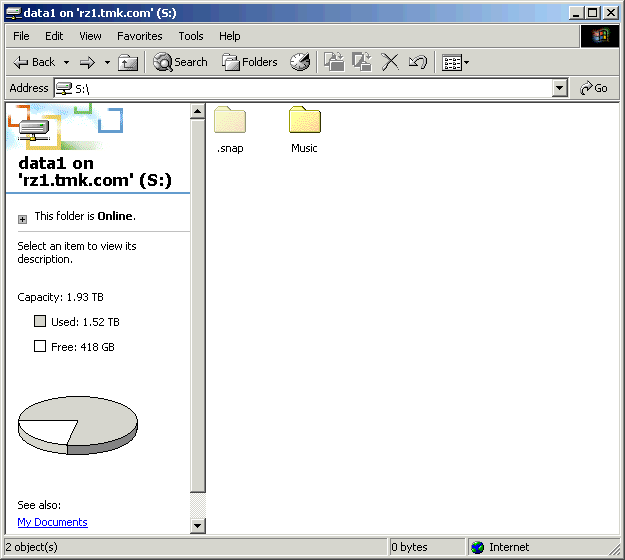
Figure 7: A screenshot showing the filesystem’s capacity
Figure 7 is a Windows view of one of the server’s filesystems, showing its 1.93TB total capacity. Please note that this system is firewalled from the Internet, so don’t bother trying to come visit. It will only bother me and cause me to make unhappy noises at your ISP.
As a basis of comparison to other NAS tests on SmallNetBuilder, I ran iozone on RAIDzilla using a Dell Dimension 8400 w/ 3.6GHz CPU, 2GB RAM running Windows XP Home. The network adapter was an Intel MT1000 connected at 1000Mbps, full duplex w/ 9K jumbo frames enabled. Figures 8-11 were taken using the NAS Performance Charts.
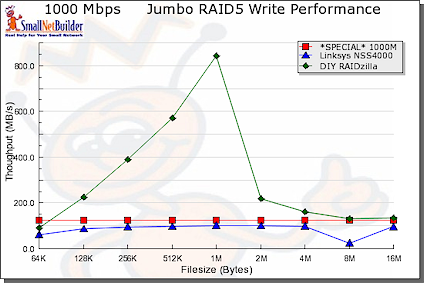
Figure 8: Write performance comparison, small file sizes
Figures 8 and 9 show that RAIDzilla tops the charts for 1000 Mbps RAID 5 write performance for file sizes 16 MB and under, but comes in second to the Linksys NSS4000/4100 [reviewed here] for read. Note that the NSS4000 used only 4K jumbo frames while the RAIDzilla used 9K.
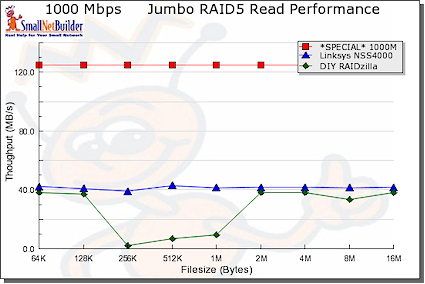
Figure 9: Read performance comparison, small file sizes
Figures 10 and 11 show a reversed trend for file sizes 32 MB to 1 GB. The Linksys does slightly better than RAIDzilla for write, but RAIDzilla crushes the Linksys for reads.
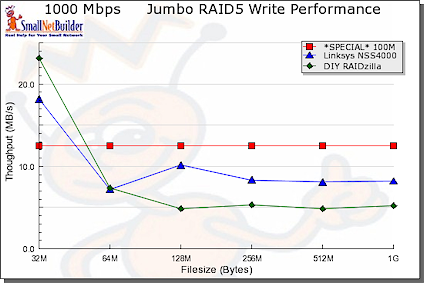
Figure 10: Write performance comparison, large file sizes
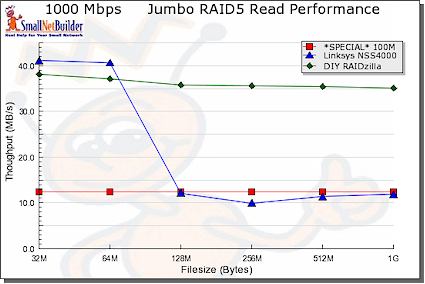
Figure 11: Read performance comparison, large file sizes
I also did some performance testing between a pair of RAIDzillas using FTP (get /dev/zero /dev/null) and was able to achieve > 650Mbit/sec. Performance of actual file serving is limited by the speed of the disk subsystem, of course.
I haven’t done a lot of performance tuning yet, mostly because this level of throughput is more than adequate for my applications.
It may not be the easiest way to go. But by designing and constructing your own NAS, you get a system with all the features you want…and know how to fix it when it breaks!
This article originally appeared as The RAIDzilla Project.
Markup and text Copyright © 2004-2007 Terence M. Kennedy unless otherwise noted.
All pictures Copyright © 2004-2007 Terence M. Kennedy unless otherwise noted.