

Introduction
| At a Glance | |
|---|---|
| Product | Iomega StorCenter Pro NAS 150d (33610) |
| Summary | Simple, solid, RAID 5 NAS targeted at small business users |
| Pros | • Hot-Swap RAID 5 • Gigabit Ethernet w/ jumbo frame • NFS, AFP, AD support |
| Cons | • No HTTPS • Noisy • No logging • Firmware update requires Windows |
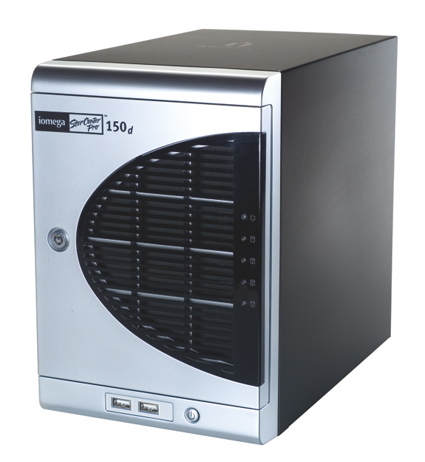
It’s been awhile since I checked out Iomega’s StorCenter Pro 200D, a business-class Network Attached Storage (NAS) device. When I reviewed the product, I found it to be a powerful, full-featured NAS. But with a starting price of $1400 for an entry-level 320GB model, it was a bit pricey. Times, and prices, have changed. In this review, I’ll check out the 1TB 150d, a more cost-effective model in the same StorCenter Pro line.
Like others in the StorCenter Pro line, the 150d is not a terribly small device. It’s around 7x12x10 inches, comparable in size to a cinder block. Figure 1 shows the front of the box with the lockable door open.
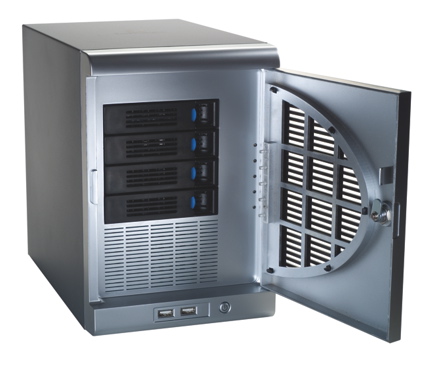
Figure 1: Door Open
You can see the four hot-swappable drives, two USB ports and a power button. Figure 2 shows the back of the box where two more USB ports are visible along with a gigabit-capable Ethernet port and two large fan vents.
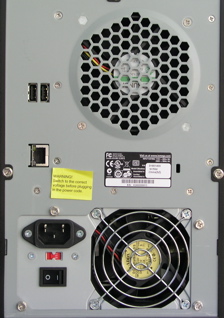
Figure 2: Back Panel
Iomega advertises that the 150d is quiet, but I’m not sure what they’re comparing it to. When the unit is powered up and those fans kick in, you know it. It’s loud. Measuring the power-draw when the unit was booted showed that it pulled about 53 Watts. And if there’s any question about what country you’ll be using the 150d in, Iomega supplies six different types of power cords for their switchable power-supply.
Once the unit was fully up, I turned to the installation software supplied on a CD. Iomega supports installation from both Mac and Windows machines, so I ran the setup process on my preferred system, a MacBook Pro. After a couple of clicks, and a minute or so, I was presented with the pop-up shown in Figure 3 telling me that the unit was fully initialized.
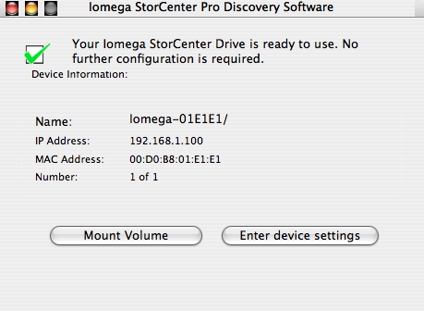
Figure 3: Ready To Use
When I clicked the “Mount Volume” button, the 150d was mounted as a network drive, ready to be used. If you have simple needs, your total setup time, start-to- finish would be less than five minutes.
Feature Tour
To dig deeper, I selected the “Enter device settings” which spawned my browser and connected to a web server running on the box. Figure 4 shows the initial configuration menu that is displayed after the administrator logs in.
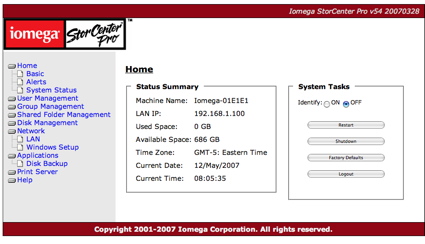
Figure 4: Main Menu
Note that the 150d only supports HTTP, not the more secure HTTPS connections. In the Summary display, you can see that my one terabyte capacity has been reduced to 686 GB due to the default RAID 5 setup of the device.
Under the System Task area you can see several options such as restart, logout, etc. which are pretty clear, but I wasn’t sure what the “Identify” button was used for until I checked the documentation. When this button is selected, an LED on the front of the box will blink. So if you’re not sure which of your several 150ds you’ve logged in to, hit the button and it will be obvious. Clever.
Under the Basic menu (Figure 5), options were available for several standard configuration items, such as machine name, administrator password, language, time, etc.
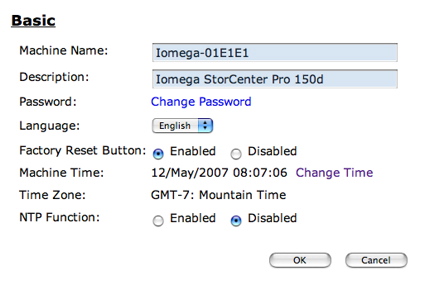
Figure 5: Basics Menu
The 150d supports setting the time via the Network Time Protocol (NTP), but there is no way to specify which NTP server to use. Hopefully Iomega implemented the NTP protocol properly, because as others have found out,
hard-coding an NTP server is generally a bad idea and can lead to unexpected problems. An “Alerts” menu lets you set up an email address for problem reporting. Figure 6 shows the “Alerts” configuration.
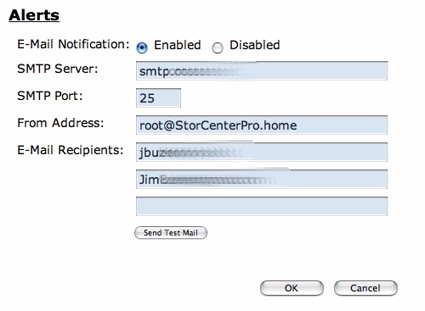
Figure 6: Alert Setup
I set up the system with my information, and was able to get a test message, but during this review, the only other alerts I received were related to RAID testing I describe later. Note the absence of any way to specify a username/password for the outbound SMTP connection, so if your ISP requires logging in before sending email, you’ll have to make other arrangements.
Users and Groups
Since this product is designed for business use, user control is an important feature. Figure 7 shows the basic setup screen for creating users.
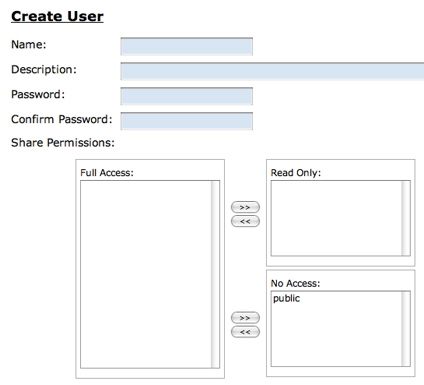
Figure 7: User Creation
Users can also be assigned to specified groups for better access control (Figure 8).
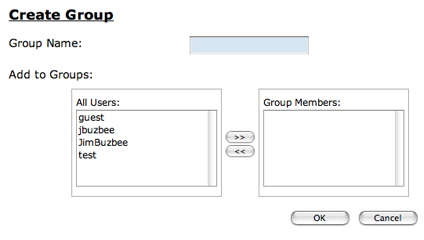
Figure 8: Group Creation
Note also that the 150d can act as an Active Directory (AD) client and import user and group information from and AD domain controller.
I had a slight hiccup when creating users. The first user I created seemed to go OK, but upon completion, I got the popup shown in Figure 9.
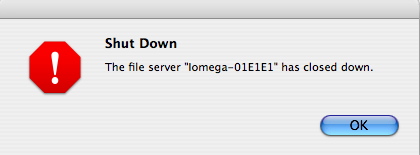
Figure 9: Error Popup
At first I thought that the pop-up itself was in error because everything seemed to be working fine. My user was created, and I could access shares as that user. But when I went to create another user, I got repeated errors along the line of “Failed to create local user”, and even a reboot didn’t help.
Only when I reset the unit to factory defaults and started my configuration over did the problem clear up, allowing me to create new users at will. This wasn’t a big problem for me, but if the unit was in use in a business, having to reset everything could be a major hassle.
Shared Folder Setup
By default, the 150d comes with a single “Public” network share, but additional shares can be defined and configured. Figure 10 shows the share creation menu.
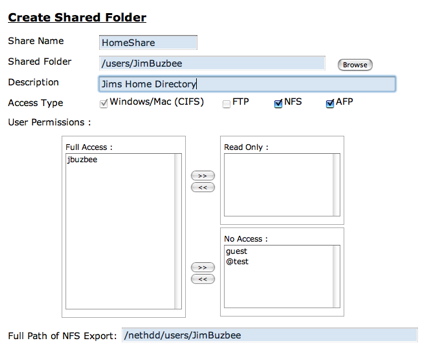
Figure 10: Shared Folder Creation
In this menu you can see the capability to create a share, restrict user access and make the share available in several different protocols. This muti-protocol support including NFS and AFP is a nice feature for a heterogeneous network. Note that the FTP access button only appeared to be available on the default Public share and it was not possible to turn off CIFS access on a share.
RAID Setup
A big selling point of the 150d is its RAID capabilities, allowing users to make a choice between performance and data security. By default, the device comes configured with RAID 5, which is a reasonable choice for most uses. Under RAID 5 all of the disks are combined into one large logical drive. The space equivalent to one disk is reserved for parity information to support single disk failure recovery. If a single disk dies, you just pull it out and replace it which causes the system to automatically rebuild the system without data loss.
To test this feature, I pulled a drive out and replaced it while the system was up and running. When I pulled the disk out, its associated LED went out, the power LED started blinking red and the system status as shown in the Disk Management screen was listed as “Degraded”.
When I plugged the drive back in, its LED went back on and the power LED continued to flash red. During this period, the Disk Management screen gave a status of “Rebuilding”, and gave an estimated time to completion. Rebuilding took just under two and a half hours.
As far as alerts, I received an email alert when the disk was pulled, and another when it was replaced, but I did not receive an email when the rebuild was complete.
As you can see in Figure 11, three other RAID levels are supported by the 150d.
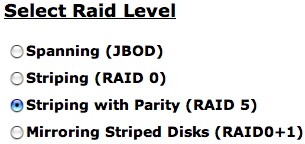
Figure 11: RAID Support
Spanning combines all of yours disks into a single share, making them look like one big drive. Striping also combines all of the disks into a single share, but it does parallel reading and writing, giving increased performance with no data recovery possibilities. Mirroring does what it sounds like: all data is automatically written to two drives, creating data redundancy, but cutting capacity in half.
Disk Management
Other disk management features include the ability to set the spin down time for the disks. Figure 12 shows the Disk Management menu where the spin-down time can be set, the health stats of the drives is shown, and an option for USB- attached drives can be set.
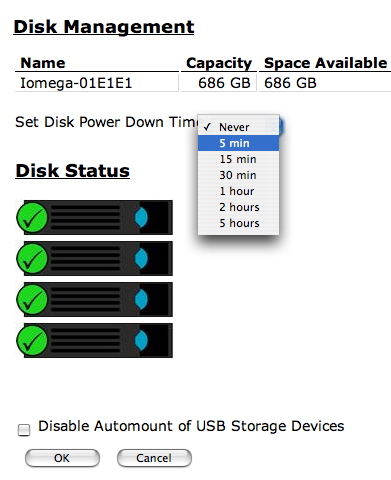
Figure 12: Disk Management
Be default, when a USB drive is plugged in, it gets mounted and exported as a share. Iomega documents support for USB disks formatted in FAT, FAT32 or NTFS in a read-only mode.
Backup
One of the main uses of a device like this is for backup. To this end, Iomega includes two licenses for EMC Retrospect Express, a backup package that can be installed on both Windows and Apple computers.
This type of backup is a push from clients to the 150d. It might have been nice to see a “pull” backup as well where the 150d would mount a network share and then copy it to a specified directory.
In addition to acting as a destination for backing up client computers, the 150d has the ability to back itself up to either an external USB drive or to another 150d located on the network. Figure 13 shows the menu that allows these backup jobs to be defined.
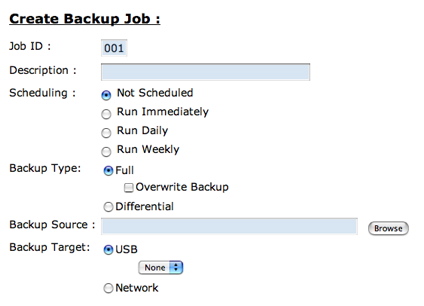
Figure 13: Backup Creation
As you can see, the jobs can be scheduled various ways and can be complete or incremental backups.
After I had explored the administration menus, there were a few things I didn’t see. First, there was no logging capability. I like to see some level of logging so I can tell what is happening in the box. In addition, I’d like the ability to check the SMART status of the drives for preventative maintenance purposes.
The last thing I didn’t see was any firmware update capability. Typically on these boxes, you’ll find a menu item where an updated firmware image can be loaded. When I dug a bit deeper, it appears as if updating the firmware requires running an executable on a Windows box. This is a bit of a downside for people running Linux or Macs.
Performance
The 150d was tested in JBOD and RAID 5 modes with 100 Mbps and 1000 Mbps LAN connections using our iozone-based test procedure. A summary of average read and write throughput for JBOD and RAID 5 with a gigabit LAN connection can be found in Table 1.
| Test | Iomega Storcenter Pro 150d |
|---|---|
| JBOD Write | 18.9 |
| JBOD Read | 19.4 |
| RAID 5 Write | 15.6 |
| RAID 5 Read | 15.1 |
Table 1: Gigabit LAN Average Throughput – Large filesizes
Note that while the 150d supports jumbo frames, only 9k frame sizes are available. But you won’t find 9k Jumbo frame resuts in our NAS Charts because we usually test with 4k jumbo frames. So for the record, the average large filesize JBOD write and read throughput was 19.2 and 21.8 MB/s respectively and 15.0 and 17.8 MB/s for RAID 5 write and read.
TEST NOTES:
- Firmware version tested was 54.54
- The full testing setup and methodology are described on this page
- To ensure connection at the intended speeds, the iozone test machine and NAS under test were manually moved between a NETGEAR GS108 10/100/1000Mbps switch for gigabit-speed testing and a 10/100 switch for 100 Mbps testing.
The NAS Chart Throughput vs. Filesize tool was used to generate a few example plots. The green line in Figures 14 and 15 shows the Infrant ReadyNAS NV, the blue line shows the LaCie Ethernet Disk RAID and the black line shows the 150d (33610).
As you can see in the write test (Figure 14), the 150d unit performs well, handily beating the other two in all cases.
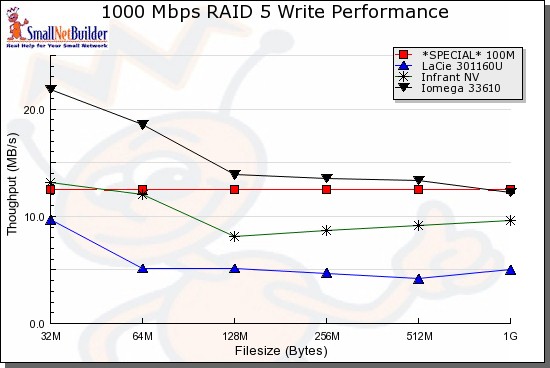
Figure 14: Write Performance
In the read test, things are not so clear-cut, as caching causes the chart to jump around a bit. But even with the varying numbers, the performance of the Iomega is noticeably lower than the Infrant, and generally fairly close to the LaCie.
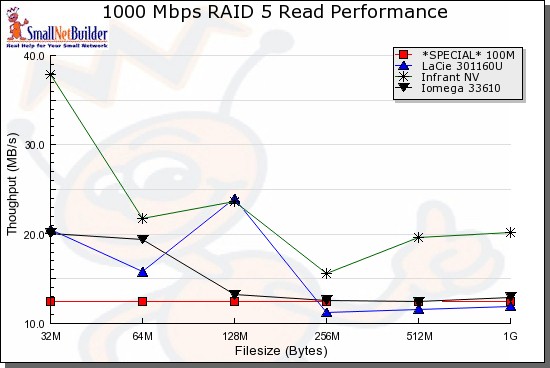
Figure 15: Read Performance
I also did a simple drag-and-drop test moving files back and forth to the device. To do this test, I used my MacBook Pro, 2 GHz Intel Core Duo with 1.5 GB of RAM running Windows XP SP2 natively. The directory tree I copied contained 4100 files using just over a gigabyte.
I found
that with a gigabit connection, moving the files to the 150d (write) took just over 3 minutes (~5.6 MB/s). With a 100 Mbps connection,
the same transfer took around 4 minutes, 45 seconds (~3.5 MB/s). Going the other direction, from the 150d to my XP system (read), the transfer
took around 3 minutes 15 seconds (~5.1 MB/s) with a gigabit connection and just under 5 minutes with a 100 Mbps connection (~3.3 MB/s).
Under The Covers
Figure 16 shows the motherboard of the 150d.
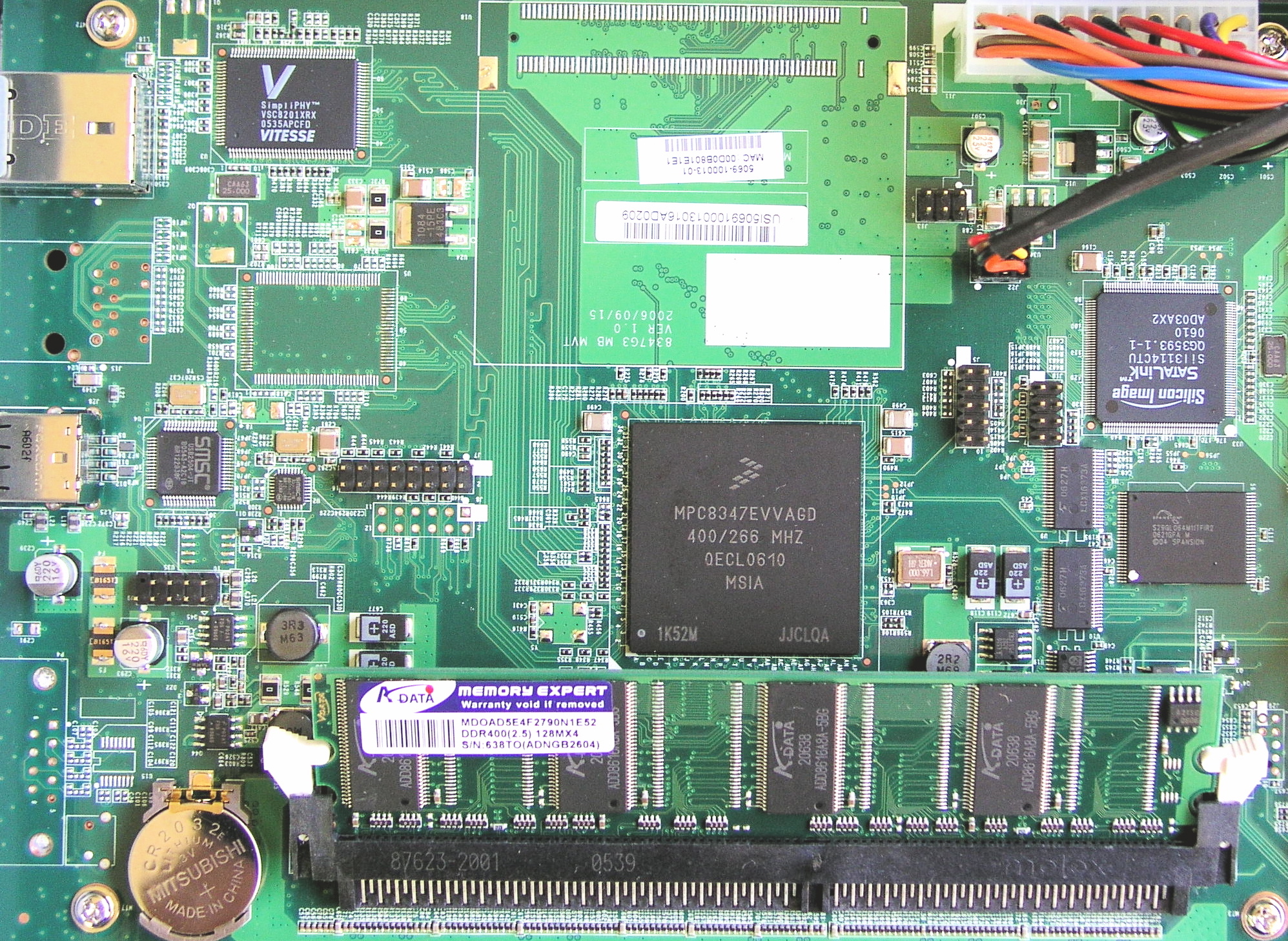
Figure 16: Main Board
Iomega specifies the processor of the 150d as being a Freescale 8347 running at 400MHz with 128MB of RAM using a Vitesee 8201 chip for Ethernet. The SATA support is provided by a Silicon Image 3114 chip, and the USB support is provided by SMSC 2504 controller.
Internally, Iomega specs that the box runs a Linux 2.6.13 kernel, and also provides GPL source code on the installation CD. But I wanted to poke around a bit to see how the box was internally organized, so I started looking for a way to get visibility into the operating system.
When creating a network share, the user interface limited me to choosing data directories only, not operating system directories. But like many of these products, the 150d used the flawed strategy of using JavaScript for validation.
To bypass this, I redirected my browser to my own HTTP proxy that let me edit all parameters sent to the box. Using this technique, I specified the directory shown in Figure 17, which exported the very top level of the operating system directory.
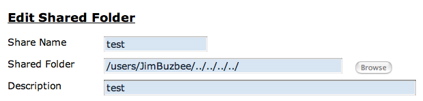
Figure 17: Hacked Share Name
Now I could mount this new share and roam around the operating system tree viewing boot scripts, binaries, the password file, etc. This showed me typical components such as Busybox for utilities, Samba for Windows sharing, vsftp for ftp support, etc. But I wasn’t able to view everything because I only had the privilege of a standard user.
To elevate my privilege, I needed to look further. Another common error developers make is insufficient validation of data entered into a form. Iomega made this mistake when processing the input entered into the Email Alert form. I found that by using “back ticks” I could embed an arbitrary command into the email address and Iomega would dutifully pass this on to a command shell. Also, when I executed a command to list all of the running processes, I found that this command was executed as the “root” user, another “No-No” for developers (Figure 18).

Figure 18: Running my command as root
Game over. Now I could change the password file to give my user root privileges, execute my own scripts, edit any file, etc. Note that in order to do what I did, I needed to have the administrator password to start with, so this is not a wide-open vulnerability. But also remember that administration has to be done over an insecure HTTP connection instead of a secure HTTPS connection, so the administrator password could be exposed to a determined local user.
Conclusion
I found the 150d to be a powerful NAS, with decent performance. The user interface is well designed and the RAID modes provide a measure of protection against disk failure. The USB ports give the ability to expand storage and also to share a printer to the network.
This feature set is fairly complete—as long as you’re not looking for media serving—but not as extensive as some competing products such as the Infrant ReadyNAS NV. The fact that it supports Linux, Apple and Microsoft network file systems is a plus, as is its Active Directory support.
The
feature was nice as well, making it easy to plug and unplug disks while the NAS was up and running. But I would liked to have seen logging, a lower noise level, and the ability to update firmware from my Mac.
Overall, I would recommend the 150d if you’re a small business administrator looking for a cost-effective way to add controlled storage to a heterogeneous network.