

Introduction
| At a Glance | |
|---|---|
| Product | Buffalo LinkTheater Wireless A&G Network Media Player (PC-P4LWAG) |
| Summary | Network Multimedia player with Wireless 802.11a & g support |
| Pros | • Inexpensive • UPnP Compatible • Viiv Compatible |
| Cons | • Limited video codec support • No HDMI port • Dull user interface • Buggy |
When I reviewed the Buffalo LinkTheater mini
last year (which has since been discontinued), it was the first network multimedia device I’d seen in the sub $100 range. But
even though the mini was cheap, I judged it missed the mark by making too many concessions
to get the price down. In this review, I’ll check out a new entry in the LinkTheater line.
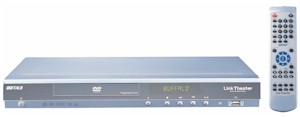
The Buffalo A&G Network Media Player can be found for around $210 and has the same form-factor as the mini, but it adds support for wireless networking, additional video codecs, 720p HD capabilities and optical audio.
Setup
Figure 1 shows the back panel of the LinkTheater. From left to right, you can see a 10/100 Ethernet port, TOSLINK (optical) digital audio port, right and left analog RCA audio connectors, a composite video port, an S-Video port, and a D4 connector for component HD video (cable included). Also present are two 802.11a/g antennas. But nowhere to be found is an HDMI port, which seems to be a continuing theme for Buffalo media players.
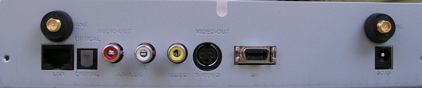
Figure 1: LinkTheater A&G back panel
Supporting 802.11a is an interesting choice by Buffalo, since it’s not often used these days. But perhaps Buffalo chose 802.11a to give users the option of a utilizing a less-crowded wireless spectrum, since the range used by 802.11g is getting pretty crowded.
Although wireless use is a major feature of this unit, for my initial checkout I hooked it up with Ethernet. When you can use it, Ethernet is always preferred for moving large video files around. In this mode, the device booted up and automatically acquired an address via DHCP.
I wanted to check out the HD capabilities of the device, but the initial setup has to be accomplished via the analog standard-def output. Once the device is booted up, the configuration screen can be used to change the default output to the HD port (Figure 2).
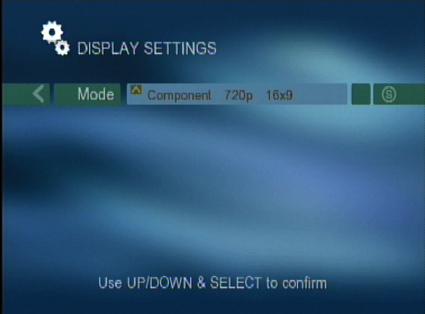
Figure 2: Changing the output resolution
When running, the product drew about 7 watts of power, and when idle it drew about 6, so it is an efficient little unit.
The LinkTheater can get media in several ways. If you have a Buffalo Network Attached Storage (NAS) device such as the
LinkStation or a TeraStation on your LAN, the LinkTheater can acquire the data using a Buffalo-unique protocol. The device can also acquire its data using any DLNA server on your LAN.
If you want to bypass the LAN altogether, it can get data from a FAT32 USB drive plugged into a front USB port. Finally, if you have an Intel Viiv certified PC, the LinkTheater can get its data that way. For my initial test, I turned to the included Windows-only CD for software installation. Figure 3 shows the first menu from the installation.
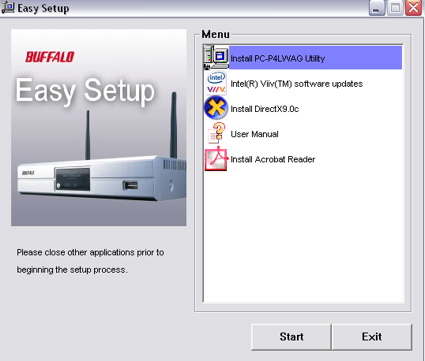
Figure 3: Software installation
Setup – more
Like most PCs out there, mine is not Viiv certified, so I went with the standard install. The installation went
smoothly, but I was a bit annoyed to have to reboot when the install was complete. When the reboot finished, I entered
the media server configuration menu to choose which directories I wanted to serve up to the LinkTheater (Figure 4).
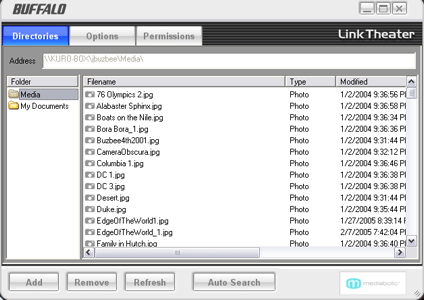
Figure 4: Server configuration
The basic idea is that you pick out the directories that include your multimedia, and the server will index them for
serving up to the LinkTheater. I found that this indexing could take quite a while, depending on how many files you
have. Once I had this running, I turned back to the LinkTheater for playback. Figure 5 shows the top-level menu.
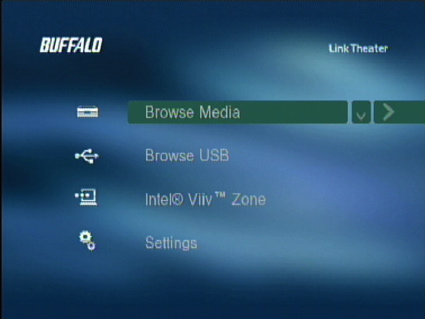
Figure 5: LinkTheater top-level menu
As you can see, the basic menu is fairly spartan with little visual appeal, sort of reminding me of the Windows 3.0 days. Under the “Browse Media” sub menu you’ll find a selection of all of the media servers present on your network (Figure 6).
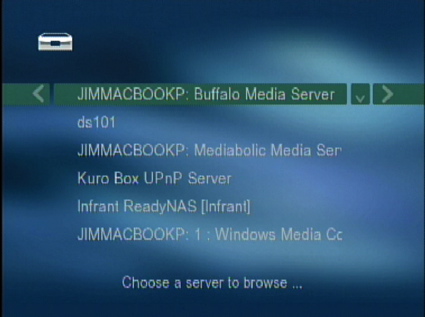
Figure 6: Server Selection
In my case, I had quite a few to choose from. For some reason, the LinkTheater install loaded two different servers,
the “Buffalo Media Server” and the “Mediabolic Media Server.” I was already running Windows Media Connect, which is a
standard Windows UPnP AV server compatible with the LinkTheater. I also had several more UPnP AV servers running on NAS
devices on my LAN that I could use. I checked out the various servers and for the most part, the LinkTheater responded the same with all of them. Figure 7 shows the options once a server is selected.
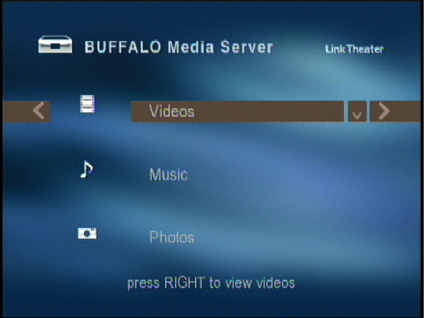
Figure 7: Media Server Main Menu
The top-level menu will vary a little depending on the server you’re talking to, but in all cases, the menu is very basic.
Video Playback
The first feature I checked out was the video capabilities. This is a hard feature to get
right since there are a lot of video formats in use. Over the last few years, I’ve tested a dozen or so of these types of products, and I’ve yet to see one that would play
every video file that I had laying around on my system. Buffalo advertises support for the following: MPEG-1, MPEG-2, MPEG-4, Xvid, WMV, and H.264 (MPEG-4 AVC).
But even though the basic format may be supported, it’s not always that easy, since
each of those types can vary greatly and can be contained in different file types. It was good to see H.264 listed,
since this is a nice video codec that is not often seen in these types of devices. But on the other hand, it was curious not to see DivX listed, since support for Xvid and DivX usually goes hand-in-hand with these devices.
For my testing, I usually just start down the line playing video files I have on my system. Depending on what files
you have, you will likely have different results. Usually MPEG-1 files play without a hitch on these products, but on the
LinkTheater, I had several that just gave me black screens, and I had one that played back with the wrong aspect ratio.
I had better luck with MPEG-2 files—all of my standard-definition files played fine. I could even play
decrypted VOB files ripped from DVDs. A
stress-test 1080i MPEG-2 file failed to play, giving me only a black screen. But since the LinkTheater advertises support for video only up to 720p, I can’t hold this failure against it.
Other formats were hit-and-miss and things get really confusing when
video codecs get mixed with video container formats. I only had a single H.264 video that was in an AVI container, and it failed to
play. However, I had a number of standard-definition Xvid files in AVI containers, and they all played fine.
Attempting to play one of my WMV files caused the LinkTheater to lock up, requiring me to pull the power cord. Some other WMV
files played, some didn’t—with little feedback as to why—which is common with these devices. I had a bunch of DivX
movie trailers and some played, even though DivX was not listed as being supported. But none of my High-def DivX videos played. If you have DRM-restricted video files, Buffalo documents that they can be played back from the Windows Media Connect server, although I had none to test with.
I’ll also note the behavior of the fast-forward and
reverse buttons on the non-backlit remote. These worked, but they were more like jump-ahead and jump-back, which is also common with these devices. It’s just too hard to pump the data across the network fast enough for smooth operation of these modes.
In general, I’d say the video-playing ability of this device was sub-par. None of these devices are perfect, but the LinkTheater played fewer of my files than similar devices I’ve tested recently.
Music Playback
Music is somewhat easier to handle than video since there are fewer formats in common use. Buffalo documents support for: MP3, WAV, WMA, M4A (AAC), LPCM, and AC3. At the top-level menu, options are presented for sorting your collection by Album, artist genre, etc. (Figure 8)
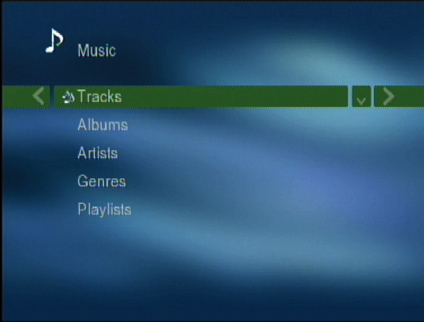
Figure 8: Music selection
Like most people, the bulk of my digital music is in MP3 format ripped from my CD collection, so that is what I do
most testing with. One of my big complaints about the LinkTheater mini was its handling of music that had added
album art from the iTunes music player. The mini would crash whenever it tried to play one of these files. I had hoped that this new LinkTheater would do better. It did, but only a little.
Instead of crashing on these files,
the LinkTheater would start and then just give up. Ugh. Once again, this is a flaw that I see in too many of these devices. I have a lot of
music files with album art, and none of them could be played. MP3s without album art played back fine.
When talking to a TwonkyVision UPnP AV server I was also
offered the ability to listen to Internet Radio Stations under the Music sub menu. This worked well and was a nice
feature. As far as other music formats, several WMA format files I tested played fine. Note that you won’t be able to
play DRM-restricted music purchased from the iTunes music store. However, when using the TwonkyVision server, I was successful in playing back one of the new non-DRM music files (AAC Format) purchased from the iTunes store. The file would not play, however, using either of the Buffalo-installed servers. While music is being played, you can navigate into the Pictures menu to start a slide show to accompany your music.
Photo Display
Buffalo documents support for pictures in JPG, BMP and PNG format. Interestingly, GIF was not listed, and indeed GIF files did not show up in my picture selection menus. Figure 9 shows a picture selection sub menu.
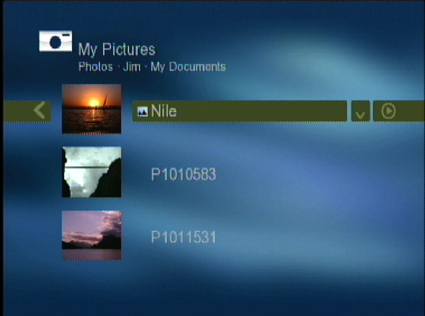
Figure 9: Photo selection
Finally something more than a flat list of filenames was shown; the thumbnail view was a nice touch. From this menu, I could select individual pictures for viewing or I could use the “Play” button to view them all in sequence. As far as picture transitions, such as fading, sliding, etc., none were supported. The only configuration item was the ability to change the time spent on a single picture.
I’ll note that the LinkTheater had an issue with the TwonkyVision server when showing images. Navigation was extremely slow. It sometimes took 10 seconds for the remote command to be recognized when trying to view a slide show from the Twonkyvision server. And when the photos did show, they were tiny, as if the LinkTheater was only viewing the thumbnail version of the image. This was not an issue with my other UPnP servers. I’ll also note that one time, the unit locked up while starting a slide-show. When the LinkTheater locked up, the screen saver never came on. So if your TV is susceptible to burn-in, be careful.
A quick check of the USB capabilities showed it worked pretty much as you’d expect. Plug in a USB device, and then you can browse the directory structure looking for content to play back.
Wireless
Since most people won’t have an Ethernet drop in their entertainment center, the wireless capabilities of these devices is important. As mentioned earlier, Buffalo supports both 802.11g and the less common 802.11a. Since my household runs g, that is what I tested.
To try it out, I shut down the LinkTheater, unplugged the Ethernet, and powered it back up. When the unit booted up, it gave me three options for wireless configuration: AOSS, a one-touch configuration option that my access-point doesn’t support; Viiv, which I don’t have; or “Regular” setup, which I choose. Note that the vendor-neutral version of AOSS—Wi-Fi Protected Setup (WPS)— is not supported.
Regular or manual setup wasn’t too difficult either. A site survey identified my access point, which I selected (Figure 10).
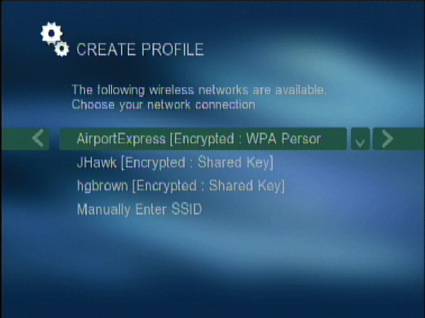
Figure 10: Wireless Site Survey
Next I entered my encryption key using cell-phone style key entry. Buffalo supports WPA-PSK (TKIP) and 128/64-bit WEP, but not WPA2, the most recent standard for wireless security. After I entered my encryption key, the LinkTheater joined my network and acquired an IP address via DHCP. At this point, everything functioned as before.
In my case, the access point I was using was also in my entertainment center, so it wasn’t much of a stress-test. To check it out further, I moved the LinkTheater out to the far corner of my house, one floor and several walls away where my signal strength is known to be lower. In this location, everything still worked, but over time, I would expect to see an occasional drop-out with video. And since none of my HD clips worked even on the LAN, I couldn’t really stress the LinkTheater. But if I wanted to stream HD content, I don’t think I’d be choosing a wireless connection in any case.
Under The Covers
Figure 11 shows the main board of the LinkTheater.
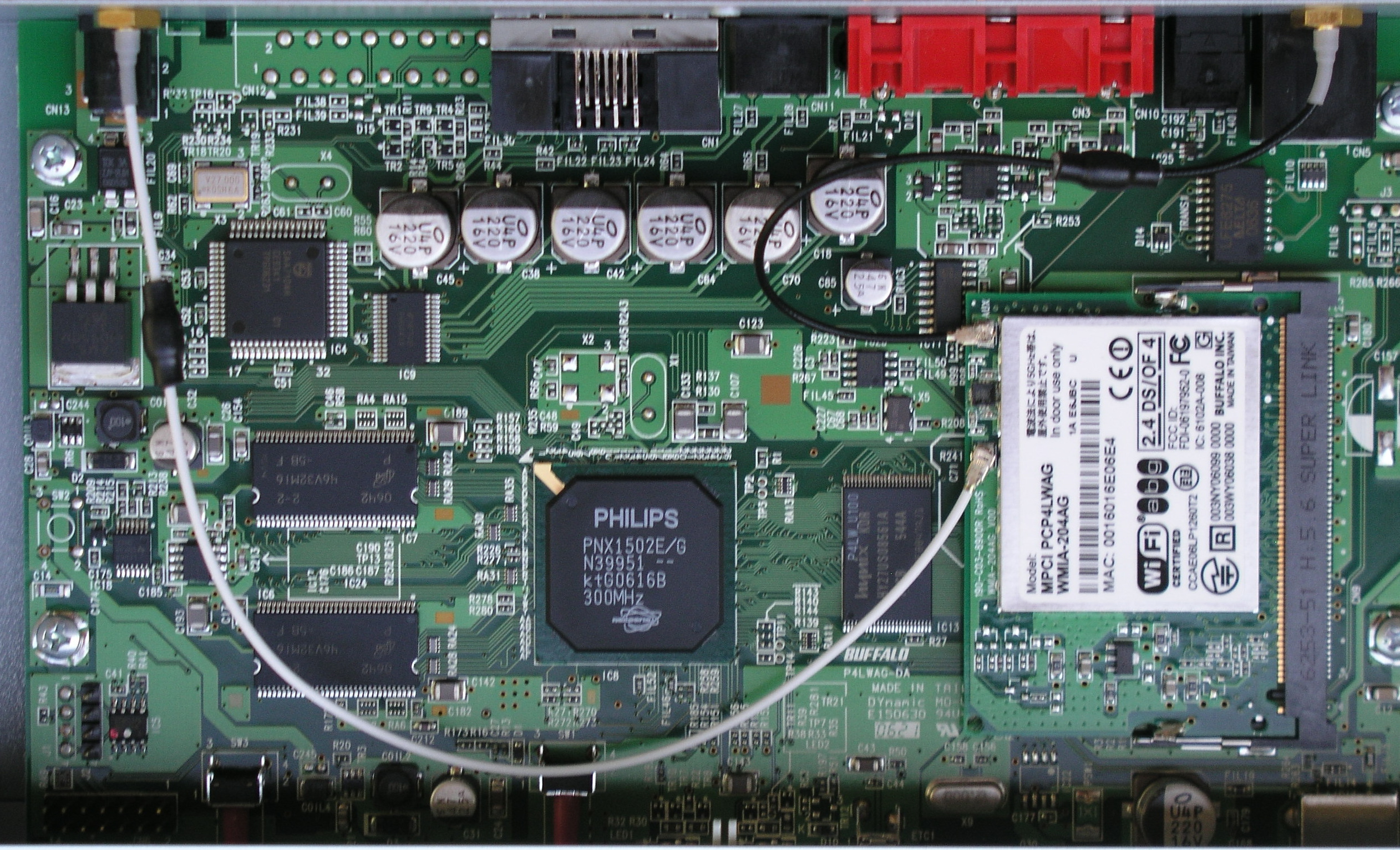
Figure 11: Main Board
You can see in the photo that the heart of this product is a Philips PNX1502E/G processor which handles audio/video decoding, general processing, network support, etc. A Buffalo Mini PCI card provides the wireless support. Software-wise, a network port-scan turned up nothing of interest, but the LinkTheater is advertised to be powered by a Mediabolic software stack.
Conclusion
In general, I found the LinkTheater A&G Network Media Player to be lacking in a lot of areas. Its user interface was spartan, it had a hard time with my music files, its handling of my video files was sub-par, and there wasn’t much special about its slide-show capabilities. I did appreciate that it worked with off-the-shelf UPnP servers, but it had trouble with my TwonkyVision server.
The list price of the LinkTheater is $250, so it’s a bit cheaper than similar products I’ve reviewed lately, such as the Netgear EVA8000. But even with the lower price, I’d still have a hard time recommending it.
The LinkTheater can also be compared to the new AppleTV, which I’ve also had a chance to look at. And while the AppleTV has its own issues—such as limited video format support—for $50 more than the LinkTheater you get a player that includes a 40GB hard drive, dual-band draft 11n wireless, HDMI and component video, access to YouTube video and a user interface that makes the LinkTheater look like a poorly-written MS-DOS application. If Buffalo wants to compete in this market, they still have a lot of work to do.