

Introduction
Update 11/15/2007: Slow WAN failover fixed. (Pg 4)
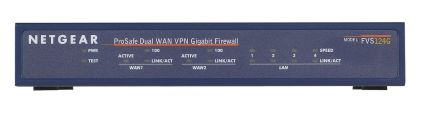
| At a Glance | |
|---|---|
| Product | Netgear ProSafe Gigabit VPN Firewall (FVS124GNA) |
| Summary | Mid-priced dual-WAN IPsec endpoint router with gigabit LAN |
| Pros | • Dual WAN capability • Gigabit LAN ports • One IPsec client license included • 25 IPsec tunnels |
| Cons | • No Vista support for IPsec client • Difficult VPN Configuration/Poor Ease of Use • Too little throughput for too many tunnels |
We’ve gotten requests for more reviews of routers with built-in VPN endpoints. Readers have also asked for more reviews of dual-WAN routers. The Netgear FVS124G fits the bill on both counts and won’t place too heavy a hit on your bank account either.
The FVS124G is part of Netgear’s Business-Class ProSafe line of Firewall routers. At only 7.5”x5” and about 1.25” high, it is a compact device that won’t take up too much real estate despite its critical role in your network. The front of the unit has the standard indicator lights for each port, and the back of the unit (see Figure 1, below) has two 10/100 Ethernet WAN ports, as well as four LAN ports, a reset button, and the power connection.
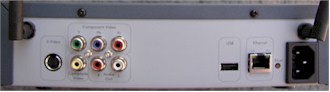
Figure 1: Rear panel of the FVS124G
For a product released two years ago, I’m impressed it includes gigabit LAN ports, since we’re testing newly released devices that don’t include gigabit LAN ports, and I think that is shortsighted. Even though gigabit speed may not be required, it is nice to have for possible future needs. I connected a LAN port on the Netgear to a gigabit switch and verified the Netgear was signaling at true gigabit speed. However, the FVS124G does not support jumbo frames, which somewhat reduces the advantage of having gigabit ports.
Many network devices have a warning indicating opening it could invalidate the warranty. Netgear doesn’t, and opening the device is easily done by removing a single screw. As you can see in Figure 2, the FVS124G uses passive cooling; there are no cooling fans or noise. I didn’t need to remove the heat sinks to determine CPU and Memory specs; Netgear lists them here as a 200 MHz 32-bit RISC processor and 4MB Flash, plus 16MB DRAM memory
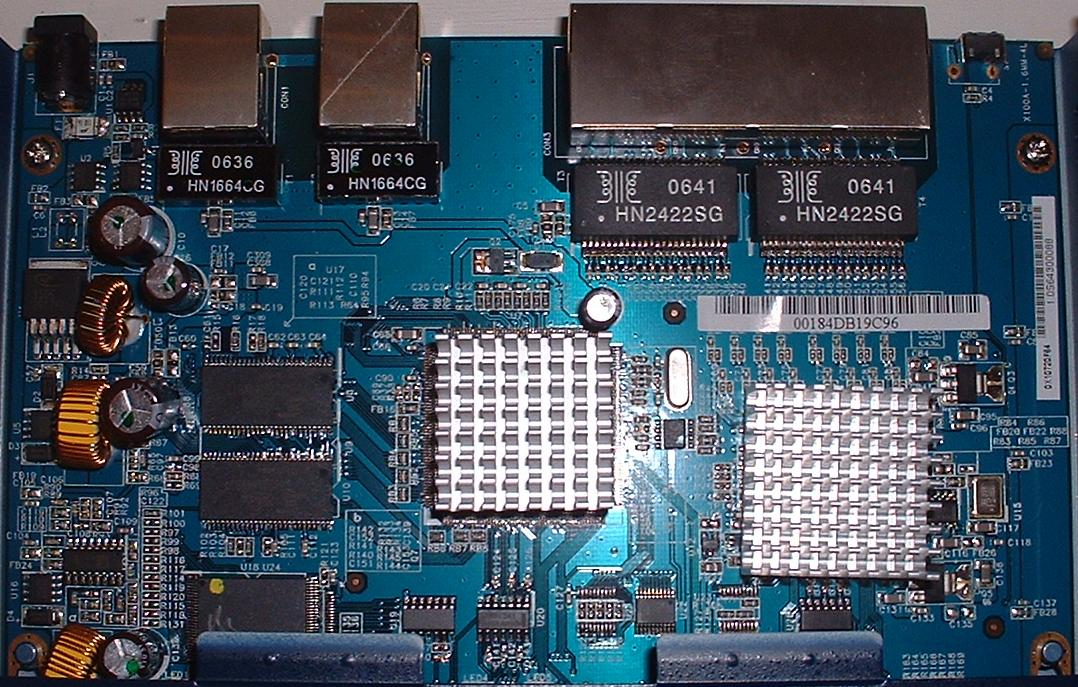
Figure 2: The internal view of the FVS124G
In Use
The menus of the Netgear FVS124G are pretty straightforward. If you don’t like reading manuals, you’re in luck: you should be able to get up and running on your own. I had no problem configuring the WAN port for a PPPoE connection, defining the subnet I wanted for my LAN in the DHCP server, configuring dynamic DNS, changing the default password, and enabling remote access. If you run into trouble, though, there is a link to the most current version of the manual in the FVS124G menu.
There is a nice menu option to check status, as you can see in Figure 3, below. Netgear also includes with each menu option a fairly clear set of help information, as you can see on the right of Figure 3.
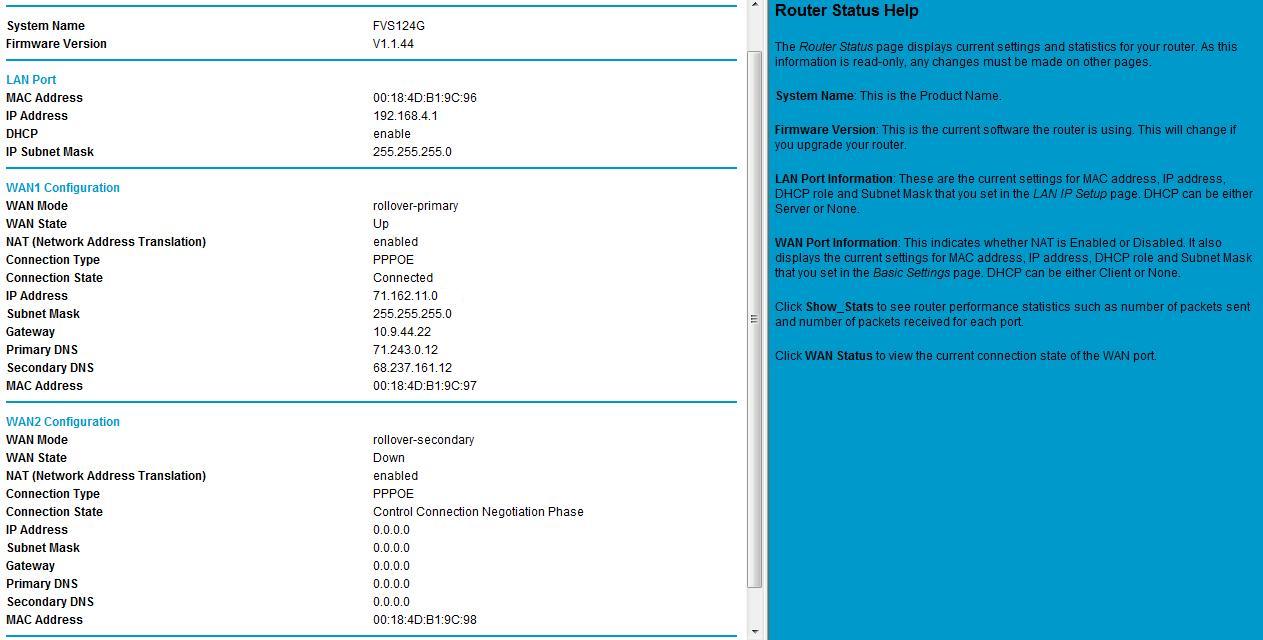
Figure 3: The status screen, with help information on the right
Firewall
The FVS124G is a more robust Firewall than a simple gateway router with NAT services, as it provides enhanced security through the use of Stateful Packet Inspection (SPI) technology. To quickly review, an SPI based Firewall creates and maintains a state table, which is a listing of all active connections. Connections are things such as access to an Internet web page, or an FTP session.
A Firewall creates additions to the SPI state table by looking at the Firewall’s rules to determine if the connection is allowed. The default Firewall rules for the FVS124G are to allow all Outbound connections and to block all Inbound connections, as you can see in Figure 4, below.
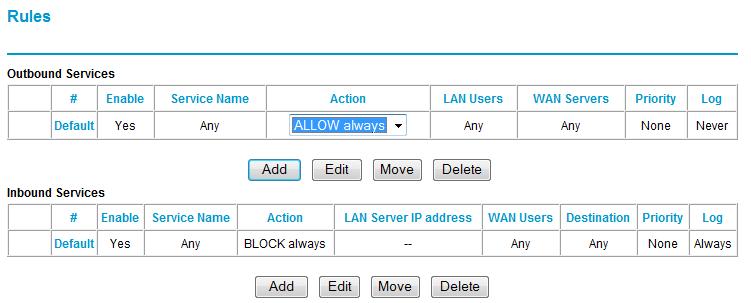
Figure 4: The default fiewall rules
With the Netgear’s default rules, if a connection is originated on your LAN, it will be entered in the state table and will be allowed through the SPI firewall until it times out after a period of inactivity. If a connection is originated on the WAN, it will be blocked by the SPI firewall unless there is a firewall rule allowing that connection. I wouldn’t call SPI a competitive advantage of the Netgear, as SPI is a relatively common feature in today’s small network routers.
Regarding firewall rules, the FVS124G has a pretty simple menu for creating rules to allow inbound connections to devices on your LAN. For example, if you’re running an FTP server on your LAN that requires WAN access, you can use Netgear’s menu of common network services to set up a rule to route FTP requests from the WAN to a specific server on your LAN. As you can see in Figure 5, I’ve set up a simple rule to “ALLOW Always” WAN FTP requests to 192.168.4.7 on my LAN.

Figure 5: A sample rule for an FTP server
Netgear’s rule menu also allows for creation of schedules, which would be used to restrict the rule to user-defined hours. Further, you can configure a rule to only work from specific IP addresses if you want to limit access to your LAN from specific IP addresses.
Firewall rules such as the above FTP example are also known as port forwarding, referring to the fact that the rule forwards inbound connections to port 21 (FTP) to a LAN IP address. Additional rules can be created to meet the needs of your LAN, and additional services can be added to Netgear’s list of approximately 40 pre-built network services.
For example, if you wanted to forward SIP signaling traffic for a VoIP application, you would first add SIP (port 5060) to the list of available Services and then create a rule to “ALLOW” and forward this traffic to an IP on your LAN.
VPN
The downside to creating Rules, or port forwarding, is you are essentially creating “holes” in your firewall, which could be used to compromise your network. Virtual Private Networking, or VPN technology, is another means to provide secure access to devices and services on your LAN without creating “holes” in your firewall.
The Netgear FVS124G will allow you to set up three different types of VPNs, including client-to-gateway, gateway-to-gateway, and client-to-gateway through NAT router connections with a total of 25 simultaneous tunnels. For this review, I successfully set up and completed the first two types, which I’ll walk you through below.
For the client-to-gateway, or “Road Warrior” connection, you need to load VPN client software on each PC that will be accessing the home LAN. Netgear includes a single license for its VPN client software with the FVS124G, which is actually based on a product called SoftRemote from SafeNet.
Netgear/SafeNet hasn’t updated their VPN client to support Vista, although SafeNet’s website indicates Vista support is due in 2007. I tried installing it anyway, and can confirm that it doesn’t work on Vista.
The Netgear VPN client does work with XP, however. I used Version 10.7.1 Build 10 of the Netgear VPN client (see Figure 6, below) on a Windows XP Home PC. Using the client, I was able to remotely access all the devices on my LAN, including mapping network drives, using Remote Desktop Connection to access a Windows server, and using SSH to access a Linux server.
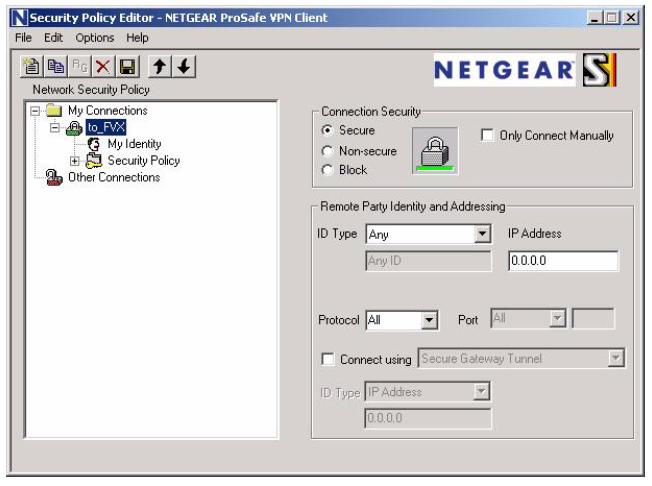
Figure 6: The VPN client software
VPN – more
The Netgear FVS124G manual directs you to use the VPN Wizard to configure the router and then walks you through the steps on configuring the client software. I found the instructions on Netgear’s website, located here, work better for configuring client-to-gateway VPN connectivity. These instructions add the step of using the router’s “ModeConfig” feature to specify an IP range for remote clients, as well as specific Tunnel, Encryption and Authentication options.
Using the instructions from Netgear’s site, a sub-interface was created on my remote PC and assigned a new IP address in the 172.16.0.0 /24 network. There is one problem in these instructions, though. In the “Configuring the Netgear ProSafe VPN Client for ModeConfig” section, Step 2, last bullet, it says “For Internet Interface, select your network adapter.” This is incorrect. It should be left as “Any” to allow the PPP/SLIP interface to be used once the tunnel is up; see Figure 7 below. Otherwise, you’ll be able to connect, but not pass traffic.
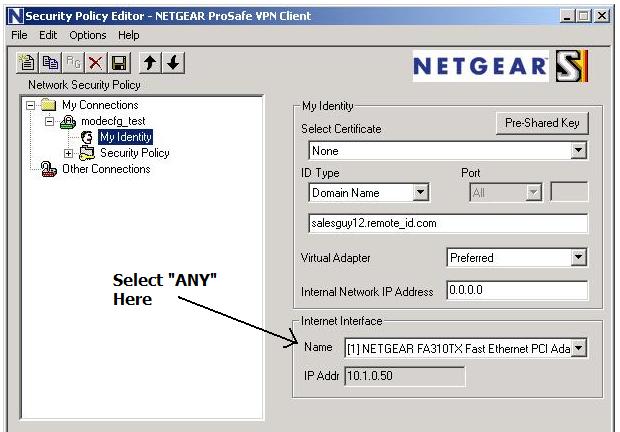
Figure 7: Be sure to select “Any” for Internet Interface
I was able to access devices on the 192.168.4.0 network from my remote PC with the sub-interface on the 172.16.0.0 network, as well as ping my remote PC from the 192.168.4.0 network. The advantage to this detailed approach from the website is greater control over services on your LAN, as you’ll have a defined IP range of all VPN clients accessing your network.
I liked that the VPN client had some useful intelligence. You configure the VPN client with the subnet range of the home LAN, and the software is smart enough to automatically create the VPN connection when you try to access an IP address on the home LAN.
For example, if I tried to set up an SSH connection to my Linux server remotely, the VPN client would see the request to route to my home LAN subnet and initiate and complete the VPN connection automatically. This is a nice feature for end users who may not be technically savvy enough to remember to set up their VPN connection to access the office LAN.
I was also able to set up a gateway-to-gateway VPN, as depicted in Figure 8, using the Netgear FVS124G as my (Local) and a Linksys RV042 as my (Remote).
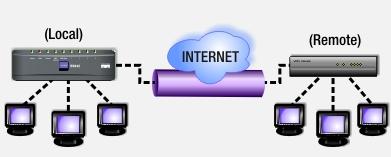
Figure 8: A gateway-to-gateway VPN
I used settings of DES Encryption and MD5 Authentication, selected Aggressive for the Exchange Mode, and enabled Perfect Forward Secrecy (PFS) on both routers. I also selected Diffie-Hellman Group 1 (768 bit) for the key exchange algorithm, and used a Pre-shared Key of “123456789.” Finally, since both routers had dynamic IP addresses, I used Fully Qualified Domain Names for targets and validation at both ends. Once you’ve got all the settings correct, there is a VPN Status button (see Figure 9, below) to verify your connection is established.
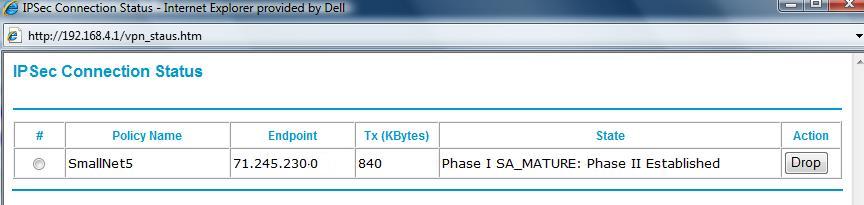
Figure 9: The VPN Connection Status
My Local LAN is the 192.168.4.0 /24 network, while the Remote LAN is the 192.168.3.0 /24 network. With the above VPN established, I have essentially connected these two private LANs over the Internet. The advantage of a gateway-to-gateway VPN is that I can allow secure access between PCs and Servers on both LANs without creating holes in either Firewall, or loading VPN clients on PCs.
It would take days to explain all the details in the above. The keys points are that both ends require the same Internet Key Exchange (IKE) and VPN tunnel settings, and that each side must know the other’s WAN IP/Domain and LAN subnet. Below are two screen shots; Figure 10 shows the configuration options I used on the Netgear for IKE configuration, and Figure 11 shows the configuration options I used on the Netgear for the VPN tunnel settings.
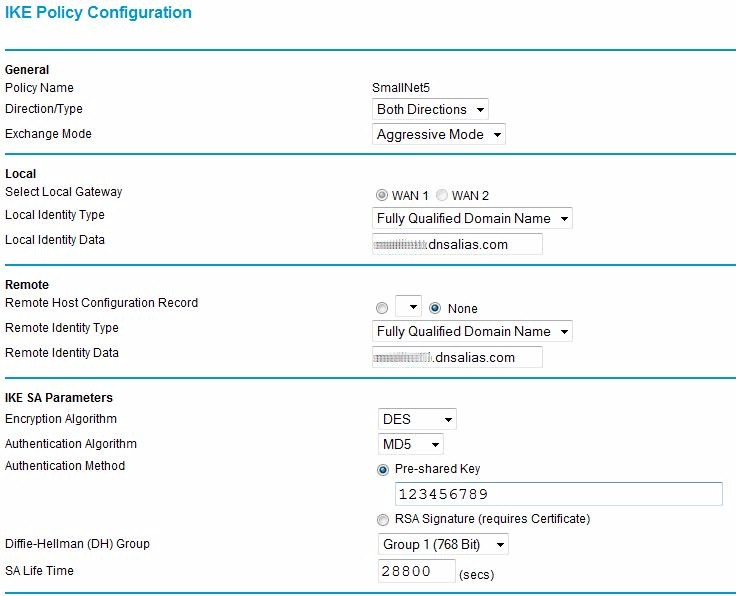
Figure 10: IKE configuration options
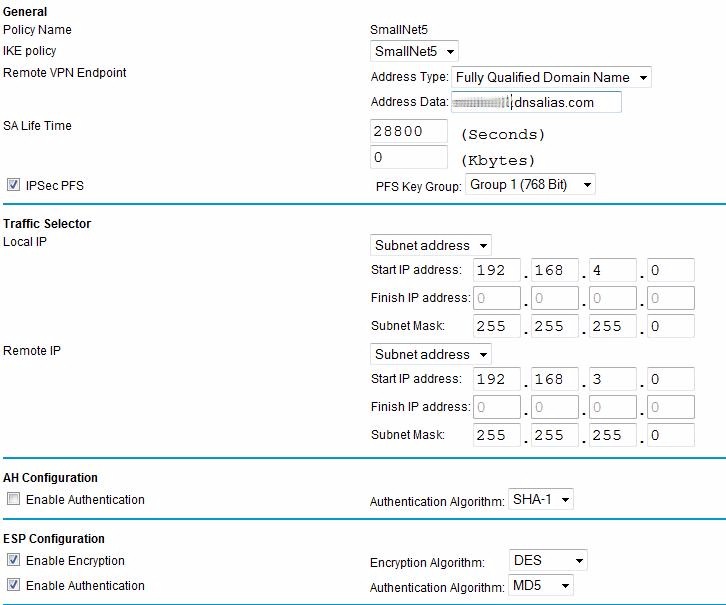
Figure 11: VPN tunnel options
The gateway-to-gateway VPN here demonstrates the ability of the Netgear to run standard VPN protocols and set up an IPSec tunnel to other brands of routers. Of note, the configuration I used has lesser security options. The Netgear FVS124G does support more secure AES-256 bit encryption, as well as SHA-1 authentication.
Dual WAN
Dual WAN functionality is something I think all small businesses should look into, and I’m not trying to increase business for the ISPs. Most businesses today rely heavily on email and Internet access, and have little tolerance for interruption of their service. Having the redundancy of Dual WAN connections is, in my opinion, good planning and smart management.
The FVS124G has two WAN ports, both supporting Ethernet or PPPoE connections. For Dual WAN, you can configure the FVS124G in Rollover or Load Balancing Modes. The Rollover mode will utilize one WAN connection exclusively, only switching to the second WAN connection if the first one fails.
The Load Balancing Mode will utilize both connections, but adds some configuration complexity. For Load Balancing over two ISPs, you may need to configure or “bind” some services, such as VoIP, to a specific WAN interface to ensure equal media flows.
I set up the FVS124G with Internet service from Verizon FiOS as my WAN1 connection and Comcast Cable as my WAN2 connection. Both services use simple Ethernet configuration and dynamic public IP addresses, requiring virtually no configuration on the FVS124G to get running. Figure 12 shows the router status with the two WAN services active.
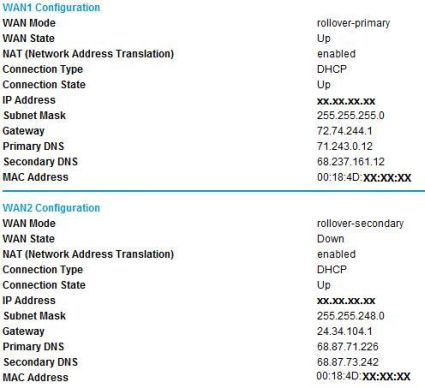
Figure 12: Router status with Dual WAN active
Netgear uses DNS proxy configuration in its DHCP server. The Netgear DHCP server will broadcast its gateway address as the DNS address, in this case, 192.168.4.1. This is a more flexible solution than having to issue DNS IP addresses from each ISP and allows LAN clients to seamlessly use either WAN connection.
To test Dual WAN Rollover, I disconnected the WAN1 cable and timed how long it took to switch over to WAN2. On average, it took the router about three minutes to switch over from WAN1 to WAN2. Reconnecting WAN1 was seamless; there was no interruption to Internet access as the router detected WAN1 going active.
Update 11/15/2007: In response to a helpful comment from Joe Sutherland, I went back and found the settings in the WAN mode section that allow adjustment of the amount of time before a WAN failure is detected and triggers a rollover.
There are two parameters; Test Period (default = 30sec), and Failover (default=4), representing the number of failed Test Periods before rollover. The Test Period default of 30 seconds is the minimum, the router won’t allow you to set it any lower. However, the default value of 4 in the Failover field can be set to a lower number.
I repeated my test with the defaults, and then adjusted the Failover parameter. I was able to improve rollover time by 30 seconds for each “click” of this control, as would be expected.
BTW,to set up port forwarding in rollover mode when connecting to the secondary WAN port, specify the incoming interface (WAN1 or WAN2), then the port and internal server IP where you are directing the traffic. You need to set up the same rule for both WAN1 and WAN2 directed at the internal server. I tested this and was able to set up port forwarding for Remote Desktop Connection (tcp port 3389) traffic from both WAN interfaces to the same internal server.
WAN failure detection can be customized in the Netgear menu by configuring DNS lookup to the DNS servers associated with each interface (default), configuring a specific DNS IP, or by configuring an IP address to ping. I used the default setting. The other two settings would be useful to improve failover time if you have a DNS or IP address that is usable only via the primary WAN interface.
I also tested Dual WAN Load Balancing. As mentioned above, configuration can get complicated if you’re running path sensitive traffic flows over the Internet, such as VoIP. If your Internet use is primarily web surfing and email, though, this mode allows your LAN to use both WAN connections, essentially increasing available bandwidth to your LAN. Load Balancing alternates your Internet use from one WAN connection to the other, reducing the load on both WAN links, and results in better overall Internet performance.
In Load Balancing mode, I was able to run speed tests to speakeasy.net and speedtest.net simultaneously, and could see by the IP addresses that each was going out over different WAN interfaces, verifying the router was using both ISPs.
While in Load Balancing mode, it still took the router about three minutes to detect WAN1 was down when I disconnected the cable. Since Load Balancing is alternating between the two WAN interfaces, LAN access to the Internet in Load Balancing mode is intermittent until the router switches to WAN2. Likewise, when I disconnected the WAN2 cable while in Load Balancing mode, there also was about three minutes of intermittent Internet access until the router detected that interface down.
Both Rollover and Load Balancing gives you Internet access redundancy. Rollover is the router default and less complex. Load Balancing will let you use both ISPs, but may require some additional setup.
Performance
WAN to LAN throughput measured 13 Mbps, with LAN to WAN coming in at 12 Mbps. This is adequate for many Cable/DSL connections, but not fast enough for ADSL2+ and Fiber service. This places the 124G 39th out of 46 tested routers in our WAN to LAN Throughput Router Chart.
| Test Description | Throughput – Mbps |
|---|---|
| WAN to LAN | 13 |
| LAN to WAN | 12 |
| Total Simultaneous Throughput | 12 |
| Maximum Simultaneous Connections | 196 |
| VPN Client – Remote to Local | 5.1 |
| VPN Client – Local to Remote | 3.6 |
| Firmware version | 1.1.44 |
Table 1: FVS124G Performance Test Summary
NOTE: Our router test procedures are described here.
Given this throughput, it’s surprising that the router ranked #2 in number of simultaneous connections supported (196). Usually (but not always) a high number of maximum simultaneous connections tends to correlate to routers with higher routing throughput.
Throughput with the VPN client came in at 5.1 Mbps for a Remote to Local test and 3.6 Mbps for Local to Remote, as shown in Table 1 above. Again, not bad for lower-end Cable / DSL use, but inadequate for heavy VPN use with higher-bandwidth service. These throughput numbers would also have a tough time keeping up with 25 tunnels, unless activity was very low.
While making configuration changes, I noticed the device would hang occasionally upon choosing a menu selection or applying a change. Being impatient, I would then try clicking other links, refreshing my screen, or various other random acts. These actions periodically resulted in the device freezing, requiring a power cycle to get back on line.
Through trial and error, I discovered if I left it alone for a minute or so when it hung, it would often restore on its own without having to be power cycled or rebooted. I’ve experienced greater stability with Linksys’ RV042, which has a faster processor and double the memory, with an Intel 266 MHz processor and 8MB Flash, plus 32MB DRAM memory.
Pricing and Conclusion
The FVS124G isn’t a new product, having been launched in mid-2005. So, I was able to check a couple of online retailers to get some idea of customer (dis)satisfaction—something I always find helpful when investigating a product purchase.
I found a good number of comments reflecting frustration with the FVS124G. Common themes were speed, hangs, and challenges with VPN and dual-WAN configuration. Certainly, our test FVS124G was not the fastest router we’ve ever tested, and we did have our problems with incorrect VPN setup instructions.
VPN configuration is probably the most frustrating networking technology for non-experts to get working, and the Netgear is no exception. In my testing, I had functional results with the FVS124G’s VPN features, both with client-to-gateway and gateway-to-gateway tunnels. However, setting up the software and the router required a bit of trial and error before I could successfully establish connections.
For dual-WAN functionality, the Netgear FVS124G does the job, and with its Rollover and Load Balancing modes, provides useful options to best utilize both WAN connections for your network. I’d like to see the device failover from one connection to the other in less than three minutes, but I wouldn’t consider that a reason to not use dual WAN connections. Those three minutes go by rather slowly if you’re trying to get on the Internet. But three minutes is a lot better than three hours of outage!
Netgear recently announced a lifetime warranty on its ProSafe product line, perhaps in response to customer feedback. Regardless of the motivation, knowing that this product is warrantied forever provides great peace of mind!
The Netgear FVS124G is available at various retailers for about $150.00, which is in the same ballpark as the very similar Linksys RV042. Additional licenses of the VPN Client Software are available for about $40 per client. If you can give up the need for dual WAN ports, there are many other products available, including the Linksys RVS4000 (~$105), which has gigabit LAN and WAN ports, Netgear FVS114 (~$40), Zywall 2 Plus (~$170) , and the Netgear FVS318 (~$90).
If you’re looking for gigabit LAN support, IPsec remote client and gateway-to-gateway support, and dual-WAN capability, the Netgear ProSafe FVS124G has what you need.