

Introduction
Updated 9/20/07 – Figure 11 changed.
What if you were granted the gift of human flight in exchange for possesing the average land speed of a duckbill platypus? Would you take it?
Such is the riddle proposed by Microsoft. Networking in Vista has been retooled from the ground up, promising unprecedented (at least in the world of Microsoft computing) advances in the field of TCP/IP, UDP, and many other networking protocols and services. But the company that today’s home user and Information Systems strategists around the world have grown up with (and grown wary of when upgrade season comes) is still the same Microsoft it has always been.
So join me as we take a trip through Windows Networking… Vista style.
Author’s Note: For purposes of this series, we’ll be networking a Vista machine with an XP Professional machine.
Easing Into It
If you’re on a network with machines running multiple operating systems, chances are you’ll want all the machines to be in the same workgroup. This is where you get your first look at Vista “innovation.”
Depending on whether you have upgraded from XP Home or XP Professional, the name of your Workgroup may have changed. (Vista may or may not change the Workgroup name to reflect what it was in XP… depending on how you upgraded.)
Changing the computer name, Workgroup, or domain is still a System Settings property. In Windows XP you would simply right-click on “My Computer”, click “Properties”, and starting from a “General” tab, which gave you a very basic report on your system specifications, you could click on Computer Name, Hardware, etc…
But in Vista, “My Computer” has been renamed “Computer”. And rather than presenting you with tabs that would immediately allow you to modify your System settings, you’re greeted with the window shown in Figure 1.
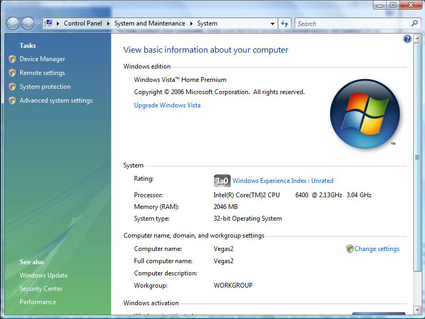
Figure 1: The “System Properties Before System Properties” menu.
This
window doesn’t immediately allow you to do anything. So you scroll down to Computer name, domain, and workgroup settings, click “Change Settings” and…
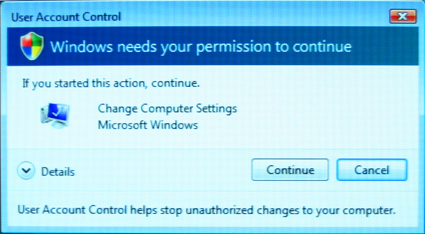
Figure 2: Windows doesn’t believe you really want to do that.
…Windows needs your permission to continue (Figure 2).
After clicking “Continue”, you finally arrive at the window where you can change your Workgroup and computer name. This "permission to continue" is a small thing, and has been covered to death by other articles. But it’s a recurring theme (and annoyance) for Vista’s Networking features as well, and I wanted to set the right tone here in the beginning.
So now that you have all of your computers on the same workgroup, you may be wondering why you can’t access the shared documents on the Vista machine from the XP system. The reason is that File and Printer Sharing is disabled by default in Vista (as they were in XP).
But even if they were enabled, you wouldn’t have been able to access the Shared Documents folder, because the Shared Documents folder has been renamed to “Public”. And had you known that before hand, you still wouldn’t have been able to connect to it, because shared folders in Vista are password protected by default. (More on that later.)
Network and Sharing Center
To enable File and Printer sharing, you must now travel to the all-new Network and Sharing Center (Figure 3) by right-clicking on “Network” under the Start Menu and selecting “Properties”. Here, you can change the name of your network, its location type, and its options. Note that the network name differs from the Workgroup name because it is just a label the user has chosen for his or her network, for example, "Johnny Redhot’s Flaming Network of Love".
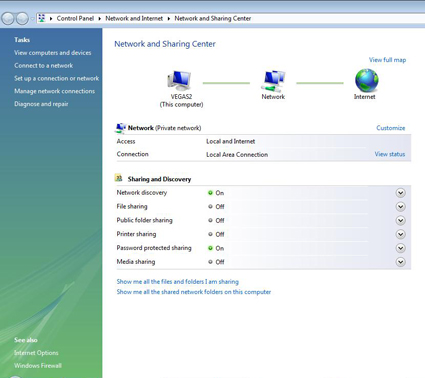
Figure 3: Network and Sharing Center
In Vista, sharing options can now be enabled individually. You can choose to enable Printer sharing but forbid File sharing. Or share files, but not the Public folder, or any combination therein. Network discovery may be enabled or disabled by default, depending on whether you chose Public or Private as your location type.
If you chose “Private” as your location type, your machine will be discoverable over the LAN by simply viewing the machines in your Workgroup. If you select “Public”, then discovery is limited and you may only see the machine you’re searching for my knowing its name or IP address.
Curiously… the Network Map doesn’t actually provide an accurate map of the network. Instead, it lists the machine that you’re on and how that machine is connected to the Internet (Figure 4).
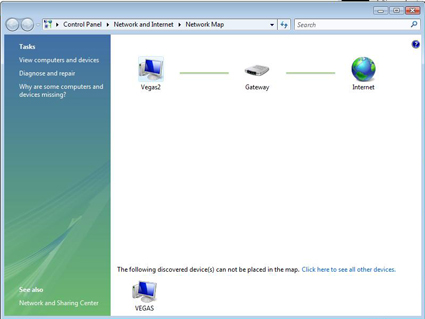
Figure 4: Vista’s Network Map.
By hovering over the clients and gateways, you get each device’s name and IPv4, IPv6 and MAC addresses. At the bottom of the screen is a list of devices that were “discovered” and “can not be placed in the map.” This begs the question: “If they were discovered, then why can’t they be placed
on the map?” I’d advise you to steer clear of that question, because it would only lead to others like “Why have a Network Map which doesn’t show all the discovered devices on the network?”
Instead, you can view and access the computers on your network by either selecting “View computers and devices” at the sidebar on the left or by selecting “Click here to see all other devices” at the bottom of the network map.
Continuing with the theme of making easy things difficult is the simple task of bringing up the Local Area Connection Status window (Figure 5).
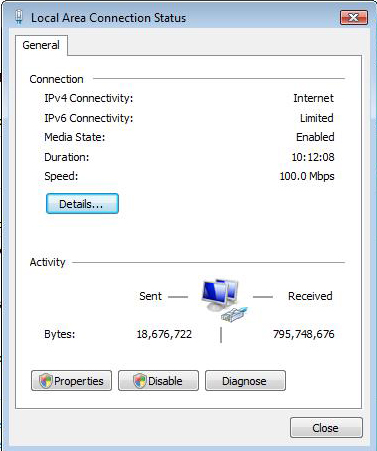
Figure 5: Local Area Connection Status.
Vista newbies may be wondering where the hell I came up with this screen. Well, for the first time since Windows 3.1, you can’t just double click on the little computer icon in the system tray to view your network status.
In an effort “to make things easier”, you must now enter the Network Sharing Center and select “View Status” from there. One more window and two more clicks that you have to go through to get something to simple (and something frequently accessed).
One of the things you’ll notice when you eventually get to view your network connection status is that, in Vista, it displays both the IPv4 and IPv6 connection rates. IPv6 was already available to users of Windows XP. but in Vista, IPv6 and IPv4 are both installed and enabled by default.
In addition, IPv6 in Vista sports an enhanced Teredo client (disabled by default) that is backwards compatible with IPv4. Unfortunately, IPv6 is only useful if you’re connecting from an IPv6 host to an IPv6 client or you’re connecting two IPv6 hosts or clients. My own router is only IPv4 compatible. So under the connection status in Figure 5, my IPv6 connectivity is listed as “Limited.”
Windows Firewall
One area where you can see a visible improvement is in the new Windows Firewall (Figure 6). The new firewall combines Vista with IPsec and provides management of both incoming and outgoing connections (in XP you could only manage incoming).
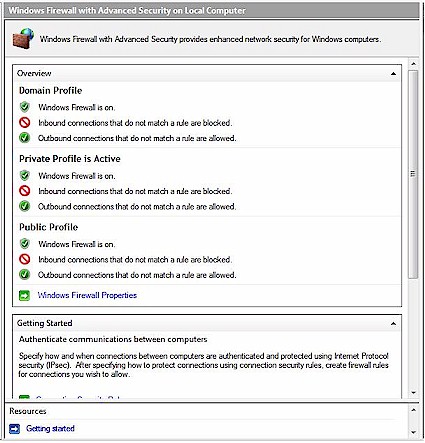
Figure 6: Windows Vista Firewall
Connection Security Status offers a wealth of connectivity functions, though, like everything else in Vista, they’ve all been given Disney names. This is probably the only place within Vista where you’ll actually be able to see a real improvement instead of just a bunch of fancy new menus that are only going to slow you down.
I had been working with Vista for quite some time while preparing this article. So I decided to check out the firewall logs since I didn’t see any kind of window where you could actually monitor firewall activity. The logs are located all the way at the bottom of the Windows Firewall main menu under “Monitoring.”
Monitoring provides sort of an overview of your incoming and outgoing firewall connections. If you have a specific secure location (like a VPN tunnel or something.) then it can be displayed under “View active connection security rules”.
The log file is right in the middle of the Monitoring window under "Logging Settings" and lists the file name C:\Windows\system32\firewall\pfirewall.log. But when I clicked it, I received a cheery C:\Windows\system32\firewall\pfirewall.log does not exist. Would you like to create this file?
Uh, yeah. And could you create the information that’s supposed to be there from the past week or so of use while you’re at it? I was (unpleasantly) surprised to find that the log does not keep track of dropped packets or successful connections by default, nor can you just turn them on from the Monitoring window. You have to return to the Windows Firewall main menu, select “Windows Firewall Properties” and turn them on from there. But when I did that… wonder oh wonders:
FIREWALL OFF
Why would turning on firewall logging actually turn the firewall off? Maybe it was just a fluke. But a hell of a fluke to run into if you’re getting bombarded by unwanted connections and you want to turn on logging (which is the only way I see that you can find out where the hits are coming from).
Network Backup
I saved Network Backup for last, because I figured it would probably be the easiest thing to do and I wanted to give myself a break at the end. But things turned out differently.
Network backups are managed via the Backup and Restore Center in the Control Panel. Unlike other places in Vista (*cough* Network and Sharing Center *cough*), you can actually back up and restore directly on the Backup and Restore Center’s main screen in simple mode!
Standard backup and restore is pretty cut and dry: You click on “Back up Files,” it asks you where you would like to back up your files and what drives you would like backed up, and then you’re off to the races.
Network Backup works a little more like this. You select “Back up Files” (Figure 7). Windows will stop you yet again for administrative permission.
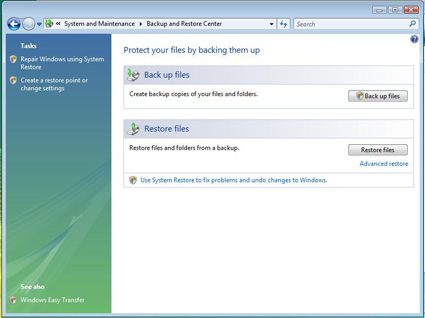
Figure 7: Backup and Restore Center
Browse for the appropriate network location (Figure 8).
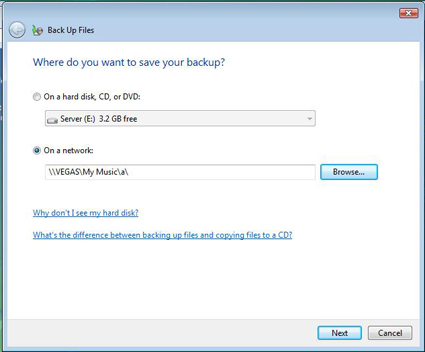
Figure 8: Network Backup.
And enter your user name and password (Figure 9). Note that I specifically created an account on the remote computer for this purpose.
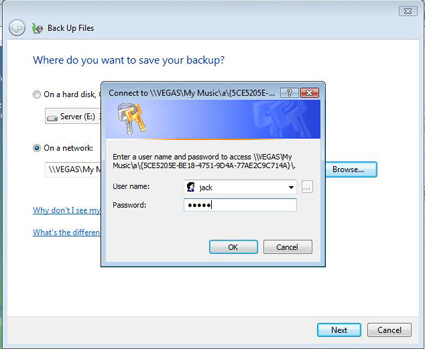
Figure 9: Network Backup User Authentication.
But then Vista tells you that you don’t have Full Control of the folder you are trying to access (Figure 10).
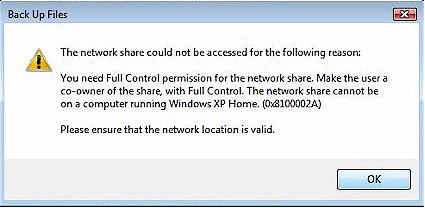
Figure 10: Network Backup Error.
But you do! (Figure 11)
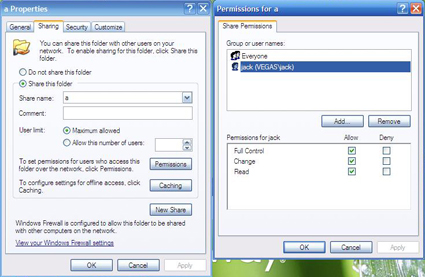
Figure 11: Permissions under Windows XP.
Network Backup – more
The problem seems to stem from the fact that, since the network share is listed as \\Vegas\My Music\a, you need to have share-level “Full Control” Permission of both the “a” folder and the “My Music” folder. If you have Sharing Permission to the parent folder, “My Music” in this case, it will carry over to the sub-folder, but not the other way around. If you just wanted to back up directly to a without giving permission for “My Music”, you would have to make “a” shared seperately.
This may run contrary to the logic of “Well I can read and write to the folder to my heart’s content. So why can’t I make a backup there?” I believe the restriction is somehow linked to the way password protection works in Vista.
You’ll notice that, once you’ve selected the network location for your backup, the first thing Vista does before attempting a backup is to ask you for your username and password. But there shouldn’t be a user name or password since it’s an open share on an XP machine which doesn’t require it.
So maybe the restriction is that someone with administrative priveleges should have access to the folder. Well, our user had administrative privileges and still couldn’t access the folder. I believe Vista checks the user name and password against the list of users in that folder’s sharing permissions. Then, regardless of what the user’s other rights may be, he is granted or denied access.
As I stated previously, all shared folders are now password-protected by default. I actually see this as a positive thing, as it helps to close one of the original back doors into XP. But the implementation is rather quirky. Unlike Windows 98 and earlier Windows versions where you could password protect individual files simply by right-clicking on them, going into the sharing options, and selecting “Full Access By password”, what do you suppose the password is for the password protected files in Vista?
If you’re logging in from a remote computer under a guest account, or if you’re like the majority of Vista users who haven’t even set a password (so that, when the machine boots up, it goes straight into windows without logon), there might not be a password to the remote shared folder! Simply entering a blank, if you don’t have a password, will get you nowhere.
Remember that the Public folder takes the place of the Shared Documents folder from Windows XP. This would seem to be the most ideal location for a network share, because all local users (people logging in on the same machine) and everyone in the same Workgroup have access to it. Unfortunately, for networked computers, this access is not enabled by default because file sharing is not enabled by default.
Furthermore, since each folder is password protected by default, the only way you’ll have access is if you have an user account with a password set up on the machine you’re trying to access. This is more restrictive than In Windows XP where there was no password required to access the Shared Documents folder as “Everyone” was allowed access under default permissions.
Conclusion
So most of the networking benefits you’ll receive from upgrading to Vista will only be effective if every other computer, gateway, client and server on your network is also running Vista. From IPv6 to simple file sharing, the entire system seems to be set up so that you need to be a member of the Vista club (or a client connecting to a Windows 2008 server) to have hassle-free access to networked shares.
On the other hand, the benefits you’ll see in a mixed Vista/XP environment are minimal. In fact, you’re going to run into quite a few annoyances because of the way security and permissions are handled in Vista vs. XP.
In a future article, I’ll be networking from a Vista machine to another Vista machine so we can talk a bit more about IPv6 and its benefits. We’ll also discuss Wireless networking under Vista and the new Wireless Zero Configuration as well as VPN. Stay tuned.
In the meantime, if you have your own pet peeves (or kudos) about the Vista networking "experience", just post ’em in the Comments below!