

Introduction
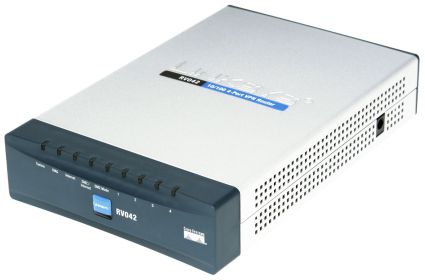
| At a Glance | |
|---|---|
| Product | Linksys 10/100 4-Port VPN Router (RV042) |
| Summary | Multi-featured dual-WAN VPN router supporting 30 IPsec tunnels |
| Pros | • Dual WAN ports • 30 VPN Tunnels, good throughput • Support for IPSec and PPTP Tunnels • XP and Vista supported |
| Cons | • WAN Fallback/PPPoE stability • No Gigabit LAN support • Inconsistency in documentation on VPN Tunnel quantities |
The RV042 is the entry-level member of Linksys’ line of wired business-class VPN routers. Linksys has three models in this lineup: the RV042, RV082, and RV016. All three are VPN and Dual WAN capable routers, with the main differences being the number of available LAN/WAN ports and VPN tunnels.
The RV042 has four 100 Mbps LAN ports and two 100 Mbps WAN ports
on the rear of the unit. We reviewed the RV082 here in 2004,
with its eight 100 Mbps LAN ports and two 100 Mbps WAN ports, all on the front of the
unit. The largest model in this lineup is the RV016, with a total of 16 physical
ports in front. The RV016 is interesting in that two ports are WAN, one is a
DMZ, and of the remaining 13, eight are LAN, while five are configurable as WAN or LAN ports.
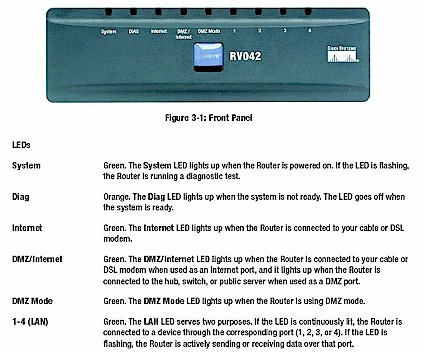
Figure 1: Front panel of the RV042
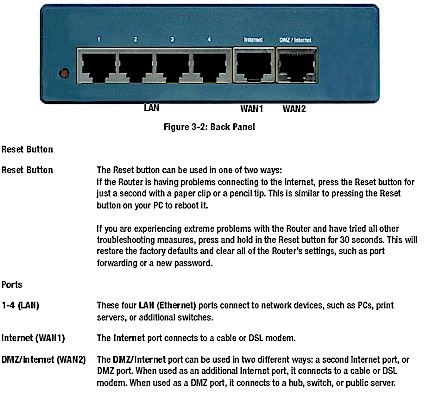
Figure 2: Rear panel of the RV042
The RV042 has a somewhat unique shape: deeper than it is wide,
measuring 5.1″ across the front, 7.9″ from front to back, and 1.5″ high. The
indicator lights are on the front, as well as both the Linksys and Cisco logos, reminding us of Cisco’s 2003 acquisition of Linksys.
The specific RV042 I’m examining in this review has been in
use in my network since February 2006. I have used it to successfully connect
to multiple ISPs, establish site-to-site VPNs with multiple different brands of
routers, establish remote client VPNs, leverage port forwarding, and provide security for my network, all successfully and reliably.
I’ve updated the firmware
multiple times (currently at 1.3.8.2) and modified configurations countless
times without hanging it or having to paper clip it. In short, I can report the RV042 is a stable and reliable device based on over 18 months of use.
With all this information
available on our web pages, the goal of this review is to cover some new ground
and highlight functionality not previously covered. For example, the firewall
menus of the RV042 are the same as that of the RV082 as described in the
2004 review, so I won’t repeat that discussion.
 See the slide show for a look at the RV042 mainboard, a few configuration screens and some performance plots.
Networking
For a gateway router, the RV042 provides some useful
addressing and routing functions to enable better network management. Those
functions include support for multiple LAN subnets, non-subscription based
dynamic DNS, one-to-one NAT, and basic distance vector routing protocols such as RIPv1 and RIPv2.
Multiple LAN Subnets
An easily overlooked feature on the RV042 is the ability to
support multiple internal networks. Say you’re running two subnets, one for
your client PCs and the other for your servers. The RV042 allows assigning
multiple addresses to the internal interface, providing a means of separating
your network into different subnets. It’s not as robust as 802.1q VLAN tagging,
but does provide network separation and routing between subnets. If you’re
familiar with Cisco routers, this is akin to assigning a secondary IP address to an Interface.
In Figure 3, I’ve configured the RV042 to use 192.168.3.1 as its LAN IP address. Doing so makes the 192.168.3.0/24 subnet the network assigned by the DHCP server to the PCs on my LAN.
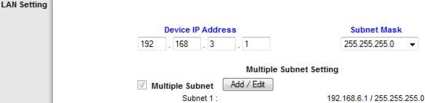
Figure 3: Configuring LAN subnets
I’ve also configured the RV042 to use 192.168.6.1 as its LAN IP address. I can then statically assign devices to the 192.168.6.0/24 network, using 192.168.6.1 as the gateway and DNS IP addresses.
I tested this by assigning a static IP address on the
192.168.6.0/24 network to a PC directly connected to the RV042. With this
configuration, I could still surf the Internet, as well as access devices on
the 192.168.3.0/24 network. The value here is this gives the network administrator additional options for segmenting a network.
Dynamic DNS
Remote access to a network requires either a static IP or
URL. Most ISP services for homes and small offices have dynamic public IP
addresses. A static IP can be expensive, though. In my area, Comcast charges
$57.95 for a standard Internet service with a dynamic IP address. Comcast’s
business class Internet service that has the option of static IP addresses
starts at $95 a month. If all you need is the static IP service, the additional $37/month is expensive.
The higher cost for a static IP address is due to the
dwindling availability of public IP addresses using IPV4 addressing technology.
There is a solution to this shortage, but it involves ISPs converting their
networks to the newer addressing technology, known as IPV6. Japan, some
European countries, and several Asia Pacific countries are rolling out IPV6
aggressively. The United States doesn’t seem to be moving in this direction as
quickly. 2008 will be interesting, though, with the Department of Defense having mandated that all its systems be migrated to IPV6 that year.
In the meantime, the simple solution is Dynamic DNS. The
RV042 has configuration options for separate Dynamic DNS accounts on both WAN
connections with three different organizations, including dyndns.org, 3322.org,
and oray.net. As you can see from Figure 4, configuration is easy. Simply select
your service and enter the user name, password, and domain you’ve set up with your chosen supplier.
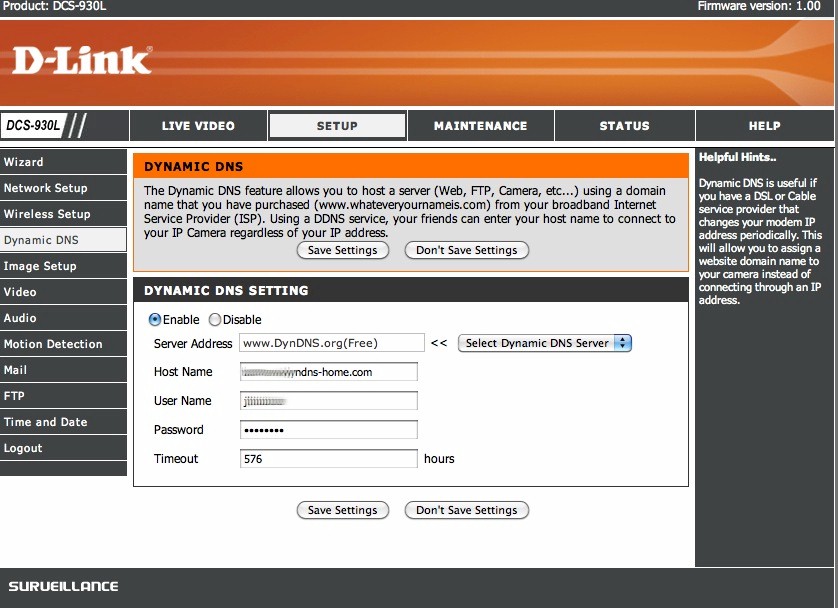
Figure 4: Configuring Dynamic DNS
We’ve reviewed other routers where Dynamic DNS is a subscription-based
service only. Kudos to Linksys for providing network administrators the option
to use either a simple free account, or a more robust subscription-based service.
One-to-One NAT
The RV042 has multiple DMZ options to allow external access
to internal devices, including designating one internal IP address as part of
the DMZ, or assigning the additional WAN port as a physical DMZ port. I’ll discuss the WAN/DMZ options shortly.
In the event your network has several servers with private
IP addresses, and you want to allow external access, and have a range of public
IP addresses, the One-to-One NAT function is a nice way to map those public IP addresses to those servers.
For example, let’s say you have three servers, which you’ve
assigned 192.168.3.2, 192.168.3.3, and 192.168.3.4 using the multiple subnet
feature previously described. Let’s also say you have three public IP
addresses, 10.0.0.2, 10.0.0.3, and 10.0.0.4. (Of course, these are private IP
addresses, but assume they’re public IP addresses for purposes of this example.)
As you can see in Figure 5, I’ve configured the RV042 to
translate the internal IP addresses 192.168.3.2-4 to 10.0.0.2-4. This allows
the servers to be available on the internal LAN as well as available to external users targeting the 10.0.0.2-4 addresses.
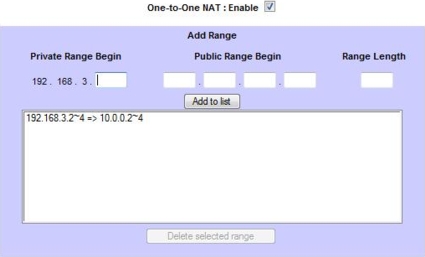
Figure 5: One-to-One NAT setup
Routing Options
The RV042 can be configured either as a Gateway router, or
as an internal network Router. The typical application is for the RV042 to be
configured as a Gateway router, supporting your Internet connection(s) and providing NAT, firewall, and network services to your LAN.
In the event that you’re using another router on your
network to maintain access to the Internet and plan to use the RV042 to route
between subnets, the RV042 can be configured as a basic Router. The RV042
supports both RIPv1 and RIPv2 routing protocols, as well as static routing to enable forwarding packets between subnets.
VPNs
The RV042 supports up to 30 VPN tunnels, established as
Site-to-Site tunnels or remote end user access tunnels. I’ve used my RV042 to
successfully set up and test Site-to-Site VPN capability with the SonicWALL TZ190W, the NETGEAR
FVS124G, and
the D-Link DFL-CPG310.
(Click on the model number to see any of these reviews.) We’ve put together a
slide show here
on the configuration options used for a Site-to-Site tunnel between the RV042 and the DFL-CPG310.
Clearly, the RV042 supports a wide variety of router-to-router
IPSec configurations. Encryption options include DES and 3DES, plus the more
secure Advanced Encryption Standard (AES) at 128, 192, and 256 bits. Authentication
options include both MD5 and SHA-1 hash functions. The RV042 adds additional
configuration options for Aggressive or Main key exchange and Keep-Alive
functionality, giving it the flexibility to connect with many different IPSec VPN capable devices.
For remote users, Linksys provides two options: their
QuickVPN Client, which is readily available for download from Linksys’ website,
as well as basic PPTP access. Out of the box, the RV042 supports 10 QuickVPN
Clients and five PPTP Clients. There are two versions of the QuickVPN Client software;
1.1.0 is for Windows XP/2000 machines, and 1.26 is a recently-released version
for Windows Vista. Having a Vista VPN Client is a plus for Linksys, as there are quite a few networking products that still don’t have Vista clients.
We were able to set up an account and password on the RV042,
install the client on both a Vista and Windows machine, click on connect, and
establish a connection using the default certificate that comes with QuickVPN. Figure
6 below is a screen shot of the simple VPN Client user setup screen on the RV042.
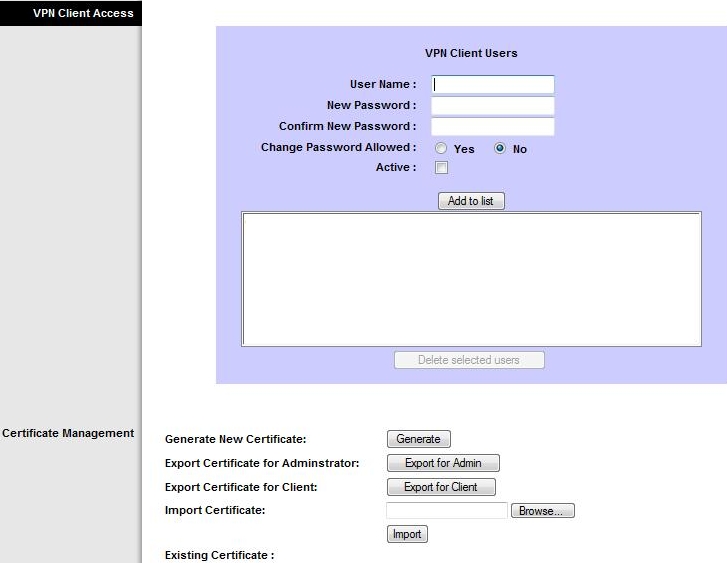
Figure 6: Setting up the VPN client
To update the security certificate from the default, simply
click Generate New Certificate and use the export buttons to make a copy of the
Router’s certificate and Client certificate. You’ll want to keep a backup copy
of the Router’s certificate in case you have to default the router, and you’ll
need to install a copy of the Client certificate in the Windows\Program Files\Linksys\Linksys VPN Client directory on each remote user’s PC.
Note that the firewall HTTPS option must be enabled on the RV042 for the VPN client to work. It’s a simple button on the Firewall page,
but I had this feature disabled for some reason, and was going nuts trying to
figure out why I couldn’t get the VPN client to work. (If I helped you with
this, please let me know by posting a comment. It’ll make my day to know that I’ve done some good in this world and saved someone else some VPN frustration.)
The other option for remote access to the RV042 is PPTP. PPTP,
or Point-to-Point Tunneling Protocol, is a simpler remote client software,
built in to both Windows XP and Vista. No software needs to be installed on the
Windows machine, eliminating common configuration and driver hassles. Configuring
PPTP is as simple as adding a user name and password in the RV042, and configuring the connection on the PC.
Creating a PPTP connection on a Windows XP machine can be
done via the Control Panel by clicking on Network Connections and then
selecting Create a new connection. The Windows Wizard makes it pretty
easy. Figure 7 is a screen shot from a Windows XP machine for setting up the PPTP connection.
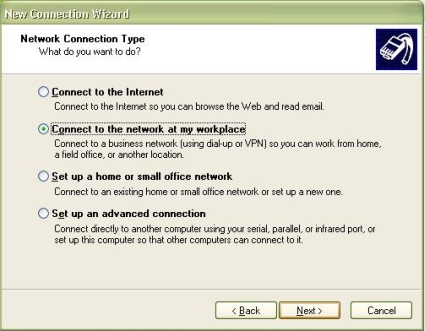
Figure 7: Setting up a PPTP connection on Windows XP
PPTP is supported in Vista as well. A PPTP connection is
added via the Network and Sharing Center by selecting Set up a connection or network, and then selecting Connect to a workplace. Figure 8 is
another Windows screen shot, this time from a Vista machine, showing the simplicity of the PPTP client.
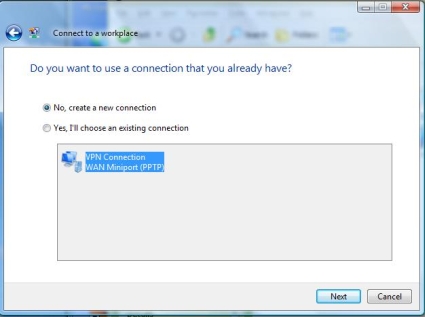
Figure 8: Setting up a PPTP connection on Windows Vista
PPTP is not considered as secure as an IPSec VPN Client. But
for simple purposes, it has its value. Either an IPSec or PPTP connection is
superior to leaving open holes in your firewall for remote access to key
devices. The nice thing about the RV042 is that it supplies the options for
both remote client technologies, allowing the network administrator a choice in remote access.
Dual WAN/DMZ
As mentioned in previous reviews, I’m an advocate for Dual
WAN connections for any organization that depends on email and the Internet to
conduct business. The RV042 has Dual WAN ports, with the option of configuring
the second port for a connection to an alternate ISP in either a failover or load-balancing mode, or configuring that port for a DMZ network.
The RV042’s two WAN ports support Ethernet or PPPoE connections. My primary WAN
connection is a Telco PPPoE connection. I used a second router to simulate an
external WAN connection. I configured the secondary WAN connection as a standard Ethernet connection and to obtain an IP address.
For Dual WAN, you can configure the RV042 in Smart Link Backup or Load Balance Modes. The Smart Link Backup mode will utilize one WAN
connection exclusively, only switching to the second WAN connection if the
first fails. Further, the RV042 provides configurations for Network Service
Detection, which instructs the RV042 to test the active WAN interface by
pinging a remote server or IP. In the event that Layer 2 on an interface is up, but Network Service Detection fails, this should trigger a WAN failover.
Interestingly, while in Smart Link mode, the RV042 does not
acquire or display an IP address on its secondary WAN port. Figure 9 shows the
RV042 with WAN1 active and WAN2 in standby with the RV042 configured in Smart
Link mode. Notice that the WAN1 port has a public IP (74.72.XX.XX) from my ISP,
while there is no IP assigned to WAN2, even though the port is green as shown in the graphical display.
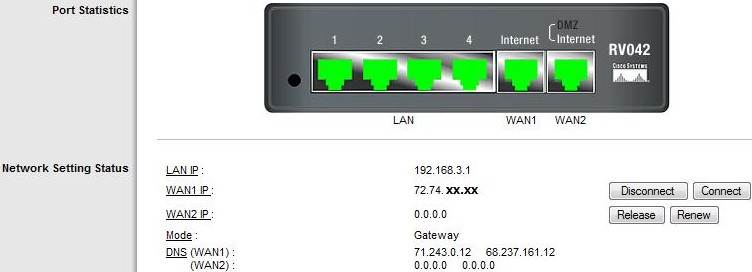
Figure 9: Dual WAN port status in Smart Link mode
To test Dual WAN Rollover, I set up a continuous ping to a
public website, disconnected the ISP cable from the WAN1 port, and plugged it
into the secondary router. Upon disconnecting the ISP cable from the WAN1 port,
I expected to see the WAN1 interface go down, and it to switch over to the WAN2 interface.
This worked as expected, with Internet connectivity, as
verified by the continuous ping, restoring on average in 45 seconds. In recent
tests of another Dual WAN router, the Netgear FVS124G, failover took nearly 3 minutes, so this was a relatively impressive result.
The Linksys disappointed when I restored the ISP connection to
the WAN1 port, however. This should have resulted in the RV042 switching back to the
WAN1 connection. Unfortunately, the only way it would connect back to the WAN1
connection was if I manually clicked the Connect button next to the
interface. I’m not sure if this is due to the login requirement of the PPPoE
connection or a failure of the Network Service Detection functionality. Nevertheless,
failover is only half the battle. Fallback is equally important, and this didn’t seem to work as expected.
The Load Balance Mode increases bandwidth, as well as
configuration options for utilizing both links. As you can see in Figure 10,
Load Balancing requires configuring the bandwidth capabilities of both links,
as well as binding various protocols and flows to specific WAN interfaces as required.
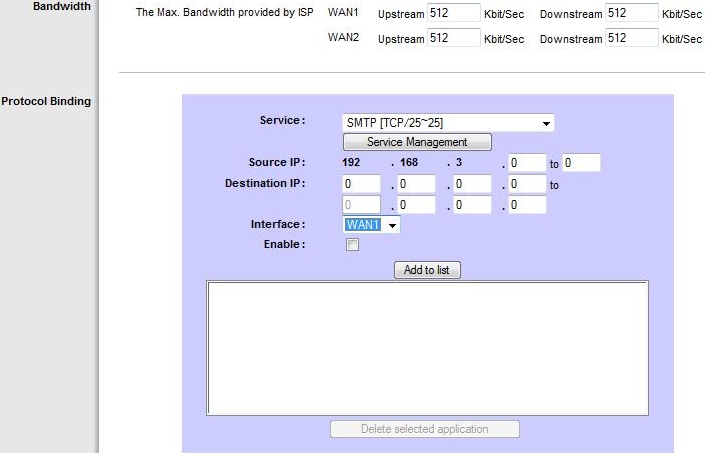
Figure 10: Dual WAN links in Load Balance mode
The Dual WAN/DMZ port can also be configured with the DMZ
option. This option makes sense when there are one or more devices with pubic
IP addresses that you want outside the firewall, but retain access to the Internet.
Port Management
There are six RJ45 ports on the back of the RV042. Four are
LAN ports, the other two are WAN/DMZ ports. The RV042 provides means for
viewing Layer 2 status on all six ports, reviewing statistics on the use of each port, and configuring options for each port.
As shown in Figure 11, there is a graphical display of the
RV042’s six ports in the System Summary page. If a port is green, it indicates
that the port has a good Layer 2 connection. Of course, Layer 2 doesn’t mean
data will pass; a Layer 3 address still needs to be assigned. I deactivated the WAN2/DMZ port in the figure to highlight the usefulness of this display.
Figure 11: System Summary showing port status
To see if the port is passing data, the Port Management-Port
Status submenu displays statistics on packets, bytes, and errors received and
transmitted. What I find the most useful is the per port configuration options.
Linksys provides a menu for setting each port’s speed, duplex setting, priority, and on/off status.
The Priority option is a simple QoS implementation,
telling the RV042 to prioritize the traffic on a specific port. In Figure 12,
I’ve configured port 3’s traffic (which is where I’ve connected a VOIP device) to have a higher priority than the other ports.
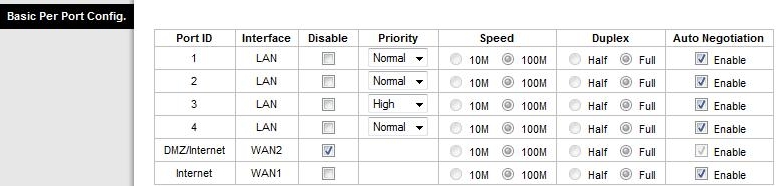
Figure 12: Per port configuration options
Performance
The RV042 is similar in functionality and features to the
recently reviewed NETGEAR FVS124G. It is
also interesting to compare the RV042 to another Linksys product, the RVS4000. Further,
as mentioned in the opening of this review, the RV042 is the little brother to
the Linksys RV082 and the RV016.
As you can see in Table 1, the RV042 produces some solid
performance numbers compared to the FVS124G and the RVS4000. Although it is in the
middle regarding maximum connections at 72, it produces the most balanced
throughput of these three routers. It is clear that the RVS4000 produces
significantly higher LAN to WAN throughput with its Gigabit capability, but
considering the typical WAN link is only 5–10Mbps down and 384Kbps–2Mbps up, it’s kind of hard to utilize 500+Mbps of LAN to WAN throughput.
The VPN throughput numbers are the most impressive,
indicating the RV042’s ability to handle multiple VPN connections
simultaneously. These throughput speeds show the RV042 shouldn’t be a bottleneck to inbound traffic unless your WAN connection is greater then 20Mbps.
| Throughput (Mbps) | |||
|---|---|---|---|
| Test Description | NETGEAR FVS124G | Linksys RV042 | Linksys RVS4000 |
| WAN to LAN | 13 | 54 | 16 |
| LAN to WAN | 12 | 80 | 530 |
| Total Simultaneous Throughput | 12 | 59 | 526 |
| IPsec Client Remote to Local | 5.1 | 21.9 | 1.6 |
| IPsec Client Local to Remote | 3.6 | 32.6 | 1.6 |
| Maximum Simultaneous Connections | 196 | 72 | 48 |
| Firmware Version | 1.1.44 | 1.3.8.2 | 1.1.09 |
| Price | $144 | $157 | $113 |
Table 1: Product comparison
The next three Figures are directly from the slideshow,
but they bear some explanation. As you can see in Figure 13, the RV042’s
simultaneous LAN>WAN and WAN>LAN throughput averaged about 54 Mbps over
one minute. Interestingly, the RV042’s combined throughput performance starts out high, and then trends downward.
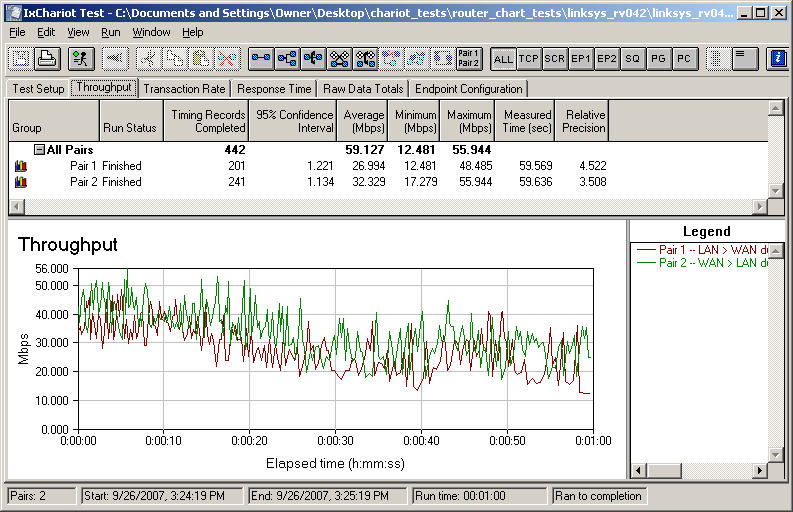
Figure 13: Simultaneous LAN>WAN and WAN>LAN throughput
If we look at throughput in each direction separately, we
can see the declining throughput occurs on inbound traffic. Figure 14 shows the
WAN>LAN throughput, and Figure 15 shows the LAN>WAN throughput. It is
clear that the WAN>LAN throughput graph declines, while the LAN>WAN throughput remains relatively steady and predictable.
We double-checked our testing, and these results were repeatable. QoS and Firewall functions weren’t the cause, as the trend continued even with these functions disabled.
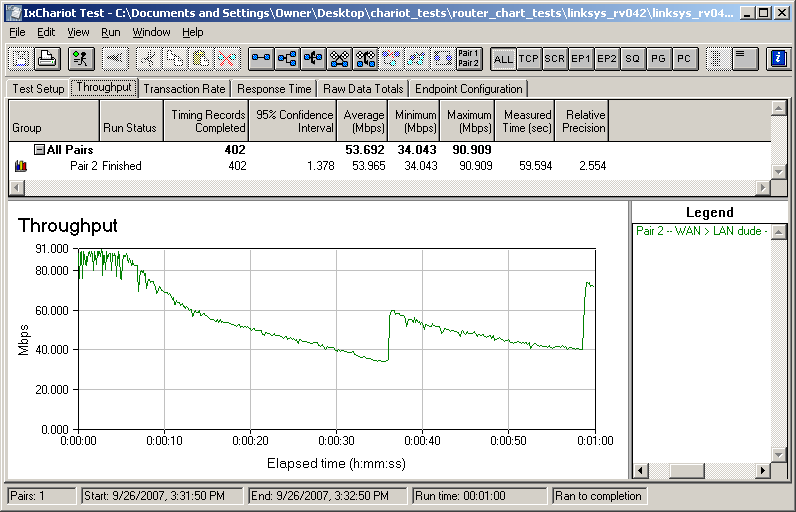
Figure 14: WAN>LAN throughput
The pattern above implies a condition of packet loss driving
down the transmission rate, then stabilization resulting in transmission rate
increase, similar to the TCP slow start algorithm. Although odd, I wouldn’t be
concerned about this data unless I was connecting to a WAN link with greater than 30Mbps of download speed.
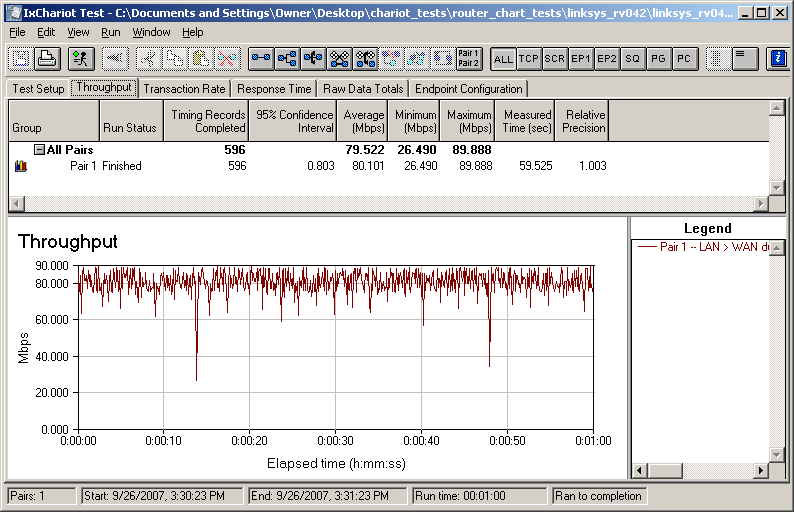
Figure 15: LAN>WAN throughput
Closing Thoughts
Overall, I give this product a hearty thumbs up. However, there are
some shortcomings, such as the fallback capability on the Dual WAN port. Both
failover and fallback should be automatic. However, even a manual connection to
a second ISP is superior to a single ISP that is down. Further, even though
this product has been out awhile, I feel that the lack of gigabit ports is a negative.
In terms of pricing, the RV042 comes in at $157, slightly higher than the $144
for the NETGEAR and about $45 more than Linksys’ RVS4000. If you need more
ports, the RV082 runs $258 and the RV016 can be found on line for $361. This
nice thing about the pricing on the RV0XX line is there are no subscription services or additional costs, other than adding VPN Client licenses.
Linksys has a product called the QuickVPN 50 Client License,
which can be found on line for about $119. This increases the total available
VPN Client capability to 50, an interesting number since the RV042 lists support for only a maximum of 30 tunnels.
I’ve been using the RV042 in my LAN for well over a year
without issue. I’ve hacked at its features, updated the firmware, set up
numerous VPNs, and used it to connect to multiple ISPs. I like the variety of
network options it provides, and I like the fact that there are no subscription based services required. The RV042 is a solid component on my small network.