

Introduction
Authentication is an essential part of securing any service or network, and one of the heavyweights of network authentication is RADIUS. RADIUS, which is an acronym for "Remote Authentication Dial In User Service", is a network authentication protocol that widely implemented for a number of different services.
According to Wikipedia, RADIUS was originally specified in an RFI by Merit Network in 1991 to control dial-in access to NSFnet. Livingston Enterprises was awarded the contract and delivered their PortMaster series of Network Access Servers and the initial RADIUS server to Merit. RADIUS was published as RFC 2058 in 1997 and RFC 2059 (current versions are RFC 2865 and RFC 2866).
Among its many uses, RADIUS is used by the 802.1X security standard, which is incorporated into the WPA and WPA2 wireless security protocols. But home and small business networks frequently use the PSK (Pre-Shared Key) form of WPA and WPA2, since those versions don’t require the RADIUS server that most of us don’t have access to. But many users don’t use strong WPA passwords, which leaves their wireless LANs open to being compromised via dictionary attacks.
In this two-part series I’ll show you how to use the most popular (and free) RADIUS server, FreeRADIUS, with your wireless router or AP that supports WPA or WPA2 "Enterprise". This installment will provide some background on the methods, standards and protocols used.
Why Authentication?
Encryption is obviously an important part of security. But why is authentication so important as well? Consider the following situation:
You’re at a coffee shop, surfing the Internet connected to its AP. But then all of a sudden, you lose connection to the AP. No problem. Wireless can be ornery at times and sometimes the wireless signal just gets disrupted, right? You reconnect, and start surfing again. If you’re running Windows, it probably spewed forth a mountain of re-authentication packets in an attempt to reconnect you to the AP. But how do you know that the AP you reconnected to is who it claims to be?
Generally we just assume that an AP belongs to its obvious owner. But the scenario above could be the start to a classic "man-in-the-middle" attack. In this exploit, the attacker deauthenticates a wireless client, then masquerades as the AP. The new AP then proxies all the client’s traffic through the attacker’s computer, reading everything the client sends and receives—including secure webpages.
So authentication provides a two-way benefit. It lets a service provider confidently identify users in order to grant network access only to authorized personnel. But it also provides users with the security of knowing that they are really connecting to the intended network.
Public Key Infrastructure Overview
In WPA and WPA2 "Enterprise", authentication is handled by five EAP (Extensible Authentication Protocols) standards, which rely on a Public Key Infrastructure (PKI). Now, cryptography can scare even the most hardened system admins and the documentation is, well… awful. Here’s a brief overview to help bring you up to speed.
In PKI, Alice and Bob each have a set of two keys, a public key and a private key. The keys work in such a way that if something is encrypted with the public key, only the private key is able to decrypt it and vice versa (I won’t get into the details of how this works mathematically, you can read all about the gory details here).
The public key, as the name implies, is released to the public. That way, when Alice wants to send a message to Bob, she can encrypt it using Bob’s public key. Once the message is encrypted, not even Alice can decrypt it without using Bob’s private key. When Bob wants to send something back to Alice, he uses Alice’s public key to encrypt the message so that only Alice will be able to decrypt it, using her private key (Figure 1).
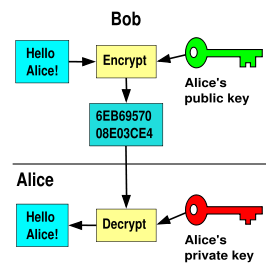
Figure 1: Bob sending an encrypted message to Alice (Courtesy Wikipedia)
This sounds pretty secure right? And it is, but we’re still missing one piece. Since the public key is, well, public, someone could create a another key pair that has the same identity as Bob’s. So, how can Alice know for sure that Bob’s key is really his?
This is handled by introducing an independent third party: a Certificate Authority (CA for short). The CA acts as a trusted intermediary that creates and vouches for the authenticity of public keys. As you might expect, this is a big responsibility. Companies like VeriSign make a business from issuing digital certificates that contain public keys with the identity of the owner and attesting to the authenticity of the key and owner.
This is not as easy as it sounds, since it requires actually verifying an applicant’s credentials and documents of identity. But this scheme allows anyone to check the validity of a public key against a trusted third party (the CA).
Now, in the process of encrypting a message to Bob, Alice can check Bob’s public key to see if it was signed by a trusted CA’s. That way, Alice knows for sure that she is using Bob’s public key, and that only Bob will be able to decrypt the message.
The actual authentication process used in EAP is a little more complicated than this, but this is a pretty good overall picture of how things work. By the way, our weapon of choice for creating our PKI in Part 2 will be OpenSSL.
Symmetric Key Underpinnings
All these private and public keys enhance security, but at the cost of performance. As you might expect, it takes a lot of computational horsepower and extra bandwidth to do all this encryption.
In WPA / WPA2 Enterprise, the client and server authenticate each other in a heavily-encrypted "tunnel", but then agree on a symmetric-key encryption scheme—such as AES or TKIP)—that is used for the rest of the conversation. This is done because symmetric key encryption is much less computation and bandwidth intensive.
Temporal Key Integrity Protocol
WPA uses TKIP as the underlying symmetric key encryption mechanism. TKIP uses the same RC4 based cipher as WEP, but rotates the key on a per-packet basis, making it practically impossible to back out the key with a traditional WEP attack. RC4 is a stream cipher, meaning it operates bit by bit which is generally faster but not necessarily as secure.
In addition, TKIP hashes the initialization vector with the symmetric key, whereas WEP only concatenated them. WEP’s main vulnerability is that the IV is included in plaintext in the packets that are sent over the network, making it easy to pick out the key with enough captured packets.
Advanced Encryption Standard
AES, implemented in WPA2, is the encryption standard used by the U.S. government. Normally, that wouldn’t make me feel too much better about using it, until I read that it’s also the encryption scheme they use all the way up to the "Top Secret" level. Now we’re talkin’!
In contrast to RC4, AES is a block cipher, meaning it performs the encryption on a fixed "block" of bits. This provides stronger encryption, but takes a bit more horsepower to compute. But this generally isn’t a problem on modern computers.
The Different Flavors of WPA
That’s enough background. Let’s start talking about WPA. WPA stands for Wi-Fi Protected Access. The original version—WPA—was created by a group organized by the Wi-Fi Alliance. WPA was a stop-gap measure, intended to restore confidence in 802.11 wireless technology that was lost when it was shown that its original security technology—WEP—could be easily compromised.
WPA is based on a subset of IEEE 802.11i, which was slowly crawling toward completion.
WPA2 is an enhanced version of WPA, based on the final, ratified version of IEEE 802.11i. The key difference between WPA and WPA2 is that WPA uses TKIP encryption while WPA2 uses the stronger AES.
Both WPA and WPA2 come in two versions: "Personal" and "Enterprise". The Personal versions are typically referred to as WPA-PSK and WPA2-PSK, with "PSK" meaning "Pre-Shared Key", which is a fancy term for password. The Enterprise versions are commonly referred to as WPA-RADIUS and WPA2-RADIUS because they require a RADIUS server employing one of five different EAP standards. If you want the long story behind why five EAP standards, George Ou’s article is suggested reading.
| Version | Encryption | Authentication | Pros | Cons |
|---|---|---|---|---|
| WPA-Personal | TKIP | PSK | – Easy to set up – Wide h/w support |
– Weaker encryption – Weak passwords are susceptible to dictionary-type attacks |
| WPA-Enterprise | TKIP | RADIUS+EAP | – Robust authentication | – Weaker encryption – Requires RADIUS server – Difficult to set up |
| WPA2-Personal | AES | PSK | – Easy to set up – Strong encryption |
– Weak passwords are susceptible to dictionary-type attacks – Might not be supported on older h/w |
| WPA2-Enterprise | AES | RADIUS+EAP | – Robust authentication – Strong encryption |
– Might not be supported on older h/w – Requires RADIUS server – Difficult to set up |
Table 1: Summary of WPA / WPA2 Key Features
Table 1 summarizes the key features and attributes of the four versions. The short story is that you should be using WPA2 if your hardware supports it and WPA2 Enterprise for the most security.
Tip: Our testing of Draft 802.11n products show significant throughput reduction when using WEP or WPA wireless security. You’ll need to use WPA2 (either Personal or Enterprise) in order to minimize throughput loss—which can still run up to around 20% with some products.
The good news is that, with a few exceptions, all current-generation "Wi-Fi" products support at least WPA2 Personal. The bad news is that there are many wireless LAN products out there that can’t be upgraded to support WPA2. Sometimes this is because their vendors have not produced the required driver and firmware updates. But there are also older products such as Wi-Fi VoIP phones and media players whose chipsets can’t handle the higher number-crunching requirements of AES.
If you find yourself in this situation, your only options are to contact the problem product’s vendor and ask if there is a WPA2 update available. If there isn’t, see if there is a WPA upgrade. Newer Wi-Fi access points and routers will allow you to run a mix of WPA and WPA2 clients. (They won’t allow you to mix WEP and either WPA or WPA2.) If neither WPA or WPA2 is available, you’ll need to replace the product with one that supports WPA2.
Conclusion
I have set up the basic concepts behind why your wireless network needs strong encryption and authentication and provided some background on how the authentication and encryption process works. In Part 2, I’ll show you how to tie all of this together and set up FreeRADIUS (which really is Free, except for the computer you need to run it on) to implement WPA2-Enterprise and add industrial-strength security to your wireless network.