

Introduction
Judging from some of the feedback in the gigabit switch reviews we’ve published this year—8 Port Gigabit Switch Roundup | $250 Gigabit Smart Switch Roundup—some readers are having problems getting the boost in performance they expected from upgrading to a gigabit LAN.
The problems usually arise when there is a mixture of gigabit and Fast Ethernet (100 Mbps) clients. The problem scenario usually involves simultaneous transfers from a single gigabit-equipped client to a mix of gigabit and Fast Ethernet clients. Figure 1 illustrates the troublesome setup. (The Netgear switch is just used for illustration. The problem is common to virtually all non-managed gigabit switches.)
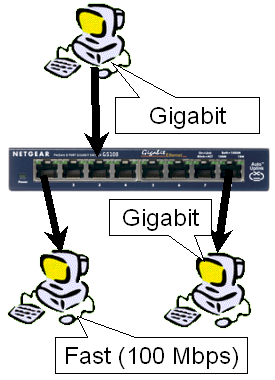
Figure 1: Flow Control test setup
The expected behavior in this configuration is for the sender’s gigabit bandwidth to be divided between the two receivers. Each receiver would lose some throughput due to the overhead of the simultaneous tranfers. But both would still function at speeds near those experienced when running solo.
But what readers have reported are instances of gigabit links being forced to Fast Ethernet speeds. One reader said that merely plugging a NIC running at 100 Mbps into a gigabit switch was enough to force all gigabit links to 100 Mbps speed. But the more common scenario requires simultaneous transfers from a single gigabit machine to a mix of gigabit and 100 Mbps computers.
The Culprit – Flow Control
Once a helpful reader (thanks, Walken!) provided a detailed description of the problem and some links to supporting documentation, the reason for this behavior made sense. The problem is caused by 802.3x Flow Control.
Flow control was intended to handle the situation where a transmitting computer is sending data faster than a receiving machine can handle it. The IEEE 802.3x standard specifies a PAUSE flow control mechanism communicated via MAC Control frames in full duplex Ethernet link segments. Like jumbo frames, the PAUSE mechanism requires all device in the data flow path to support it, which includes the switch.
Unfortunately, it seems (at least in small networks) that 802.3x does more harm than good. This may be partly because it duplicates the loss-based flow control mechanism already built into the TCP protocol. But whatever, the reason, I was able to confirm that the throughput loss that some people were attributing to "defective" or "low performance" switches, was in fact, due to Flow Control.
Confirming the Culprit
To explore the source of the problem, I set up three machines as shown in Figure 1. The gigabit-equipped computers had Intel PRO/1000 MT Desktop PCI NICs and the 100 Mbps machine had a built-in 10/100 Ethernet port that the device manager identified as a 3C920 (3C905C-TX compatible) Integrated adapter.
I used a Linksys SLM2008 8 port gigabit "smart" switch instead of a non-managed switch because the SLM2008 allows Flow Control to be enabled on a per-port basis. This would allow me to explore the effect of disabling flow control in the switch.
Once the three computers were plugged into the switch and correctly auto-negotiated their connections, I used IxChariot to send test traffic. I set up two High Performance Throughput scripts using TCP/IP. The scripts sent 10,000,000 Byte files repeatedly at full speed from one of the gigabit-equipped machines. One stream went to the other gigabit machine, while the other went to the 100 Mbps computer.
Figure 2 shows the result with Flow Control enabled in all NICs and their corresponding switch ports.
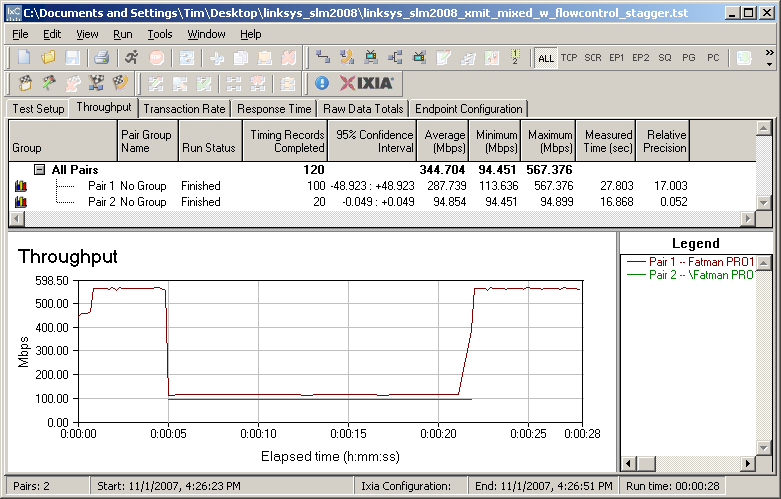
Figure 2: Throughput with Flow Control enabled
I delayed the start of the transfer to the 100 Mbps receiver for 5 seconds to test whether the connected, but inactive 100 Mbps receiver would affect the transfer between the gigabit transmitter and receiver. Obviously, it does not. It’s only when the transfer starts to the 100 Mbps receiver that the sender throttles back its speed to near 100 Mbps speeds.
Figure 3 shows the desired behavior, i.e. the gigabit receiver operates near gigabit speeds, while the 100 Mbps receiver runs near 100 Mbps. Note that the gigabit pair’s speed is limited to below 600 Mbps by the 32 bit PCI gigabit adpaters and the slower bus speeds of the two test machines (one a 2.4 GHz P4, the other an Athlon 3000+)—not due to any Flow Control mechanism.
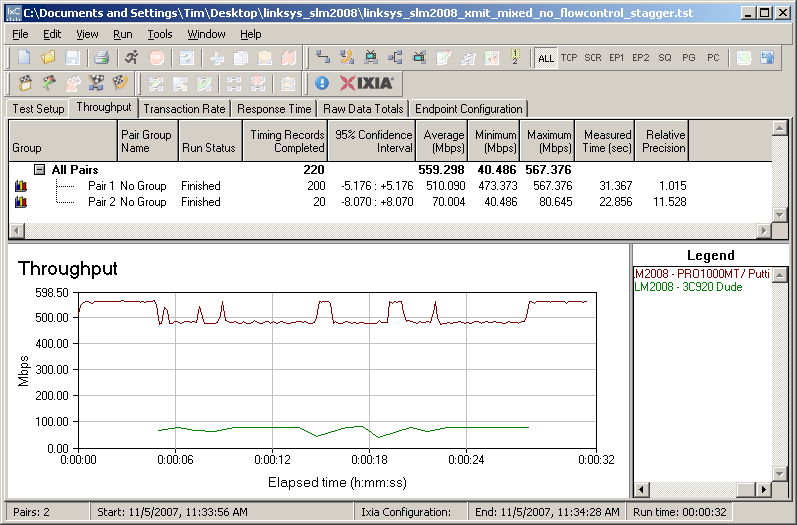
Figure 3: Throughput with Flow Control disabled
To gain more insight as to exactly where the PAUSE command was coming from, I tried all combinations of enabling and disabling flow control in each NIC and its corresponding switch port. I had thought that disabling flow control in the 100 Mbps NIC or its switch port would prevent the throughput-throttling, since that was the slowest NIC in the group. But I was wrong!
The only way that I could prevent the throughput reduction was to disable Flow Control in either the Transmitting computer’s NIC or its corresponding switch port. Disabling either one was enough to produce the desired behavior shown in Figure 3. But the disable worked only for the transmitting NIC.
This seems odd, since the PAUSE command is supposed to be issued by a receiver that can’t keep up with data flow. But I repeated my experiments multiple times, tried another managed switch and also an unmanaged gigabit switch, but the results were consistent. I was able to stop the throughput throttle-back only by disabling Flow Control in the transmitting NIC.
Closing Thoughts
So you’re seeing low throughput in your mixed gigabit / 100 Mbps LAN, you have a few options to fix it:
- Disable Flow Control in the NICs – This is the lowest-cost approach and should be tried first. But your adapter might not allow you to futz with Flow Control. I took a survey of the Ethernet adapters in my various machines and found that only the Intel PRO/1000 MT Desktop and internal 3C920 (3C905C-TX compatible) Integrated adapter had Flow Control properties.
Two notebooks that had Realtek RTL8139/810x family integrated 10/100 NICs did not show Flow Control properties, even though the chipset does support Flow Control. If my experiments are accurate, however, you only need to worry about diabling flow control in the gigabit adapters anyway.
- Disable Flow Control at the switch – It’s unlikely you would have to resort to this, since you should be able to disable Flow Control in your gigabit NICs. But if you can’t, then you need to get yourself a "smart" gigabit switch that has Flow Control enable/disable. You can’t do this by changing to a different unmanaged gigabit switch, since all of them support 802.3x flow control, which can’t be disabled.
But moving up to a "smart" switch might not be as painful a hit in the wallet as you’d think. For example, the unmanaged Linksys SD2008 can be found for as little as $71, while its "smart" SLM2008 cousin is around $100. And in addition to Flow Control, you get other goodies such as VLANs, bandwidth control, port mirroring, link aggregation and more.
- Upgrade to all gigabit NICs – This is a good solution if you have desktop machines, since PCI NICs can be had for as little as $12. But if your notebooks have only 10/100 Ethernet ports, or you have devices with embedded NICs such as media players or NASes, you won’t be able to upgrade.
By the way, you may need to hunt around for your NIC’s Flow Control setting. I finally managed to find the PRO/1000 MT Desktop adapter’s setting buried as shown in Figure 4.
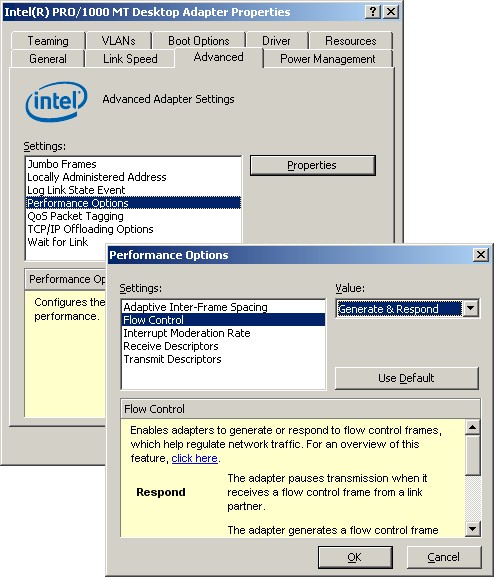
Figure 4: Flow Control option in Intel PRO/1000 MT Desktop adapter
By contrast, the 100 Mbps NIC’s Flow Control setting was one of the top-level settings in the adapter’s Advanced Network Properties.