

Introduction
By now, you’ve probably heard of virtualization technology. VMware,
a virtual software provider, had a very successful IPO earlier this year, and there
has been other high profile market activity, such as Dell’s $1.4B acquisition of Equal Logic, a
virtual storage company. Virtualization is really a hotbed of development and
growth, with industry analysis indicating that most IT departments either have or will undertake virtualization projects within the next year.
The concept of virtualization has been around for some time,
but in the last few years, has really grown in application and utility, even for
the small network. Simply put, virtualization is the ability to pool computing
resources such as CPUs, memory, disk space and network interfaces for multiple
functions, instead of the traditional 1-1 mapping of hardware to operating system functionality.
Quoting a white paper from a virtualization-focused website,
“a single eight-core host will easily accommodate 32 virtual machines on
average, which is more than enough to build a complete data center for many
small businesses.” For a single core CPU, running a host OS and three virtual machines is quite possible.
In this article, I’m going to leverage free
virtualization software for both a Linux-based VoIP application and a FreeBSD
Storage application. I’m going to use an older Windows XP Pro machine with a 3.2E P4 CPU and 2 GB of DDR400 RAM.
Virtualization Options
One of the cool things about virtualization technology is that
most virtualization companies offer free full or trial versions of their software. For a network administrator looking to evaluate options, this can be a
useful, low-risk means of determining if and how virtualization can be of value
in your network. For long term use, businesses typically require supported and
licensed software, but the free versions can be useful for getting started, and certainly valuable in lab environments.
Virtualization companies make money by selling advanced
software that works with the underlying virtualization software. VMware offers
products like Vmotion that enable centralized management and other features,
such as moving a virtual machine from one server to another in real time and
without service interruption. This can be highly useful for
multiple purposes, including peak demand management, redundancy, and maintenance.
VMware is one of the
more well known providers of virtualization software, with solutions for
desktop, server, and data center management. VMware Player is the free version
for desktop PCs, and VMware Server is the free version for servers, as shown in
Figure 1. VMware Fusion is a virtualization product for running Windows on a Mac.
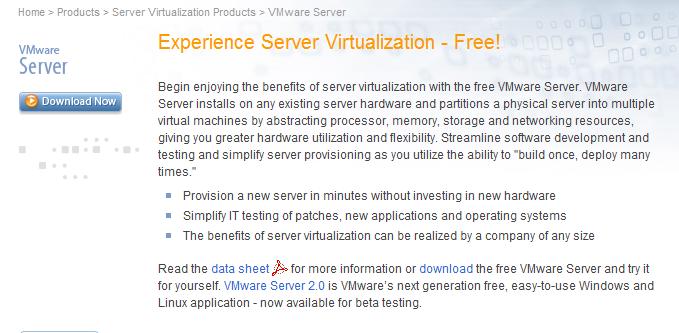
Figure 1: Webpage for VMware Server
A key difference between the Server and Player is the Server
version allows for installing an operating system from scratch and creating a
virtual machine, while the Player version will run a previously created virtual
machine. For experimenting with various operating systems and applications, the
Player version is probably adequate, especially if you’re looking to run
multiple OSes on a laptop. The Server version makes more sense when creating and customizing a virtual machine.
Microsoft
virtualization software includes their free desktop program, Virtual PC 2007, which enables running multiple OSes on a Windows desktop
simultaneously. In addition, Microsoft offers Virtual Server 2005—also free—for server-based virtualization. Further, Microsoft just announced a
new product, called Hyper-V, to directly compete with some of VMware’s more advanced products.
Citrix is a well known
remote access software vendor who has also joined the virtualization game with their recent acquisition of XenSource, makers of products such as XenDesktop and XenServer. Citrix offers a free
version called XenServer Express Edition. Virtual Iron is another virtualization vendor. Virtual Iron also has a free version available for download.
Before I start in the installation section, let’s clarify a
few terms. Host is the term for the computer/OS running VMware, while Guest is the
term for the computers/OSes running within VMware. For example, I have a
Windows XP Pro computer, which is my Host. I’ll be loading VMware server
software on this host, and have installed Linux and FreeNAS as virtual machines
(VMs). The Linux and FreeNAS VMs are Guests. Keep in mind that sufficient OS licenses are still required, whether the OS is running as the Host or Guest.
How To: VMware Installation
I decided to virtualize an IP PBX and a NAS, as these are
both independent functions running on my small network. Without the luxury of
excess funds, space, power, and switch ports, I’m always looking for ways to
optimize functionality in my network. Prior to this project, I was running
separate physical PCs for Linux and Windows XP Pro, two NAS devices, and had
daisy-chained multiple desktop switches to connect all my devices on a LAN. Each
of these devices produces fan noise and heat, contributes to a higher electrical bill, and fills up shelf space in my lab.
I chose VMware’s free server software, version 1.3, as VMware
seems to have the most buzz in the industry. I tried upgrading to versions 1.4
as well as the newer 2.0 beta version, but had problems with both and reverted to 1.3, which seemed to be the most stable on my Windows XP Pro system.
Downloading and installing the VMware software is straightforward. The
software is available from VMware’s website, and installation is
point and click. VMware Server is designed to run on a server OS, and during
installation on XP Pro warns that some of the features may not be available, as shown in Figure 2. Not to worry; it works on XP Pro.

Figure 2: Warning that VMware Server is designed for server OSes
Further, VMware offers a web interface, which on a Windows
box uses Windows IIS (Internet Information Services). So I encountered a warning
message (Figure 3) that indicated manual configuration may be required. Note that IIS is
not installed by default on XP Pro, but can be added via the Add/Remove Windows
Components option in the Add/Remove Programs Control Panel. Since I’m not using
the web features of VMware Server for this article, I can ignore these warning messages and not worry about IIS configuration.
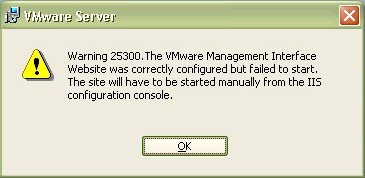
Figure 3: Warning that IIS is not installed (default on XP)
A few more clicks on OK and a full reboot, and VMware is
installed with an icon in the system tray as well as on the desktop. With the
virtualization application installed, we’re now ready to install a new guest operating system.
How To: Installing a Virtual Linux Machine
Linux is a highly available operating system that comes in
many different “flavors” or distributions. In the past, if you wanted to play
around with Linux, you’d install it on an old computer or set it up a dual-boot
on an existing system. Or if you were lucky, you might find a “Live CD” version of the desired distro, which ran entirely from the CD.
In the old computer case, there is the luxury of a
standalone machine, but the negatives of requiring another switch port, more
electricity, and more space. In the dual-boot case, changing to the other OS,
such as Linux, requires a reboot, creating a trade-off between two systems. And for the Live CD, the OS disappears when you shut down your system.
With virtualization, Linux can be installed within VMware,
and it will function completely as if it were an independent machine, all while
the Host OS is functioning normally. The first step is to download an ISO file image of
the distribution of your choice. For this example, I downloaded a fresh copy of
Ubuntu Linux 7.10 from Ubuntu’s website.
To install the virtual machine, there is a simple wizard
that guides the process. Clicking New and using the Typical
options moves the process along quickly. A subsequent window prompts to check which
operating system will be used. In this case, see Figure 4, I chose Linux
and selected Ubuntu from the Version drop-down menu.
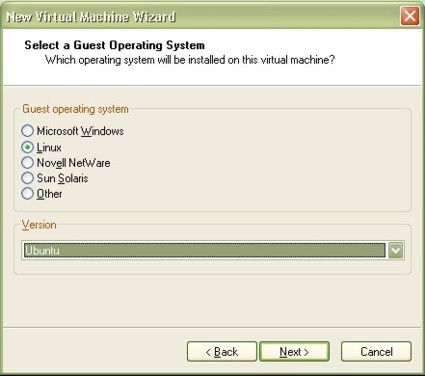
Figure 4: Selecting Ubuntu Linux as the OS
After giving the machine a name and choosing the directory
on my host machine in which to save configuration files, I selected my network
option, bridged networking, as shown in Figure 5. Bear with me; I’m
going to go into more detail on this subject in a later section in this article called “Networking with VMware.”
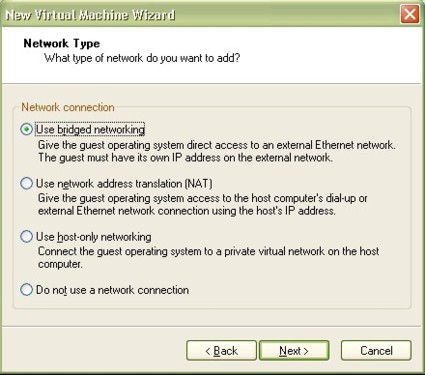
Figure 5: Network connectivity options for the virtual machine
Installing The OS
The next step in creating the VM is to allocate the disk
space within the working directory that will become the virtual disk for the
virtual machine. In this case, I allocated 4GB of disk space for this Linux
machine. Remember, my Linux machine will have full access to all my network
hard drives and resources, and I can always allocate additional disk space based on available disks in my physical host computer.
It takes a few minutes for VMware to create the disk, but
fear not, it is not partitioning the disk as it would in a traditional Linux
install. Rather, it is allocating disk space for the Linux virtual machine,
which can easily be reclaimed in the future if I decide to delete/erase the machine.
One of the nice things here is that there are no worries about
partitioning software or goofing up disk drives on the host machine. Simply
deleting the virtual file created for the virtual machine’s disk erases the configuration and returns the capacity to the host machine.
The virtual machine is now created, but the actual OS has to
be loaded within the virtual machine. Here’s one of the cooler aspects of
testing a new OS through virtualization: burning a boot CD/DVD of the ISO file
is unnecessary. Simply pointing the virtual CD drive of the virtual machine at
the ISO image of the Linux distribution will allow it to boot as if it were booting a physical machine to a physical CD, as highlighted in Figure 6.
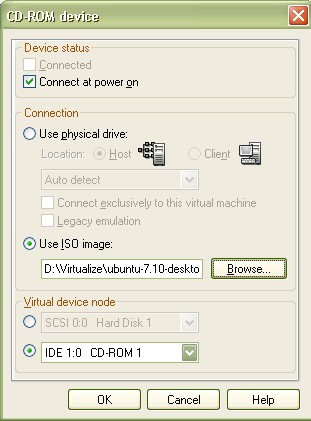
Figure 6: Booting an ISO image from a virtual CD drive
At this point, I’m now installing Linux as I would in a
fresh install on a physical machine. Figure 7 shows Ubuntu Linux install options.
I’ll spare you the details on installing Linux, but the end result is a fully functioning Linux machine running within VMware.
Letting the Ubuntu install set up its network interface using DHCP enables the virtual machine to get an IP address on my network, fully independent of the host machine’s IP.
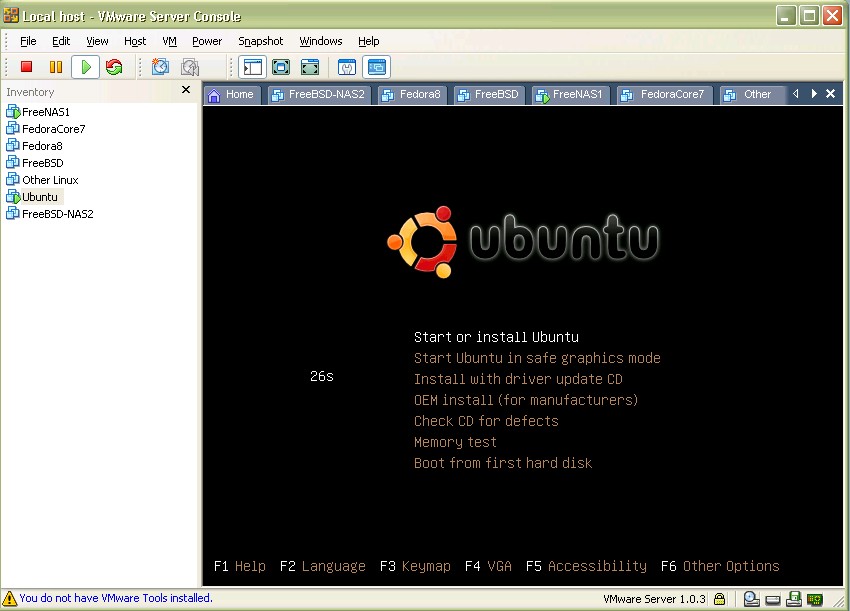
Figure 7: Ubuntu Linux installation options in VMware console
The VMware manual provided a couple of tips to optimize the performance
of a virtual machine. I’m using a Pentium 4 CPU with Hyper-threading enabled on
my host computer, so I could allocate two processors to my virtual Linux
machine. However, the VMware manual indicates that Hyper-threaded CPUs can
perform worse when selecting dual CPUs for the virtual machine, so I configured my Linux VM to use only one CPU.
Virtualization can be a memory hog, so the more memory
allocated to the virtual machine, the better it will perform. The trick is
balancing the amount of memory allocated to each virtual machine without
degrading the performance of the Host or other guest machines. Linux
installations default to 256MB of memory, which can be increased all the way to
the total amount of memory in the Host. VMware recommends consulting each OS’s
documentation to determine optimal memory allocation. For simple command line Linux use, I left it at the default 256MB setting.
Another performance enhancement is to disable CD drives
within the virtual machines. They can always be re-enabled if necessary, so
disabling them shouldn’t cause a problem. Finally, for Linux, VMware has
improved Linux drivers that can be loaded using a package called VMware Tools.
In the bottom left corner of Figure 7, there is a message
reminding me to install VMware Tools on my Ubuntu virtual machine. Installing VMware
Tools is done with the virtual machine running, through a combination of VMware
Server menu selections and Linux file activity. There is a handy step-by-step guide
on VMware’s website for installing VMware tools.
As stated in the beginning, I was running Linux in order to
run an IP PBX based on open source software. The open source software I’ve been
using is Asterisk. We ran an article a little over a year ago on running an
embedded Asterisk machine here. In my
case, virtualization has eliminated the need for the specialized hardware
discussed in last year’s article and allows me to run Asterisk on a full-blown Linux machine.
I installed Asterisk on my virtual Linux machine, copied my Asterisk configuration files I had saved on a network drive, and I was passing calls through the virtual machine just as I previously had through my physical machine.
How To: Installing a Virtual NAS
We recently posted an article on some really neat free
software to create a full-featured NAS device using older computer hardware,
called FreeNAS.
After reading that article, I thought about trying the FreeNAS software on my former Linux machine, but then thought, why not virtualize this too?
As discussed in Brandon’s article, FreeNAS is an application
running on the FreeBSD operating system, stripped down and customized to be a
full-featured storage device. In VMware-speak, a combined OS and application solution is often
referred to as an “appliance.” VMware maintains a website with a wide array of these
appliances available for free download, including FreeNAS. Typing "FreeNAS" into the search window brings up several choices
I downloaded the FreeNAS ISO file from VMware’s appliance
page. I created the virtual machine as I did in the Ubuntu Linux discussion
above, this time choosing FreeBSD as the guest OS type. I configured the
virtual CD drive to point to the downloaded FreeNAS image and clicked Play to
boot up the FreeNAS machine. As shown in Figure 8, the screen shows typical boot up messages within the VMware console window.
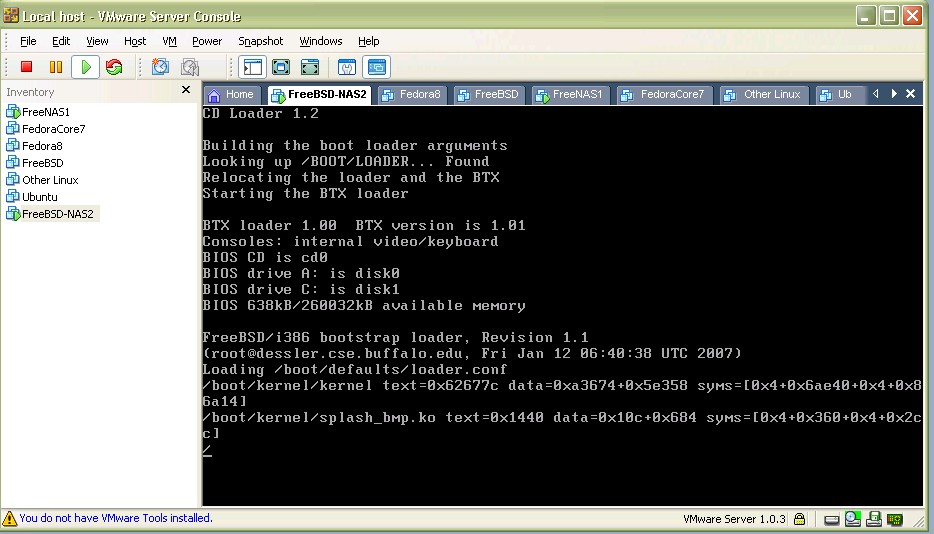
Figure 8: FreeNAS boot message screen in VMware console
In a few short minutes, my FreeNAS appliance was up and
available for final configuration. Brandon’s article does a really nice job of going
through the details of FreeNAS, so I won’t duplicate his efforts. Two things to
add, though, are the network configuration and allocating more disk space to the Virtual NAS.
FreeNAS uses a command line menu for configurations. To
allow the NAS to get an IP address, I simply selected option 2 (see Figure 9,
below) which allowed the Virtual Machine to get an IP address from my network DHCP server. I’ll be going into this in more detail in the next section.
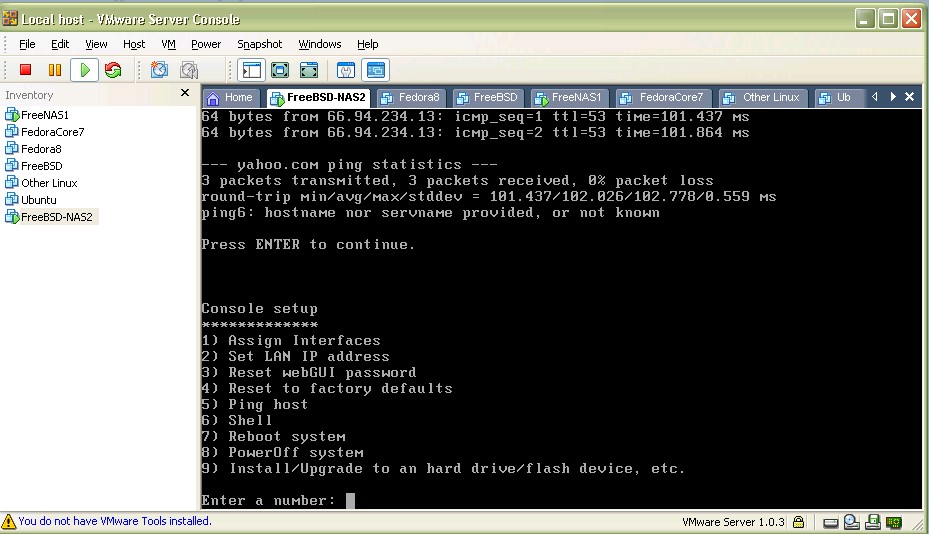
Figure 9: Selecting DHCP from the FreeNAS menu
To allocate more disk space to my virtual FreeNAS device, VMware
has options to add devices to a virtual machine, which are pretty
straightforward. After powering down the virtual machine using the shut down
options available within the OS, additional virtual hardware can be added to the virtual machine, as shown in Figure 10.
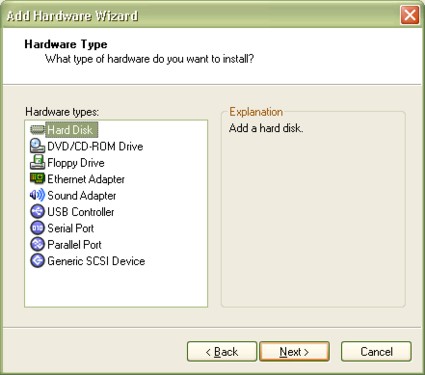
Figure 10: VMware Add Hardware Wizard
Choosing the Hard Disk option brings up additional screens,
allowing selection of which drive(s) and amount of disk space on that drive is
to become storage space on the virtual NAS, or on the virtual Linux machine, as in the Ubuntu example.
Networking with VMware
Virtual machines in VMware are networked in a variety of
ways, as displayed previously in Figure 5. Those choices are Bridged, NAT,
Host-Only, or Do Not Use Networking. Bridged networking is the most common option, which I used for both my virtual machines.
In this option, the Host NIC is shared with the guest
machines, with a virtual NIC created for each guest machine. The VMware
software creates a couple of virtual network adapters, which will show up in the network connections of the host machine.
The virtual NIC(s) are bridged to a virtual switch created
within VMware. The physical NIC is also bridged to this virtual switch. This
“bridge” enables the virtual NIC to connect to the same network as the physical
NIC. The virtual machine can be a DHCP client and gain an IP from a DHCP server, just as the physical NIC.
Alternatively, a static IP can be assigned to
the virtual machine via the network configuration of the virtual machine’s OS. Both
scenarios enable a virtual machine to appear as a real physical machine to all
other devices on the network. Figure 11 is taken from VMware Server?s manual, and shows the bridged networking layout.
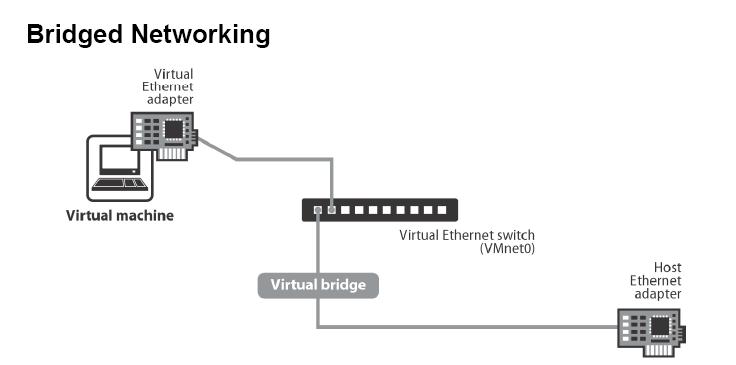
Figure 11: VMware bridged network diagram
I use the 192.168.3.0 /24 network for my LAN, with my XP Pro
machine’s IP address being 192.168.3.15. By going into my router, I was able to
determine that the Linux virtual machine was assigned 192.168.3.16 and the FreeNAS virtual machine was assigned 192.168.3.17.
From a network perspective,
both of these virtual machines are completely independent of the XP Pro Host,
with their own IP addresses. Indeed, I can access and ping all three machines simultaneously, even though they are sharing the same physical NIC.
Another VMware networking option is NAT. If the Host computer
is directly connected to the Internet, it may not be possible to give the guest
computers their own external IP addresses. In this case, VMware can perform as
a NAT device, complete with a virtualized DHCP server to issue IP addresses to the guest operating systems? virtual NICs.
The physical NIC is connected to the outside world and then
acting as a virtual NAT service. The virtual NAT service is connected to the
virtual switch, where the virtual machines’ NICs are connected, enabling them
to connect to the outside world. Port forwarding can be set up on the virtual
NAT device, enabling external devices to talk directly to virtual machines behind the NAT, exactly as with a typical physical gateway router.
In Host-Only network configuration mode, the virtual
machines connect to a virtual network, only accessible by the host machine. Routing
can be enabled between the host machine and the virtual machine. This is an
interesting option if the design calls for running virtual machines on a different subnet than the host machine.
Another networking option is to run the virtual machine entirely within VMware, with no network access at all. This option may be useful in lab environments or for security purposes.
Conclusions
After experimenting with virtualization, some interesting
benefits become apparent. There is no BIOS to configure or manage for my
virtual machines, as each is running on a common virtual platform. Remote
access to a server’s BIOS requires additional devices, which are eliminated through the use of virtualization.
Rebooting my virtual machines does not require physically
powering devices up/down, but is done completely within the confines of the
virtualization application, without affecting the host machine. Since rebooting is done
inside the Host, I can watch a machine fully power down and up, and monitor the POST messages via the VMware console.
Interestingly, the virtualization application is not
required to keep the guest machines running. Once the guest machines are up,
the VMware software can be closed, yet the guests continue to run, with complete functionality, in the background.
The XP Pro machine I used as a Host is running completely
headless, meaning it has no keyboard, monitor, or mouse. I access this machine
over my network using Remote Desktop. Simultaneously, I can access the virtual
Linux machine, which runs on that XP Pro host, using SSH for secure command
line operation, or VNC for more user-friendly GUI-based operations. In
addition, I access the FreeNAS device via the web configuration pages, as discussed in Brandon’s article.
I have run simultaneous connections to all three from my Windows Vista laptop without issue. As shown in Figure 12, all three machines are running at the same time—sharing the same physical hardware.
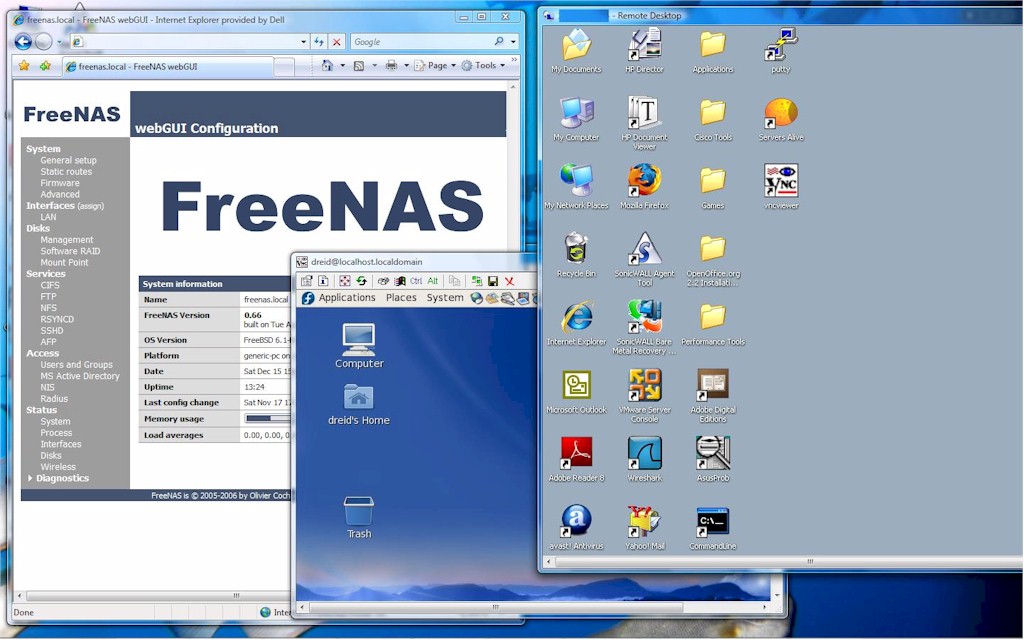
Figure 12: The power of virtualization: three virtual machines run simultaneously on one computer
This demonstrates how network technology enhances virtualization.
Remote Desktop, SSH, VNC and Web Utilities are all network access technologies
and nothing new. But using them with virtualization software produces fully functional devices without the related hardware costs.
When considering virtualization on your network, there are some key metrics to consider that could help quantify the value. Some people estimate that the typical IT server is running at 10–15% of its overall capacity, meaning that a properly configured VMware server can run 5–10 different virtual machines relatively easily.
An article in the Boston Globe (12/14/07), which is a
reprint of a Reuters article, quoted a VMware spokesperson as stating,
“companies can save about $600 per year and 7000kW hours in electricity for
every software application put onto a virtual machine.” For my small network, I
doubt I’ll save $600 virtualizing my little Linux machine and a single-disk
NAS. However, if each of my virtualizations saves one-tenth that amount per device, I will have saved $120 in electricity this year.
In this article, I’ve walked through steps using entirely
free software to create a virtual Linux machine to be used as a VoIP server, as
well as creating a virtual FreeBSD machine to be used as a virtual NAS for data
storage. Both devices function completely as would a standalone physical
machine, with their own IP addresses, disk space, and network interface. Through
the use of virtualization software, I’ve saved network ports, electricity,
physical space, reduced fan noise and CPU heat output, and even eliminated the need to burn CDs; all things that would make Al Gore proud.
Through my virtual IP PBX, I can make real phone calls, and
through my virtual NAS, I can store real data. The question is, do these
virtual devices function as well as they would in a standalone configuration? In a
follow-up article, we’re going to take a look at virtualization’s effect on application performance and attempt to answer that exact question.