

Introduction
| At a Glance | |
|---|---|
| Product | TRENDnet Wireless N Gigabit Router (TEW-633GR) TRENDnet Wireless N PC Card (TEW-621PC) |
| Summary | Clone of the D-Link DIR-655 with some minor tweaks |
| Pros | • Gigabit WAN and LAN, excellent routing speed & jumbo frame support • Top-of-chart simultaneous sessions • WDS Bridging / Repeating • Top-of-chart wireless performance |
| Cons |
• No option to partition wireless traffic • High throughput variation, especially in 20 MHz mode • Companion client does not support WPS • Large difference between up and downlink throughput |
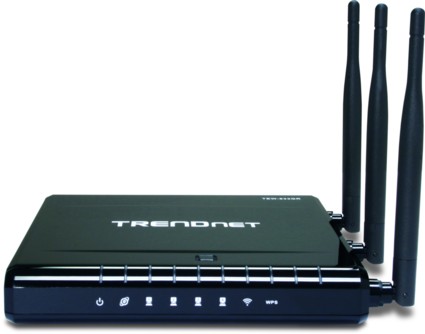
As draft 802.11n products gain in popularity, we see attempts to position similar products for different markets. Enter TRENDnet’s TEW-633GR Wireless N Gigabit router. Although it’s very similar to the D-Link DIR-655 (reviewed here), it’s black, which may indicate it was intended for the gaming market. TRENDnet is not consistent in their naming of the router, however, sometimes referring to it as a gaming router, and sometimes not. Not that it matters anyway, since the "gaming" moniker is for marketing purposes only.
The TEW-633GR is essentially a rebadged U-MEDIA WRT-390U. It shares many of the same features and interface characteristics with the DIR-655, so if you’re comfortable/familiar with that router, you should find the TEW-633GR easy to use.
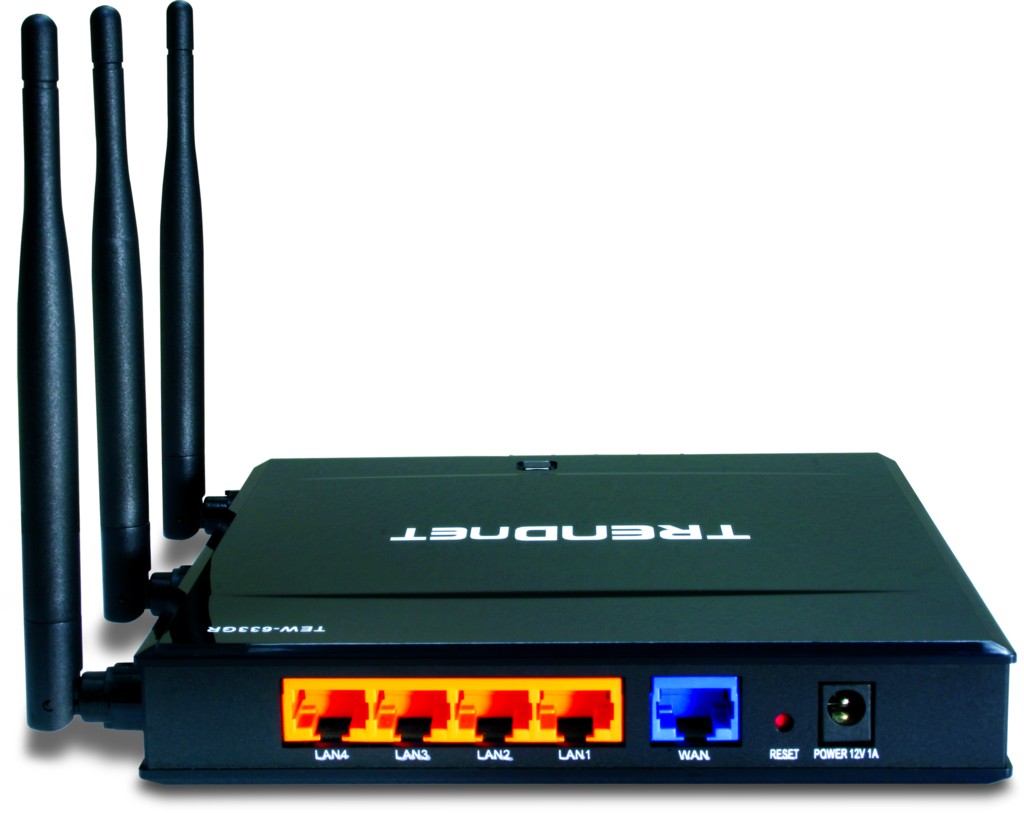
Figure 1: Rear view, showing connectors
The TEW-633GR measures 6.4″ wide x 5.9″ long x 1.0″ high, and has four LAN ports and one WAN port, as seen in Figure 1. All of the ports are gigabit, which is nice. And nicer still that the LAN switch automatically supports jumbo frames up to 9K, although Trendnet doesn’t officially spec this. The rear panel also houses the power connector and a factory defaults reset button.
The little bump on the top of the router in Figure 2 is the WPS button, which enables Wi-Fi Protected Setup. The switch on the side in Figure 2 is used to turn the WLAN radio on or off. Note that this is the only way to enable and disable WLAN functionality. This is both a blessing and a curse. It’s a blessing because it’s nice to set this option physically, so that it can’t be tampered with via the admin interface; it’s a curse because it means you have to put the router somewhere accessible if you plan on using the switch often.
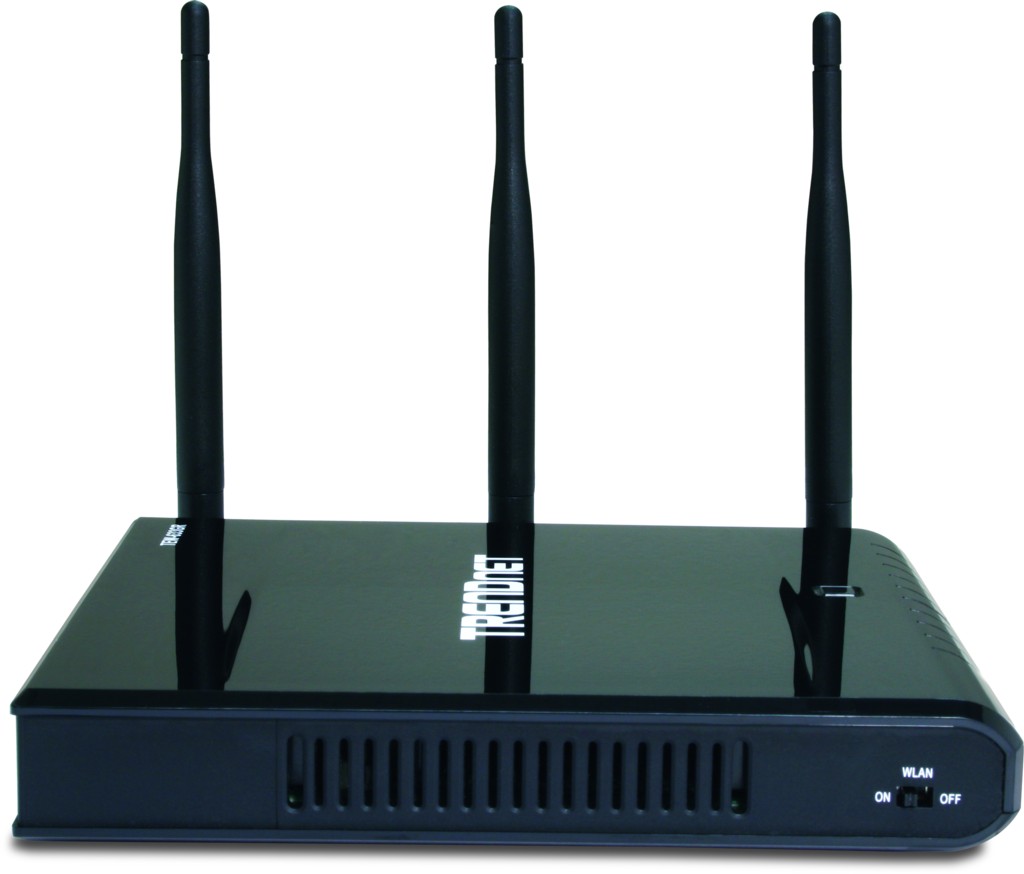
Figure 2: Side view, showing the WLAN on/off switch
Internal Details
Internally, the TEW-633GR contains the same main components as the DIR-655—namely a Vitesse VSC7385 switch, a Ubicom 5160 processor, and an Atheros 5416 baseband/MAC chip and AR2133 3×3 MIMO 2.4 GHz radio (AR5008 series). Some of these details can be seen in the internal board picture in Figure 3.
The board doesn’t use any heatsinks, just the small thermal patch on top of the processor. Most other routers in this class use large metal heatsink plates that are thermally connected to the processor, switch and sometimes radio section.
Since draft 802.11n radios and gigabit switches tend to run hot, reliability and stability could be an issue with the TEW-633GR. So you may want to use the supplied base to stand the router up vertically, which helps cooling airflow, don’t stack it with other components and keep it away from heat sources.
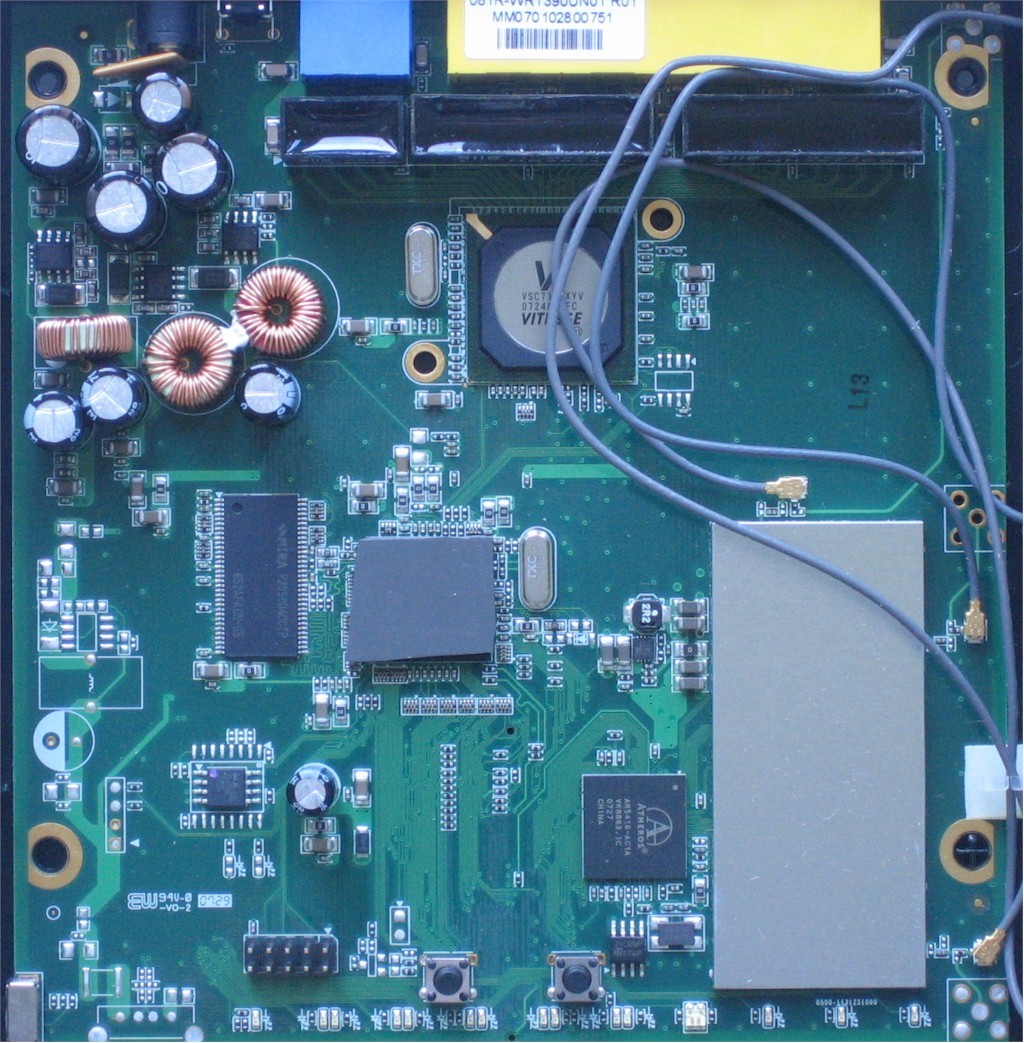
Figure 3: Internal board view of the TEW-633GR
 See this slideshow for more construction details.
Figure 4 shows the board found in the 633GR’s companion card, the TEW-621PC, which is a rebadged U-Media WCB-370A. The 621PC V1.0R card uses the same Atheros chips found in the router and is Wi-Fi Draft 2.0 802.11n Certified. Note, however, that there is also a V2.0R card in distribution, which uses a Ralink chipset and is not Wi-Fi Certified.
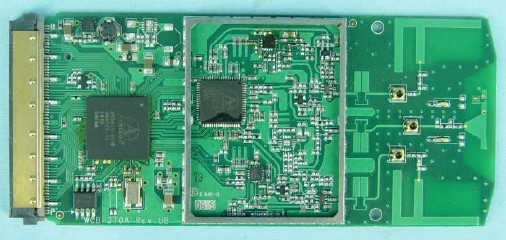
Figure 4: Internal board view of the TEW-621PC
Routing Features
As previously noted, the TEW-633GR’s features are similar to the DIR-655 and other D-Link Ubicom-based routers. So in this review, I’ll just mention some highlights. To explore the 633GR’s options in more detail, check out the configuration emulator at TRENDnet’s website.
Figure 5, below, shows the 633GR’s Advanced> Firewall menu.
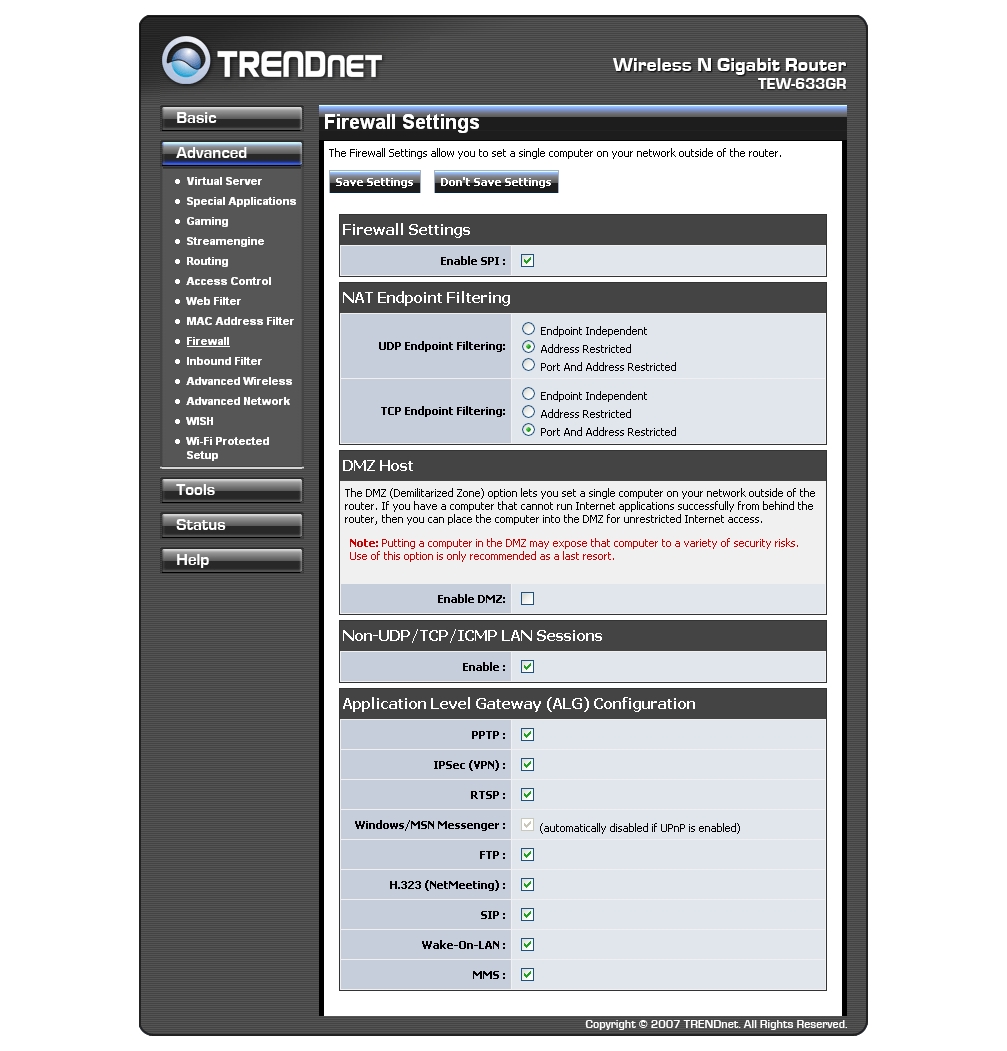
Figure 5: Advanced Firewall settings menu
- WAN support—includes static, DHCP, PPPoE, PPTP, L2TP, and BigPond. All types support MAC cloning and MTU configuration.
- Advanced> MAC Address Filter—filters wired and/or wireless clients, has an allow/deny option, and has an option to copy your PC’s MAC address, as well as an option to copy the address of connected DHCP computers.
- Advanced> Access Control—includes a nice wizard to guide you though adding and configuring a policy. You can filter by computer, time, IP address, traffic type, or just log access.
- Advanced> Web Filter—uses an allow-only model, which is not as useful as an allow/deny choice. You must enter all websites allowed, and then configure an access control policy that utilizes web filtering.
Routing Features – more
- Advanced> Firewall—includes some pretty advanced settings. Options include enable/disable SPI, configure NAT endpoint filtering, enable a DMZ, and ALG settings. The ALG pass-throughs include PPTP, IPSec, RTSP, Windows Messenger, NetMeeting, FTP, SIP, Wake-On-LAN, and MMS. An interesting option is “Non-UDP/TCP/ICMP LAN Sessions,” which allows the NAT to track a session even if it doesn’t recognize the protocol, allowing use of applications without configuring an ALG.
- Tools> Dynamic DNS—provides support for Dynamic DNS service. Note that you can only select from a list of 12 services, you can’t enter an address yourself. The services are: changeip.com, DynDNS.org (Custom, Free, and Static), EasyDNS.org, EuroDynDNS.org, no-ip.com, ods.org, ovh.com, regfish.com, tzo.com, and zoneedit.com.
- Tools> Admin—sets administration options. No HTTPS access, but you can set the port, use inbound filters, and set the inactivity timeout.
- Status> Logs—sets options for logs and allows you to view the logs. Logs can be filtered over three What to View categories with three View Levels. If you enable traffic logging, however, you’ll have to search through the main logs to find the traffic, because there is no separate traffic log.
- Advanced> StreamEngine—contains QoS configuration options for the Ubicom StreamEngine, successfully used by many other routers.
- Basic> Network Settings> WAN Port Mode button—switches the router between Router Mode and Bridge Mode. Bridge mode disables the DHCP server and requires setting a static IP address and entering a default gateway, which lets you use the 633GR as an access point.
- Basic> Network Settings> Enable RIP button—allows the router to communicate route information via RIP. Supported versions include V1, V2 Broadcast, and V2 Multicast (default).
Routing Performance
Testing performed by Tim Higgins
After running the TEW-633GR through the test suite, I created a table pitting it against the DIR-655. The results in Table 1 show a virtual dead heat between the two routers. Seeing that the routers use the same basic hardware, the slight differences in results might be due to the firmware implementation. Of course, to create your own comparison, just use the Router Charts.
| Test Description | TEW-633GR Throughput – (Mbps) | DIR-655 Throughput – (Mbps) |
|---|---|---|
| WAN – LAN | 239 | 231 |
| LAN – WAN | 241 | 245 |
| Total Simultaneous | 259 | 254 |
| Maximum Simultaneous Connections | 200 | 200 |
| Firmware Version | 1.0.2.3 | 1.04 |
Table 1: Router performance comparison
Figure 6, below, is a composite of the WAN to LAN, LAN to WAN, and simultaneous up/down throughput tests in IxChariot. You can see that the routing performance is pretty uniform. Its overall performance puts the TEW-633GR near the top of the charts.
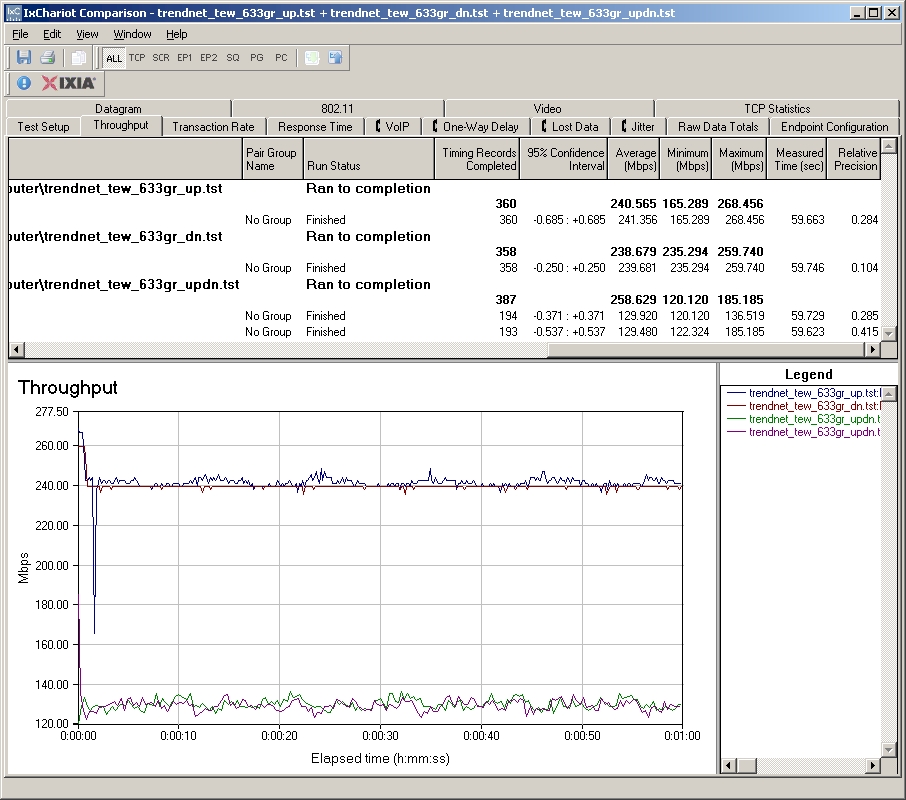
Figure 6: Composite throughput test results
Basic Wireless Features
The wireless features of the TEW-633GR are very similar to those of the DIR-655, with the notable exceptions of the lack of WCN support for the 633GR (a good thing), and the lack of L2 (WLAN) separation options for the 633GR (a bad thing).
Figure 7, below, shows the Basic> Wireless Settings menu.
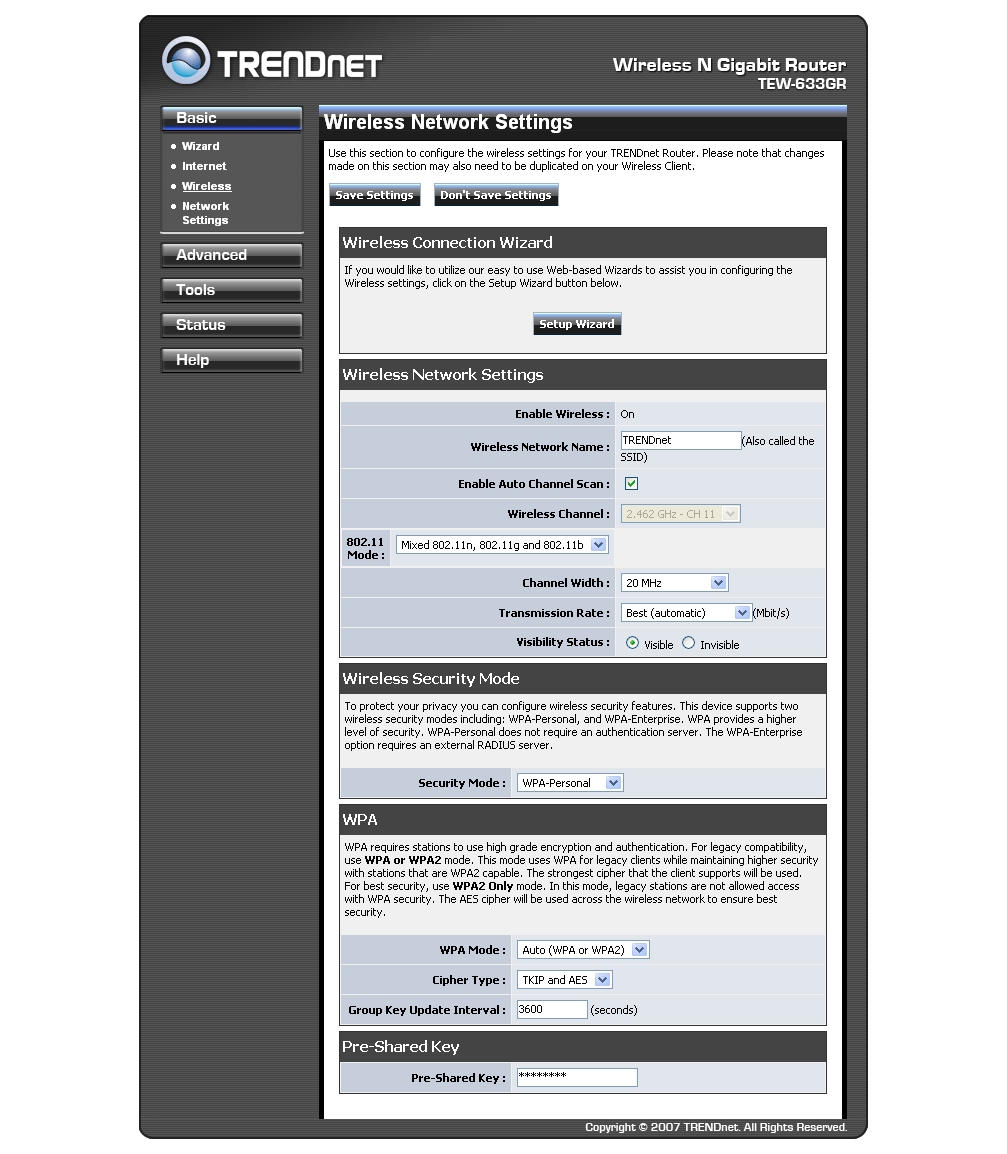
Figure 7: Basic wireless settings menu
The 633GR comes with a Wireless Connection Wizard, which is a helpful feature if you know a little bit about your network but not much about how to set up security on a wireless router. It’s actually more of a security wizard, and in fact does the same thing as the Launch Wireless Security Setup Wizard button in the Basic> Wizard menu.
Wireless network settings include Enable Auto Channel Scan or a Wireless Channel selector, 802.11 Mode, Channel Width, Transmission Rate, and Security Mode.
Enable Auto Channel Scan allows the 633GR to scan available channels and find the one that offers the least interference. 802.11 Mode includes mixed n/g/b (default), mixed n/g, mixed g/b, n only, g only, or b only. Channel Width switches between 20 MHz (default), or Auto 20/40 MHz. Operating in 40 MHz mode will cause the 633GR to use a control channel and an extension channel.
Transmission Rate offers a long list of rates, from 1 to 54 Mbps in 12 variously-sized steps, and from MCS 0 to MCS 15. The default is Best (Automatic). Security Mode supports None, WEP, and WPA Personal and Enterprise (RADIUS server) modes. WPA options include Auto (WPA or WPA2), WPA2 only, or WPA only; and TKIP, AES, and TKIP and AES.
Advanced Wireless Features
Figure 8, below, shows the Advanced> Advanced Wireless menu.
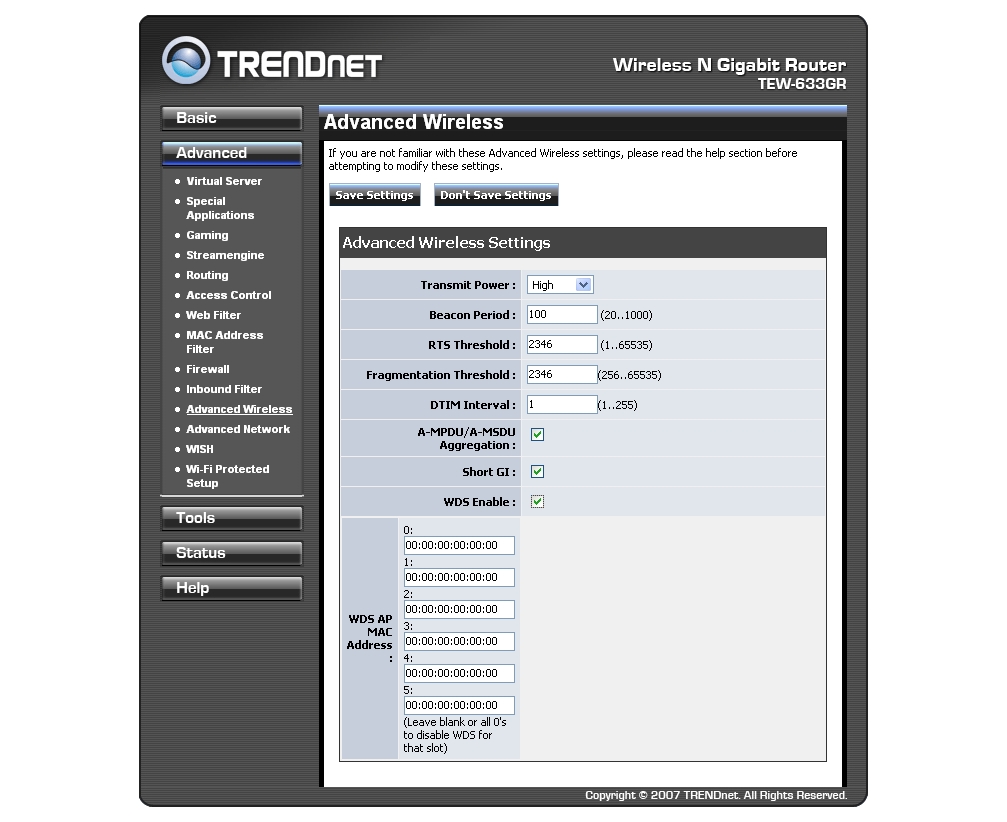
Figure 8: Advanced wireless settings menu
Advanced wireless features include Transmit Power, Beacon Period, RTS Threshold, DTIM Interval, A-MPDU/A-MSDU Aggregation, Short GI, and WDS Enable.
Transmit Power can be set to one of three steps: High, Medium, or Low. Beacon Period, RTS Threshold, and DTIM Interval should only be adjusted if you encounter problems and know how to adjust these values to correct them.
A-MPDU/A-MSDU Aggregation is part of the 802.11n standard that increases throughput, but at a potential performance penalty if data must be resent. Only disable this option if you’re sure it’s causing problems.
Short GI, enabled by default, sets a short Guard Interval. This increases throughput, but can degrade performance if your location is susceptible to signal echos. Again, most likely you will only need to disable this option if you’re sure it’s causing problems.
An option that could have used a little more attention is the WDS Enable feature. One of my main complaints with the GUI is that TRENDnet left most of the screen empty, instead of putting help information in the blank spaces. WDS (Wireless Distribution System) is a non-standard feature that allows WAPs to be connected without wires. The same version of WDS must be supported by both APs to work.
The mode supported by the 633GR is repeating mode, which allows it to communicate with clients and other access points. You must enter the MAC address of the access point to connect to, and also enter the MAC address of the 633GR on that access point. The Advanced Wireless screen does not tell you anything about this, and the help is not context-sensitive, so you have to click through the help menu to find it. This is my other main complaint with the 633GR’s GUI. It would also be nice to have a wizard that walked you through WDS setup, perhaps with a list of visible APs to which you can link. Note that to use WDS, you must use WEP or no security, and set both access points to use the same channel.
Wireless Performance
Testing performed by Tim Higgins
I tested the 633GR using our wireless test procedures, which use both open-air testing and Azimuth’s ACE 400NB Channel Emulator.
Trendnet initially provided a TEW-621PC V2.0R card for testing. But when initial testing revealed wide throughput variation which seemed to be caused by the card constantly changing its link rate, I started exploring. I found that the V2.0R card was using a Ralink driver, which didn’t match the FCC board photo that showed an Atheros chipset. Long story short, Trendnet sent a V1.0R card, which is Wi-Fi Draft 2.0 certified and matches the FCC photo, so I started to test with that.
But, the Wi-Fi gods were still messing with me. Because when I went to connect the card to the Azimuth system, I found that the V1.0R card used different mini-connectors that I didn’t have mating cables for. It’s probably for the best, since the card had connectors mounted on only two of the three antennas!
So I fell back to using the Atheros-based D-Link DWA-652 Cardbus card that uses the same chipset as the Trendnet TEW-621PC V1.0R card. The card was inserted into a Fujitsu P7120 Lifebook (1.2 GHz Intel Pentium M, 504 MB) notebook running WinXP Pro SP2 with all the latest updates. I used the Atheros 6.03.107 driver and Windows Wireless Zero Config during testing.
I updated the router to 1.0.2.3 firmware and I left all factory default settings in place, except to set Channel 1 and disable the wireless auto-QOS WISH feature. Note that the 633GR properly defaulted to 20 MHz bandwidth operation upon power up.
Maximum Throughput
Figure 9 shows a composite IxChariot plot of wireless uplink, downlink and simultaneous up and downlink tests with the router set to 20 MHz channel bandwidth mode. Testing was done with the router and notebook about 10 feet apart in open air sitting in my lab with no other networks in range.
The plot is hard to follow due to the high throughput variation. The two upper lines are the separate up and downlink tests, while the two bottom lines are the simultaneous up/downlink tests. Basically, throughput is a bit wonky in the default 20 MHz bandwidth mode, with best case throughput coming in at around 57 Mbps, in the downlink direction. But if you check the results for the DIR-655, you’ll see similar results.
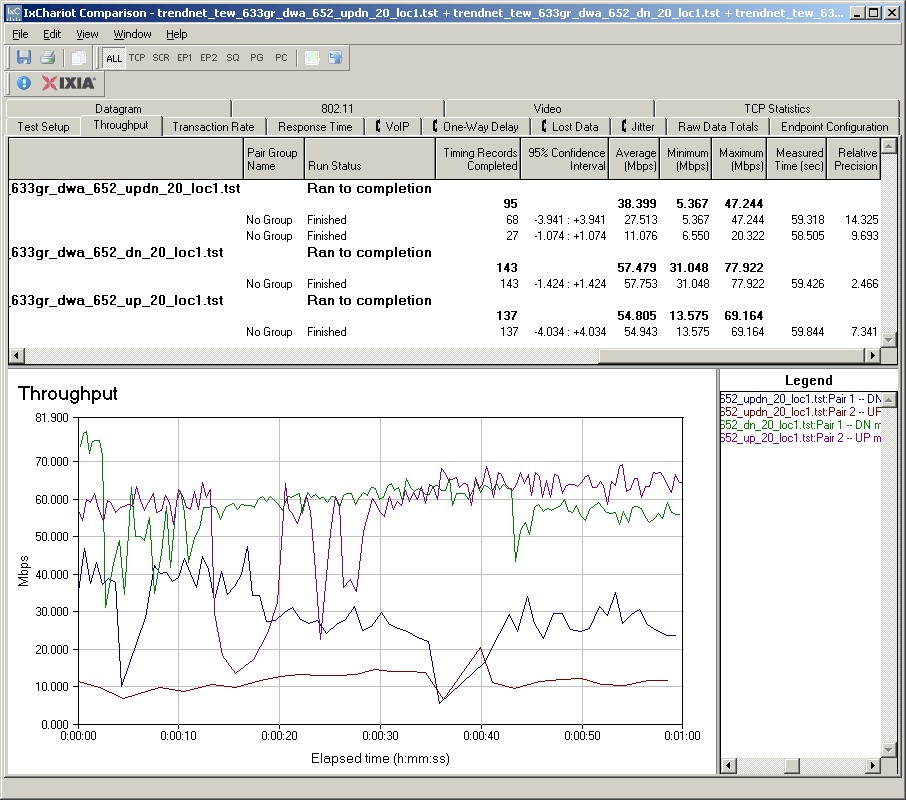

Figure 9: Up and downlink throughput – 20 MHz bandwidth
Figure 10 shows a composite of test runs with the Auto 20/40 MHz mode set, which produced significantly higher throughput. I monitored spectrum use during testing with the Cognio Spectrum Expert, which confirmed that Channels 1 and 5 were used when the tests were run.
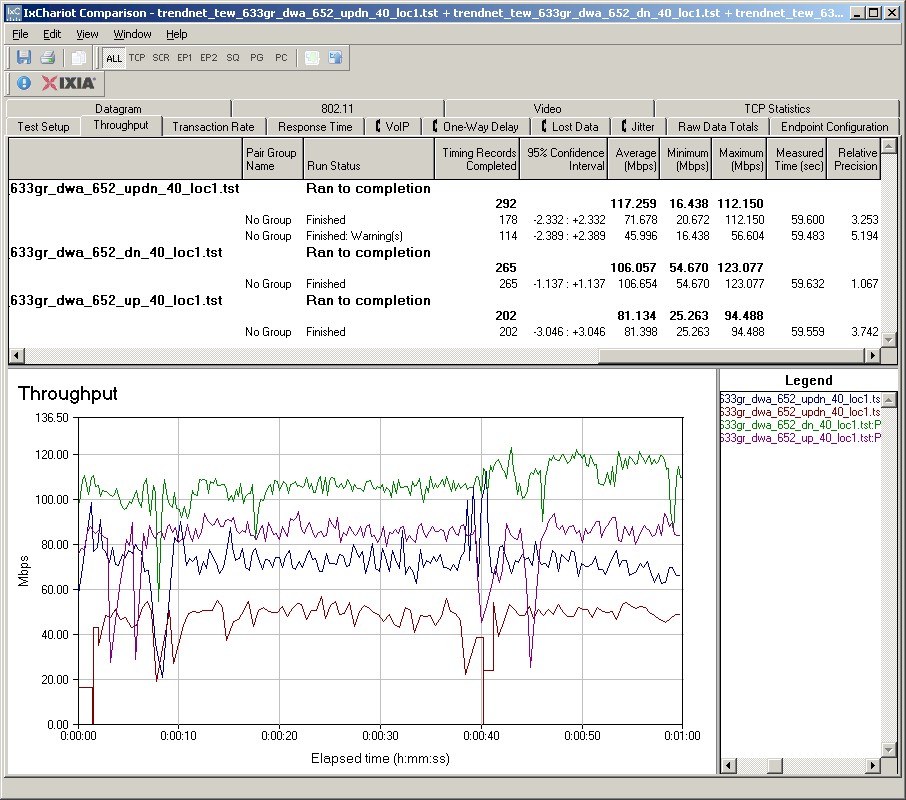
Figure 10: Up and downlink throughput – 40 MHz bandwidth
These results are sigificantly better than the DIR-655’s. In fact, they establish a new SmallNetBuilder high for maximum throughput from a draft 802.11n router with total up/down throughput of 117 Mbps and downlink-only throughput of 106 Mbps.
Since the 633GR is a virtual clone of the DIR-655, I didn’t conduct extensive tests of security mode throughput. I only ran quickly through WEP 128, WPA/TKIP and WPA2/AES modes and saw throughput hits similar to those of the DIR-655.
I should note that although the 633R supports Wireless Protected Setup (WPS), the client application for its companion TEW-621PC card does not. So even if you buy the 633GR’s "matching" card, you’ll have to set up wireless security manually.
I ran no test of mixed STA or Legacy Neighbor performance, since the behavior of Draft 2.0 products has been well-established by now. There is no reason to expect that Trendnet (or more accurately, Atheros) has done anything to move the ball forward with the 633R.
Throughput vs. Path Loss
NOTE: We don’t refer to "range" in these plots, but instead use the more accurate "Path Loss". For an explanation, see the How we Test Wireless article.
Figure 11 was generated using the Compare Benchmarks tool of our Wireless Charts and shows up and downlink performance in 20 and 40 MHz channel modes in the 2.4 GHz band. It appears that Trendnet has tuned bandwidth utilization a bit differently than the DIR-655, since switching from the default 20 MHz bandwidth mode to Auto 20/40 yields almost a 2X boost in both up and downlink directions!
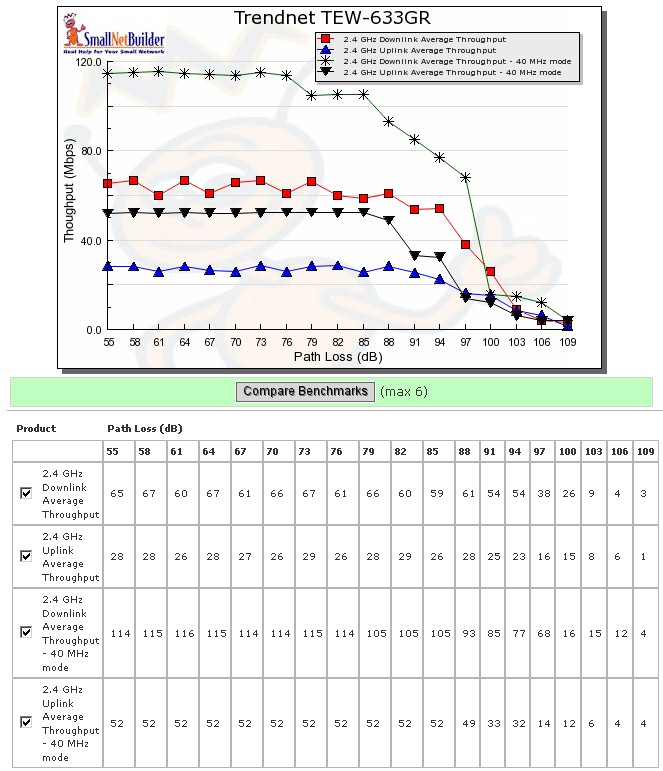
Figure 11: Throughput vs. Path Loss
On the other hand, it also looks like Trendnet has decided to favor downlink bandwidth over uplink, since there is also a 2X difference in downlink vs. uplink throughput in both the 20 and Auto 20/40 modes.
Throughput vs. Path Loss – Competitive Comparison
For a product-to-product comparison, I chose the top four products from our Wireless Charts, omitting the Apple Airport Extreme because it doesn’t allow 40 MHz bandwidth operation in 2.4 GHz. The products chosen were the Belkin N1 Vision, Linksys WRT600N, D-Link DIR-655 and D-Link DGL-4500.
Figure 12 shows a comparison of downlink performance in the 2.4 GHz band with the default 20 MHz channel width. There isn’t a huge difference in performance, and no overall clear winner.
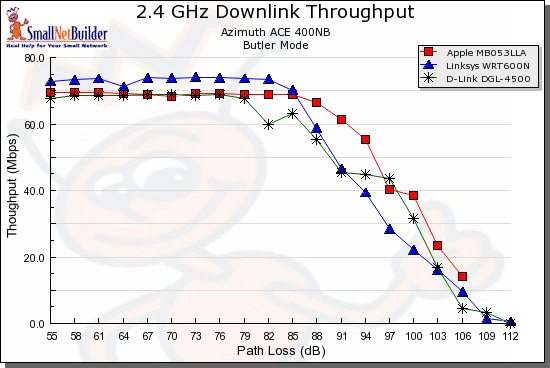
Figure 12: Throughput vs. Path Loss product comparison – Downlink, 20MHz channel
Figure 13 switches to uplink and shows a wider performance spread. The uplink throughput penalty imposed by the 633GR is clearly shown, with the other products breaking into two groups with higher signal levels (lower path loss).
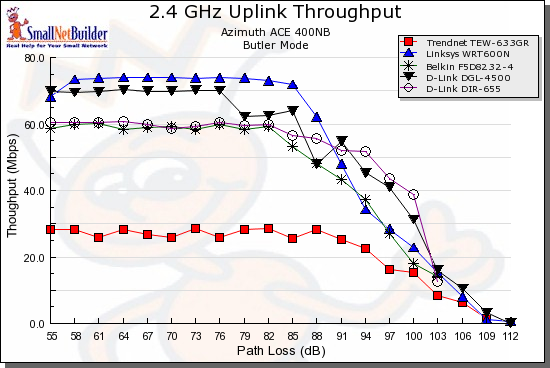
Figure 21: Throughput vs. Path Loss product comparison – Uplink, 40MHz channel
Throughput vs. Path Loss – Competitive Comparison – more
Figure 14 shows the 633GR’s throughput advantage when running downlink in Auto 20/40 mode. Not only is throughput significantly higher than the next best product, the D-Link DGL-4500, but it stays high over a significant path loss range.
The other interesting thing in the plot is that the 633’s virtual twin, the D-Link DIR-655, is at the bottom of the pack. But it should be noted that the DIR-655 has had four firmware revisions since the chart data was taken, with one of them (1.04) specifically noting "Enhanced wireless performance". I suspect that if the DIR-655 were rerun with the latest firmware, its performance might look more like the 633GR’s.
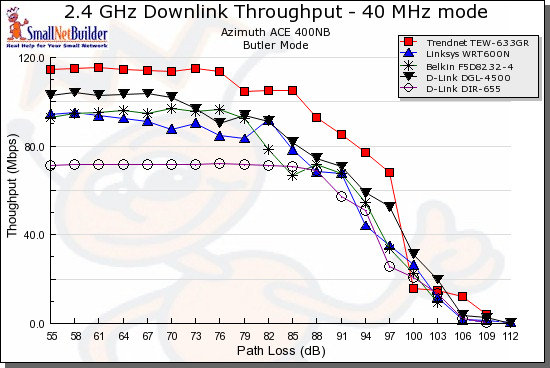
Figure 14: Throughput vs. Path Loss product comparison – Downlink, 40MHz channel
The last plot, Figure 15, shows the price paid for the 633GR’s high downlink performance. This time, it comes in at the bottom of the pack, significantly below the other products.
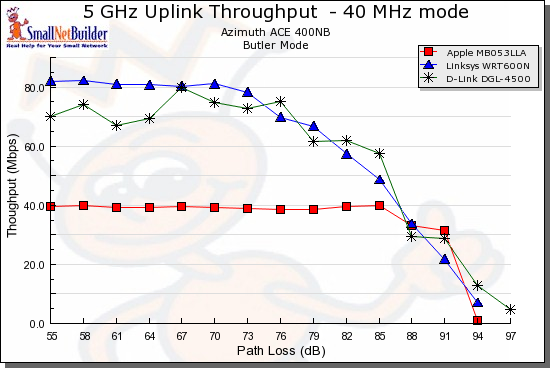
Figure 15: Throughput vs. Path Loss product comparison – 5 GHz, Uplink, 40MHz channel
Use the Wireless Charts to generate other comparisons.
Closing Thoughts
The TEW-633GR is essentially a lower-cost alternative to the D-Link DIR-655. But as I write this, Pricegrabber was showing a price range of $109 – $133 for the 633R, vs. $116 – $178 for the DIR-655. So the potential price savings isn’t really that big.
If you’re trying to decide between the two, the choice will come down to which company you feel more comfortable with: Trendnet or D-Link. Your past experience with either company will probably play a large part in your decision. But you might also consider the 633GR’s 3 year warranty vs. the 655’s 1 year.
Either way, you’ll be getting a single-band draft 802.11n router with top routing and wireless performance and Ubicom’s Streamengine auto-Qos. Which is a good deal any way you look at it.