

In my last two posts on this subject, I’ve covered some of the basics and
tools used to perform packet captures, highlighting the well known software from Wireshark. In this installment, I’m going to show how I used Wireshark packet captures to solve a real network problem.
The Problem
I use an HP 7300 All-in-One Network Printer/Fax/Scanner on my LAN. I have several Windows XP PCs that work with the HP without issue, but my Windows Vista laptop consistently has problems recognizing and being recognized by the HP. To restore connectivity from my Vista laptop to the HP, I’ve had to re-install HP’s All-in-One network software numerous times, which is both time consuming and a nuisance.
I could have just chalked this issue up as another Vista frustration. But I decided to dive into the problem, instead. Knowing that Vista claims to have greater levels of security than XP, I suspected the firewall as a possible cause of my problem, and decided to use Wireshark to explore this theory.
The Solution
To start, I disabled the Vista firewall to allow for unrestricted packet flow between my PC and the HP. With the firewall disabled, I re-installed the HP software to restore connectivity between my laptop and the HP.
Previously, I configured the HP with a static IP = 192.168.3.112, so my next step was to start Wireshark with a filter configured to capture all packets to and from host 192.168.3.112, using the steps discussed in my previous packet capture blog.
Right away, I had some indication that I was on the right path! I noticed the Wireshark output showing packets being sent between my PC and the HP using several protocols that could easily be blocked by a firewall. I noticed traffic using the SNMP protocol, as well as two other protocols, SRVLOC and NBNS. After running the packet capture for a couple minutes, I clicked Capture-Stop, and then File-Save to store the results to a file.
As you can see from the below three figures, SNMP, SRVLOC (Service Location Protocol) and NBNS (NetBios Naming Service) packets are being exchanged between my PC (192.168.3.152) and the HP (192.168.3.112).
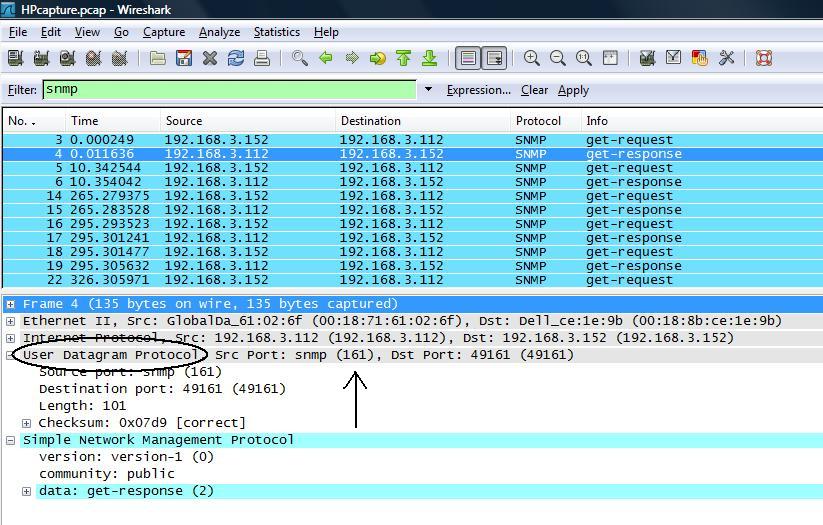
Figure 1: SNMP packets
Closer examination of the packets identify that the SNMP packets are using UDP port 161, the SRVLOC packets are using UDP port 427, and the NBNS packets are using UDP port 137. In the figures, I’ve circled the output that indicates the use of UDP and put an arrow showing where the port number is displayed.
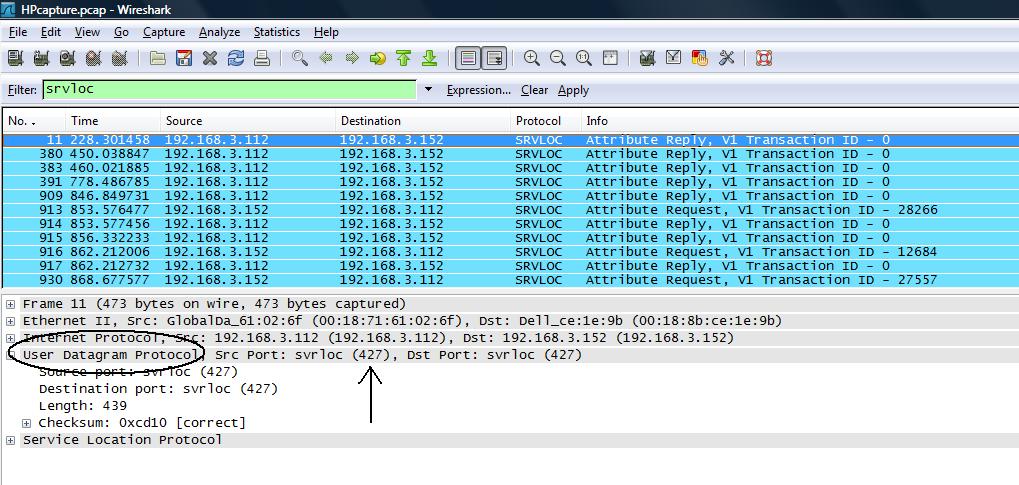
Figure 2: SRVLOC packets
Armed with this data identifying specific ports used for network connectivity between my PC and the HP, I was now able to apply specific configurations to resolve the issue.
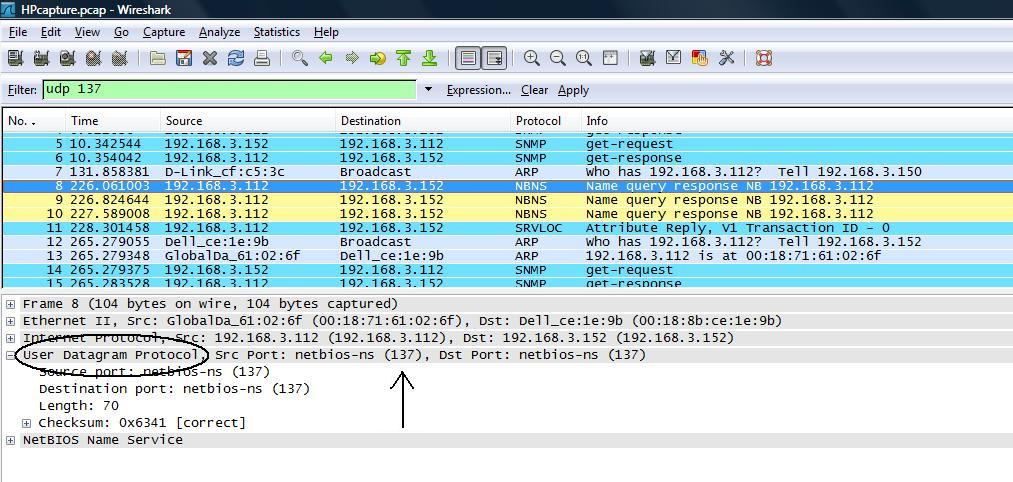
Figure 3: NBNS packets
I re-enabled the firewall, and configured exceptions to allow for passing traffic on these ports. Windows’ firewall has the ability to define a "Scope" for each exception, which means you can open firewall ports only for specific IP ranges.
As illustrated in Figure 4, I used this feature to open SRVLOC (UDP port 427) traffic only when my PC is on my LAN (192.168.3.0/24). I then repeated the process for both SNMP and NBNS.
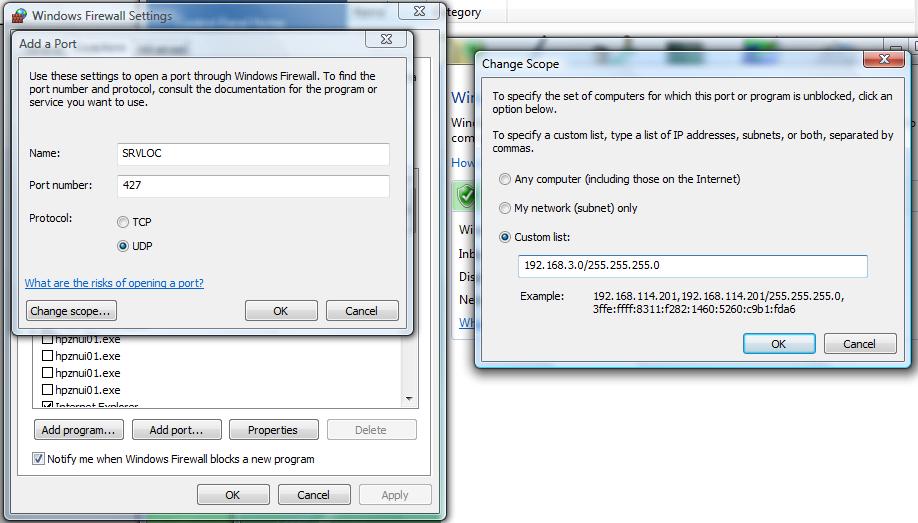
Figure 4: Setting Windows Firewall Exceptions
Opening a port in a firewall can mean the port is open on all networks, making opening ports a significant security risk. The "Scope" feature means I’m only opening the port for traffic on my own LAN, where I have greater confidence in the security than I do in a public location such as a hotel or airport.
Conclusion
With detailed information provided using packet capture software, I was able to apply a specific network security configuration to resolve a problem affecting the use of one of my network devices. More importantly, since applying this fix, the connectivity between my laptop and the HP All-in-One has been stable and reliable!
I hope this little series on Packet Captures and Wireshark has been useful. If you have a tip, question, or idea on using packet captures and or Wireshark, please feel free to post a comment. I’d love to hear your suggestions and success stories!