

With the growth of IPTV and other IP media streaming technologies, applications for multicast technology are increasing. Live Video broadcasts and VoIP applications are viable uses for real time transmissions over an IP network from a single source to multiple recipients.
Most data transmissions are unicasts, which are a one-to-one data stream sent from one device to another device. Email, web surfing, and file downloads are all examples of unicasts, even for the busiest sites or most downloaded files. Although a single web page may be visited thousands of times each day, each time it is viewed it is individually transmitted to the requestor’s PC as a unicast.
Another type of data transmission is a broadcast. Broadcasts are a special transmission from one device to every device on a specific network, typically a LAN. Common LAN broadcasts are ARP requests and network switch frame flooding performed over local networks. Routers typically do not forward broadcasts, so the range and extent of broadcast transmissions are limited.
Live media transmissions sent from a single source to multiple recipients, which are a one-to-many data stream, are good candidates for multicast technology. For example, Yahoo offers live NHL hockey games several times a month, which is great for someone like me who is a fan of the Detroit Red Wings yet lives on the east coast and is too cheap to pay for the NHL package on DirecTV.
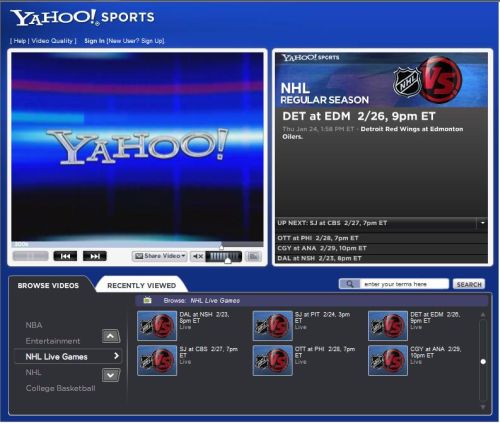
Figure 1: Yahoo TV
Why is this example a good candidate for multicast? Well, multicast technology can save network bandwidth, both on the Internet and on your own network. Multicasts allow routers to replicate the video stream out more than one interface. The source continues to send a single stream of video while each downstream router can copy the stream out multiple interfaces.
In the simple diagram below, a video stream (represented by the blue line) is being multicast from a single source to three different PCs. If the transmission were using unicast technology, there would be three independent streams of data from the source to each PC, consuming excess bandwidth on multiple legs of this little network.
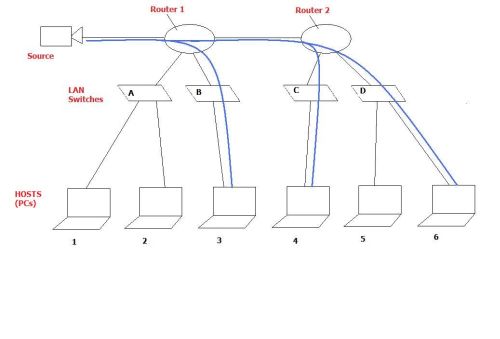
Figure 2: Multicast replication
Using multicast and the appropriate network configurations, the source sends out one stream of data, which Routers 1 and 2 replicate out their interfaces that have interested viewers. In addition, Switches B, C and D only forward the multicast streams out ports with interested viewers, which in this example are PCs 3, 4 and 6.
Notice that the multicast wasn’t sent out Router 1’s interface to Switch A. Further, Switch D only forwarded the multicast to PC 6 and not to PC 5. This saved bandwidth on the legs not interested in this multicast. Video streams can consume a lot of network bandwidth, so the effective use of multicast configurations is useful in conserving bandwidth and optimizing network performance.
Out of curiosity, I ran a packet capture on my laptop while watching my Red Wings lose in overtime to Edmonton last week and was surprised to see the video packet flow was using a TCP based unicast protocol. Based on the advantages of multicasts and knowing that Internet bandwidth is limited, I expected to see the video stream using a UDP based one-to-many multicast technology
That means the live video I was watching wasn’t utilizing multicast and likely consuming more bandwidth over the Internet than if multicasting were used. Why would Yahoo not transmit live video using multicasting instead of unicast? (Why the Red Wings couldn’t put the puck in the net to win the shootout against the Oilers was also crossing my mind, but that is a different subject.)
In my next entry, I’m going to discuss the technologies used by routers and switches to enable multicasts. I’ll also touch on some of the issues that exist on the Internet that limit the use of the multicasts, trying to uncover why multicast technology isn’t used in examples like the NHL game I discussed here. Post a question or comment if you’d like to see other areas covered, too.