

Introduction
Updated 12 March 2008: Ubicom test result corrected
Updated 6 March 2008: Added metamaterial antenna info
Updated 5 March 2008: Corrected Linksys WGA600N info
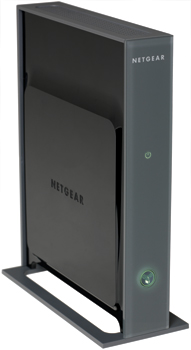
| At a Glance | |
|---|---|
| Product | Netgear 5 GHz Wireless-N Access Point/Bridge (WNHDE111) |
| Summary | 5 GHz Draft 2.0 802.11n AP/Bridge with auto connect and automatic QoS |
| Pros | • Self-configuring when used as a pair • Can be used as AP or bridge • 100+ Mbps close-range throughput |
| Cons | • Disappointing range • Single band vs. dual-band • Disappointing performance with 11a clients |
One of the ways that networking vendors are trying to entice you to make the jump to draft 802.11n is to resurrect access points as a consumer networking product. D-Link was the first, announcing its DAP-1555 Xtreme N Duo MediaBridge back in May 2007.
Linksys also decided to try this approach, announcing its WGA600N Dual-Band Wireless-N Gaming Adapter at this year’s CES. Netgear also introduced the WNHDE111 and WNHDEB111 kit (which just bundles two WNHDE111s into one box) at CES, which I’ll be looking at in this review.
Of the three products mentioned, the WNHDE111 is the only one to be a 5 GHz single-band only draft 11n solution; the other two are dual-band products. I think that Netgear took the single-band approach to hit a $100 price point vs. the $160 – $215 that Pricegrabber currently shows for the DAP-1555.
Updated 5 March 2008 But Linksys might have trumped them both, with multiple etailers offering the dual-band WGA600N between $80 and $85! Note however, that the WGA600N can’t operate as a true AP, but can be configured in a multi-station Ad Hoc mode.
The concept of all three products is to have a single product that can be used to add draft 11n wireless to your current wired or wireless router by acting as an access point, or to wirelessly connect any device with an Ethernet port. The difference between this new generation of "gaming" adapters and the current 11b/g models is the AP / bridge dual modes and the use of draft 802.11n technology.
Figure 1 shows the controls, lights and ports on the front and rear panels of the 111, which are pretty straightforward.
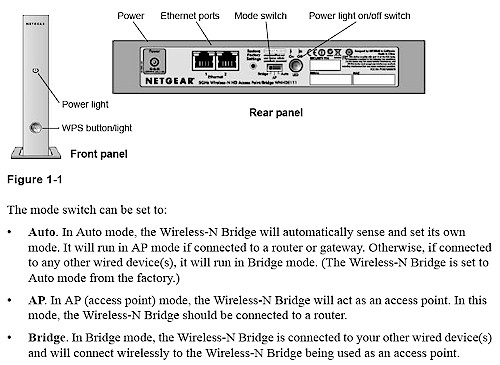
Figure 1: Front and rear panels
The two ports are 10/100, not gigabit, which might seem like a foolish tradeoff given the > 100 Mbps useful throughput that draft 802.11n is capable of. But given the conditions under which the adapters will typically be used, your throughput won’t really be limited by Netgear’s choice to try to eke out a bit more margin before the sales price gets driven down by competition. (If you want to see Som Choudhury, Product Line Manager of the Advanced Wireless group at NETGEAR, defend the 10/100 port and other of the 111’s design choices, see this DSLReports thread.)
Internal Details
Figure 2 shows the 111’s main board with RF shield and heatsink in place. But the FCC ID photos were helpful in getting some of the component details. The processor under the heatsink is from Ubicom, but the photos aren’t clear enough to tell which one. But if it’s based on the same Ubicom reference design as the Linksys WGA600N, it will be an IP5090.
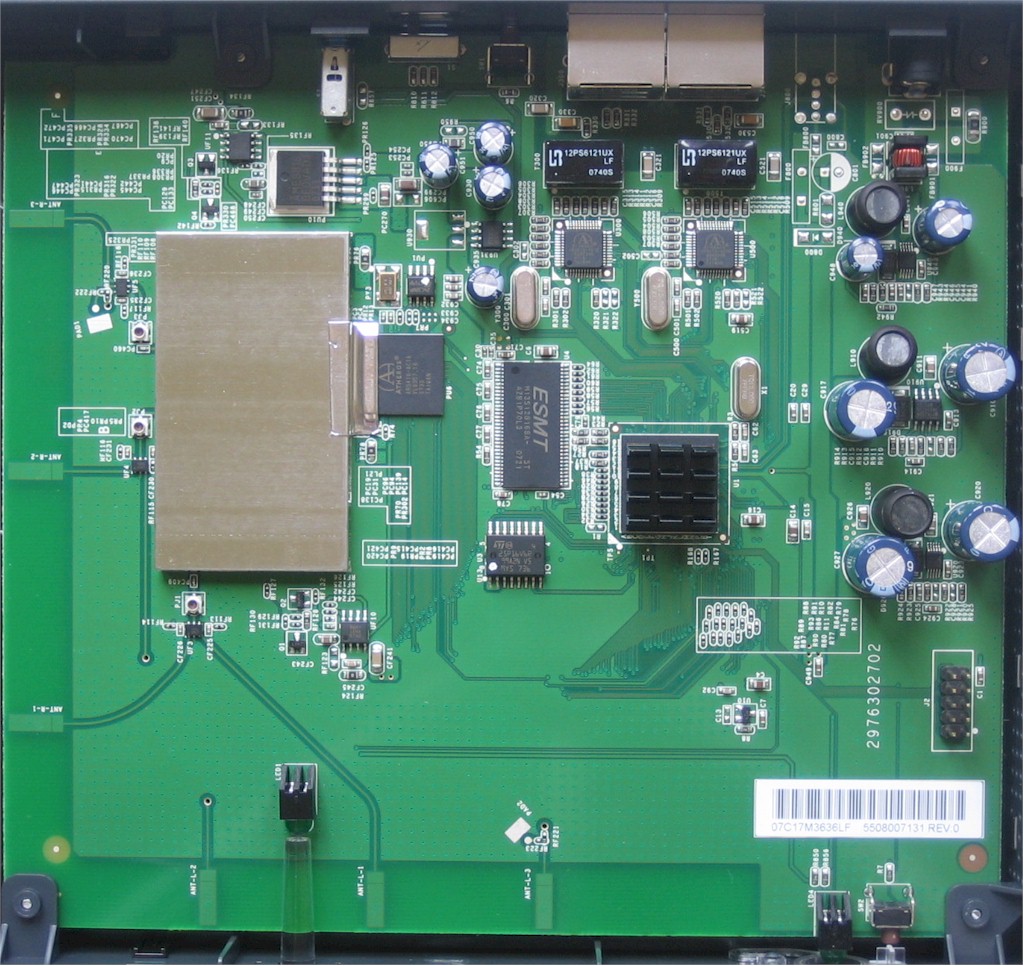
Figure 2: Inside view
The radio uses an Atheros AR5416 MAC/Baseband and probably AR5133 dual/band 3×3 MIMO Radio, since Atheros doesn’t make a 5 GHz-only MIMO radio chip. Two Atheros AR8012 10/100 PHYs are used for the dual Ethernet ports, which appear to be configured as a mini switch. There is also 256 KB of flash and 16 MB of RAM. Updated 6 March 2008 By the way, you can see the six "metamaterial" antennas at the bottom and left side edges of the board.
In Use
The 111 is designed to be a plug-and-go solution, getting you up and running without even using a computer. The key is that Auto / AP / Bridge Mode switch shown in Figure 1, which should come factory-set to Auto mode (and, of course, the firmware behind it).
All I needed to do was check that the switch on both 111s was set to Auto, connect one 111 to a free port on my LAN’s router, the other to my notebook’s Ethernet port and plug the wall warts in. In under a minute, my notebook reported that it was connected and a UPnP notification popped up informing me of a new device, which also showed up in My Network Places (Figure 3).
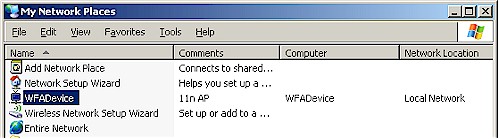
Figure 3: The 111 in Network Places
After that, I just fired up the browser on my notebook to confirm that I was online. It was that simple. Note that the Ethernet ports are Auto MDI/X, so you don’t have to worry about using crossover cables to get connected; the ports will sort out the right configuration on their own.
Of course, I wanted to see how the 111’s had actually set themselves up, so I clicked on the WFADevice icon in Network Places to take me to the Admin login. Depending on how you have UPnP set up, you might not see the WFADevice icon. But Netgear also includes a Windows-only Configuration Assistant (Figure 4).
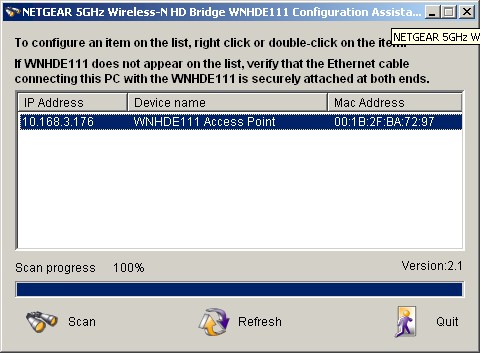
Figure 4: Configuration Assistant
This little.exe app just scans for 111s and tells you their configuration (AP or Bridge), IP and MAC addresses. Either way, once you have the IP address, you just enter it into your browser, hit the login page and log in. You see the Setup Wizard page (Figure 5) upon login and can make your way through the admin functions from there.
I covered the Admin functions pretty well in the slideshow, so I won’t repeat the info here.

Figure 5: Setup Wizards
 See the slideshow for an admin interface tour
In Use – more
I found that the 111 had properly set itself to AP mode with the settings shown in Figure 6, which included a Channel Width of Auto 20/40 for maximum throughput and WPA2-PSK for maximum security.
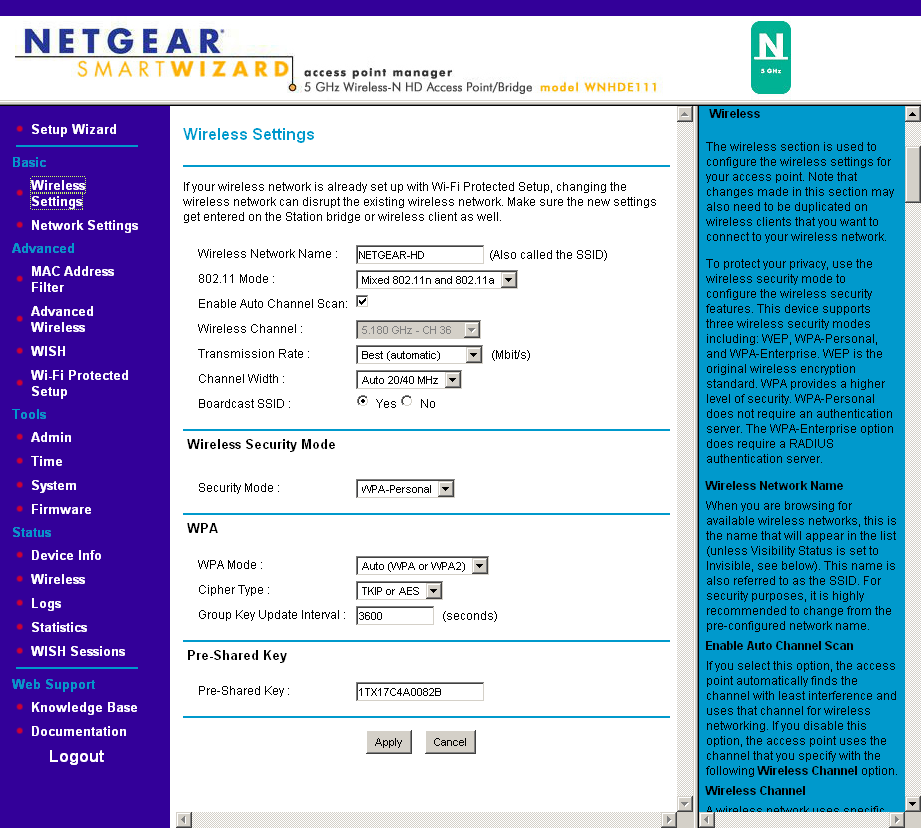
Figure 6: Setup Wizards
The admin interface of a 111 in Bridge mode is pretty much the same as an AP’s, with appropriate changes to accomodate the difference between an AP and Bridge functions. You have no control over the Bridge mode’s channel on the Wireless Settings page and in the Advanced Wireless settings you can’t control the Beacon Period and DTIM Interval and there are no enables for 802.11d or Wireless Isolation.
A 111 in Bridge mode also doesn’t have MAC Address filtering and there is no DHCP server option when you switch the Network Settings to Static IP mode, as there is for a 111 in AP mode.
There are a few errors in the online documentation (the right hand frame) when the 111 is in AP mode that are worth noting. You can ignore references to WPA Enterprise mode on the Wireless Settings page; it’s not supported. And on the Advanced Wireless page, ignore the references to WDS; it’s not supported either.
Since the 111 is based on a Ubicom processor, you get their WISH wireless auto QoS, which is controlled on the WISH page (Figure 7). By the way, kudos to Netgear for not renaming Ubicom’s WISH (Wireless Intelligent Stream Handling).
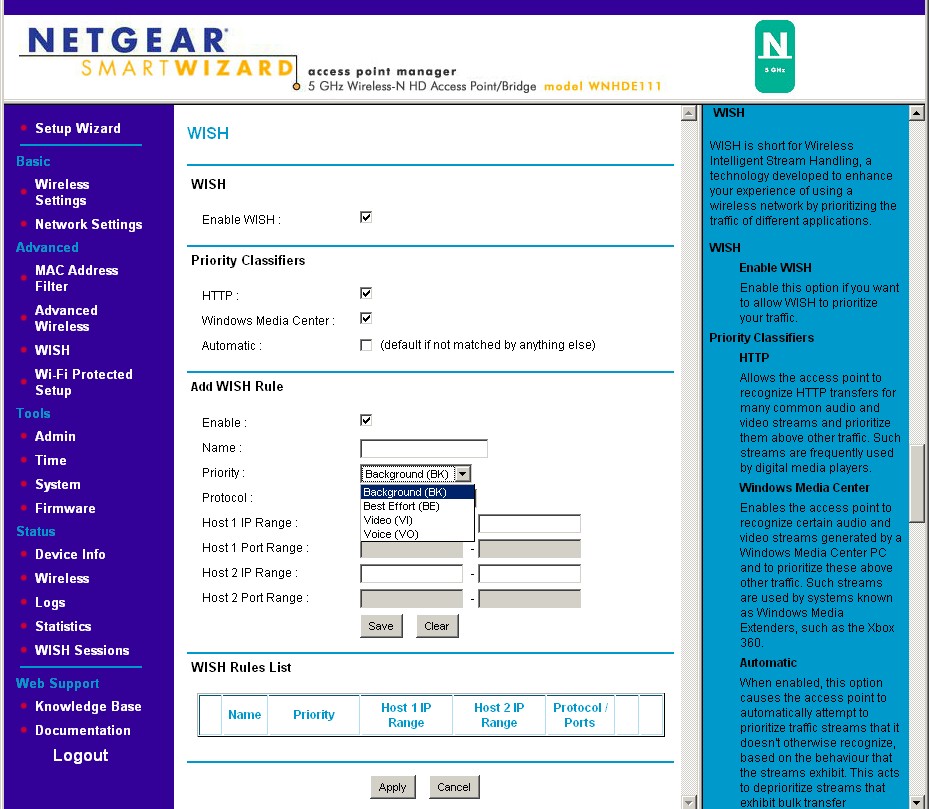
Figure 7: WISH
WISH is disabled by default. But if you choose to use it, you should enable it only on the 111 that is in AP mode. To see if WISH is doing anything useful, Ubicom has two online tests that you can play with: one for gaming and one for Voice.
But when I tried out the Voice test, it showed no improvement (Figure 8) on my DSL connection that has around 800 Kbps of uplink bandwidth. (The test configuration was Computer – WNHDE111 – WNHDE111 – Router – Internet.)
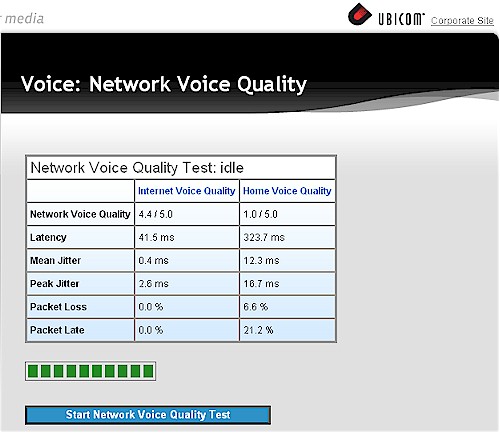
Figure 8: Ubicom Voice Test Result
If WISH had been doing its job, the Home Voice Quality scores in Figure 8 would have been more like the Internet Voice Quality scores. But I also ran the tests with a wired connection and a Ubicom StreamEngine enabled router and obtained similar results. So perhaps the Ubicom test site was having a bad day.
Updated 12 March 2008 It turns out that Ubicom’s online tests are only helpful for QoS that is applied at a LAN’s gateway router and not inside the LAN. So the results that I obtained, which showed no improvement with WISH enabled, were correct.
Performance
Lately, I seem to be running into products that I can’t test on the Azimuth system and the 111 joined that group. It seems that the Azimuth ACE MIMO test software isn’t set up to handle a client that’s an Ethernet bridge. So I had to fall back to using my five location walk-around test.
Figure 9 shows downlink performance for three out of the five test locations. No results are shown for my most difficult Locations 4 and 5 because the 111’s were not able to establish a reliable link. This is due partially to the higher attenuation of 5 GHz signals vs. 2.4 GHz. But I think it also reinforces my observations that draft 11n gear doesn’t really do much for extending range.
Still, when it does work, the throughput is pretty impressive, with downlink speed ranging from a best case of 82 Mbps in Location 1 (same room) to a worst of 67 Mbps (same floor, two rooms away).
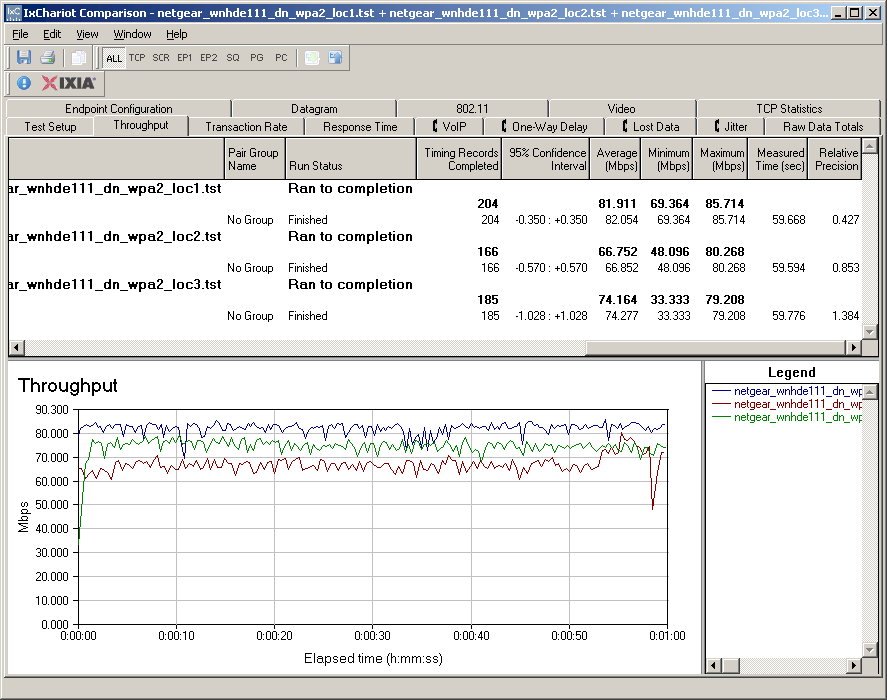
Figure 9: Downlink throughput comparison
Figure 10 shows uplink performance, which turns in higher Location 1 throughput of 89 Mbps. The large throughput drops in the Location 2 and 3 runs were not that unusual, as I saw them from time to time during my testing.
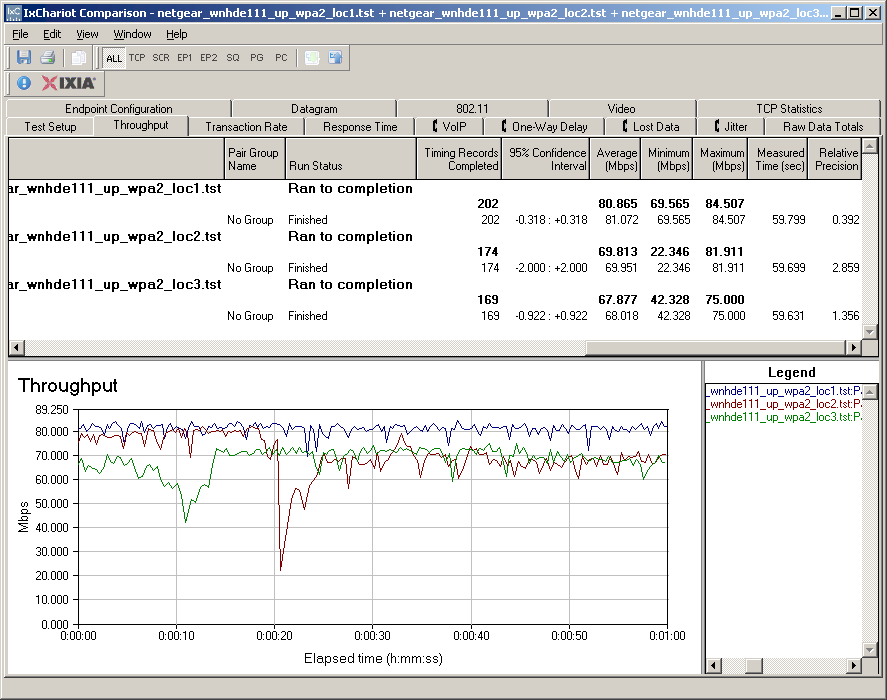
Figure 10: Uplink throughput comparison
The 111 is actually capable of total throughput over 100 Mbps when running full-tilt in both directions simultaneously. The throughput plot in the slideshow shows 105 Mbps. This means that the 100 Mbps LAN port is slightly limiting maximum performance. But since this is only under best-case (same room) conditions, I wouldn’t lose too much sleep over it.
All of the above results were taken with the default conditions, which include Auto 20/40 Channel Width and WPA2 AES wireless security. I ran throughput tests using WEP and WPA/TKIP security and found the usual fallback to 54 Mbps 11g connection rates in both modes, which dropped throughput to the low 20 Mbps range.
By the way, I verified that the 111’s were using 40 MHz channel width during the above tests by using a Cognio (now Cisco) Spectrum Expert spectrum analyzer. So I also ran a Location 1 test with the Channel Width forced to 20 MHz mode, which reduced total and unidirectional best-case throughput to around 60 Mbps.
Performance – more
Since the 111 can be used as an access point by itself, I checked it with draft 11n and 11a clients. I chose a Linksys WPC600N Notebook adapter (using the Broadcom Intensi-fi chipset) for the draft 11n client and the Intel 2915abg internal mini-PCI adapter in my notebook for 11a.
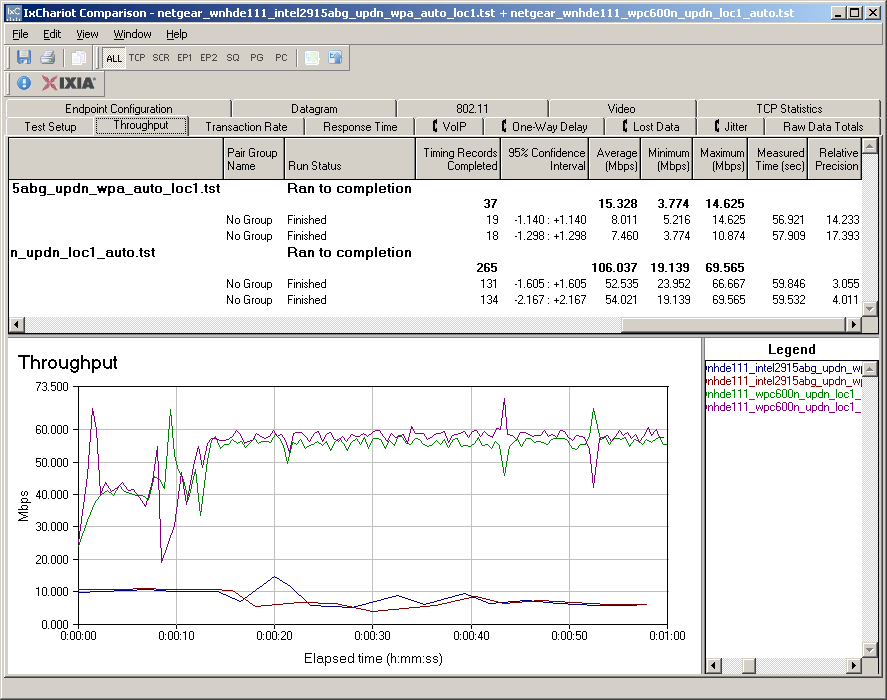
Figure 11: Throughput as an AP
Figure 11 shows that the 111 handled the Linksys client, with performance equivalent to running with another 111. But the Intel 11a client didn’t fare nearly as well. I should have seen performance in the low to mid 20 Mbps, i.e. the same as with an 11g client. But the 15 Mbps I measured seems to indicate that there hasn’t been much effort expended on tuning performance with 11a clients.
Closing Thoughts
I think the primary use for this crop of draft 11n AP/Bridges will be as wireless to Ethernet adapters vs. add-on APs. There isn’t really any substitute (other than the existing crop of 11b/g "gaming" adapters) if you need to get an Ethernet-only gizmo wirelessly-linked up.
But on the other end of things, consumers have shown that they prefer wireless routers to access points, especially given the way that vendors price both products (and the fact that vendors stopped making consumer models!). The only thing going for these products it that they are the only way to get 5 GHz draft 11n capability for around $100. Any dual-band draft 11n routers—even single radio models—currently run $150 and up.
Updated 5 March 2008 As I mentioned at the top of this review, the WNHDE111 had a nice price position vs. D-Link’s DAP-1555 until Linksys’ WGA600N came on the scene. And while I haven’t checked out the Linksys product, it seems to do almost everything that the 111 does, including Ubicom-based auto-QoS, but in both the 2.4 and 5 GHz bands. The Linksys, however, can’t act as a true AP, but supports a "LAN Party Gaming" mode that can join multiple adapters in Ad Hoc mode, i.e. connecting without an AP.
That said, the WNHDE111 does what it’s designed to do and does it well, providing an easy to set up way to get a secure, HD-capable wireless link up and running in a jiffy. If you don’t care about dual-band operation and you’re not trying to link to a difficult-to-reach location, the WNHDE111 (or WNHDEB111 pair) are worth a try.