

Introduction
When I posted the How is WPS Supposed to Work? article, I expected to have the error of my ways shown to me in short order. But instead of a barrage of "You bonehead! This is how you do it…" comments, the article received only a few responses, most of which reported similar experiences.
The Wi-Fi Alliance provided no information, either, just an query via its PR agency asking which products had been tested. It turns out, however, that one reader, known only as "UTO", had the golden clue, which I’ll share with you shortly.
So due to the scarcity of useful information on the workings of Wi-Fi Protected Setup, I’m going to use this Need To Know to flesh out the subject. I hope that it will save others the hassle of having to discover by experimentation information that should have been provided by the product manufacturers that are (so very) slowly incorporating WPS into their products.
As noted in the first article, WPS is a wireless security setup protocol announced in August 2006 that the Alliance brokered as a way to get Buffalo, Intel, Atheros, Broadcom and Microsoft to stop working at cross-purposes.
WPS combines elements of Broadcom’s Secure Easy Setup, Buffalo’s AOSS (AirStation One-Touch Secure System), Atheros’ JumpStart, Intel’s Smart Wireless Technology and Microsoft’s WCN (Windows Connect Now) into a single method for getting a wireless network securely set up quickly and easily.
We put both AOSS and Secure Easy Setup through their paces back in 2005. While both had their problems, both did succeed in automatically making a secure connection. But neither system would interoperate with the other; the problem that WPS set out to solve. Here we are three years later with the technology available to do what was done in 2005, but still not widely deployed for various reasons known only to the chip, product makers and Wi-Fi Alliance.
I suspect that part of the reason is that unlike WPA and WPA2 security, WPS is an optional certification. While many draft 11n routers are WPS certified, products introduced even as recently as last year, such as the Linksys WRT150N, still don’t support it.
WPS support in client devices is even harder to find and must be supported in manufacturer-provided client applications. This is because Windows XP provides no WPS support and Windows Vista supports only the PIN method (more on that shortly). And even then, the router and client device must be initially connected via Ethernet (!) for Vista to support the WPS PIN session. (Subsequent client additions can be done via wireless connection, however.)
WPS Basics
The best source of WPS technical detail is the "Wi-Fi CERTIFIED™ for Wi-Fi Protected Setup" (PDF link) white paper—once you wade through the first 4 or 5 pages of marketing-ese.
WPS currently supports two methods: Personal Information Number (PIN) and Push Button Configuration (PBC). The spec also includes a third method, Near-Field Communication (NFC) but there are currently no products that support NFC. To quote from the white paper:
"The Wi-Fi Protected Setup specification mandates that all Wi-Fi CERTIFIED products that support Wi-Fi Protected Setup are tested and certified to include both PIN and PBC configurations in APs, and at a minimum, PIN in client devices."
The difference between the two methods is pretty much described in their names. The PIN method involves entering a client device PIN, obtained either from a client application GUI or a label on a device, into the appropriate admin screen on a Registrar device.
Quoting further:"A Registrar… issues the credentials necessary to enroll new clients on the network. In order to enable users to add devices from multiple locations, the specification also supports having multiple Registrars on a single network. Registrar capability is mandatory in an AP."
The PBC method requires the user to push buttons on the Registrar and Client devices within a two-minute period to connect them. (The two-minute period also applies to the PIN method.) The buttons can be physical, as they typically are on AP / router devices or virtual, as is normal on client devices.
AP Interfaces
Let’s look at how WPS is actually implemented, starting at the AP side of things. Figure 1 shows the Wi-Fi Protected Setup page in D-Link’s routers.
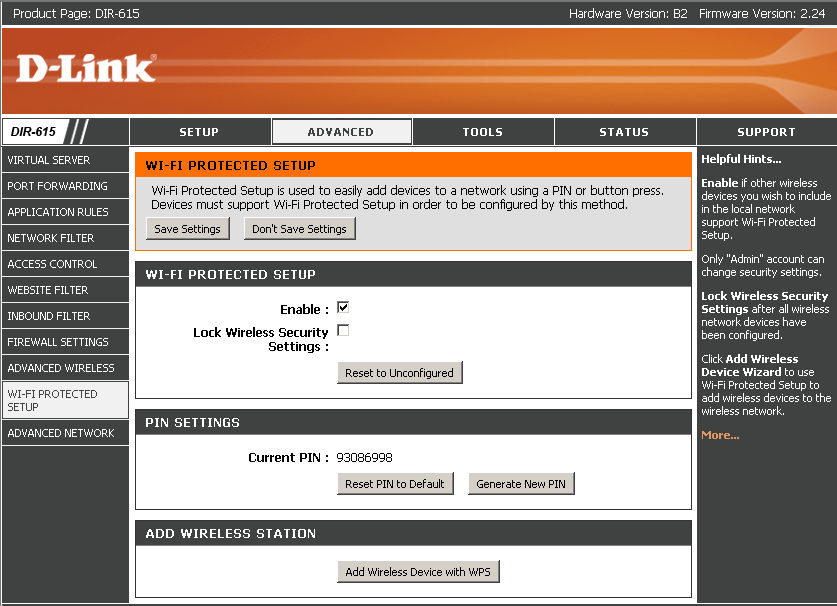
Figure 1: D-Link Router WPS settings
Figure 2 shows the Wi-Fi Protected Setup screen in the Belkin N Wireless Router (F5D8233-4).
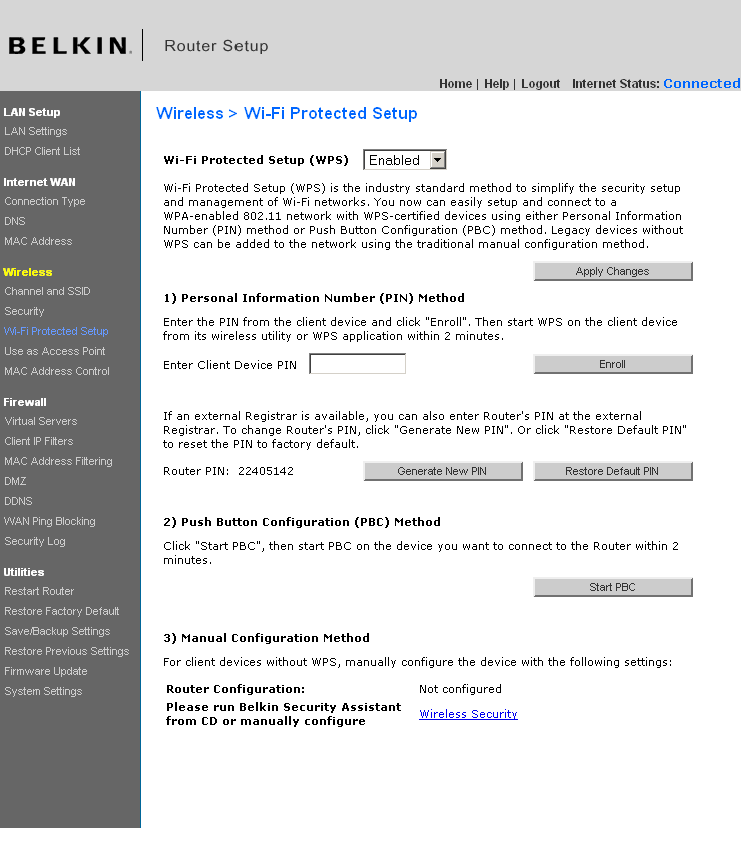
Figure 2: Belkin WPS settings
Both have a general Enable, which is set by default and both show the Router PIN, let you generate a new one or reset it to its default. But the Belkin takes a one-screen approach, letting you enter a client PIN for a PIN session or start a PBC session. You also can see the Configuration Status, but unfortunately, not reset the router to Unconfigured. We’ll see how important that is later.
D-Link takes a multi-screen approach, making you go to the General Status page and scroll down to the Wireless LAN section to see WPS status (Figure 3).
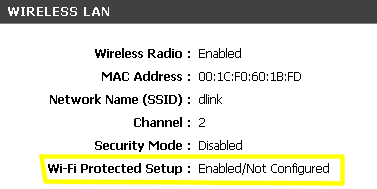
Figure 3: D-Link WPS Status
Starting either a PIN or PBC session requires a click on the Add Wireless Device with WPS button on the Wi-Fi Protected Setup screen. This launches a wizard shown in Figures 4 – 6. I think this is overly complicated and prefer Belkin’s one-page approach. All Belkin needs to do is add a Reset to Unconfigured Button to their screen and they’d have everything in one place.
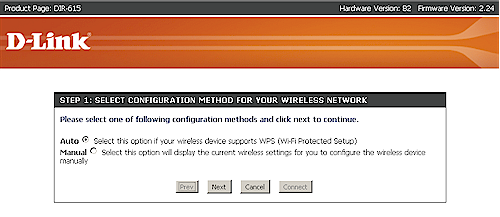
Figure 4: D-Link WPS Wizard – Step 1
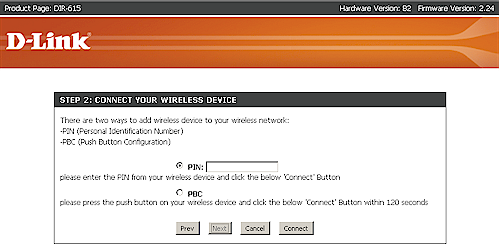
Figure 5: D-Link WPS Wizard – Step 2
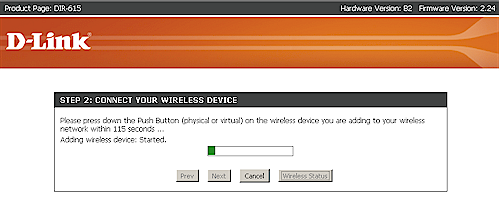
Figure 6: D-Link WPS Wizard – PBC in progress
Client Interfaces
I would have liked to show more than one example of a WPS client interface. But I was able to find only one among my current collection of wireless cards: D-Link’s Client Manager. The reason appears to be that Atheros has done a better job than the other Wi-Fi chipmakers in implementing WPS on the client side. And since most of D-Link’s wireless products are Atheros-based, they reap the benefits of Atheros’ work.
I asked my Linksys contact whether there were any Linksys adapters that supported WPS and was told that, except for the WGA600N Gaming Adapter, there were none. Client support for WPS is supposedly coming soon, but given my previous experience with such reassurances (and not only from Linksys), I won’t be holding my breath.
I could find no examples of WPS client support for Netgear, even in its latest WNDA3100 Dual-Band Wireless N USB Adapter. But, like many other manufacturers, WPS is supported in the companion WNDR3300 Dual-Band Wireless N router.
Figure 7 shows the D-Link client manager’s main screen.
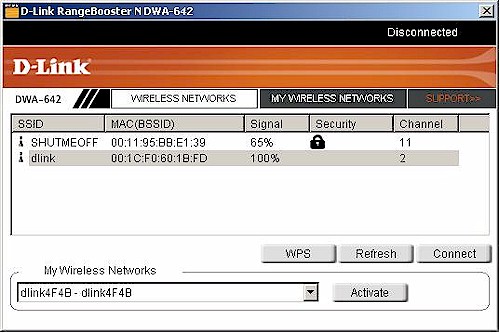
Figure 7: D-Link Client Manager with WPS support
Clicking the WPS button takes you to a PBC / PIN selection screen (Figure 8).
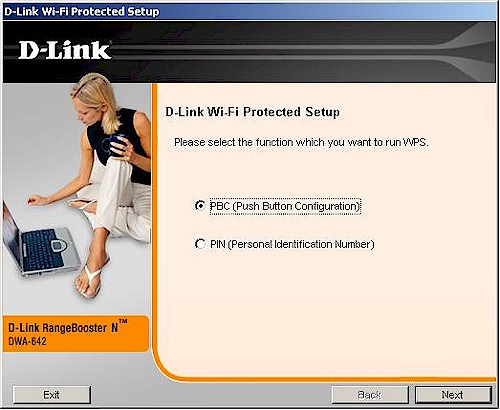
Figure 8: PBC / PIN selection
Selecting PIN takes you to a screen that provides the PIN that you enter into the Registrar, i.e. the wireless router or AP (Figure 9).
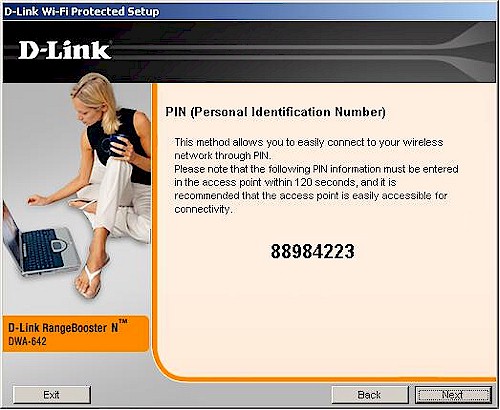
Figure 9: Client PIN screen
Selecting PBC takes you to the Figure 10 screen, where a click of the button starts the client’s participation in a PBC session.
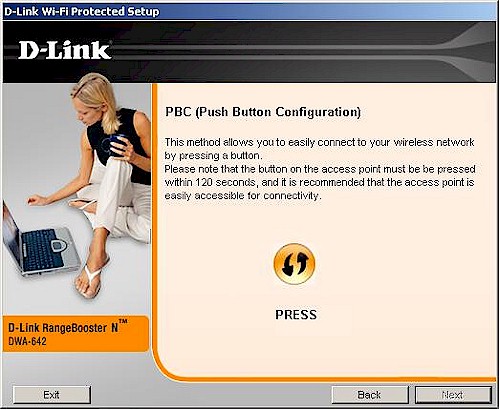
Figure 10: The magic PBC button
You’ll see the Figure 11 screen while the PBC session is in progress. I found that this screen didn’t stay up for long; most PBC sessions completed within 10-15 seconds!
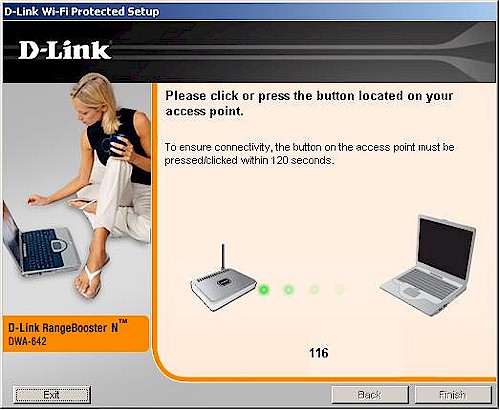
Figure 11: PBC session in progress
Figure 12 shows a successfully completed WPS session.
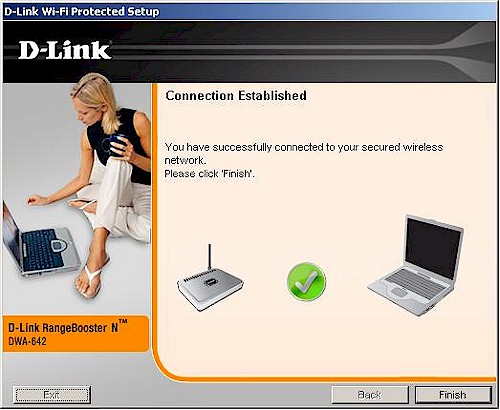
Figure 12: PBC session completed
Again, there are too many screens for my taste. But at least WPS is supported!
The Secrets to WPS Success
My first article was born out of frustration with not being able to get a WPS session to successfully complete on any of the products that I have been testing. The "final straw" product, by the way, was a D-Link DIR-615 tested with a DWA-642 Notebook adapter. And the real shorts-twister was seeing a successfully-completed WPS session with no encryption enabled and no warning! These were all products that had passed Wi-Fi WPS Certification, too!
As mentioned earlier, the key to the mystery was provided by reader "UTO" who suggested resetting the router to defaults and retrying the WPS session or resetting the WPS mode to "Unconfigured". I didn’t pay attention to the comment at the time. But the Configured / UnConfigured issue came up during discussions with D-Link as we tried to debug the WPS failures.
D-Link explained: "WPS has a "Configured" mode and an "Unconfigured" mode. A router, straight out of the box is in "Unconfigured" mode. If you were to take this completely defaulted router, plug it in and press the buttons, you will get a secured link".
And, sure enough, when I tried this, the DIR-615 and DWA-642 completed a WPS session in about 10 seconds, including enabling security.
D-Link further explained: "If you take a router straight out of the box and change the SSID and nothing else, WPS is still set to "Configured" and when you press the buttons, you will get an unsecured link. If you take the router out of the box and set the SSID and Security, then push the buttons, you will get a secure link".
It turns out that it’s my practice to change the SSID in the routers that I test because the Azimuth system used for performance testing identifies devices by SSID. I have gotten into the habit of doing the change when I start bench testing, so that I don’t forget later when I move the products into the Azimuth.
Since part of the WPS process is to generate a unique SSID (typically a combination of the default SSID and the last four digits of the product’s MAC address), WPS code in the firmware checks to see if the SSID has already been changed. If it has, it considers the Registrar to be "Configured" and doesn’t mess with the SSID or security mode settings. When a WPS session is initiated, it just propagates the "Configured" settings to the Client device, whether or not wireless security has been enabled.
While it makes sense for WPS to not change settings if security has already been set on the router, it doesn’t make sense to me to consider a router with a changed SSID, but no security enabled to be "Configured"! At the very least, an alert should be thrown that the link is in an unsecure state at the completion of a WPS session where security has not been enabled.
I should note that the D-Link routers show a warning (Figure 13) if you have WPS enabled and manually enable any wireless security options (WEP, WPA or WPA2). But you don’t get the warning if you just change the SSID, which is why I had no clue as to the implications of this seemingly innocent change.
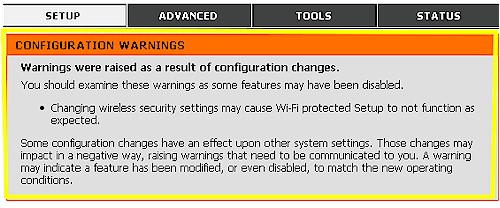
Figure 13: WPS Setup Warning
Client Side
So much for the AP / Registrar side. The other WPS essential is clients that support it. And this is where the industry—including the Wi-Fi Alliance—has made an unholy mess. While manufacturers have been relatively good about shipping new wireless routers with WPS supported, they have been doing a lousy job on the client side.
From what I can tell, part of the problem is political and a hold-over from the proprietary auto-secure-setup wars days. While manufacturers can see the value of making it easy for other manufacturers’ client devices to connect to their AP, they apparently don’t see the value of making their clients easy to connect to other manufacturers’ APs. (This is a puzzler to me, since I have to believe that they margins are better on clients than on wireless routers! So why wouldn’t they want to sell more wireless adapters?)
Another barrier is, of course, Microsoft, which seems uninterested in getting WPS support into its built-in Wireless Zero Configuration utility. WPS has no support in XP and Vista supports only the PIN method via an initial wired (!) setup.
So, as they did with WPA and the "supplicants" required to make it work, product manufacturers have to jump into this WPS breach. This basically means pushing back on wireless chipmakers to implement the required WPS client-side functions. For clients based on Atheros chipsets, this comes in the form of something that you may have already noticed and been wondering what it was.
Figure 14 shows the Network Connection properties for the Atheros XSPAN-based D-Link DWA-642. I have highlighted two drivers that you should know about.
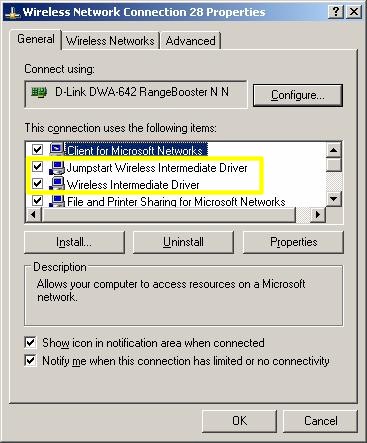
Figure 14: Atheros drivers
The Jumpstart Wireless Intermediate Driver (Jumpstart was Atheros’ contribution to the WPS melange) is installed by Atheros-based clients that support WPS. According to Andy Davidson, Sr. Director of Software Engineering at Atheros, this driver contains the guts of what is needed to implement client-side WPS.
It is interesting that, according to Andy, this driver will add WPS client functions to any other manufacturer’s wireless client! So once it is installed, it will automatically link to all other installed network adapters and any adapters that you subsequently install. Of course, unless the client application works along with this driver, the user still won’t see any WPS functions.
The Wireless Intermediate Driver is Atheros-specific and provides WPA / WPA2 supplicant functions. It should not automatically link to non-Atheros products and you should uncheck it if you find it linked. This driver doesn’t really have anything to do with WPS. But I’ve always wondered what it was doing and, now that I know, thought I’d share the information.
Even though WPS was announced in August 2006 and Wi-Fi Certification testing started in January / February 2007, most new Wi-Fi products—even the "matching" clients to the latest and greatest draft 11n routers that do support WPS—are not shipping with WPS support. And adding WPS support to old products? Fuggeddaboudit!
Manufacturers would rather spin new generations of draft 11n products than work on upgrades to the current ones. So don’t count on manufacturers actually delivering upgrades for product that you’re using today. Past product transitions show they always prioritize pumping out new stuff over upgrading old.
Testing, Testing
So, now armed with the knowledge of what I had been doing wrong, I set out to achieve some successful WPS sessions. Unfortunately, due to Wi-Fi industry’s reluctance to focus on supporting WPS in clients, I was able to find only one card among my current assortment that supported WPS in its client application. So Table 1 isn’t as big as I had hoped it would be.
| D-Link DWA-642 [Atheros] |
|
|---|---|
| D-Link DIR-615 (B2) [Atheros] |
– Success. PBC and PIN – AP always reports WPA-only / TKIP – STA usually reports WPA / TKIP, sometimes reports WPA2/AES |
| D-Link DIR-625 (C1) [Atheros] |
– Success. PBC and PIN – AP always reports WPA-only / TKIP – STA usually reports WPA2 / AES |
| Linksys WRT160N [Broadcom] |
– Success. PBC and PIN – AP reports WPA2, TKIP or AES – STA reports WPA2 / AES |
| Trendnet TEW-632BRP (A1.0R) [Atheros] |
– Success. PBC and PIN – AP reports WPA-Auto / TKIP – STA reports WPA2 / TKIP |
| Belkin F5D8233-4 (Ver. 4000) [Ralink] |
– Success. PBC and PIN – AP reports WPA / TKIP – STA reports WPA / TKIP |
Table 1: WPS Testing Summary
What is does show is support for WPS on the AP side for products with Atheros, Broadcom and Ralink chipsets. It also shows an interesting mix of security levels that result from WPS sessions.
All of the products tested support the highest WPA2 / AES security. But only one pairing, the Linksys WRT160N and DWA-642 resulted in a WPA2-secured connection. All other combinations looked like WPA / TKIP, although the D-Link DIR-615 and 625 reported mismatched WPA/TKIP and WPA2 connections between AP and client, which shouldn’t be possible.
I don’t understand why all of these products didn’t negotiate WPA2 connections. But maybe that’s a subject for another article.
Conclusion
At the rate things are going, it is anyone’s guess as to when consumers will really be able to push buttons on wireless routers and wireless clients and get a reliable, secure wireless connection. Actually, given the apparent lack of urgency and enthusiasm from the Wi-Fi Alliance and consumer networking product manufacturers, WPS may never really take hold.
Every day that goes by without WPS, consumers are learning to do without it. While there will always be those who are clueless about technology and who could really reap the benefit of WPS, other, more technically-savvy users just soldier along. They have learned to fend for themselves and to make sense out of the piecemeal, half-done "solutions" that companies continue to push out.
This is really be a shame, especially given the time, effort and resources that many companies have been "encouraged" to devote to developing a "standard" technology. A technology that is no better than the proprietary technology that started it all, Buffalo’s AOSS, that has an installed base in the millions of units and that is an example of what WPS could do, if the industry would get behind it.
Before its creation and while WPS has been poking along, Buffalo got AOSS designed into four of the most popular game consoles on the planet—the Sony PS3 and PSP and Nintendo Wii and DS. Every day, consumers use AOSS push-buttons to connect these devices to Buffalo AOSS-equipped wireless routers. They even use it, along with a Nintendo Wi-Fi USB adapter, to turn an Internet-connected PC into a wireless hotspot for DS game parties.
Of course, none of these products support WPS, so Buffalo, Sony and Nintendo are just as guilty as other Wi-Fi Alliance members of not getting behind the technology. But just think of the benefit to consumers if the consumer wireless industry would just once, act in the interest of consumers, who ultimately pay their salaries, instead of their own?