

| At a glance | |
|---|---|
| Product | PepLink Balance (30) [Website] |
| Summary | Relatively expensive three WAN router supporting link aggregation, balance and auto-failover. |
| Pros | • Three WAN ports for Internet redundancy and diversity • Sophisticated load balancing and fail-over options • Drop-in mode for easy implementation into existing network |
| Cons | • No gigabit Ethernet •No VPN endpoints •Relatively expensive |
Typical Price: $495
Introduction
Updated 9/25/13: Corrected RAM and flash size
Routers with multiple WAN connections are increasingly
common, which is a good thing. Internet connectivity is essential, and ISP
connections fail. In the last year, I’ve reviewed products from NETGEAR,
Linksys, D-Link, and SonicWALL, all with dual WAN ports. In this review, I’m
going to take a look at the PePLink Balance 30, which goes one step further
than dual-WAN routers by supporting THREE independent WAN/Internet connections!
Initially, I thought triple WAN connections might be
overkill, as customers in most markets use one of two Internet providers,
typically a cable or telephone company service. Customers needing redundancy
would then subscribe to connections from both the cable and telephone
companies. Note that in areas with multiple telephone companies, the outside
wires used by the different Telcos are typically on the same wiring
infrastructure, so products from multiple Telcos may provide limited diversity.Â
Satellite is a viable Internet choice if installing a dish
on the building is possible: the latency from the satellite connection isn’t a
problem, and weather related interruptions are tolerable. Using WWAN, or
cellular data services for Internet services, in a network fail-over
configuration is also an option, which we looked at with the SonicWALL TZ190.
However, cellular Internet bandwidth can be limited and usage is often capped,
rendering WWAN viable only in a backup capacity. Finally, many cities now have free or subscription-based Wi-Fi Internet services providing another option.Â
PePLink had all this in mind when they created the Balance
30 with its three WAN interfaces. The Balance 30 has been introduced to allow a
network to load balance or fail-over to up to three Internet connections of
varying types. On the surface, the Balance 30 seems relatively basic, with
simple configuration options for its three Internet connections, but PePLink has some powerful tools for leveraging multiple connections.
In addition to directly connecting cable or DSL services, the
Balance 30 can be easily inserted between an existing Internet router and LAN
with the "Drop-in Mode" configuration option. This mode allows continued use of
an existing router supporting perhaps a satellite or WWAN connection, as well as traditional wired connections.
Another creative solution to multiple WAN connections from
PePLink is what they call the "Surf Combo." Using
the PePLink PepWave200 to receive a Wi-Fi signal and physically connecting it
to a WAN interface on the PePLink Balance 30 creates a network that can be
connected to two wired Internet providers, as well as a Wi-Fi Internet provider.
I like this solution, as it creates value out of using a free Wi-Fi solution
that normally might not be suitable for a business network. Free Wi-Fi may be
slow and have connection issues, but it can certainly be a useful solution for fail-over or low priority traffic.
Before I go into configuration and performance analysis, I
have to give PePLink credit for putting a demo of their product on the web. Click
on this link and you will be able to view all the configuration options of a PePLink Balance 380.Â
This review is about the Balance 30, not the 380 as in the
demo, but the menus and configuration options are identical with the exception
that the 380 has additional options for High Availability. After working on a
live Balance 30 and reviewing this demo, I can confirm the configuration
options in this web demo are identical to configuring the real device. As you read this review, feel free to check out the menu options for yourself.
Hardware Details
The Balance 30 is a simple device physically, outfitted in a
black plastic housing measuring 9.57" W x 6.25" D x 1.26" H. The power supply
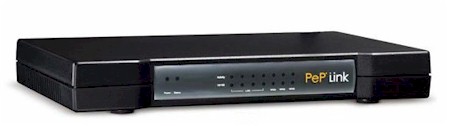
is external, so the device is very lightweight. Indicator lights on the front (Figure 1) provide status indicators for the physical ports residing on the back (Figure 2).
Figure 1: Front view diagram of the Balance 30
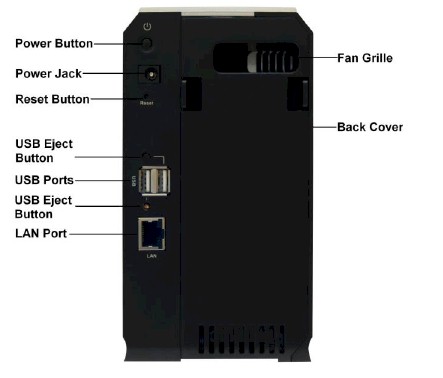
Figure 2: Rear view diagram of the Balance 30
Hardware Details – more
Figure 3 shows the layout of the Balance 30’s main board. Cooling
is passive, thus the Balance 30 runs silently. The CPU and Ethernet switch are
an integrated System-on-Chip (Sock) circuit from Micrel, part number KSZ8695P, using
Micrel’s 166 MHz ARM9 processor along with a five-port Ethernet switch.
Although the chip says it is a five-port Ethernet switch, the Balance 30 only
has four physical LAN ports. 10/100 Ethernet controllers are Realtek RTL8139D chips.
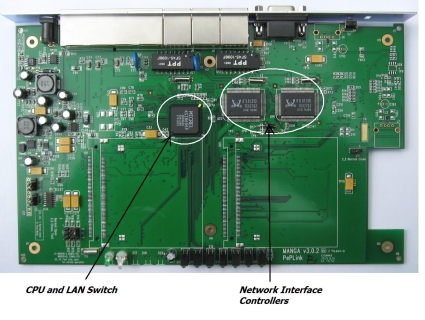
Figure 3: Internal view of the Balance 30
Updated 9/25/13
The Balance 30 has a healthy amount of memory. In addition
to 256 32 MB SDRAM (chip part number V54C3256164VDI7I), the device uses
dual flash memory for boot images. Firmware files can be loaded to one of the
two 64 8 MB flash chips (chip part number S29GL064A90TFIR4) and either can be
selected as the boot source, as illustrated in Figure 4. This provides the
ability to test a new firmware release and a nice fallback in the event the new firmware causes issues.
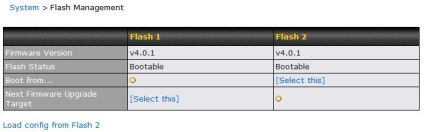
Figure 4: Selecting the flash chip to use as a boot source
Network – WAN
Each of the three WAN interfaces supports Static or DHCP
addressing using Ethernet, PPPoE, or GRE configurations. A simple DHCP
connection would likely be used for cable Internet connections, with PPPoE
often used for DSL Internet connections. Further, Dynamic DNS to changeip.com, dyndns.org, and no-ip.org is supported on each WAN interface.
GRE is an interesting WAN option. Generic Routing
Encapsulation is a WAN option often used with a service provider supplied VPN
tunnel. Figure 5 shows the simple menu for selecting a WAN interface, which is the starting point to get into a specific interface’s configuration mode.
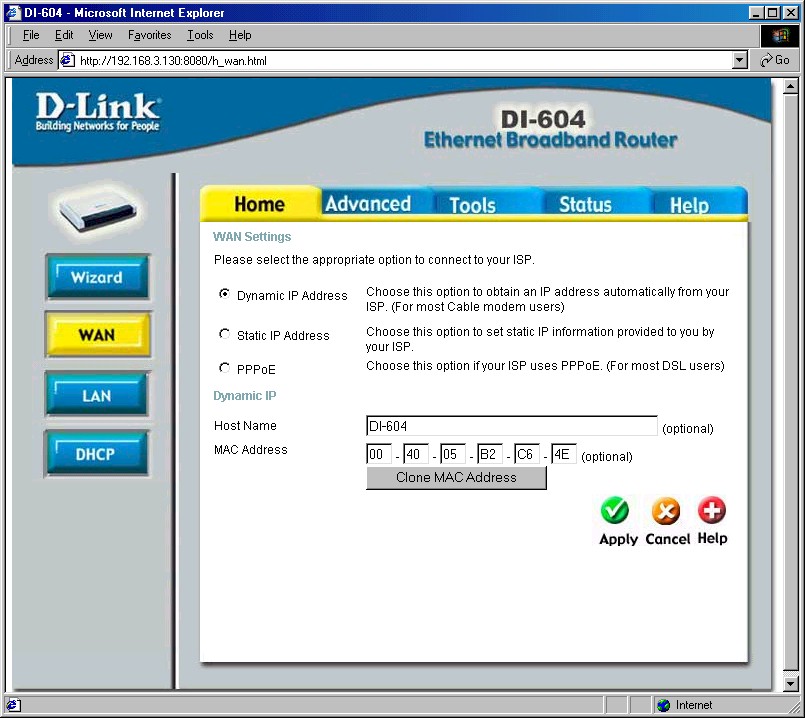
Figure 5: Selecting a WAN interface
I connected my Balance 30 using Static and DHCP services, as
well as to an authenticated PPPoE service, all successfully. Each of the WAN
interfaces can be configured as Always-on and used in a Load Balancing
configuration, or as a Backup to then be used in the event an Always-on connection fails.Â
There are three Load Balancing Policy options as shown in
Figure 6. The High Application Compatibility mode will route all traffic from a
PC to a single WAN interface. In this mode, all the traffic from a PC will
route to a single WAN connection. Load balancing is then achieved by
distributing the PCs over different WAN connections. For example, in a network
with 10 PCs and two equal WAN connections, five PCs would use the first WAN connection, and the other five PCs would use the second WAN connection.
The Normal Application Compatibility mode will route traffic
from a PC to a specific destination over a specific WAN interface. Load
balancing is subsequently achieved by spreading out the destinations over
different WAN connections. For example, PC 1’s connection to one web site will
flow over WAN1, while PC 1’s connection to a second web site will flow over
WAN2. Each PC’s traffic to various destinations will be similarly distributed
over the WAN interfaces. This is the default mode and allows for the greatest level of load balancing.
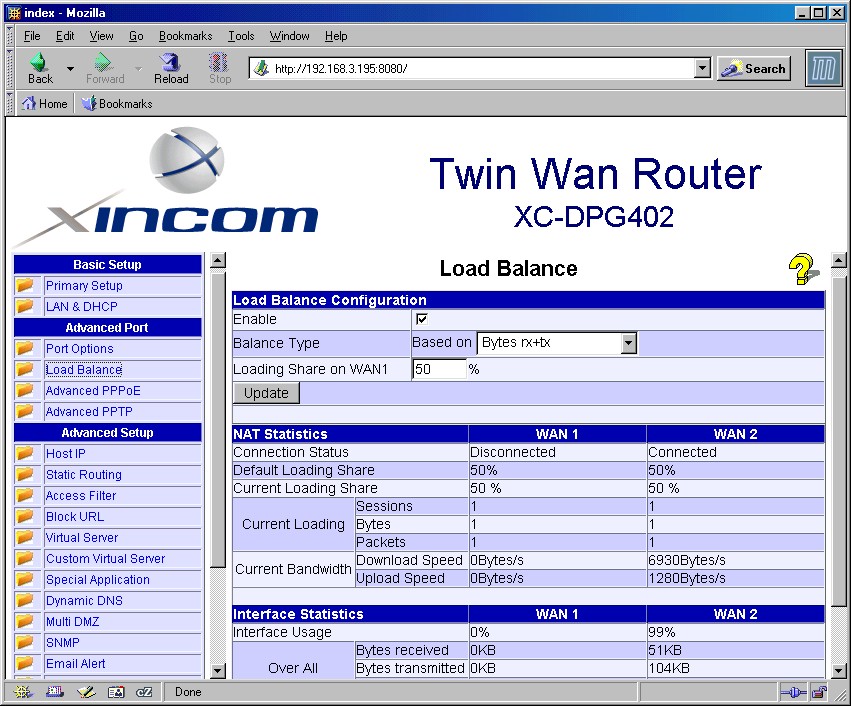
Figure 6: Load Balancing Policy options
Custom Load Balancing options also exist, enabling mapping
specific applications to specific WAN interfaces. More specifically, traffic
flows defined by source and destination IP addresses, protocols, and/or port
numbers can be distributed over multiple interfaces using one of four load balancing algorithms: Weighted, Persistent, Enforced, and Priority.Â
The Weighted algorithm allows for assigning a weight to each
WAN interface. Traffic percentages will then be allocated to each interface
based on its relative weight. The Persistent algorithm is used to apply High
Application Compatibility to some applications and/or Normal Application
Compatibility to others. The Enforced algorithm is used to map specific traffic
types directly to a specific WAN interface, and the Priority algorithm directs
all traffic to the top priority WAN interface first, then to the second priority WAN interface, and then to the third.
For simple fail-over, a WAN connection can be configured as
Backup. In this case, it will only be used when other WAN connections fail. With
three WAN interfaces, the option exists to configure WAN1 as Always-on, WAN2 as
Backup Group1 and WAN3 as Backup Group2. This configuration would tell the Balance 30 to fail-over from WAN1 to WAN2 to WAN3, in that order. Â
In multiple tests of Backup Mode, it took approximately 55–60 seconds before I could successfully surf the Internet after simulating a
failure by disconnecting an active WAN connection. The Balance 30 acts as a DNS
proxy, so my laptop on the router’s LAN side didn’t have to change DNS IP addresses when the Balance 30 switched over to a different WAN connection.
Network – Drop-in Mode
Drop-in Mode is an interesting feature to simplify the
transition and installation of the PePLink multi-WAN router into an existing
network using a single WAN router. In Drop-in Mode, the PePLink 30 can be
inserted between the current single WAN router and LAN without changing network
IP addressing, duplicating configurations from another router, or adding the latency of another router hop.Â
In this mode, the Balance 30 acts as a bridge between the
WAN1 interface and the LAN interface, meaning packets between the two
interfaces are on the same subnet. However, frames forwarded between the WAN1
and LAN interfaces and back will have their source MAC addresses changed to the
PePLink’s MAC, meaning an ARP table refresh on all devices may be necessary after inserting the Balance 30 into an existing network.
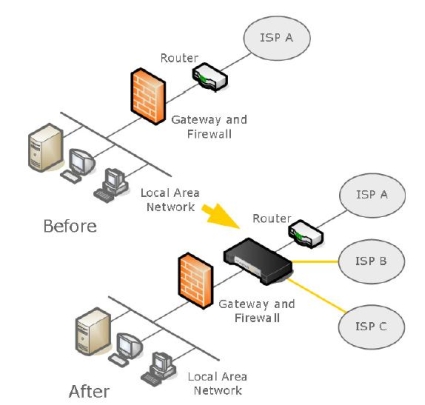
Figure 7: Drop-in Mode scenario diagram
The illustration in Figure 7, which graphically depicts a
situation in which the PePLink could make a network administrator’s life easier,
is from PePLink’s product specifications. It allows for the addition of 1–2
more WAN connections without having to alter or remove the working configurations in the existing WAN connection or firewall.Â
As you can see, a network with a single WAN connection to
ISP A is transitioned to a multi-WAN scenario by installing the Balance 30
between the existing router and firewall, and then adding additional WAN connections to leverage the multi-WAN capability of the Balance 30.
Network – Routing and Firewall
With three WAN interfaces, the Balance 30 could be useful as
a router between multiple subnets. NAT can be disabled on each WAN interface as
necessary, but only after uncovering the IP Forwarding option hidden in a help menu warning that you should "know fully what you’re doing."
I successfully
tested IP Forwarding mode, using the Balance 30 on a network with multiple
other routers. Static routes can be entered in the LAN configuration section,
but I was disappointed to find the Balance 30 doesn’t support any dynamic routing protocols, even basic RIP.Â
As a firewall, the Balance 30 can filter both outbound and
inbound traffic. As displayed in Figure 8, rules can be defined to allow or
deny outbound or inbound traffic based on protocol, source IP and port
addresses, and/or destination IP and port addresses. In addition, inbound rules
can be created and applied to all WAN interfaces, or to specific WAN interfaces. However, creating time schedules for traffic rules is not supported.
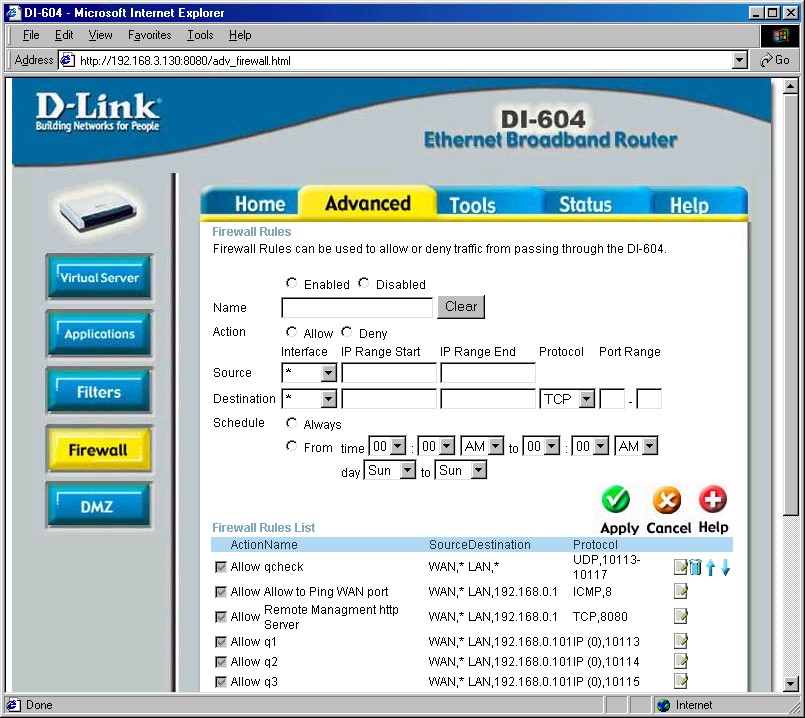
Figure 8: Configuring a firewall rule
For outbound traffic controls such as content filtering,
configuration is based on destination IP address. The Balance 30 doesn’t
support URL-based filters. I tested outbound traffic filtering by creating a
simple rule to block traffic to YouTube.com. (Note: I’m not picking on
YouTube, but have seen that some workplaces have been restricting YouTube access due to productivity and bandwidth issues.)
I pinged YouTube.com to get their IP address, and since they
have multiple servers, set up a simple rule to block all outbound traffic from
any LAN user behind the Balance 30 to the /24 subnet including YouTube’s IP
addresses. Once configured and enabled, browser attempts to YouTube.com would
simply hang; no error message or warning was presented notifying the user they are attempting to reach a restricted site. Figure 9 shows my configuration.
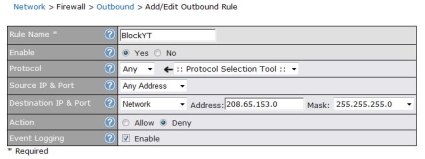
Figure 9: Blocking outbound traffic to YouTube’s subnet in the firewall
Firewall – more
In addition to creating rules for filtering traffic in both
the outbound and inbound directions, rules can be created for port forwarding.
Port forwarding applies when using Network Address Translation, or NAT. With IP Forwarding enabled on a WAN interface, port forwarding isn’t an option.Â
Configuring port forwarding on the Balance 30 is standard. Traffic
flows from the WAN side of the router destined for the Balance 30 can be mapped
by WAN interface, by port or protocol, to the IP address of specific devices on
the LAN. For example, I’ve configured port forwarding in Figure 10 to direct inbound FTP traffic to an FTP server at 192.168.1.22 on my LAN.
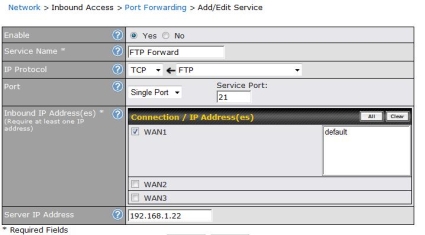
Figure 10: Port forwarding of FTP traffic
Management
Effectively managing multiple WAN links requires clear
utilization data. Visibility into WAN utilization is available in the Balance
30 Status menu, and historical data collection can be enabled via the PePLink
website. These two features complement the Balance 30’s multi-WAN capability,
giving network administrators information needed to tune their load balancing configurations.
The Balance 30’s Link Usage menu provides totals of inbound
and outbound data transfers by WAN interface collected since the last device
reboot. Further, the Link Usage menu reports a summary of data transferred by common protocol types, including HTTP, HTTPS, IMAP, POP3, SMTP, and "Others."
To track data utilization by time period, the Balance 30 can
be configured to post data to the PePLink reporting server. Setting up
historical reporting involves creating a username and password on the PePLink site,
with the link conveniently located in the Balance 30 menu. Once a username and
password is completed and the function enabled, reports such as the simple
report in Figure 11 showing inbound and outbound daily utilization on the WAN1
interface are available. Additional reports by interface, day, week, and month
are also available as the data is generated and collected. (Note: the report
below shows erratic utilization reflecting my lab testing environment. Production reports will likely be more consistent.)
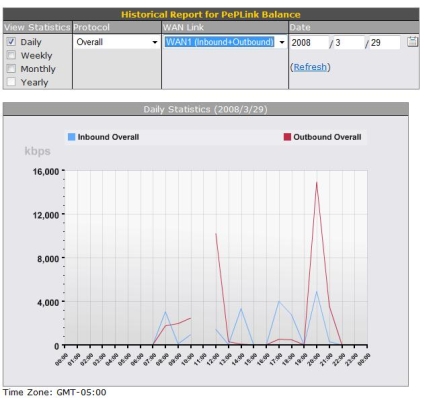
Figure 11: Inbound and outbound daily utilization report
Other reporting tools include basic logging, writing log
data to a syslog server, SNMP support, and email notifications. The Balance 30
Status menu has a basic log, showing time-stamped entries recording events as
they occur on the router. Firewall rules can have logging enabled, which will create entries showing when each rule was triggered.Â
To maintain historical log data, syslog messages can be sent
to a Syslog server by enabling this option and configuring the Balance 30 with
the IP address of the Syslog server. Further, SNMP polling can be enabled for SNMP versions 1–3.
Email notification can be configured so the Balance 30 will
send notifications when there is a status change on a WAN interface, or when
there is a firmware upgrade available. The menu only allows for configuring a
single email recipient, so you may want to set up an email alias to ensure the message is sent to multiple destinations.
Remote configuration of the Balance 30 can be enabled for HTTP and/or HTTPS access, and can be limited by WAN interface. Specific source subnets can be specified to further restrict external access.
Performance, Pricing, and Conclusion
I compared the Balance 30 to several other multi-WAN routers
I’ve reviewed in the past year to see how it stacked up. As discussed, the
Balance 30 is a focused product, with its strength being support for three WAN
connections. Unfortunately for PePLink, its performance numbers aren’t up to
par with most of its competition, putting in the lowest throughput numbers (~ 21 Mbps) of the five routers listed in Table 1 below.
The $495 price listed below for the Balance 30 has an
asterisk to indicate limited pricing information. Normally, we look at pricing
information services such as Pricegrabber.com to see the range of prices
available on a product. The PePLink Balance 30 doesn’t appear in any of the
typical online retailers’ websites, so this is the price as listed on the
PePLink website. Various eBay retailers do list the Balance 30 at a slightly lower
price of $455. If you’re interested in the "Surf Combo," PePLink’s website shows that adding a PepWave200 to the Balance 30 only adds $50.
The Balance 30 includes a 1-year limited warranty and
Standard Support Service, providing unlimited 24-hour email response and five
free calls. 1-year Priority Support with unlimited 12-hour email response and unlimited calls can be purchased for an additional $495.
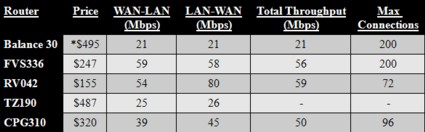
Table 1: Multi-WAN router comparison chart
Although I like the product and the idea of three WAN ports,
the price seems unreasonable compared to what the product offers. Even though
none of the other multi-WAN routers in the above chart has three WAN ports,
they all provide options not included in the Balance 30, such as VPN
connectivity. The closest-priced competitor is the SonicWALL TZ190, which has dual WAN ports, a WWAN port, eight LAN ports, plus VPN capabilities.
At this price point, it seems reasonable to expect support
for common small network router features like Site-to-Site IPSec VPN tunnels
and gigabit Ethernet. Critical sites often need secure connections to other locations,
so it is surprising that there isn’t basic VPN functionality in the Balance 30.
Regarding GigE, brand new $40 motherboards can be found with built-in gigabit
NICs. If the majority of PCs built today include gigabit NICs, shouldn’t all new network devices support gigabit Ethernet?
The PePLink Balance 30’s strength is its support for
multiple Internet connections. The Balance 30 supports more connections than
the typical small network router, and it offers more sophisticated load
balancing options than other multi-WAN routers. To optimize the multiple WAN
connections, the Balance 30 provides useful tools to monitor and tune
utilization over the multiple connections. Further, I found the device stable
and its menus easy to configure. At a lower price point, it would be an
appealing product for small networks looking for a flexible product to pull together multiple Internet connections.