

Introduction
| At a Glance | |
|---|---|
| Product | Intel Entry Storage System (SS4200-E) |
| Summary | Four drive RAID 5 BYOD SATA NAS with top of the chart performance. |
| Pros | • Top of the chart RAID 5 read/write performance • AD support • Bundled EMC Retrospect client software for PC/Mac • Two e-SATA ports |
| Cons |
• RAID limited to 0+1 and RAID 5 • Drives not hot swappable • No Jumbo frame support • No support for RAID expansion or RAID Migration |
If you’re thinking about buying a 4 drive BYOD NAS, the brand names that come to mind are likely to be Synology, QNAP, Thecus, Linksys, and possibly Zyxel. Though Intel has been in the storage business for many years, they are often overlooked as a BYOD NAS vendor.
Yet Intel’s Entry Storage System SS4200-E offers screaming performance at a very affordable price. Intel’s product is actually available in two separate SKUs, so you need to be careful when ordering. I discovered that on Pricegrabber, the product descriptions are the same for both SKUs. The SS4200-E, our review unit, comes pre-loaded with Lifeline NAS software from EMC. EMC software powers both the NAS and provides client backup software via an OEM version of its popular Retrospect Express application.
The second SKU, the SS4200-EHW is a hardware-only product targeted at ODMs or OEMs who want to build their own branded NAS on Intel’s solid hardware platform.
The EMC-powered SS4200-E is targeted to the SOHO and small business market space. And though its performance tops the charts for RAID5 four-drive BYOD NASes, it is missing some features found in competing products.
Product Tour
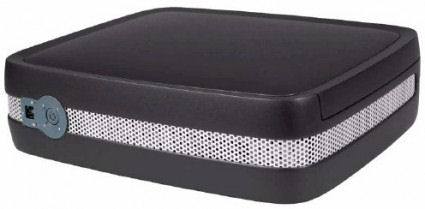
Compared to other 4-drive NASes on the market, the SS4200-E has an unusual form factor. Measuring 4.8” X 16” X 13.23”, it looks more like a small overnight suitcase than a traditional NAS.
It weighs in at a hefty 14.75 lbs without drives, or about 20 lbs when fully loaded. Both the top panel and the bottom panel have a slight bulge, so whether you choose horizontal or vertical mounting, you’ll need to use the supplied metal “feet” to stabilize. The power supply is built in, so unlike some devices, you don’t have to contend with a power supply brick.
The front panel (Figure 1) has LED status indicators for each installed drive, a power switch, NIC and drive activity indicators as well as two USB 2.0 ports. These ports, and as the two USB 2.0 ports on the rear panel, can be used for attaching external USB drives or a UPS. According to the release notes, which make for interesting reading, you can’t use the USB ports for a shared network printing. However, print server functionality is planned for a future release.
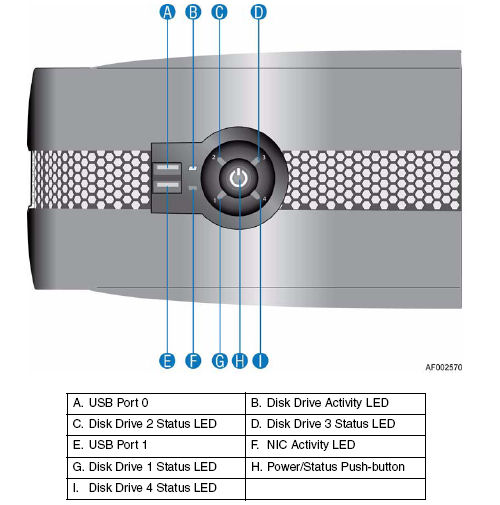
Figure 1: SS4200-E front panel
The rear panel (Figure 2) has the two additional USB 2.0 ports mentioned above as well as two e-SATA ports. There is a single gigabit Ethernet port, reset button, power connector and openings for two 70X70 mm temperature-controlled fans and a small fan for the power supply. The use of the two relatively-large fans makes for surprisingly quiet operation, once you get past the startup fan calibration routine that temporarily spins the fans up to full speed, then ramps them down to a quiet operating level.
It is important to note that the gigabit Ethernet interface, based on the Intel 82573 chipset, does not support jumbo frames, nor can you control the speed of the port; the only mode is auto-negotiation. The back panel also includes a security slot so that you can “tie down” the NAS with a standard notebook cable lock.
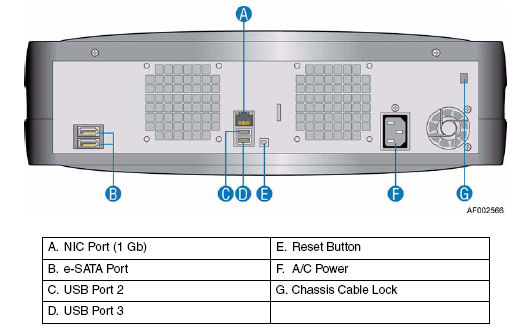
Figure 2: SS4200-E rear panel
On the Inside
While there is no front panel access to the drives, the SS4200-E is designed for accessibility and serviceability. In fact, you can remove the cover and install the drives without any tools. You remove the top cover by unscrewing the two captive screws and lifting the panel off. Once removed, you’ll see the location for each of the four drives (Figure 3).
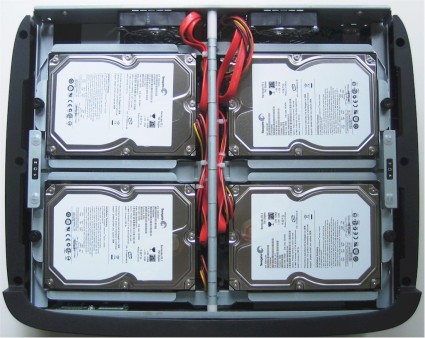
Figure 3: Inside view
For each drive bay, there is a single captive screw that holds the drive bracket in place. Each drive bay is equipped with four “RVR” (rotational vibration reduction) screws for mounting a supported drive (Supported drive capacities are from 80GB to 1 TB.) Though normally shipped without drives, our evaluation unit supplied by Intel arrived with four 750 GB Seagate Barracuda ES.2 drives (ST3750330NS) installed.
According to Intel’s technical specifications, the estimated time for a trained technician to remove the top is 0.5 minutes, and the time to remove and replace a drive is 1 minute. Based on timing myself for these operations, I have to agree that they are in line. I was disappointed that there is no way to lock the top cover to secure the drives. With such easy accessibility and no need for tools, drives could be quickly removed even if the NAS were secured with a security cable.
The SS4200-E is powered by an Intel low voltage Celeron M420 running at 1.6 GHz. It ships with 512 MB of DDR2 SDRAM (PC4200) in a single slot that can be swapped for 1 GB module. This is significantly more memory than you’ll find on most NASes, and is, in part, partially responsible for its excellent performance.
 Check out the slideshow for more internal photos
Setup
Client setup is quite simple. You merely insert a CD and run the HTML-based installation. A wizard doesn’t guide you through the procedure, but if you click on the software tab and then install client software, the process starts. Client operation is virtually the same on a PC or on a Mac.
The setup installs a “sohoclient” application and places an icon on your desktop as well as in the system tray if you’re running Windows. It also installs Retrospect Express, EMC’s backup software. To access the SS4200-E, you merely click on the icon. Alternatively, if you know the IP address of the device, you can type that into your browser. You access the SS4200-E through HTTPS (secure http) via a self-issued certificate. Either way, you end up at the SS4200-E’s home page (Figure 4).
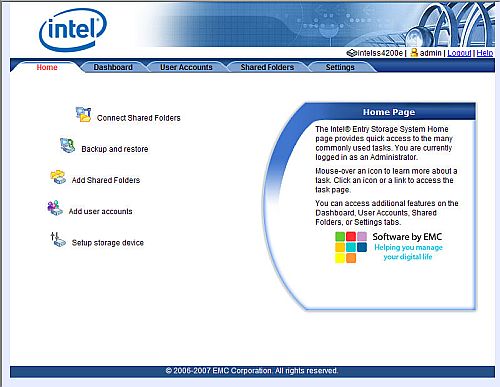
Figure 4: SS4200-E home page
Feature Tour
The main menu has five tabs: Home; Dashboard; User Accounts; Shared Folders; and Settings. As you mouse over each icon, the description appears in the window on the right side of the screen. Many of the entries in each of the tabbed folders are self explanatory, but I’ll highlight significant features for each one:
Home – The first two items in this menu allow you to connect to shared folders, or access Retrospect Express if it has been installed on your system. These two functions are only available if you have access the SS4200-E via the sohoclient application – not directly through the IP address. You can also add user accounts here (Figure 5). However to manage user accounts, you have to go to the User Accounts tab.
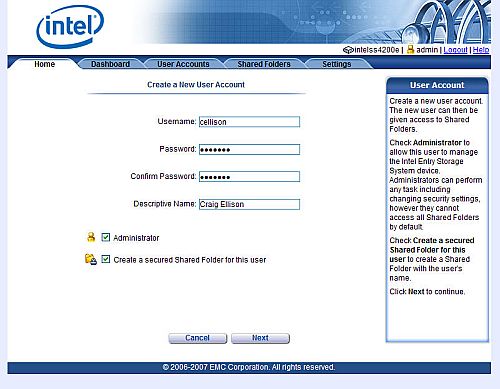
Figure 5: SS4200-E Add User Account dialogue
One nice feature of creating a new user account is the ability to automatically create a secured folder accessible only by the user. However, note that you cannot temporarily disable an account, nor can you set account quotas.
The Home tab also provides access to a three-step setup wizard that allows you to change the name of the device, define an NTP server, set up email notifications and test the email notification function. I tried two different SMTP servers and neither of my test notifications arrived at my mail box.
Dashboard – The Dashboard (Figure 6) gives you an “at a glance” overview of your SS4200-E. It shows the condition of the device, status of externally-attached devices and information about backups. For each of the three conditions, you can drill down for more information.
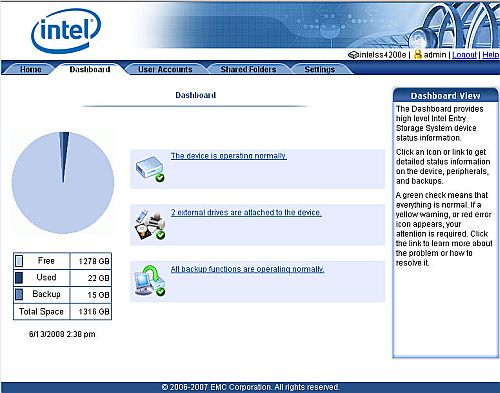
Figure 6: SS4200-E Dashboard
Clicking the top link brings up the System Health page, where you can see the operating voltages of the power supply, the speed of each of the fans and the temperature of the board and CPU (Figure 7). You can’t, however, retrieve S.M.A.R.T. information or temperatures of the individual drives.
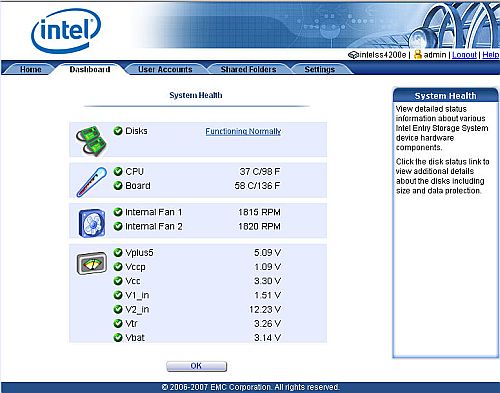
Figure 7: SS4200-E System Health screen
The Backup status (Figure 8) lets you see the last backup status of each backed up device, and lets you manually start another backup session.
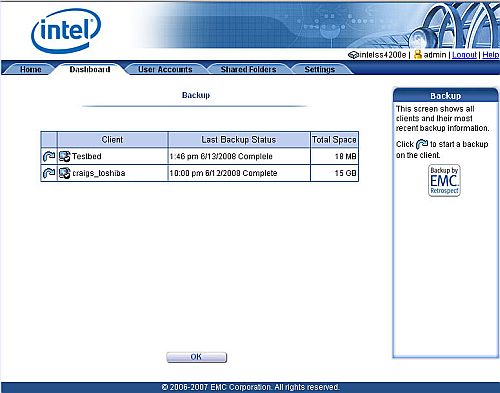
Figure 8: Backup status screen
User Accounts – The User Accounts tab (Figure 9) shows a list of each user in the local database. You can view, edit or delete information about the user. The SS4200-E also supports Active Directory.
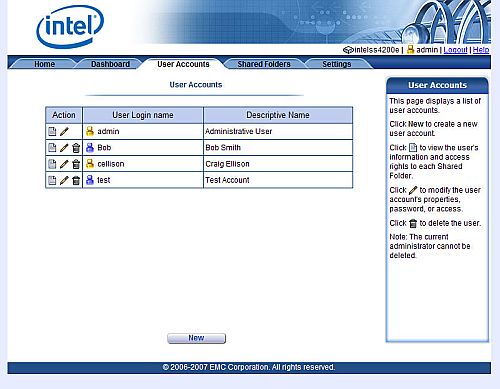
Figure 9: User Accounts summary
When modifying a user’s account (Figure 10), you can change their password, promote them to administrator, or change the access rights to each share. But you can’t assign users to groups since the NAS doesn’t support them. Note that each externally-mounted storage device is shared as an unsecured public share with full read/write rights for all users, by default. You can change the permissions, but the default is surprisingly permissive.
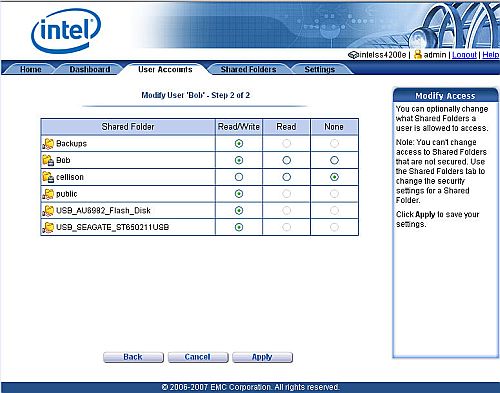
Figure 10: Access rights for user “Bob”
Feature Tour – more
Shared Folder – Under this tab (Figure 11), you can view each share. As with the user accounts, you have the option of viewing, modifying or deleting. If you click on View, you can see each user’s access to the share. Of course, to change user’s access, you have to return to the User Accounts tab.
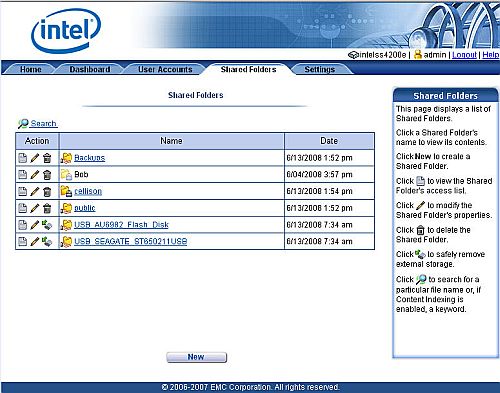
Figure 11: Shared Folders
If you click on Modify, you can designate the share as not secured, secured for read, or secure for read/write. You can also search for file names, or, if you’ve enabled content indexing for a share, search for keywords within a file.
Settings – This tab (Figure 12) has the most options of any tab. But many of the options are also configurable by wizards or accessible under other tabs. I’ll provide screen shots for only a couple of important settings.
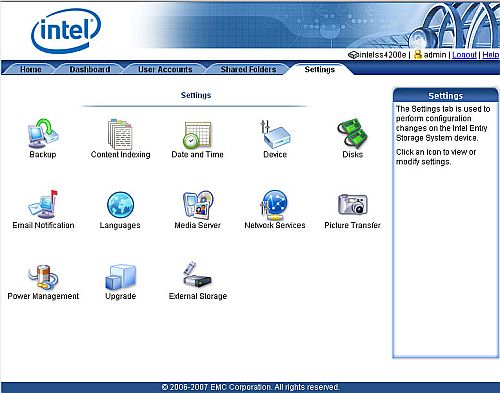
Figure 12: Settings screen
- Backup: Shows backup status and lets you run client backup. Also available under dashboard.
- Content Indexing: enabled content indexing for each individual volume.
- Date/Time: configuration for time/date and NTP server
- Device: Allows you to change the name/description of the SS4200-E, shows you the current firmware version and serial number. From here, you can also shutdown or restart the device.
- Disks: this shows you the status of both internal and external disks. This is also available from the Dashboard tab. If you click on “data protection”, it shows you the status of your device. This is worthy of a screenshot (Figure 13).
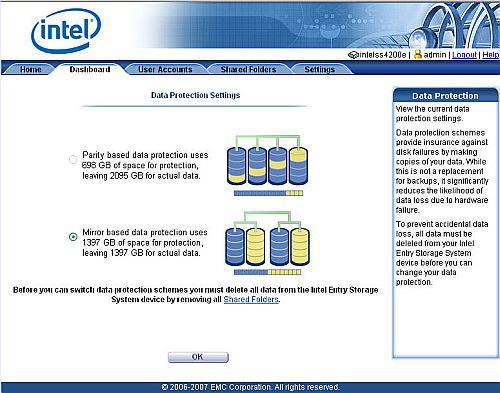
Figure 13: Data Protection Settings
The SS4200-E only supports either RAID 1 (with mirrored drive pairs) or RAID5. The product brochure says that RAID 10 is also supported, but it doesn’t appear to be, in reality. In a four drive configuration, a RAID 1 configuration yields only 50% of the total installed drive capacity usable for storage, while RAID5 provides about 75% of the installed capacity.
The SS4200-E doesn’t support individual drives or JBOD and neither RAID migration nor RAID expansion is supported. In order to change protection schemes, you have to delete all data and remove all shares. Since the SS4200-E doesn’t support backup to external drives or another SS4200, this could create a problem.
- Email notification – also configurable via the wizard on the home page. Mail notification didn’t work with either of the SMTP servers I tried.
- Languages – the SS4200-E supports 12 languages
- Media Server – there’s a single “enable” checkbox for media servers as well as the iTunes server. The iTunes server did show up and worked properly on both PC and Mac platform tests with iTunes. There’s also an option to force a scan to update media servers.
- Network Services – Here you can set your IP address or enable the DHCP client (enabled by default). You can also enable FTP as well as anonymous FTP. There’s a single click “enable SMNP”, but no provision for password protection.
Finally, there’s a setting for windows file sharing (CIFS) where you can choose workgroup or Active directory and set the workgroup name. The SS4200-E does not support AFP for legacy Macs, nor does it support NFS. However, Macs running OS10.x should have no problems connecting to shares on the device. - Picture Transfer – the SS4200-E supports transferring photos from digital cameras that support PTP (Picture Transfer Protocol). You can set the target directory for the images, and optionally have the SS4200-E remove the photos from your camera after the transfer has been completed. There is no web photo sharing feature, however.
- Power management lets you select when to power down disks from a drop down menu of choices ranging from 5 minutes to “Never”. But, as mentioned in the release notes, the feature doesn’t work in the current firmware. You can also configure a USB-attached UPS, but note that the SS4200-E doesn’t support scheduled power shutdown or startup.
- Upgrade – allows you to upgrade the firmware in the device
- External Storage – this shows you the status of external storage devices and lets you safely “eject” them.
Fail Test
Those of you who have read my reviews of other NAS products know that I will always “fail” a drive to see how a NAS, configured for fault tolerance, will recover. The SS4200-E is no exception. I shut down the SS4200-E, removed the lid, and removed the power connector from drive 4 and then re-powered the system.
Upon bootup, the power button, which normally glows blue, turned amber and the drive status LED for drive 4 turned amber. I logged into the management console, and found no notification on the home page that there was a problem. However, clicking on the Dashboard tab showed that drive #4 was missing from my system, and warned that data might be lost if another drive were to be removed or failed.
The Dashboard System Health screen also showed the device running in a degraded mode. Similarly, the “Disks” Settings tab showed that drive 4 was missing and also warned of potential data loss. Unfortunately, since I never received any of my test email messages, I can’t really tell if the system tried to send an email notifying me of the failure.
Since the SS4200-E doesn’t support hot-swapping of drives, I powered down the SS4200-E and reconnected the power to drive 4. Upon boot up, the drive automatically started rebuilding. On the front panel, all four drive status LEDs lit up blue, but also blinked amber to show the drive rebuild. And, of course, the disk activity light showed lots of activity.
I’m not really sure how long it took to rebuild the RAID, as the SS4200-E has virtually no logging functions. Based on the percentage of the rebuild completed after 1 hour (26%), I’m assuming that the rebuild of the 750 GB drive will take a little under four hours. The good news is that no data was lost, and the device continued to function properly in its degraded mode with all shares still available. Rebuilding the array was as simple as plugging in a new drive.
Performance
It’s fair to say that the SS4200-E turned in screaming fast performance numbers. For my comparisons, I looked at 1000 Mbps RAID 5 read and write performance for all BYOD NASes. As the radio announcer says, “hold the calls – we have a new winner”.
Figure 14 shows that the SS4200-E easily topped our recently crowned champion, the Synology DS508 for with RAID 5 average write performance of 48.4 MB/s for files 32 MB to 1 GB. A look at the throughput vs. filesize plot shows that for file sizes less than 64 MB, it wasn’t even close.
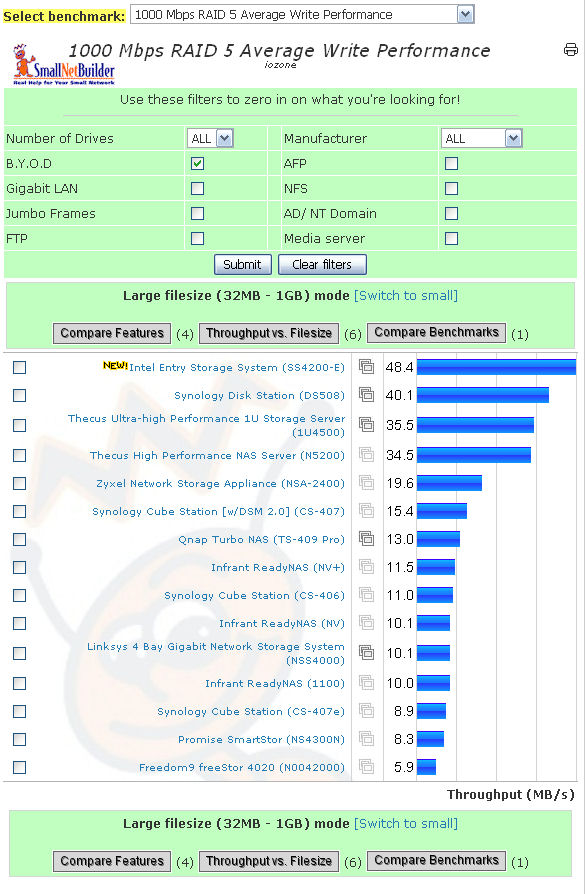
Figure 14: RAID 5 Write Performance – 1000 Mbps LAN
For 1000 Mbps RAID 5 Average Read performance (Figure 15), the SS4200-E only slightly edged out the DS508 with 40.4 MB/s throughput. A look at the read throughput vs. filesize plot shows that the Synology actually did better than the SS4200-E at 128 and 256 MB file sizes, but then dropped below at 512 MB and 1 GB.
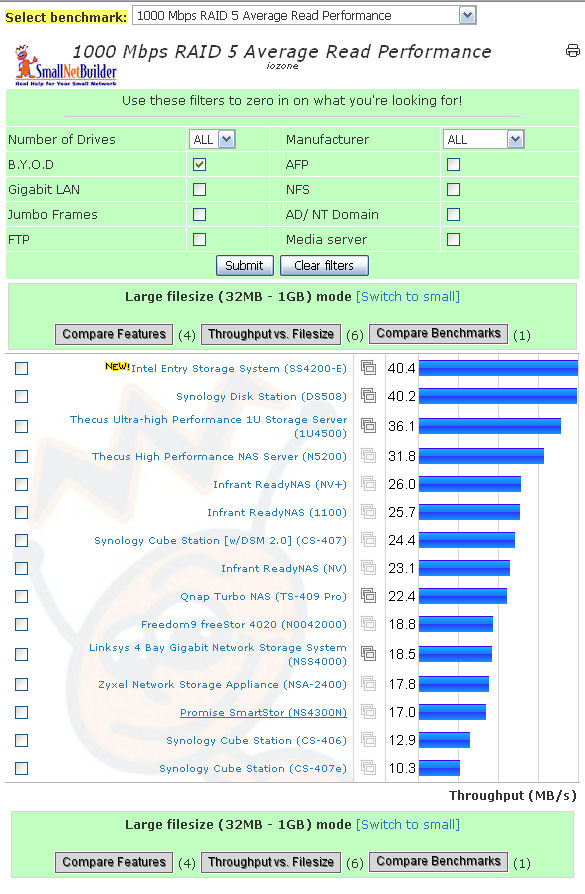
Figure 15: RAID 5 Read Performance – 1000 Mbps LAN
It’s too bad that the SS4200-E doesn’t support jumbo frame. It would have been fun to see if it still could beat the DS508. Of course, you can run your own comparisons of products and different files sizes using the NAS Charts to see how it might stack up in your environment.
Final Thoughts
There is a lot to like about Intel’s SS4200-E – especially the performance. Compared to the other BYOD NASes that join it near the top of the performance charts, the SS4200-E offers a lot of performance “bang for the buck”. But the SS4200-E’s mix of features tends to come up short when viewed both from a home and small business perspective.
Although the SS4200-E has a media server that even supports iTunes and a Picture Transfer feature for easy digicam offloading, it doesn’t have a web photo-sharing application like that found on Synology, Qnap and even HP’s MediaSmart and MediaVault NASes. There is also no built-in client for unattended Torrent, web or FTP downloads, the print server feature is as yet not implemented and the size and styling aren’t exactly consumer friendly.
But the business feature set also falls short of the mark, with a complete lack of logging, problematic AD support (see the release notes), no user groups, no storage quotas, no RAID migration and no support for NFS or AFP. And while there EMC’s Retrospect is bundled for client backup, the SS4200-E has no scheduled backup of its internal drives. Finally, the NAS isn’t very friendly for remote users, with no remote access portal and no browser-based file browsing or access.
Still, the SS4200-E’s performance will appeal to many who just want fast, RAID-protected file serving and are willing to forego the bells and whistles found on some of the more fully-featured devices. If you don’t need those additional features, the SS4200-E’s price/performance is hard to beat.