

Introduction
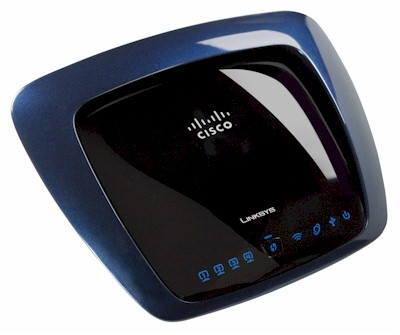
| At a Glance | |
|---|---|
| Product | Linksys Simultaneous Dual-N Band Wireless Router (WRT610N) |
| Summary | Second generation of popular dual-radio, dual-band Draft 802.11n router |
| Pros | • Good routing performance • Good wireless performance • Gigabit switch |
| Cons | • Can’t set channel in Auto mode • No jumbo frames • Large periodic throughput dropouts |
Linksys’ WRT600N [reviewed] has been the product of choice for those itching for a dual-radio, dual-band draft 11n router. D-Link’s DIR-855 [reviewed] is way late and way overpriced. And while there are plenty of Netgear’s WNDR3300’s around [reviewed], its "unique" combination of draft 11n and 11b/g radio and poor draft 11n performance doesn’t make it a top choice.
But the WRT600N will be gone as soon as retailers clear out their stock and replaced by the WRT610N. The question on everyone’s mind is whether moving the antennas inside and redesigning for manufacturability and lower cost has screwed up the top-selling dual-band draft 11n router. For those of you who can’t wait, the answer is, it hasn’t. For those who want more details, read on.
Internal Details
I already did a deep dive on the difference between the 600N and 610N. Basically, the 610N has the same processor and gigabit switch, but more memory, different (internal) antennas and different radios than the 600N.
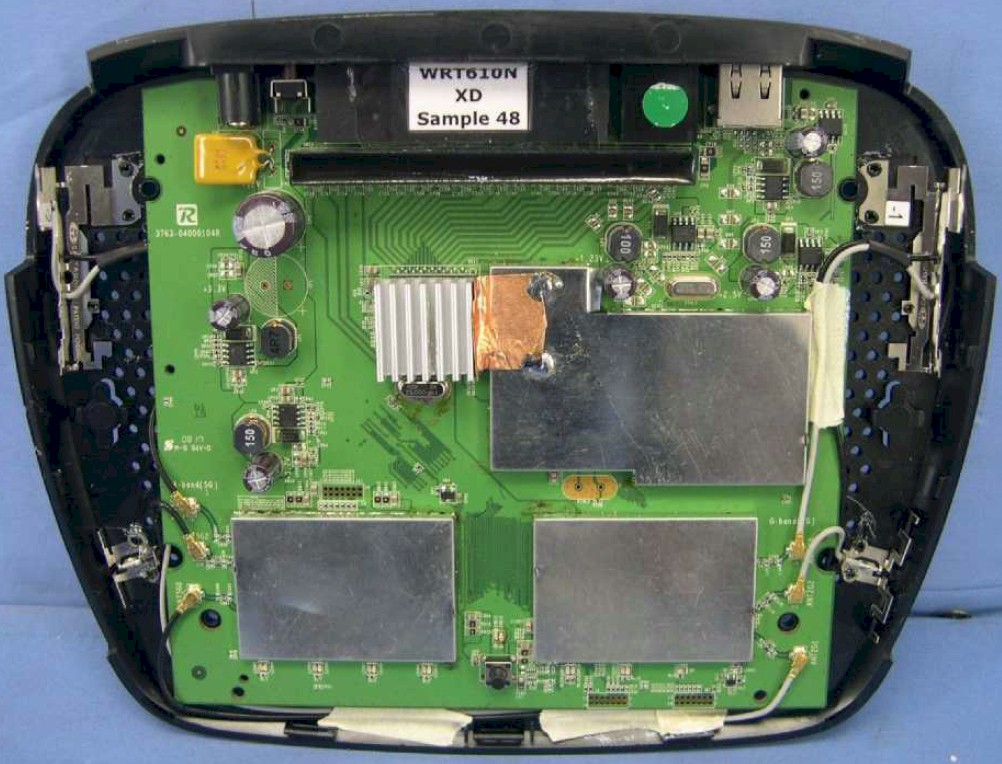
Figure 1: WRT610N inside view
Features
The 610N is almost feature-for-feature the same as the 600N. If you need a feature rundown, check the WRT600N review and its slideshow.
The differences are that the 610N properly defaults to 20 MHz channel bandwidth for the 2.4 GHz radio, as per the Wi-Fi Alliance’s Draft 2.0 Certification requirements. The 5 GHz radio defaults to Auto mode, which means that it will be using 40 MHz channels.
Just like the 600N, when the 610N’s radios are set to Auto mode, you can’t select the channel. Changing the Radio Band selector from Auto to Standard – 20 MHz Channel lets you directly set the channels for both radios, although you still have an Auto option in the Standard Channel selector. The 5 GHz radio can be set to channels 36, 40, 44, 48, 149, 153, 157 and 161.
The other difference is that the 610N supports Wi-Fi Protected Setup (WPS), so the Basic Wireless Settings page has radio buttons to select Manual and Wi-Fi Protected Setup (default) modes (like the WRT110). Figure 2 shows the WPS page, which reflects some of my manual security settings.
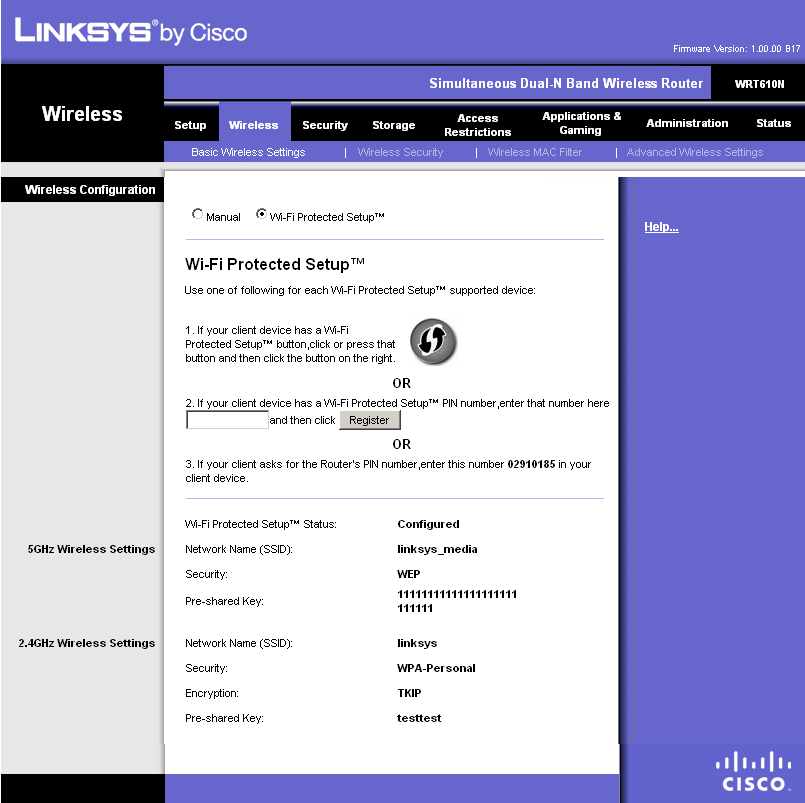
Figure 2: Basic wireless configuration
Remember not to futz with any wireless settings if you want WPS to work. I didn’t test it because Linksys still hasn’t added WPS support in the WPC600N Dual-Band Notebook card that I used for testing. Note that there is no button to restore the WPS settings to their defaults.
Routing Performance
Routing performance for the 610N using our standard test method is summarized in Table 1, along with the 600N’s test results for comparison. The 610N is plenty fast, but it is different from the 600N.
LAN to WAN measured 157 Mbps, while WAN to LAN came in at 136 Mbps. By contrast, the 600N was pretty much equal in both directions.
| Test Description | WRT610N Throughput – (Mbps) |
WRT600N Throughput – (Mbps) |
|---|---|---|
| WAN – LAN |
136
|
164
|
| LAN – WAN |
157
|
159
|
| Total Simultaneous |
143
|
171
|
| Maximum Simultaneous Connections | 200 | 136 |
| Firmware Version |
1.000.00 B17
|
1.01.33
|
Table 1: Routing throughput
The Maximum Simultaneous Connections test of 200 connections is the best that I’ve measured for a Linksys router and beats out the 600N’s 136. Maybe that’s due to the increase in memory from 32 to 64 MB.
Figure 3 is a composite plot of the three routing tests. The simultaneous up and down test shows a good deal of variation in each direction.
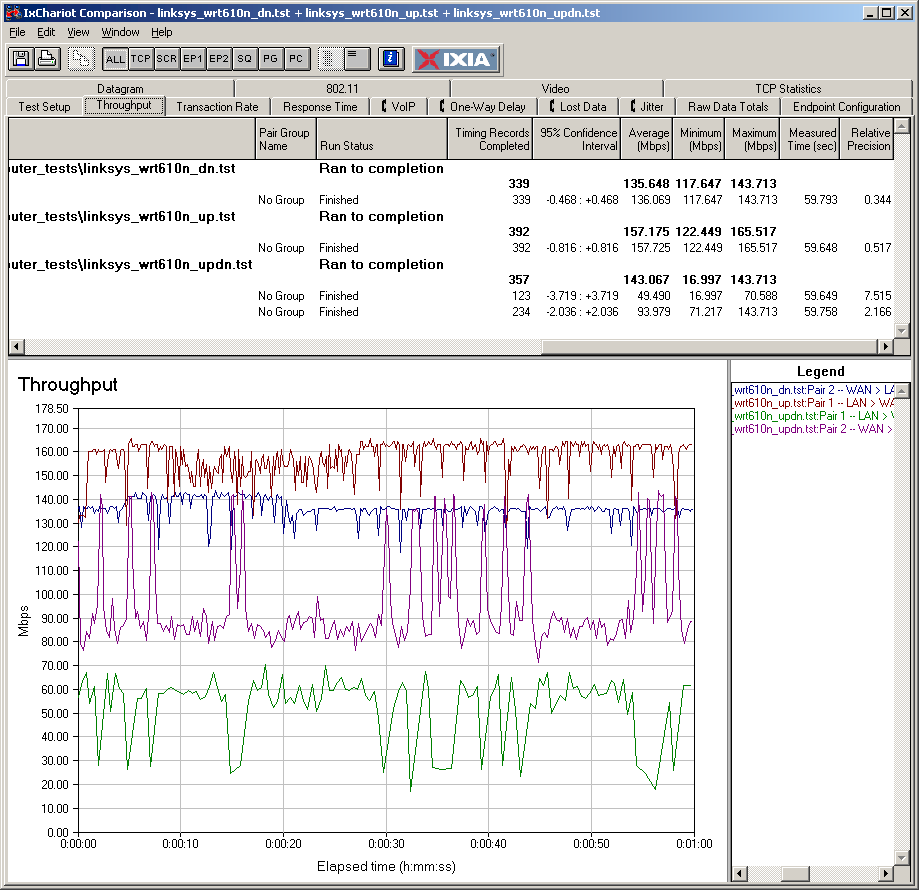
Figure 3: WRT610N Routing throughput composite plot
By contrast, Figure 4 shows the simultaneous up and download results for the 600N, which are evenly matched and have low variation.
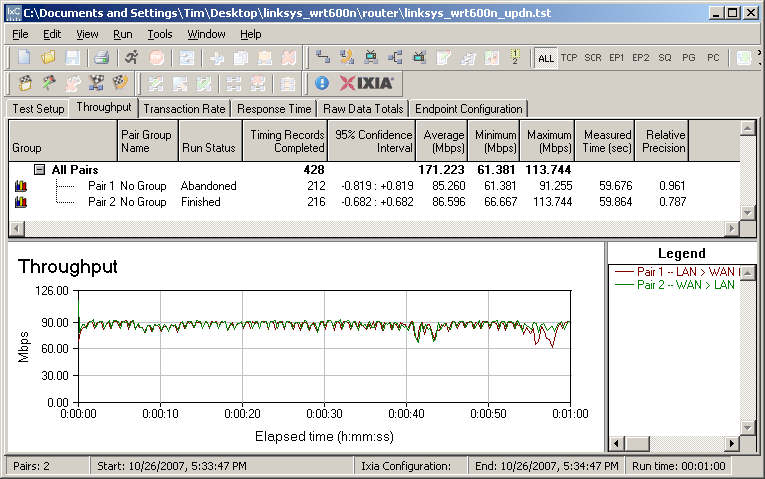
Figure 4: Linksys WRT600N simultaneous routing throughput
Use the Router Charts to see how the 610N stacks up against other routers.
Wireless Performance
I used the open air test method described here to test the 610N’s wireless performance. Testing was done using a Linksys WPC600N Cardbus adapter inserted into a Fujitsu P7120 Lifebook (1.2 GHz Intel Pentium M, 504 MB) notebook running WinXP Pro SP2 with all the latest updates. I used the latest Win XP SP2 4.150.31.0 driver and Win XP’s built-in Wireless Zero Config client during testing. The router was upgraded to 1.000.00 B17 firmware and I left all factory default settings in place, except to set channel 1 for the 2.4 GHz mode tests and channel 36 for the 5 GHz tests.
 Note:I wanted (and I know you wanted) to compare the 600N and 610N using open-air testing. But Linksys wasn’t able to scare up a 600N for me to test. So I’ll only be able to compare the best-case (Location A) open-air results that I have for the 600N.
Figure 5 shows a composite of downlink throughput tests made at the six test locations in four wireless modes: 2.4 GHz, 20 MHz channel; 2.4 GHz, 40 MHz channel; 5 GHz, 20 MHz channel; and 5 GHz, 40 MHz channel. Each column represents the average throughput from a one minute test.
You can see best-case (Location A) throughput is 86 Mbps using a 40 MHz channel. This is virtually the same as the 85 Mbps that I measured for the 600N.
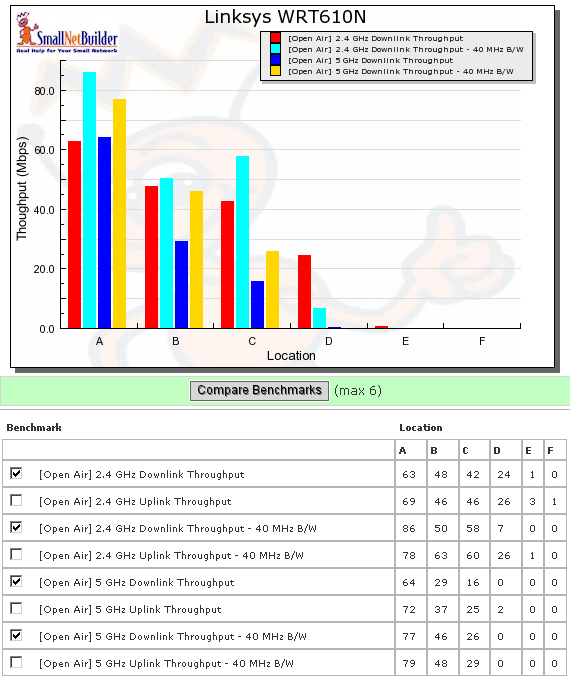
Figure 5: WRT610N six location downlink summary
As is typical for most products that I’ve open-air tested so far, the WPC600N wasn’t able to even see the 610N in test Locations E and F when using the 5 GHz band. The connection was also iffy in Location D, with connection, but no traffic running downlink and only 2 Mbps throughput running uplink.
In the 2.4 GHz band, the Location F test running downlink with a 20 MHz channel didn’t run the whole way, resulting in a sub-1 Mbps reading that rounded down to zero. And with a 40 MHz channel, I could connect, but not pass traffic.
Figure 6 shows a composite of the actual IxChariot test results running downlink 2.4 GHz w/ 20 MHz channel. Throughput isn’t exactly what I’d call steady, with lots of big ol’ dropouts in all locations. But the 600N’s wireless throughput had similar dropouts (pop up an example here), which I think is characteristic of Broadcom’s chipset.
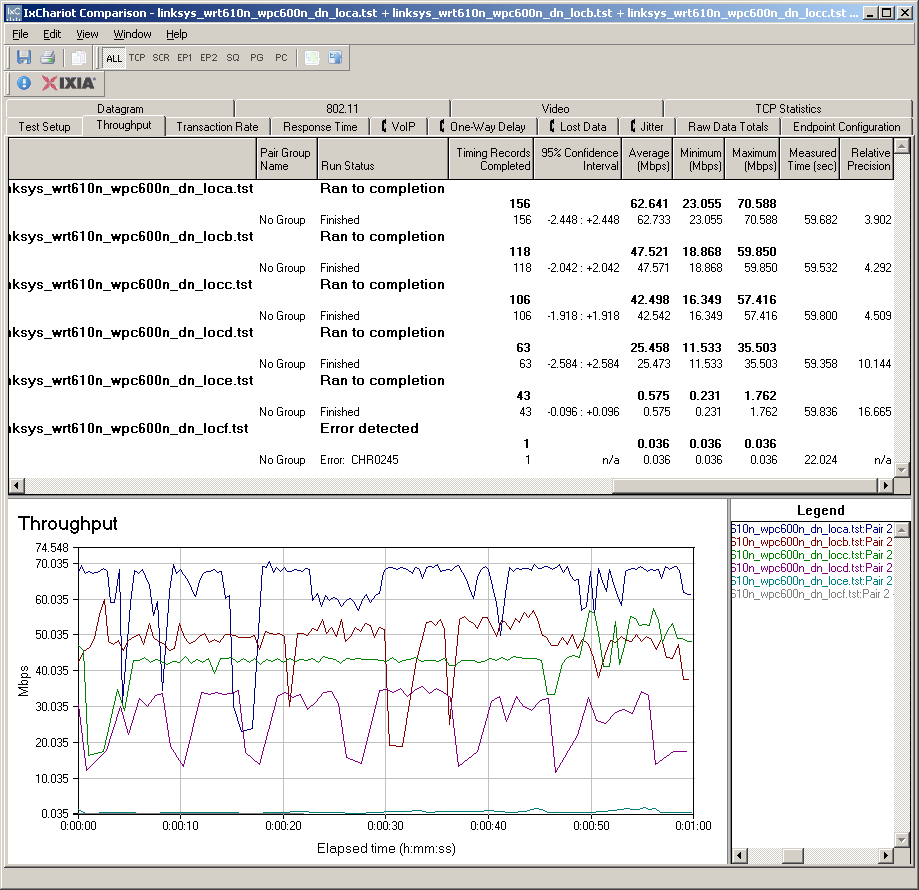
Figure 6: Six location wireless throughput – 2.4 GHz, 20 MHz channel, downlink
Figure 7 shows the six location plots in the uplink direction. The 610N seemed like it was faster running uplink while I was testing. But the data doesn’t seem to back that up, at least not consistently.
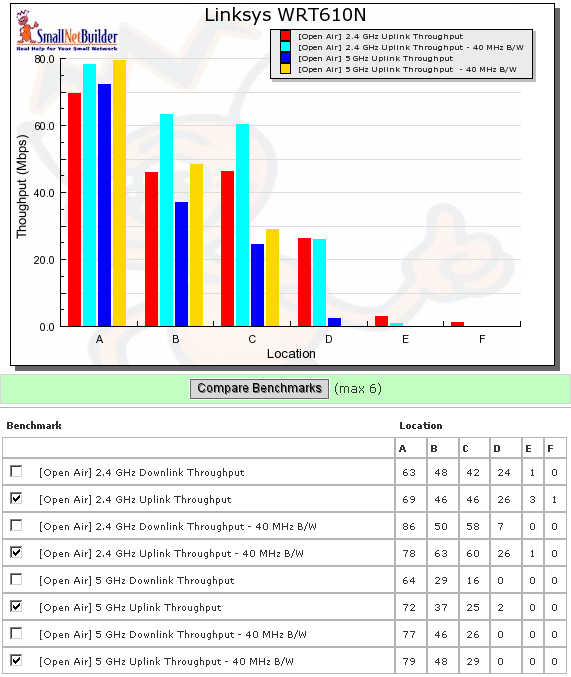
Figure 7: WRT610N six location uplink summary
The IxChariot plots look very similar to the downlink, including the periodic throughput dropout. You can see them here if you want.
I also tested for throughput reduction with wireless security set to WEP, WPA/TKIP and WPA2/AES and found the usual penalty in WEP and WPA/TKIP—about 40% in this case (Figure 8).
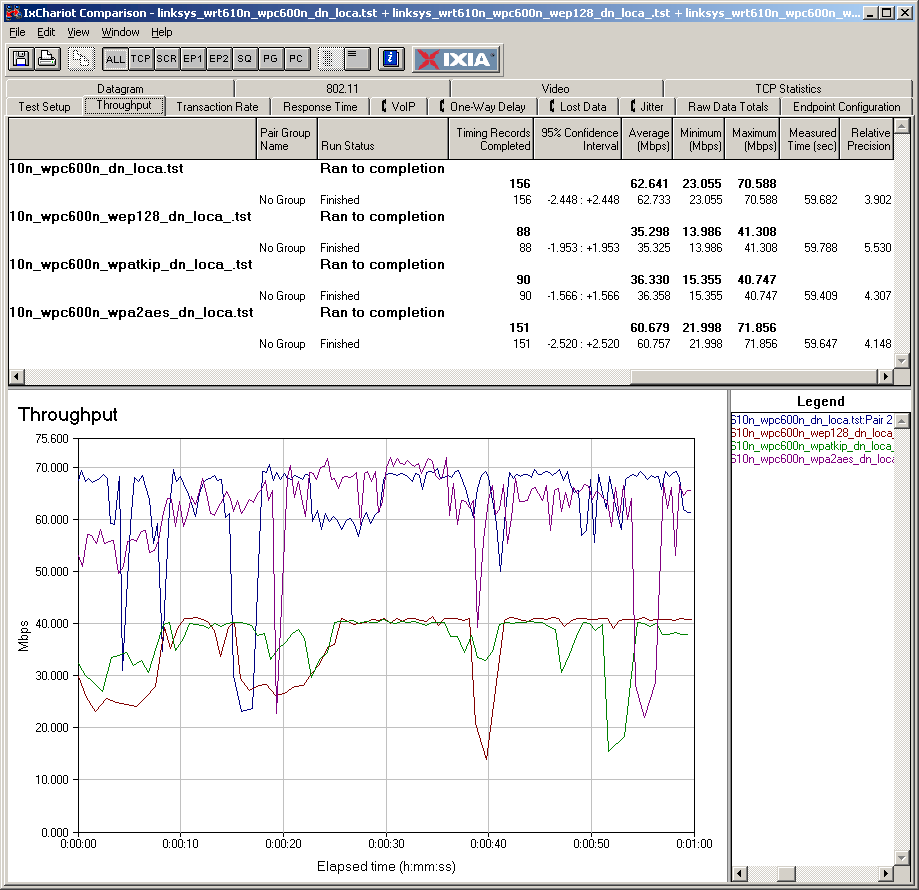
Figure 8: Security mode comparison – 2.4 GHz, 20 MHz channel, downlink
Wireless Performance – Competitive Comparison
While I can’t compare the 610N against the 600N, I can compare it against a few other dual-band products. The D-Link DIR-628 [reviewed] and DAP-1522 [reviewed] aren’t dual-radio, dual-band, however. I didn’t include the Netgear WNDR3300 in the comparison because its 2.4 GHz radio is 11g if you want simultaneousl dual-band.
Figure 9 shows that the 610N’s 2.4 GHz radio is definitely better than the DIR-628 with strong signals running in its default 20 MHz channel mode. But the DIR-628 pulls ahead in the lower signal level Locations C and D and the DAP-1522 beats them all in the tough Location E.
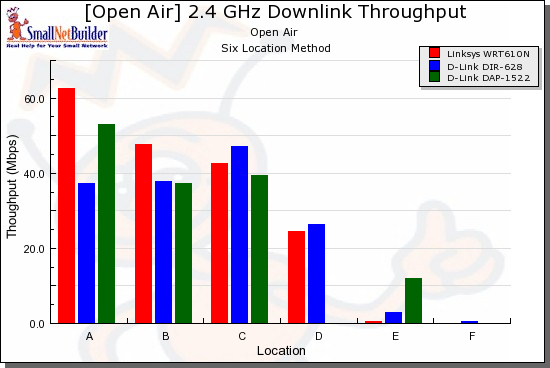
Figure 9: Competitive comparison – 2.4 GHz, 20 MHz channel, downlink
Figure 10 finally confirms my impression that the 610N’s uplink is stronger than its down, with it clearly beating the other products except in Location F.
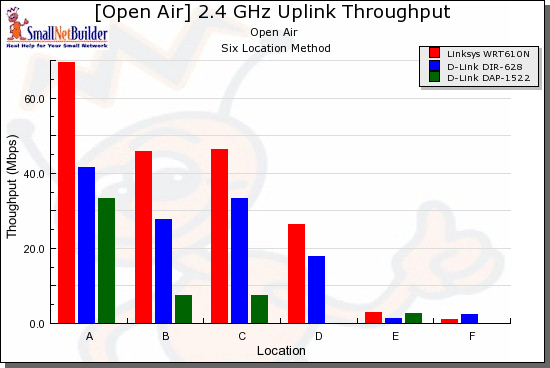
Figure 10: Competitive comparison – 2.4 GHz, 20 MHz channel, uplink
I chose to plot results for the default 40 MHz channel for the 5 GHz radio. But I think the 40 MHz default is a poor choice because it reduces effective range. Although Figure 11 shows that the D-Links were slightly faster than the 610N at Location C, they all failed to connect in Locations E and F and the DIR-628 was the only one to pass traffic in Location D.
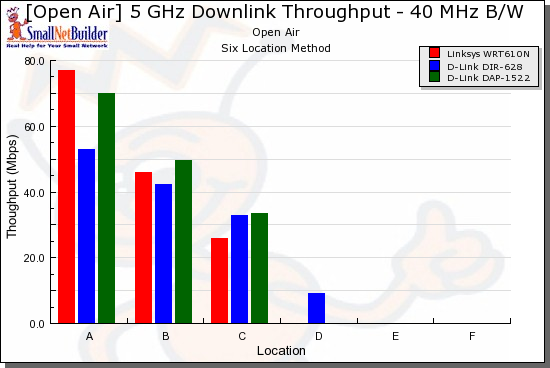
Figure 11: Competitive comparison – 5 GHz, 40 MHz channel, downlink
But the DIR-628 fails to deliver running uplink and really slows down even under the reasonable signal levels in Locations B and C. The 610N, on the other hand, turns in decent performance in those locations.
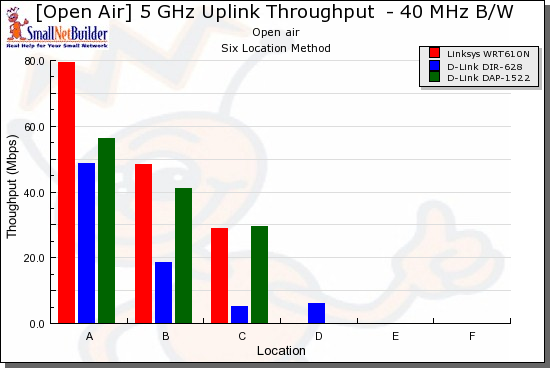
Figure 12: Competitive comparison – 5 GHz, 40 MHz channel, uplink
These tests illustrate both the state of the draft 11n art and the significantly reduced range that you’ll encounter with 5 GHz. I have yet to see a product that is best in both bands and both channel widths and the 610N is no exception.
Stress Test
A little blurb on the front of the 610N’s product box says: "Dual-N Band: Two N radio bands for twice the bandwidth". This doesn’t mean that you can get 600 Mbps out of a single connection. Instead, you should be able to get the full available bandwidth from each radio if you’re running clients on both. I hadn’t checked this before, so decided to finally give it a shot.
I cobbled together the setup in Figure 13 for the test. I used two notebooks, each with a Linksys WPC600N dual-band draft 11n notebook card and set them so that one connected to each radio. I decided that one wired client using a gigabit Ethernet connection would be plenty fast to handle sending traffic to both wireless clients. Note that for the wireless stress test, all traffic is on the LAN side of the router, so the router performance isn’t involved.
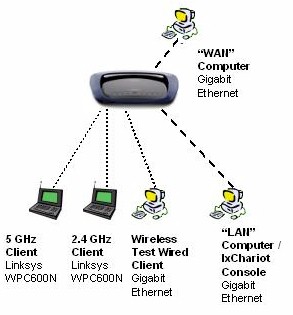
Figure 13: Stress Test Setup
I also decided it would be fun to stress the router section of the 610N at the same time as I was maxing out the wireless connections. So I set up two more gigabit-Ethernet connected computers, one on the WAN side of the router and the other plugged into a LAN port. This was to ensure that the router traffic was completely independent of the WLAN test traffic.
I first ran just the wireless stress test, basically blasting full-speed TCP/IP traffic between the two notebooks and the 610N. Figure 10 shows that the two radios do indeed operate at the same speeds that I obtained when testing them independently. Figure 14 shows uplink traffic. Downlink tests had similar results.
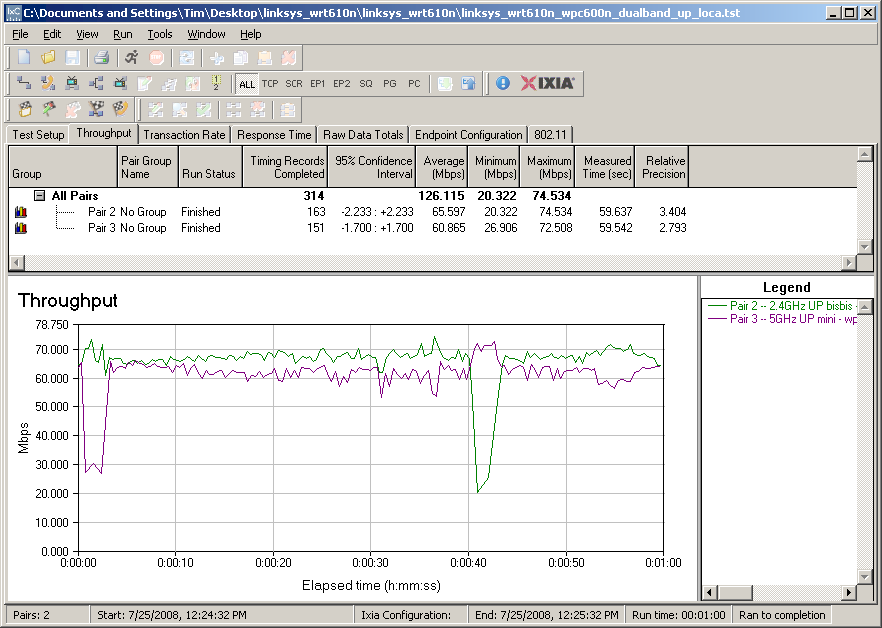
Figure 14: Simultaneous 2.4 and 5 GHz, 20 MHz channel, uplink
I then added full-tilt LAN to WAN traffic and finally found the 610N’s limits. In Figure 15, I first started the two wireless uplink streams. 10 seconds into the test, I ran some LAN to WAN traffic, rate-limited to 10 Mbps for 5-6 seconds, and found no effect.
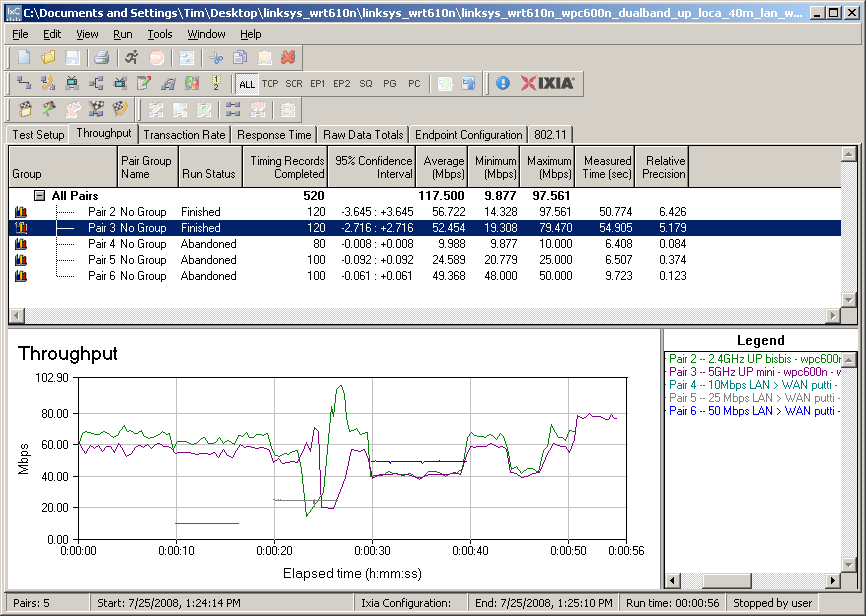
Figure 15: Simultaneous 2.4 and 5 GHz plus LAN > WAN
Then at 20 seconds into the test, I ran 5-6 seconds of LAN to WAN traffic again, but this time rate-limited to 25 Mbps. The stupid throughput dropouts (which are not an effect from the test) make it difficult to see the drop in wireless throughput. But look right between the 20 second mark and the dropout start and you can see about a 10 Mbps reduction in wireless throughput on both radios.
30 seconds into the test, I started my last blast of LAN to WAN traffic, this time at a 50 Mbps rate. You can clearly see both radios get knocked down to 40 Mbps throughput; about a 2/3 of their normal maximum speed.
My last little test is around the 45 second mark, where I just clicked on the 610N’s admin interface to change from one page to another (no LAN to WAN traffic was running). You can again clearly see a 33% drop in both radios’ throughput, as the 610N’s CPU services the administration request.
It’s highly unlikely that you would see any of these effects in normal use. But it was fun to see what happens when the 610N was pushed to its limits!
Closing Thoughts
I’m glad to see manufacturers producing dual-band routers, since they can provide a needed alternative for folks whose neighborhoods have too many wireless LANs competing for too little airspace. But the 610N shows once again that if you’re looking for dual-band draft 111n to solve all of your wireless LAN problems, you’re sure to be disappointed.
As I said earlier, I have yet to see a dual-band draft 11n product (either AP, bridge or wireless router) that is consistently good in both bands and both channel widths and the 610N is no exception. The MIMO technology used in draft 11n is complicated stuff and seems to be proving difficult to optimize for good performance under all conditions. And neither Broadcom nor Linksys seem to have cracked the code in the 610N.
Since I wasn’t able to test the 600N and 610N under the same conditions, I can’t conclusively say that the 610N’s wireless performance is better or worse than the 600N’s. But if you’re looking for a reasonably-priced dual-band, dual-radio draft 11n router, the 610N continues the 600N’s tradition of being the only viable game in town.