

Introduction
Updated 5/18/2009: Link to retest article.
Updated 12/3/2008: Added info on SODIMM sockets.
Updated 8/18/2008: Added comments on jumbo frames and support.
| At a Glance | |
|---|---|
| Product | QNAP Turbo NAS (TS-509 Pro) |
| Summary | Five-drive server-like BYOD NAS with support for single drives, JBOD and RAID 0, 1, 5, 5+ hot spare and 6. |
| Pros | • Hot-swappable drives • Online volume expansion and RAID migration • Automatic rebuild to hot spare • Built-in LAMP server, DLNA multimedia server, FTP, iTunes • USB support for external storage, UPS or up to 3 printers |
| Cons | • Expensive • Logging and status reports could be better • No US-based phone support • Limited availability |
Five-drive NASes seem to be the latest move in the small-business NAS race. In addition to higher capacity (5 TB with 1 TB drives), five drives let you have a four-drive RAID 5 array plus a spare drive that is automatically swapped in should one drive fail. Of course, you only need three drives for RAID 5, but I digress…
QNAP’s latest entry is the TS-509 Pro, which is aimed squarely at Synology’s DS508 [reviewed]. In general, the 509 Pro is a good right-back-atcha to Synology, except for one important omission that I’ll discuss shortly.
Product Tour
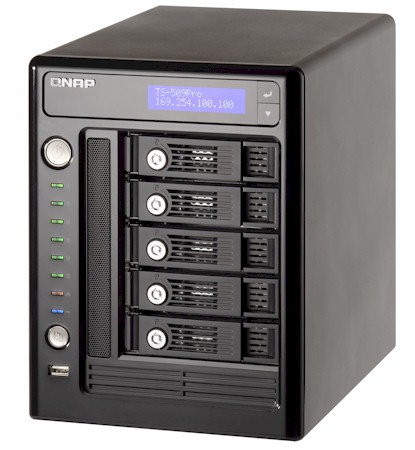
The 509 Pro comes wrapped in a steel chassis with a plastic front panel bezel. Its tower form factor is a bit on the large side, but by no means huge, measuring 10.28(D) x 7.42(W) x 10.28(H) inches. Figure 1 shows the front and rear panels, which call out key features.
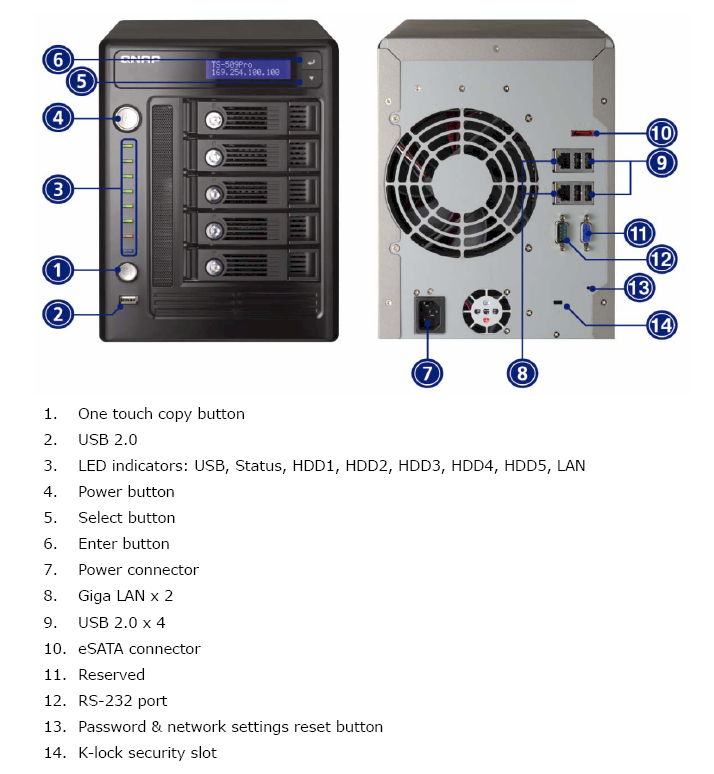
Figure 1: QNAP TS-509 Pro Front and Rear Panels
The front panel sports an LCD status display, which the Synology DS-508 omitted but the Thecus N5200 and 5200 Pro have. You navigate through the menus with "Enter" and "Select" buttons and the display shuts off after a minute or so. The display isn’t automatically turned back on when alerts are put up, however, and I think it should be.
The first button press to turn the display back on isn’t ignored, so I kept getting into menus that I didn’t want when I pressed the top "Enter" key. There is no "back" key, so I had to navigate all the way down to Menu 8 to return to the top "page" that holds the IP address information for the two 10/100/1000 LAN ports.
I’m a fan of audible signals on NASes, particularly when it comes to acknowledging a power down command press and making it obvious that drive has failed. The 509 Pro comes through on both counts.
QNAP has left off a front cover to cover the five drives that mount on sturdy metal drive trays that have key-lockable extraction levers. There cover isn’t missed, however, since the front of the unit is functional and attractive without it.
The rear panel has more going on than the TS-409s, with an eSATA connector for drive expansion and four USB 2.0 connectors (in addition to the one on the front panel). The USB ports can be used for external storage, print servers or for connection to a compatible UPS. The TS-409 supports up to three printers.
UPS support includes APC USB
auto detect, APC with SMNP management, or MGE Ellipse premium UPS support. The
Smart Fan is temperature controlled and runs at low speed below 40C and at high
speed above 48C. You can also manually configure the low and high-speed temperatures in either Celsius or Fahrenheit.
The dual 10/100/1000 Ethernet ports can be configured in standalone, failover and load-balancing modes. When in "standalone" you can connect the NAS to to different LANs, obtaining IP address information via DHCP or statically entering it. You can also enable a DHCP server on LAN 1 only.
I ran a quick failover test by running two LAN cables to the same switch, running a continuous ping and pulling a cable. The connection switched over without a hitch as I took turns pulling and reinserting each cable.
They are a bit hard to see in Figur 1, but the two connectors marked "Reserved" have plastic caps that, when removed, reveal a DB9 serial RS232 port and DB15 VGA port. (On the rear panel the connectors are labeled "RS232" and "Reserved" respectively.) I connected a display to the VGA port and was able to follow the complete boot sequence, which ended in a login prompt.
On a hunch, I also connected a USB keyboard and mouse and they were immediately recognized. I was then able to log in (admin / admin) and had complete root access. I didn’t try it, but I would guess that the RS232 port allows serial access for both SSH (enabled by default) or Telnet, which are also available via the Ethernet interface.
Unlike the TS-409s, the 509 Pro has an internal universal power supply instead of an external brick. Although I like having the supply inside, it is not easily replaceable, requiring complete disassembly of the unit to get it out.
As for noise, the almost 5" fan is speed controlled and so helped keep the 509 Pro relatively quiet. But with five 7200 RPM drives spinning away, it was noisier than my Core 2 Duo desktop. The clunks and taps from the drives were particularly loud and seemed louder from bouncing off the cabinet sides. I didn’t, however, have to banish it to my back room during testing, as I have with other, noisier products.
Internal Details
QNAP has opted to power the 509 Pro with an 1.6 GHz Intel Celeron M 420 Processor, which is seen topped with a hefty copper-cored heatsink in Figure 2 below. Intel seems to be popular among the NASes that rank high in our NAS Charts, being used in the Thecus N5200, 5200 Pro and 1U4500 rackount as well as Intel’s own SS4200-E. The 509 Pro, however, is the first NAS I have tested to have 1 GB of RAM (DDR2 667). Flash is relatively plentiful too at 128 MB.
Updated 12/3/2008: It’s hard to see in the photo, but there are two stacked SO-DIMM sockets.
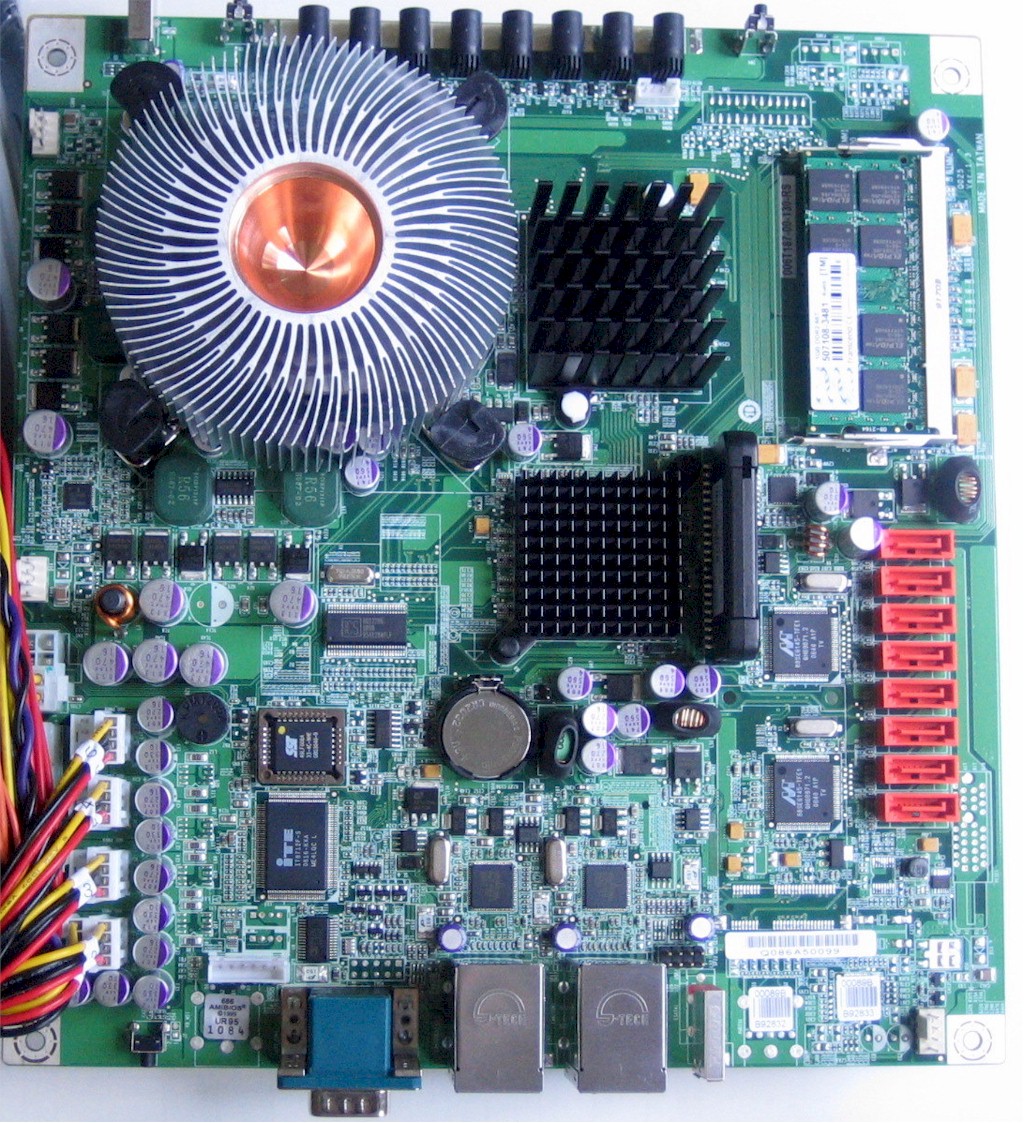
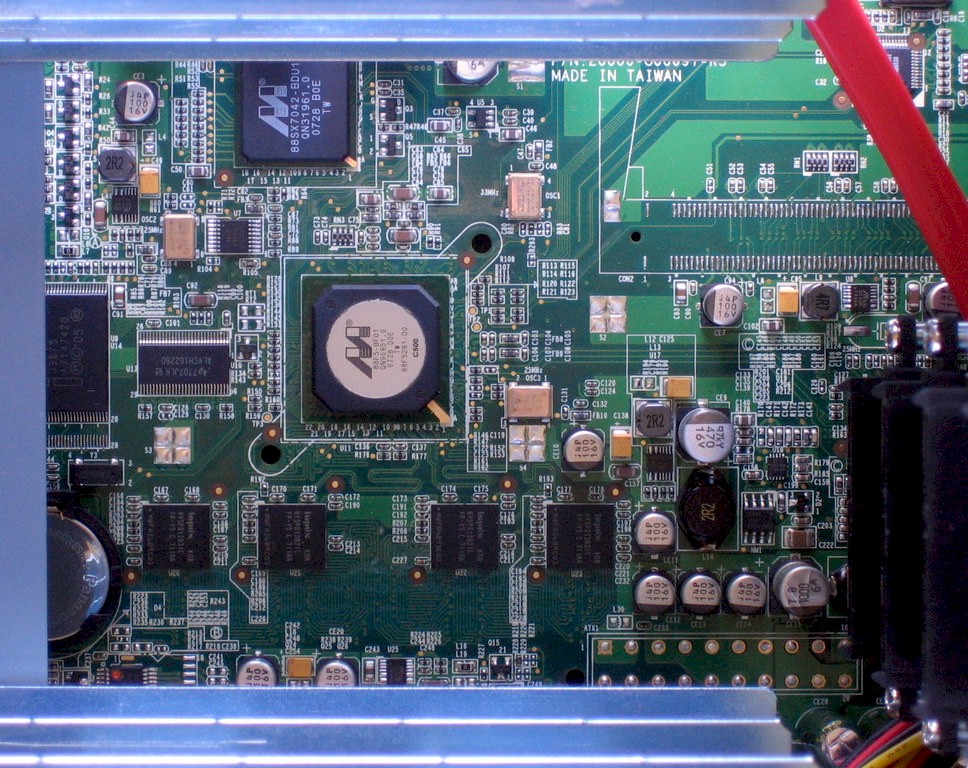
Figure 2: QNAP TS-509 Pro main board
The two gigabit Ethernet ports are provided by two Broadcom BCM5787 NetLink Gigabit Ethernet Controllers with PCI Express. Those last two words are encouraging, since a PCI Express interface should provide more bandwidth headroom for gigabit network transfers. But I was disappointed to find that QNAP has chosen to not enable jumbo frame support in the 509 Pro!
Given all of the horsepower that QNAP has put into the product and its target market of business users, this decision doesn’t make much sense to me and I told QNAP as much. But it is what it is for now and there is no indication from QNAP that this will change.
Updated 8/18/2008
QNAP responded that the Broadcom BCM5787 does not support jumbo frames. But they chose it because it had the best throughput of the chipsets they evaluated.
Note the eight SATA connectors supported by two Marvell 88SE6145 SATA controllers. There is also an ITE8712F I/O Controller, SST 49LF008A PLA and Analog Devices ADM213 RS-232 interface. Due to the heatsinks, I couldn’t tell what the other two chips were.
Since QNAP was so kind as to provide shell access, I was able to find that the 509 Pro is running a version of Ubuntu, i.e.
[/] # cat /proc/version
Linux version 2.6.24 (root@NasX86-2) (gcc version 4.1.3 20070929 (prerelease) (Ubuntu 4.1.2-16ubuntu2)) #1 SMP Fri Jul 25 01:47:37 CST 2008
The drives are formatted using the EXT3 filesystem, with no tweaks that could prevent drives from being removed and read by another EXT3-capable system.
 See the slideshow for more internal details
Given the processor and five drives, I knew that the 509 Pro wouldn’t be exactly a low-power NAS. But I was surprised to find that it drew around 95W with all five drives spun up and 52W with them spun down. Compare this to the Synology DS508 whose equivalent power consumption measured 51 W / 27 W with five drives.
Features
You can think of the 509 Pro as being a five drive, faster version of the 409 Pro, with a few differences in features. The things that the 409 Pro has that the 509 Pro doesn’t are gigabit jumbo frame support and the Surveillance Station feature that allows recording directly from select network cameras.
Features unique to the 509 Pro include the dual LAN ports, Wake on LAN and schedulable power off and on (both have idle drive spin-down). Of course the 509 Pro has one more drive and therefore the ability to go to 5 TB vs. the 409 Pro’s 4. Check QNAP’s model comparison table if there is a specific feature that you need to confirm.
Drive Fail Test
Craig did a great job of seeing how robust the TS-409’s RAID recovery was. So I just did a quick test with the NAS set up with three drives in RAID 5 and a fourth configured as a hot spare. I first enabled and tested email alerts, then started a drag-and-drop copy of an almost 2 GB folder. I let the copy start, then pulled the # 1 drive.
The drive light winked out immediately, but it was about 30 seconds before the system’s buzzer sounded for a few seconds. But the LCD panel did not automatically come on and my button press accidentally killed the message that was put up there. (Note that there are no controls to disable the display auto shut-off.)
I logged into the admin interface and saw no indication of the failed drive. The only indication on the Systems Logs > System Information page was a missing temperature for HDD 1. I had to navigate to the Device Configuration > SATA Disk page to see that the Drive 4 hot spare had been swapped into the RAID 5 array and a rebuild automatically started. Note that the only indication of the rebuild available on the LCD status display was a "(B)" next to the RAID5 volume. % of rebuild was not there.
I did receive the alert email below, within 30 seconds of the drive failure. Note that the system was able to distinguish between a drive failure and a pulled drive.
Server Name: NASB92833
IP Address: Date/Time: 08/15/2008 13:06:12
Level: Error Drive 1 plugged out.
After about 10 minutes of rebuilding, I decided to see what happened when I reinserted Drive 1. I checked the SATA Disk page and it at first showed that Drive 1 had been reinstalled. After a minute or so the RAID 5 Volume field on the SATA Disk page changed from Drive 2 3 4 back to Drive 1 2 3 Hot Spare Disk 4, which it was before I pulled the drive. Rebuilding was still running.
I had stopped the filecopy shortly after the rebuild had begun because I knew that continuing to copy would lengthen the time for the rebuild to finish. But when I tried to restart the copy after reinserting Drive 1, I found that access was denied for write. I could open the share to browse files and even copy a file from the NAS to my computer desktop. But the system was evidently protecting itself from further changes until it could complete the rebuild—which would take close to 3 hours (3 TB array).
The process was robust enough, but QNAP could do better in terms of notifications and log entries. The only email I received was the "drive plugged out" notice. I received no notice of rebuild start or finish. I also found the log entries hard to read (Figure 3) due to truncation, although mousing over entries brought up a tooltip that showed the entire line.
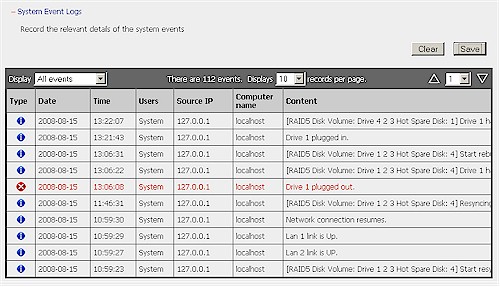
Figure 3: Truncated log entries
Performance
Updated 5/18/2009: Link to retest article.
Note: The TS-509 Pro has been retested on the new NAS testbed. See this article for a comparison to the TS-639 Pro and more information.
I put the 509 Pro through our iozone performance tests with all five drives configured in one Linear (JBOD) array and a RAID 5 array with 100 Mbps and 1000 Mbps LAN connections. No jumbo frame tests were done because jumbo frames are not supported. The system was loaded with five Hitachi Deskstar HDS721010KLA330 1 TB drives (7200RPM 3.0 Gb/s SATA 32 MB) that were provided by QNAP.
Figure 4 shows read and write benchmark results for filesizes from 32 MB to 1 GB with a 100 Mbps LAN connection. Except for some write caching effects at smaller filesizes, performance is right about at 100 Mbps wire-speed (12.5 MBytes/s).
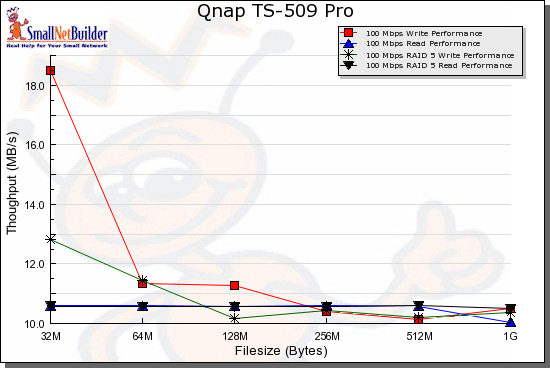
Figure 4: 100 Mbps benchmark comparison
Figure 5 shows benchmark results for tests using a 1000 Mbps LAN connection. You can see that there is virtually no performance difference between JBOD (Linear mode) and RAID 5.
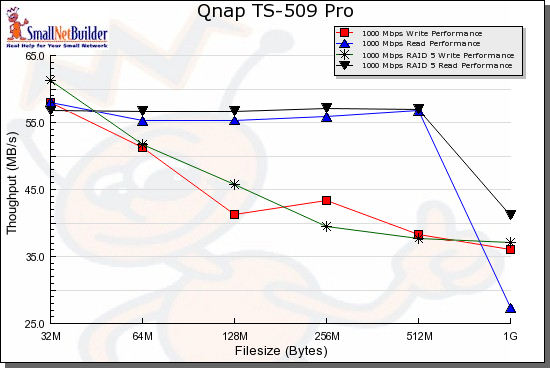
Figure 5: 1000 Mbps benchmark comparison
Figure 6 shows 1000 Mbps RAID 5 write competitive comparison for the 509 Pro and the three other products at the top of that NAS Performance chart: the Intel SS4200-E [reviewed], Thecus N5200 Pro [reviewed] and Synology DS508 [reviewed].
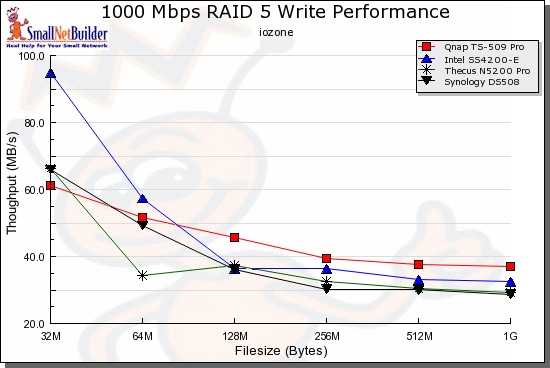
Figure 6: RAID 5 Write competitive performance – 1000 Mbps LAN
These current top four RAID 5 products are very similar in performance, but note that this is without jumbo frames. However, the Intel also does not support jumbo frames and the Thecus doesn’t seem to gain much speed from them. And while the Synology’s throughput does increase at some filesizes, the average large filesize performance is essentially the same.
At any rate, Figure 6 shows similar performance, but with the TS-509 Pro staying on top as file sizes increase, followed by the Intel SS4200-E.
Finally, Figure 7 shows 1000 Mbps RAID 5 read results for the same group of products. The 509 Pro has exceptionally flat performance out to 512 MB filesizes, with speeds exceeding 55 MB/s. The Thecus is clearly the (relative) laggard, while the Intel and Synology end up about even in average performance for the filesizes shown)
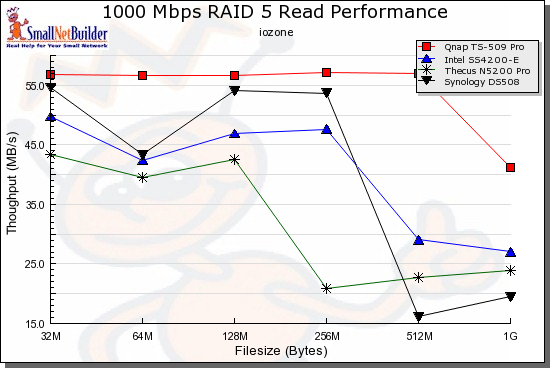
Figure 7: RAID 5 Read competitive performance – 1000 Mbps LAN
Closing Thoughts
Since they first entered the market, Thecus, Synology and QNAP have been battling it out for bragging rights to being the fastest RAID 5 NAS. It’s a fun game to watch and the battle has been good in general for consumers, spurring better-known brands to raise their game and improve the peformance and feature sets of their products.
But high performance comes at a cost, as the 509 Pro once again shows. At around $850, it’s significantly less than the $1000 Synology DS508, but still quite a chunk of change. And QNAP still has no U.S. office, online support only and limited distribution. So if you’re uncomfortable dealing with smaller companies on big-ticket items, you should look elsewhere.
Updated 8/18/2008
QNAP said that they have a U.S. office under their parent company name IEI Technology USA Corp that handles sales, support and warehousing:
IEI Technology USA Corp.
168 UNIVERSITY PARKWAY
POMONA, CA 91768-4300
TEL: 909-595-2819
FAX: 909-595-2816
Email:
[email protected]
Still, if you have been eyeing Synology’s DS508, but felt your wallet being stretched a bit too thin, you should take a look at the TS-509 Pro.