

One of the confusing aspects of NAS performance is the significant impact of caches. Today’s computing systems have multiple caches, not only in the main system RAM, but in the client, the server and client CPUs, and hard drives themselves. Each cache is aimed at reducing the time it takes to access frequently-used data.
As a baseline, consider Figure 1, which shows a Linux 2.6.8 NFS client reading a file that it has recently written. The client has 256 MB of RAM and the reads are hitting the client side cache nicely. As long as the application is reading and writing files that are less than 256 MB, it will experience RAM-speed file accesses.
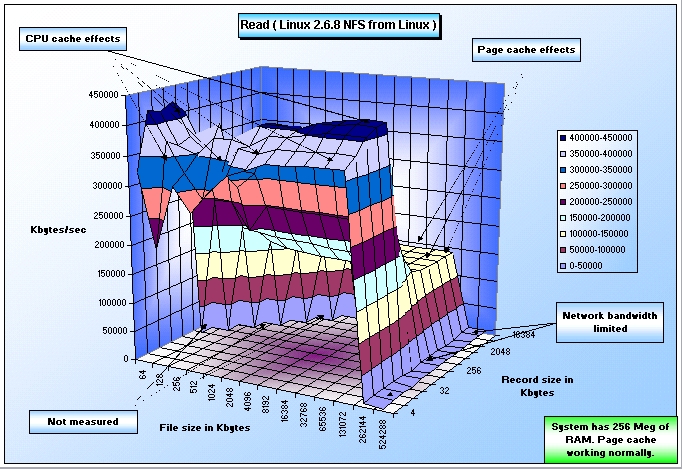
Figure 1: Linux 2.6.8 NFS client with functioning cache
Figure 2 shows an example of when things are not going so well. In this case, the NFS client is Fedora Core 5 with 512 MB of RAM. Notice that the client side cache is not working and results in all files larger than 2 MB missing the cache and reducing read performance by a very large multiplier. It also places additional stress on the NFS server, because data must be pulled from the server, instead of from the client side cache.
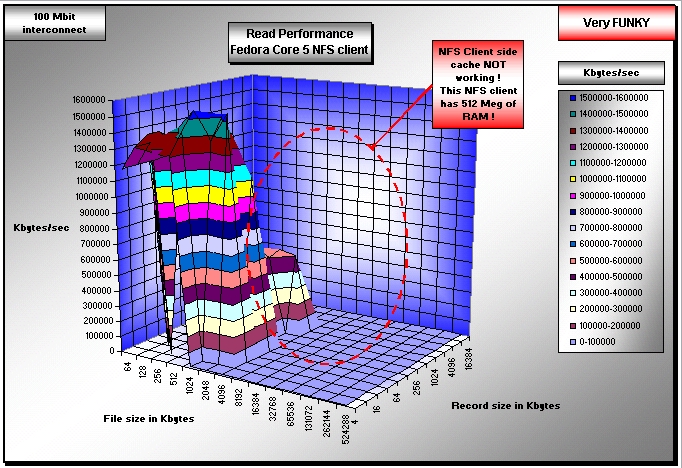
Figure 2: Fedora Core 5 NFS client with improper caching
Figure 3 shows another example of when things go wrong with the client side cache, this time for writing. In this case, we have a Solaris 10 NFS client. Please notice that the write performance is again not what it should be. The client side cache appears to break down for all files larger than 1 MB, when the system should have been able to perform at RAM speeds for files up to 256 MB files. The application will suffer, and the server will again be unduly stressed.
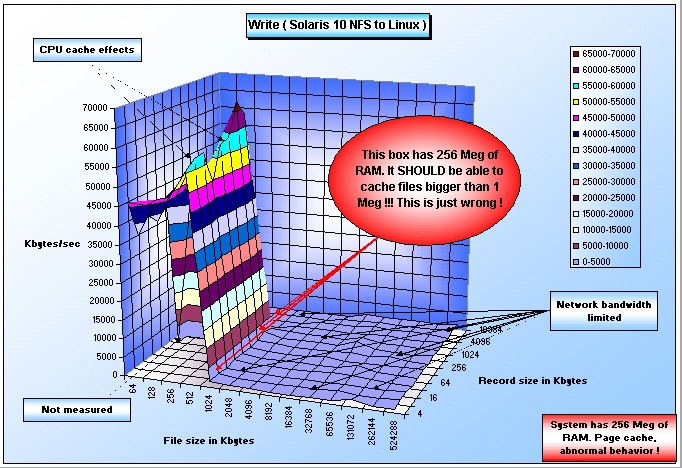
Figure 3: Solaris 10 NFS client with improper caching
In Figures 2 and 3, there is a huge performance impact on the application and NFS server load because when client caches don’t work correctly, work shifts to the server. Not only does the application suffer severe performance problems, but the server is experiencing undue (and very high) stress. Misbehaving client-side caching also has an impact on server / NAS vendors because they usually get blamed for poor the performance.
I believe it is critical that the users understand the end-to-end performance of a solution, the components that are working well and those that are not. It is only by looking at the entire performance chain that poorly behaving clients can be identified, fixed, or eliminated. Everyone benefits if this is achieved. But this goal cannot be achieved unless caching effects are measured.
Don Capps, creator of the IOzone filesystem benchmark tool is a recognized filesystems expert.