

Introduction
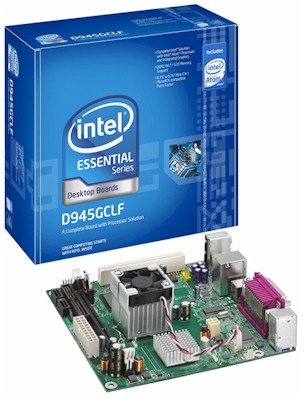
In parallel with the work on the Fast NAS series, I also have been experimenting with a dual-drive RAID 1 NAS using Intel’s D945GCLF Atom motherboard. There are no commercial NASes yet that are based on Intel’s little wonder, so I thought this was as good a time as any to see what the future might bring.
Components
Table 1 shows the components used in the NAS. The case is a real cheapie, but has room for four 3.5" drives and two 5.25" drives.
| Component | Cost | |
|---|---|---|
| Case | APEX MJ-16 | $46 |
| CPU | Intel Atom | (included in mobo) |
| Motherboard | Intel BOXD945GCLF | $80 |
| RAM | Kingston 2GB DDR2 667 (PC2 5300) | $33 |
| Power Supply | 200W | (included in case) |
| Ethernet | Intel PRO/1000 PCI | $25 |
| Data Drives | Hitachi Deskstar HDS721680PLA380 80GB 7200RPM 3.0 Gb/s SATA 8MB |
$80 (2 x $40) |
Table 1: Atom NAS component summary
The total cost without drives was about $185 without shipping. This is $20 – $30 more than D-Link DNS-323 and almost $50 more than a DNS-321, which are the current price / performance leaders in off-the-shelf dual-drive BYOD NASes.
You could shave a bit off this by going for less RAM and the Intel board actually has gone down by $10 as I write this. But you shouldn’t try to save money by not buying a gigabit NIC if you are going for the maximum performance that can be squeezed from this board. The onboard Realtek RTL8102EL onboard Ethernet is only 10/100, which will definitely limit your throughput. I also had OS install problems as you’ll see shortly.
Figure 1 is a photo of the board, which, unfortunately, has a fixed-speed fan on the Intel 82945GC GMCH Northbridge. The Atom CPU is under the heatsink to the left. From what I understand from Googling around, Intel used this Northbridge for low cost and not low power. I moved the Northbridge fan from over to the variable speed case fan connector and that seemed to quiet the fan down a bit.
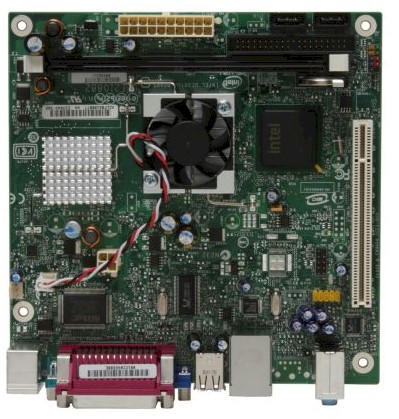
Figure 1: Intel D945GCLF Atom Board
Speaking of power, I measured my rig with two Hitachi SATA drives at around 54 W while running iozone tests. This is over twice what I usually measure for off-the-shelf dual-drive NASes (including drives), so low power is not one of the Intel Atom board’s advantages!
Figure 2 is the board’s block diagram if you’re interested. There is a single 240 pin DIMM socket for DDR2 667 (PC2 5300) RAM, one PCI connector, one IDE connector, two SATA connectors and six USB 2.0 slots. You also get basic onboard video and audio.
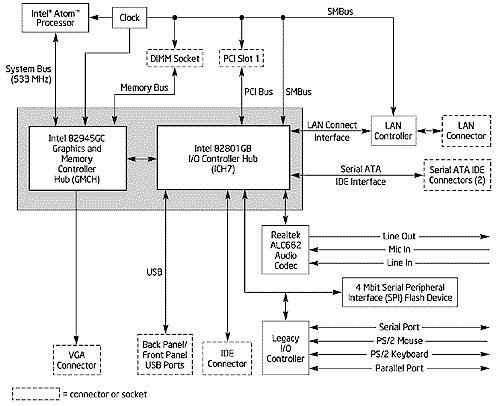
Figure 2: Intel D945GCLF Board Block Diagram
I have to say that the mini-ITX form factor of the board really helped to make the assembly a breeze by leaving plenty of room in the case (Figure 3). No component collisions and no cuts or skinned knuckles for me!
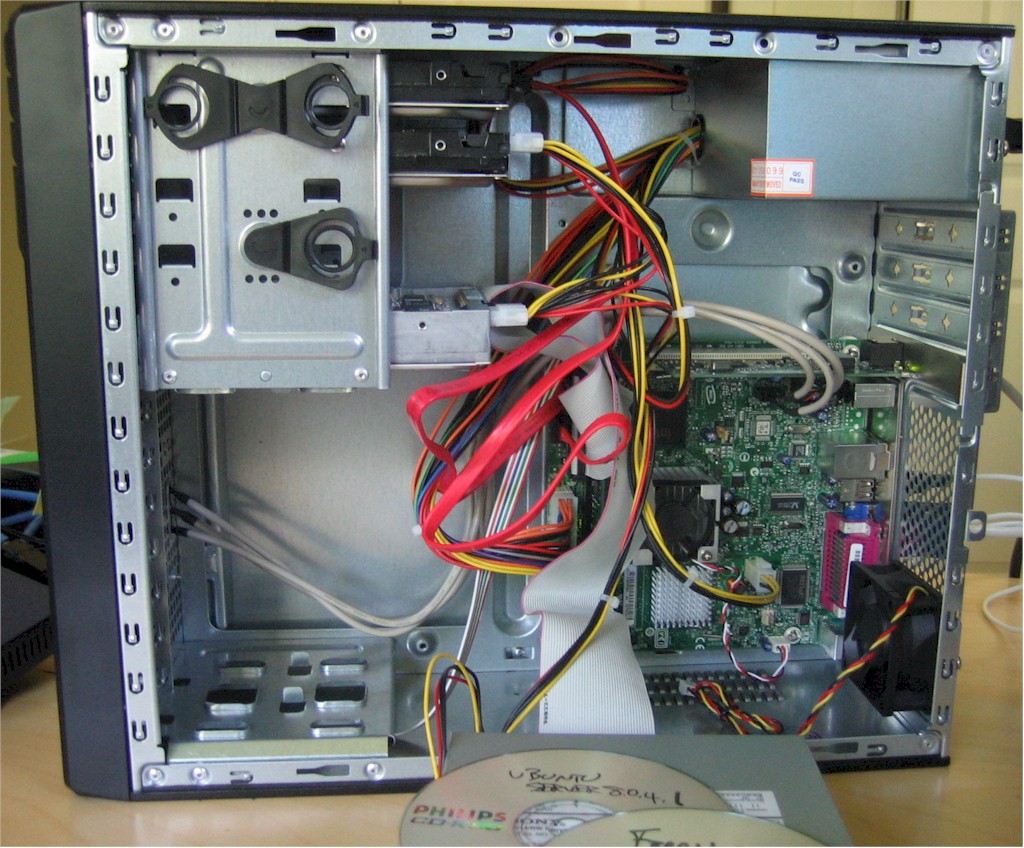
Figure 3: Atom NAS system
Performance- FreeNAS
I started by installing FreeNAS (0.69b2) onto a 1 GB Kingston Flash drive, first using the onboard Ethernet just to get going. But after trying both the released and most current (0.7.3514) builds without success, I gave up and retrieved an Intel PRO/1000 MT gigabit PCI NIC from another system. That installed without a problem and I was up and running.
The next hurdle was to get a RAID array configured so that I could start iozone runs. I’m not a ‘nix (or FreeBSD) jock and am accustomed to the simple RAID configuration controls on consumer NASes. So I found the FreeNAS controls to be less than intuitive.
After about an hour of failing to successfully create a RAID array, I finally resorted to downloading the PDF User manual and found what I needed in Section 4.6 (Software RAID configuration with geom modules).
As the manual describes, the basic steps for configuring a simple RAID array in FreeNAS are:
1. Add Disks
2. Format Disks for “Software RAID”
3. Create the RAID array using the previously formatted for “Software RAID”
4. Format the newly created RAID array in UFS filesystem
5. Add Mount Point
6. Enable Services (CIFS, FTP, etc.)
After reading this (and the additional details of each step), I quickly discovered that I was skipping Step 4. Once I stopped doing that, my array was up and I was able to start testing. All testing was done with the "New NAS Test Bed" machine (Core 2 Duo E4400, 512 MB, Win XP SP2) that I’m using for the Fast NAS series.
The first write results are shown in Figure 4 and include RAID 1 test results for a D-Link DNS-321 (run on my standard iozone test machine – 2.4 GHz P4, 512 MB, Win XP SP2).
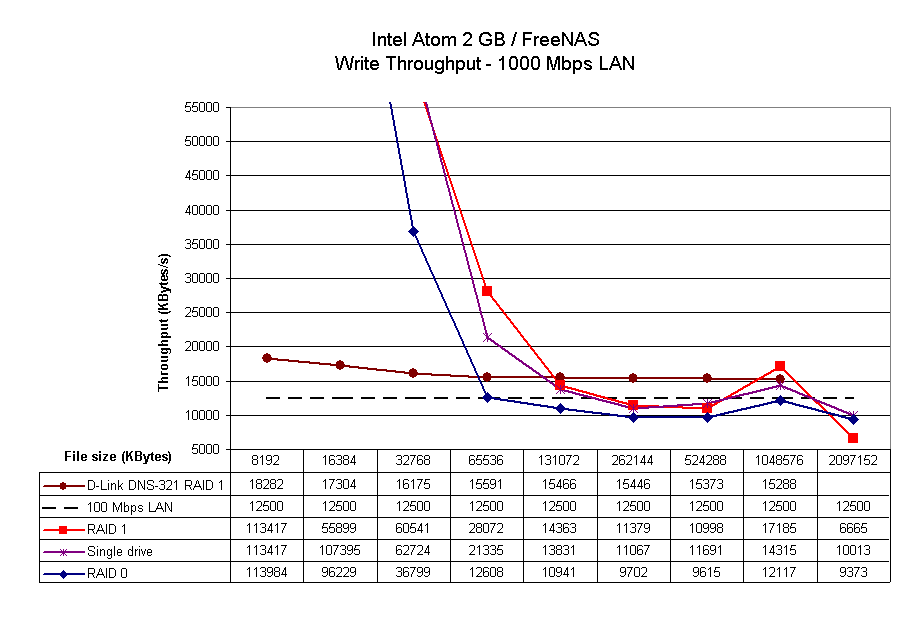
Figure 4: Atom Write performance – FreeNAS
I expanded the Y axis to show the subtle difference in the non-cached section of the plots, so the 66.9 Mbps measured gigabit transfer rate reference line is not shown. This is fine, since none of the results come anywhere near it. Note that the DNS-321 is the winner, in RAID 1 no less, with a steady 15 MB/s after its rather meager 64 MB cache is exhausted.
The read results in Figure 5, however, are a different story. The DNS-321 is left in the dust in the low teens while even the Atom’s RAID 1 reads stay above 30 MB/s until the test file size equals the Atom’s 2 GB RAM size.
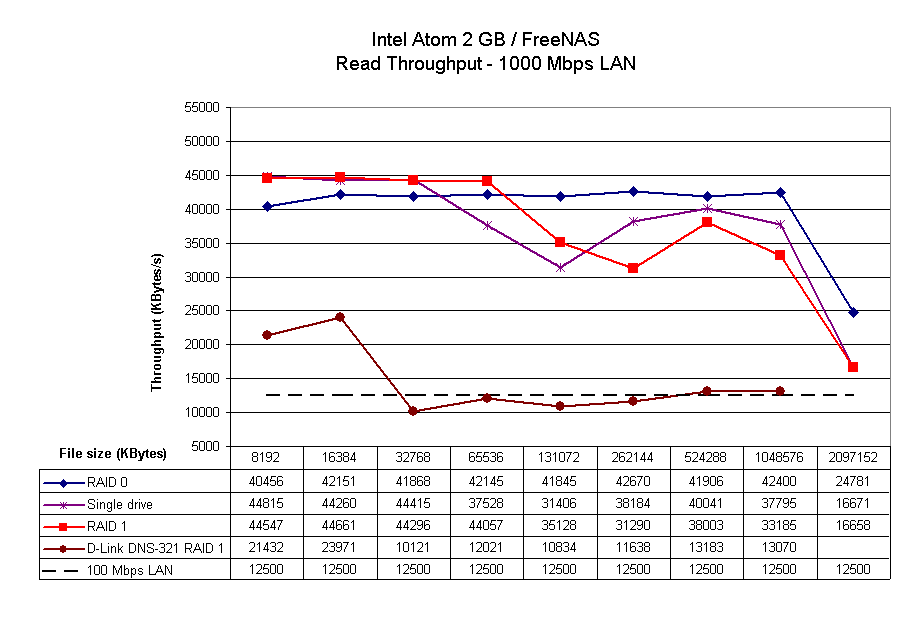
Figure 5: Atom Read performance – FreeNAS
While these results were decent, they came nowhere near the PCI gigabit Ethernet transfer limit or 67 Mb/s SATA drive "wall" that I saw in my testing on the Core 2 Duo based "BigNAS" testbed. Is that really all that the Atom has to offer as an inexpensive NAS platform?
Performance- FreeNAS + Vista
Since running Vista on my iozone test machine had helped goose the performance of the Windows Home Server based system in Fast NAS Part 3, I decided to see if it would help with a NAS that wasn’t using Microsoft SMB, TCP/IP or file copy code.
I also noticed the performance improvement suggestions at the bottom of the FreeNAS CIFS/SMB settings page (Figure 6), so decided to try enabling the Large read/write (shown) and Tuning (System:Advanced page) options, too.
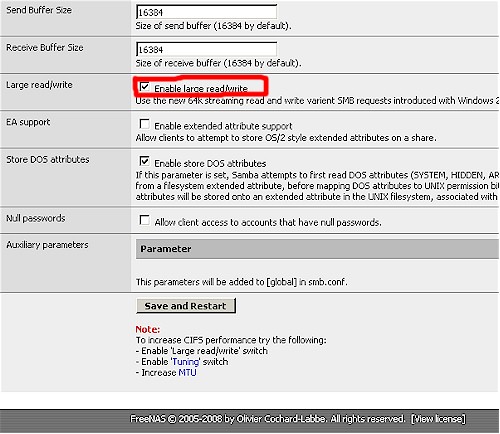
Figure 6: FreeNAS CIFS performance improvement options
To keep the graphs uncluttered, Figure 7 shows a comparison of only RAID 0 write performance with these variations:
- RAID 0 – original configuration. No CIFS Tweaks. Win XP2 on iozone machine
- RAID 0 Vista SP1 – Same as #1, but with Vista SP1 on iozone machine
- RAID 0 Vista SP1 HD – Same as #2, but with FreeNAS installed on IDE hard drive
- RAID 0 Vista SP1 HD Tun Lg – Same as #3, but with FreeNAS Large read/write and Tuning options enabled
Note that I expanded the tests to include a 4 GB file size, so that both the iozone 512 MB and FreeNAS 2 GB memories were exceeded during the test. I also dropped the D-Link from the chart, since I didn’t have any RAID 0 mode data handy.
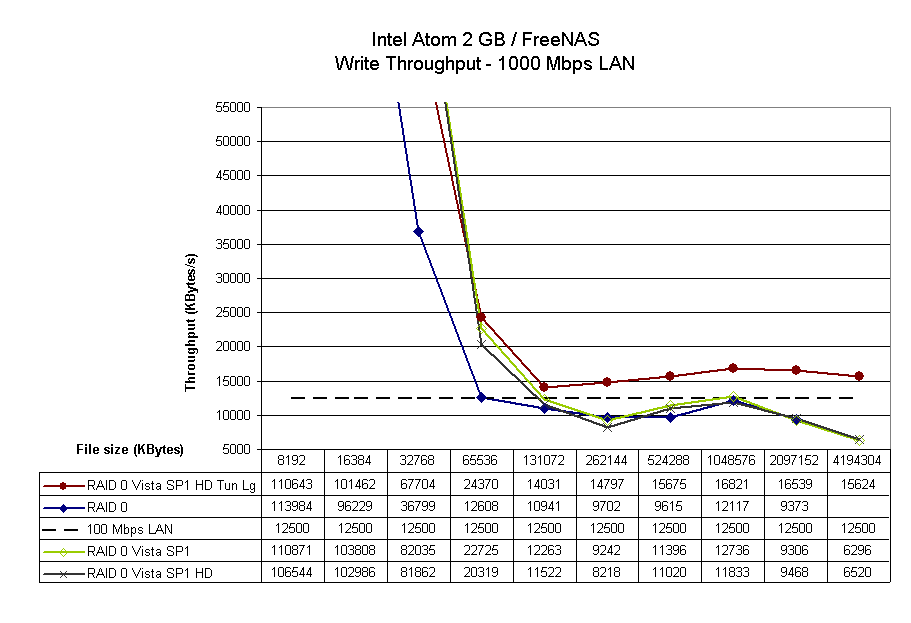
Figure 7: Atom Write performance – FreeNAS w/ Vista, CIFS tweaks
The tests with FreeNAS running from an IDE hard drive were just to convince myself that there was no performance penalty from running the OS from a flash drive (or vice versa). The bottom line from these tests is that Vista SP1 alone didn’t provide write throughput improvement, but enabling the Large read/write and Tuning options did.
Figure 8 tells a different story for reads, however. This time, it is Vista that provides a read speed boost, with no difference from enabling the Large read/write and Tuning options.
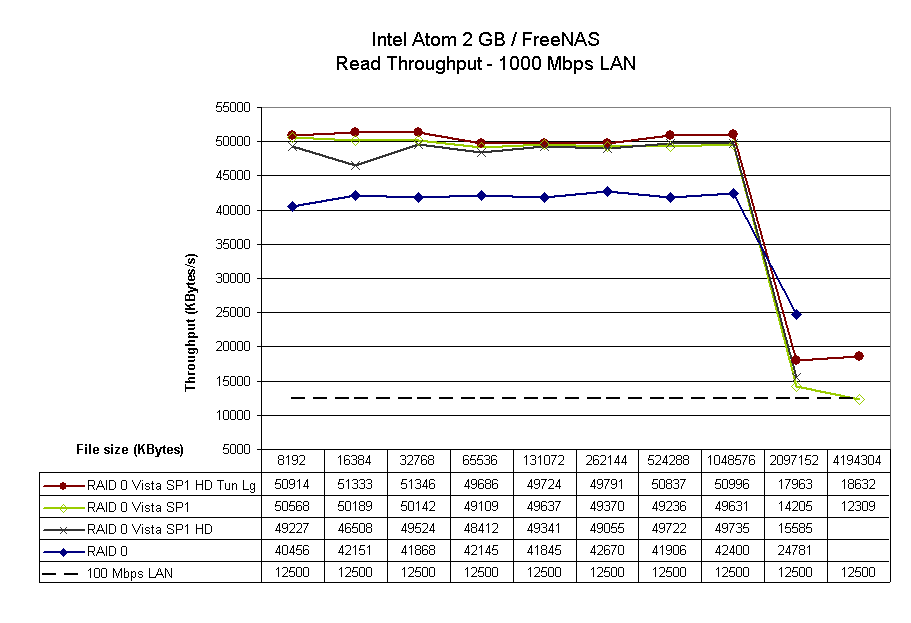
Figure 8: Atom Read performance – FreeNAS w/ Vista, CIFS tweaks
Closing Thoughts
So it looks like the combination of the Intel Atom mobo, a gigabit PCI NIC, FreeNAS with Large read/write and Tuning tweaks enabled and Vista SP1 running on a client, yield a NAS with slightly-better write and much better read performance than you can get from an off-the-shelf, comparably-priced dual-drive NAS. The extra performance comes at a $20 – $50 premium and 2X power consumption compared to the D-Link DNS-321/323, however. And, at least for my build, the Atom-based result isn’t anywhere near as small or attractive!
But the Atom-based NAS also didn’t come anywhere near bumping up against the 67 MB/s single-spindle SATA drive limit that I found in my tests of NASes using beefier CPUs. And I also didn’t see any sign of RAID 0 or 1 providing higher performance than single drive operation. Is that all there is? Or can a different OS make the difference?
In Part 2, I’ll exchange FreeBSD for Linux and find that not all open source distros are equal—at least when it comes to building NASes!