

Introduction
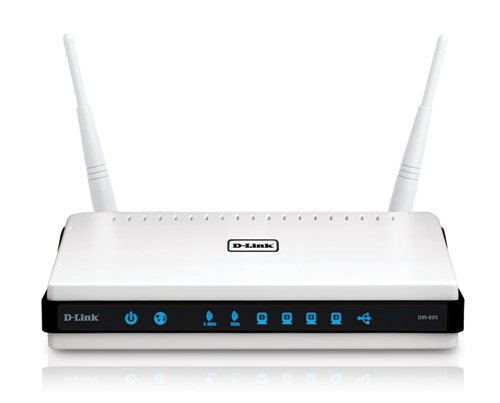
| At a Glance | |
|---|---|
| Product | D-Link Xtreme N Dual Band Gigabit Router (DIR-825) |
| Summary | Dual-band dual radio dual antenna Wi-Fi Certified 802.11n Draft 2.0 router based on Atheros XSPAN silicon |
| Pros | • Two radios for simultaneous dual-band operation • Gigabit WAN and LAN with > 300 Mbps routing spee • High simultaneous sessions • Automatic QoS for Internet uplink and WLAN • USB server for storage and printers |
| Cons | • Unimpressive range, particularly 5 GHz |
D-Link has apparently decided to take another run at making a two radio, dual-band draft 802.11n router, given all the negative baggage that its late-to-the-market, expensive, still hard-to-find and poor-performing DIR-855 has acquired. The good news is that you can actually find the DIR-825. The bad is that its performance, particularly in the 5 GHz band, will probably cause many of them to go right back to the store.
What It Is
The 825 uses the same basic design that first appeared in the DGL-4500, i.e. Ubicom CPU, two mini-PCI board Atheros XSPAN radios and a four port gigabit switch. In fact, if you look at the larger version of Figure 1, you can see labeling in the lower left corner for the DIR-855, DIR-655, DIR-660 and DGL-4500. Note the heatsink on the gigabit switch and thermal pad on the Ubicom processor.

Figure 1: DIR-825 inside view
I already detailed the differences in between the 855 and 825 in this article. They boil down to using a Realtek RTL8366SR gigabit switch, instead of the Realtek RTL8356 in the 855 (both support up to 9k jumbo frames) and radios using Atheros’ newer XSPAN AR9100 chipsets vs. the AR5008 chipsets in the 855. Both products are powered by a Ubicom IP5170U clocked at 350 MHz.
You might notice that D-Link has used the 855’s case, with an empty middle hole for a third antenna. The photo also shows that the mini-PCI radios even have all three miniature connectors loaded. But if you want to try to turn an 825 into an 855, forget it. All the components required to combine the 2.4 and 5 GHz radio outputs aren’t loaded. And you’d have to scare up an additional dual-band antenna, too.
I tested the 825 using the B1 hardware version of D-Link’s Xtreme N Dual Band USB Adapter. The A1 version uses an Atheros AR9170 MAC/BB and AR9104 Dual-band 2×2 MIMO radio and, if you’ll remember, delivered very poor performance when I tried it with the DIR-855. The B1 version shown in the not-so-great FCC photo in Figure 2 uses a Ralink RT2870F BB/MAC and RT2850L 2.4/5GHz 2T3R Transceiver.
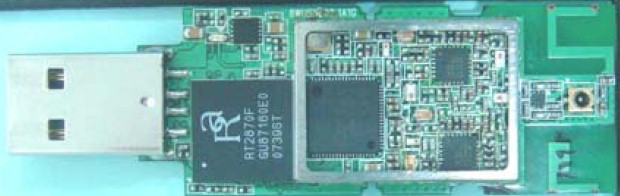
Figure 2: D-Link DWA-160 B1 USB adapter board
Features
Modes and channels are the same as the 855, but I’ll repeat the information here for your convenience. Channels in the 5 GHz Lower (36, 40, 44, 48) and Upper (149, 153, 157, 161, 165) bands are available, whether or not you choose the Auto Channel Scan Wireless Channel option.
The 802.11 Mode selector provides just about all the options you would need to solve compatibility problems with "legacy" 802.11b/g clients. For 2.4 GHz you get:
- Mixed 802.11n, 802.11g and 802.11b (default)
- Mixed 802.11n and 802.11g
- Mixed 802.11n and 802.11b
- Mixed 802.11g and 802.11b
- 802.11n only
- 802.11g only
- 802.11b only
and for 5 GHz you get:
- Mixed 802.11n and 802.11a (default)
- 802.11n only
- 802.11a only
The Basic Wireless settings screen also provides access to Wireless Security settings, which include a full suite of WEP, WPA and WPA2 settings, with both "Personal" (PSK) and "Enterprise" (RADIUS) WPA/WPA2 modes. Security can be set separately for each radio.
I did a quick WPS pushbutton session check with the Ralink-based B1 version of D-Link’s DWA-160 Xtreme N Dual Band USB Adapter —D-Link’s only dual-band adapter. I reset the router to defaults to ensure that there were no settings that could prevent a successful WPS push-button session. Unfortunately, after multiple attempts, I could not get a connection via the WPS session.
Advanced Wireless controls are the same as the 855’s and include High / Medium / Low transmit power and WLAN partitioning.
New Features
D-Link has thrown a few new features into the 825 to make it a bit more interesting. The first is "Guest Zone" capability (Figure 3). This feature creates a separate WLAN with its own SSID that allows wireless clients Internet access, but blocks LAN access to any wired clients (or wireless clients associated to the other SSID).
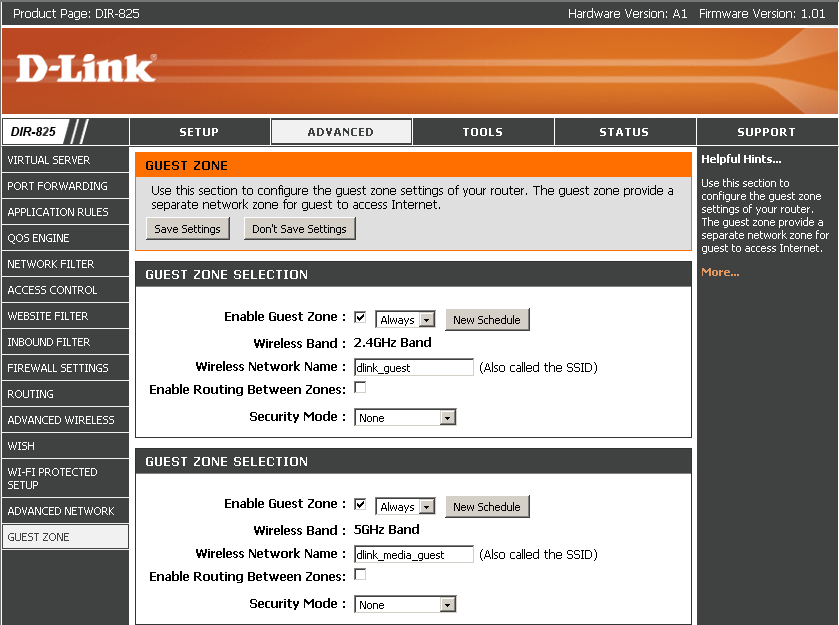
Figure 3: Guest Zone setup
There are separate zones for each radio and I verified that a client associated with the Guest Zone was not able to reach a wired client. If you decide that you want to allow access, you can check Enable Routing Between Zones and the Guest Zone becomes just like the normal WLAN. Just like the basic wireless access, Guest Zones can be turned on and off on a programmable schedule.
The other sweetener has also been rolled into all of D-Link’s Xtreme N routers via new firmware. SharePort takes the USB 2.0 connector that D-Link has dutifully been including in most of its routers to implement Microsoft’s WCN Flash Configuration method and enables it to act as a USB server.
The feature works for USB printers (including multi-function models) and USB storage (both flash and hard drive) only, so forget trying to share a USB camera or any other multimedia USB thingies.
SharePort takes these USB devices and allows clients that are running a Windows (2000/2003/XP/Vista 32-bit) utility to connect to them one-at-a-time over the network. The app sits in the System Tray and pops up notifications when new devices are detected.
To connect to a device, you just open the utility, point to a device and click the Connect pop-up. Figure 4 shows that you can connect a USB hub to make multiple devices available. Note that each system connecting to a device must have the proper drivers for that device loaded on it.
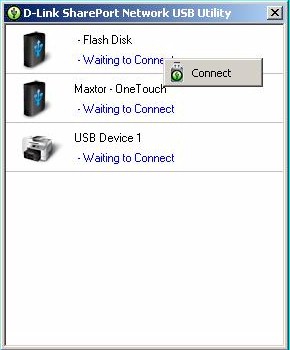
Figure 4: SharePort showing multiple devices
You can connect to multiple devices at once, but only one user at a time can connect to each device. If the device you want to use is in use, you can send a request to the current user as shown in Figure 5.
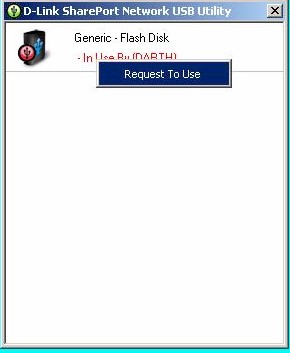
Figure 5: SharePort requesting access to In Use device
The device user gets a pop-up as shown in Figure 6 and must release the device. You need to keep checking to see if the requested device is available, however, since a device release acknowledgement is not sent back to the requestor. If the device user isn’t there to respond to the request, there is no override available.
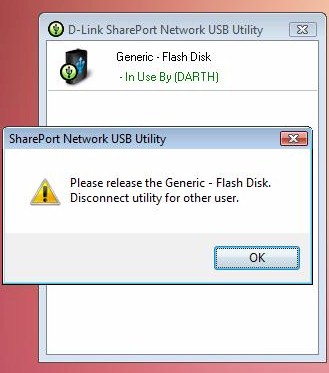
Figure 6: SharePort request at In Use device
SharePort worked well on the Windows XP SP2 and Vista SP1 systems that I ran it on and I wasn’t able to break it.
To check for performance, I ran iozone on a Maxtor OneTouch USB hard drive both directly connected to a system and connected via SharePort. Figure 7 shows that SharePort speed was about 25% of direct connect. This wouldn’t bother you for printing. But it shows that SharePort isn’t a substitute for a real NAS (or a directly-connected USB drive).
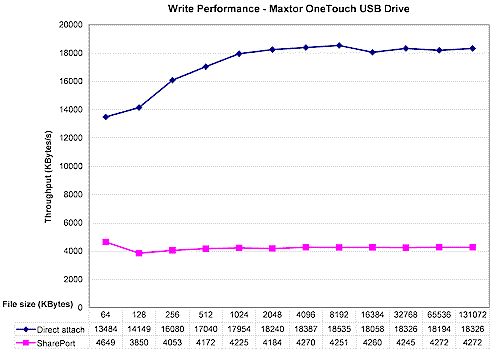
Figure 7: SharePort vs. Direct-Attached performance
Routing Performance
I put the 825 through our suite of router tests, with the results shown in Table 1 along with the DIR-855 for comparison.
| Test Description | DIR-825 Throughput – (Mbps) |
DIR-855 Throughput – (Mbps) |
|---|---|---|
| WAN – LAN |
305
|
332
|
| LAN – WAN |
327
|
340
|
| Total Simultaneous |
320
|
337
|
| Maximum Simultaneous Connections | 200 | 200 |
| Firmware Version |
1.01
|
1.02
|
Table 1: Routing throughput
For all intents and purposes, the two products are the same in routing performance. I also confirmed that the 825’s gigabit switch supports up to 9K jumbo frames.
Figure 8 shows a composite of WAN to LAN, LAN to WAN and simultaneous up/down IxChariot throughput tests. Throughput is nice and steady and fairly evenly balanced between upload and download. Note that I disabled the QoS Engine and SPI, which are enabled by default, to run the router tests.
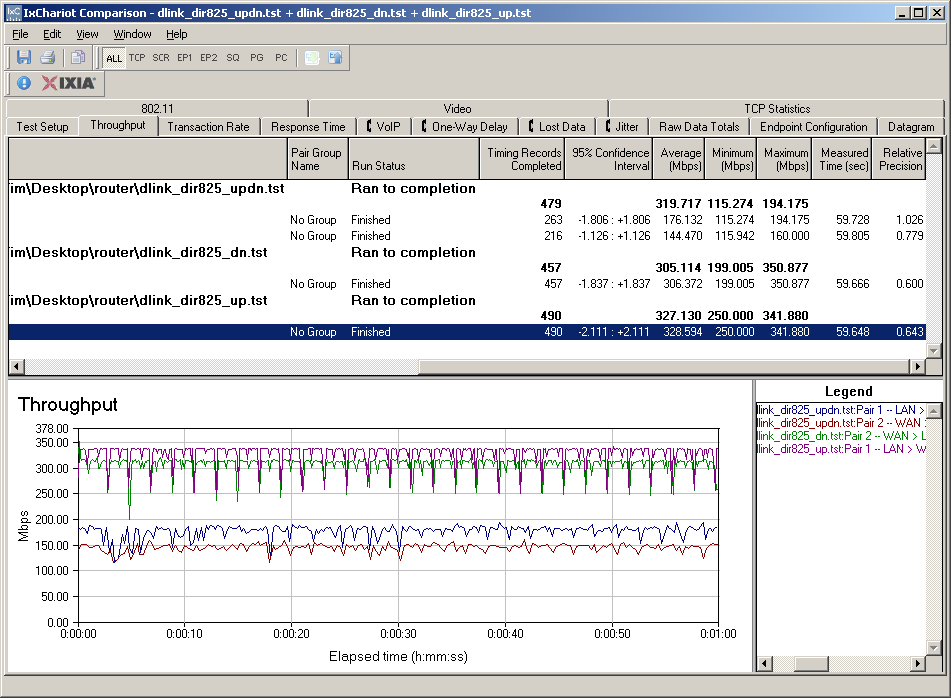
Figure 8: DIR-825 routing performance
The bottom line is that the 825 sits at position #3 in the current Router Charts. Along with the DIR-855, it is one of the fastest routers (for wired connections) that you can buy.
Wireless Performance
I used the open air test method to test the 825’s wireless performance. Testing was done using a D-Link DWA-160 B1 USB adapter inserted into a Fujitsu P7120 Lifebook (1.2 GHz Intel Pentium M, 504 MB) notebook running WinXP Pro SP2 with all the latest updates. I used the latest Win XP SP2 1.02.01.0000 driver and D-Link V2.1 client utility during testing. The router had the latest 1.01 firmware and I left all factory default settings in place, except to set channel 1 for the 2.4 GHz mode tests and channel 36 for the 5 GHz tests.
Figure 9 shows a composite of downlink throughput tests made at the six test locations in four wireless modes: 2.4 GHz, 20 MHz channel; 2.4 GHz, 40 MHz channel; 5 GHz, 20 MHz channel; and 5 GHz, 40 MHz channel. Each column represents the average throughput from a one minute test.
You can see best-case (Location A) throughput is 94 Mbps using a 40 MHz channel in the 2.4 GHz band. This is significantly better than the 68 Mbps 855 did for the same test. But keep in mind that I used different client adapters, although the NETGEAR WNDA3100 I used with the 855 is Atheros based.
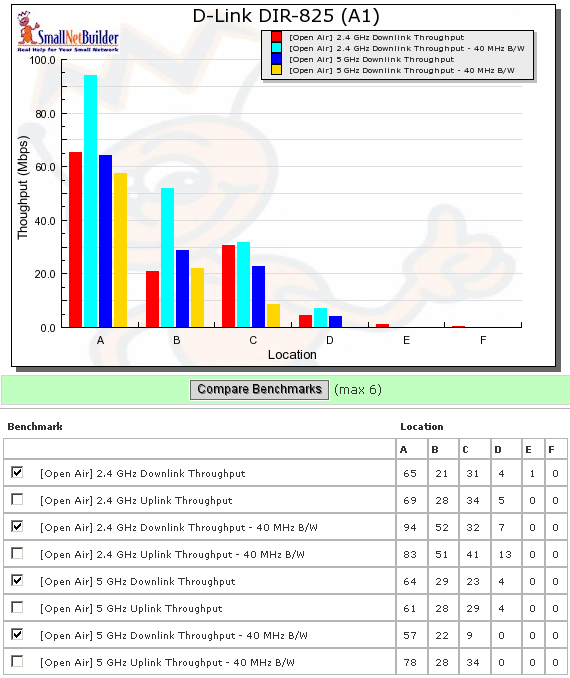
Figure 9: DIR-825 six location downlink summary
Like most dual-band products that I’ve open-air tested so far, the client wasn’t able to even see the 825 in test Locations E and F when using the 5 GHz band. The connection was also iffy in Location D using 20 MHz mode, averaging only around 4 Mbps.
In the 2.4 GHz band in the 40 MHz bandwidth mode, the DWA-160 could see the 825 and connect, but not reliably pass traffic in Locations E and F. In the 20 MHz mode, the client could still see the 825, but connection was very iffy at Location F.
Figure 10 shows a composite of the IxChariot test results running downlink 2.4 GHz w/ 20 MHz channel. There are plenty of 50% drops in throughput, which would not deliver trouble-free high-def video streaming.
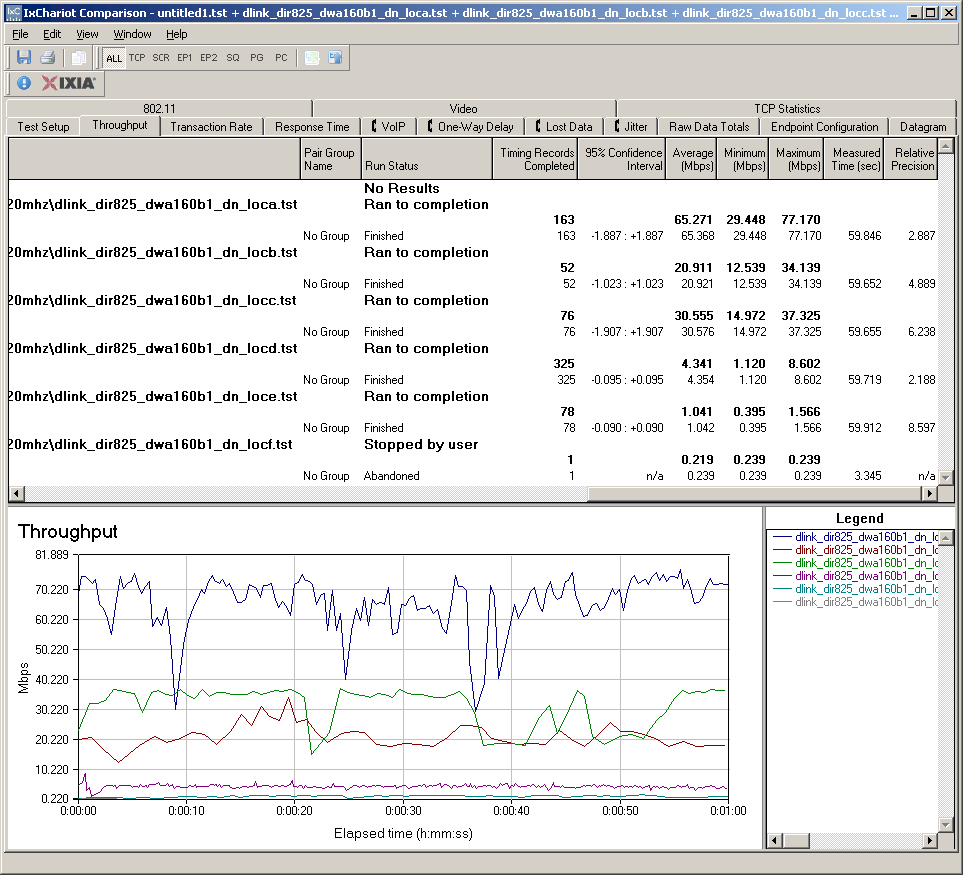
Figure 6: Six location wireless throughput – 2.4 GHz, 20 MHz channel, downlink
Figure 11 shows the six location plots in the uplink direction. Performance was very similar to downlink, with best-case throughput of 83 Mbps again measured at Location A using a 40 MHz channel in the 2.4 GHz band. Unfortunately, uplink was also essentially unusable in locations E and F. Throughput variation actually was lower running uplink, however, as you can see in this plot.
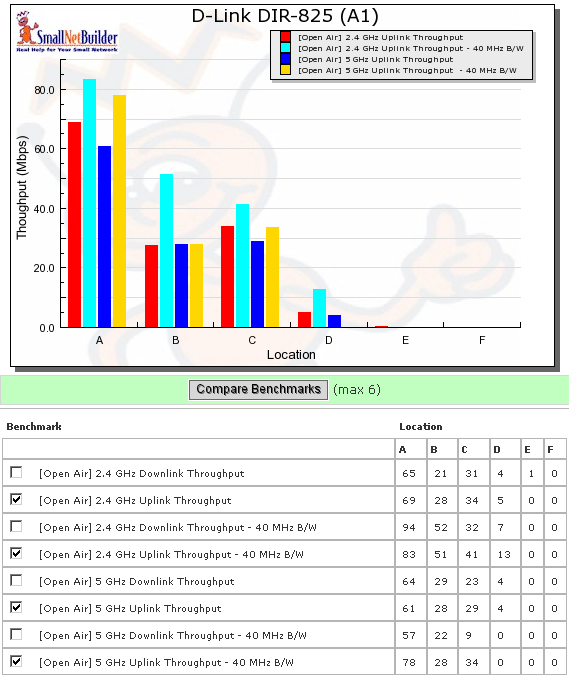
Figure 11: DIR-825 six location uplink summary
Wireless Security Performance
I also tested for throughput reduction with wireless security set to WEP, WPA/TKIP and WPA2/AES and found the usual penalty in WEP and WPA/TKIP—about 70% in this case (Figure 12). The difference between the results for no encryption and WPA2/AES is basically due to high throughput variation.
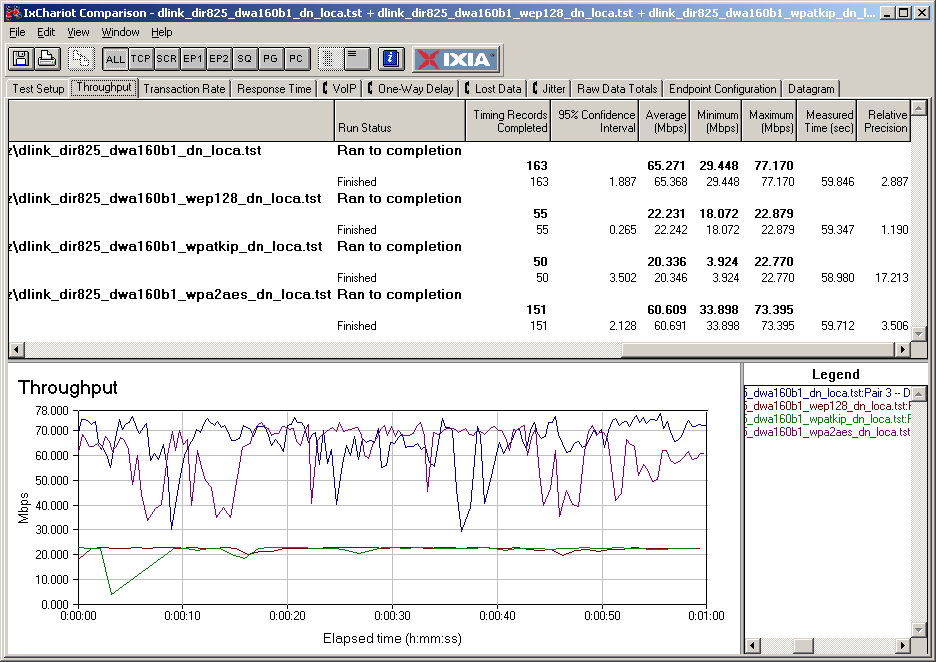
Figure 12: Security mode comparison – 2.4 GHz, 20 MHz channel, downlink
Wireless Performance – Competitive Comparison
Since I tested the 855 using the Azimuth method, I can’t directly compare it with the DIR-825. Fortunately, I did open-air test the current concurrent Draft 11n dual-band sales leader—Linksys’ WRT610N. To provide some lower-cost single-radio dual-band alternatives, I threw the D-Link DIR-628 and DAP-1522 AP/Bridge into the comparison.
Figure 13 has the Wireless Chart comparison for 2.4 GHz, 20 MHz bandwidth average downlink throughput for this roundup of products. What’s clear is that there is no consistent winner in all locations. As I was preparing the other screen captures from the Wireless Charts, I kept seeing the same thing;no clear winner in all locations.
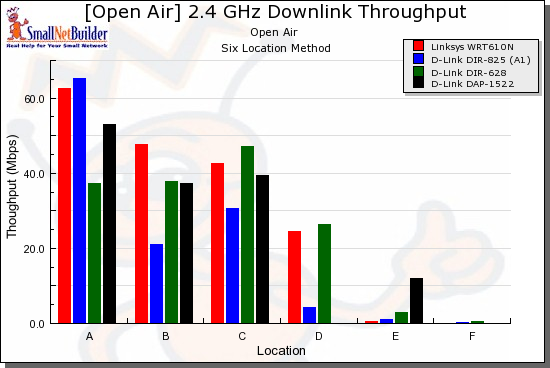
Figure 13: Competitive comparison – 2.4 GHz, 20 MHz channel, downlink
So instead of presenting all the plots and having you go crazy trying to make sense of them, I have tried a different approach. Table 1 summarizes the highest downlink throughput product in each location for the four combinations of bands and modes tested.
All I did was go through each chart and put an X in the product’s box that had the highest throughput for each test. So all you have to do is add up the checkmarks for each product!
You can easily see that there is no consistently best product for downlink performance! But the dual-band single-radio DIR-628 and DAP-1522 seem to do better than the 825.
| Product | 2.4GHz /20 | 2.4GHz / 40 | 5GHz / 20 | 5GHz / 40 | ||||||||||||||||||||
|---|---|---|---|---|---|---|---|---|---|---|---|---|---|---|---|---|---|---|---|---|---|---|---|---|
| A | B | C | D | E | F | A | B | C | D | E | F | A | B | C | D | E | F | A | B | C | D | E | F | |
| Linksys WRT610N | X | X | X | |||||||||||||||||||||
| D-Link DIR-825 | X | X | ||||||||||||||||||||||
| D-Link DIR-628 | X | X | X | X | X | X | X | X | ||||||||||||||||
| D-Link DAP-1522 | X | X | X | X | X | X | X | |||||||||||||||||
Table 1: Best downlink throughput summary
Table 2 contains a similar summary, but for the uplink tests. It’s clear that the WRT610N outshines the other products in the 2.4 GHz band. But not so much for 5 GHz.
| Product | 2.4GHz /20 | 2.4GHz / 40 | 5GHz / 20 | 5GHz / 40 | ||||||||||||||||||||
|---|---|---|---|---|---|---|---|---|---|---|---|---|---|---|---|---|---|---|---|---|---|---|---|---|
| A | B | C | D | E | F | A | B | C | D | E | F | A | B | C | D | E | F | A | B | C | D | E | F | |
| Linksys WRT610N | X | X | X | X | X | X | X | X | X | X | X | X | ||||||||||||
| D-Link DIR-825 | X | X | X | X | ||||||||||||||||||||
| D-Link DIR-628 | X | X | X | X | ||||||||||||||||||||
| D-Link DAP-1522 | ||||||||||||||||||||||||
Table 2: Best uplink throughput summary
If you want to see the other Wireless Chart plots, just click on the links below.
- 2.4 GHz / 20 MHz uplink
- 2.4 GHz / 40 MHz downlink
- 2.4 GHz / 40 MHz uplink
- 5 GHz / 20 MHz downlink
- 5 GHz / 20 MHz uplink
- 5 GHz / 40 MHz downlink
- 5 GHz / 40 MHz uplink
Stress Tests
Since there have been many reports of problems with the Linksys WRT610N that seem to point to poor thermal design, I decided to do a little stress testing on the 825. I set up two notebooks with the DWA-160 A1 in one and the B1 in the other. I then ran a few multi-hour tests with IxChariot running both links full blast simultaneously.
I ran the tests for three hours, then five hours and both ran without a hitch (Figure 14). The speeds that I got when running both radios simultaneously matched up nicely with what I measured when running only one radio at a time.
I also swapped the A1 and B1 versions of the DWA-160 so that each operated in both bands. I didn’t see a significant speed difference between them, but remember that I was testing under same-room conditions.
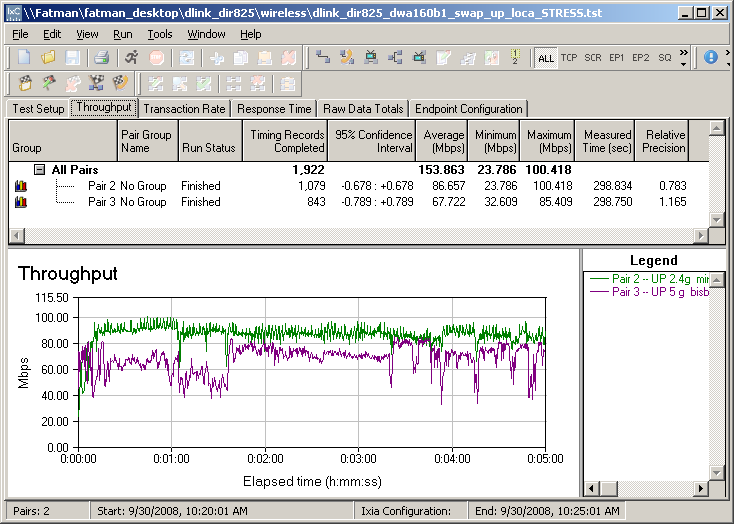
Figure 14: 5 hour simultaneous dual band stress test
When I tested the WRT610N, I found some interaction between wireless and routing throughput. So I decided to run the same test on the 825. I kept the two notebooks running simultaneous links on both radios and added a third LAN to WAN wired stream to exercise the routing portion of the 825. The wireless traffic ran to a LAN side client, so didn’t add to the single wired LAN to WAN stream.
Figure 15 shows the three stream test. The router kicks in at the 10 second mark and you can see a slight decrease in the 2.4 GHz radio throughput, which is running higher than the 5 GHz radio. But the really interesting part happens when the wireless streams end. When the 2.4 GHz radio goes idle, routing throughput jumps by around 60 Mbps! Then when the 5 GHz stream stops, it jumps up another 80 Mbps!
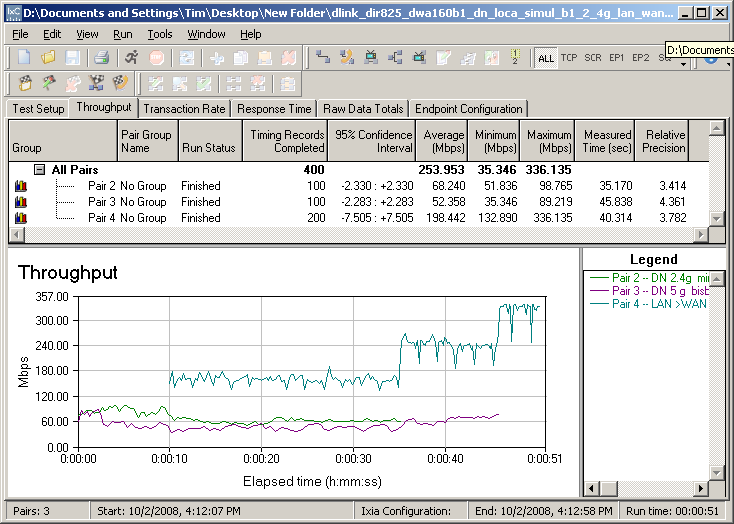
Figure 15: Simultaneous 2.4 and 5 GHz plus LAN > WAN
I was surprised that the Ubicom processor is doing so much heavy lifting for the wireless radios. My guess is that this is due to WISH (Wireless Intelligent Stream Handling) processing, which is on by default and that I left on for the test.
I ran a few other tests with routing traffic speed dialed down. Figure 16 shows routing traffic speed limited to 100 Mbps, which still causes wireless throughput reduction.
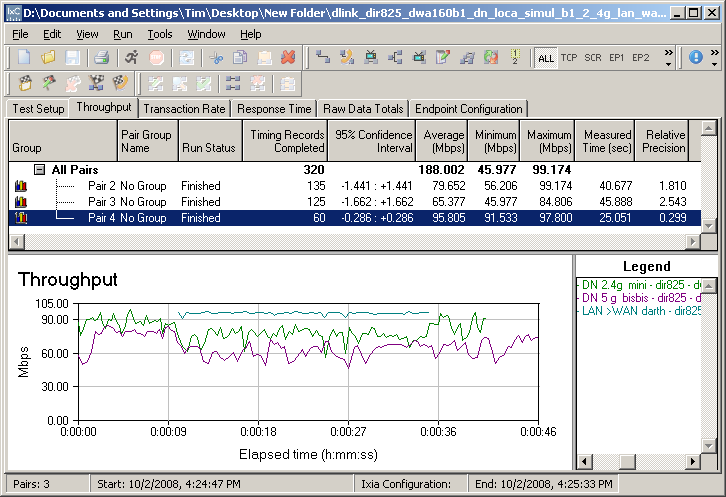
Figure 16: Simultaneous 2.4 and 5 GHz plus LAN > WAN – 100 Mbps routing limit
But when I limited routing traffic to 50 Mbps, there was no effect on the wireless streams.
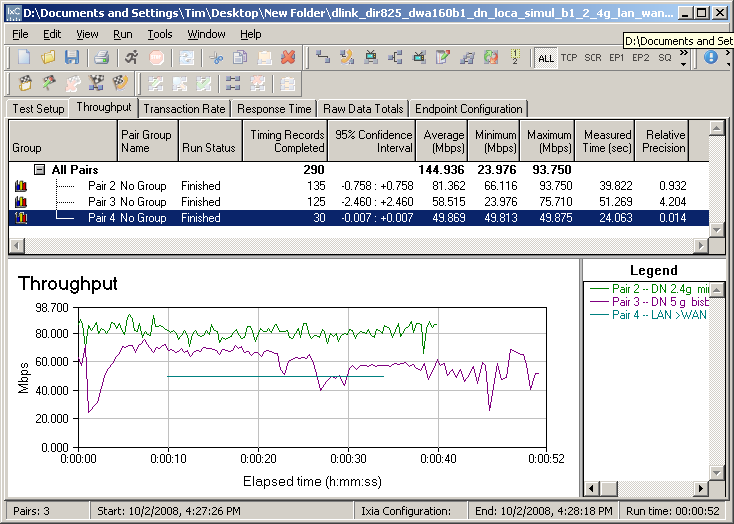
Figure 16: Simultaneous 2.4 and 5 GHz plus LAN > WAN – 50 Mbps routing limit
100 Mbps + Internet connections are pretty rare and continuous traffic like that used for these tests is also unlikely. So I doubt if the average buyer will come anywhere near stressing the 825’s CPU and looks like the thermal design is adequate.
Closing Thoughts
As I said at the top, the good news about the DIR-825 is that it is competitively priced and, more importantly, available. My guess is that D-Link is going to focus on the 825 as its mainstream simultaneous dual-band router and just let the 855 whither away.
There is really nothing in the 855 that I can see that justifies a 2X price difference. The real question is why D-Link didn’t bring out all three antennas on the 825, given that the radios are 3T3R designs and the cost of the combiner components is peanuts. This holdback would indicate that D-Link intends to keep on selling the DIR-855 for anyone foolish enough to pay the ridiculous premium.
As the "best throughput" tables back in the Performance section showed, there is no current product that delivers excellent performance both uplink and downlink and across both bands. No matter what you choose, you’ll be making a compromise.
The bottom line is that if you have been thinking about buying the 855, then save some money and get the 825. But if you want to get the "best" simultaneous dual-band router available then, frankly, keep your money in your pocket. There really isn’t a "best" in this category right now and I don’t see anything on the horizon. If you’re buying D-Link, you would be better off with the single-radio DIR-628 or DAP-1522 (if you don’t need a router) and just buy two, if simultaneous band support means that much to you.