

Introduction
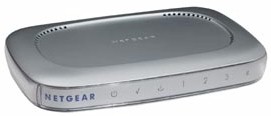
| NETGEAR Cable/DSL Web Safe Router Gateway (RP614) | |
|---|---|
| Summary | Basically an RP114 in a sleek new package, with Setup Wizard and new interface. Comes bundled with 1 year free subscription to zer0knowledge’s Freedom Security and Privacy suite. |
| Update | 12/06/02 – Fixed Wrap Up 11/14/02 – 4.11RC24 firmware adds UPnP, AOL support, PPTP fixes 10/1/02 – 4.10 Sep 13 2002 firmware supports remote admin and port filtering 7/23/02 – Clarified zeroknowledge Freedom bundle. |
| Pros | • Scheduled, emailed logs & alerts • Logs web traffic |
| Cons | • No log analysis or summaries |
The RP614 Cable/DSL Web Safe Router Gateway is part of NETGEAR’s new “Platinum” networking line. NETGEAR says that the “Platinum” line is intended for the Home user (hence, the “designer” look), but does the RP614 have what it takes, and what is a “home” user anyway?
Basic Features
The RP614 comes in NETGEAR’s new “Platinum” plastic packaging. As I said in the intro, NETGEAR is aiming the “Platinum” line at the Home user, with the good ol’ Blue Metal Box (BMB) package used on products intended for “business” users, going forward. The “Platinum” is an attractive, stackable design, that can also be stood on its end when you use the stand that’s included with the product, or wall mounted with the screw-type mounting features molded into the bottom cover.
All indicators are on the front panel of the cabinet and include one Link/Activity/Speed (color indicates the connection speed, Green for 100Mbps, Amber for 10) for each of the four LAN ports, Link/Activity for the WAN, and Power and Test. All lights are nice and bright and show up as backlit symbols that are visible from a wide angle.
All four switched 10/100 LAN ports are on the rear, along with the 10BaseT WAN port, power socket, and Reset-to-Factory-Defaults button. There’s neither a shared Uplink port, nor Normal/Uplink switch. So if you need to expand beyond 4 ports, just follow the instructions in the Reference Manual.
NETGEAR includes a printed Installation Guide, and Resource CD, and includes a normal CAT5 patch cable. The CD contains:
- PDF versions of the Installation guide and Reference Manual,
- some helpful info on setting up port forwarding, including a list of ports used by popular applications
- setup information for major broadband ISPs
- a copy of the Adobe Acrobat Reader installer
- a copy of NETGEAR’s Installation Assist (more on this later)
- a copy of zer0knowledge’s Freedom Anti-Virus program (Version 3.2)
Update 7/23/02
 NETGEAR’s zer0knowledge Freedom bundle is a no cost 1 year, full-featured, 8 user version that includes Anti-Virus and Firewall capability. If you see zer0knowledge bundles with other products, check to see whether it’s just a “demoware” version that you’ll need to pay extra to enable the Anti-Virus and Firewall capabilities! Note that the software is Windows-only.
Setup
Given that NETGEAR is trying to position the RP614 for the “Home” market, you’d think that they would give it a different interface to go along with its different packaging. But you would have thought wrong, because once you fire it up and log into the default address of 192.168.0.1 for the first time, you get the same Install Wizard that greets you on the “business” oriented FVS318 [reviewed here] and more recent FR114P [reviewed here]. And if you check the CD inventory above, you’ll see it’s the same as you get with the FVS318 and FR114P, too.
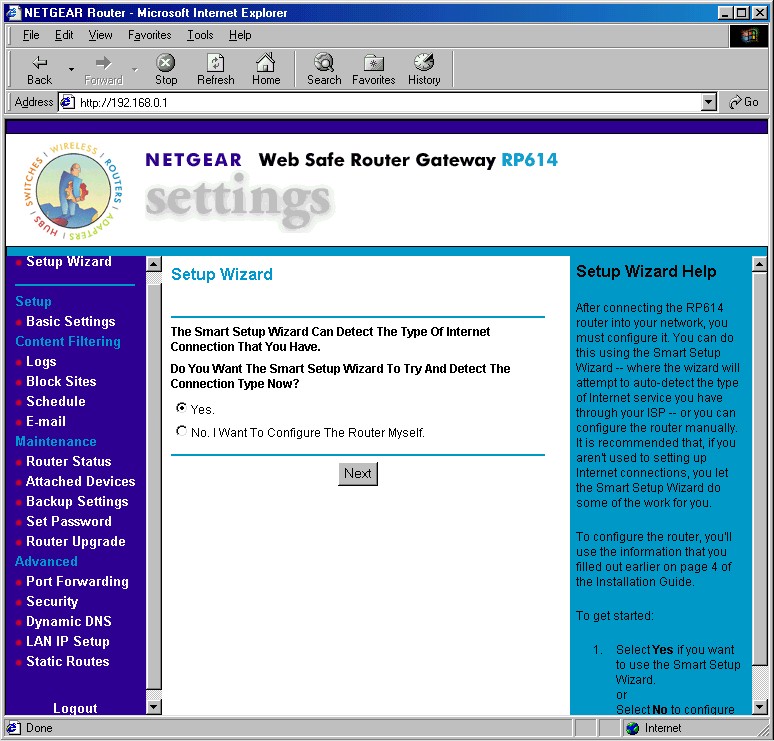
Figure 1: Setup Wizard
(click on the image for a full-sized view)
As a matter of fact, the 614’s feature set is essentially the same as that of the FVS318‘s, minus the 318’s VPN endpoint features, and a few other variations. A key improvement over the 318 is that the 614 uses frames properly in its browser interface. Although the middle frame (which is where all the admin activity takes place) has a fixed size, it’s sized correctly, with no need (or ability) to scroll back and forth to access any features, including log data.
On the other hand, a key negative is that there’s no remote management feature, which is probably due to the “home” target customer, who might get confused by such a feature, or mis-configure it, possibly leaving the router open to attack.
Update 10/1/02 – Remote management added in 4.10 Sep 13 2002 firmware.
The 614 also allows multiple administrator logins at a time, but doesn’t provide any warning about the multiple administrators. You’re automatically logged out after 5 minutes of inactivity, which you can’t change, and will have to enter the proper password to get back in, since the 614 doesn’t share the 318’s no-password-relogin-bug.
Finally, although I’m no fan of the feature (see the UPnP NTK for the reasons why), I would have thought a router intended for the “home” market would support Universal Plug and Play (UPnP). Since one of UPnP’s key features, NAT Transversal, is supposed to automatically configure a router’s firewall for applications like games, voice and video conferencing, and other “home” applications, I think the omission is notable.
Firewall and Filtering
The 614 has a NAT-based firewall, with features, again, similar to those of the the FVS318. I’ll just run down the differences here – check the spec table to your right, or the [FVS318 review] if you want all the details:
- You can statically forward up to 20 (vs. 10 on the 318) ports or port ranges (no protocol selection), picking from a list of common services, or defining your own service
- Forwarded server “loopback” is not supported
- The Block Sites feature supports both websites and newsgroups, and can have 255, 32 character entries.
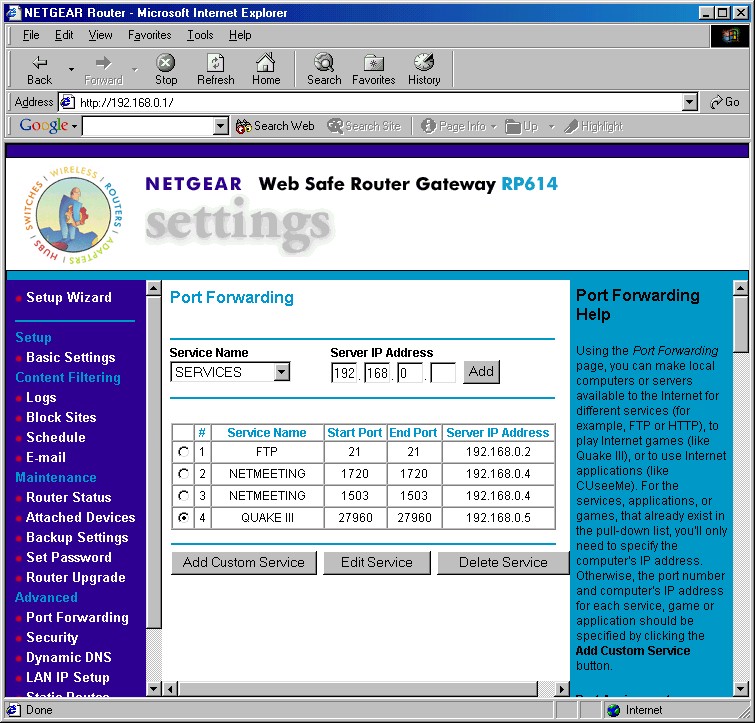
Figure 2: Port Forwarding
(click on the image for a full-sized view)
Note that like the FVS318, there are no port filters, so you can’t block, say, the ports needed for certain games or file-sharing services.
VPN
The 614’s VPN support is pass-through only, and although NETGEAR’s website description says that IPsec and L2TP VPN protocols are supported, the Reference Guide makes no mention of VPN at all… other than in the Glossary.
Logging and Other Features
As is suited to the 614’s home user focus, the logging feature does log the websites that your users visit. You can view, clear, refresh, and immediately send the log to one designated email address, and you can schedule the emailing of the log, too. The 614 can also immediately send an email “alert” when someone tries to access a blocked URL or newsgroup.
I did find a couple of hitches, however. First, any machine that you put in DMZ won’t be logged. Second, the info that’s logged is pretty raw, and includes hits on ad and image servers if the visited page calls on them. I think NETGEAR and pretty much everyone else is missing an opportunity to differentiate themselves by providing better traffic logging features. It wouldn’t be that hard to have a log analysis tool that kept something like a tally of visits to the top, say, 25 domains visited, and then let you drill down a level or so to see the top visited pages in each domain. Heck, why not just have the browser access the browser History files on each client machine and display that data, or crunch on it for an aggregate view of who’s browsing what. With routers just about at the blister-pack-impulse-item-at-the-supermarket-checkout stage, and router memory more plentiful, I’d think that someone would jump ahead here!
Other Features
The router has a few other features worthy of note:
- you can enable the router to respond to WAN ping requests (this is disabled by default, which is good security practice)
- you can set and view 8 static routes (useful in networks that have more than one subnet)
- dynamic routing protocols RIP1, and RIP 2B send and receive are supported
- dynamic DNS support is built-in for using dyndns.org.
The first bullet might be useful to some of the target “home” crowd, but will the average Joe (or Jane) have a clue as to what to do with the other three? And note that you can’t tweak the router’s MTU (Maximum Transmission Unit) value, which has proven its worth with many a balky PPPoE connection.
Routing Performance
Good marks all-around. Fast enough to be invisible on pretty much any network!
Routing Performance Test Results
| Test Description | Transfer Rate (Mbps) | Response Time (msec) | UDP stream | |
|---|---|---|---|---|
| Throughput (kbps) | Lost data (%) | |||
| WAN – LAN | 6.8 | 3 (avg) 3 (max) |
499 | 0 |
| LAN – WAN | 6.6 | 3 (avg) 4 (max) |
482 | 3 |
| Firmware Version | 4.00 Apr 22 2002 | |||
See details of how we test.
Wrap Up
Plenty of speed, decent feature set, and a price below $50. If you’re looking for a basic 4 port router, the RP614 should be on your short list.