

Introduction

| m0n0wall Firewall – Part 2 | |
|---|---|
| Summary | Powerful and easy-to-configure FreeBSD firewall with Web GUI IPsec and PPTP endpoints and bandwidth shaping |
| Update | 8/22/2004 m0n0wall 1.1 released. |
| Pros | • Runs on both embedded PC platforms and normal PCs • Includes bandwidth shaping and VPN endpoint features • Free |
| Cons | • Firewall configuration could be daunting for some users |
In Part 1 of this review I described m0nowall’s background and how to install it on both the Soekris net4501 embedded PC platform and normal PCs. In this second and final part, I’ll take you through configuring m0n0wall, a review of some of its features, some performance testing and a look at what’s next for m0n0wall.
Basic m0n0wall Configuration
m0n0wall has a very simple, but easy to use Web interface for configuration. The screen shots and examples that follow are based on m0n0wall on the Soekris net4501, but are applicable to all the m0n0wall images.
Enter the m0n0wall IP address into the Address box of your web browser and you will be prompted for a Userid and Password. Enter the defaults are admin and mono (both lowercase, no numbers) and you’ll be then taken straight to the Status page (Figure 1).
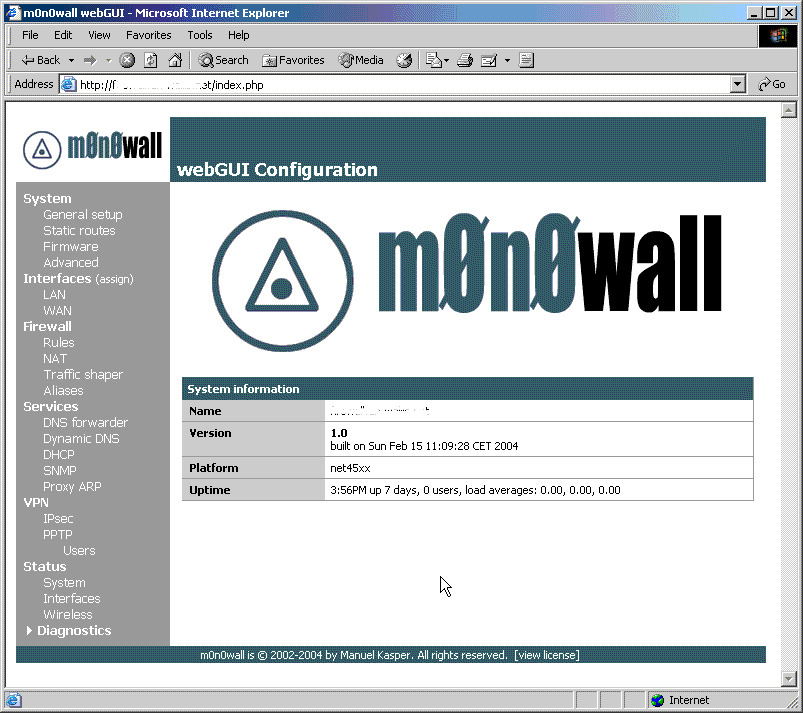
Figure 1: m0n0wall Status page
The web GUI has a simple layout with all configuration options and features grouped and listed in a pane down the left side of the page and the details of the selected option are displayed in a large pane on the right side of the page.
As with most firewalls, m0n0wall offers a certain amount of security in its default configuration. The important defaults are:
Security
- The WAN interface is configured to get its IP configuration by DHCP.
- Traffic entering on the LAN interface is allowed to pass to any other interface, WAN and optional interfaces.
- Outbound NAT is enabled; all outbound traffic passing through the WAN interface appears as if it originated from the WAN IP address.
- Inbound traffic entering on the WAN interface is blocked.
Administration
- Web administration is allowed on the LAN interface IP (default 192.168.1.1/24) on port 80 (http).
- The DHCP service is enabled on the LAN interface so that PCs are correctly configured with an IP address in the 192.168.1.100 – 199 range. The DNS forwarder service is enabled allowing PCs connecting to the LAN interface to use the LAN IP address as a DNS server. Queries are forwarded to the DNS servers, statically configured or obtained by DHCP / PPP, on the WAN interface.
- The firewall’s time zone is set to Etc/UTC and synchronises its internal clock every 5 hours with one of the time servers at pool.ntp.org 1.
Under most circumstances, this is enough to give a small network of PCs and other Ethernet devices using TCP/IP protected access to the Internet. All other features and services are disabled.
1 pool.ntp.org is a voluntary project providing public Network Time Servers. The project uses ‘Round Robin’ DNS to spread the load of time requests over a large number of servers, currently 188.
Basic m0n0wall Configuration, Continued
The settings you are going to want to change immediately are on the System -> General setup page (Figure 2):
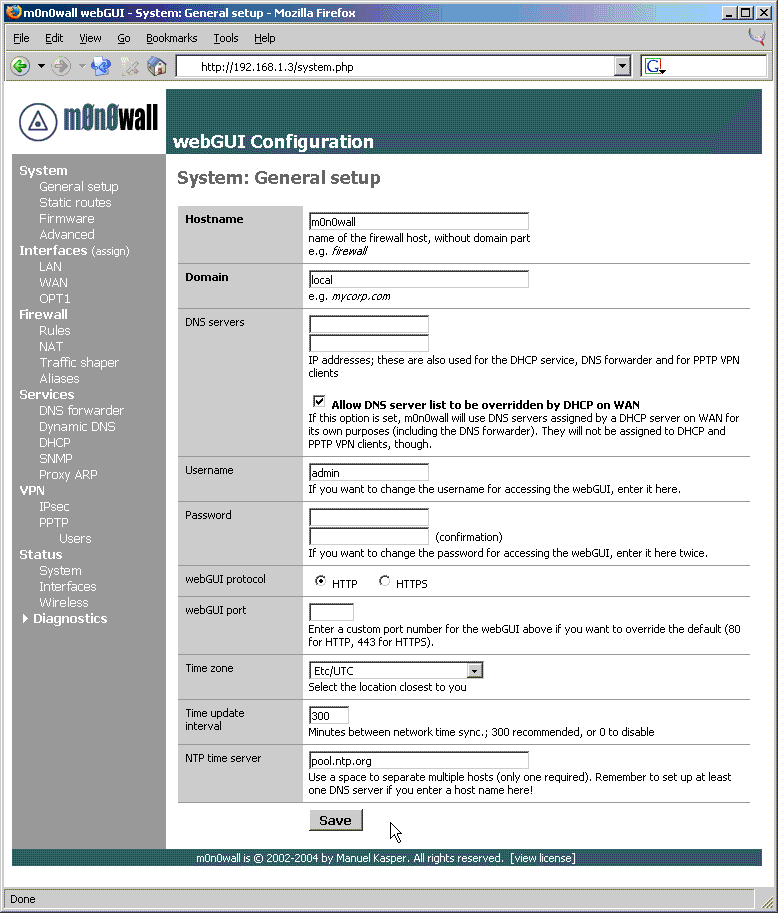
Figure 2: General Setup page
- Username & Password; obviously the defaults are public knowledge. Most importantly change the password, however changing the Admin username also helps through ‘Security by obscurity’.
- Time zone, select the zone geographically closest to you.
- NTP time server, your ISP might provide a time server for your use. Typically ISP DNS servers also provide NTP services.
After this, your next priority will be to configure the TCP/IP settings of the WAN interface so that the firewall can communicate with the device you are using for Internet access. Typically this device would be a xDSL modem/router, cable modem, ISDN router etc. The main criteria is the device can connect to the firewall using standard Ethernet 2. The WAN interface configuration settings are on the Interfaces -> WAN page (Figure 3).
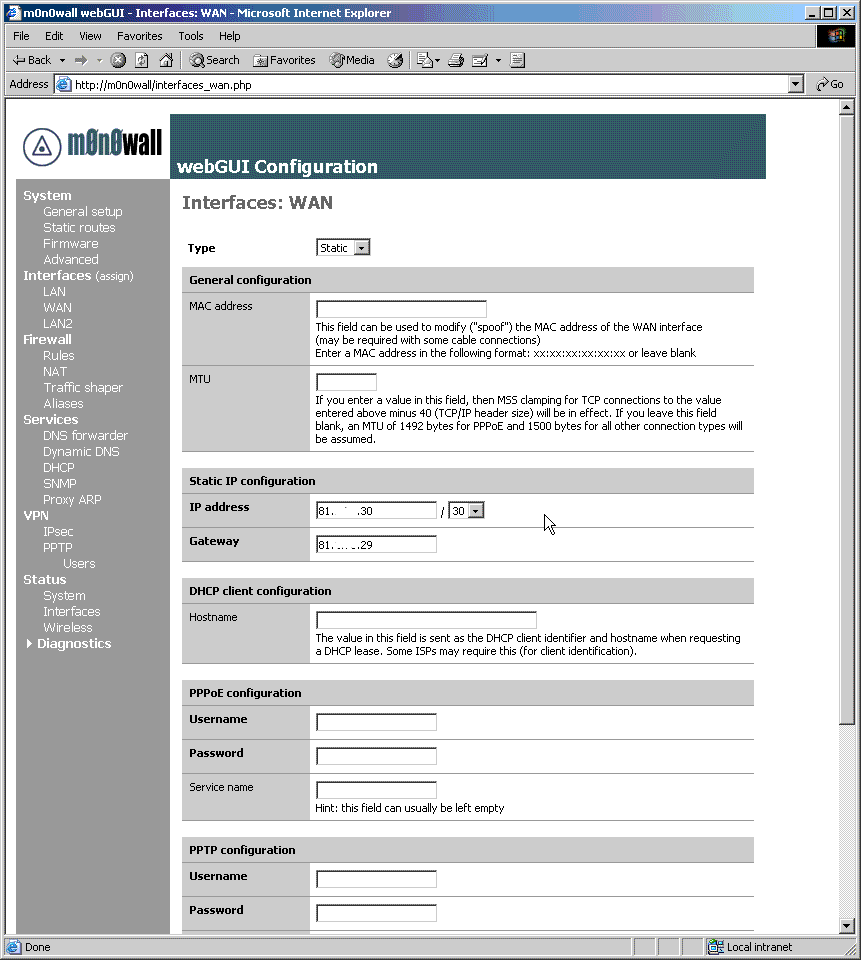
Figure 3: WAN interface configuration
The configuration options available in m0n0wall v1.0 are:
- Static configuration, useful for direct connections to other networks and routers where your ISP has assigned static IP addresses
- DHCP, useful for both direct connections to other networks and most cable modems
- PPPoE, typically used by some cable and most xDSL modems
- PPTP, more unusual but used by some ISPs to assign IP addresses using cable and xDSL modems 3
The required information for each option is relatively self explanatory; much will have been supplied by your ISP. Selecting each option with the dropdown box enables the relevant areas of the page that require completion.
2 Using a miniPCI Wireless Networking card you could connect to a wireless Internet service, however this is beyond the scope of this article.
3 m0n0wall v1.1 provides support for Telstra Big Pond Advance cable customers in Australia.
Advanced Configuration – NAT, PAT & IP Routing
If you want to allow connections from the internet to PCs and other devices on your internal network, you have a number of choices. The most common is to use network address translation (NAT), optionally with port address translation (PAT). m0n0wall’s flexibility with this can be initially confusing, but once you understand the conventions in use, it is fairly straight forward.
There are four tabs on the NAT option, Inbound, Server NAT, 1:1 and Outbound. Inbound is akin to the functionality you will find on most firewalls and some routers, and allows connections to the IP address of the WAN interface to be mapped to IP addresses on one of the internal interfaces, port range by port range. An example of its use would be to map inbound SMTP connections on port 25 to an internal mail server.
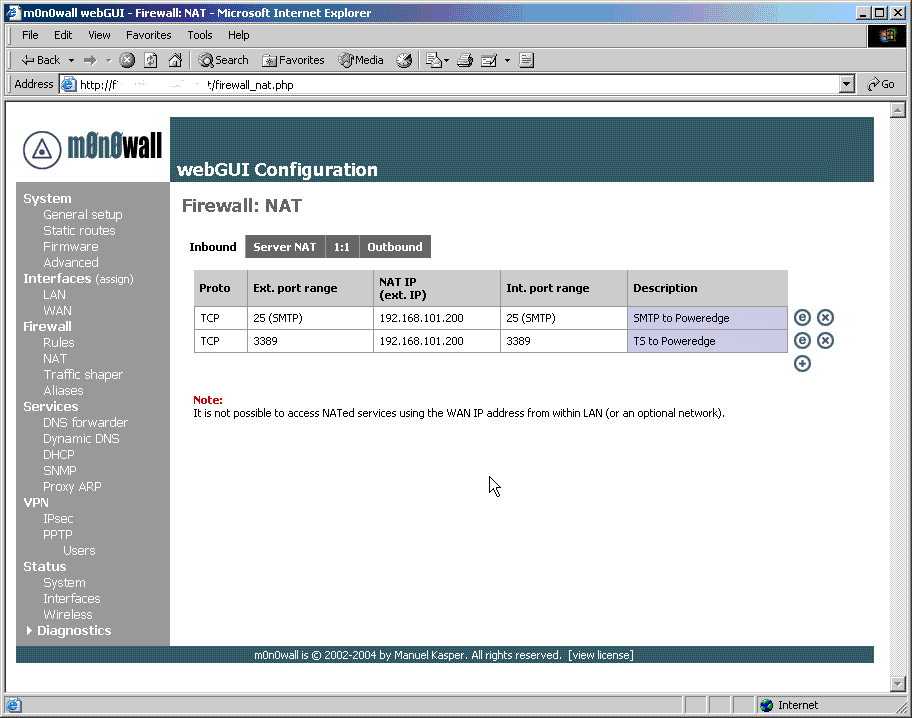
Figure 4: Internal NAT Admin Page
The next two tabs are useful if you have a range of public IP addresses assigned to you by your ISP. Server NAT is used to define additional external IP addresses that can be used in inbound NAT mappings as above. 1:1 can be used for two purposes. The first is to map all connections on all ports on a specified external IP address to a specified internal IP address. This is useful if you have a server that provides more than one external service, so that you don’t have to specify port mappings separately for each service.
The second capability that 1:1 NAT provides is more powerful and allows the mapping of an external subnet of IP addresses to an internal subnet of the same size. This is extremely useful if you have a number of externally accessible servers on an internal interface.
The final tab, Outbound, can be used to turn NAT off completely so that m0n0wall behaves as a no-NAT router. Enabling Outbound NAT removes all the automatically created outbound NAT rules. Alternatively, you can configure outbound NAT mappings for specified internal subnets to specified external IP addresses.
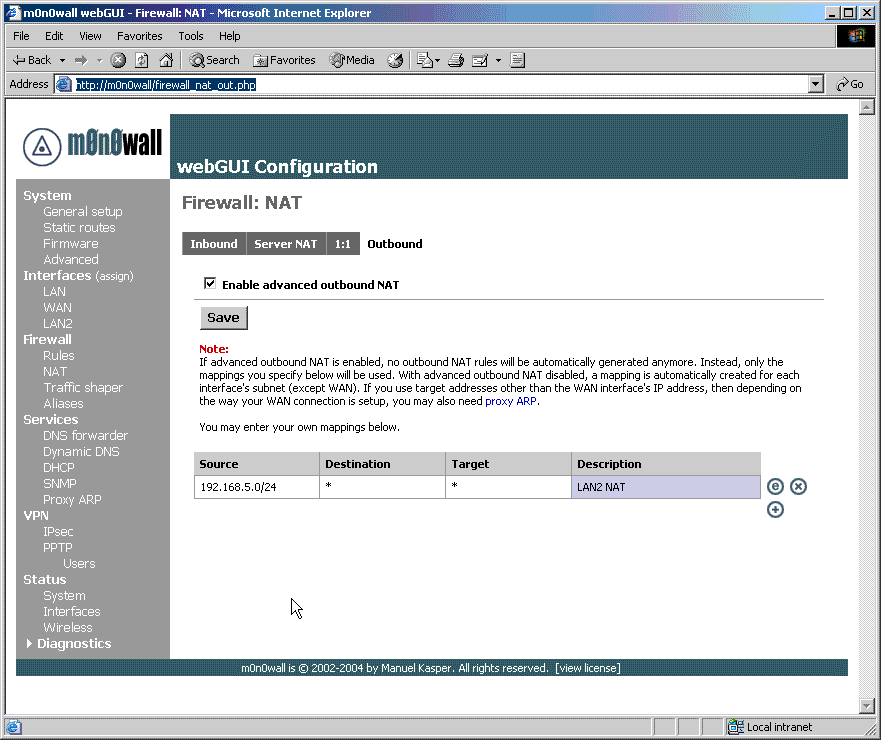
Figure 5: Outbound NAT Admin Page
For Server NAT, 1:1 and Advanced Outbound NAT, you may need to configure Proxy ARP so that m0n0wall responds on its WAN interface for IP addresses other than the WAN IP address. Proxy ARP is used instead of aliasing IP addresses to the external interface (also known as “server loopback”) because it allows whole subnets and ranges of IP addresses to be configured very easily, whereas aliases would have to be configured individually. Be aware that Proxy ARP only works where the WAN interface is configured with a static IP address or by DHCP. It also isn’t required if extra IP addresses are routed to your WAN IP or are assigned to the WAN interface by PPPoE or PPTP.
One final point to remember is that all NAT / PAT mappings are still subject to the firewall rules, which I will cover now.
Advanced Configuration – Firewall Rules
Figure 6 shows m0n0wall’s firewall rule interface. Rules are executed on a first match basis, i.e. the rule to first match a packet will be executed. To provide maximum security, m0n0wall will block all traffic unless it is explicitly allowed by a matching firewall rule. As a convenience in its default configuration, there is a single rule allowing all traffic originating at the LAN interface.

Figure 6: Firewall Rules Admin Page (click on the image for a larger view)
The default LAN interface rule is the rule at the bottom of the screen. The rules above it are used to block NetBIOS type traffic from leaving the local network. In this scenario, as packet passes in on the LAN interface, it is checked to make sure it doesn’t have a target TCP port of 137-139 by the first rule, 135 by the second and 445 by the third. The final rule explicitly allows all packets that reach this rule to pass.
This means a packet with a port 80 (http) as a target will not match the first three rules to be blocked, but will match the final rule and be allowed to pass. The final rule is very important, as it allows all packets to pass that aren’t blocked by a previous rule. If this rule were not present, all packets would be blocked by the firewall’s default behaviour.
To clarify how the firewall rules work further, let’s look at the rules at the top of the screen for packets entering on the WAN (Internet) interface. The bottom “catch all”‘ rule blocks previously unmatched packets and the rules above it allow packets that meet the criteria of the rule to pass.
The rules above the bottom “catch all” rule allow (in order):
- Windows Terminal Services traffic on TCP port 3389 from a specific network (JPNET) to my internal server “homer”
- HTTPs traffic on TCP port 443 from JPNET to the WAN IP address of my m0n0wall to allow remote administration
- HTTP traffic on TCP port 80 from JPNET to the WAN IP address of my m0n0wall to allow remote administration
- HTTPs traffic on TCP port 443 from any Internet address to “homer”
- HTTP traffic on TCP port 80 from any Internet address to “homer”
- SMTP traffic on TCP port 25 from any Internet address to “homer”
All other traffic is blocked by m0n0wall’s default WAN Interface rule.
Advanced Configuration – Firewall Rules, Continued
A very important factor we haven’t considered yet is the order of the rules. To illustrate this, consider a rule on the WAN interface to allow FTP traffic on port 21 to my internal server. If I added this rule after the rule blocking all traffic, packets would match the “block all” rule first and would therefore always be blocked. For the FTP rule to be executed, it must be placed above (i.e. before) the rule blocking all traffic.
Note that I have put the rules for blocking all packets in just for clarity and as good practice for debugging purposes.The firewall would block unmatched packets anyway by default. Note also that it is easy to change the order of rules by using the up and down arrows next to each rule. When you are happy with any changes, just click the Apply Changes button to save them.
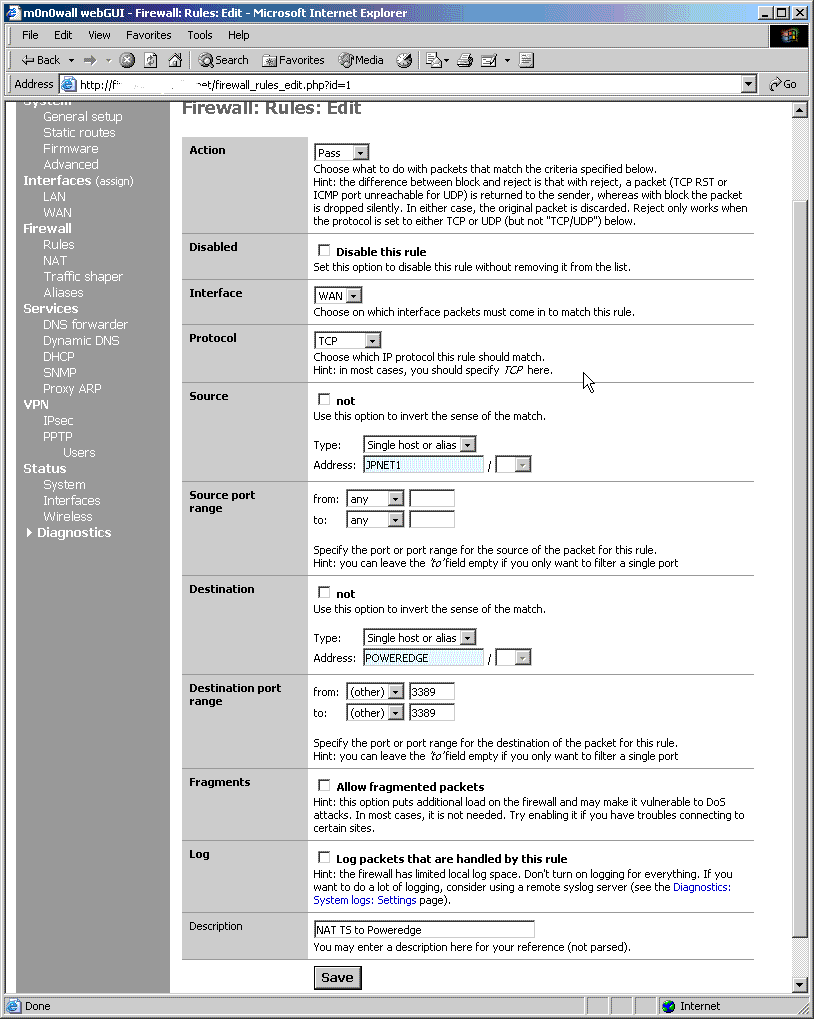
Figure 7: Firewall Rule Edit Page
(click on the image for a larger view)
The screen for editing rules is also quite clear and straight forward. Figure 7 shows the rule for allowing MS Terminal Server traffic entering on the WAN interface to an internal server. You will notice that the source and destination specify the address as JPNET1 and POWERDGE respectively, rather than an IP address or network such as 192.168.55.6. This is another feature of m0n0wall called aliases. Aliases are a convenient way of giving an IP address or subnet a more identifiable name that can be used in place of the IP address or subnet in rules and other areas of m0n0wall.
In addition to providing a more readable reference to an IP address, the alias feature eliminates the need to update firewall rules in the event that IP addresses change. For example, if your ISP updated your WAN IP address, you would only need to enter your new IP address in the alias entry. All firewall rules that referenced the alias would then reflect the change of address automatically.
Router Performance
We have looked at the Soekris net4501 embedded PC platform and some of the basic m0n0wall features, but how does the combination of the two perform?
Below are two sets of performance data provided by Manuel Kasper showing the throughput of the firewall under NAT and packet filtering, and throughput of an IPSec VPN.
Test Setup
[XP notebook] —– LAN [device to be tested] WAN —– [FreeBSD PC]
- In IPsec throughput tests, the ESP tunnel was established between m0n0wall and the FreeBSD PC (which was running racoon and FAST_IPSEC).
- FreeBSD PC hardware: P4 2.8 GHz (CPU usage was below 50% at all times during the tests).
- m0n0wall configuration: factory defaults (except for “block private networks on WAN” disabled, an inbound NAT mapping + rule in the WAN->LAN no-IPsec test and of course the IPsec tunnel).
- The highest of three iperf TCP readings was used (10 seconds each).
- All network connections 100 Mb/s Ethernet.
- iperf throughput between XP notebook and FreeBSD PC with no m0n0wall in between: 94 Mb/s in both directions.
- All test results given in Mbits / second (LAN->WAN / WAN->LAN).
| Manufacturer | Platform | NAT Test, Mb/s | IPsec Test, Mb/s (3DES-MD5) | ||
| LAN -> WAN | WAN -> LAN | LAN -> WAN | WAN -> LAN | ||
| PC Engines | WRAP.1C-2 | 38.3 | 42.8 | 3.64 | 3.52 |
| Soekris | net4501-30 | 16.5 | 18.5 | 2.07 | 2.02 |
| net4801-50 | 25.3 | 33.6 | 3.85 | 3.76 | |
In the real world, the net4501 would perform more than adequately for most users’ needs as an Internet firewall, since not many of us are lucky enough to have Internet connections that exceed 15Mb/s. However, the IPSec performance is more likely to be an issue, especially if multiple tunnels were configured.
As you can see, the CPU speed does have an impact on throughput performance of 2.07 / 2.02 Mb/s. However using the more efficient Blowfish encryption algorithm improves this to 3.99 / 3.89 Mb/s.
Although in this article I have focused on the Soekris net4501, the data shown above for all the embedded platforms is fairly indicative of what you might expect from standard PC hardware. The net4501 is approximately Pentium 100 MHz in performance; the net4801 and WRAP.1C-2 are Pentium 266 & 233 MHz respectively.
If you needed increased performance, using more recent standard PC hardware such as a Pentium III CPU with 128MB of RAM and good quality network cards such as 3Com or Intel is likely to yield ‘wire speed’ transfers approaching 90 to 95 Mb/s. This would be appropriate for using m0n0wall as an inter-departmental router/firewall on a large LAN
The full test results are available at http://m0n0.ch/wall/list/?action=show_msg&actionargs[]=62&actionargs[]=57.
What’s Next for m0n0wall?
As of August 2004, m0n0wall version 1.0 has been available for 6 months. Since version 1.0’s release, there have been 17 public betas of m0n0wall version 1.1. The small increment in version number doesn’t really do the new version justice, however, since alongside many small improvements and fixes, the following functionality has been added:
- Third party optional module support
- Adobe SVG real-time traffic graph
- Captive Portal with RADIUS authentication
- Ability to activate ‘Wake on Lan’ network clients from admin interface
- USB and SCSI disk support
- 802.1Q VLAN support
- ‘Magic Shaper’ auto-configured traffic shaping
Of these I consider the Captive Portal and the VLAN functionality the most significant. The Captive Portal allows you to run a public network on one of the firewall interfaces, useful for public wireless hot-spots and public access areas such as libraries, etc. The Captive Portal displays a web page upon a client’s first attempt to access the Internet, typically displaying a ‘Acceptable Use Policy’ which must be agreed to before unrestricted access to the WAN network is permitted. The Captive Portal also allows an external RADIUS server to authenticate the user before they are granted access.
VLAN works in conjunction with a managed network switch that supports 802.1Q VLAN tagging. This allows “virtual” optional interfaces to be configured in m0n0wall and was added with larger segmented networks in mind.
Among the list of enhancements already on the “To do / Wish list” for subsequent versions are:
- OpenVPN support
- Certificate authentication for IPSec VPNs
- Host/network grouping for aliases, will allow firewall rules to be applied to logical groups
- Time of day/week based firewall rules
- Port scan detection with automatic black holing
- Secondary WAN networks, possibly with load balancing
- Dialup backup link, via serial port
Of these host/network grouping, secondary WAN interfaces and backup links, and Certificate Authentication for IPSec VPNs will be the major features.
Update 8/22/2004 – m0n0wall v1.1 has been released. Changes include:
- captive portal support (with RADIUS authentication)
- 802.1Q VLAN support
- magic shaper wizard for the traffic shaper
- SVG-based traffic grapher
- Wake on LAN client
- improved HTTP (webGUI) server security
- updated base system to FreeBSD 4.10-RELEASE
- updated various utilities to the latest versions (PHP, racoon, MPD, ipfilter)
- many bug fixes (PPTP VPN, ipfilter, etc.)
A full description is available in the m0n0wall Change Log.
Summary and for More Info
I hope I have given you a flavour of the functionality available and the ease of use that m0n0wall provides. Due to the scope of this article, I have only begun to scratch the surface of what it can do. It is a small download (4 – 5 MB), and the ability to boot using the CD-Rom image without having to install the software to disk makes m0n0wall very easy to have a play with.
For more information, please visit the project website at http://www.m0n0.ch/wall. Documentation is currently limited, however this is a collaborative effort and the content is being added to regularly. The current documentation is available at http://www.m0n0.ch/wall/docbook.
If you can’t find what you need in the documentation, there are large searchable archives of the project mailing lists, see http://www.m0n0.ch/wall/mailinglist.php for details. m0n0wall has a very active user community collaborating via the mailing lists. While you will generally find everybody very accommodating and friendly if you post questions and queries, don’t forget to have a good search through the archive first to see if your issue has been raised and answered in the past.