

Introduction
Those of you who have been following this series know that I have been unable to achieve the goal of 100 MB/s read and write throughput for any NAS that I have put together. Try as I might, I have been unable to achieve non-cached performance better than around 70 MB/s.
Well, folks, I have found out why.
The key to unlocking higher performance can be summarized in three words: larger record size.
The journey to this conclusion started with SmallNetBuilder Forum posts by Dennis Wood, detailing his success at coaxing much higher performance from his QNAP TS-509 Pro than I measured using iozone. Dennis has been hammering on the TS-509 Pro and running more tests in more configurations than I want to even think about!
Some of the performance gains have been from firmware updates that QNAP has issued in response to performance and other problems that Dennis found and some have been from increasing the 509 Pro’s RAM to its 4 GB maximum. But Dennis’ best results seem to have been consistently achieved when using systems running Vista SP1 with a three-drive RAID 0 array. With this configuration, Dennis has been able, in some of his tests, to achieve over 100 MB/s file copy performance.
Iozone is very careful about disk use and does not access the drive on the system that it is running on when performing its reads and writes to the filesystem under test. So while drive speed is a factor in real-life file copy and filesystem performance, it isn’t a factor in iozone testing. So using a RAID 0 array on the iozone system won’t help to achieve higher performance.
But Dennis’ success got me thinking about what Vista SP1 was doing that iozone was not. Vista SP1’s higher file copy performance has also been discussed in the SNB Forum. Multiple posts have mentioned Mark Russinovich’s much-referenced Inside Vista SP1 File Copy Improvements blog post, which contains an excellent description of Microsoft’s journey to improved filecopy performance.
Part of the article describes how Vista removed XP’s limit of 64 KB blocks for network reads and writes, increasing them in some cases to up to 2 MB! In the article, Process Monitor traces were used to illustrate some of the points so that the actual read and write block sizes could be seen. That inspired Forum member 00Roush to run some experiments of his own using Process Monitor, iozone and XP file copies, which peeled the onion a bit more.
00Roush’s experiments inspired me to run my own tests with Process Monitor, which were quite helpful. I first, however, had to create a test NAS that I was sure was capable of > 100 MB/s performance, at least with Vista SP1 file copies.
Table 1 summarizes what I came up with, thanks to Intel who supplied the CPU and motherboard, Western Digital who provided the VelociRaptor drives and Microsoft who sent a copy of Vista Home Premium.
| Component Summary | |
|---|---|
| CPU | Intel Core2 Duo E8500 @ 3.16GHz |
| Motherboard | Intel DG45FC |
| RAM | Corsair XMS2 TWIN2X2048-6400C4 2 GB DDR2 800 (PC2 6400) |
| Hard Drives | Western Digital WD3000HLFS 300 GB VelociRaptor Qty. 3 |
| Ethernet | Intel 82567LF-2 Network Connection (Onboard PCIe gigabit) |
| OS | Vista Home Premium SP1 |
Table 1: Test NAS
The Intel DG45FC motherboard doesn’t have an IDE interface so that I could set up the OS on its own drive. So I just configured the three WD VelociRaptor drives into a RAID 0 volume using the BIOS RAID utility and the suggested default 128 KB stripe size before installing Vista and upgrading it to SP1.
With the target NAS in place, I now had to choose a testbed system. I ended up using the "Big NAS" machine based on an ASUS P5E-VM DO motherboard that I have been using in the Fast NAS series as the test NAS. Table2 summarizes the system used, with some tweaks from its previous role.
| Components | |
|---|---|
| CPU | Intel Core 2 Duo E7200 @ 2.53 GHz |
| Motherboard | ASUS P5E-VM DO |
| RAM | Kingston ValueRAM 2 GB PC2 – 5300 (KVR667D2N5) |
| Hard Drives | Seagate Barracuda 7200.11 1TB 7200 RPM 32MB Cache SATA 3.0Gb/s (ST31000340AS) Qty. 2 |
| Ethernet | Intel 82566DM (Onboard PCIe gigabit) |
| OS | Vista Home Premium SP1 |
Table 2: NAS Test Bed
RAM has been expanded to 2 GB to better reflect systems in use today. But to ensure that I capture non-cached performance, I ran iozone tests out to 4 GB filesize. The other change is that I configured the two Seagate 7200.11 drives into a RAID 0 volume using the Intel BIOS RAID utility, again using the default suggested 128 KB stripe size. This was so that hard drive performance would not limit drag-and-drop file copy performance.
Testing – Vista File Copy
Figure 1 shows a Process Monitor trace of an XP SP2 drag-and-drop filecopy read of a test folder containing a single non-compressed ripped DVD. The 4.35 GB (4,680,843,264 bytes) folder contains 38 files of various sizes ranging from 1 GB to 10 KB.
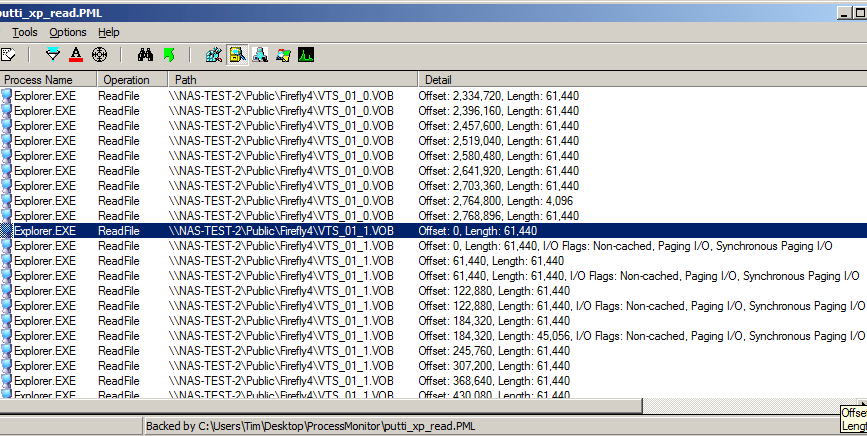
Figure 1: XP SP2 file copy read Process Monitor trace
Figure 1 shows the end of one file read and the start of another. You can see that the length of most transfers is 61,440 Bytes (60 KB) instead of 64 KB, which Russinovich’s post explains is due to an SMB1.0 protocol limit on individual read sizes.
Figure 2 shows a read transfer of the same folder, but using Vista SP1. Big difference, eh? Instead of wimpy little 60 KB reads, Vista SP1 has bulked up to reading 1 MB blocks—a 17X increase!
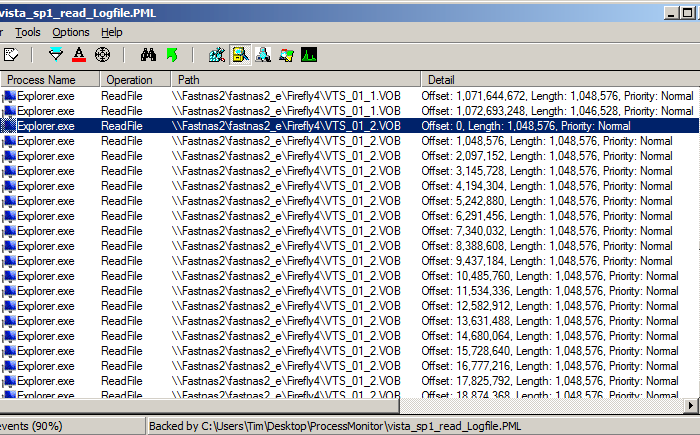
Figure 2: Vista SP1 file copy read Process Monitor trace
So now let’s see if the larger block sizes make any difference in file copy speed. Figure 3 shows a Vista Performance Monitor plot of Disk Bytes/sec of the RAID 0 array on the NAS Testbed machine while running a write drag-and-drop filecopy to the Test NAS. The average speed reported is 105,125,011 Bytes/sec or 100.2 MB/s
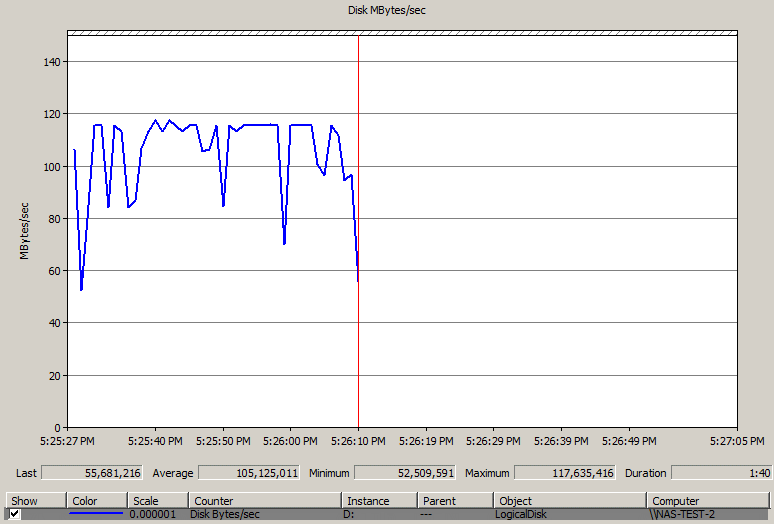
Figure 3: Test NAS Write Vista Performance Monitor plot – Test Bed 2 drive RAID 0
Figure 4 shows the read results for the same test conditions, which measured 112,754,606 Bytes/sec or 107.5 MB/s.
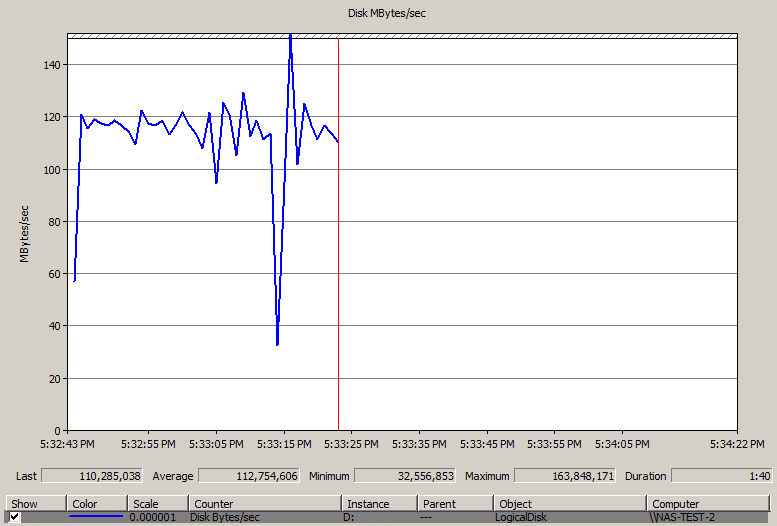
Figure 4: Test NAS Read Vista Performance Monitor plot – Test Bed 2 drive RAID 0
I also ran the tests with a single non-RAID drive and a three-drive RAID 0 array on the NAS Test Bed machine, to see if I really needed to run a RAID array and whether three drives would provide higher test capability than two drives. The results are summarized in Table 3, which contains links to bring up the related Performance Monitor plots.
| Test Bed Volume | Average Write (MB/s) | Average Read (MB/s) |
|---|---|---|
| Single Drive | 103.8 [plot] | 92.2 [plot] |
| RAID 0 – 2 drive | 100.2 [plot] | 107.5 [plot] |
| RAID 0 – 3 drive | 101.2 [plot] | 105.2 [plot] |
Table 3: Vista SP1 File Copy performance summary
I apologize for the different plot scales and separate plots, which make it hard to compare the plots. This was my first attempt at using the Vista Performance Monitor and I hadn’t quite gotten the hang of it.
I also was confused by some Googling that I did when I couldn’t figure out how to create a Data Collector Set of the captured data so that I could create a composite plot of the test runs with Excel. The references said that you had to have Vista Business or Ultimate in order to create a Data Collector set and I had only Home Premium. But while writing this article, I found that I can create data collector sets in Vista Home Premium, which is what I’ll do next time.
Anyway, my take-away from the testing is that it didn’t look like RAID 0 helped for the write test, but it did for the read. But there is no significant difference between two-drive and three-drive RAID 0 arrays, so I have settled on a two-drive RAID 0 array for the NAS Test Bed.
Testing – iozone
So if file copying with Vista can show > 100 MB/s speeds, why can’t iozone? Well first, we need to realize that my Vista file copy was done between two machines that each had 2 GB of RAM and the largest file in my test file copy folder is only 1 GB. So that means that memory cache effects on both machines is in play.
But the major difference is that my iozone testing is usually done with a 64 KB record (block) size, to reflect the 64 KB (actually 60 KB) network transfer limit of Windows XP. iozone is perfectly capable of testing with larger record sizes, so let’s see what happens when we do!
Figure 5 shows the iozone write throughput vs. file size plot extended to 4 GB file size (to make sure that cache is busted on both the iozone and Test NAS) and for record sizes of 64 KB, 128 KB, 256 KB, 512 KB and 1024 KB.
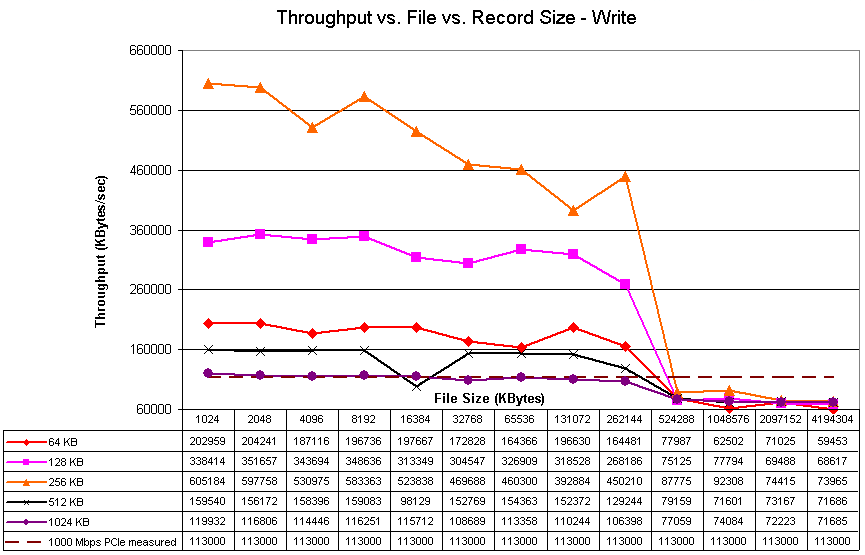
Figure 5: iozone throughput vs. file vs. record size – write
Remember that all the results that exceed maximum LAN throughput (in this case 113 MB/s, which was actually measured between two machines with PCIe gigabit NICs) are cached results. So looking at the plots up to 512 MB file size, we see that the best cached performance was when using a 256 KB block size, followed by 128 KB, 64 KB, 512 KB and 1024 KB. This surprised me, given that the Vista SP1 file copy used the 1024 KB record size.
Figure 6 expands the Y scale and zooms in on the non-cached area of the plot, so that we can more clearly see what happens there. 256 KB still appears to be the winner when cache runs out. But the larger record sizes of 512 and 1024 KB seem to do better than they did while cache was in effect.
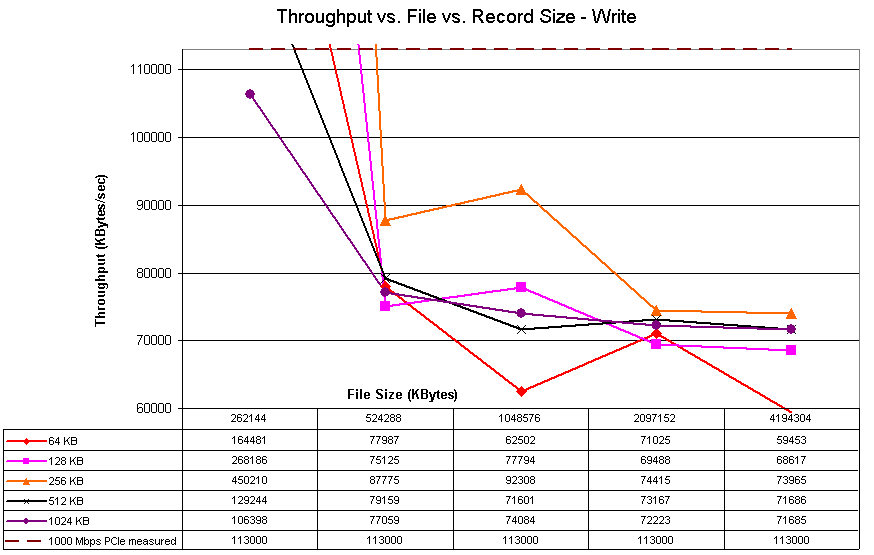
Figure 6: iozone throughput vs. file vs. record size – write detail
The read performance plot (Figure 7) shows that results generally improve with increased record size, at least once file sizes are larger than 32 MB. This explains why Microsoft probably made the choice to use larger record sizes when possible in Vista SP1.
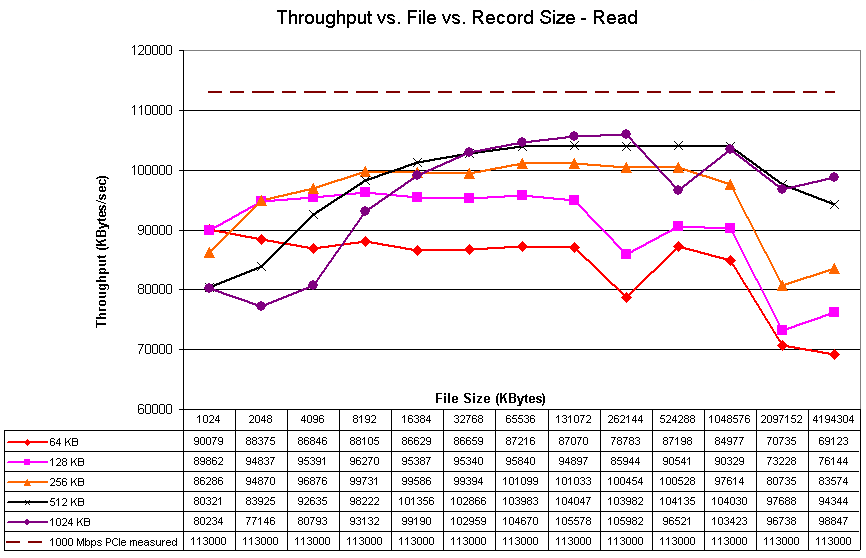
Figure 7: iozone throughput vs. file vs. record size – read
If you look at the 1024 KB record size plot line at a 1 GB file size, you can see that iozone’s read results match up pretty well with the Vista SP1 file copy. But for writes, not so much. Why?
The answer is found in the Russinovich article, which describes how pipelined I/O can be used by Vista when it is doing a network transfer to another Vista or Windows Server 2008 system. This is due to the use of an improved SMB protocol—SMB2. iozone, on the other hand, always issues only one I/O transfer at a time.
Conclusion
I now have a better understanding of why some readers have been reporting higher throughput than I get when using iozone, when using Vista SP1 file copies to measure NAS performance. Vista SP1 still reserves its best performance for when it is reading and writing files to another Vista SP1 or Windows Server 2008 system, since only those platforms support SMB2. But the use of large block / record sizes doesn’t require SMB2; just a network connection and client system capable of dealing with the larger sizes.
So will running Vista SP1 on your LAN computers bring you blazing new speed from your NAS? Perhaps. First, you’ll need to be running a gigabit Ethernet LAN and using PCIe NICs in your systems. Otherwise, even with NASes (or servers or even other computers) capable of 100+ MB/s throughput, PCI NICs will limit throughput to somewhere between 60 and 70 MB/s.
You’ll also need systems capable of running a gigabit connection at or near full capacity. I haven’t done exhaustive testing on this. But from what I have seen in my experiments, any Core 2 Duo system (or its equivalent) should have plenty of power to meet this requirement.
Once you have ensured that your computers and network have the required throughput, then you can turn to your NAS. So far, the only NASes that I have seen that are capable of running anywhere near 100 MB/s are powered by Intel CPUs and have at least 1 GB of memory, i.e. the QNAP 5-bay TS-509 Pro and NETGEAR 6-drive ReadyNAS Pro. The larger memory certainly helps, but the performance gains, especially when running RAID 5, come from the higher compute power.
It’s also important to note that even if you are running Vista SP1, you might not get high file transfer performance from all the applications that you run. As Mark Russinovich noted in his article’s closing Summary, applications need to use the CopyFileEx API to get improved file copy performance. So if you are running multiple users against a NAS-hosted database, or doing video editing on a NAS-hosted file, you will probably not see the same throughput as you get with a Vista Explorer file copy.
These experiments have lead me to believe that it will be valuable to add Vista SP1 Filecopy write and read benchmarks to the NAS Charts when I switch over to using the new NAS Test Bed machine. This decision isn’t carved in stone at this point, however. So let me know what you think.