

Introduction
Updated 7/17/2008: BitTorrent and Jumbo frame support added
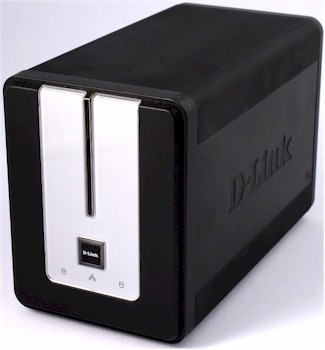
| At a Glance | |
|---|---|
| Product | D-Link 2 Bay Network Storage Enclosure (DNS-323) |
| Summary | High-performance BYOD dual drive SATA NAS with gigabit Ethernet and many serving options |
| Pros | • High performance • Gigabit Ethernet • Supports separate drives, JBOD, RAID 0, RAID 1 • Print, FTP, iTunes, UPnP AV servers • Quiet |
| Cons | • Clunky interface for user, group and network access mgmt. • No FTP server logging • Buggy UPnP AV media server |
One of the latest NASes to hit the market is D-Link’s DNS-323 2 Bay Network Storage Enclosure (323). The DNS-323 includes a number of features and turns in performance numbers that make it a strong candidate for any home network needing shared storage.
D-Link departed from its traditional case designs and came up with an attractively styled black case measuring 7 7/8″x 4″ x 5″ with silver accents. On the front panel, there’s a large square power switch and three blue LED status indicators for network and drive activity.
Unlike some B.Y.O.D. (Bring Your Own Drive) NAS devices, the 323 is designed to accommodate SATA drives. Installation of the SATA drives is even simpler than installation of IDE drives in other devices because no tools are required and you don’t have to connect any cables. To install the drives, you just slide the faceplate up and off, insert SATA drives into the two bays and gently push each drive to mate the drive and 323 connectors.
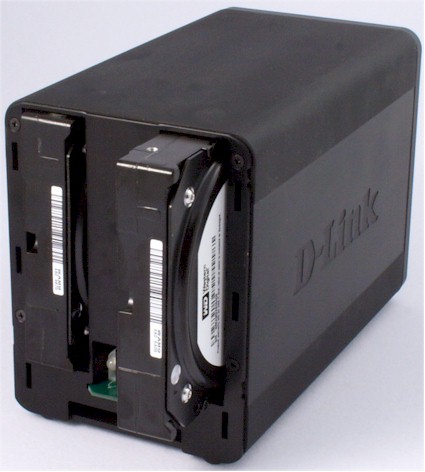
Figure 1: D-Link DNS-323 with faceplate removed
The rear panel (Figure 2) has a power connector, 10/100/1000 Mbps Ethernet port, and a single USB port for sharing a printer via the 323’s built-in print server. There are also two levers to help you eject the drives, and a vent for the ultra-quiet temperature-controlled fan. D-Link joined the growing list of NAS providers who include a gigabit Ethernet port. As you’ll see in the performance tests shortly, the 323 is fast enough to make good use of the gigabit port, even without jumbo frame support.
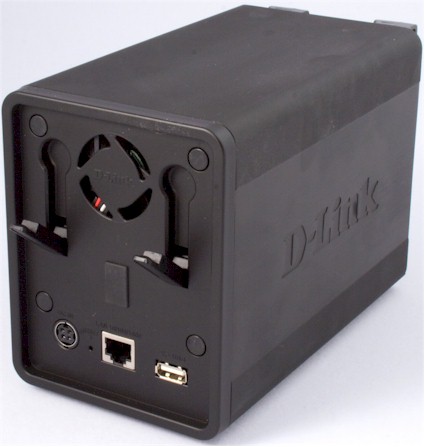
Figure 2: Rear panel
Construction Details
As you’ll see later, the 323’s performance is among the highest performing products in our NAS charts. A view inside the 323 reveals that Marvell technology is powering the 323. Figure 3 is a photo of the 323’s chassis, where you can see the drive backplane plugged into the main circuit board.
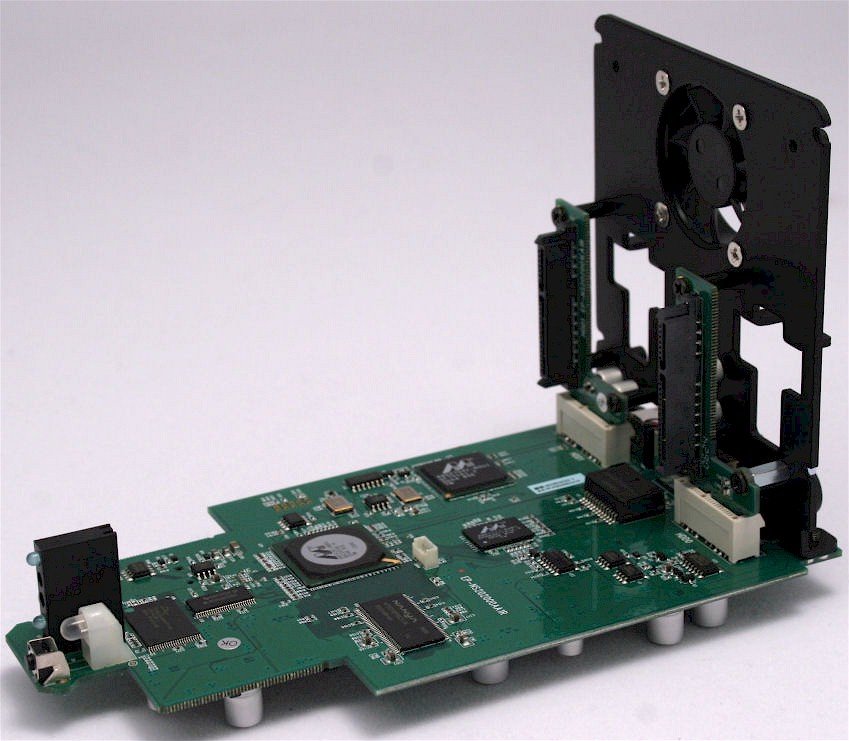
Figure 3: DNS-323’s chassis
Figure 4 is a close-up of the main board, where the components are clearly shown. The processor is a Marvell 88F5181, which is based on Marvell’s proprietary Feroceon ARM CPU architecture. The SATA drive interface comes courtesy of a Marvell 88X7042 is a PCIe to Serial ATA Controller chip, while a Marvell 88E1111 “Alaska” single-port gigabit Ethernet tranceiver handles the Ethernet port duties. The Marvell CPU must also handle the single USB 2.0 port since there don’t seem to be other chips present for that function.
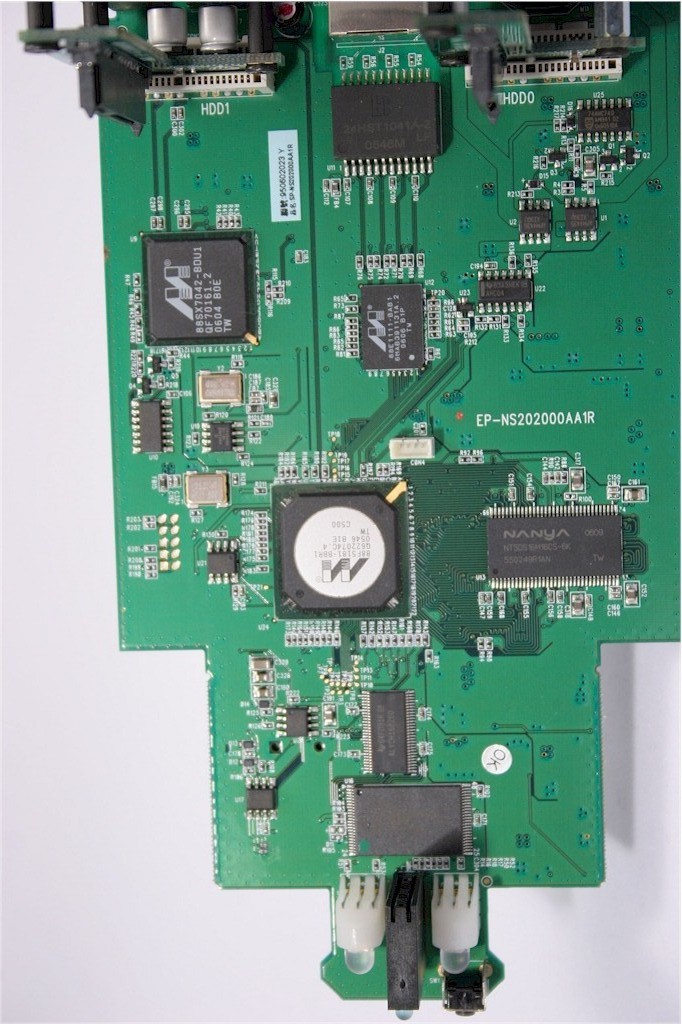
Figure 4: DNS-323 main board
Like most other consumer NASes, the 323 runs Linux. So if you want to try some hacking, visit the 323’s GPL download page to get the sources you’ll need.
Initial Setup and Drive Configuration
After you physically install the drives, the setup is also quite straightforward. You just connect the 323 to your network and power it up. By default, it’s configured to receive an address from your network’s DHCP server, but if it doesn’t receive one, it defaults itself to 192.168.0.32. (The 192.168.0.0/24 network is the default network used by all D-Link products.) For initial configuration, D-Link supplies its Easy Search utility (Figure 5) that will search your network regardless of IP addressing used and find the 323.
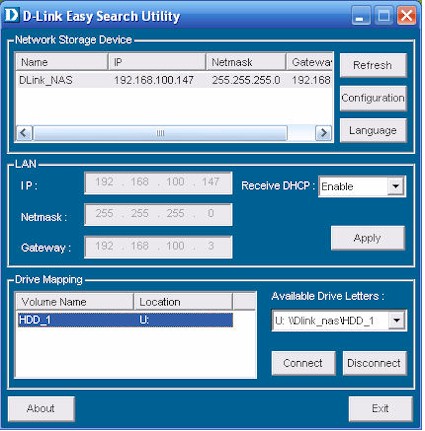
Figure 5: Easy Search Utility
The utility lets you assign a static IP address and enable/disable the DHCP client. Once you’ve initialized the drives, you can connect to them and map a drive letter from within the utility if you like. Or a click on the Configuration button takes you to the 323’s web-based administration page where a wizard is available to help you through the initial configuration of your hard drive(s). The 323 supports four drive configurations (Figure 6):
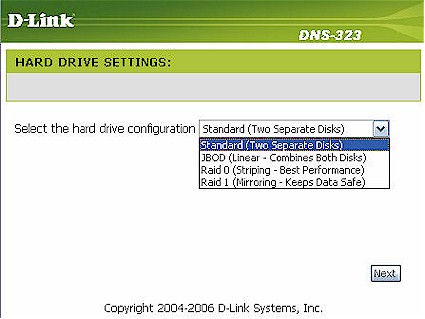
Figure 6: Drive Configuration screen
- Standard
Mounts each drive separately. so that each drive is its own volume - JBOD (Just a bunch of disks)
This configuration concatenates the two drives together to make one large volume. The advantage of this configuration is that you can use any capacity drive in either of the two drive bays, and the total capacity is the sum of the capacities of the individual drives. If one drive fails, you’ll only lose the data on the failed drive. - RAID 0
In this configuration, data is striped across the two physical disks without parity information for redundancy. While you can use different sized disks, such as 160GB and 250GB drives, the maximum capacity of the striped volume will be two times the size of the smallest drive. In this example, that would be 320GB.
The “leftover” 90GB can be configured as an individual JBOD volume giving you a total storage capacity of 410GB. You would normally choose RAID 0 for optimal performance, but keep in mind that if either disk fails, you’ll lose all of your data contained in the RAID 0 array. - RAID 1
In a RAID 1 configuration, all of the data on one disk is mirrored on the second disk. Though you use twice as much physical disk space, RAID 1 provides you with redundancy. If one disk fails, all of the data is available on the second disk. As with RAID 0, the size of the RAID 1 volume is based on the smallest sized disk. Using the example above, in a RAID 1 configuation, you could have up to 160 GB of fault tolerant storage. Similarly, the “leftover” 90GB could be configured as a JBOD volume giving you a total storage capacity of 250GB.
After you decide how you want to configure your disks, the 323 will format the drives. The 323 supports EXT2 (default) and EXT3 file formats. All data will be lost, so if you’re installing a previously formatted disk that contains data you had better have it backed up somewhere! Once the drives have been formatted, the 323 will reboot, and you’ll be ready to start configuring users, groups and some of the more advanced features of the 323.
Other Setup
When you first log into the 323 you’ll notice that the opening screen (Figure 7) has a familiar “D-Link” look and feel. The icons arranged horizontally across the top of the screen are identical to those found on a D-Link router I recently tested. Arranged vertically along the left side of the screen are options for selected menu item in the top row.
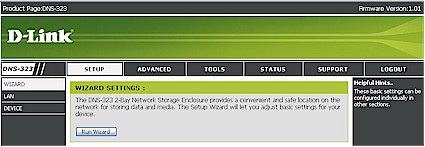
Figure 7: Main Screen
The Setup tab lets you run (or re-run) the setup wizard, configure LAN settings and name the device. Most of the configuration will be done under the Advanced or Tools menu selections. The Users and Groups setup screens felt very much like a 1.0 release of a product. Indeed, the unit tested was based on firmware version 1.01. Version 1.0 had some issues related to using the Firefox browser that were addressed in 1.01, so be sure to check the 323’s support page for the latest firmware before you start setting up.
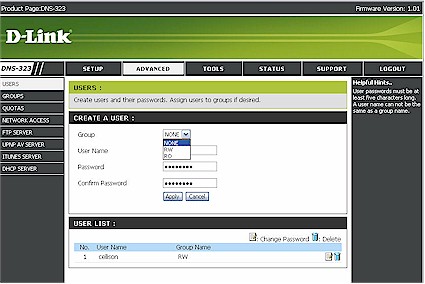
Figure 8: Create User screen
When creating a user (Figure 8), I discovered that you first had to create groups, because once you created a user, you couldn’t go back and edit group membership. The only edit allowed on a user account is to change its password. Note that users can belong to only one group, but multiple users can belong to the same group. Similarly, the screen for group “management” lets you add or delete groups only.
Network access was also cumbersome to configure. You can configure access for either individuals or for groups. But the manual doesn’t tell you that you have to create directories outside the web-based configuration utility before you can assign network access rights. In the example in Figure 9, I tried to assign rights to the group “RO”.
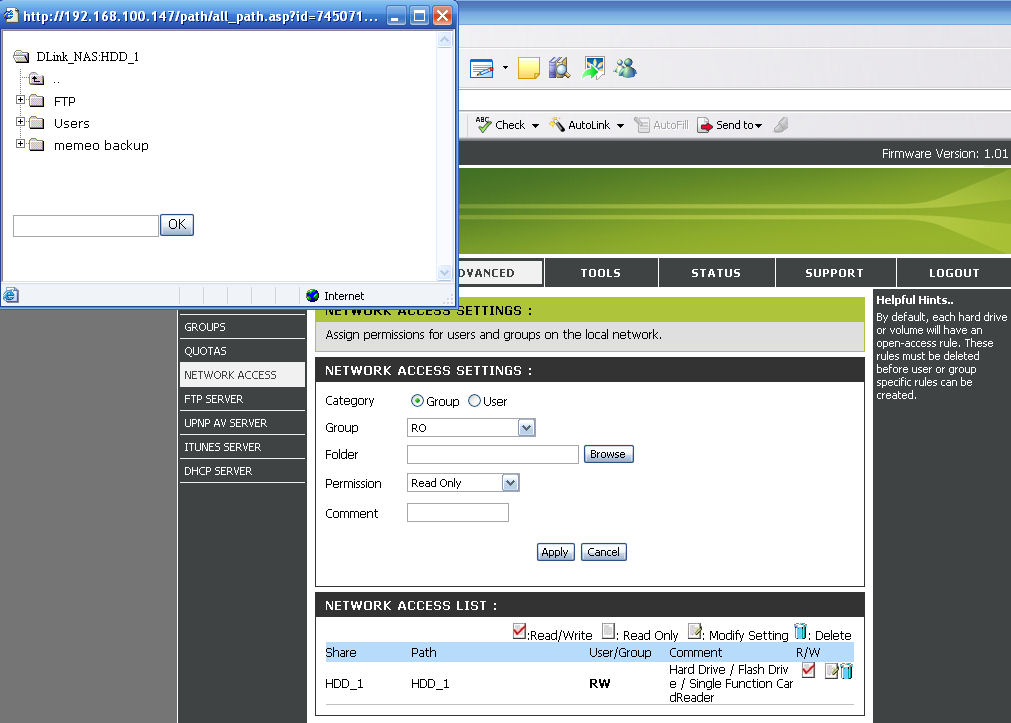
Figure 9: Network Access Configuration screen
But when I tried to type into the Folder field, I got an error message saying “A folder must be selected”. I hit the browse button, and it brought up a directory tree to select. Unfortunately, when I selected any of the directories, the field adjacent to the “OK” button didn’t populate properly. I had to manually type in the volume name and path and hit OK before I could set permissions. Interestingly, you only have two choices for permission: Read only or Read/Write. There isn’t a selection for “None”.
While you can probably configure the rights you need in a home environment, it would be nice if you had more control over directories, groups and users. A Western Digital NAS I recently tested had a very simple procedure for creating users and setting up rights for them. When you created the user, automatically a “private” space was created for their personal files, and a slick wizard mapped drive letters for both their personal and shared drive spaces.
Media Services
In addition to providing shared storage on your network, the D-Link 323 also has five servers to provide additional function and value. With the exception of the built-in print server that doesn’t require configuration, each of these servers is also configured on the Advanced tab.
I’ll first cover the UPnP AV server, which enables media players located on the network to stream pictures, music and video from content stored on the NAS. While it’s common for media server software to run on a PC to serve up content, more home-based storage devices are starting to include media server software. This eliminates the need to keep a PC running to ensure that content is always available.
I tested the 323’s UPnP server by setting up a D-Link DSM-320RD media player and copying an assortment of.JPG,.MP3,.AVI and.MPG files to a media directory off the root. I then configured the UPnP server to use media as the content directory. The good news is that when I installed the DSM-320RD media player, it immediately discovered the 323. The bad is that none of the content played properly. An upgrade (unreleased as of this writing) of the Media Player’s firmware enabled me to play back.MP3 files, but the media player still wouldn’t play either.JPG or.AVI files.
To troubleshoot the problem further, I installed D-Link’s UPnP media server software on a Windows notebook and pointed it to the same directory on the 323. The software-based server was able serve up.JPG files that played properly on the media player. So it’s safe to assume that there’s a problem with the 323’s built-in UPnP AV server that keeps it from properly serving.JPG to the D-Link Media Player. I notified D-Link about this problem and hopefully it will be addressed in a future firmware release.
I also discovered that the DSM-320RD doesn’t support uncompressed.AVI files— the type commonly used by digital cameras that shoot video. So to test video streaming capabilities, I converted a video file to MPEG format, placed it in the media directory and found that the video streamed smoothly from the 323. I also discovered (and D-Link confirmed) that if you place new content on the 323, you have to log in and manually “refresh” the server. In other words, the server doesn’t automatically rescan the media directories on a scheduled basis.
If you’re an iTunes user, you’re going to love the 323 because it also has a built-in iTunes server that’s a snap to configure (Figure 10). It’s enabled by default so all you have to do is enter an iTunes password (if you want one) and point it to your music directory. Any iTunes client should then be able to automatically find and connect to the 323’s iTunes server.
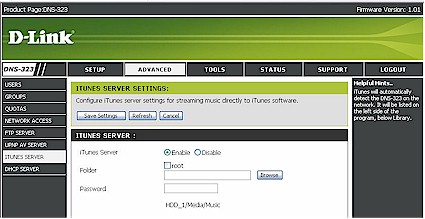
Figure 10: iTunesServer configuration
I tested the ITunes server on both the PC and MAC versions of ITunes (Version 7.02) and found that both clients automatically discovered the server and were able to play songs from the server without incident. Note the “D-Link_NAS” entry located immediately under the iTunes Store in Figure 11 below. By the way, I also found that you also have to do the manual rescan trick each time new iTunes content is added.

Figure 11: iTunes Version 7.02 showing connection to DNS-323
Other Services and Features
The FTP server (Figure 12) allows users or groups either read only or read/write access. I tested the FTP server using multiple clients, including IE7 and was able to connect successfully. There’s also a option, which you shouldn’t use, to allow FTP access to the root of the selected drive. The FTP server also supports anonymous FTP, but unfortunately, the 323 doesn’t log FTP activity, so you have no idea who’s downloading or uploading on your server.
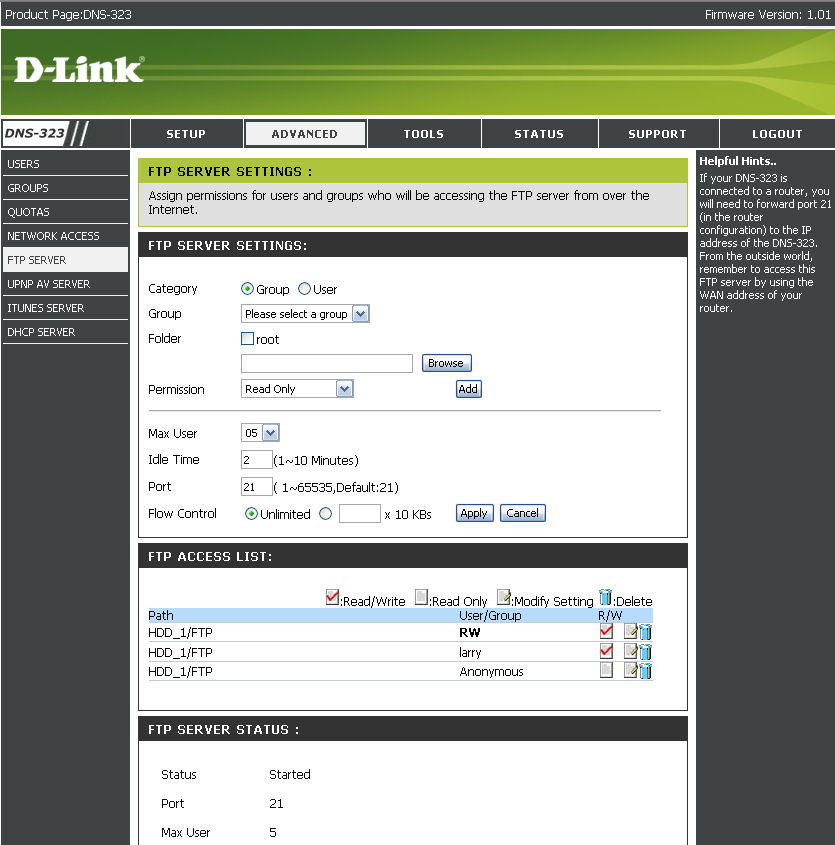
Figure 12: FTP Server Configuration
Since the 323 is Linux based, it should be easy enough for D-Link to add FTP logging capabilities. D-Link thoughtfully included instructions in their manual that shows you how to set up port forwarding on one of their routers so that internet users can access files.
The 323 includes a built-in DHCP server, but you probably won’t use it. Virtually every router on the market has a DHCP server built-in, and you most likely already have one enabled on your network. Still, if you need a DHCP server, the 323 provides a very basic one. You can’t set DHCP reservations, but it will show you a list of DHCP leases.
Finally, the 323 has a single USB port on the back panel that’s used to connect USB printers to the built-in print server. I connected an old Epson 785EX printer to the USB port and installed the drivers. The D-Link instruction manual provides good guidance on how to configure a USB printer to work with the 323. When browsing for network printers, Windows XP discovered the LP port on the 323 and I was able to print just fine. Note that there is no ability to monitor or delete the print queue.
I found it odd that D-Link included only a single USB 2.0 port on the 323. Most competitive products include three ports to support not only print sharing, but the attachment of external USB drives and flash keys for storage expansion and quick file backups. But D-Link said that the 323’s USB port currently supports print serving only, although this might change in a future firmware release.
Moving on, the Tools menu has a number of fairly obvious utilities that you need to administer the 323. From this menu, you can change the administrator’s password, set the time, save and restore system settings and update firmware. Being a time freak, I appreciated that you can set the system time from an NTP server. There’s also a power management feature that will let you shut down the drive(s) after a specified period period of inactivity. A disk utility will let you scan and repair disks as well as de-fragment them.
Finally, there’s a page for setting up email alerts (Figure 13). The 323 supports authenticated SMTP login, and you can select from a number of alerts for email notification.
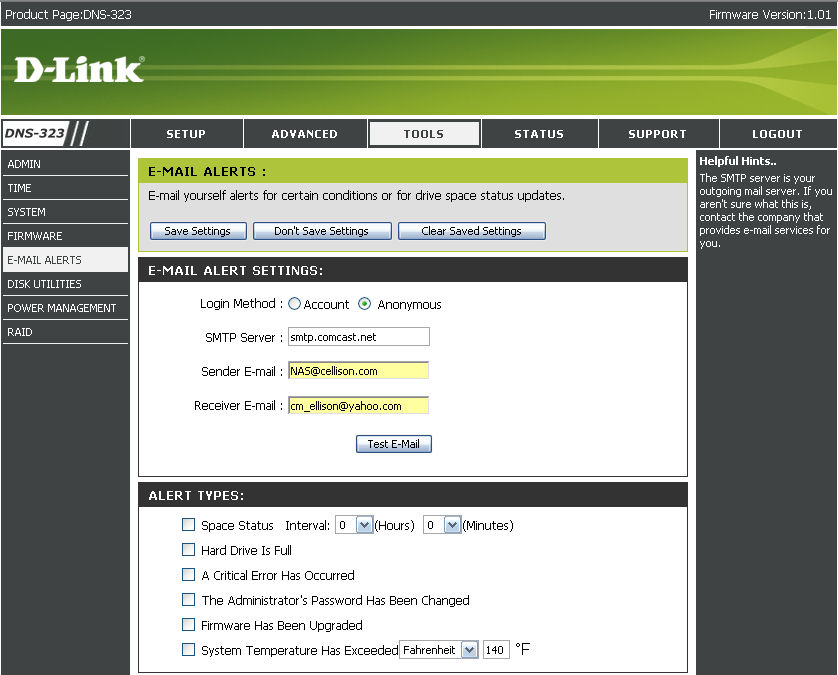
Figure 13: Email Alerts Setup
Other Features – more
The Status tab (Figure 14) has only one page that shows you a snapshot status of the 323. Note that this page includes the internal temperature of the NAS device. (System temperature exceeding a user-settable limit can trigger an email alert.)
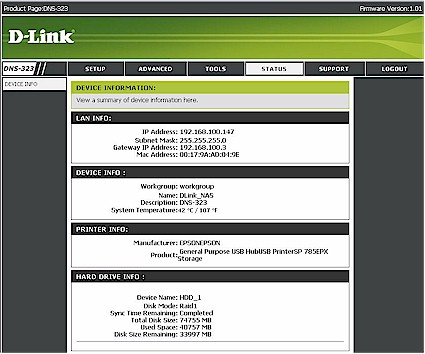
Figure 14: Status Page
Virtually every NAS manufacturer feels obligated to include backup software and D-Link choose to include Memeo’s AutoBackup software (Figure 15). This application lets you define backup jobs, but I found that you don’t have much control over when the job runs. So, for example, you can’t schedule when your initial backup job is going to run.
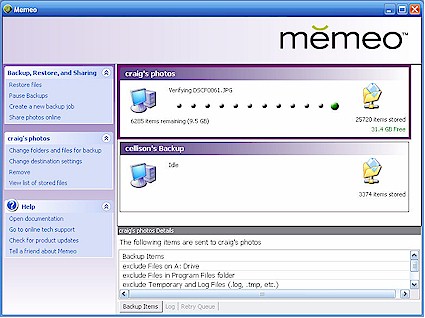
Figure 15: Memeo AutoBackup
When the backup job runs, Memeo creates a mirror image of your source directory tree on your destination drive and then backs up the files. But examining the destination directory, I discovered that all of the files that were backed up had creation dates equal to the backup time instead of the original files’ timstamps. I also found a 1K file with the same name but with a .dcm extension for each backup file!
This file is in xml format and contains the original file creation data and file modification dates. While this might enable the Memeo restore software to restore files with the original date stamps, you can’t date index files on your archive. And, the 25,000 files in my images directory grew to 50,000 files because of the individual.dcm files.
While Memeo AutoBackup does what its name implies, I think I would prefer a backup utility that doesn’t litter my backup with thousands of individual files and one that doesn’t change the file created/modified dates.
Performance – 100 Mbps LAN
As with all our NAS testing, IOzone was used to check out the file system performance on the 323 (the full testing setup and methodology are described on this page). Tests were run in “Standard”, JBOD and RAID 1 modes with 100 and 1000 Mbps LAN connections. To ensure connection at the intended speeds, the iozone test machine and the 323 were manually moved between a NETGEAR GS108 10/100/1000Mbps switch for gigabit-speed testing and a 10/100 switch for 100 Mbps testing.
NOTES:
- Firmware version tested was 1.01
- Drives used were two Western Digital WD800JD 80GB 7200RPM SATA hard drives with 8MB of cache supplied by D-Link
- Keep in mind that the maximum raw data rate for 100Mbps Ethernet is 12500 Kbytes/sec and 125000 Kbytes/sec for gigabit
Figures 16 and 17 show write and read performance for the 323 and HP Media Vault in “standard” mode, i.e. independent drives. Both products exibit the typical fall-off in performance with larger file sizes and while the 323 comes out on top for write, it’s a tougher call for read.
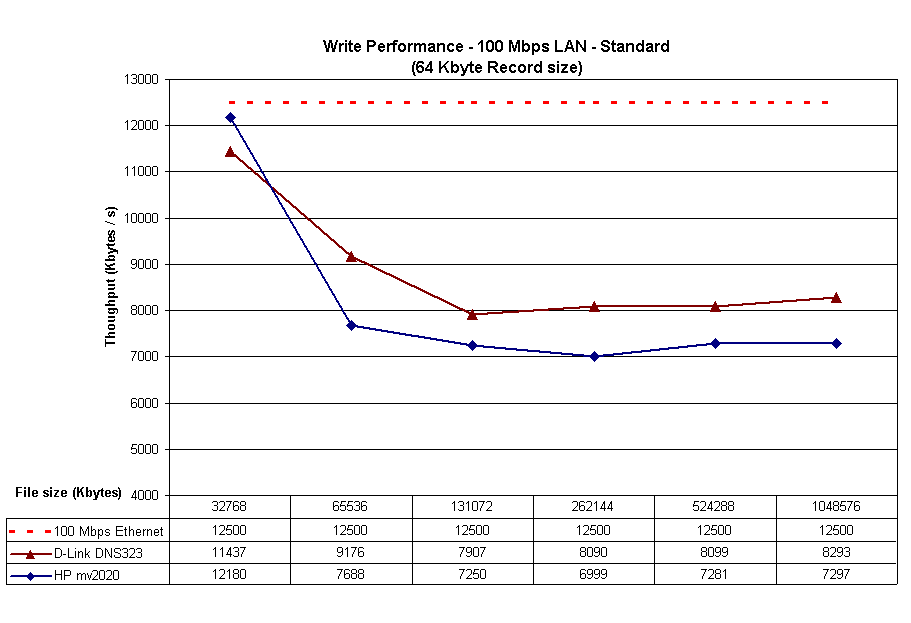
Figure 16: Write performance comparison – Standard Mode – 100Mbps
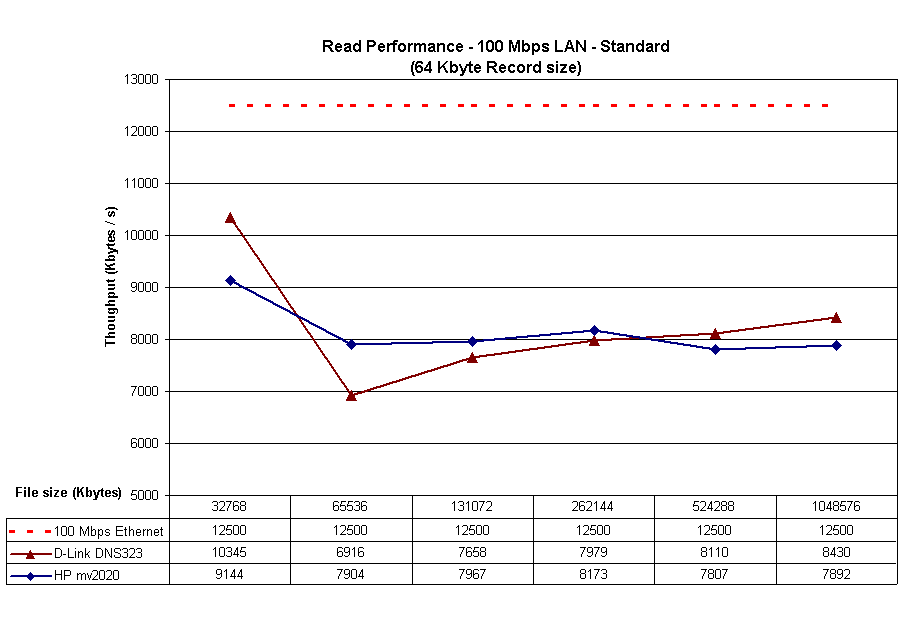
Figure 17: Read performance comparison – Standard mode – 100Mbps
The JBOD mode plots shown in Figures 18 and 19 and RAID 1 plots in Figures 20 and 21 add the Thecus N2100 to the comparison and follow a similar pattern to the “standard mode”—323 comes out on top for write, but mixed results for read.
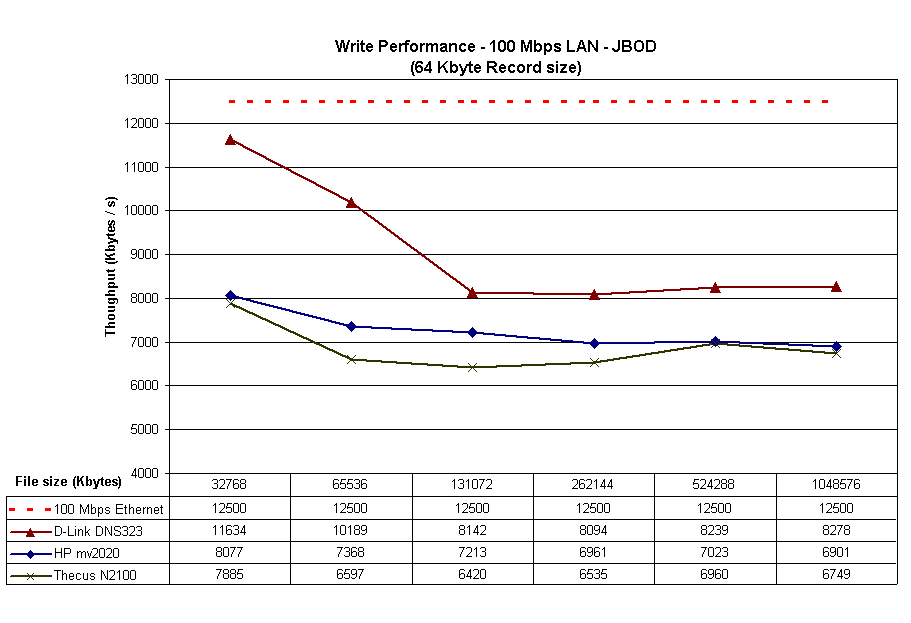
Figure 18: Write performance comparison – JBOD Mode – 100Mbps

Figure 19: Read performance comparison – JBOD Mode – 100Mbps
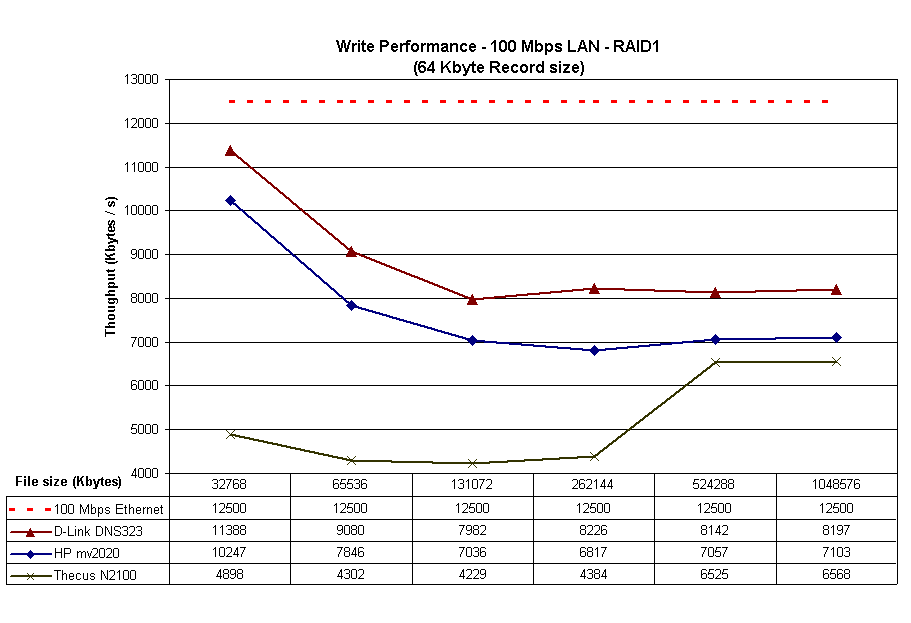
Figure 20: Write performance comparison – RAID 1 Mode – 100Mbps
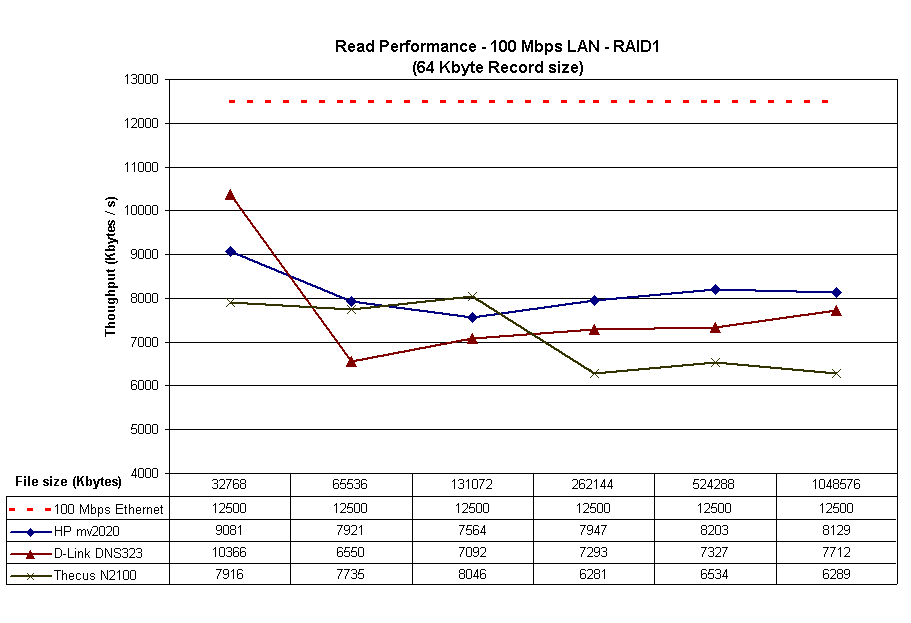
Figure 21: Read performance comparison – RAID 1 Mode – 100Mbps
Performance – 1 Gbps LAN
The test with gigabit LAN connection resolved the mixed read results, but not in the 323’s favor! Figures 22 and 23 show write and read results for “standard” mode, with the 323 besting the HP Media Vault by a healthy margin for write. But while the 323 starts out with off-the-chart read performance for a 32 MB file size, it drops below the Media Vault for the remaining file sizes.
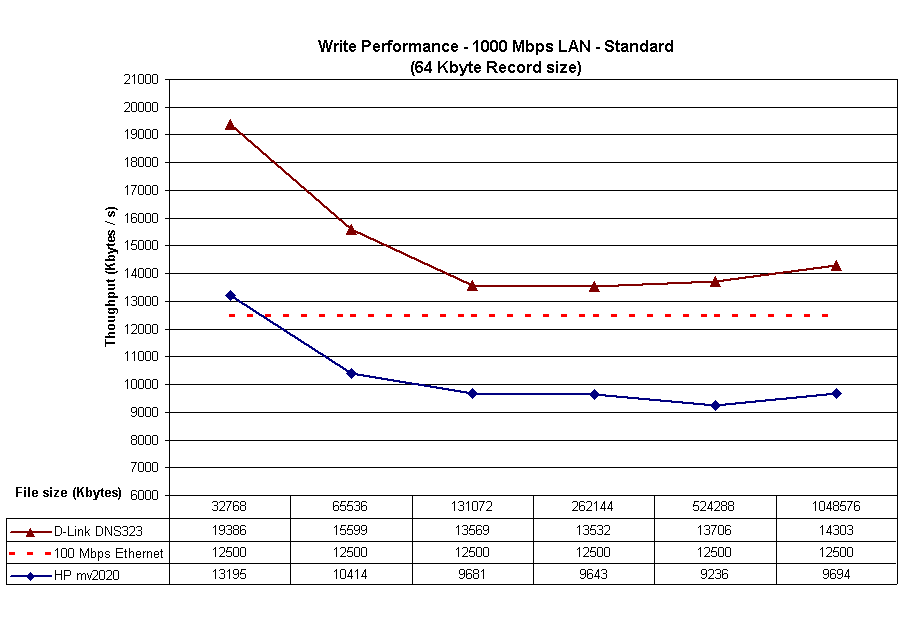
Figure 22: Write performance comparison – Standard Mode – 1000 Mbps
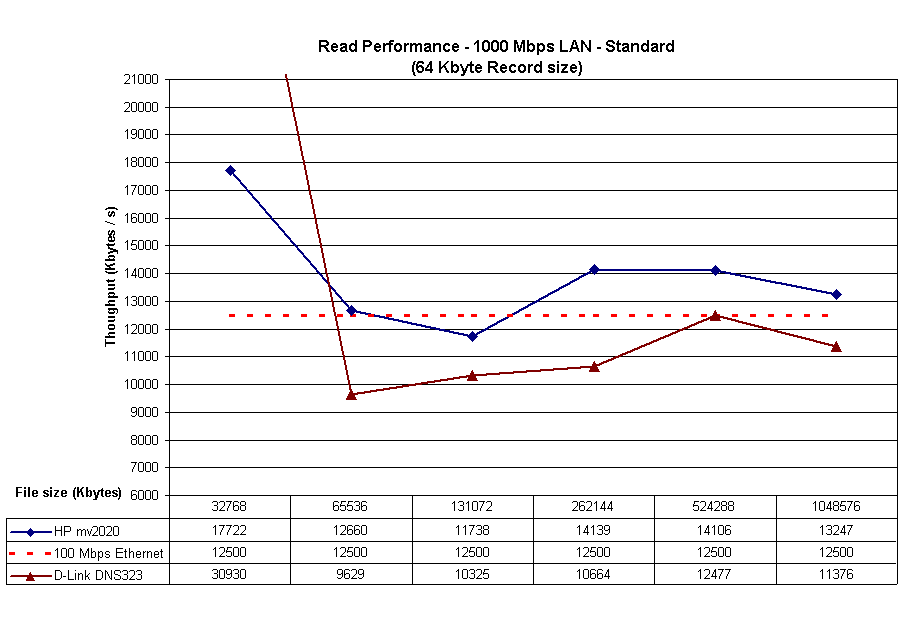
Figure 23: Read performance comparison – Standard mode – 1000 Mbps
The JBOD (Figures 24 and 25) and RAID 1 (Figures 26 and 27) plots follow a similar pattern with the 323 clearly winning the write battle, but losing to the HP Media Vault for reads.
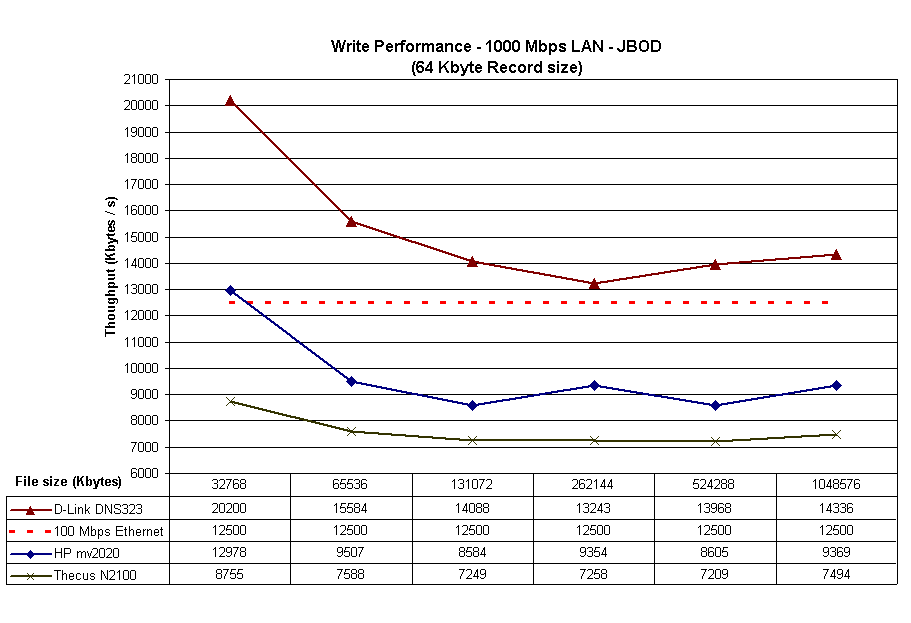
Figure 24: Write performance comparison – JBOD Mode – 1000 Mbps
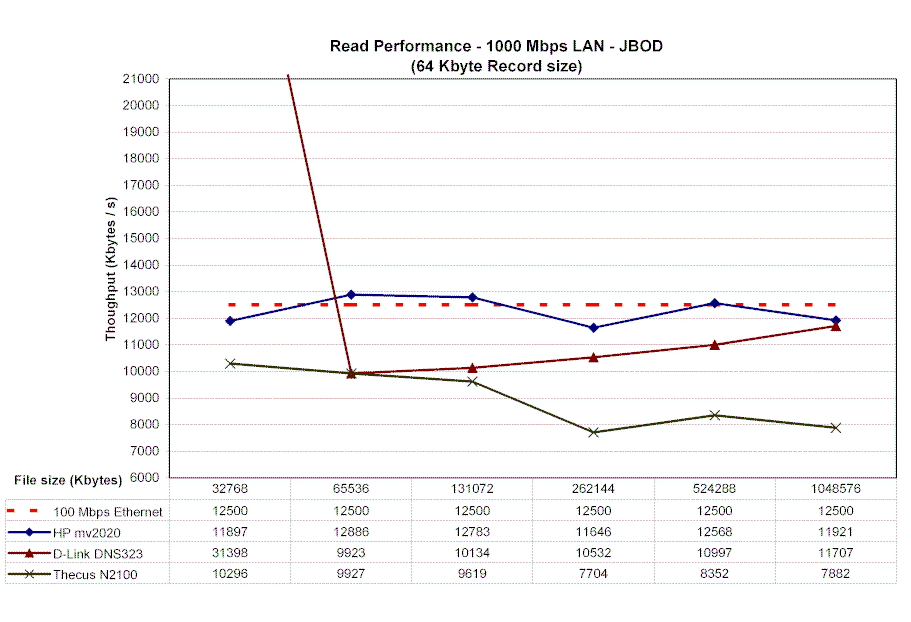
Figure 25: Read performance comparison – JBOD Mode – 1000 Mbps
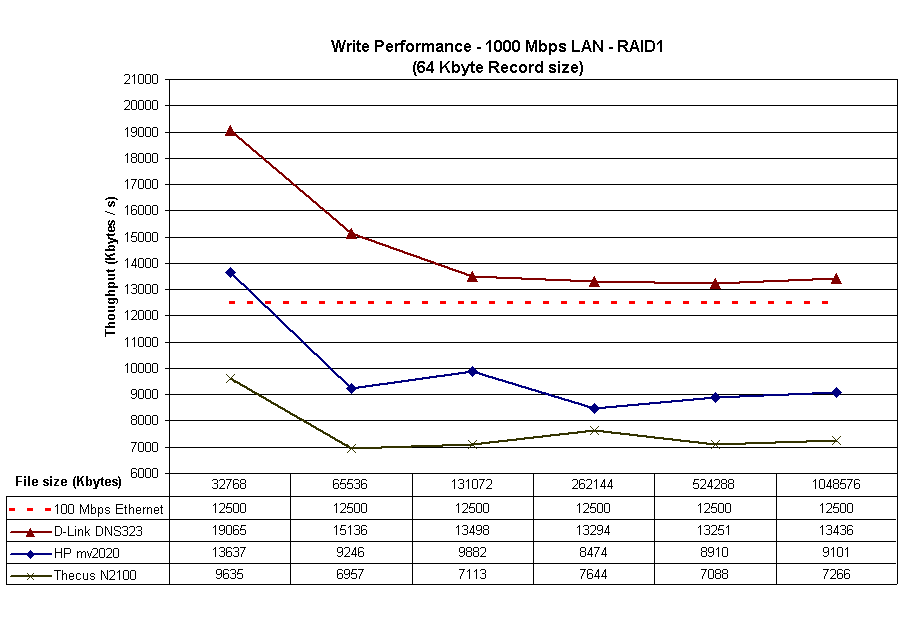
Figure 26: Write performance comparison – RAID 1 Mode – 1000 Mbps

Figure 27: Read performance comparison – RAID 1 Mode – 1000 Mbps
Visit the NAS Charts if you want to compare the 323 to the other NASes we’ve tested.
Closing Thoughts
The DNS-323 might be thought of as D-Link’s somewhat belated response to Netgear’s SC101. Both are two-drive RAID 1-capable BYOD NASes with easily installable drives and similar physical sizes. But fortunately for D-Link, that’s where the similarities stop. The DNS-323 uses SATA drives instead of the IDE drives used by the SC101 and a gigabit Ethernet port vs. the SC101’s 10/100. The 323 also sports print, FTP, UPnP AV and iTunes servers, where the SC101 has no built-in servers. Finally, since the DNS-323 supports the standard SMB/CIFS network filesystem protocol, it can be used by machines running OSes other than Windows including Mac OS and Linux.
A fairer comparison would be to Thecus’ N2100 Yes box, which accepts two SATA drives and supports JBOD, RAID 0 and RAID 1. The N2100 also has an iTunes and FTP serving, but has a “community photo webserver” instead of a general-purpose UPnP AV server. But since the N2100 is $50 to $70 more expensive with an inferior feature set and comes from a lesser-known company, the 323 is more likely to end up in buyers’ shopping carts.
The biggest competition for the 323 could be from HP’s Media Vault, since it comes from a “name” vendor, has a similar feature set (sans the iTunes server, alas) and better performance than the 323 in some modes. The Media Vault’s pricing is competitive, too, at $349 for the mv2010 model that includes a 300 GB drive.
D-Link just needs to get the DNS-323 into stores in time to hit the end-of-year buying season and pump out new firmware that addresses the bugs that I found and hopefully adds new features. If D-Link can get the job done, then they could really have a hit with the DNS-323.