

Introduction
Updated 9/19/2007 – Performance results updated with DS107e retest data.
| At a Glance | |
|---|---|
| Product | Synology Disk Station DS107 Series (107, 107e, 107+) |
| Summary | Single-drive BYOD SATA NAS with eight built-in server functions |
| Pros | • Gigabit Ethernet with jumbo frame support • Simple Setup • Built-in servers for Web, FTP, iTunes, Printer, UPnP AV, Photo sharing, Backup, and BitTorrent download • Mac/PC Compatible with support for legacy Macs • Domain/ADS support (DS107 and DS107+ only) |
| Cons | • Media player could use some improvement, including improved playlist support • Limited alerting options • Very limited documentation for using built-in web server/MySQL |
It’s been a busy year for Synology. Over the course of this year, the company has revamped its product line with new models, new features, and in some cases, new case designs. Recently, I reviewed the new Cube Station CS407/407e four-bay BYOD SATA NAS and Tim Higgins reviewed the DS207 Disk Station two-bay BYOD NAS earlier this year. Now, Synology is completing their product line refresh with the introduction of three new single-bay BYOD NAS products. You’ve probably figured out by now that following the naming convention, the family name for the new single drive NASes is DS107.
Product Tour
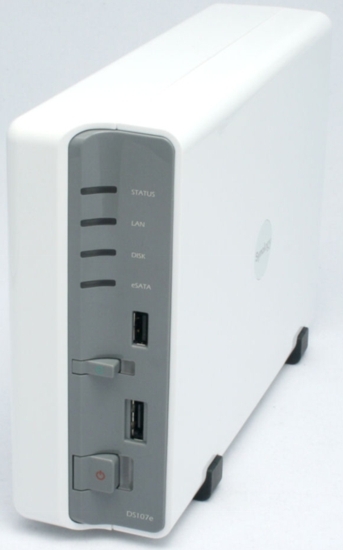
Each of the new DS107s sports a completely new case design as compared to last year’s model, the DS106. The new case design is essentially a single bay version of the DS207. On the front panel, there are individual status LEDs for Status, LAN (Link/activity), Disk, and eSATA. There’s one USB 2.0 port on the front panel (plus two more on the rear panel), as well as an eSATA port for attaching an external SATA drive.
The power button turns on the device as well as performing a “safe” shutdown of the system. Finally, a USB Copy button will copy files from an external USB device to the root of a user-defined share on the internal disk.
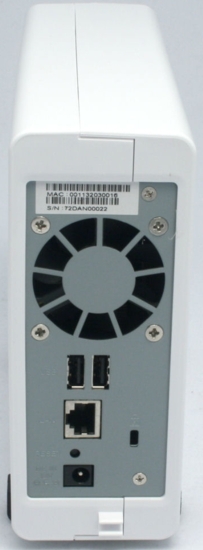
Figure 1: Rear view of the DS107
The rear panel of the DS107 (Figure 1) has two additional USB 2.0 ports. You can use the USB ports for up to three external drives, an external USB printer, USB connected speakers, or the receptor for Synology’s new remote control. In addition, though not mentioned in the manual, the DS107 also supports a limited number of UPSes. (see this page). There’s also a reset button, gigabit Ethernet port, power jack for the external power supply, and a security slot. The quiet, temperature controlled fan ensures that the DS107 won’t overheat.
Product Comparison
The DS107e, my review unit, is the cost effective entry-level member of the family. On the Synology web site, it’s grouped with other “Home and Small business” NASes. The other two family members, the DS107 and DS107+ are grouped with Small Business and Corporate products. Both the DS107 and the DS107+ have identical feature sets that mirror the features found on the Cube Station CS407. The only difference is, of course, with a single-drive NAS, there’s no support for RAID. The main hardware differences between the three units are summarized in Table 1 below:
| Model | Processor | Speed | Memory | Est. Street |
|---|---|---|---|---|
| DS107e | MPC8241 | 266 MHz | 32 MB | $199 |
| DS107 | MPC8241 | 266 MHz | 64 MB | $259 |
| DS107+ | Marvell 5281 | 500 MHz | 128 MB | $319 |
Table 1: DS107 series summary
 Check out the slideshow for photos and descriptions of main board components for all three DS107 models
All of the Disk Stations contain the same full suite of server options designed to make it the center of your network. Like the CS407, all of the DS107 models include a Web server with PHP and MySQL, a UPnP Multimedia server for music, photo and video, and a download server that supports direct scheduled downloads using either HTTP, FTP or BitTorrent. In addition, the built-in print server supports LPR, CIFS, and AppleTalk. The file server supports CIFS, FTP, and for legacy Macs, AFP. All models also include a backup server and well as an iTunes server.
One of the minor differences between the entry level DS107e and the DS107/DS107+ models is the FTP server. On the DS107e, the FTP server is just a simple, un-encrypted FTP server. On the two “corporate” models, the FTP server also supports FTP over SSL and FTP over TLS.
There are some additional differences between the corporate models and the entry level DS107e. First, the corporate models support management over HTTPS. They also support encrypted network backup. In addition, as you expect from products targeted at the enterprise, both the DS107 and the DS107+ support Windows ADS domain integration with support for ADS/NT4.
Setup
As with other Synology products, the DS107 is a BYOD device, so you’ll need to install your own SATA drive. The installation guide provides easy-to-follow, well-illustrated instructions. You should be able to install your drive, connect it to your network, and be up and running in about 10 minutes. Once the device boots and is online, you’ll need to use the Synology Assistant (Figure 2) to find it on your local network.
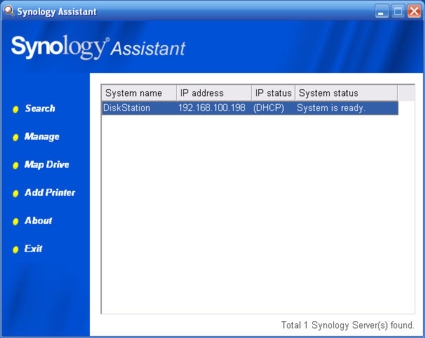
Figure 2: Synology Assistant searches your network and identifies the Disk Station
This utility is quite simple. It lets you map network drives, add a USB printer, or manage the DS107. When you click on “Manage,” you are taken to the DS107’s home page (Figure 3). The web-based management runs on port 5000 of the DS107’s IP address.
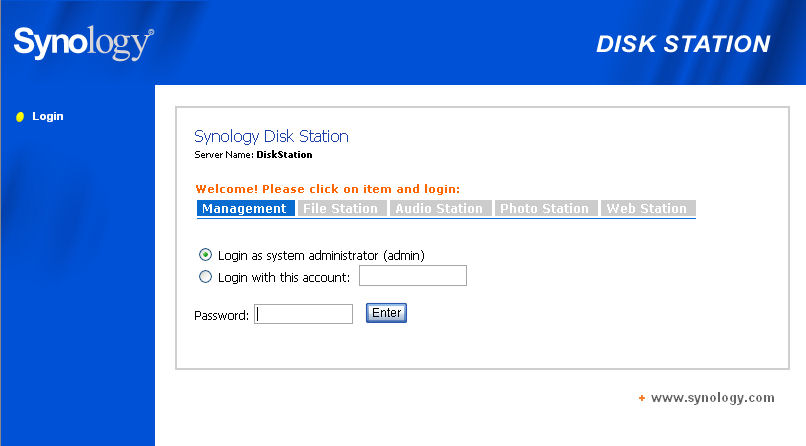
Figure 3: Home page of the DS107
From this home page, you can log into the DS107 management console, or log into one of the built-in applications to manage them. From my perspective, I would have preferred a single admin login with access to configure the web applications from within a single user interface.
Management Console
Once you log into the management interface, you are presented with a logically designed screen (Figure 4). The menu is arranged vertically along the left side of the screen. A convenient site map allows you to jump directly to any configuration page.
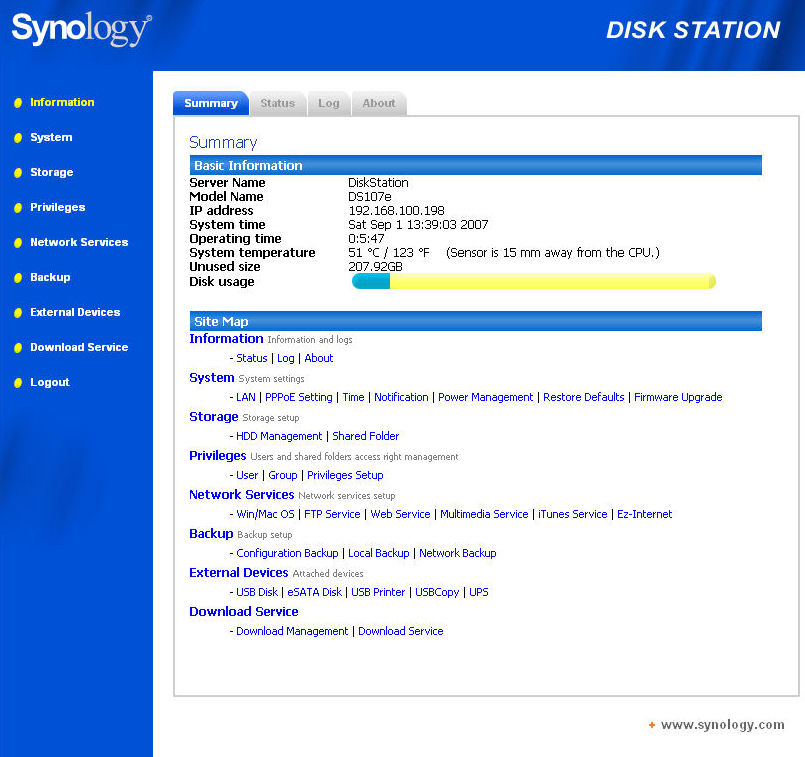
Figure 4: DS107 Management home page
This management console is almost identical to the one found on the CS407. To avoid repetition, see the CS407 review for a top-level description of the menus. However, I will briefly mention features that are different.
System menu—The DS107 has a PPPoE option that allows you to connect your Disk Station directly to the Internet via a DSL connection. Though this is a nice feature, for security, I’d prefer to have my DS107 behind a good firewall and set up port forwarding on the firewall for web services I choose to enable.
Storage—The DS107 lacks the Volume configuration menu found on the CS407 because it’s a single drive system.
Network—The DS107 has a feature called Ez-Internet. Ez-Internet allows you to configure Dynamic DNS so that your public IP address always resolves to a known domain name. This is useful if you enable web services, FTP, or the Photo sharing applications. Synology currently support only one DDNS provider—DynDNS.org. I hope that they’ll add additional DDNS providers as options in the future.
External Devices—The DS107 supports an external SATA drive via the eSATA interface, so there’s an option to configure it, if attached. The external devices menu also has the added option to configure the “file copy” location of an externally connected USB drive. A press of the drive copy button on the front panel copies the contents of the external drive to your configured location. Note, however, that you only copy to the root of the selected share. (See Figure 5.)
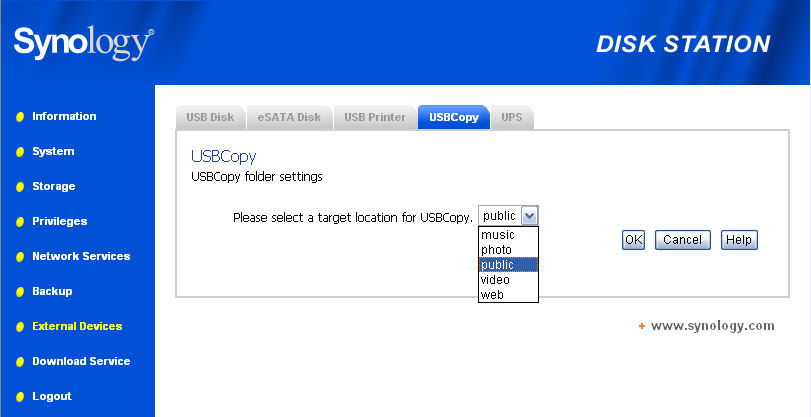
Figure 5: USBCopy allows you to specify where files from an external USB device will be copied
Hands On
The web services, Photo Station 2 and FTP services all worked exactly the same way as on the CS407. However, I would like to spend a little time talking about the media player as well as a new accessory—a Remote Control (Figure 6).
Available in late September, the Remote Control is expected to sell for $39. It will work with all Synology products that have updated firmware.
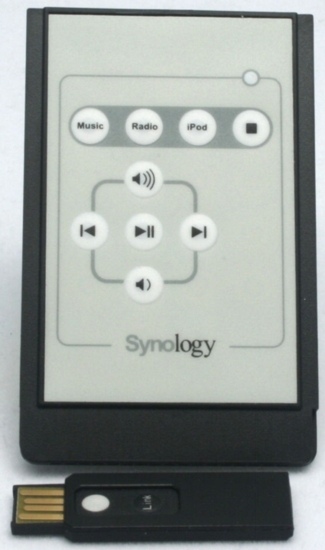
Figure 6: Synology Remote Control
Audio
To use the remote control, you first need to connect the small wireless receiver to a USB port on the NAS. The 2.4 GHz wireless receiver is based, according to the status page, on Raytec’s chipset. To a second USB port, you connect a pair of supported USB speakers.
Once the speakers are connected, you can use the remote control to play your default playlist (Music), your default Internet radio station (Radio), or your iPod through the attached speakers. You also have play/pause, forward/backward and volume up/down control of the player built into the DS107.
It’s nice that it’s wireless—you don’t have to have line of sight to the receiver as you would need if the remote were based on infrared. I tried the wireless control, and though it didn’t work in every room of my house, it was able to control the DS107 from adjacent rooms and even from the floor below. For remote control, that’s more than adequate.
I tested the audio component of the DS107 extensively, and overall, I liked the features. Of course, there are improvements I’d like to see in a future version of the player, which I’ll detail. First, the iTunes server worked flawlessly. In fact, empirically, it seems to work better than the iTunes server on the D-Link DNS-323 or the Buffalo LinkStation Live. Synology includes a smart playlist generator (Figure 7) that can help you populate playlists on your iTunes server.
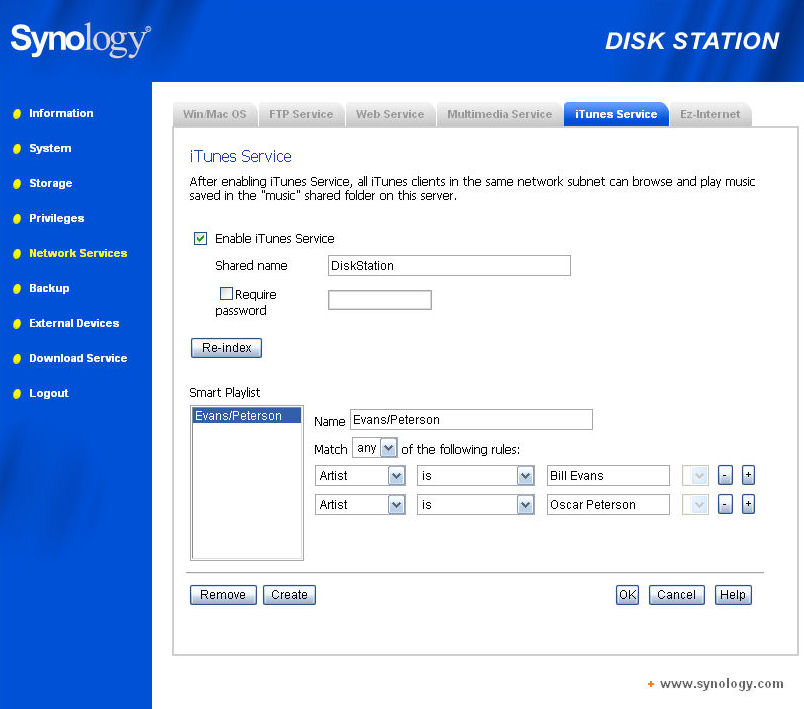
Figure 7: iTunes Service configuration, including Smart Playlist generator
You can generate lists based on Artists, genre, file path, year, bit rate, or date added. Other than using the file path option, you can generate a playlist based on album name or track name. However, you need to know the data to fill the fields—there’s no drop-down box showing artists, genre, etc. The playlist generator did generate a playlist based on my selection criteria, and the generated playlist was also available to the Synology media player.
In my perfect world, however, it would be great if the Synology iTunes server could read my XML file so that my playlists generated in iTunes for my IPod, as well as the Smart Playlists created by iTunes (favorites, recently played, recently added, etc.) could be available to the iTunes server.
To play audio content through speakers attached to the DS107, you need to log into the “audio station” from the home page. While the remote is certainly a nice accessory, you can play music, Internet radio, or your iPod (attached to the DS107) using the music player. Music dropped into the \music share is automatically indexed and is available to both the iTunes server and the Synology music player.
In order to play music, however, you must create a playlist. You can’t just play music from the list. In order to create a playlist, you select the music tab, and then check the tracks you want to add. You can sort your music on any of the column headings. When you click Add to Playlist, you have the option of adding the selected tracks to a new playlist or to an existing playlist, available in a drop-down selection box. You need to add your selections on each page before proceeding to the next page, or you’ll lose your selections—a lesson I learned the hard way. The resulting playlist files reside in a \music\playlist directory in the standard.m3u format. Unfortunately, the playlists you generate from within the Audio Station are not available to the iTunes server. Since both reside on the same device, it would be nice if you could link them.
From the Music tab (Figure 8), you can select music to add to the Synology Music Player’s playlist. You can sort on any of the column headings.
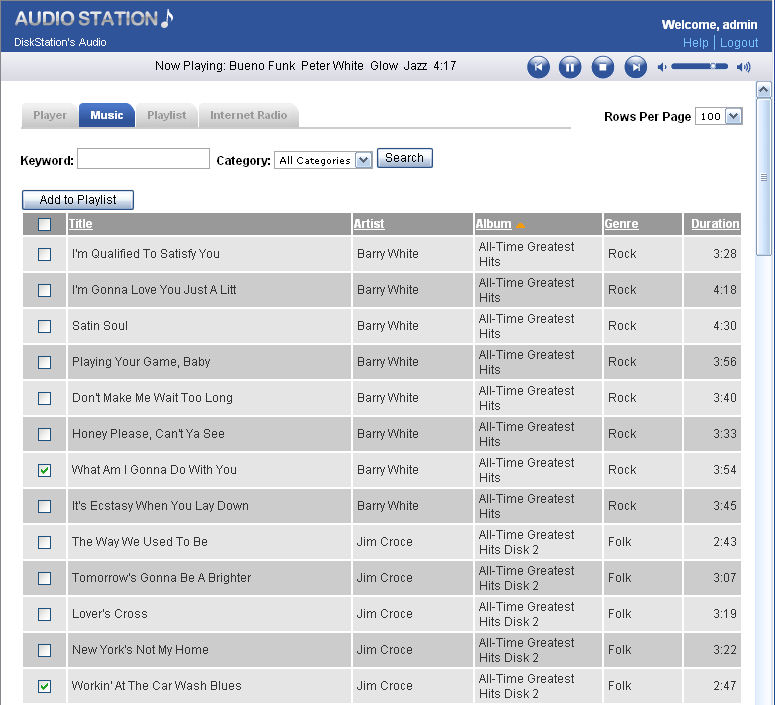
Figure 8: Adding music to the Synology Music Player’s playlist
Internet Radio/iPod
The Synology products also support streaming of Internet radio stations. The server list comes pre-populated with 21 Internet radio stations (Figure 9). If those stations don’t satisfy your tastes, you can add your own favorite station. I was able to add my favorite Jazz station (KCSM – San Mateo) and have been streaming the station for the last three days. The Internet radio player supports both MP3 as well as RealMedia format, but Windows Media Player format is not supported.
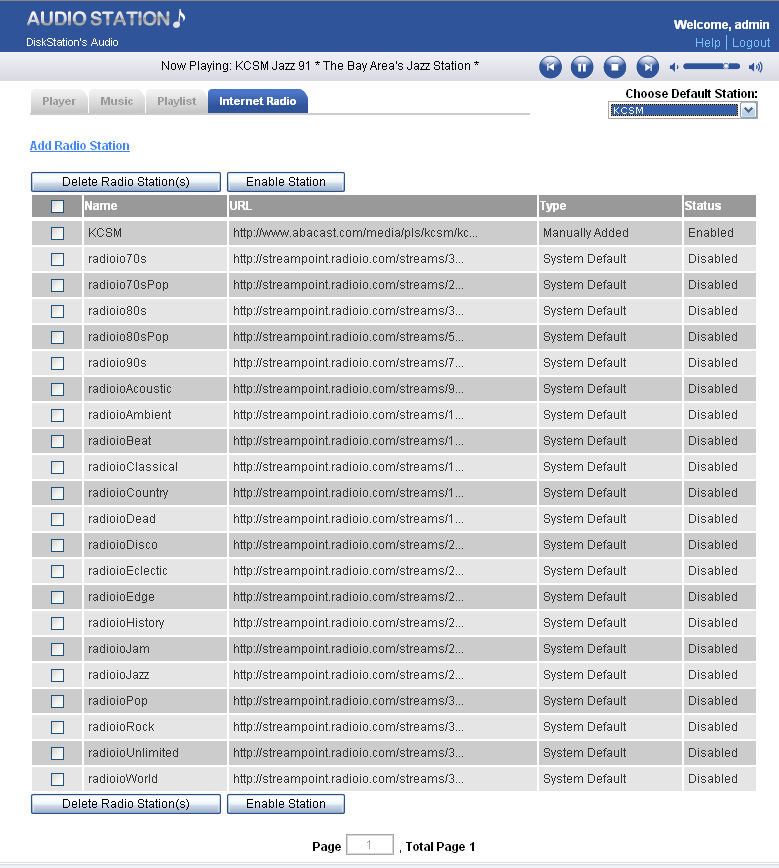
Figure 9: Default Internet Radio Station list plus the addition of one of my favorites
The last feature of the Synology Music Player is “iPod.” When you attach your iPod to one of the USB ports, the DS107 polls the device for its tracks and playlists.
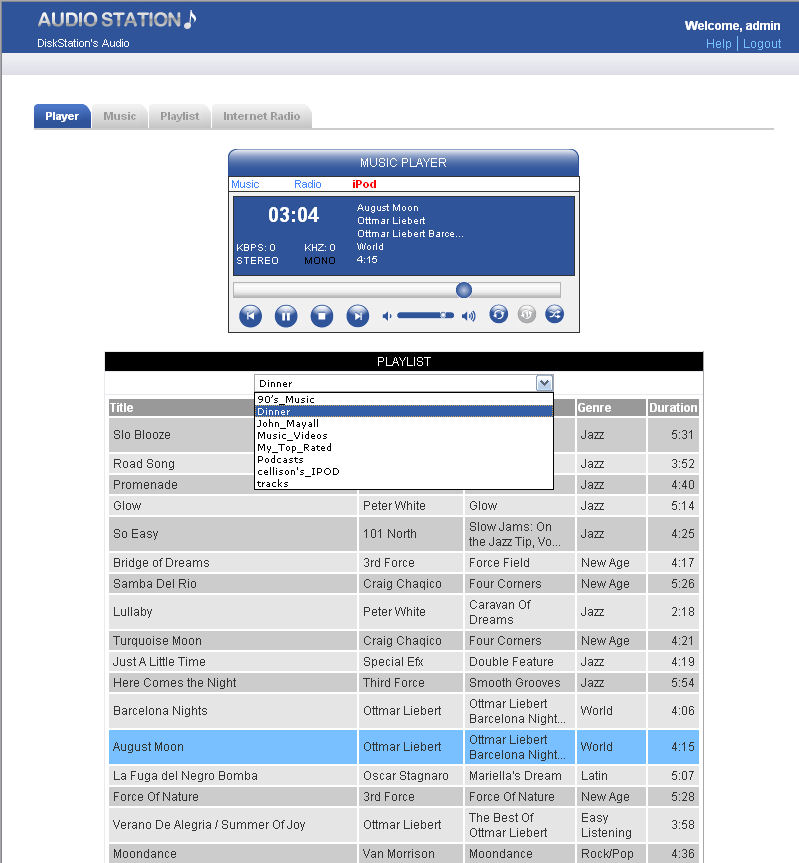
Figure 10: Synology Music Player with an iPod attached
Once polled, you have access to what appears to be some, but not all of the playlists on the iPod. In this example, the top 25, recently added, and recently played lists, available on my iPod, were not available in the drop-down list (Figure 10). I also noted that it took what I considered a relatively long time to change between playlists. After I changed playlists and clicked on play, it took ~70 seconds (!) before the first song in a playlist of 48 started to play.
It also appears that you can play tracks not included in a playlist by clicking on the name_IPOD. I clicked on cellison’s_IPOD and eventually it started playing tracks. However, when the music list screen opened, it was limited to a single screen. Perhaps the number of files on my iPod slowed it down, but I don’t consider 5,000 tracks to be excessive. Though this feature did work, it’s not one that I’d like use very often. You have much more control playing your music with iTunes.
Performance
It’s not surprising that with three different hardware configurations you’d see different performance results. As you might expect, of the three models, the DS107e was the slowest performer and the DS107+ was the fastest. All of the performance results are detailed in the NAS performance charts. Using the interactive charts, you can create your own comparisons.
Testing Notes:
- The DS107e was the first of the three models that was tested. It was tested with version 2.0.3 – 509 firmware that, by default, had CIFS database optimization disabled, which would product lower performance results. Version 2.0.3 – 510 firmware, installed on both the DS107 and DS107+ changed the default to enable database optimization. The DS107e has now been upgraded to the same level of firmware and new, directly comparable results will be posted shortly.
Updated 9/19/2007 – Performance results and charts updated with DS107e retest data. - Tests were performed with the following drives provided by Synology:
DS107e: WDC WD2500JS-60NCB1
DS107, DS107+ : Seagate Barracuda 7200.10 ST3250820AS - The full testing setup and methodology are described on this page.
- To ensure connection at the intended speeds, the iozone test machine and NAS under test were manually moved between a NETGEAR GA108 10/100/1000Mbps switch for gigabit-speed testing and a 10/100 switch for 100 Mbps testing.
Performance – more
For my comparisons, I chose to filter the results and limit them to single drive NAS products. Here’s how the family of DS107 products stacked up against the competition:
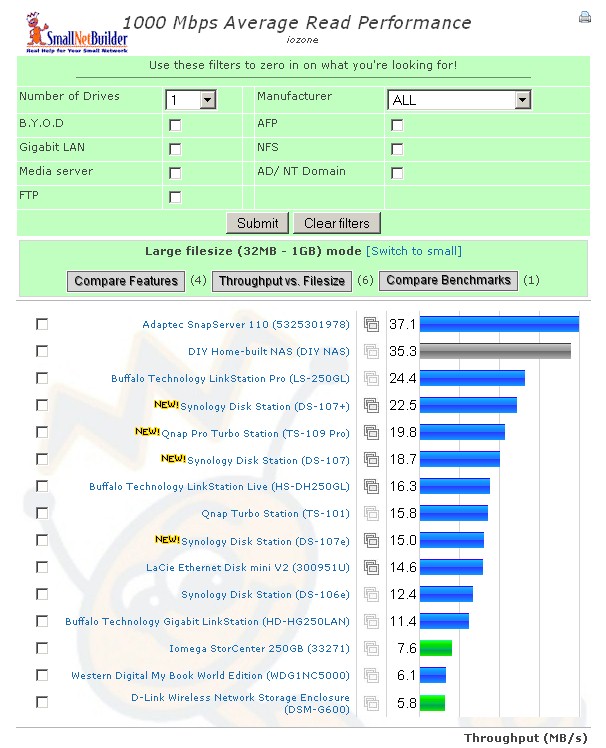
Figure 11: Single drive NAS comparison for 1000 Mbps LAN average read performance
As expected, the DS107+ outperformed the other DS107 products, but was at a slight disadvantage compared to the Buffalo LinkStation Pro. However, you can see from this chart that both the DS107 and DS107+ do benefit from a gigabit Ethernet connection.
Figure 11 shows a detailed comparison of 1000 Mbps read performance for the three Synology DS107s along with three other competing products, the Buffalo LinkStation Live and Pro and Qnap TS-109 Pro.
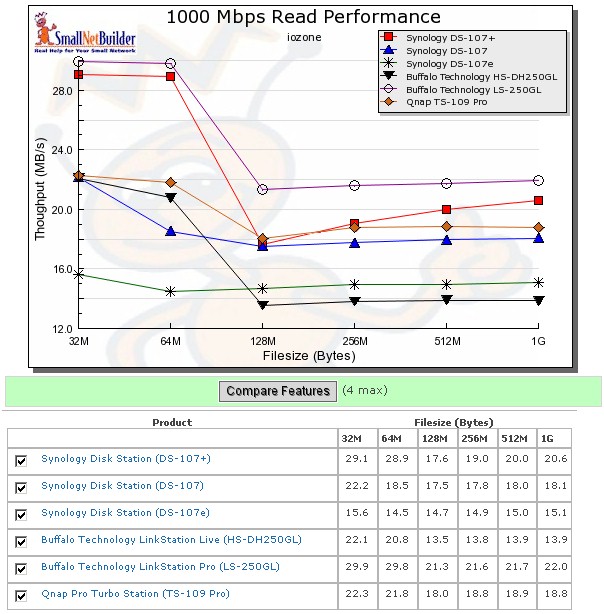
Figure 12: Detailed comparison of 1000 Mbps Read performance for large file sizes
In Figure 12, you can see that for file sizes of 128MB and larger, the DS107 and 107+ have very similar performance characteristics.
Turning to write performance, Figure 13 shows the single drive comparison for average 1000 Mbps write performance.
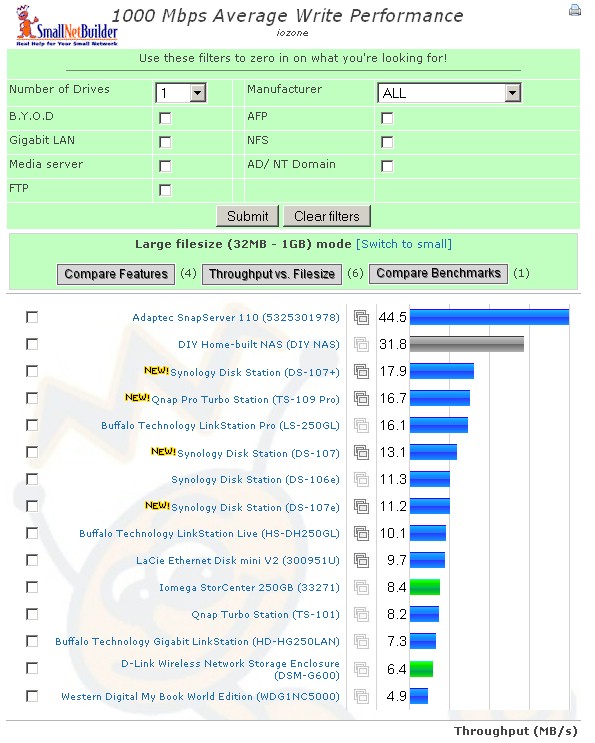
Figure 13: Single drive NAS comparison for 1000Mpbs average write performance
Again, results are as expected, with the DS107+ outperforming its siblings. It also outperformed, on average, the Buffalo LinkStation Pro that had slight bragging rights for read performance.
Detailed Write Performance Comparison
Figure 14 shows a detailed comparison of 1000 Mbps read performance for the three Synology DS107s, along with the same three other competing products:
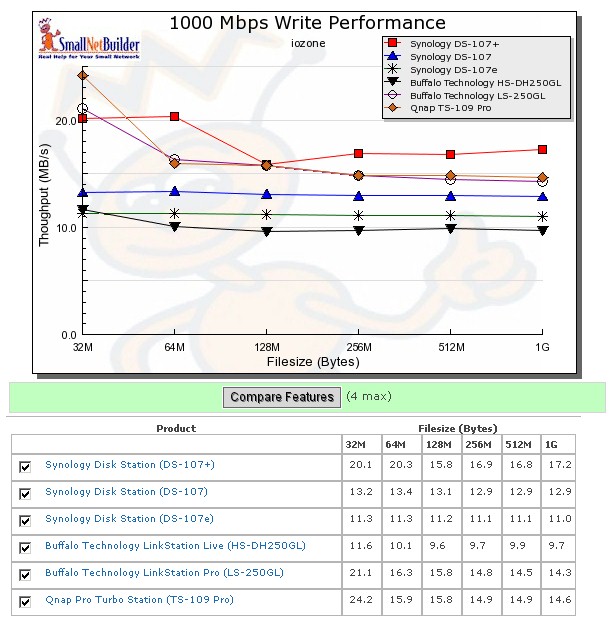
Figure 14: Detailed comparison of 1000 Mbps Write performance for large file sizes
Here there’s more of a difference between the DS107 and the DS107+ at different file sizes. The DS107+ was the clear performance winner at file sizes above 32MB. Only the Qnap TS-109 Pro bested it at 32 MB and equaled it at 128MB file sizes.
Final Thoughts
Synology products, including the DS107 family of single drive NASes, seem to be on the right track of offering an abundance of built-in services in a BYOD NAS. I prefer Synology’s approach to that of Buffalo, which forces you to choose between its “Live” products that include media servers, and its “Pro” models that offer “corporate” type features, i.e. ADS/NT4 support, without media servers. While Synology also offers “business” and “consumer” focused models, the business versions provide features in addition to all those found on its consumer models.
If you’re not afraid to spend about 10 minutes with a screwdriver to install a drive, and don’t want/need the fault tolerance offered by multi-drive systems, any of the DS107 family of single-drive NASes would be a good choice. For a simple home network, the DS107e would be ideal. For a network using ADS, either the DS107 or DS107+ would be appropriate. From a price/performance perspective, it appears that the DS107 is the sweet spot. However, for the best performance, the DS107+ is the clear choice.