

Introduction
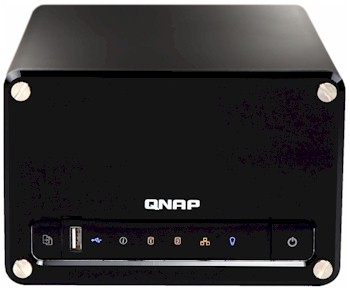
| At a Glance | |
|---|---|
| Product | QNAP Pro Turbo Station (TS-209 Pro) |
| Summary | Powerful Small Business Network Storage Device |
| Pros | • Hot-Swap RAID 1 • Gigabit Ethernet with jumbo frame support • Full-featured • Good Performance |
| Cons | • Relatively Expensive |
Last year when I did a review of the TS-101 from QNAP, I found it to be a powerful little NAS with a few drawbacks, the main one being limited availability in the US. Now, a year later, QNAP has improved their US distribution channels, and has come out with the TS-209 Pro Turbo Station, a higher-end unit geared more toward business users than home users.
Instead of being single-disk based like the TS-101, the TS-209 Pro supports dual hot-swappable drives and adds a number of high-end features. In this review, I’ll check out the new capabilities and see how well QNAP’s “Pro” line stacks up to similar units we’ve reviewed recently.
Note: The same capabilities, except for RAID 1, are available in the single-drive TS-109 Pro.
 View the TS-109 Pro slideshow.
Setup
Physically, the TS-209 Pro is a fairly plain cube-like unit about the size of a couple of stacked hard-cover books. The removable front-panel supports a USB port, a power button, a copy/backup button, and a number of status LEDS. The rear (Figure 1, from the QNAP manual) has two more USB ports, a gigabit-capable Ethernet port (with jumbo-frame support), a fan vent, and a power connector, among other connectors.
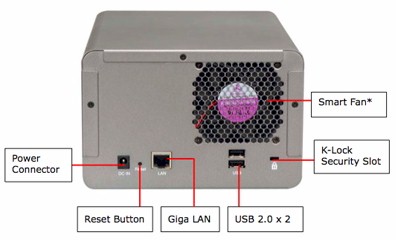
Figure 1: TS-209 Rear Panel
The “Smart fan” reference in the diagram refers to the fan being variable-speed, dependent on the internal temperature of the system—a nice feature.
The TS-209 is a “Bring Your Own Disk” (BYOD) unit, but QNAP was kind enough to send me a unit with two Seagate ST3250620AS 250 GB 3.5 inch SATA drives pre-installed on removable drive trays. If you’re installing your own disks, the instructions are well written and appear to be easy to follow. The TS-209 manual lists a number of disks that have been verified to work with the TS-209, so before you pick up drives, check the list. In Figure 2, you can see the drive bay, and the disk trays after the front panel of the unit has been removed.
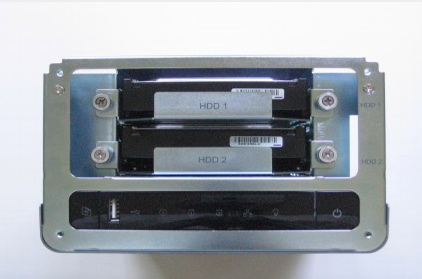
Figure 2: Drive Bay
Like most of these units, setting up the TS-209 was as easy as plugging it into thenetwork and powering it on. When the unit booted up, I noted the noise level, and judged it to be fairly low. As far as power-draw, I measured it to use around 20 watts when active and a very low eight watts when idle. I won’t go into details on configuration of the unit, since it was basically the same process as with the TS-101, which I reviewed here, but in general, configuration was fairly easy, with a wizard walk-through of setting network parameters, user accounts, network share characteristics, etc.
Features
I also won’t detail the features that are common between the two units—check out the TS-101 review for these features, but there are a number of new features to try out. One is support for sharing the drive on the network using NFS, a protocol that is natively used in Unix-like systems such as Linux, Solaris, and Mac OSX. Figure 3 shows the NFS setup page, where access privileges can be set for the shared folders.
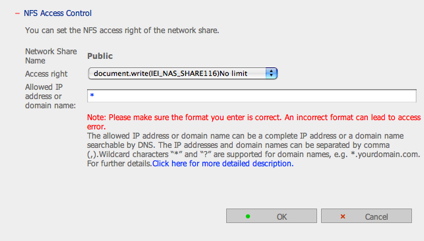
Figure 3: NFS Setup
The one key item missing in this screen is the remote path for the share on the TS-209. Under NFS, the client specifies the remote path when mounting a network share. Fortunately, even though it’s left off the web configuration page, the manual specifies that the remote path will be the same as the share name, which should make it easy to remember.
The only difficulty I ran into with NFS was under Mac OS X. By default, OS X uses a non-reserved port for NFS, which usually gets rejected by most servers (including the TS-209 NFS server). There are two ways around this. The first is to skip the GUI “Finder” method of mounting the share and do the NFS mount from the OS X command line instead, specifying a reserved port. The other is to make a change to the configuration on the server side. Once I made the change on the TS-209’s server (more on this later), I was able to mount and use the NFS share from my OS X system.
Another new feature as compared to the TS-101 is secure FTP. By default, FTP transfers occur “in the clear,” meaning that anyone that has access to your network could watch the network traffic to sniff out your username and password. By using an encrypted transaction, this risk is avoided. Figure 4 shows the FTP setup screen, where secure FTP can be specified, port numbers can be set, throttling can be configured, etc.
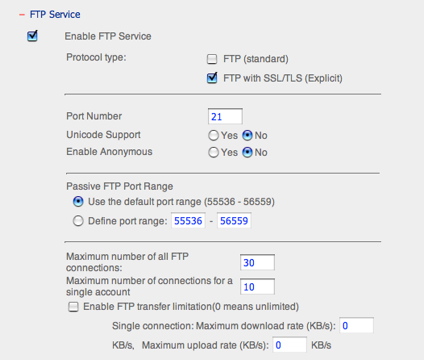
Figure 4: FTP Setup
The TS-209 also adds feature to do what it calls remote replication (backup) to another QNAP NAS on the LAN. Figure 5 shows the setup screen for defining the backup.
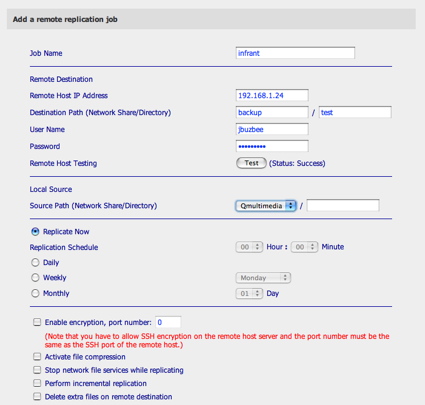
Figure 5: Replication Setup
Note that there are a lot of powerful options, including incremental backup, compressed backups, scheduled backups, etc. Although the documentation stated that this replication was for use between two different QNAP devices on the LAN, I found that the underlying backup functionality was provided by rsync, a powerful open-source utility designed for backing up data across the network. This means you’re really not limited to QNAP devices for the destination.
Features – more
As I analyzed what was going on, I saw that when the encryption option was turned off, the TS-209 would mount a remote SMB share and run rsync between the two specified directories. When encryption was turned on, rsync would be run in an SSH session so that the data would be encrypted over the network—which could be important if your destination is somewhere off your local LAN.
Note that the data is encrypted during the transfer, but is not encrypted on the final destination disk. The same is true for compression. As I was setting this up, I entered incorrect information a couple of times, and I was sent an email notifying me of a problem during the backup. Figure 6 shows the list of backup jobs and their current status.
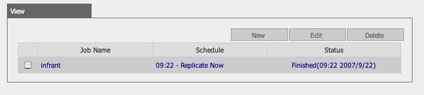
Figure 6: Backup Jobs
This backup feature was well done, powerful, and is the kind of thing that I usually do myself by writing the appropriate scripts and job scheduling. Like the TS-101, the TS-209 also includes a software package to back up data from your PC to the TS-209. Check out my TS-101 review for a description of this package.
The TS-209 Pro advertises itself as a “12 in 1 server.” This refers to the unit running a lot more services than the normal NAS device you’d pick up at your local big-box electronics store. Along with the standard web server, file-server and print server, the TS-209 optionally runs a UPnP multimedia server, an iTunes server, and two different database servers—MySQL and SQLite.
During this review, I got notice of a firmware update, so I re-flashed to the version “V1.1.1 build 0831,” which had several bug fixes, and also includes a popular administration utility for MySQL, phpMyAdmin, which makes it easy to manage your database. Along with the utility, QNAP also provides an Application Note on their web site describing how to use phpMyAdmin to administer and install phpBB, a popular bulletin-board program, on your TS-209.
The TS-209 Pro is not your Grandmother’s NAS. QNAP is clearly targeting sophisticated users. Speaking of sophisticated users, when I reviewed the TS-101, I had to perform an ugly hack to get root-level access to the unit. This is not the case with the TS-209. Figure 7 shows another new feature of the TS-209, the ability turn on either telnet or SSH.
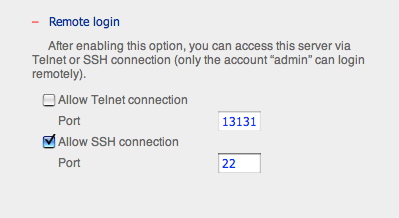
Figure 7: Remote login configuration
Also note the ability to run these servers on non-standard ports for a little bit more protection. For power users like myself, this remote login access is much appreciated. Personally, I don’t even consider using a NAS on which I can’t get a command-line anymore.
For example, earlier in this review when I had a problem with NFS access and my Mac, I was able to fix it. Since I had command-line access, I was able to log in and change the NFS configuration file to be compatible with Apple’s OS X. With most consumer NAS devices, I would have been out of luck and at the mercy of the manufacturer to release an update.
For PHP power users, the TS-209 has a new screen that allows the administrator to edit the PHP configuration file through the web browser (Figure 8), or to upload or save a complete configuration file.
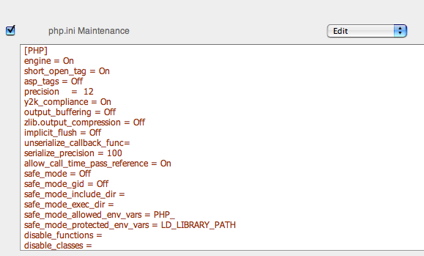
Figure 8: PHP Maintenance
This, and the ability to load new PHP libraries via the command-line, should satisfy the needs of those who utilize PHP in the web server.
Multimedia
Another new feature I see in the TS-209 is the inclusion of a couple of multimedia servers. For serving content to UPnP A/V devices, QNAP has added a server from Twonkyvision. I’ve used this server previously with a number of different UPnP A/V devices, and it has performed well. Figure 9 shows the configuration screen for the Twonkyvision server.
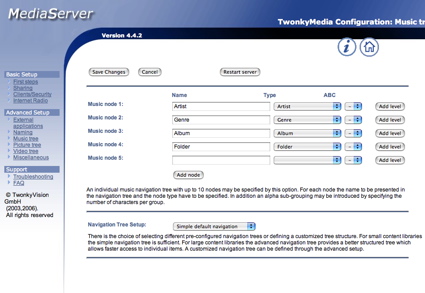
Figure 9: UPnP A/V configuration
The other new server included with the TS-209 is an iTunes compatible server. Figure 10 shows a portion of the iTunes application on my Mac after I’ve connected to the iTunes server on the TS-209 Pro.
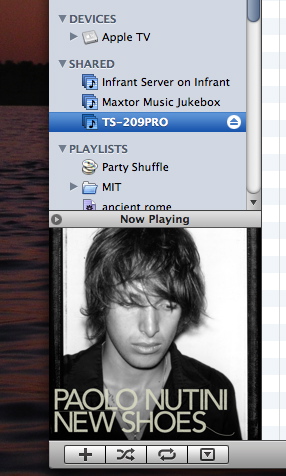
Figure 10: iTunes Support
As you can see, the album art for the selected song has been served up, and the DRM-restricted song played fine. From my poking around with the command line, I could see that the server being used was Firefly. Firefly normally runs a configuration service on port 3689, but when I connected to that port on the TS-209, instead of the standard configuration screen, my browser was served up a binary dump of the “indexnas.cgi” executable that is used internally for many TS-209 services. Oops, something is mis-configured here.
Raid Support
A big difference between the TS-101 (and TS-109 Pro) and the TS-209 is dual-drive support and the RAID capabilities that come with it. Figure 11 shows the RAID setup screen.
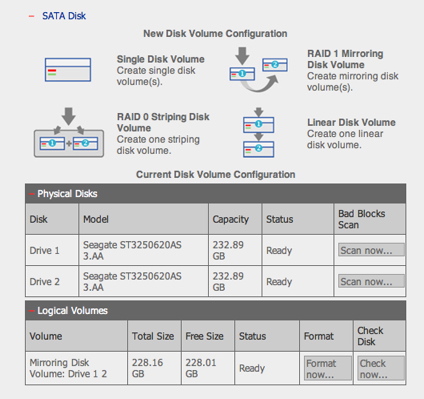
Figure 11: RAID Setup
In this screen, you can see the various RAID modes that are supported, along with a nice description of what each mode means. In this case, I am set up for mirroring mode, where my total capacity is cut in half, but my data is duplicated for security in case of disk failure.
RAID Support – more
To see how the TS-209 performed when a disk failure occurred, I opened up the front panel and yanked out a drive while everything was up and running. The first reaction from the unit was the disk LED on the front panel turning off. Then, a red flashing LED appeared, and the TS-209 beeped twice. Shortly thereafter, I received an email notice telling me that a drive had been removed.
These are the kind of notifications I want to see, and are in contrast to the Iomega 1 TBStorCenter Network Hard Drive I tested recently that gave me no indication at all that anything had gone wrong when I yanked a drive. A check of the disk status screen showed that I was now running in “degraded” mode, and a check of my network shares showed that all of my data was intact and available.
Next, I ran a test to see how well it recovered when the drive was replaced. When Ihot-plugged the drive back in, the disk LED turned on, two more beeps sounded, and the red LED changed to an alternating red/green flashing mode. Once again I received an email, this time telling me that a drive had been added to the system. The disk status screen now showed that the TS-209 automatically had gone into a “rebuilding” mode.
As before, my original data was still available during this rebuilding process. After around 75 minutes, the rebuild completed and the unit returned to a normal state. All in all, the process was very well done, and about as painless as you could hope. The only quibble I had was the lack of a final email telling me that the rebuild was complete, but this is a minor detail.
Performance
To get a feel for performance of the TS-209 Pro, we ran the unit through our standard testing procedure. You can generate your own charts comparing various modes and features with other units, but I ran a few myself to give some basic numbers, and to compare the TS-209 against other comparable units we’ve tested.
NOTES:
- The maximum raw data rate for 100Mbps Ethernet is 12,500 KBytes/sec (12.5 MBytes/sec) and 125,000 KBytes/sec (125 MBytes/sec) for gigabit
- Drives used were two Seagate ST3250620AS 250 GB 3.5 inch SATA (vendor supplied)
- Full test setup and methodology are described here
Figures 12 and 13 are composite read and write throughput vs. filesize plots for all of the benchmark tests we ran. These were generated using the NAS Chart Compare Benchmarks feature.
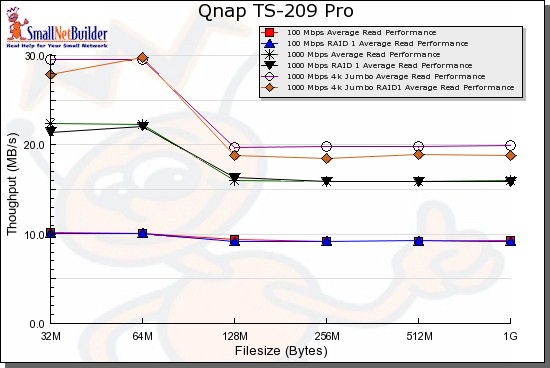
Figure 12: Composite Read Performance
Figure 12 shows that Normal and RAID 1 Read performance is virtually identical for both 100 and 1000 Mbps LAN connections, with a slight difference for gigabit LAN with 4K jumbo frames. Figure 13 shows only a slight difference for 100 and 1000 Mbps LAN connection with more of a difference with a gigabit 4K jumbo frame connection.
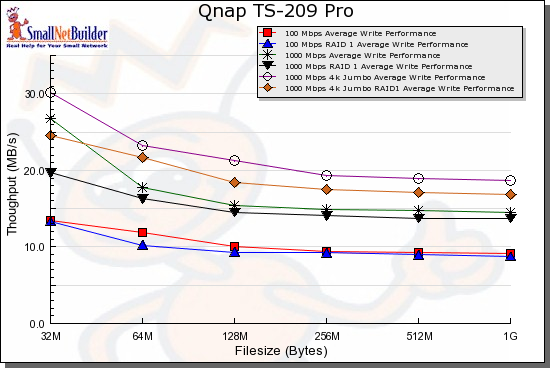
Figure 13: Composite Write Performance
Figures 14-17 show the TS-209 Pro as compared to several
other dual-drive NASes, the Hammer MyShare, the Synology DS-207, the Maxtor Shared Storage II, and the
Iomega StorCenter. As you can see in the comparative charts, the TS-209 Pro fares well against its competitors, leading the pack in almost all cases.
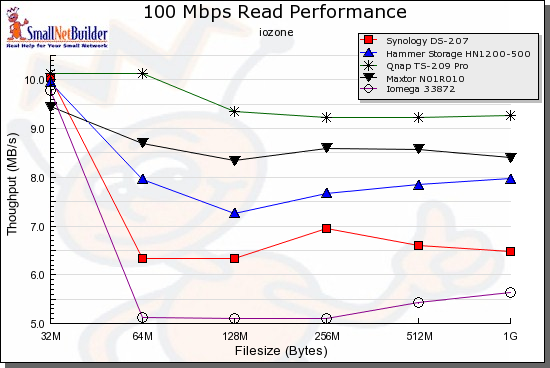
Figure 14: Comparative 100 Mbps Read Performance
Peformance – more
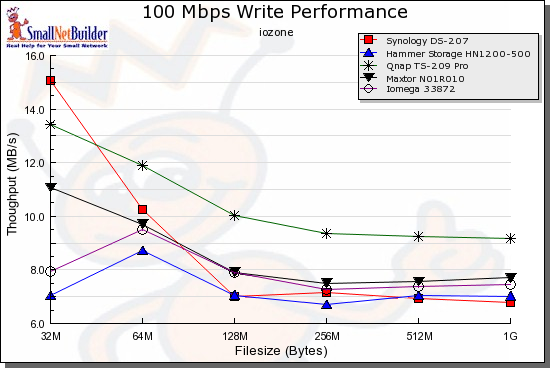
Figure 15: Comparative 100 Mbps Write Performance
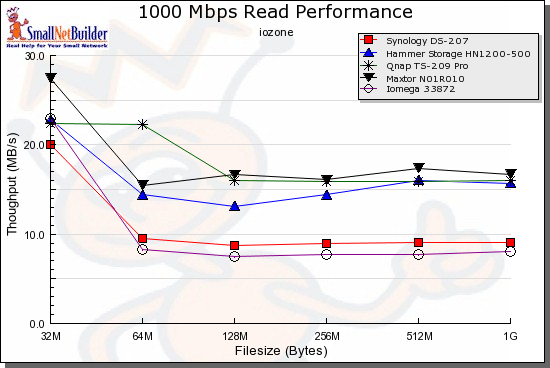
Figure 16: Comparative 1000 Mbps Read Performance
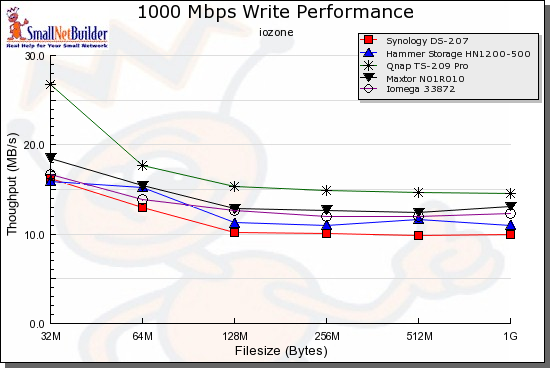
Figure 17: Comparative 1000 Mbps Write Performance
To do a bit of a real-world test, I did a drag-and-drop test, moving files back and forth to the TS-209 with the unit in Mirror mode. For this test, I used my MacBook Pro, 2 GHz Intel Core Duo with 1.5 GB of RAM running Windows XP SP2 natively. The directory tree I copied contained 4,100 files, using just over a gigabyte.
| 1000 Mbps LAN | 100 Mbs LAN | |
|---|---|---|
| Write to TS-209 | ~ 167 sec (6.13 MB/s) | ~ 205 sec (5 MB/s) |
| Read from TS-209 | ~ 184 sec (5.56 MB/s) | ~ 230 sec (4.45 MB/s) |
Table 1: TS-209 Windows XP Drag-and-Drop Filecopy times
Under the Covers
Figure 18 shows the main board of the TS-209 Pro.
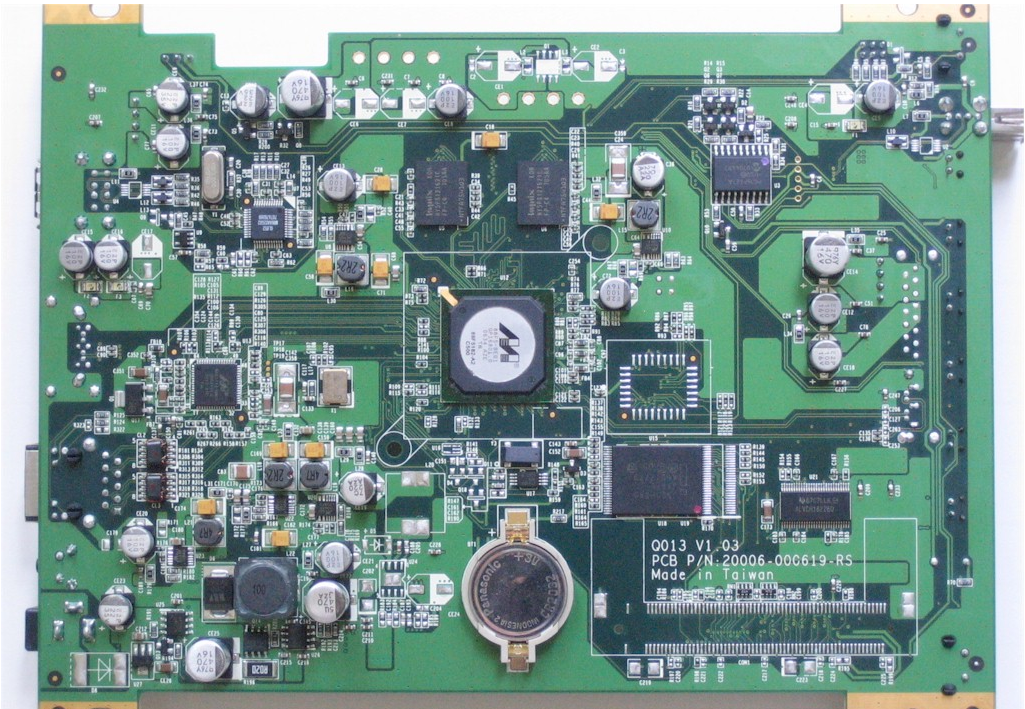
Figure 18: TS-209 Pro Main Board
In this phto, you can see that the main processor of the unit is a highly-integrated ARM-based Marvell Orion 88F5182, which QNAP advertises to run at a relatively speedy 500 Mhz. In other details, since I have command-line access, I can see that the TS-209 is running a Linux 2.6.12.6 kernel, has 128 MB of RAM, and uses ext3 for the file system.
See the TS-209 Pro slideshow for more inside details.
Conclusion
I really liked this product. It’s clear a lot of work has gone into the internal software, the user interface, and the documentation. For a power user like me, this NAS has a lot going for it. On the downside, however, the unit is significantly more expensive than its rivals. The cheapest I found the TS-209 Pro online was $370, and that doesn’t include disk drives. In contrast, you can find the dual-drive Iomga StorCenter NAS online for around $400, which includes a Terabyte of storage.
But sometimes you get what you pay for. If you’re a power user shopping for a NAS, The TS-209 Pro outclasses the Iomega unit in every respect. The TS-209 has many more features, is a much better performer, and seems to be generally better thought out than the StorCenter.
It’s also interesting to compare the TS-209 Pro to the Synology DS-207. Both are BYOD units with a nearly identical feature set. The Synology NAS has a slightly lower price at around $310, but as you can see in the performance charts, it gets handily beaten by the TS-209 Pro in almost every case—a fact I would attribute to a processor that’s around half the speed of the TS-209 Pro. Also, it doesn’t hurt that the TS-209 Pro has twice the RAM of the DS-207.
If you need the extra performance, want the extra functionality it brings, and are willing to pay a bit of a premium, the TS-209 Pro will make a powerful addition to your network.