

Introduction
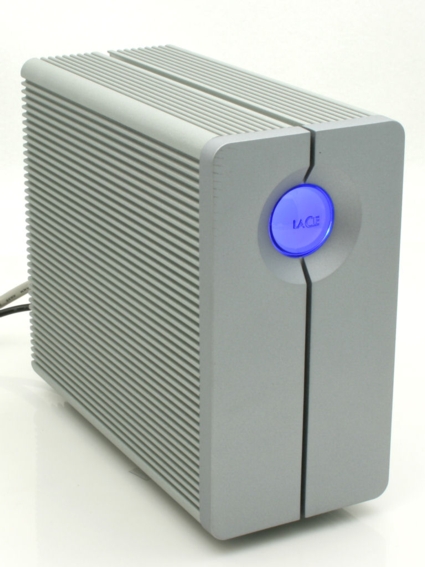
| At a Glance | |
|---|---|
| Product | LaCie 2big Network (301257U) |
| Summary | No-frills 2 SATA Drive RAID 1 NAS |
| Pros | • Gigabit LAN w/ jumbo frames • Seamless RAID 1 re-mirror • Good value ($/GB) • Quiet • Read/write/delete web access to shares |
| Cons | • Low performance compared to other two-drive NAS products • No media or print servers • Unhelpful logging, no email alerts • No idle power down |
Consumers wanting to add additional storage capacity to their networks face an almost dizzying array of choices. On the low end, “brain dead” simple single-drive NASes such as Buffalo’s LinkStation EZ (reviewed) require almost no setup, and correspondingly lack many features.
If you want a fault-tolerant NAS, you need a device with at least two drives in order to configure it for RAID 1 (mirroring). For two-drive NASes, there are a lot of choices, but they basically fall into two categories: BYOD (bring your own drive); or devices that ship with the drives already built in.
If you browse through SmallNetBuilder, you’ll find a number of feature-rich two-drive BYOD NASes; including the QNAP TS-209 Pro (reviewed), the Synology Disk Station DS-207 (reviewed), the D-Link DNS-323 (reviewed), and several others. For each of those devices, you have to buy and install your own drives—something that not everyone feels comfortable doing.
For those wanting the simplicity of a two-drive NAS with drives already installed, there are relatively few choices. Recently, I reviewed the two-drive LinkStation Pro Duo. Now I’m going to take a look at another two-drive device from LaCie—a name long familiar to Mac users.
Product Tour
LaCie chose an interesting name for their two-drive NAS entry—2big network. Though you might think that the large button on the front panel is a power switch, you’d be wrong. The button is actually for automatically copying the contents of an inserted USB key to a network share. Under normal conditions, the button glows blue, but it changes color to reflect degraded RAID status. (More on that later).
The case is formed from heavy-duty extruded aluminum. This is probably the most solid NAS enclosure I’ve seen. Its sheer mass alone gives it excellent cooling capacity, but the 2big does include a two-speed temperature-controlled miniature blower.
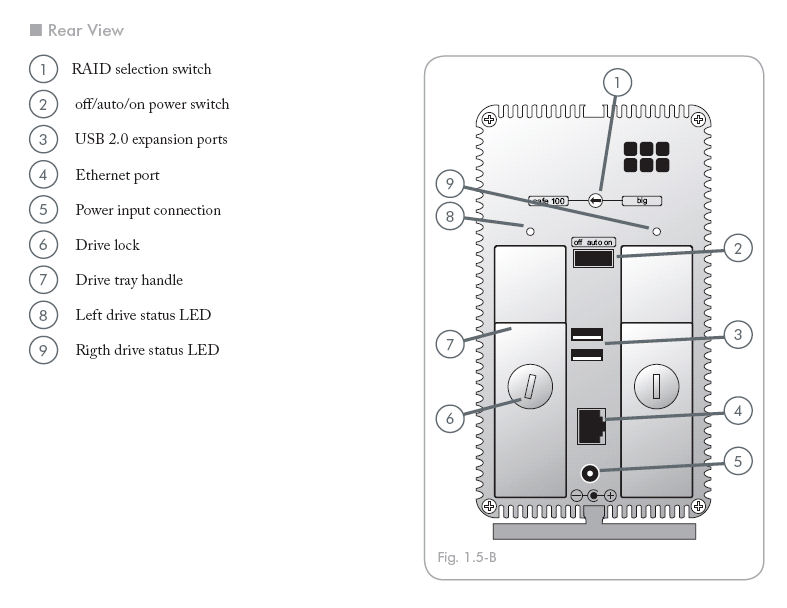
Figure 1: Rear view of the 2big network NAS
The rear panel has two drive-status LEDs, two USB 2.0 ports, a power connector, and two removable drives. The USB ports are only for attaching external storage such as a flash drive or external USB hard drives—the 2big lacks UPS support and does not include a print server.
You lock the drives into position using a screwdriver to turn the slotted locking screw. The rear panel also has a three-position power switch (on/off/auto). If the on/auto/off power switch on the 2big is set to auto, the Shut Down button in the web admin interface will restart the 2big, not shut it down. The 10/100/1000 LAN port supports 4k and 9k jumbo frames.
LaCie made an interesting design decision by putting a RAID selection switch on the rear panel. You can change the RAID switch from “BIG” to “SAFE 100.” “BIG” (JBOD) is the default setting, in which the drives are concatenated for maximum storage (1TB). The name “SAFE 100” refers to the fact that it sets the drives to a “safe” mode, i.e. RAID 1 (mirroring) with 100% data redundancy.
To change RAID levels, you need a jeweler’s screwdriver—a normal small slotted screwdriver is too large. Once you change the selection switch, you also have to log into the management console to confirm the change. Noticeably missing from the back panel is a security slot for use with a security cable.
On The Inside
The 2big network features a fairly standard hardware lineup (see slideshow). It’s based on a 400 MHz Marvell Orion 88F6182 processor with 64MB of RAM and 512KB of Flash. Our test unit was outfitted with two Hitachi DeskStar HDP725050GLA360 500 GB drives (3 Gb/s SATA, 7200 RPM, 16 MB cache). LaCie also sells a 1.5TB and a 2.0TB version of the 2big network NAS.
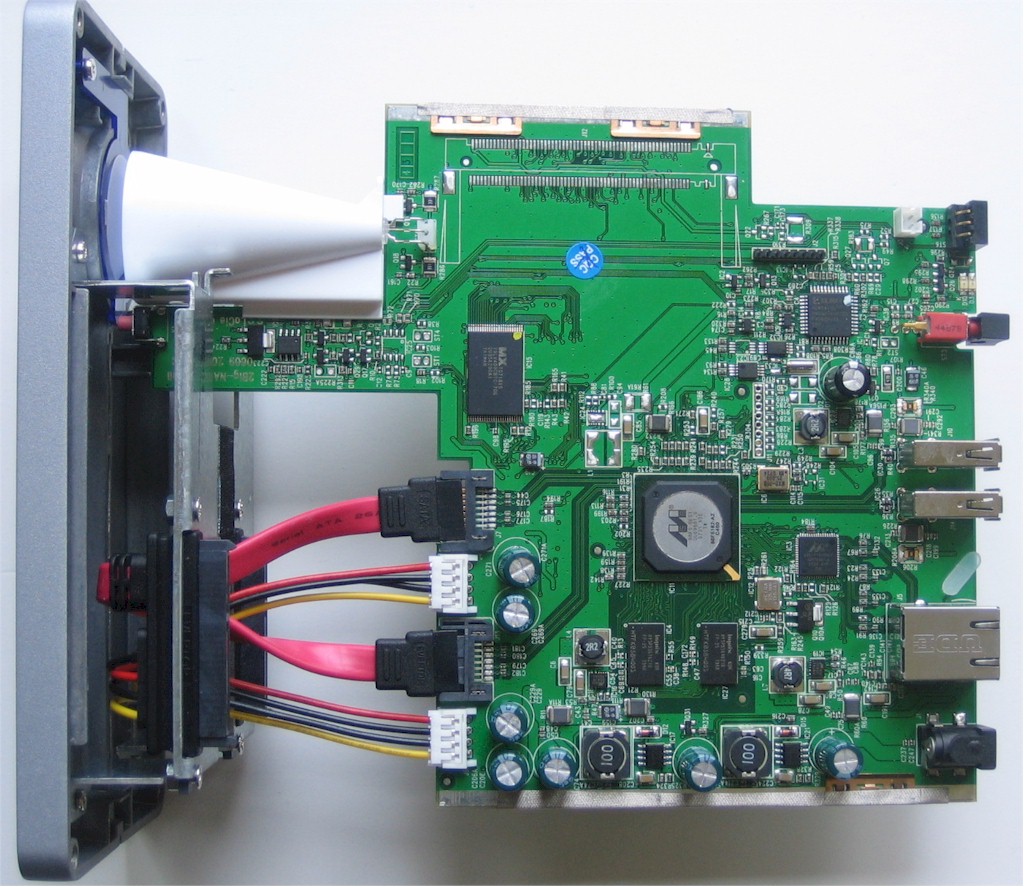
Figure 2: Internal view of the 2big
Power consumption measured around 18 W, a few watts lower than other dual-drive NASes we’ve tested. The 2big is virtually silent, too, given the natural heatsinking qualities of its heavy extruded aluminum case and its use of a small thermally-controlled blower instead of a fan.
 See the slideshow for more internal photos and admin interface tour.
Setup and Installation
Since the drives are pre-installed, there’s not much involved in setting up the 2big. You just plug it into your network, connect the power, and turn it on. Like many NASes, the power supply is an external “brick,” so the heat associated with the power supply doesn’t heat up the case interior. By default, the device will automatically retrieve an IP address from your network’s DHCP server.
To help you find the LaCie 2big device on your network, you can install the LaCie Ethernet Agent, supplied on an accompanying CD. Interestingly, as part of the installation of the Ethernet Agent, LaCie also installs Bonjour on a Windows system.
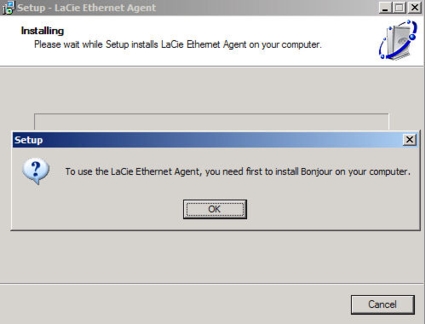
Figure 3: LaCie Ethernet Agent installation includes Bonjour
After completing the installation, the agent will sit in the system tray and discover any 2big NASes on your network. The utility lets you change the IP address of the NAS, disable DHCP, map a share, or navigate to the browser-based management interface.
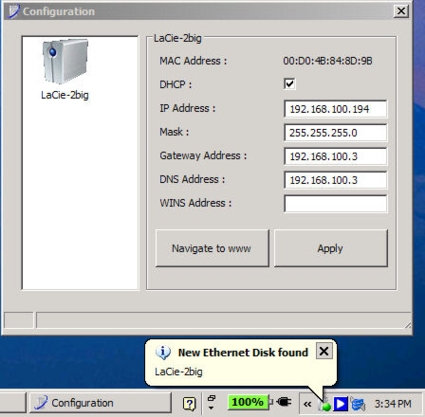
Figure 4: LaCie Ethernet Agent
Setup and Installation – more
By default, the 2big network NAS arrives with both of the drives concatenated so that you get the maximum amount of storage. Of course, you give up fault tolerance with this configuration, but you can start using the device immediately. SMB, AFP, HTTP, and FTP—all of the available protocols on the 2big—are enabled by default.
There is a default share set up and configured for public access. Public access means that anyone on the network has full read/write access to the share without any user authentication. You can either change the access rights of default share or create new shares with different access rights. Guest rights (no authentication, read only), as well as both user and group access rights are supported. Unlike some NASes, “public” access worked the way it was supposed to and didn’t pop up a login box when browsed.
According to LaCie, the 2big network device is a fairly barebones NAS by design. It doesn’t have any built-in media servers such as a DLNA-compliant server for music/video/photos or an iTunes server. Nor does it have the features of a LAMP (Linux, Apache, MySQL, PHP) server that would allow it to function as a web server.
The 2big is intended as a simple networked store and backup device for either a home office, or a very small business office, as it lacks support for active directory, email notification of any kind, or SNMP monitoring. With so many features not included, you’d expect the browser interface to be very simple—and you’d be right.
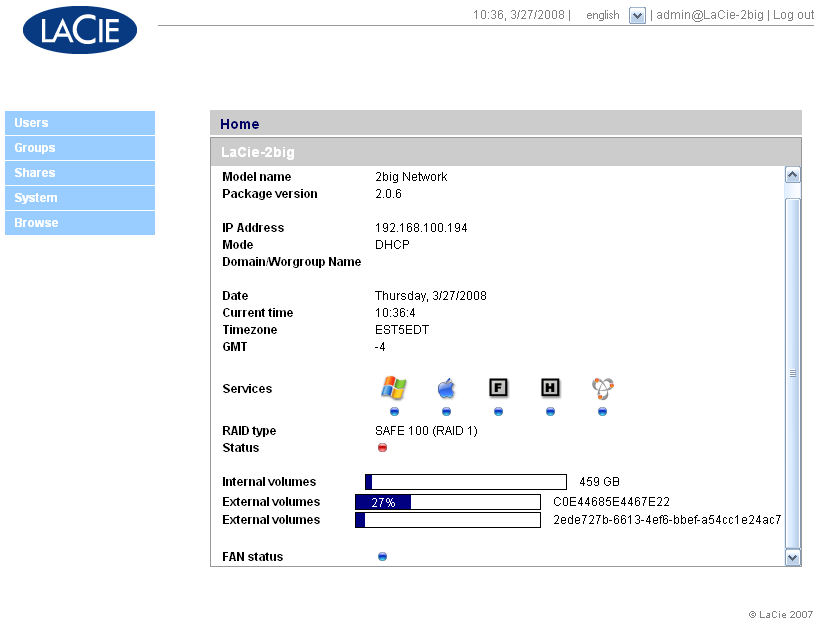
Figure 5: Home Page of the 2big network NAS
The home page provides a summary status of the NAS. In the screenshot above, you can see that SMB, AFP, FTP, HTTP, and Bonjour services are running. The NAS has been configured for RAID 1, but the red dot indicates that it’s running in a degraded mode. Below the RAID status indicator, there’s a listing of both the internal as well as the external volumes. Each volume shows the amount of space in use. There’s also a fan status indicator.
Since it’s such a simple device, there only a few menu options. I’ll comment on each briefly.
Users—This menu allows you to create/delete users, change passwords, enable/disable existing users, assign users to groups, and assign access rights to shares.
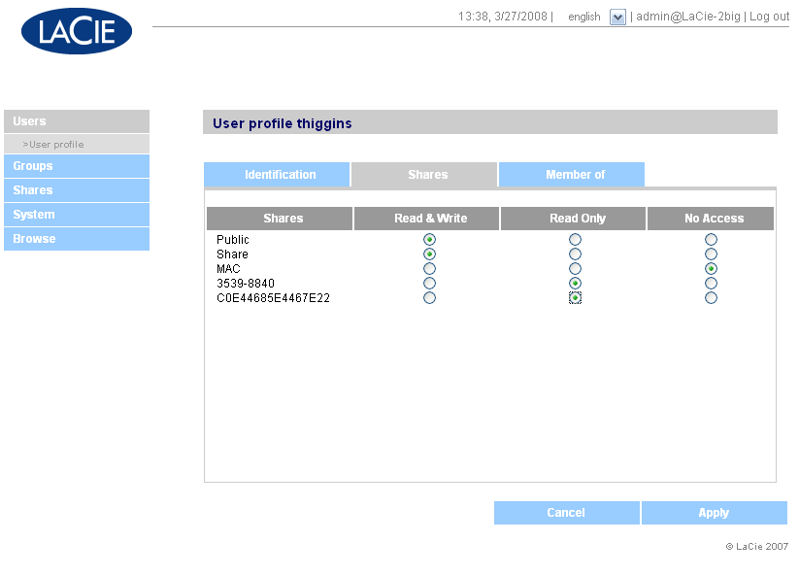
Figure 6: Assignment of user rights to shares
Groups—This menu lets you create/delete groups, assign users to groups, and set group access rights to shares.
Shares—This is the menu where you can create or delete network shares. For each share, you can decide which services to enable and whether to grant public or guest privileges. You can also set both user and group access rights (see Figures 7 and 8).
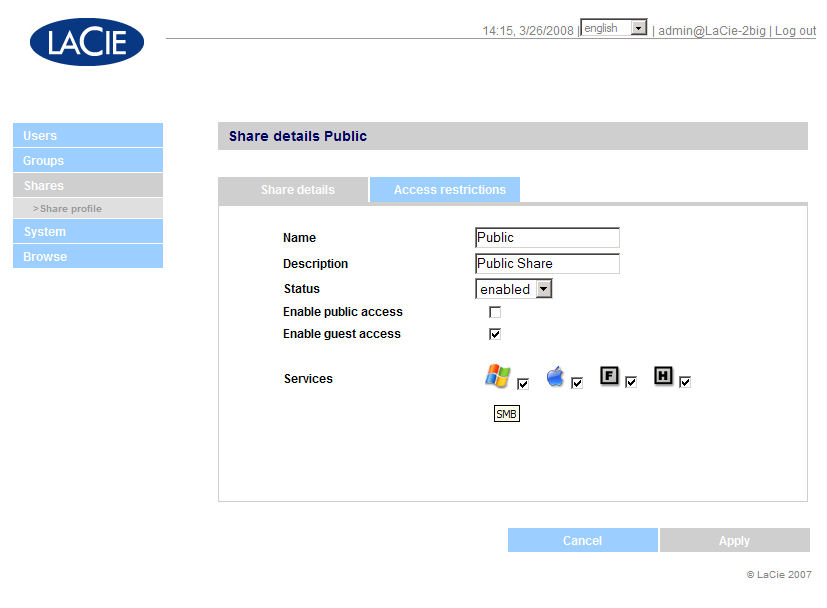
Figure 7: Creating a share named “Public” on the 2big network NAS
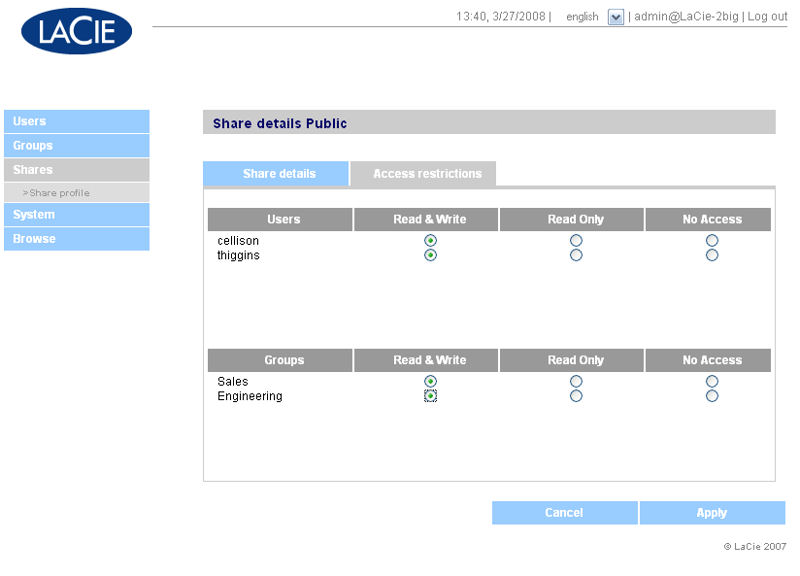
Figure 8: Setting user and group access rights for the share “Public”
System—In this menu, you can manage your network settings, view/format disks, view/change RAID status, view system status and logs, and upload firmware updates. The system logs appeared to be Linux console logs and were of limited use, as they didn’t log FTP, SMB, AFP or HTTP connections. They also did not log when drives failed, or when rebuilds started or completed. I’ll cover disk/RAID in more depth uin the next section.
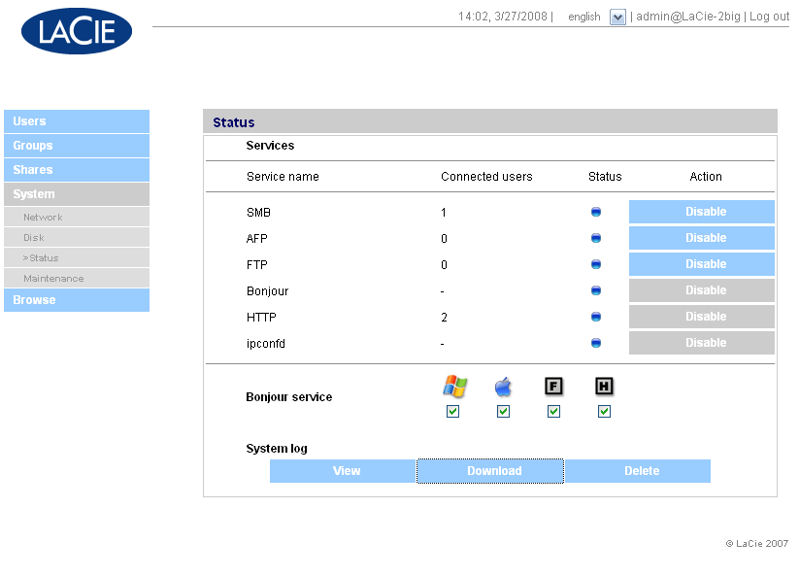
Figure 9: Status screen showing service summary. You see the number of connected users for each service, but no additional user details.
Browse—This menu lets you browse shares through a web browser. With a share selected, you can upload, download, or delete files (depending on your user rights). This browser-based file sharing only works on the default HTTP port 80. You can’t change the default port, nor does the 2big support secure HTTPS browsing. During testing, I was able to upload, download, and delete files using the browser interface.
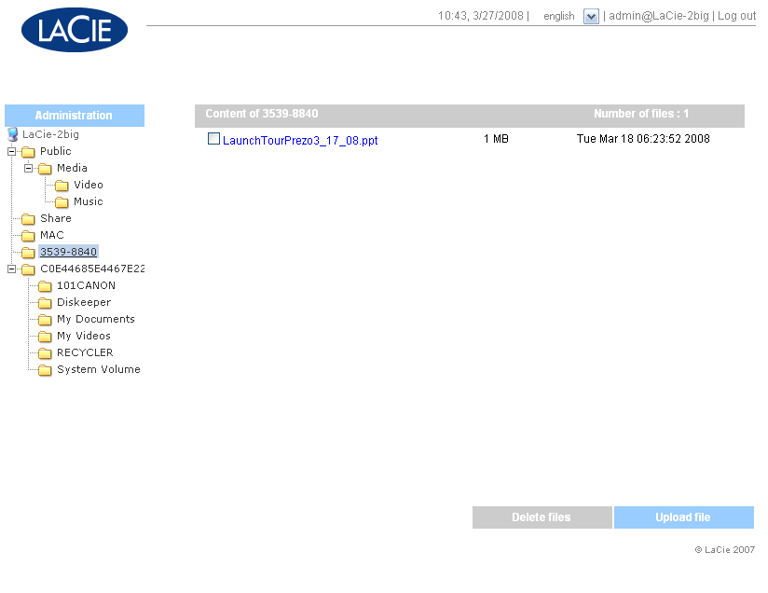
Figure 10: Browser-based file access
Hands On
The two USB 2.0 ports are used to expand the capacity of the 2big. To test this feature, I plugged in a 1GB flash drive into one port, and an external USB hard disk with two partitions in to the second port. Each of the partitions on the external hard drive mounted as separate shares, as did the flash drive. All of the shares mounted as public shares—i.e., full read/write privileges for anyone.
The 2big lets you easily copy the contents of the attached USB storage devices by merely pressing the large, backlit front panel switch. By default, the mounted shares appear with their volume names. When you copy the contents using the USB copy function, additional shares for each volume, also with public access, are created. The name for the share with the USB data that resides on the NAS is the original volume name but with “_snap” (snapshot) appended to the end.
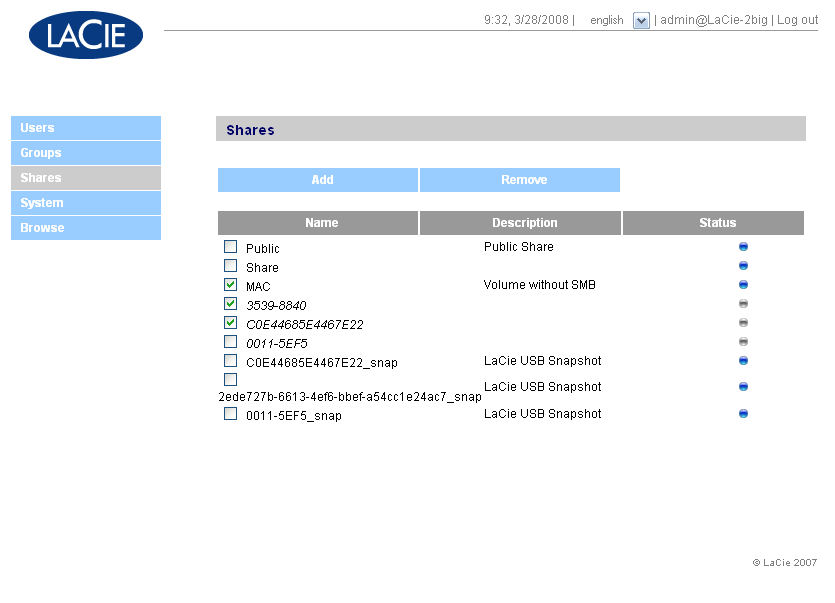
Figure 11: LaCie 2big share page showing attached USB drives as well as LaCie USB snapshot shares
I always like to test how well a NAS recovers from a hard disk failure. That is, after all, one of the main reasons you purchase a two-drive system. Since the 2big NAS arrived with the drives concatenated, I first had to change the RAID setting from “BIG” to “SAFE 100.” Using a jeweler’s screwdriver, I moved the switch to the SAFE 100 position. I then logged into the 2big. When I navigated to the System, Disk menu, I was warned that the switch and the current configuration were out of sync.
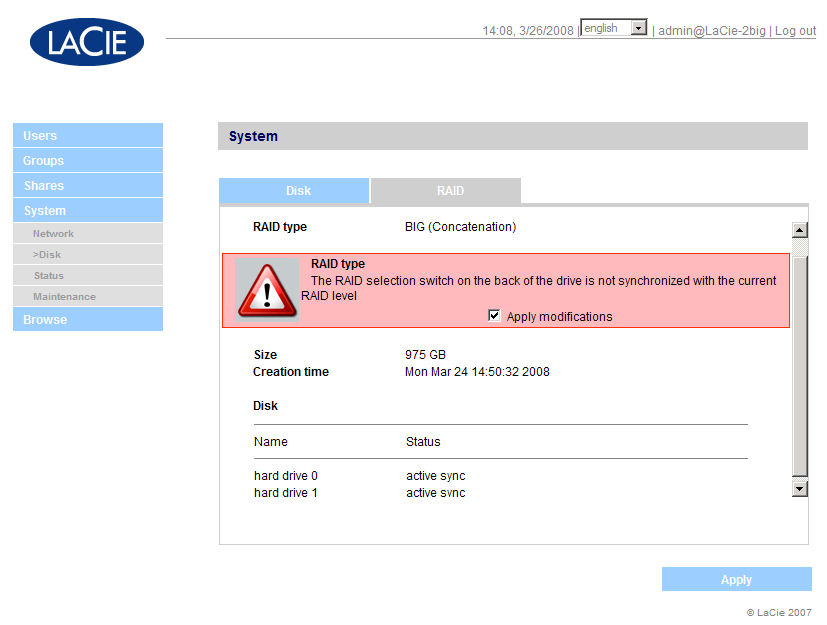
Figure 12: Changing RAID type
I clicked on “Apply modifications.” The system restarted and re-initialized, wiping out the existing data. It took just over 2 minutes for the NAS to come back online. Once it was “up,” I could create shares and write data to the device even though the RAID 1 synchronization took several hours to complete. While the synchronization was in progress, the two LEDs on the rear, which are normally a solid blue, blinked red.
In addition, the large blue indicator on the front panel glowed red. Perhaps it’s a dated reference, but the big red indicator eerily reminded me of the HAL9000 computer in 2001: A Space Odyssey. I should also note that the front panel light was a bit inconsistent in its operation. During the first conversion from “BIG” to “SAFE100” mode, the light never turned red. I also did a USB-copy operation while the array was rebuilding. The front panel light turned from red to blinking blue, as it should. However, when I ejected the key, the light stayed blue instead of turning back to red.
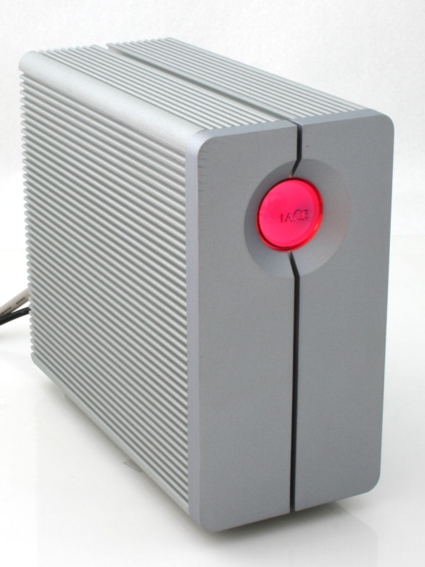
Figure 13: 2big network NAS during RAID synchronization
While the RAID was re-synchronizing, I copied about 25 GB of music files to the 2big NAS. After the synchronization completed, the red front panel status light, as well as both drive LEDs, returned to their normal blue status.
Next, I decided to fail a drive by pulling it out while the unit was still under power (LaCie specs the 2big as hot-swappable). The front panel indicator switched to red as did the drive indicator on the rear panel. Even when running in a degraded mode, I still had access to all shares. I wrote an additional 4 GB to the NAS while it was degraded, and moved my entire music tree down one level to completely change the directory structure on one of the shares.
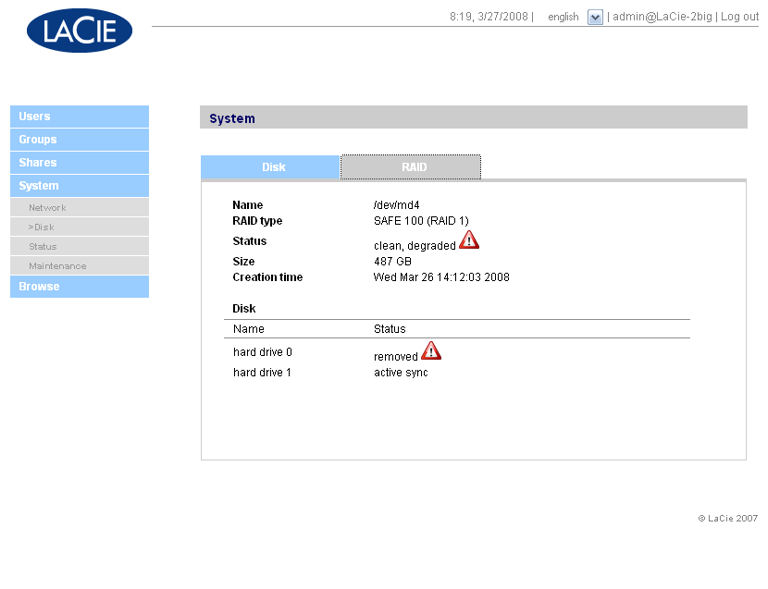
Figure 14: RAID status page showing RAID running degraded and one drive removed
Next, I re-inserted the original drive. The 2big NAS immediately recognized the drive and started re-mirroring. No other user intervention was required. After several hours, the NAS was back to its fault-tolerant state and all indicator lights went back to blue status.
Since LaCie is well known in the Mac community, I wanted to test the AFP capabilities. While it’s true that AFP is only necessary for legacy Macs (prior to OS X), there are probably still some of them around. To test AFP, I created a volume and disabled SMB access. I enabled AppleTalk in my Mac’s network preferences and browsed for available shares. In the screenshot below, you can see that only two shares appeared under “SMB LaCie-2big,” but that an additional share named “MAC,” the one I created without SMB access, also appeared under AFP LaCie-2big.
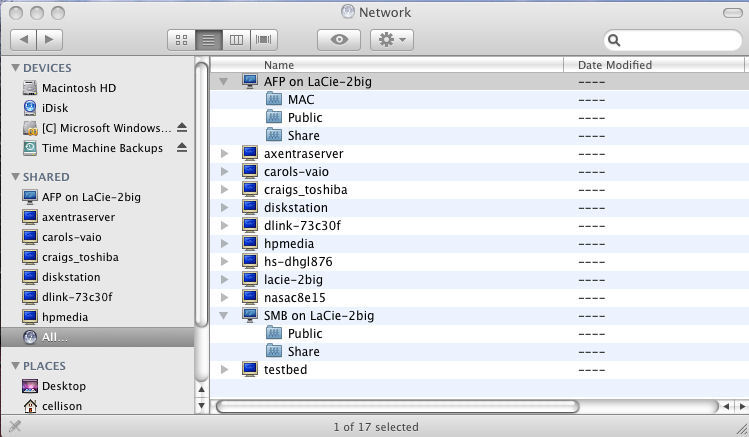
Figure 15: Mac network showing 2big shares on both AFP and SMB
Performance
We already included some performance charts in the slideshow that compared the LaCie 2big NAS with other 2 drive NASes. Of course, you can create your own comparisons using the NAS Charts. For the purpose of this review, I decided to look at 1000 Mbps read/write summary data for all two-drive NASes. Let’s look at the results.
On the large file write performance test (Figure 16), the LaCie 2big network scored dead last with average throughput performance less than 50% of the category leader.
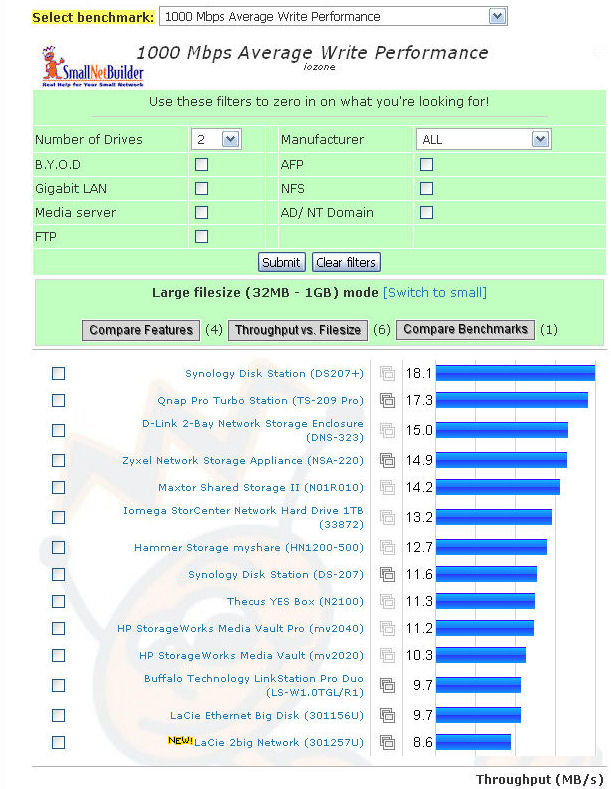
Figure 16: Large file 1000 Mbps Write Performance
Similarly, in the large file 1000 Mbps read performance tests (Figure 17), the LaCie 2big also ranked towards the bottom of the pack. Interestingly, its performance was exactly half of the category leader’s—roughly the same relative performance as on the write test. It fared better only because some of the competition performed relatively worse on the read tests.
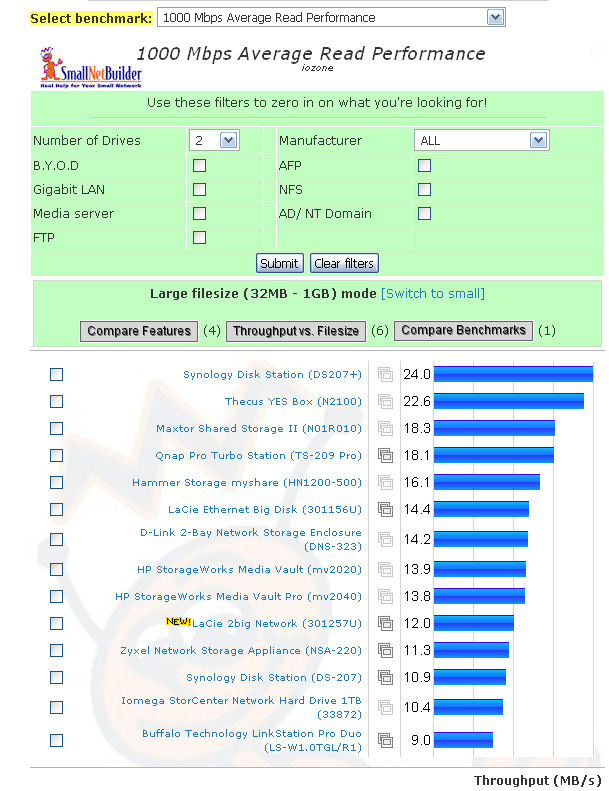
Figure 17: Large file 1000 Mbps Read Performance
When LaCie saw these results, they told us that the 2big was “designed for network security, not speed.” However, they also noted that they “are working on a firmware fix that will increase speeds of the unit.” They didn’t specify a time frame. Nevertheless, when they come up with the fix and it is publicly available, we’ll retest the product and update the results in the NAS Charts.
Final Thoughts
The LaCie 2big network device is designed to be an easy to use, easy to configure NAS. Clearly, the case design is one of the most solid I’ve seen. After several days of running, the case felt only slightly warm to the touch, and I doubt that the miniature blower ever had to kick on.
I realize that you can’t have it both ways—it’s either simple or it’s not, but perhaps the 2big is just a bit too simple—at least for me. As noted, it lacks media and print servers. And environmentally-conscious consumers may disqualify it due to the lack of programmable drive spin down—they stay up all of the time. I was also disappointed that for a device designed to be simple, the browser management interface did not include any on-line help.
The included CD does have an extremely basic “1-Click” backup utility for both the Mac and PC. Additionally, the CD includes LaCie’s SilverKeeper backup utility for Macs. However, the 2big has no built-in backup options for its internal drives, which would seem to contradict LaCie’s “network security” product positioning. Although RAID 1 provides some insurance against drive failure, it is no substitute for having multiple copies of a backup.
While somewhat hampered by a limited feature set and performance that ranks near the bottom of the charts, the LaCie 2big network NAS does offer a good value. Though it has a list price of $429.95, I found some online merchants offering it for as little as $336—approximately a $40 premium over the Buffalo LinkStation Pro Duo.
Considering you’d pay almost $125 for a 500GB Hitachi drive, that makes the 2big NAS a very attractive option compared to some of the 2-drive BYOD NASes that cost about the same as the 2big, but without drives.
Though I did like some of the additional features found on the LinkStation Pro Duo, if I were considering a NAS with built-in drives, I’d probably go with the LaCie 2big. The rebuild of the RAID after a disk failure was simple and seamless—and that’s what you’re really buying a RAID 1 NAS for.
See the slideshow for more internal photos and admin interface tour.