

Introduction
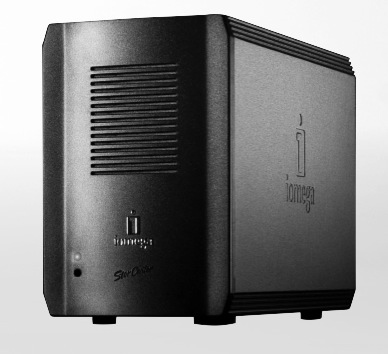
| At a Glance | |
|---|---|
| Product | Iomega StorCenter ix2 (34299) |
| Summary | Marvell-based two drive RAID 1 NAS with IP Camera recording |
| Pros | • Lots of storage for the money • Gigabit Ethernet • Compact size • Windows, Apple and Linux support |
| Cons | • Drives not user-replaceable • Middle-of-the-pack performance • No integrated scheduled backup |
Last year when I reviewed Iomega’s StorCenter Network Hard Drive, I found it to be an inexpensive little NAS with RAID support, gigabit Ethernet and a compact size. Now, a year or so later Iomega has an upgrade to the product that I’ll try out in this review.
Iomega’s ix2 has the same small form-factor as last-year’s model, but they’ve doubled the maximum capacity while only increasing the price a bit. A 2TB ix2 is now priced in the $470 range. The ix2 also has some new fairly unique features. So if you’re interested in a small, inexpensive RAID-capable NAS with some interesting capabilities, read on.
Setup
Figure 1 shows the back of the ix2, which hasn’t changed from the original StorCenter, so I reused the same photo from last time.
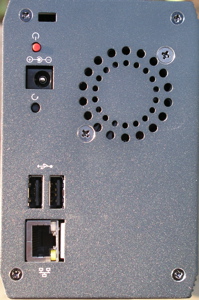
Figure 1: Back Panel
You can see two USB 2.0 ports, power connector, gigabit Ethernet port (no support for jumbo frames, however) and a fan. While the ix2 was running it drew a fairly low 22 Watts, and I judged the fan to be of medium noise-level.
The first time you log into the device, a configuration wizard walks you through the minimum configuration steps of setting the password (Figure 2), time zone, network parameters, etc.
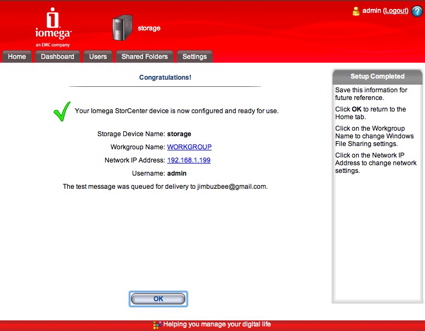
Figure 2: Setup Wizard
Setup software is provided for both Window and Apple users and Linux users are directed to the web interface for their setup. If you have simple requirements, the Wizard does everything you need and the device can be used with a couple of default shares, “backup” and “public”. But if you want to configure further, there are plenty of options. Figure 3 shows the main configuration screen which is accessed through a secure HTTPS connection.
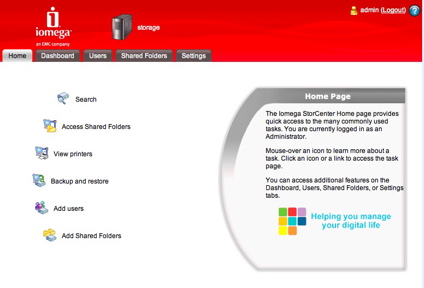
Figure 3: Configuration Menu
Features
In general, the various menus are attractive and functional. Rolling the mouse over the various icons displays help text in the little box on the right-hand side describing what the button is used for—a nice touch. Across the top of this menu, you can see tabs for other configuration items.
It wasn’t clear to me why some items were in the tab menu and others were in the icon menu. And in some cases, the functions could be found in both places. For example, if you want to add a user (Figure 4) you can do it through the “Users” tab menu or through the “Add User” icon.
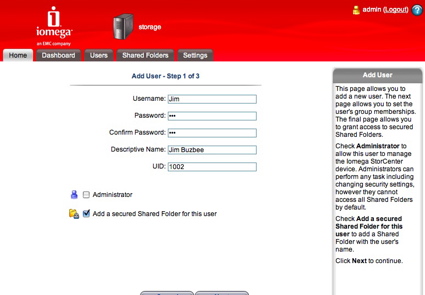
Figure 4: User Creation
The Search menu on th screen in Figure 3 is a bit unique among NASes I’ve worked with. The idea is that you use this menu as a bit of a file manager to find specific files. Figure 5 shows the result of a search.
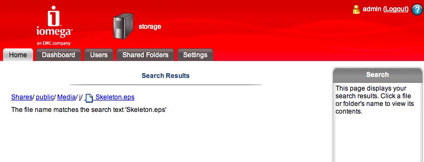
Figure 5: File Search result
The search term refers to file names, not file contents. It is important to note that Search is available without logging in, so keep that in mind when you deploy this device on your LAN (more on this later). In this case, the search located a Skeleton.eps file I had stored.
When you select a file, it gets downloaded or displayed through the web browser. And along those same lines, the “Access Shared Folder” option from the home menu is also designed to allow you to get to your files through the web browser, but I found it a bit odd.
The Access Shared Folder feature requires you to run an application on your computer that installs a web server that serves up pages looking just like the pages from the ix2, with the exception that some menu items had a different ordering. The result was that at times it became confusing whether I was connected to the ix2 or the server running on my computer. The local application will also mount network shares when they are selected from the browser. In general, the Access Shared Folder feature was somewhat cumbersome, confusing and duplicative.
The local application is also used for access to the backup utility, EMC’s Retrospect Express (Figure 6), bundled with the ix2. This nice little application allows you to back up and restore your files to the ix2 with various options such as only backing up specific folders, backing up on a timed basis, etc.
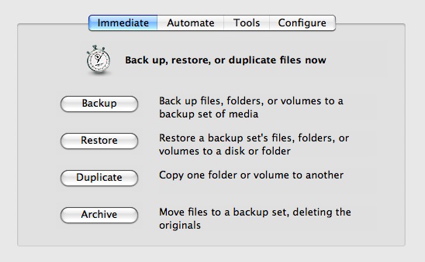
Figure 6: Retrospect Express
Note that the ix2 does not have any built-in scheduled backup features. But in addition to client backup, you can use Retrospect to back up ix2 shares.
The Dashboard tab on the ix2 shows one of the unique features of the ix2: support for Bluetooth. The ix2 itself doesn’t have an embedded Bluetooth device, but supports Bluetooth dongles plugged into the USB port. I couldn’t find any documentation specifying supported models, but it worked with the Kensington K33902 Bluetooth USB Micro Adaptor that Iomega provided for the review.
Figure 7 shows browsing the ix2 from my MacBook Pro. I found that I could use Bluetooth for transferring files to the ix2, but not for reading them.
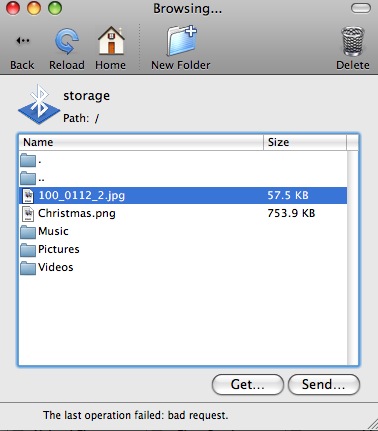
Figure 7: Bluetooth Browsing
Another unique feature that the ix2 supports is network video cameras (Figure 8). The Video Surveillance feature provides centralized management and monitoring of supported IP cameras. Controls provided include manual recording start / stop, scheduled recording, camera naming and password control and recording destination directory.
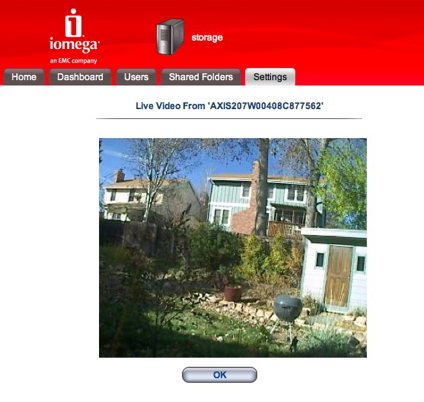
Figure 8: Network Camera Support
Iomega doesn’t have a list of supported cameras posted, but told me that Axis’ entire IP camera line is supported (Iomega provided an Axis 207 camera for the review that worked fine). They also said that any camera that can write to a network share will work, but the ix2 won’t be able to manage it.
For other multimedia support, the ix2 contains a UPnP AV server so if you have a compliant client on your network, you’ll be able to use the ix2 to serve up content. The server also knows how to decipher your iTunes library. So if you put your iTunes content on the ix2, the UPnP AV server can serve non- DRM restricted content to UPnP AV clients. But it is not an iTunes server, so the music on your ix2 won’t show up in iTunes itself.
Features – more
It’s important to know when something goes wrong with your NAS. When problems occur, the ix2 can send email to a specified user. Figure 9 shows the Email Notification page where your info can be entered.
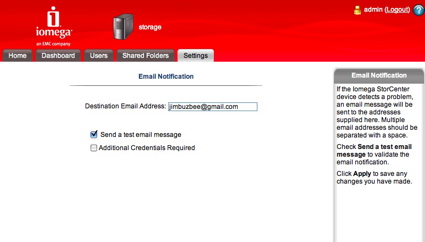
Figure 9: Alert Setup
Note that by default, all you have to enter is an email address. No SMTP server needs to be specified, which is unique among the NAS devices I’ve worked with. (Ed. note: The Maxtor Central Axis Business Edition also uses a vendor-provided SMTP server.)
Also note the “Test” button that allows you to verify that the email alert works. I often have problems with NASes being able to successfully send me email. But in this case, it worked fine even without entering any SMTP server info. If you have issues with this method, there’s an option for entering info for a SMTP server, login credentials, etc.
For web-based problem reporting, there’s also a Log as seen in Figure 10. Note that you can also download the log for preservation purposes.
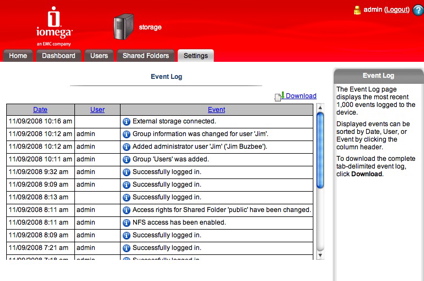
Figure 10: Logging
Figure 11 shows the Settings menu where assorted configuration items such as print serving, UPS support, language setting, etc. can be viewed or changed.
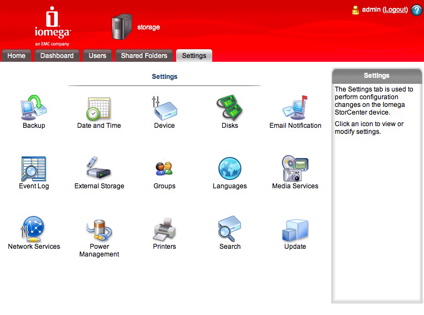
Figure 11: Settings
The Network Services menu (Figure 12) lets you set up your network and add support for NFS, FTP, CIFS, etc.
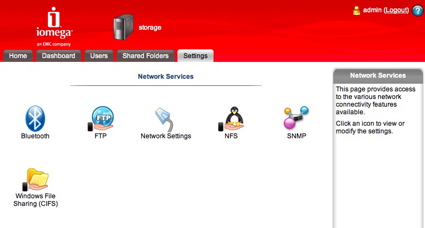
Figure 12: Network Services
Previously, Iomega had support for the Apple AFP protocol, but this has been dropped. Apple users can make use of either CIFS or NFS to get the same basic functionality.
The External Storage menu is where disks plugged into a USB port are managed. I couldn’t find documentation of supported formats, but a FAT32 disk worked fine, and it has been reported that NTFS disks are supported in read/write mode, which is uncommon for many NASes.
The ix2 has the ability to add user groups (Figure 13). So if you’re planning on creating a lot of users with different needs, this will let you give different sets of users different privileges.
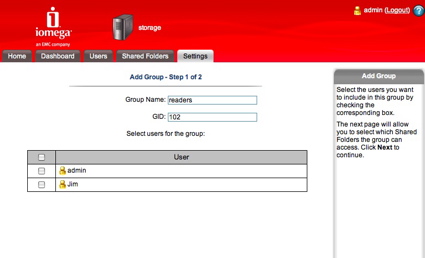
Figure 13: Add Groups
The ix2 can also join a Microsoft Active Directory Domain for user and group management (Figure 14).
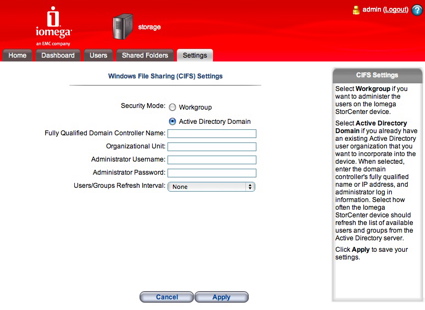
Figure 14: Active Directory Specification
Disk Configuration
The ix2 supports two different ways to configure its drives. The Settings > Disks > Manage Disks > Data Protection screen (Figure 15) is where the magic happens.
You can choose Mirroring (RAID 1) where your data is transparently duplicated but your capacity is cut in half, or JBOD where multiple disks in the box are treated as one big disk. In this case, I have the box set to Mirroring so that if one of my disks fails, I won’t lose any data.
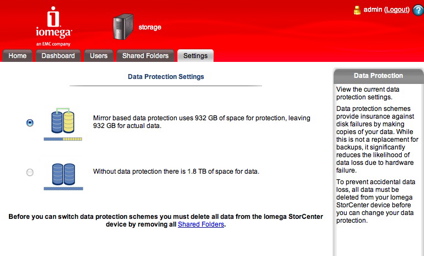
Figure 15: Disk Setup
Note that ix2’s drives are not designed to be user serviceable. So if one does fail, you’ll need to ship it back to Iomega for replacement. The drives are formatted using ext3, so at least you can attempt data recovery on your own before shipping the product back to Iomega. But opening the case will void your warranty.
RAID 1 Fail Test
In order to see what would happen in the case of a failure, I opened the case and yanked power to one of the SATA drives while the system was up and running. The first thing I noticed was a red LED on the front panel telling me that something was wrong.
Shortly thereafter, I received a couple of emails telling me that there had been a failure. The Log file (Figure 16) also noted the problem. As expected in mirroring mode, my original data was still available and unaffected.
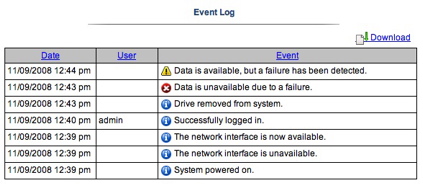
Figure 16: Log of failure
Next, to see how a recovery would occur, I shut the box down, replaced the cable and booted back up. When the ix2 came back up, the red LED started blinking, and I received an email telling me that a recovery was underway. While the recovery proceeded (several hours), my data was still available.
When the recovery was done, I received an email telling me that the process was complete, and the red LED stopped blinking. This automatic recovery was done well and is what you want to see with these devices. But since Iomega doesn’t support user-replacement of a failed drive, you’ll never see it unless you want to void your warranty.
Performance
IOzone was used to test the ix2’s performance (the full testing setup and methodology are described on this page). The test unit had the latest 1.1.17.34772 2008-09-06 00:18 firmware and was tested with 100 Mbps and 1000 Mbps LAN connections.
Figure 17 shows NAS Chart rankings for the 1000 Mbps Write test, filtered to show only two-drive NASes. The bars represent the average of performance for file sizes from 32 MB to 1 GB. The ix2 ends up in the lower third with 11.5 MB/s average.
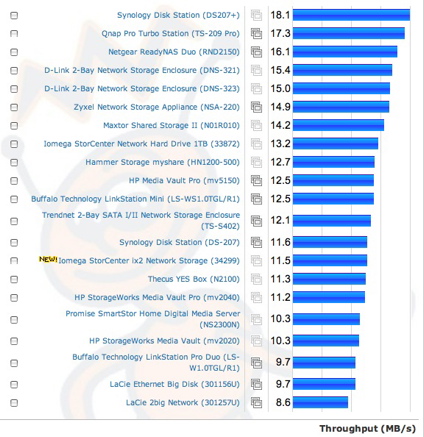
Figure 17: 1000 Mbps Average Write NAS Chart ranking
Read speed is better, ranking in the top third with a 15.6 MB/s average.
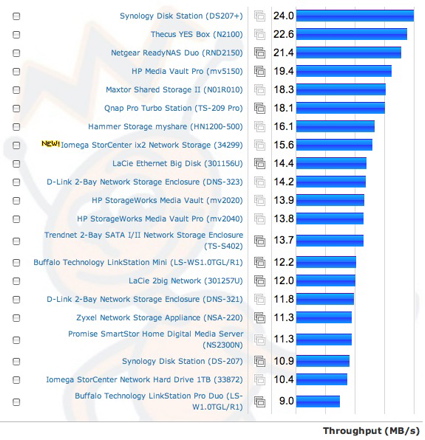
Figure 18: 1000 Mbps Average Read NAS Chart ranking
To compare the ix2 competitively, I chose the Netgear ReadyNAS Duo (RND2150), Buffalo Technology LinkStation Mini (LS-WS1.0TGL/R1) and the ix2’s predecessor, the Iomega StorCenter Network Hard Drive 1TB (33872).
Figure 19 compares write performance with the products configured in either JBOD or RAID 0 with a 1000 Mbps LAN connection. The NETGEAR does consistently best across the range of large file sizes and the ix2 (34299) is the slowest once filesize hits its internal RAM size. Note that the original StorCenter Terabyte, even with half the memory, does better than the ix2.
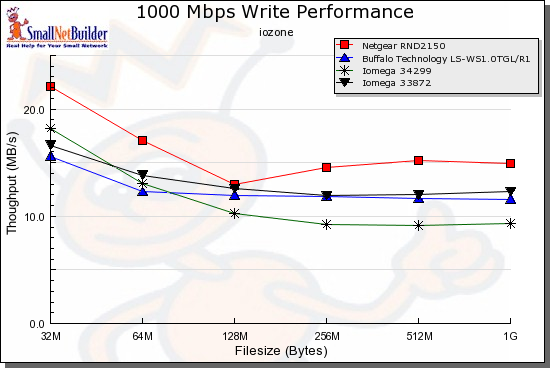
Figure 19: 1000 Mbps Comparative Write
The ix2 does better in the read comparison, actually coming in first after the test file size meets and exceeds the NETGEAR’s 256 MB of RAM.
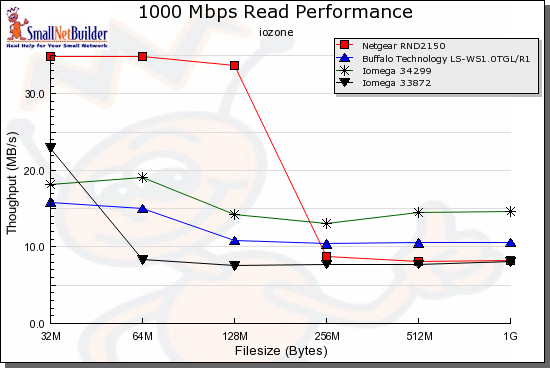
Figure 20: 1000 Mbps Comparative Read
Figure 21 compares the ix2’s write and read performance
with the 1000 Mbps LAN connection. You can clearly see the performance change once the test file size is equal to or larger than the ix2’s 128 MB of RAM.
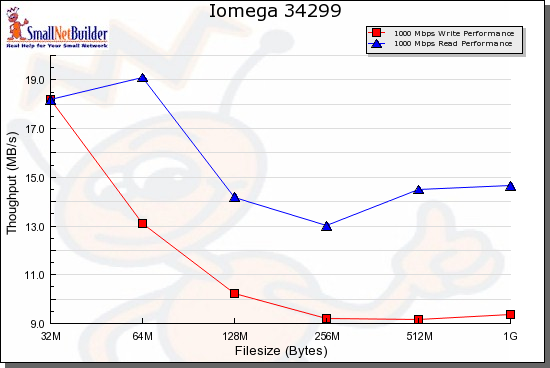
Figure 21: 1000 Mbps Read Write Test
Use the NAS Charts to further explore the ix2’s performance.
Under the Covers
Figure 22 shows the main board of the ix2.
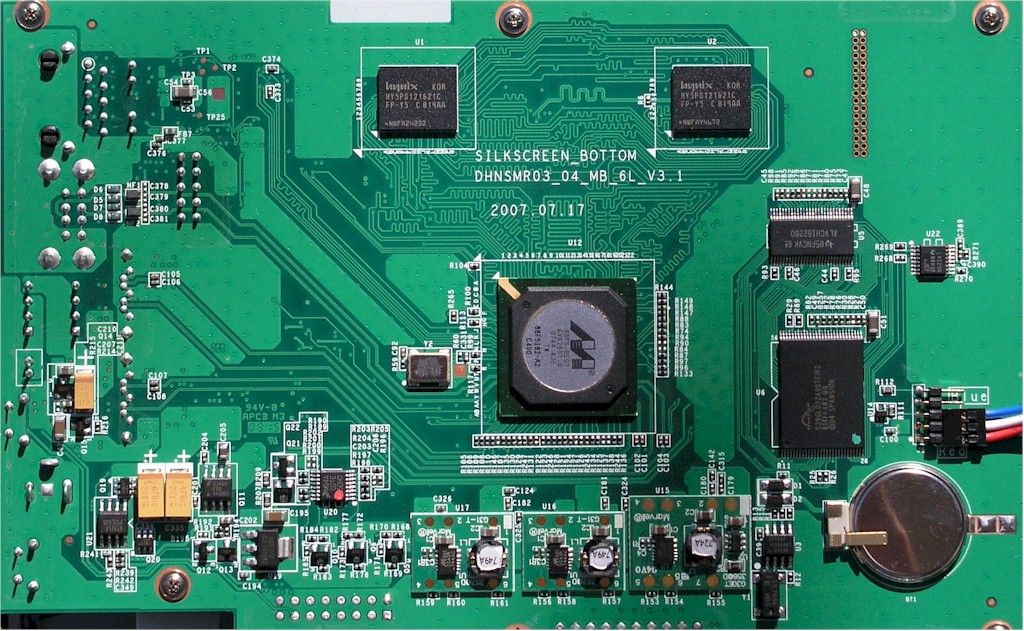
Figure 2: ix2 Main Board
As you can see, it’s pretty sparse. Most of the functionality is provided by Marvell’s 88F5182 “Orion” Network Storage Processor. The two Hynix chips at the top are the 128 MB of RAM and the Spansion device on the right provides 4 MB of flash. You can’t see the Ethernet chip, but if it’s like all other Orion-based NASes, it’s a Marvell 88E1118.
As usual, I always try to get command-line access to find out more about what makes a NAS tick. In my review of Iomega’s original StorCenter Terabyte, I found that I could exploit a bug to easily share the top-level operating system directory using the web interface. Once the OS was shared, I created a startup script to fire off a telnet daemon allowing me to log in as root. Very easy.
This time, I started down the same path, but I found that Iomega had tightened up their interface quite a bit. Attempts to share anything other than the standard directories were properly caught and rejected. And since the interface was encrypted using HTTPS, I couldn’t use an argument-modifying HTTP proxy to make arbitrary changes to the passed-in arguments.
Another exploit I often try is injecting shell commands using the email address specified in the alert form. I tried this and my attempts were once again caught and rejected. What to do?
One possible vulnerability I noticed during my testing was the new “search” capability. I suspected that whatever search term I put in the form would eventually be passed to a shell script on the system to do the actual work. If the search input was not properly processed to remove characters that should not be found in search terms, then it might be possible to submit Linux commands to the search function and have them processed by Linux.
Long story, short, I found that the ix2 did, in fact, have this vulnerability. Not only was I able to submit commands, but could have them reference a script that I stored on an ix2 share. By modifying the script, I was able to find daemons for both SSH and Telnet, enable a commented-out startup script for SSH, create a new privileged user, reboot, and get Linux shell root access that was persistent across reboots. (Figure 20)
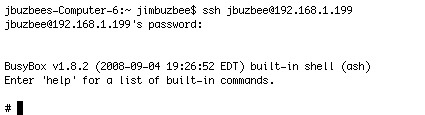
Figure 20: Logging in to the ix2
When logged in, I found a standard embedded Linux system with 128 MB of RAM, running version 2.6.22.7 of the kernel and using common Linux apps such as busybox for utilities and Samba for file sharing. UPnP AV support was being supplied by a Twonkyvision server.
To determine how the ix2 was sending email with no SMTP server specification, I checked out the system log and saw a reference to a commercial SMTP service, authsmtp.com. Looking around for drivers, I saw support for a number of different filesystems such as xfs, ext2, FAT, etc.
Since there is a lot of GPL software in use on the ix2, Iomega should be supplying source code as required by the license. I couldn’t find source to the ix2 on Iomega’s web site or on the included CD. But they do have source posted for their other products, so I assume they’ll make it available soon.
Since the search capability I used to hack the box is available to anyone on the network, anyone could perform the same operation without even logging in. And it would be easy to cause mischief by formatting a URL that embedded a command to do a reboot, reformat, re-initialize, password change, etc.
So I thought it only fair to report the vulnerability to Iomega before posting this review. Iomega responded quickly and has posted Version 1.1.18.37694 firmware that closes the hole.
Closing thoughts
The ix2 isn’t a bad little NAS and has some unique capabilities that I haven’t seen previously, most notably Bluetooth connectivity and IP camera management. And as with the original StorCenter, its price is one of the main draws. At the current low price of $422, it beats out the Maxtor Central Axis Business Edition by $60 and has a better feature set, RAID recovery and write performance, too.
The ix2 did much better than its predecessor with failure-recovery after a disk fail. But it’s unfortunate that Iomega doesn’t support user replacement of failed drives or at least doesn’t void your warranty if you open the box to attempt data recovery before shipping it back to Iomega.
If you’re looking for more features and performance and don’t mind paying more, my picks would be the Qnap TS-209 or the Netgear ReadyNAS Duo. But if you’re on a tight budget, can live without fancier features, are ok with mid-teen MB/s performance and want a lot of storage for the buck, then you might consider the ix2.