
Friday, Feb 10th

You are here: NAS NAS Reviews New To The Charts: Iomega ix2-200 StorCenter Network Storage

New To The Charts: Iomega ix2-200 StorCenter Network Storage

 
Print E-mail

The ix2-200 is basically a two-drive version of Iomega's ix4-200d, available in 1, 2 and 4 TB (tested) versions. The user-replaceable 3.5" SATA drives can be configured only in JBOD and RAID 1. RAID 0 and separate volumes for each drive aren't available.

The ix2-200 runs the same Linux-based EMC Lifeline OS and, except for the volume modes, has all the same features, including the ability to perform immediate or scheduled backups to and from attached drives, rsync servers and SMB/CIFS network shares.
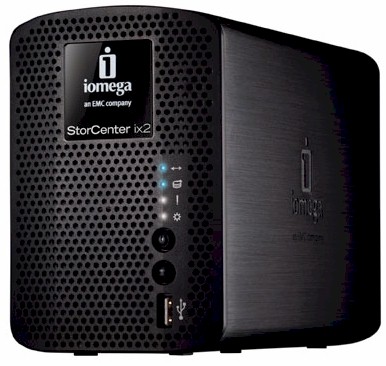
Iomega StorCenter ix2-200 Network Storage

Hardware-wise, the ix2-200 is very similar to its bigger sibling, but with a slightly slower CPU and half the memory. It's covered by a soft thermal pad in the photo below, but there's a Marvell "Kirkwood" 88F6281 processor running at 1.0 GHz instead of 1.2.
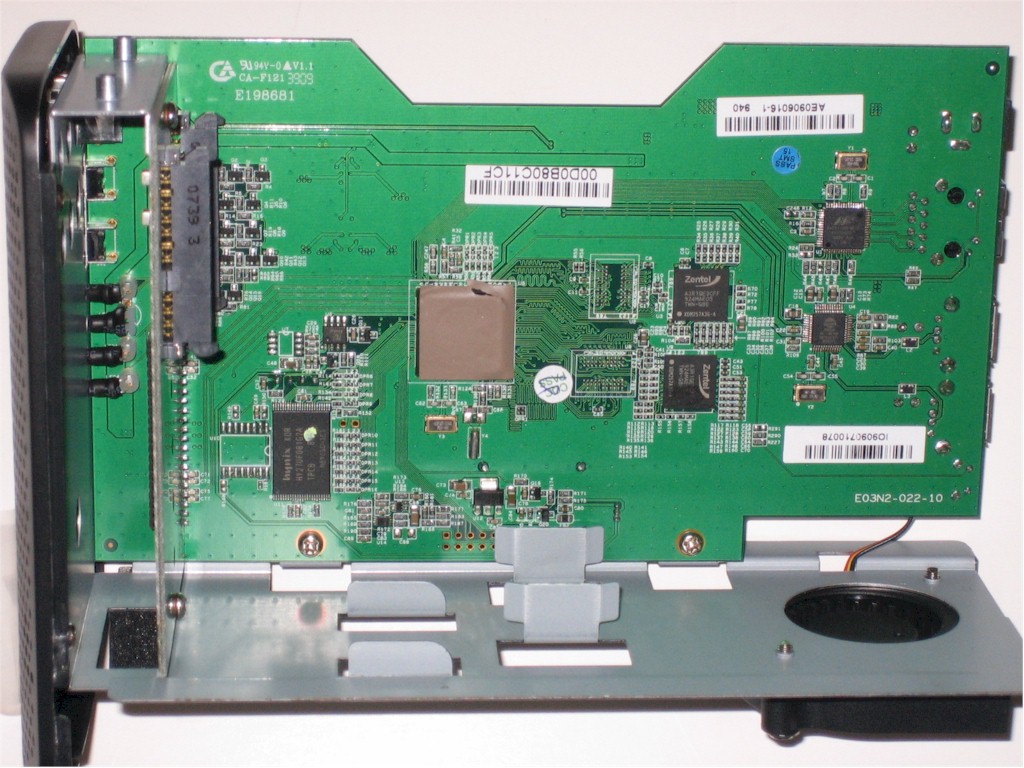
Iomega ix2-200 Pro board
Click to enlarge image

Other components include 256 MB of Zentel RAM, 128 MB of Hynix flash and the often seen Marvell 88E81116R Gigabit Ethernet interface. Three USB 2.0 ports are provided by an ALCOR AU6256 4 port USB 2.0 hub. There's not much to see on the board bottom, except a button battery. There are no eSATA ports and drives are formatted in XFS.

The ix2-200 runs very quietly, in part, due to the use of the miniature blower instead of a small fan. Power consumption measured 18 W with the two Seagate ST32000542AS Barracuda LP 2 TB 3.5" drives in the 4 TB model sent for review spun up. When the programmable drive spindown kicked in (5, 15, 30, 45, 1hr, 6 hr), power dropped to 6 W. There is no programmable shutdown / startup feature, however.

CIFS/SMB, AFP and NFS network file systems are supported, and files can also be accessed via FTP and HTTP. Multiple iSCSI volumes can also be created from the primary volume.

Media features include iTunes and UPnP AV / DLNA (Twonkymedia) servers and there is a download service for BitTorrent files only. You can also view a photo slideshow (uses Cooliris), auto file copy from PTP-enabled digital cameras and record and view from up to five Axis network cameras.

Immediate and scheduled backup can be done to and from CIFS/SMB network shares in addition to rsync targets and attached USB drives. You can also use the ix2 to copy directly between two networked shares instead of to or from its own storage.

Fastest backup of our ~ 4 GB standard filecopy test folder measured 14.9 MB/s using a FAT formatted USB drive. NAS-to-NAS backup of the test folder via rsync to a QNAP TS-239 Pro measured 10.63 MB/s.

RAID 1 write performance with a Gigabit LAN connection averaged 40.8 MB/s for file sizes between 32 MB and 4 GB, with cached behavior not included in the average calculation. Read performance was slightly higher, measuring 44.7 MB/s with the same conditions.

File copy performance using a Vista SP1 client under the same conditions (RAID 1, Gigabit LAN) came in significantly lower for write at 22.4 MB/s, but about the same for read at 41.0 MB/s.

File copy to a 10 GB portion of a RAID 1 volume configured as an iSCSI target measured 29.9 MB/s for write and 26.3 MB/s for read.

Given the similarity to the ix4-200d, a full review isn't planned. See the ix4-200d review for a complete feature rundown. And further explore and compare performance (including backup and iSCSI performance) using the NAS Charts.

Check Price At Amazon

User reviews

Average user rating from: 5 user(s)

User Rating    [Back to Top]
Overall: 
 
3.8 Features :
 
3.8 Performance :
 
3.6 Reliability :
 
4.0
 
Ratings (the higher the better)
Features*
 
Performance*
 
Reliability*
 
Comments*
 

Do not buy Iomegae NAS !!!

Overall rating: 
 
1.0
Features:
 
1.0
Performance:
 
1.0
Reliability:
 
1.0
Reviewed by Martynas
February 09, 2011
Report this review
 

I want warn everybody that Iomega NAS storage reliability is zero. Even more - Iomega also claims lots of money for data recovery even when data loss was caused by Iomega SAN storage device software - logical damage in file system on Iomega NAS.

Short story behind :

Recently I bought Iomega StorCenter ix2-200 device to keep my data safe on mirrored NAS storage. I moved data from my PC to ix2-200 device and was going also to make additional backup on other disk just in case, but was not in time. One day while copying data ix2-200 lost all shares. Bang! Contacted Iomega support immediately and tried various recovery actions advised by engineer - none worked.

The final outcome was - sorry, we can't assist you further with actions that will not cause data corruption, so you might want contact other department in - Iomega Data Recovery. This department can assist to recover data that is important.

As data is very important for me and I had not yet another copy so I shipped Iomega ix2-200 device to Iomega Data Recovery center. After analysis they provided following statement :

„We have finished examining all physical and logical components of your storage media. Based on your situation we have determined that your media has sustained logical damage to the storage media. The main cause of damage is corruption in the file system that makes the data inaccessible.“

And included bill for a 1500.00 € to recover data from logical corruption in the file system ! Iomega Data Recovery is charging 1500.00 € to recover logical corruption in file system caused by Iomega StorCenter ix2-200 device.

Iomega service refuse to talk about data recovery : „As written in Terms & Conditions, Iomega is not responsible for the data loss in any case.“ . They also do not talk about any compensation for the material loss I faced because of the software they deliver with device.

But for me it looks like possibly very profitable business by Iomega – develop software that corrupts file system on storage media and later charge for data recovery sum that is couple times higher than device itself! VERY NICE.

So THINK TWICE before choosing Iomega if you want keep you data safe as later you might have to pay astronomical money back to Iomega for recovery when data is lost because of Iomega NAS storage software caused file system logical corruption.


5 Month Owner of a ix2-200

Overall rating: 
 
4.7
Features:
 
5.0
Performance:
 
4.0
Reliability:
 
5.0
Reviewed by J.Ed
May 22, 2010
Report this review
 

The features compared to the cost is what caught my eye.
I want iSCSI but also had a budget.

Setup is simple, firmware updates are simple (warning recommends you have a backup so plan accordingly) this is pretty standard for all NAS devices.

Runs quiet and adding external USB drives is simple.
Backups run better than expected to external USB drives, plug in the drive and setup the job.

I use it as a file/media share and have streemed movies (DivX , Xvid & VOB) with no issues to a WD LIVE TV.

Support is good, I tend to call support before I buy somehting just to get a sense of what I am in store for if I buy the product. The other selling point was the 3 year warranty (with product registration).

I would recommend the product, I have been very happy with the purchase.


ix2-200 Rocks

Overall rating: 
 
4.3
Features:
 
4.0
Performance:
 
5.0
Reliability:
 
4.0
Reviewed by Greg Shell
April 23, 2010
Report this review
 

Lots of file share and networking support including FTP, AFS, NFS, CIFS, plus UPnP and DLAN media server support., remote access, torrent downloading and automated system status email notifications. It stinks as a printer server so I would recommend keeping your printers attached to a router. So besides the poor printer hosting, it being a little loud and the drives not being hot-swappable, this thing Rocks.

I have been using the ix2-220 for just over three months.


3 months with the ix2-200

Overall rating: 
 
4.7
Features:
 
5.0
Performance:
 
4.0
Reliability:
 
5.0
Reviewed by Lloyd
April 07, 2010
Report this review
 

As the title states, I've owned this for 3 months. It has worked great the entire time. I use it with Windows XP & 7, as well as Linux. I never installed the software that came with the device. I knew that it was not needed, and followed my normal rule of "don't install unnecessary software". Finding the ix2 on windows in the file manager was a matter of simply expanding the network neighborhood. It was a little more tricky on Linux, but mostly because I had to do my research on how to access SMB shares with Linux file manages. Once I knew how, of course it was easy.

I did the entire initial setup while in Linux. Using findsmb, I got the IP address for the ix2, then just used that as the browser URL. I changed the work group to match my windows work group. Set up the email, disk power down, security, etc through the browser interface. I used my router's feature to always assign the same IP address to the ix2, thus I can always log in to the web interface with the same address. One can of course, set a fixed IP address on the ix2 instead of using DHCP to assign an IP address.

I installed a Samsung laser printer and an Epson inkjet printer and both worked. In windows, I simply had to go to the printer folder on the ix2 through the network tree, double click on the printer, and follow the driver install prompts. Easy. On Linux, again it was a matter of learning what to do. Also, again, it was easy once I found that the printer configuration utility was the best way to go, rather than the CUPS interface. A little experimentation later and I had both printers working. Since I have a wireless router, this also allows me to use my laptop with both printers, very slick. The only issue I have run into is that the print server needs a system restart every 5 to 6 weeks. I can print with no problem up to that time, then I will be able to send and print one page, at which point the ix2 print server loses the printers. The pages I sent that do not print are stored in the spooler on the ix2, so as soon as I do a restart through the web interface, the printers are seen and the pages are spooled to them. Since this is only happening once every 5 to 6 weeks, I can live with the need for a restart. Maybe the firmware update will fix this. I'll know in about 5 weeks

If you set up the email alerts, it will check for firmware updates and email you when one is available. I have updated the firmware, and the procedure took a total of less than 10 minutes including the file download from Iomega support. The update worked flawlessly. The web interface gave good feedback on the progress of the update.

I have been researching home NAS devices for over a year. I came close to purchasing one or another, but in each instance there was always at least one issue. Some had poor web interfaces. Others had defective RAID rebuild. Still others did not have enough USB ports. I bought the ix2-200 based on the reviews here on the ix2, ix2-200, and ix4-200d. This product has everything I needed, and many features I haven't needed yet, but are nice to have for the future. I have recommended these products to others based on my experience with the device, and also have pointed others to the reviews here.


Love this device

Overall rating: 
 
4.3
Features:
 
4.0
Performance:
 
4.0
Reliability:
 
5.0
Reviewed by Nick - Edmonton, Alberta, Canada
March 03, 2010
Report this review
 

I have owned this device almost a month now and I love it. Few issues I ran into are that it's system fan does not kick in until it reaches around 69C, and Iomega support is sketchy at best when it comes to questions about this.

As for the Performance I get across a gigabit network 20MB/s to 26MB/s through my Belkin N+ router. I don't see a problem with those speeds and I think I could probably squeeze a little more out with a new router.

As far as features I am very happy, with all except the fact that I am kind of stuck using TZO for DNS forwarding for remote access. The remote access works very good but I would have liked to have a choice.

Very happy with iomega's device here for the price it was the best performance, features and value I could find. The DS210j & Qnap TS-210 were very close with this one for me but could not find a Smallnetbuilder style review that pushed me over the top.

If the money was not a issue I would have looked at the ix4-200d.


Related Items:

New To The Charts: Seagate BlackArmor NAS 110
New To The Charts: QNAP TS-219P Turbo NAS
New To The Charts: QNAP TS-239 Pro
Iomega adds Marvell-powered RAID 5/10 NAS
New To The Charts: Seagate BlackArmor NAS 220

Amazon Top-Selling NASes