

Introduction
| At a Glance | |
|---|---|
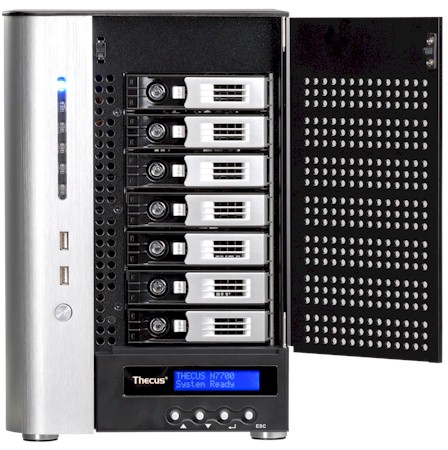
| Product | Thecus 10GbE Ready, 7-Bay Power Storage Server (N7700PRO) |
| Summary | High-performance seven-drive BYOD NAS with optional 10 GbE fiber interface, supporting multiple volumes, EXT3, ZFS or XFS filesystems and iSCSI initiator / target. |
| Pros | • Multiple volume support • Simultaneous iSCSI and SMB/NFS/AFP access • Very high file copy performance • Only NAS at its price level w/ 10 GbE network I/F |
| Cons | • Admin interface is better, but still not as good as its competition • Can’t back up to rsync targets |
I’m going to take a quick look at Thecus’ upgrade of its N7700 seven bay NAS that I reviewed just about a year ago. The N7700PRO is for all intents and purposes the same as its older sibling but with an Intel Core 2 Duo CPU instead of a 1.86 GHz Celeron M and 4 GB vs. 2 GB of DDR2 RAM.
The PRO’s focus is speed, pure and simple, as is underscored by its ability to have an optional 10 GbE fiber interface installed into a PCIe x8 slot in its motherboard. Thecus most recently added a third member to the 7700 line, the N7700+. The Plus sure looks like it’s intended to replace the original 7700 since it has the ability to accept the 10 GbE board, but has 2 GB of RAM and a Celeron M.
Internal Details
The guts of the PRO are essentially the same as the 7700’s except for a new main board. The rear panel with fans comes off with four thumbscrews and the side panels are held on with only two screws each. The left side-panel still has an interlock switch, which prevents system power-up when the panel is removed.
The power supply looks like it is easily removable and Thecus has solved my quandry about how to separate the drive backplane and main board. The backplane now is held in place by two thumbscrews and a third screw, which, once removed, make it easy to separate the backplane and slide out the main board.
Figure 1 shows most of the board. The Core 2 Duo CPU is sitting under one of the heatsinks and most likely North and Southbridges under the others. I don’t know what the clock speed is of the CPU and Thecus isn’t saying. Since they also don’t allow root access, I couldn’t look at the Linux boot records and find out either.
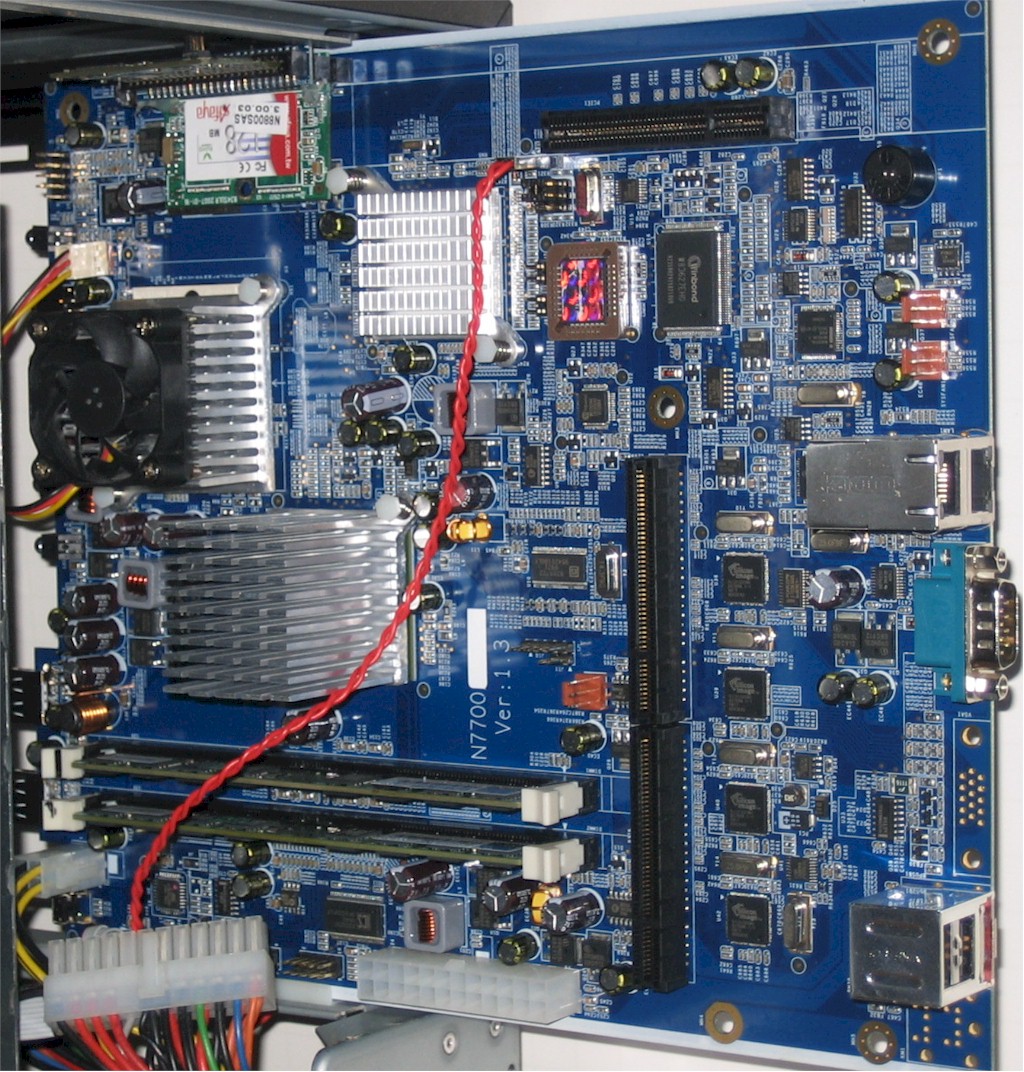
Figure 1: N7700PRO main board
The OS boots from one of two, redundant, 128 MB IDE DOMs. Dual Gigabit Ethernet ports are provided by two Intel WG82574L PCIe Gigabit Ethernet controllers that can be configured in load balance, failover, 802.3ad aggregation modes and support up to 9K jumbo frames.
The seven SATA drives are handled by four Silicon Image Sil3132CNU PCI Express to 2-Port Serial ATA II Host Controllers. There is also a Winbond W83627EHG multipurpose I/O controller and two DIMM slots holding two 2 GB sticks of RAM.
The drive bay supports seven hot-swappable 3.5" SATA drives (drive compatibility list) and Thecus supplied Seagate Barracuda XT 2 TB drives (ST32000641AS) in the review unit, which yielded total power consumption of 97 W with all drives spun up.
Fan noise is high, meaning the NAS is very audible in a quiet room with multiple computers running. However, drives can be scheduled to spin down after 30 to 300 minutes of inactivity (30 minute increments), which reduced power consumption to 41 W. You can also schedule different power on/off times for each day of the week.
Improved GUI
Thecus has continued to improve its new AJAX-based admin interface, both with additional features and a little fresher look. But some things like the cutesy animated login screen (Figure 2) feel out of place in a product clearly aimed at business users.

Figure 2: Animated N7700Pro login screen
Features
Here is a summary of the N7700PRO’s feature set for quick reference:
- Network file sharing via SMB/CIFS, NFS, AFP
- Hot-swappable JBOD, RAID 0, 1, 5, 6, 10 with hot spare for RAID 1, 5, 6 and 10
- Online RAID expansion and RAID level migration
- FTP (and -SSL) with upload / download bandwidth control
- HTTP / HTTPs file and admin access
- Joins NT Domain / Active Directories for account information
- Network Backup: Once daily, weekly or monthly networked backup to other Thecus NASes using proprietary nsync protocol or to standard FTP servers. No compression or encryption
- Client Backup: FarStone DriveClone PRO 5 (Windows only)
- Scheduled Backup to USB and eSATA drives (via installable module)
- iSCSI target (5) and initiator
- ISO mounts
- User quotas
- Email alerts
- Logging
- USB print serving
- Apache webserver (via installable module)
- Media servers: UPnP AV / DLNA, iTunes
- Web photo album
- BitTorrent / HTTP / FTP download service w/ scheduling
- Webcam recording and playback
Although Thecus has included consumer features like media, iTunes and photo servers, the PRO’s real value lies in its ability to simultaneously support iSCSI and SMB/NFS/AFP access and create multiple RAID volumes. When you create a volume, you can choose from EXT3, XFS and ZFS formats (you must use ZFS if you want volume snapshots).
Figure 3 provides a taste of the admin GUI in the V3 OS. A handy My favorite feature lets you put a shortcut to any screen on a special page that you can access via the My favorite link at the top of each page. While not yet the equal of what you’ll find in Synology and QNAP’s GUIs, Thecus is slowly getting to within striking distance.
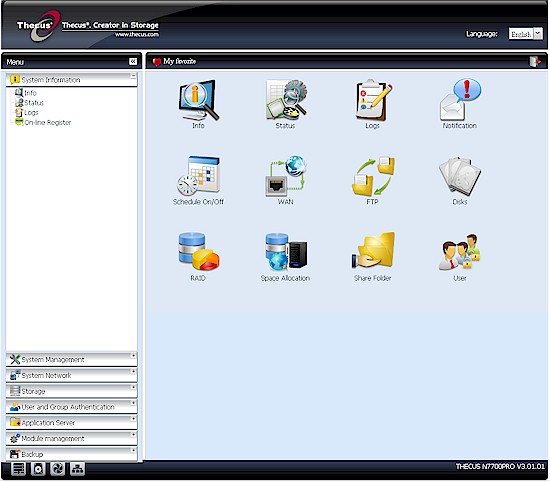
Figure 3: Admin GUI My favorites page
Thecus is also finally making progress in the area of backup. A free installable module now adds schedulable backup to USB or eSATA attached drives (Figure 4). It ain’t fancy, but it’ll get the job done. I was able to use the module to run backup tests to USB and eSATA drives.

Figure 4: Attached backup module
Unfortunately only FAT, vfat and ext3 formatted drives are supported and there is no built-in format capability. So I was only able to test FAT backup, which came in 55.8 MB/s for eSATA and 25.36 MB/s for USB. The USB performance is good, but the eSATA rather low for such a high-end NAS.
Figure 5 shows the other available modules, which I didn’t check out.
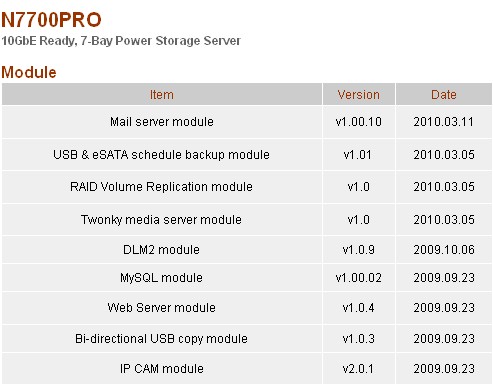
Figure 5: N7700Pro modules
Thecus has also been working on adding support for general rsync targets instead of only its modified "nsync" flavor. An rsync target enable has been added to the Nsync Target page, which I assume allows the PRO to act as an rsync target (I didn’t test this).
Figure 6 shows a Native Rsync server option when setting up an "nsync" network backup task, but don’t get your hopes up. Note there is no place where you can specify the rsync target or path within the target. Thecus obviously still has some work to do here.
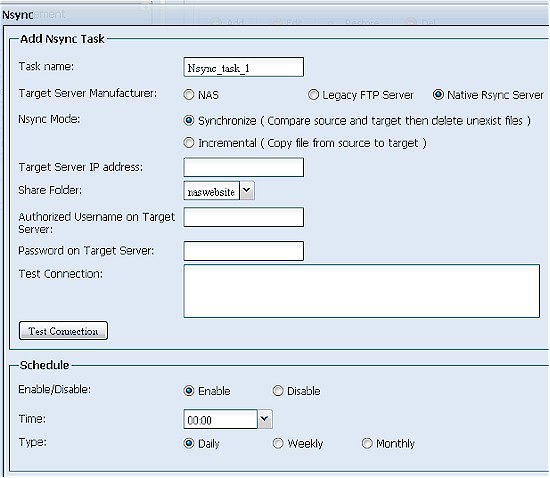
Figure 6: Misleading rsync backup setting
Performance
The N7700PRO was tested with our standard NAS test process with 3.01.01 firmware and seven Seagate Barracuda XT 2 TB drives. Tests were run with 1000 Mbps and 1000 Mbps w/ 4K jumbo frame LAN connections.
Due to reader feedback, I tested with all seven drives configured into single RAID 0 and 5 volumes, instead of using only four drives. RAID 10 volumes can only be configured with an even number of drives, so I used six drives for those tests. Due to the > 8 TB volume size, I used XFS instead of EXT3 to format all the volumes.
Figure 7 presents a summary of the iozone-based benchmark tests run for the PRO. The cache boost dropoff point tended to move around for all three volume types among the three runs that I do for each test. But once caching effects die down, it’s remarkable that for all three modes and both read and write, performance settles into the mid-to-high 60 MB/s range.
So Write performance with a 1000 Mbps LAN connection averaged over the 32 MB to 4 GB file sizes and with cached results above 125 MB/s removed from the average measured 77, 64.9 and 66.1 MB/s for RAID 0, 5 and 10 writes, respectively. These results have the PRO being soundly beaten by less-expensive four and five drive products like the QNAP TS-459 Pro and Synology DS1010+.
Read results were similar, coming in at 69.4, 71.6 and 71.9 MB/s for RAID 0, 5 and 10 writes, respectively.
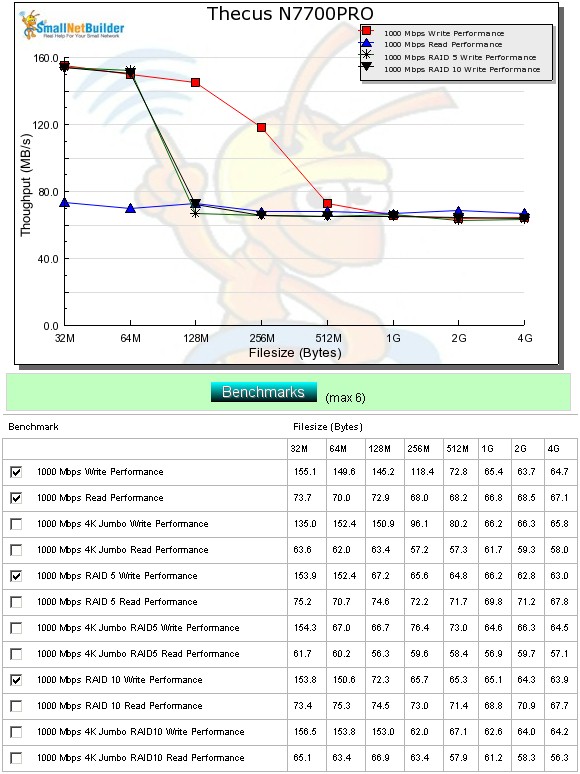
Figure 7: Performance benchmark summary
These results seemed rather low for a product that could be equipped with a 10 GbE interface, so I went back to Thecus to check them. After a few months of back-and-forth, Thecus finally came back with the explanation that their testing—and performance claims—are based on tests done with Iometer and Intel’s NAS Performance Toolkit.
They didn’t say that they achieved results similar to mine using iozone, however, only that they needed to do more work with it. They did send the test results shown in Table 1 to show that the PRO can indeed make good use of its optional 10 GbE LAN interface. I was not able to verify these claims since the SNB test bed does not have a PCIe x8 slot to install the NIC they sent. (A list of compatible 10 GbE NICs is here.)
| RAID 0 | RAID 5 | |
|---|---|---|
| Write | 501.18 MB/s | 476.21 MB/s |
| Read | 559.73 MB/s | 546.72 MB/s |
|
Test System: – Super Micro SYS-7046T-H6R – CPU : 2 x QuadCore Intel Xeon E5540 – RAM:12GB (DDR III – 1333) Hynix HMT125R7AFP8C-H9 2GB x 6 – OS : Windows 7 Professional 64Bit – 2xHDD RAID0 ATA Hitachi HDT72103 SCSI Disk Device (298 GB) X 2 N7700PRO |
||
Table 1: Thecus N7700PRO test results using 10 GbE interface – Thecus provided
Performance – File Copy
Lest you think that the N7700PRO can’t really deliver the goods in the speed department, just take a look at the Vista SP1 file copy results in Figure 8. This test is more of a real-world representation of the performance you’ll get with Vista and Win 7, assuming that you have a fast enough client.
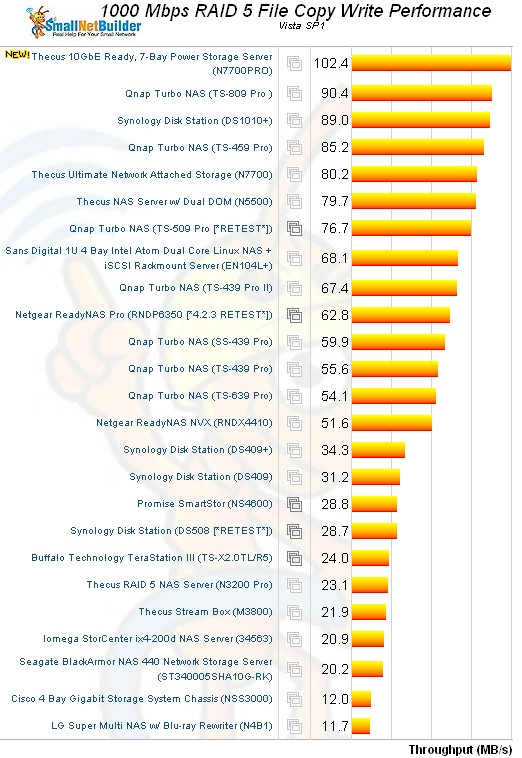
Figure 8: Vista SP1 File Copy – RAID 5 write
The N7700PRO beats everything else on the chart by over 10 MB/s with a chart-topping 102.4 MB/s. RAID 5 filecopy read also has the PRO at the top with 101 MB/s. RAID 10 is even a bit better, coming in at 106.2 MB/s for write and 103 for read!
Finally, iSCSI target read and write were tested using a RAID 10 volume and yielded 95.9 MB/s for write and 91.8 for read, earning the PRO top chart spot for write and third place for read.
Use the NAS Charts to further explore performance.
Closing Thoughts
The N7700PRO is after the server-replacement market that QNAP is pursuing with its TS-8XX series, Synology with its DS1010+ and DX510 Expansion Chassis and NETGEAR with its ReadyNAS 3200 and 4200. So it’s not going to be on the average small and even not-so-small networker’s shopping list.
I haven’t tested the ReadyNASes (and probably won’t, given their wallet-busting price points). But the N7700PRO outperforms the Synology for file copy duties and writes to it as an iSCSI target, and essentially ties it for iSCSI reads. So the PRO looks like a more cost-effective way to go than the DS1010+ and DX510 expansion chassis combo, if you want a lot of storage in a relatively compact desktop package.
Thecus is making steady progress at closing the software gap with its competition. The new V3 firmware is its best version yet, although still a bit rough around the edges. But you can finally try it yourself via an online demo. The demo is for the N5500, but all the features are the same since it’s currently running the same 3.01.01 version that I tested on the N7700PRO.
The other area where Thecus continues to lag is in support. It still comes across as disjointed (why are there two forums, with the more active one being the "Third party" forum instead of the company?) and amateurish (the company Forum is "I Love Thecus"…really?). And you still get the feeling that Thecus wants you file a ticket instead of giving them a call, since there is still no phone number listed on the Tech Support landing page. (It’s on the page where you file a ticket, in a box at the bottom of the page.)
Bargain-hunting consumers might be ok with this. But if I’m going to buy a product that my business depends on, I’m going to make sure that I can get problems fixed, pronto! And that means readily-available phone support, good Forums and meaty knowledge base articles. The N7700PRO may be a damned-fast big box o’ storage. But for business buyers, that’s only one part of what they’re looking for.