

| At a glance | |
|---|---|
| Product | Cisco VPN Router (RV180) [Website] |
| Summary | PPTP / IPsec VPN router with Gigabit ports and high routing throughput |
| Pros | • Fast routing throughput • Decent IPsec throughput • Gigabit ports |
| Cons | • Slow admin GUI • Low PPTP throughput • Basic web filtering features |
Typical Price: $249 Buy From Amazon
Introduction
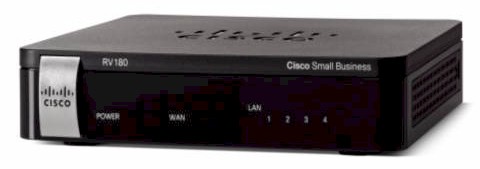
Cisco’s small business router lineup has quite a few models. I’ve reviewed the RV120W, the RV220W and the RV042 over the past 18 months. This review will cover the RV180 wired version. The is also an RV180W, which is basically the same as the RV180, plus a 2.4 GHz 802.11bgn radio. It supports four VLAN-based SSIDs, WDS bridging/repeating and WEP/WPA/WPA2 consumer and Enterprise wireless security.
In terms of features, the RV180/RV180W falls between the RV120W and RV220W. Like the RV120W, the RV180/RV180W provides firewall functionality and supports up to 10 VPN connections, but has faster interfaces and higher throughput with its Gigabit WAN and LAN ports. The RV180’s 10 VPN connections are fewer than the RV220W’s 25 connections and it does not have SSL VPN capability.
Cisco positions the RV180 for small businesses, remote office, and home networks looking for security, remote access and simple configuration. Figure 1 depicts a high level view of the RV180 and its intended uses.
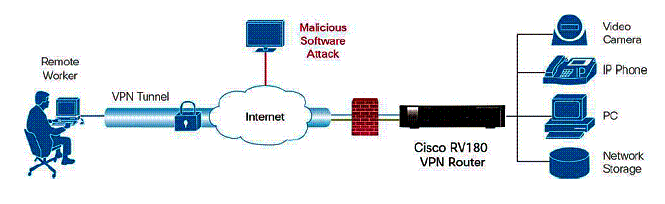
Figure 1: RV180 in use
The RV180 is enclosed in a black plastic case measuring 5.9 in x 1.2 in x 5.9 in. It is passively cooled so runs completely silent. On the front of the device are the indicator lights (Figure 2).
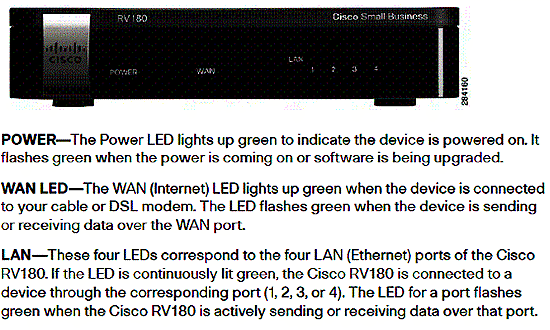
Figure 2: RV180 front panel
On the back are the Gigabit WAN and LAN Ethernet ports, power port, and power button (Figure 3).
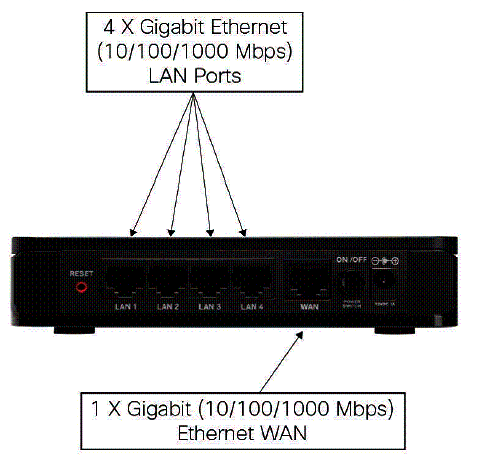
Figure 3: RV180 rear panel
Inside
The RV180 is based on a Cavium Econa 300MHz CPU along with 64 MB of RAM and 16 MB of flash memory. Ethernet ports are provided by a Broadcom BCM53125 7-Port Integrated GbE Energy-Efficient Ethernet Switch.
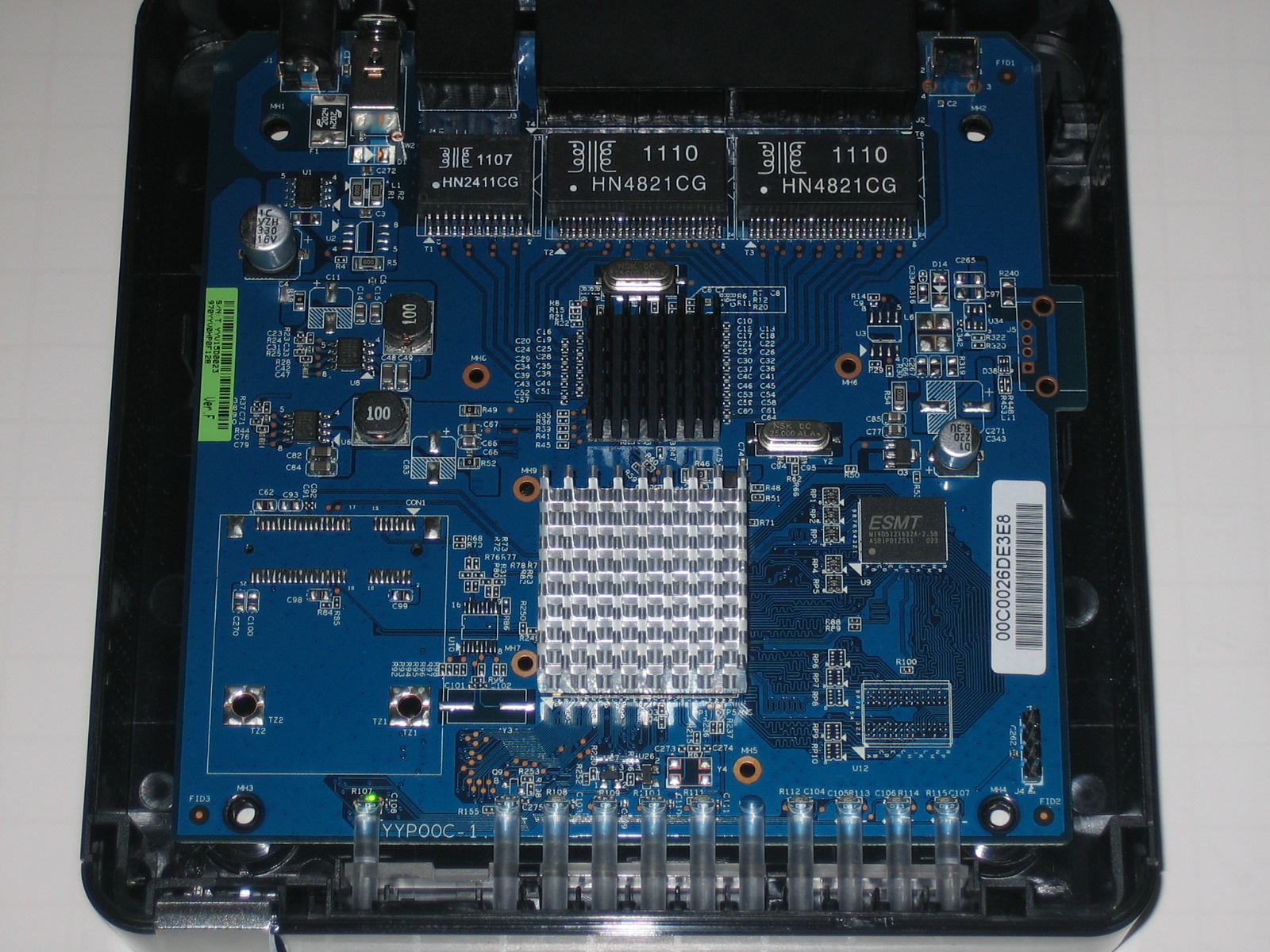
Figure 4: RV180 board
Configuration
The RV180’s configuration menus are similar to the other members of the Cisco RV series. Menus are selectable from a menu bar running down the left of the web GUI, each with multiple sub-menus for viewing status or applying configurations. I’ve laid out the configuration options in Table 1 below.
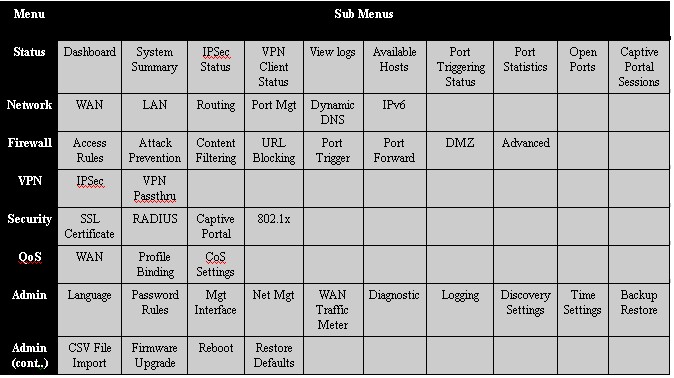
Table 1: RV180 menu structure
There is a single configuration wizard that simplifies initial setup, and I appreciated the help screens available from the RV180 menu. I found clicking help in the top right corner of any screen brought up some useful information. The manual provides more configuration support, but could use configuration examples.
Booting the RV180 takes up to three minutes before the device is fully functional. Also, I found navigating between screens and applying configurations a bit slow with Figure 5 often appearing.

Figure 5: Waiting
VPN Features
The RV180 supports Remote and Site to Site VPN tunnels. Remote tunnels are supported via PPTP and IPSec. PPTP is not included in the RV120W, so it is nice to see in the RV180. Remote IPSec can be established with Cisco’s free QuickVPN client or with other IPSec client software. I was able to use PPTP, QuickVPN, and Site to Site connections simultaneously.
I tested remote client access to the RV180 with PPTP and the QuickVPN client. PPTP is the easier of the two options, as setup on the router involves checking a box to enable PPTP, adding a user name and password, and selecting PPTP as the protocol, shown below.
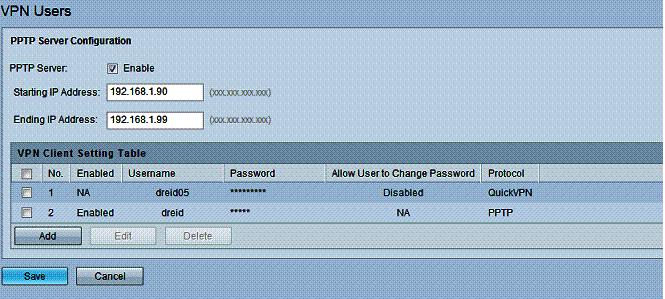
Figure 6: PPTP setup
I like PPTP tunnels because the client software is built into Windows 7, and as I recently discovered, is also built into the Apple iPad. Thus, there is no software to install on the end device. I tested both devices with the RV180 and found each to work without issue. Configuring Windows or an iPad for PPTP is quite simple. Take a look at our recent review on the Zyxel VFG6005, where we’ve listed the steps for setting up a Windows PC and an Apple iPad for PPTP connections.
A small issue I had with the RV180 is a lack of a status screen for PPTP connections. The only indicator on the RV180 of an active PPTP connection is a small section on its Dashboard. As shown in Figure 7, the RV180 VPN Dashboard shows one active Site-to-Site tunnel, one PPTP User, and noQuick VPN Users.
The Site-to-Site count is accurate, but the PPTP display is misleading and the Quick VPN display is incorrect. The PPTP display is simply a count of users created in the RV180, not a status on the number of PPTP connections. I found the dashboard showed one PPTP user whether the PPTP user was connected or not.
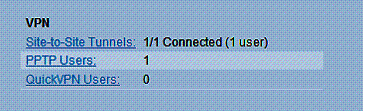
Figure 7: VPN Dashboard
At the same time I took the above screen shot, I also had an active QuickVPN connection, although the dashboard showed no QuickVPN Users. Fortunately, there is a specific status screen on the RV180 for QuickVPN user connections (Figure 8).
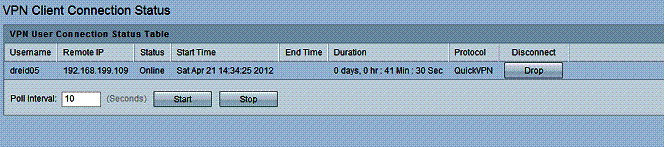
Figure 8: Quick VPN connection status
Configuring a QuickVPN connection on the RV180 is as simple as for PPTP. It is a matter of adding a user name and password for the remote connection and selecting the QuickVPN option for the protocol. The key difference is the QuickVPN software has to be installed on a PC. The software is included on the disk that comes with the RV180, and is available for download on Cisco’s website. I had no trouble installing Cisco’s QuickVPN on a Windows 7 Pro PC.
I found Site-to-Site configuration on the RV180 straightforward. There are no VPN configuration wizards in the RV180, but there is a basic VPN configuration page for creating an IPSec VPN tunnel. The basic configuration on the RV180 creates an IKE and VPN IPSec policy with default values including AES encryption and SHA-1 authentication. These configurations are easy to edit via the advanced VPN configuration page. All typical IPSec VPN options are supported, such as 3DES and AES encryption as well as MD5 and SHA-1 authentication,.
I had no problems setting up a 3DES/SHA-1 Site to Site tunnel between the RV180 and my usual site-to-site test device, a NETGEAR SRX5308 high performance VPN router. With the correct configurations on both routers, the connection came up immediately. Below is a screen shot of the established IPSec tunnel with the SRX.
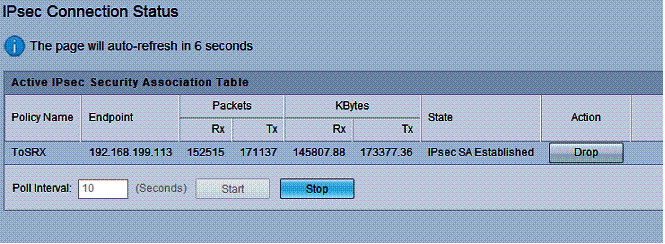
Figure 9: IPsec connection status
VPN Performance
Cisco rates the RV180 capable of 50 Mbps for IPSec VPN throughput with either 3DES or AES encryption. I measured the RV180’s IPSec throughput with Cisco’s QuickVPN software.
I tested the RV180’s VPN performance with iperf using default TCP settings, with a TCP window size of 8 KB and no other options. I ran iperf on two PCs running 64-bit Windows 7 with their software firewall disabled. (Running a simple iperf throughput test between two PCs uses the command iperf -s on one PC and iperf -c (ip) on the other PC.)
Table 2 shows a VPN throughput table comparing the RV180 to the previously mentioned Cisco routers (RV120W, RV220W, RV042) as well as several other VPN routers I’ve reviewed in recent years. Note, you can click on the model number listed in the table to go to the review for each device.
| Product | IPsec Throughput – (Mbps) | PPTP Throughput (Mbps) | ||
|---|---|---|---|---|
| Client – Gateway | Gateway – Client | Client – Gateway | Gateway – Client | |
| RV180 | 39.7 | 50.9 | 5.98 | 6.49 |
| RV120W | 23.1 | 21.2 | NA | NA |
| RV220W | 38.3 | 49.3 | 16.3 | 14.1 |
| RV042 | 37.1 | 47.5 | 10.8 | 9.7 |
| Draytek 2920 | 17.8 | 17.8 | 19.9 | 19.9 |
| Netgear FVS318N | 33.1 | 45.8 | NA | NA |
| Zyxel VFG6005 | 5.9 | 5.6 | 10.8 | 6.54 |
| TrendNet TW100 | 3.32 | 2.85 | 8.95 | 7.61 |
Table 2: VPN Performance comparison
The RV180’s IPsec numbers of 39.7 Mbps client to gateway and 50.9 Mbps gateway to client put it at the top of the chart for all devices listed and are pretty close to Cisco’s 50 Mbps rating. However, I was surprised to see the RV180’s PPTP numbers of 5.98 Mbps client to gateway and 6.49 Mbps gateway to client put it at the bottom of that ranking.
Nevertheless, ~6 Mbps of throughput is pretty reasonable for a remote connection. More likely, the available bandwidth at the remote location (such as hotel, airport, coffee shop) will be less than 6 Mbps, meaning the PPTP connection will not be the limiting factor.
Firewall and Security
The RV180’s firewall features include most of what you’d expect. It offers simple check boxes to permit or deny flooding attacks on both the WAN and LAN, as well controlling responses to ICMP messages. Typical firewall features like Port Triggering, Port Forwarding and DMZ host are all available on the RV180. I successfully created a simple Port Forwarding rule (Figure 10) to allow iperf traffic through the firewall to a specific host on the LAN.
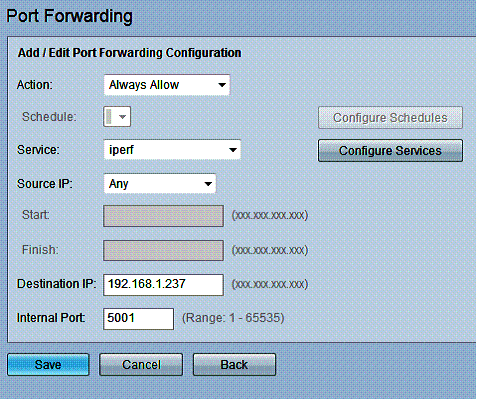
Figure 10: Port forwarding rule
More detailed firewall rules can be created in the RV180’s Access Rules menu to filter specific traffic flows. A rule can be created to either block or allow traffic always or by schedule. The rule can filter on inbound or outbound traffic, by source or destination IP or range of addresses, and by protocol. There are over 60 predefined protocols and more can be added by tcp/udp/icmp and port. Below is a rule I created to block http traffic, which effectively blocked all web surfing from behind the RV180.
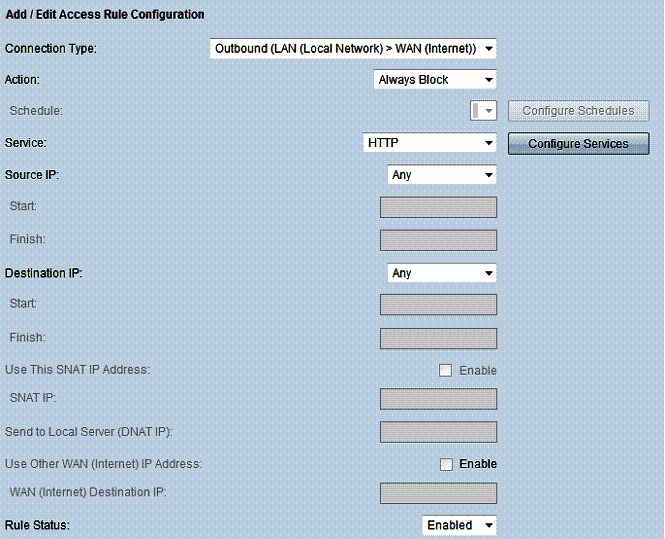
Figure 11: Access rule
Web filtering options on the RV180 include allowing or blocking specific web sites based on URL or keyword. Web filtering on the RV180 also requires creating LAN groups, which are single IP addresses or ranges of IP address. With a URL or keyword defined for filtering and applied to a LAN group, websites matching the criteria entered will be blocked with the message below.

Figure 12: Block message
Personally, I find URL and keyword filtering too basic. To be effective, URL and keyword filtering requires a human to enter all the desired sites and words for blocking. With millions of websites, I’m not sure you can be that effective in controlling web use with this basic form of filtering.
For more robust web filtering, Cisco RV220W’s ProtectLink option offers a subscription based web filtering service. Alternatively, I like Zyxel’s VFG6005 solution, which integrates the free OpenDNS service for web filtering.
Options in the RV180’s Advanced Firewall menu include MAC filtering, TCP and UDP session controls, IGMP proxy configuration, and the ability to enable or disable a SIP ALG (Application Layer Gateway.) The Advanced Firewall menu also has menu options for configuring services (protocols) and schedules.
The RV180 also supports security options to authenticate users before they can use the network. Options include RADIUS, 802.1x and “Captive Portal.” The “Captive Portal” feature will force users to enter a user name and password to access the internet by presenting them a login screen shown below. Once authenticated, users can then open another browser window and surf.
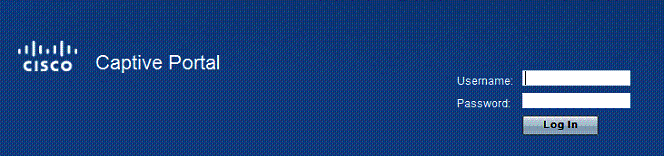
Figure 13: Captive portal
Other Features
I like the RV180’s network features. In addition to typical small network router capabilities such as static, DHCP, and PPPoE functionality on the WAN interface, the RV180 supports VLANs, Jumbo Frames, one-to-one NAS, IPv6 and QoS.
The RV180 supports up to four 802.1.q VLANs. Each of the four ports on the RV180 can be configured as a tagged or untagged member of each VLAN. VLANs can be assigned a separate subnet, and the RV180 supports a separate DHCP server for each VLAN. By assigning a port as an untagged member of one VLAN and a tagged member of one or more additional VLANs, the RV180 also supports 802.1q VLAN trunking.
I tested basic VLAN capability by creating a separate VLAN with a unique DHCP server, assigned a port on the RV180 as an untagged member of that VLAN, connected my PC to that port, and validated my PC got an IP from the new DHCP server range. As shown in the below diagram, I created VLAN # 2012 and configured port 4 as the only member of this VLAN.
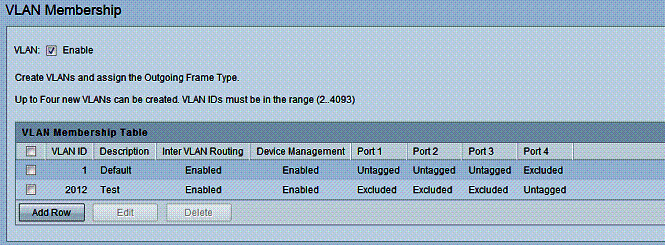
Figure 14: VLAN setup
The RV180 automatically assigns itself an IP address and creates a DHCP pool for each new VLAN created, saving you from having to configure it. In the above example, the RV180 assigned itself 192.168.2.1 for VLAN 2012 and created a DCHP pool in the 192.168.2.0/24 subnet. As expected, a device connected to port 4 on the RV180 received an IP in the 192.168.2.0/24 subnet.
With Gigabit ports, it is great to see the RV180 supports jumbo frames. The option for jumbo frames is enabled with a single checkbox and no reboot. Often, devices require a reboot to enable jumbo frames, so this is a nice convenience. Once enabled, I was able to pass up to 4000 byte frames between devices on the RV180 LAN, you can see my ping results below. (Note, my PC was limited to only 4000 byte frames, the RV180 specs indicate it supports up to 9000 byte frames.)
C:\Users\mrd005>ping -f -l 4000 192.168.1.10
Pinging 192.168.1.10 with 4000 bytes of data:
Reply from 192.168.1.10: bytes=4000 time<1ms TTL=64
Reply from 192.168.1.10: bytes=4000 time<1ms TTL=64
Reply from 192.168.1.10: bytes=4000 time<1ms TTL=64
Reply from 192.168.1.10: bytes=4000 time<1ms TTL=64
Ping statistics for 192.168.1.10:
Packets: Sent = 4, Received = 4, Lost = 0 (0% loss)
IPv6 is also supported on the RV180, but requires a reboot to enable. The default LAN IPv6 address on the RV180 is fec0::1/64, so I assigned fec0::2/64 to my PC and was able to successfully send an IPv6 ping to the router. The RV180 supports static and DHCP (stateful and stateless) IPv6 addressing on the WAN and LAN interfaces.
IPv6 tunneling, which enables passing IPv6 traffic over an IPv4 network is also supported. Supported IPv6 tunneling protocols include Automatic 6to4 and ISATAP.
The RV180 has two options for Quality of Service (QoS) configuration. In the first option, the RV180 can allocate a percentage of bandwidth to traffic designated as high, medium, or low priority. High, medium and low priority traffic is defined via profiles. Profiles are configured to match traffic based on protocol, IP, MAC, VLAN ID, or DSCP markings. In the second option, the RV180 can impose rate limits to the specific traffic profiles. Both modes control uplink traffic only.
Routing Performance
Routing performance for the RV180 using our standard test method and the RV180’s 1.0.1.9 firmware is summarized in Table 3. The RV180’s downlink throughput of 798 Mbps and uplink throughput of 811 Mbps is quite impressive! These numbers put the RV180 near the top of our Router Charts and above all the other VPN routers listed in this review.
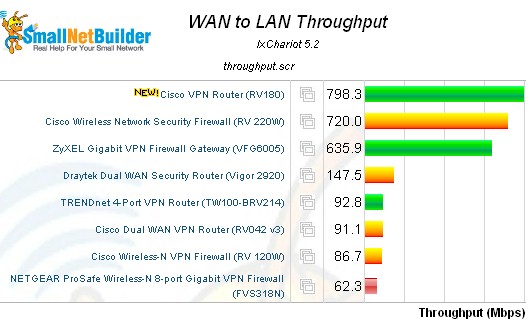
Figure 15: WAN > LAN routing throughput – select VPN routers
By comparison, the more expensive RV220W has a downlink speed of 720 Mbps and uplink speed of 728 Mbps. Total simultaneous throughput on the RV180 was 1,192 Mbps, which slightly edges past the RV220W’s 1,113 Mbps. The RV180’s max connection limit wasn’t quite as impressive at 10,000, compared to the RV220W which maxed our test at 34,925 sessions.
| Product | Throughput – (Mbps) | Max. Connections | ||
|---|---|---|---|---|
| WAN-LAN | LAN-WAN | Total Throughput | ||
| RV180 | 798 | 811 | 1,192 | 10,000 |
| RV120W | 87 | 87 | 136 | 12,086 |
| RV220W | 720 | 728 | 1,113 | 34,925 |
| RV042 | 91 | 90 | 91 | 34,925 |
| Draytek 2920 | 146 | 137 | 147 | 34,925 |
| Netgear FVS318N | 62 | 60 | 61 | 5,004 |
| Zyxel VFG6005 | 636 | 150 | 304 | 34,925 |
| TrendNet TW100 | 93 | 92 | 140 | 34,925 |
Table 3: Routing performance comparison
The composite IxChariot plot in Figure 16 of the three routing tests below shows relatively low WAN-LAN throughput variation. There is some variation in the readings, but not as high as we’ve seen in other devices such as the recently review Zyxel VFG6005. Low throughput variation indicates expected throughput of the router is consistent, which is desirable.
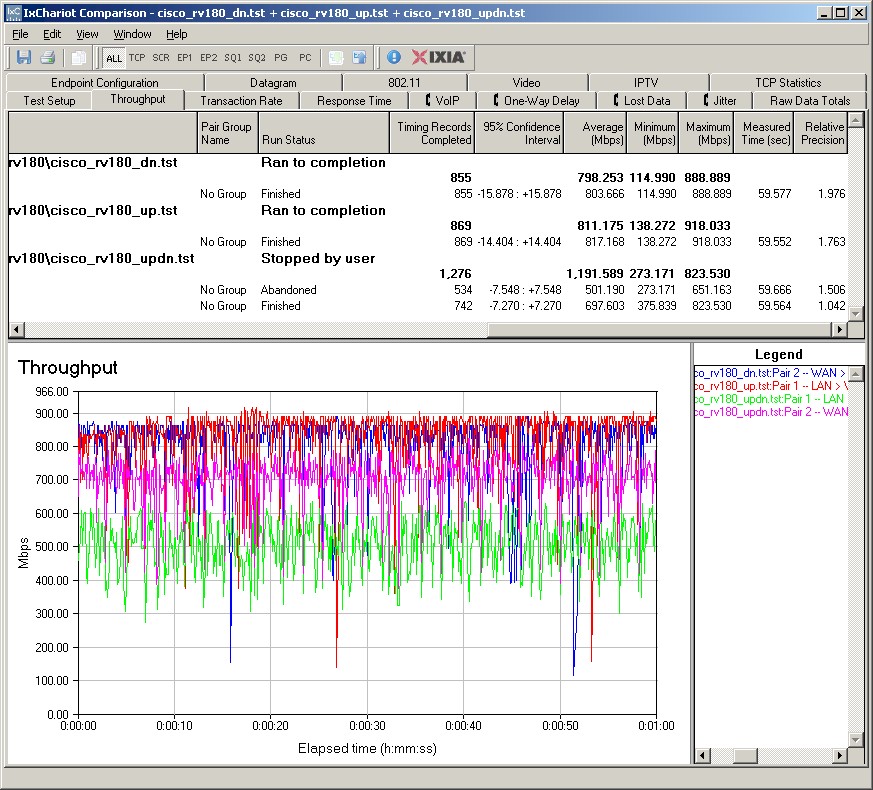
Figure 16: IxChariot Routing throughput plots
Closing Thoughts
Table 4 summarizes key data from my selected group of VPN routers including IPSec tunnel capacity, LAN features and pricing of the RV180/RV180W. (Pricing information is from Pricegrabber.com).
| Product | IPSec Tunnels |
LAN Ports | 802.1q VLANs |
Jumbo Frames |
Wireless | Price |
|---|---|---|---|---|---|---|
| RV180 | 10 | (4) 10/100/1000 | 4 | Y | (RV180W) | $141.00 / $177.00 |
| RV120W | 10 | (4) 10/100 | 4 | N | Y | $130.00 |
| RV220W | 25 | (4) 10/100/1000 | 16 | Y | Y | $246.00 |
| RV042 | 50 | (4) 10/100 | 0 | N | N | $146.00 |
| Draytek 2920 | 32 | (4) 10/100/1000 | 0 | Y | (2920N) | $245.00 |
| Netgear FVS318N | 12 | (8) 10/100/1000 | 64 | Y | Y | $179.00 |
| Zyxel VFG6005 | 32 | (4) 10/100/1000 | 0 | N | N | $113.00 |
| TrendNet TW100 | 80* | (4) 10/100 | 0 | N | N | $69.00 |
Table 4: Feature comparison
* The TrendNet TW100 lists support for up to 80 IPSec tunnels, but I question whether it can actually handle that many tunnels due to its limited throughput as noted in the review and in Table 4.
Compared directly to other wired-only routers (Cisco RV042, Draytek 2920, Zyxel VFG6005, and TrendNet TW100), the RV180 at $141 has the fastest IPSec and router throughput yet is more expensive than only the Zyxel ($113) and TrendNet ($69). However, the RV180 has 802.1q VLAN and jumbo frame capability, which is not included in either the Zyxel and TrendNet.
Compared to the wireless routers (Cisco 120W, Cisco 220W, and Netgear FVS318N), the RV180W at $177 remains the top router in terms of IPSec and router throughput and is only more expensive than the RV120W ($130).
Overall, I like the Cisco RV180. Clearly, it is a fast router. But it is also quite solid as a VPN router, with easy Site-to-Site VPN configurations, inclusion of the QuickVPN client and support for PPTP VPN tunnels. If I could ask for one thing, I would like to see menu responsiveness improved. In summary, I think a network can never be too fast, and the Cisco RV180 presents compelling performance at a reasonable price.