

Introduction
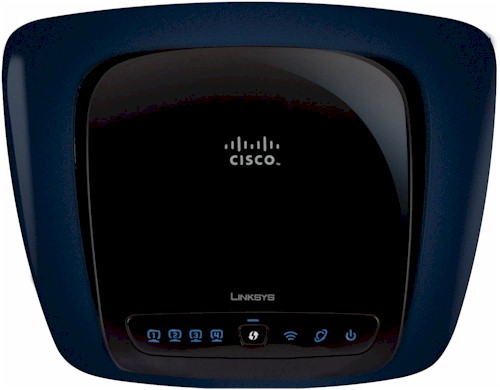
| At a Glance | |
|---|---|
| Product | Linksys Simultaneous Dual-Band Wireless-N Router (WRT400N) |
| Summary | Value-priced, Atheros-based dual-radio, dual-band 802.11n Draft 2.0 router with 10/100 switch. |
| Pros | • Good routing performance • Good wireless performance |
| Cons | • Can’t set channel in Auto mode • 10/100 switch • Hasn’t solved the 5 GHz range problem |
The WRT400N’s concept is simple—get the cost of a dual-band, two-radio draft 802.11n router closer to the magic $100 price point by reducing parts count and using a 10/100 switch instead of gigabit.
Although Cisco made it to only around $130, I found that the WRT400N out-performed not only the Linksys WRT610N, but some other dual-band draft-11n products as well.
Internal Details
I already did a detailed review of the 400N’s insides (along with the new WRT320N and WET610N). The 400N is a complete redesign of the 600N, using an all-Atheros design including an AR7161 600 MHz Wireless Network Processing Unit (WNPU), dual-band AR9220 and single-band AR9223 single-chip draft 11n radios, AR8216 10/100 switch, 32 MB of RAM and 8 MB of flash (Figure 1).
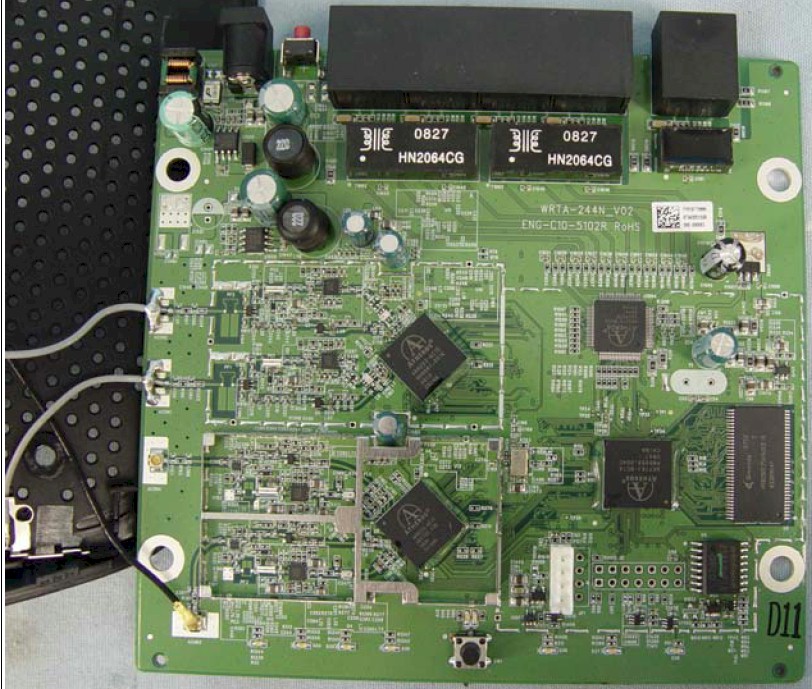
Figure 1: WRT400N inside view
Routing Features
The 400N hews closely to the Linksys router standard feature set. Aside from the WRT400N in the upper right corner of the admin screens, you would think you were driving a 600 or 610N.
The 400N’s routing features include:
- DHCP, Static, PPPoE, PPTP, L2TP, Telstra Cable WAN types
- Built-in Dynamic DNS clients for TZO and DynDNS
- Static and dynamic routing
- SPI firewall disable, multicast, WAN ping and IDENT filtering and Proxy, Java, ActiveX and Cooking blocking
- IPsec, PPTP and L2TP VPN passthrough (enabled by default)
- Single port forwarding and Port Range forwarding and triggered ports
- HTTPS admin access, remote management (HTTP / HTTPS) enable with IP range restriction and port setting
- Logging with support for Linksys Logviewer recording
- Access Restrictions with 10 deny or allow-based policies, each with its own list of clients and day/time schedule
- Uplink (LAN to WAN) only QoS with High, Medium, Normal or Low Priority that can be applied to specific applications (divided into Application, Online Game and Voice Device groups), physical switch ports or specific MAC addresses.
- WMM (Wireless MultiMedia) (enabled by default)
If you need further details, check the WRT600N review and its slideshow.
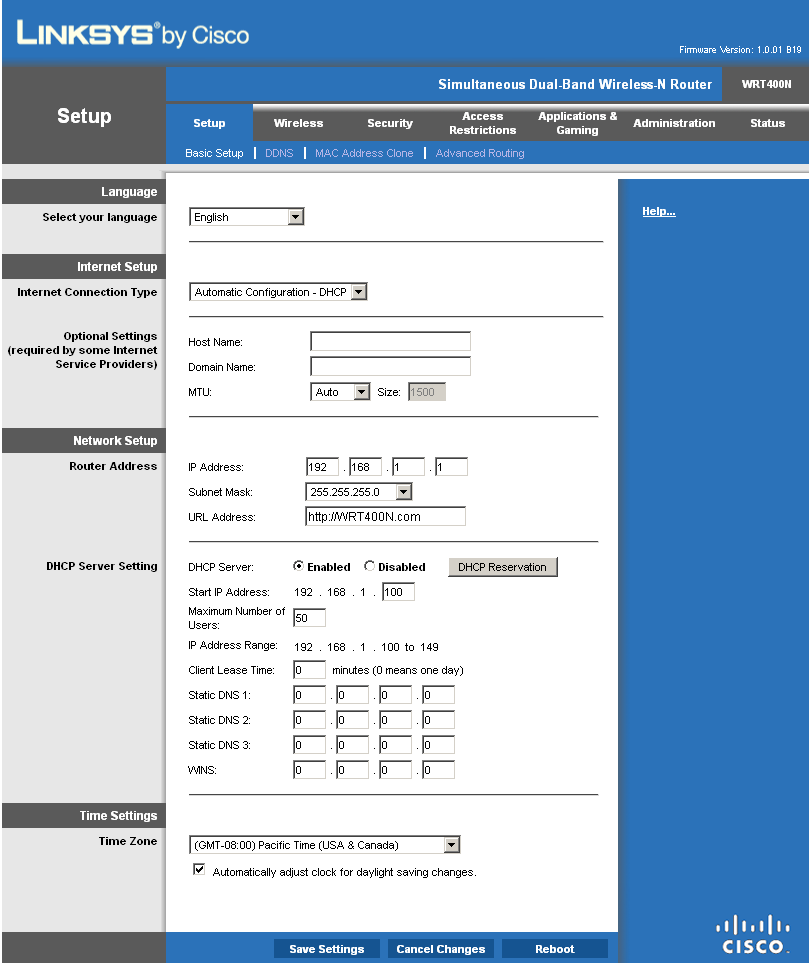
Figure 2: WRT400N Basic setup page
Routing Performance
Routing performance for the 400N using our standard test method is summarized in Table 1, along with the 610N’s test results for comparison. WAN to LAN measured 92.7 Mbps, while LAN to WAN came in at 92.6 Mbps—essentially 100 Mbps wire-speed.
But the simultaneous routing throughput measured 148.9 Mbps, which is actually slightly better than the WRT610N. Which goes to show that just because a router has a gigabit switch, it isn’t necessarily faster. Both the 400N and 610N maxed out the Maximum Simultaneous Connections test at 200 connections.
| Test Description | WRT400N Throughput – (Mbps) |
WRT610N Throughput – (Mbps) |
|---|---|---|
| WAN – LAN |
92.7
|
136
|
| LAN – WAN |
92.6
|
157
|
| Total Simultaneous |
148.9
|
143
|
| Maximum Simultaneous Connections | 200 | 200 |
| Firmware Version |
1.0.01 B19
|
1.000.00 B17
|
Table 1: Routing throughput
Figure 3 is a composite plot of the three routing tests, which shows nice, steady routing throughput. Use the Router Charts to see how the 400N stacks up against other routers.
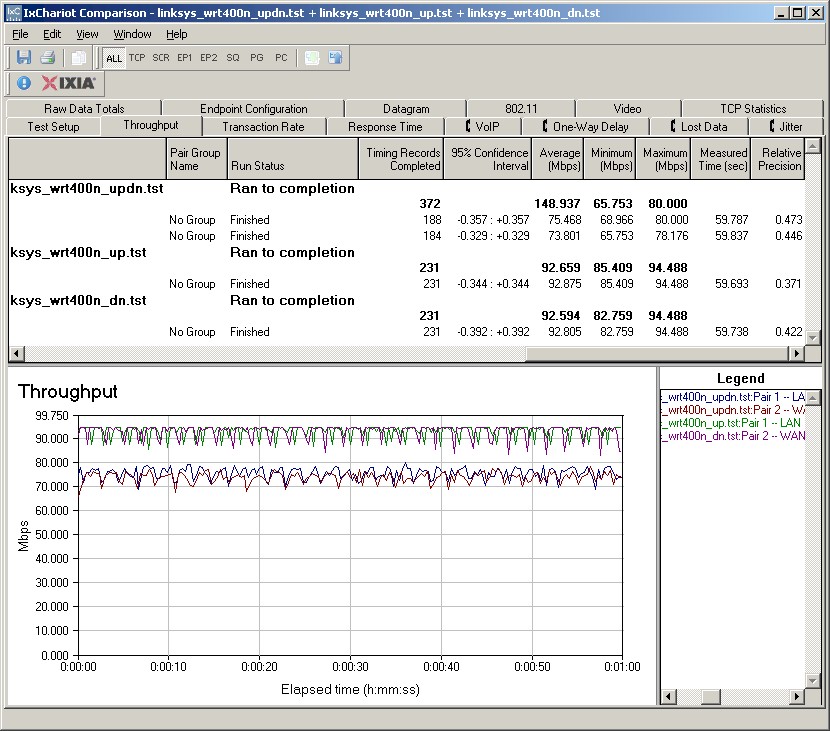
Figure 3: WRT400N Routing throughput composite plot
Wireless Features
I noticed some minor tweaks to the basic wireless settings, although I could have missed them when looking at the WRT610N. The 5 GHz radio has Disabled, Mixed (default), Wireless-A only and Wireless-N only Network Modes, while the 2.4 GHz radio shows Disabled, Mixed (default), Wireless-B only, Wireless-G only and Wireless-N only.
As is the norm for Linksys draft 11n routers, channel selection is a bit odd. Channel Width selectors properly default to Auto (20MHz or 40MHz) for the 5 GHz radio and 20MHz only for the 2.4 GHz. But when set to Auto, The Wide Channel and Standard Channel selectors are greyed out.
If you choose a the 20MHz only Channel Width on either radio, you can set only the Standard Channel. (The 5 GHz radio can be set to channels 36, 40, 44, 48, 149, 153, 157 and 161.) But the new wrinkle is the 40/20Mhz Channel Width selection instead of 40MHz only. That greys-out the Standard Channel selector and lets you set the Wide Channel instead. But once you make a Wide Channel selection, the Standard Channel selector becomes active and shows only "valid" selections.
The main problem that I have with Linksys’ method is that the Wide Channel setting is misleading. In 2.4 GHz, the draft 11n 40 MHz mode extension channel is always located four channels away from the primary channel. So when the Standard Channel is set to Channel 1, for example, the second channel is actually set to Channel 5. The resulting 40 MHz wide channel has its center at Channel 3, which is what Linksys may be trying to convey with the Wide Channel setting. I would like to see Linksys show the channels that are actually being set, but doubt that they ever will.
Minor rant: I really dislike the use of "Wireless-N" instead of Draft 2.0 802.11n as a way of getting around reminding buyers that they are still dealing with a draft-standard product. I don’t care much either for "Wireless-A", "Wireless-G" and even "Wireless-B". Call them by their standards (802.11g) or just use a, b, g, draft n.
The 400N supports Wi-Fi Protected Setup (WPS) and defaults to showing it when you first access the Basic Wireless Settings page (Figure 4). You have to select the Manual radio button to directly access the settings.
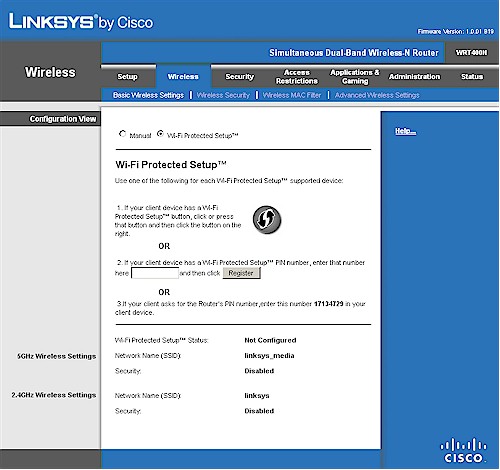
Figure 4: Basic wireless configuration defaulted to WPS
I tried using WPS to connect my notebook using an Intel 5300 AGN WiFi Link adapter using the Intel PROSet Wireless Connection Utility (version 12.2.0.0). Unlike other client utilities that I have used, the Intel utility doesn’t support a WPS push-button method. Instead, when you try to connect to an AP, you are prompted for its Device Ownership password (also called its PIN).
I initially couldn’t get a successful WPS connection because I kept pushing the WPS button on the WRT400N, even though I wasn’t prompted to. But, just as I was ready to give up, I tried just following the Intel utility’s instructions, i.e. just entering the PIN and not pushing the button. Once I did that, the WPS session completed with a WPA2 / AES connection and horrendously long auto-generated password. But I could have changed the mode (WPA / WPA2), cipher (TKIP or AES) or password as part of the WPS session. Lesson learned.
Figure 5 shows the Advanced Wireless Settings, which include Transmit Rate and Power settings and AP Isolation, which keeps wireless clients from communicating with each other. I just noticed that the Frame Burst control that the WRT600N had is missing from the 400N.
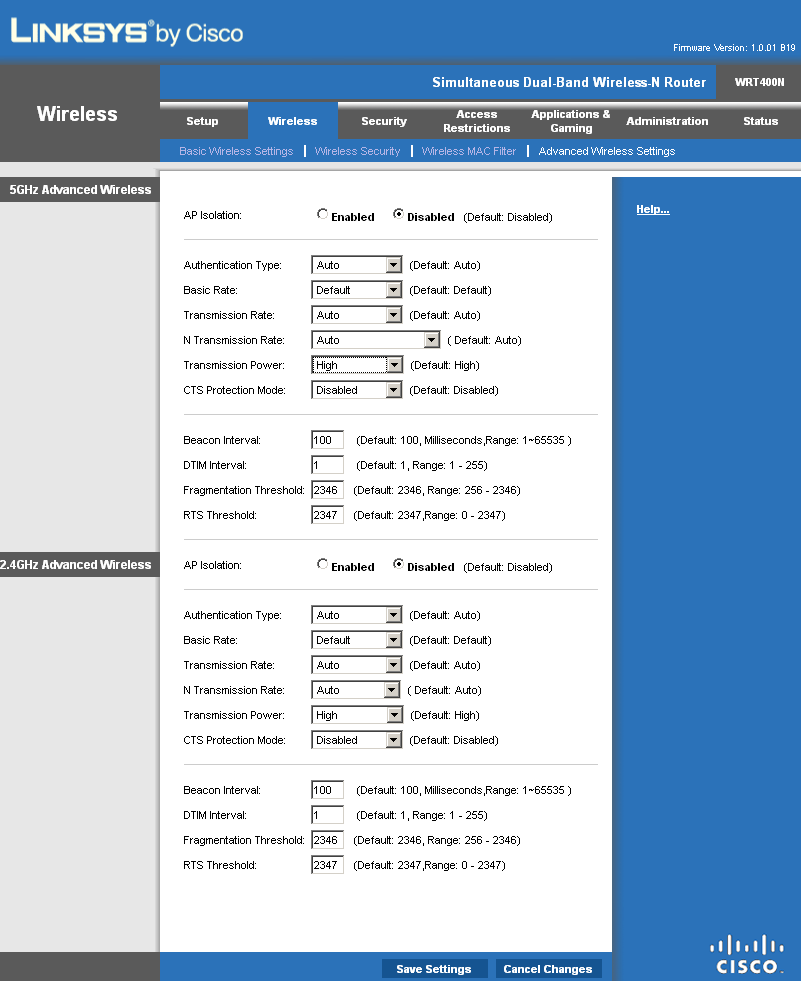
Figure 5: WRT400N Advanced Wireless Settings
Wireless Performance
I used the open air test method described here to test the 400N’s wireless performance. Testing was done using the new SNB standard wireless test client, an Intel Wi-Fi Link 5300 AGN mini-PCIe card and 12.2.0.11 driver in a Dell Mini 12 running WinXP Home SP3. I left all client-side defaults in place except for enabling throughput enhancement (packet bursting).
The router had the latest 1.0.01 B19 firmware and I left all factory default settings in place, except to set channel 1 for the 2.4 GHz mode tests and channel 36 for the 5 GHz tests.
Figure 6 shows a composite of downlink throughput tests made at the six test locations in four wireless modes: 2.4 GHz, 20 MHz channel; 2.4 GHz, 40 MHz channel; 5 GHz, 20 MHz channel; and 5 GHz, 40 MHz channel. Each column represents the average throughput from a one minute test. Best case downlink throughput of 65.7 Mbps was measured using a 40 MHz channel in the 5 GHz band.
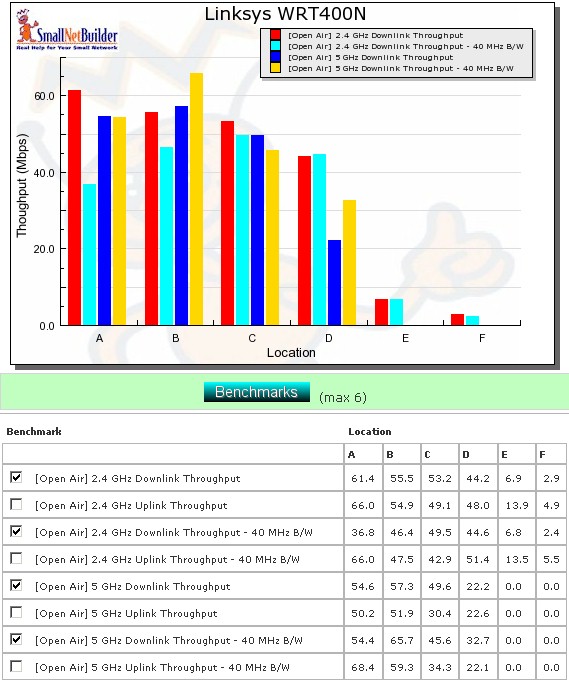
Figure 6: WRT400N six location downlink summary
As usual, I wasn’t able to connect to the 400N in Locations E and F in 5 GHz using either a 20 or 40 MHz channel. But speeds on the 2.4 GHz band were actually pretty good in Location E and usable in Location F.
Figure 7 shows a composite of the actual IxChariot test results running downlink 2.4 GHz w/ 20 MHz channel. Throughput variation is better than most other draft 11n products that I have seen and much better than the WRT610N’s (see the plot). I can’t say for sure why the variation is lower since I used different test clients.
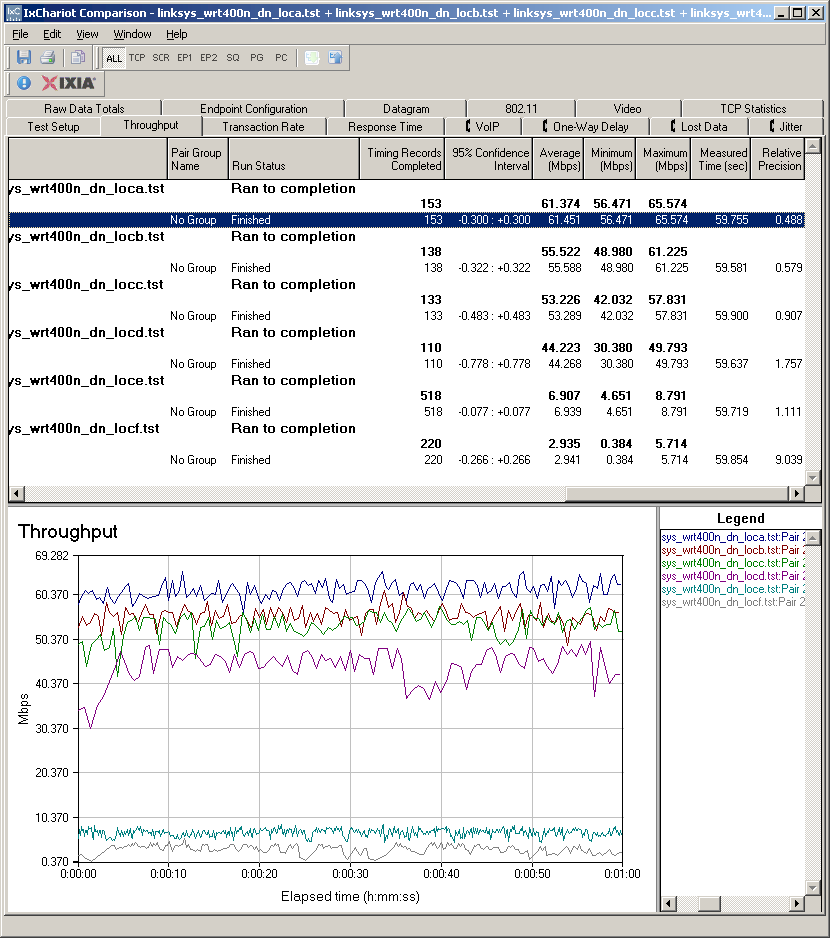
Figure 7: Six location wireless throughput – 2.4 GHz, 20 MHz channel, downlink
Figure 8 shows the six location plot for the uplink direction. Best case uplink throughput of 68.4 Mbps was measured using a 40 MHz channel in the 5 GHz band at Location A. Up and downlink speeds were generally evenly matched, except for a big difference in Location A, 2.4 GHz, 40 MHz mode. (See Figure 6 for the table of throughput values.)
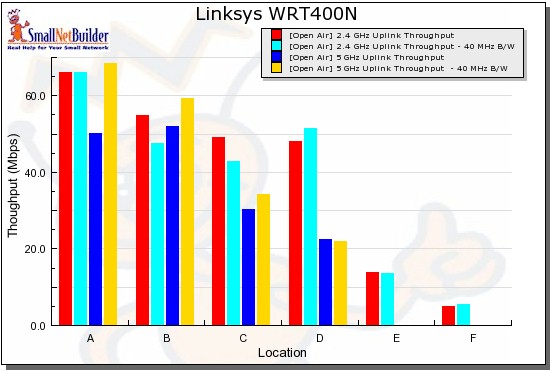
Figure 8: WRT400N six location uplink summary
The IxChariot uplink plot looks very similar to the downlink. You can see it here if you want.
Wireless Security, Wireless Performance – Competitive Comparison
I tested for throughput reduction with wireless security set to WEP, WPA/TKIP and WPA2/AES and found the usual penalty in WEP and WPA/TKIP—around 40% in this case (Figure 9).
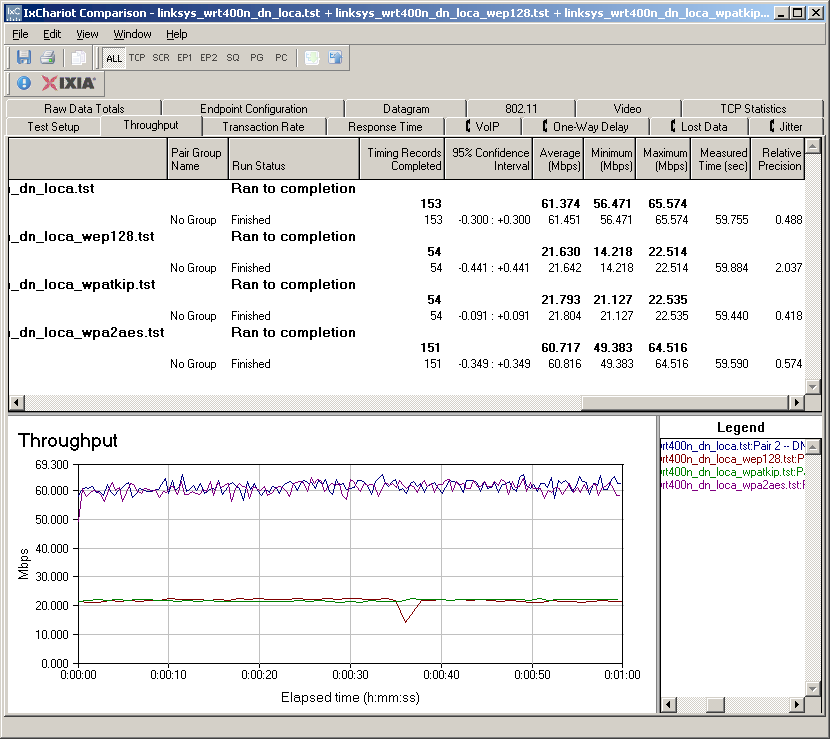
Figure 9: Security mode comparison – 2.4 GHz, 20 MHz channel, downlink
Wireless Performance – Competitive Comparison
The database of wireless routers tested with the open air method is growing and includes the WRT610N. So the competitive comparison includes it, D-Link’s reasonably-priced simultaneous dual-band router the DIR-825, and a single-radio dual-band D-Link, the DIR-628. I didn’t include the D-Link DIR-855, since I don’t have open-air test data for it and because it continues to be ridiculously expensive.
Figure 10 shows the 400N outperforming the group in every location except A, where it still delivers a respectible 61 Mbps.
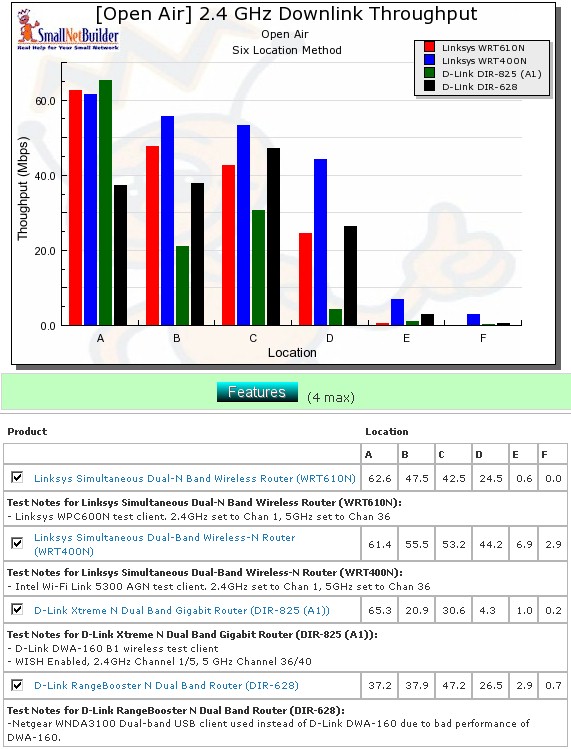
Figure 10: Competitive comparison – 2.4 GHz, 20 MHz channel, downlink
Although it didn’t beat the competition in every location and mode, the 400N came out ahead more often than not. Instead of leaving you to sort it all out by looking at multiple six-location plots, I again generated the comparison tables that I used in the DIR-825 review.
Table 2 summarizes the highest downlink throughput product in each location for the four combinations of bands and modes tested. The chart was generated by going through each six-location comparison plot and putting an X in the product’s box that had the highest throughput for each test.
| Product | 2.4GHz /20 | 2.4GHz / 40 | 5GHz / 20 | 5GHz / 40 | ||||||||||||||||||||
|---|---|---|---|---|---|---|---|---|---|---|---|---|---|---|---|---|---|---|---|---|---|---|---|---|
| A | B | C | D | E | F | A | B | C | D | E | F | A | B | C | D | E | F | A | B | C | D | E | F | |
| Linksys WRT610N | X | X | X | |||||||||||||||||||||
| Linksys WRT400N | X | X | X | X | X | X | X | X | X | X | X | X | X | X | ||||||||||
| D-Link DIR-825 | X | X | X | |||||||||||||||||||||
| D-Link DIR-628 | X | |||||||||||||||||||||||
Table 2: Best downlink throughput summary
So to find the best of the bunch, all you have to do is add up the checkmarks for each product! All it takes is a quick glance at both tables to see that the WRT400N is the clear winner.
| Product | 2.4GHz /20 | 2.4GHz / 40 | 5GHz / 20 | 5GHz / 40 | ||||||||||||||||||||
|---|---|---|---|---|---|---|---|---|---|---|---|---|---|---|---|---|---|---|---|---|---|---|---|---|
| A | B | C | D | E | F | A | B | C | D | E | F | A | B | C | D | E | F | A | B | C | D | E | F | |
| Linksys WRT610N | X | X | X | X | X | |||||||||||||||||||
| Linksys WRT400N | X | X | X | X | X | X | X | X | X | X | X | X | X | |||||||||||
| D-Link DIR-825 | X | X | X | |||||||||||||||||||||
| D-Link DIR-628 | X | |||||||||||||||||||||||
Table 3: Best uplink throughput summary
If you want to see the actual six-location plots, just click on the links below.
- 2.4 GHz / 20 MHz uplink
- 2.4 GHz / 40 MHz downlink
- 2.4 GHz / 40 MHz uplink
- 5 GHz / 20 MHz downlink
- 5 GHz / 20 MHz uplink
- 5 GHz / 40 MHz downlink
- 5 GHz / 40 MHz uplink
Stress Test
There has been a steady stream of complaints about flaky operation of some draft 11n routers, most notably the WRT610N. So I have begun to do four and eight hour stress tests of some products.
The test setup for the WRT400N was similar to the one I used for the short-term stress testing of the WRT610N. I basically set up two draft 11n clients, one associated to each radio. I then ran an IxChariot throughput test blasting full-speed bi-directional traffic between each wireless client and a single wired one. This time, however, I did not also simultaneously run traffic through the router.
Figure 11 shows that the test ran successfully for the full eight hours with no disconnects. There obviously was a wide throughput spread. But expanding out the time axis shows this was from periodic throughput "dropouts", which I didn’t see during the shorter one minute tests.
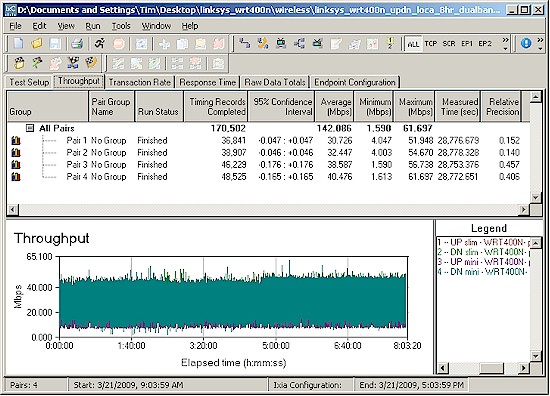
Figure 11: Eight hour wireless stress test
I’ll note that the 400N got a bit warm during the test. But apparently not hot enough to cause any problems. I suspect the absence of a gigabit switch helped to keep things cool.
Closing Thoughts
Cisco seems to believe in simultaneous dual-band routers, since the WRT400N is their third run at it. And it appears that they think you shouldn’t have to pay a lot for the benefit, since the 400N is around $50 cheaper than its flagship WRT610N.
They say that it’s better to cannibalize your own products than have someone else do it for you. From what I can see, the WRT400N is going to do just that to the 610N. But not without causing some soul-searching for those who believe that it’s crazy to buy a draft 11n router without a gigabit switch.
Draft 802.11n routers won’t replace a 100 Mbps Ethernet connection for either speed or reliability and the WRT400N is no exception. But it seems to be a well-priced, well-designed addition to a product category filled with promise-long and deliver-short offerings. It’s worthy of your consideration, if not your hard-earned cash.