

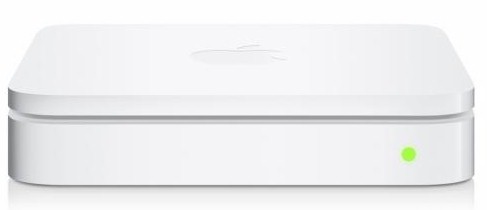
| At a glance | |
|---|---|
| Product | Apple AirPort Extreme Base Station -5th Gen (MD031LL/A) [Website] |
| Summary | 5th generation of Apple’s 802.11n router with three-stream N support on both bands and Broadcom radios |
| Pros | • Gigabit ports • 400+ Mbps routing speed |
| Cons | • No web admin • Can’t use 40 MHz mode in 2.4 GHz • 3 LAN ports • Limited routing features |
Typical Price: $99 Buy From Amazon
Overview
Updated 8/25/11: Clarified cost comments
I’ve received enough requests for a review of Apple’s latest overpriced simultaneous dual-band N router that I caved and ordered one from Amazon for testing and a quick review. This review will focus mainly on performance, since the feature set of the fifth generation of Apple’s AirPort Extreme hasn’t changed from when I looked at its predecessor almost two years ago. This will also be the first time I’ve seen what Apple has to offer for three-stream N performance. Let’s start by looking at what’s changed.
Inside
As it turns out, not much. Since I’m not keeping this little gem, I didn’t open it up. But Brian Klug over at AnandTech did. The bottom line from his findings is that the Gen 4 and 5 motherboards (Figure 1) are exactly the same, but the dual-band radio module is not.
To recap, the main board uses a Marvell 88F6281 1.2 GHz "Kirkwood" SoC processor, which is normally found at the heart of many inexpensive NASes. The switch is a Marvell 88E6350R 7 Port Gigabit, but you still get only three 10/100/1000 LAN ports.
RAM and flash remain at 128 MB and 16 MB, respectively and there is still a Pericom PI7C9X20303UL PCIe Packet Switch on the bottom of the board to connect the radio module to the CPU.
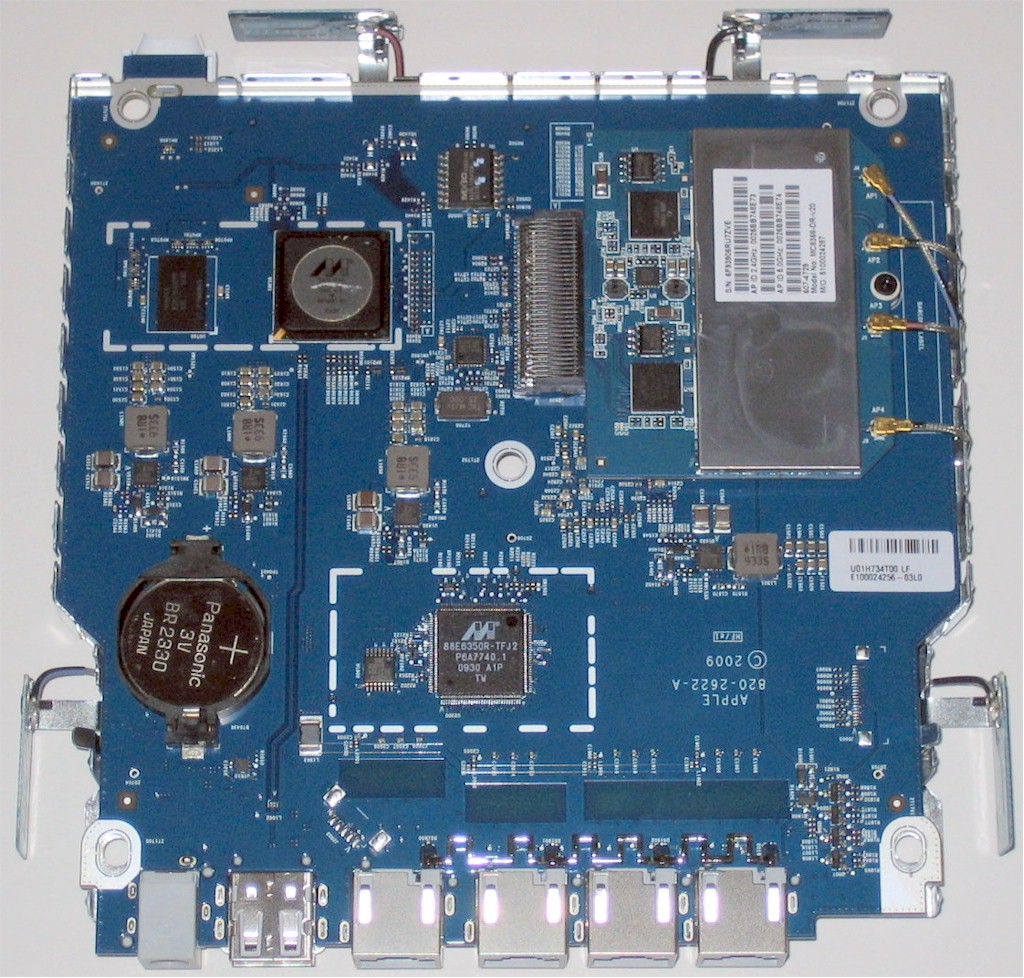
Figure 1: Gen 4 and 5 AirPort Extreme main board
Instead of a custom PCIe module with two Marvell 88W8366 802.11n 3×3 SoCs, Apple has once again switched vendors for its 802.11n radio technology, this time tapping Broadcom. Figure 2 shows the FCC closeup of the Gen 5’s radio module, which sports two Broadcom BCM4331 802.11n Dual-Band 3×3 SoCs.

Figure 2: Gen 5 AirPort Extreme radio module
If this device sounds familiar, that’s because it’s used in Cisco’s Linksys E4200 and NETGEAR’s WNDR4000 as the 5 GHz band radio. Neither of these routers produced very impressive performance in the recent three-stream tests using my standard Intel Centrino Ultimate-N 6300 three-stream N test client.
So I didn’t expect any miracles from Apple and didn’t get any, even with the outboard amplifiers that you can see in photo above. The photo is too fuzzy to completely identify the external parts, but the ones on the left appear to be from SiGe.
Figure 3 shows the Gen 4 radio board, where I could make out the numbers on the larger external parts on the right-hand 5 GHz radio. Those were SIGE 2537L 5 GHz Power Amplifier with Power Detectors.
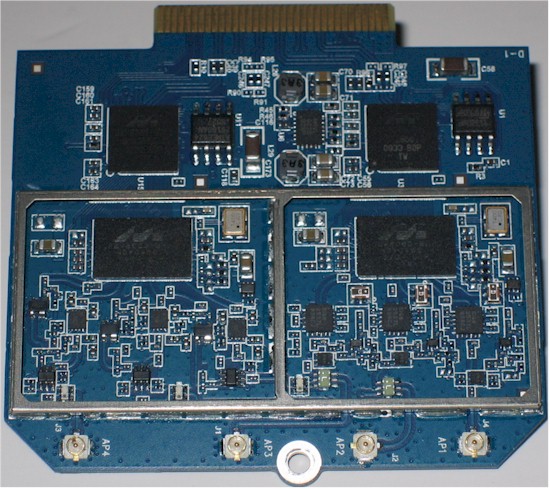
Figure 3: Gen 4 AirPort Extreme radio board
This time, after zooming in on Figure 2 enough, I was able to tell that the external components in the left-side 2.4 GHz radio are from SiGe. But it looks like the right-side 5 GHz radio components are not from SiGe.
The Gen 5 AirPort Extreme retains the funky two single-band, two dual-band antenna design of its predecessor. But this time it seems Apple got everything connected correctly the first time instead of erroneously swapping a pair of connections as it did on the first Gen 4s, killing 2.4 GHz band performance for lower signal levels.
Features
I didn’t have any problem installing Apple’s AirPort Uility (version 5.5.3) on my Win XP SP3 system (yeah, gotta upgrade someday). The little bugger also installed an AirPort Base Station Agent in the System Tray, which keeps an eye out for a USB drive shared via the AirPort’s drive sharing feature and automatically creates a Windows mapped drive for it.
Figure 4 shows the Summary screen, which doesn’t look much different than the screenshot I took in the previous review (Figure 5).
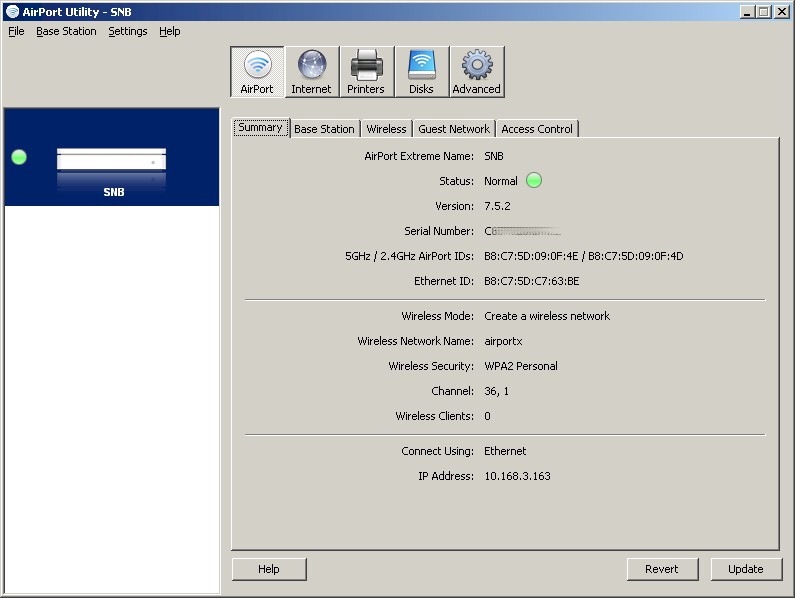
Figure 4: Gen 5 AirPort Utility Summary screen
The main difference is a wider window due to the AirPort image in the left side pane, which you can’t make go away.
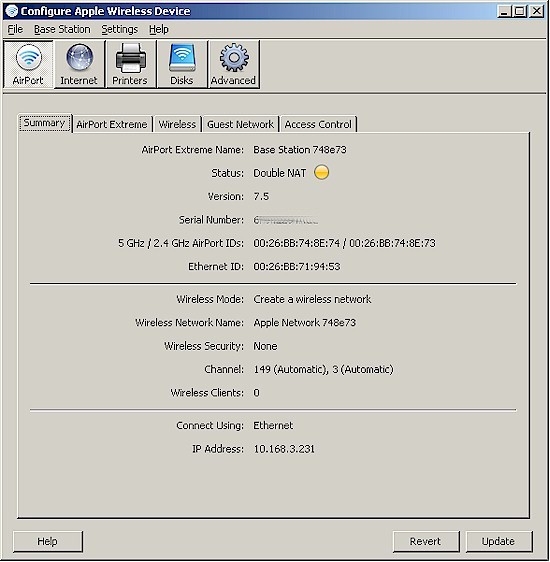
Figure 5: Gen 4 AirPort Utility Summary screen
I didn’t notice any new features, but I confess I didn’t look that hard. Here’s a quick rundown:
Routing
- Static and Dynamic IP, PPPoE WAN connections (no MTU adjust)
- IPv6 modes: Link-local only, Host, Tunnel, Router modes
- NAT, One-to-one NAT, Bridge modes
- USB printer and drive sharing (HFS, FAT32 formats only)
- DHCP server with IP reservation
- Syslog support
- MobileMe "Back To My Mac" remote access
- Log, wireless client and DHCP client viewing via AirPort Utility
Firewall
- Single port and port range forwarding w/ separate public / private ports
- DMZ host
Wireless
- WDS bridging and repeating
- WEP and Personal / Enterprise WPA / WPA2 wireless security
- Wireless Modes: Automatic, A/N and B/G, A and B/G
- Scheduled wireless MAC address control
- Wireless guest access: 2.4 GHz only, no WEP
- Tranmit power control (100, 50, 25, 10%) – one setting for both radios
Missing
- Web-based administration
- RIP v1, v2, v2 multicast and static routing
- UPnP
- Wi-Fi Protected Setup (WPS)
- Traffic statistics
- Firewall feature scheduling
- Triggered port forwarding
- WAN ping blocking
- Inbound / outbound service control w/ scheduling
- URL / domain web filtering
- Wireless client-to-client isolation
- Tranmit power control (100, 90, 75, 50, 25, 10%)
- Transmit data rate
The Missing list is a bit long and some items bear some further explanation or repeating. Since the main reason many of you are considering the AirPort Extreme is for better wireless performance, you should know what you’re trading off. The quick take is that the AirPort Extreme isn’t the router you’re looking for if you need flexible firewall features or like both your bands to be equally controllable.
First, Apple is the lone holdout in blocking acces to 40 MHz bandwidth mode in the 2.4 GHz band. While paternalistic, you’re not really losing that much, however."Wide" channels take up almost the whole 2.4 GHz band and provide significant bandwidth improvement only under strong signal conditions. But in cases where there are no nearby networks or channel use can be coordinated, their use can be beneficial.
Note that this means that if you have a three-stream N capable client, you’re only going to see a maximum link rate of 217 Mbps vs. the 450 Mbps you’ll be able to see in 5 GHz.
Next, note that the Guest Network runs on the 2.4 GHz band only. And while it has its own wireless security settings, WEP isn’t among them. Note also that you can hide the radio SSIDs ("Create a closed network") and adjust transmit power, the same settings apply to both radios.
When you first fire up the router, your client won’t even see separate 2.4 and 5 GHz SSIDs. That’s because Apple sets the same SSID on both radios, just to make things interesting.
You also still have to press the Control key before clicking the Wireless Security dropdown selector to expose the WEP option, which is still marked as a "Transitional Security Network"
I had the same result as for the Gen 4 model when I tried to measure the performance of the USB drive sharing feature. I was able to get the FAT-formatted disk to be recognized and mapped to the Win 7 NAS testbed system. But when I ran the robocopy routine, which copies a folder of files from a ripped DVD, the connection still went missing when robocopy got to a 1 GB VOB file. For non-Macers this feature is of limited use anyway, because it supports only FAT32 and HFS formatted drives only.
On the routing side, if you’re looking for any sort of web filtering or inbound / outbound service control, forget it. All you get is static port forwarding for single ports or ranges as well as DMZ. At least for the port forwarding, advanced users can set separate public and private port numbers.
IPv6 is supported. But the settings are unlike any I’ve seen on other IPv6-enabled products. And good luck to you finding useful IPv6 support information in either the rather brief AirPort Extreme 802.11n (5th Generation) – Setup Guide or Apple’s support site.
I’ve included some screenshots of the more interesting utility pages in the gallery.
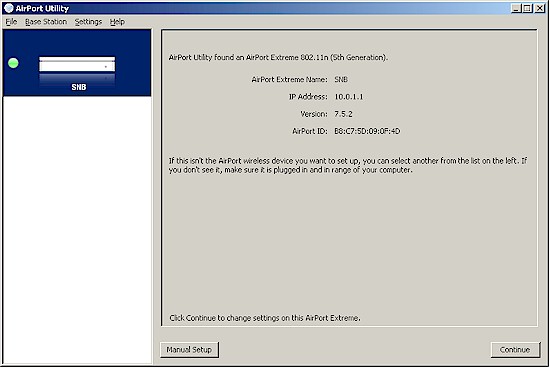
The screen you see when the AirPort Utility opens.
Summary screen repeats most of the splash screen info and adds a bit more
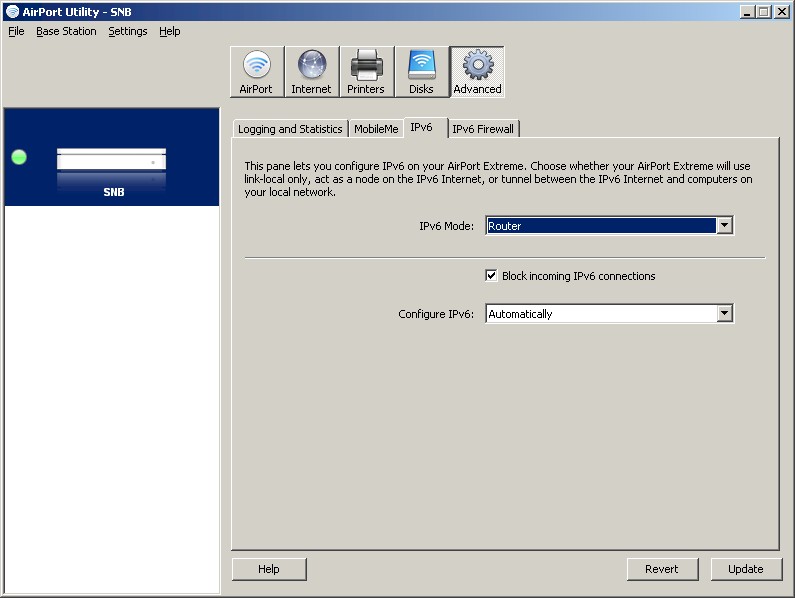
The modes available aren’t like those on other IPv6 enabled routers I’ve seen and the documentation is unhelpful.
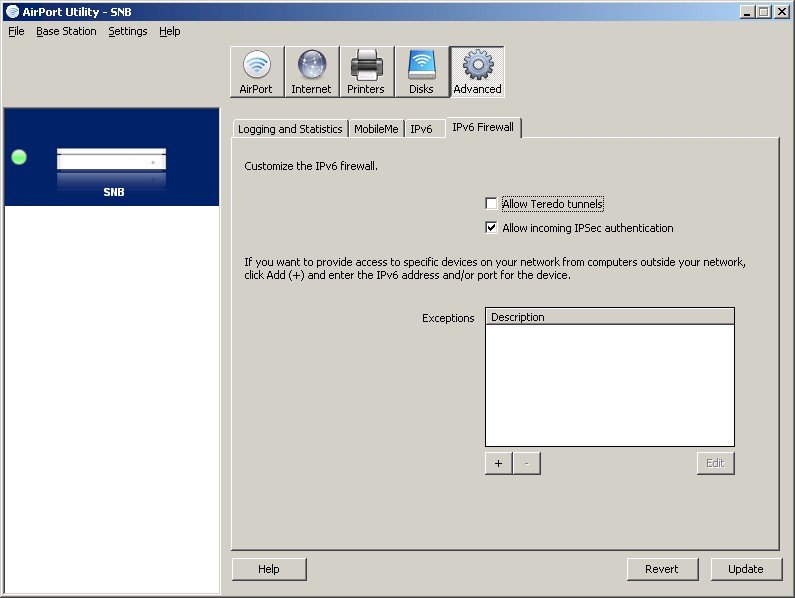
More poorly documented IPv6 features
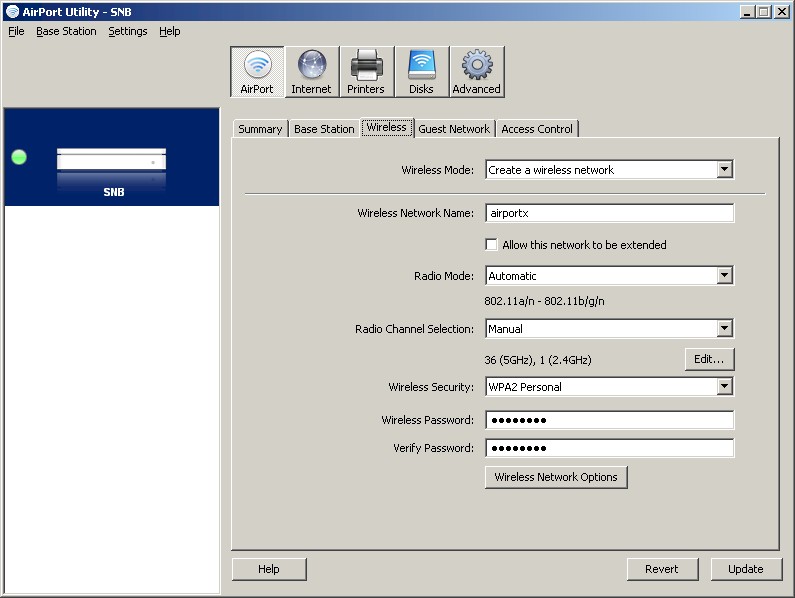
The wireless feature set is basic.
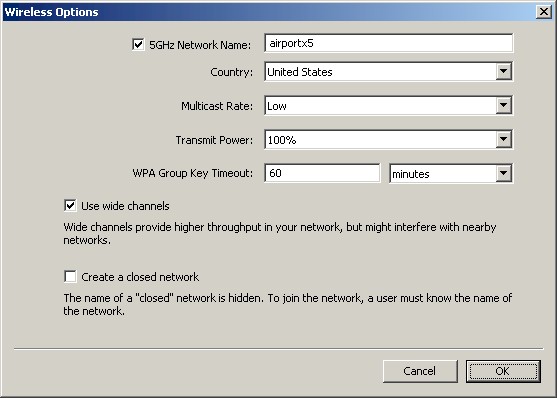
Wide channels (40 MHz mode) is for 5 GHz only
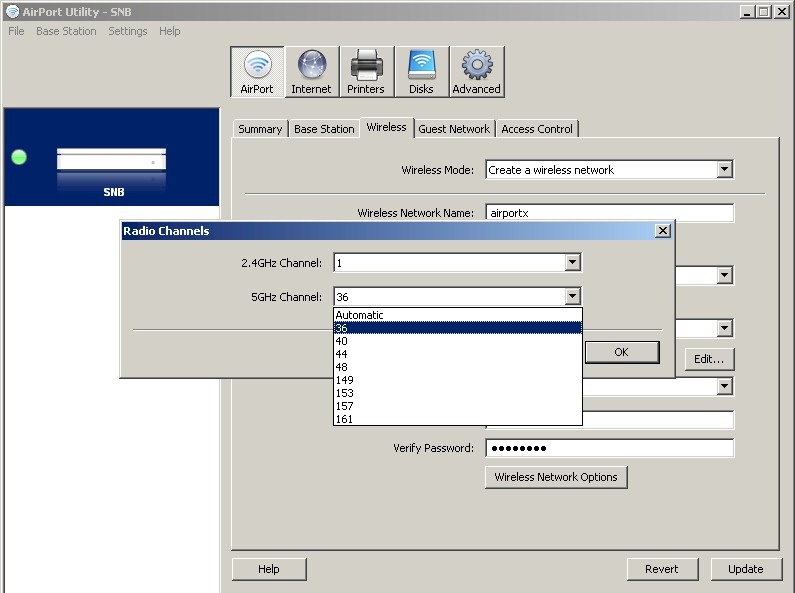
You can choose from 8 channels in the 5 GHz band and 1-11 in 2.4 GHz.
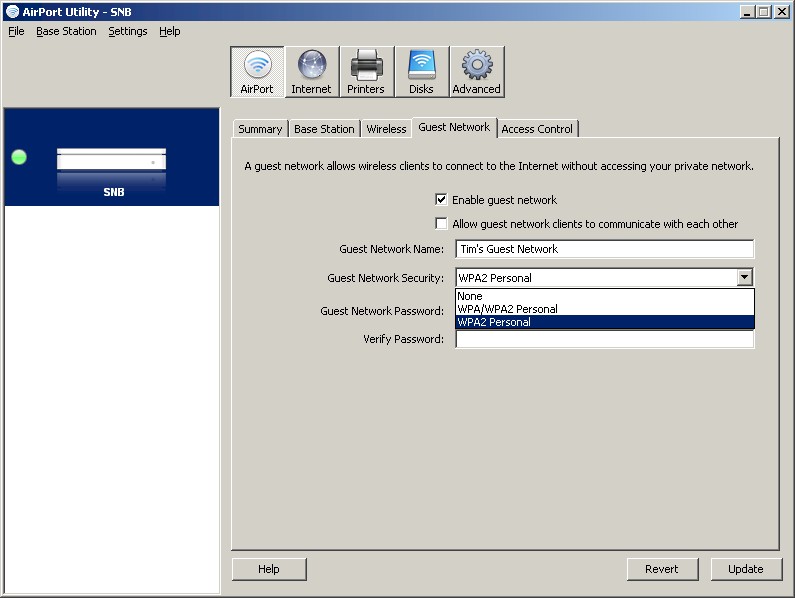
Guest access is on 2.4 GHz only with no WEP option
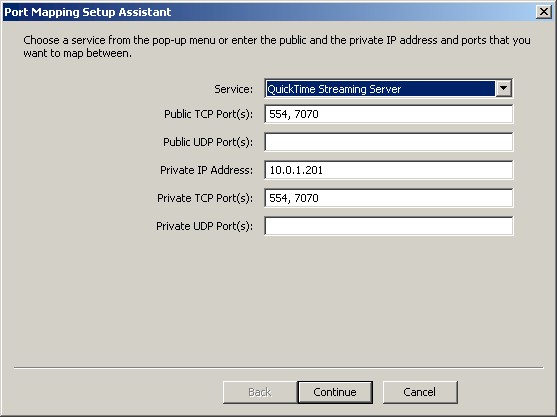
Static port mapping only, but with separate public and private ports
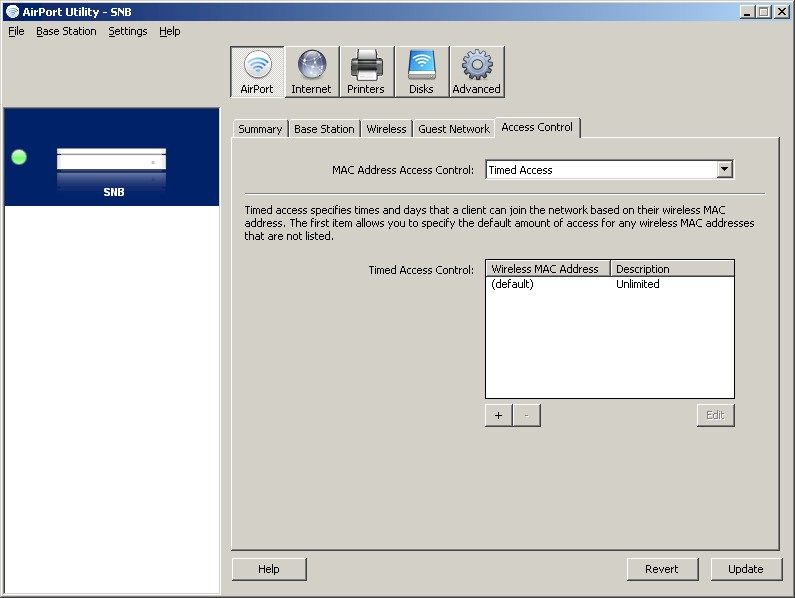
Wireless MAC address filters are schedulable.
Routing Performance
All testing was done with the latest 7.5.2 firmware loaded and the 5.5.3 AirPort Utility. If you want to compare the 5th and 4th gen AirPorts, you’ll need to click the Archived Products Switch To Show link to see the 4th gen numbers. To make it easy, though, I’ve pulled both sets of numbers into Table 1 below.
Table 1 shows that the new Extreme’s routing speed is about the same for downlink and improved by 100 Mbps for uplink. There’s also a big improvement in simultaneous session handling with the 5th gen AirPortX able to open 29,413 sessions before pooping out, vs. the Gen 4’s 128.
| Test Description | 5th Gen | 4th Gen |
|---|---|---|
| WAN – LAN Throughput (Mbps) | 430.4 | 419.5 |
| LAN – WAN Throughput (Mbps) | 434.6 | 330.7 |
| Total Simultaneous Throughput (Mbps) | 496.5 | 414.7 |
| Max. Simultaneous Connections | 29,413 | 128 |
| Firmware Version | 7.5.2 | 7.5 |
Table 1: Routing throughput
Figure 6 shows the IxChariot aggregate plots for WAN to LAN, LAN to WAN and simultaneous routing throughput tests, which look generally steady.
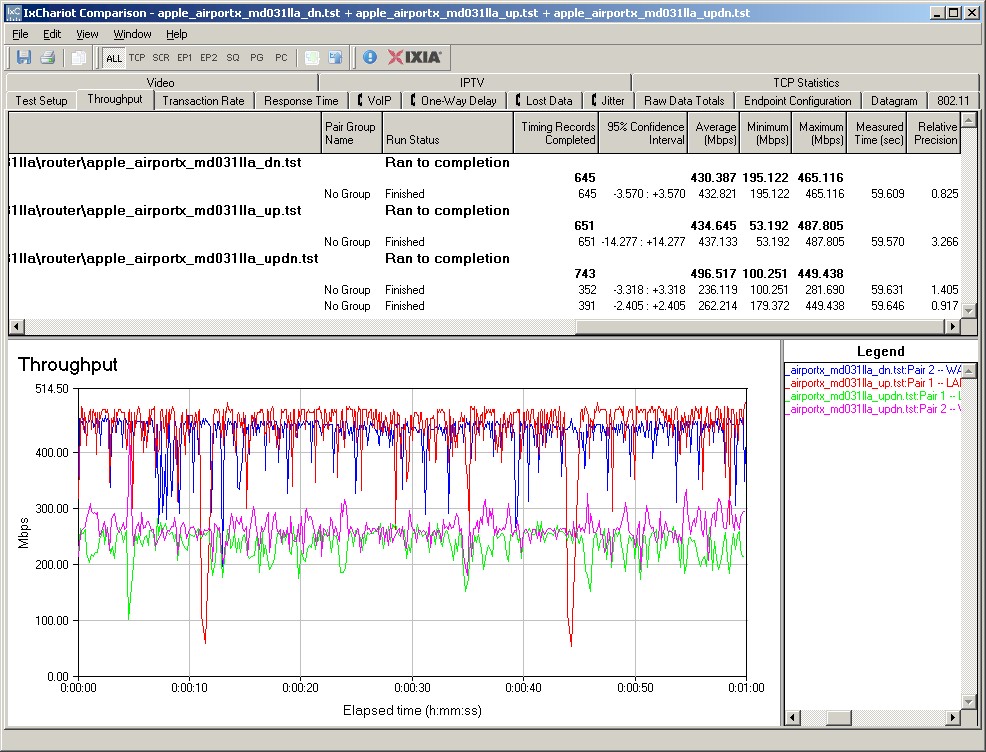
Figure 6: Apple AirPort Extreme 5th Gen routing throughput
Wireless Performance – 2 Stream, 2.4 GHz
The 5th Gen AirPort Extreme is Wi-Fi Certified and properly comes up in 20 MHz bandwidth mode in 2.4 GHz on power-up and "wide channel" mode (40 MHz bandwidth) in 5 GHz. As noted earlier, 40 MHz channel bandwidth is locked out in the 2.4 GHz band.
Wi-Fi Certification is separate for Wi-Fi Protected Setup (WPS) and the 5th Gen AirPort doesn’t have it and doesn’t support WPS. So I manually had to set up WPA2 / AES secured connections on both radios to do all testing using the new four-location wireless test process. As noted earlier, testing was done using the latest 7.5.2 firmware loaded and the 5.5.3 AirPort Utility.
The Benchmark Summary shown in Figure 7 brings all the numbers into one handy place. Before you get too depressed at the wireless throughput numbers below, remember they are the average of the tests at all four test locations.
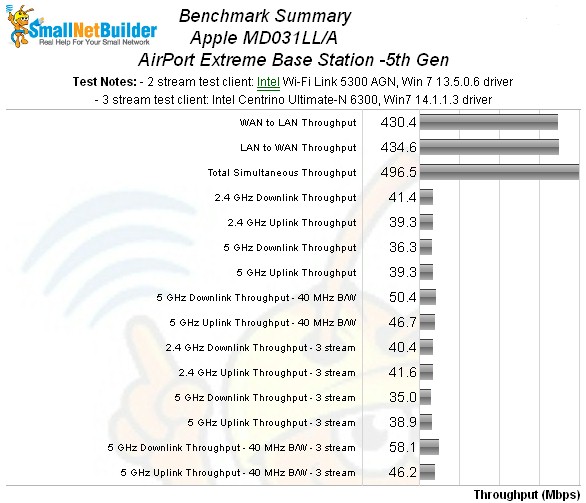
Figure 7: Apple AirPort Extreme 5th Gen benchmark summary
Let’s first look at the performance differences between 4th and 5th gen products. The Performance Table in Figure 8 compares the 2.4 GHz band performance for the two generations. Uplink speed for the 5th generation isn’t as high as seen in the 4th. But throughput in weaker test locations D and F is much improved in the latest model.
Highest 2.4 GHz band speed, however, is only 68 Mbps running downlink in the strongest signal test location A. Running simultaneous up and downlink tests in Location A yielded 82 Mbps of total throughput.
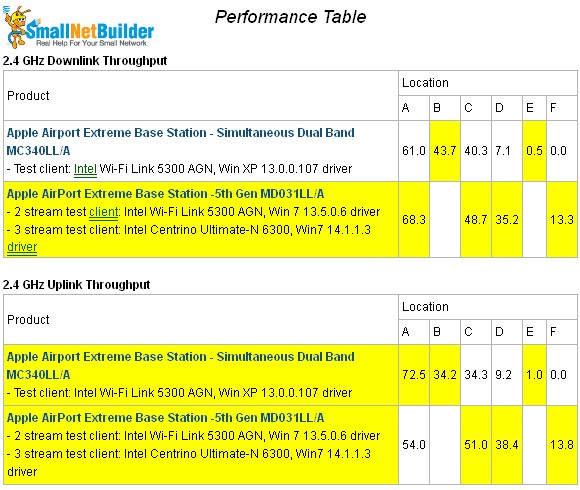
Figure 8: Apple AirPort Extreme 5th Gen performance summary – 2.4 GHz
This is to be expected, since the 4th generation results are from a test sample with improperly connected antennas. Looking back at Table 1 in the retest article shows that the 5th generation performance with lower level signals is much improved over the 4th generation.
The IxChariot plot in Figure 9 shows 2.4 GHz band downlink tests. You can see throughput ramps up at the start of the Location A and F tests–something I’ve seen before in Broadcom-based N products. I tried to eliminate this effect with multiple test runs, but couldn’t. The effect is relatively brief, so doesn’t lower the one-minute test average result too much.

Figure 9: Apple AirPort Extreme 5th Gen IxChariot summary – 2.4 GHz, 20 MHz mode, downlink
Here are links to the other 2.4 GHz plots for your reference:
5 GHz
Figure 10 shows a different story for the 5 GHz band. There, the general trend seems to be that the 4th generation AirPort Extreme turns in higher throughput results with stronger signals, although there are exceptions. As expected, the 5th generation AirPort Extreme was no more successful reaching into dead zone Location F than the 4th generation was.
Highest throughput measured for the 5th gen. was 85 Mbps in Location A, 40 MHz bandwidth, downlink. The simultaneous up and downlink test in 40 MHz bandwidth mode showed a top total throughput yield of 108 Mbps.
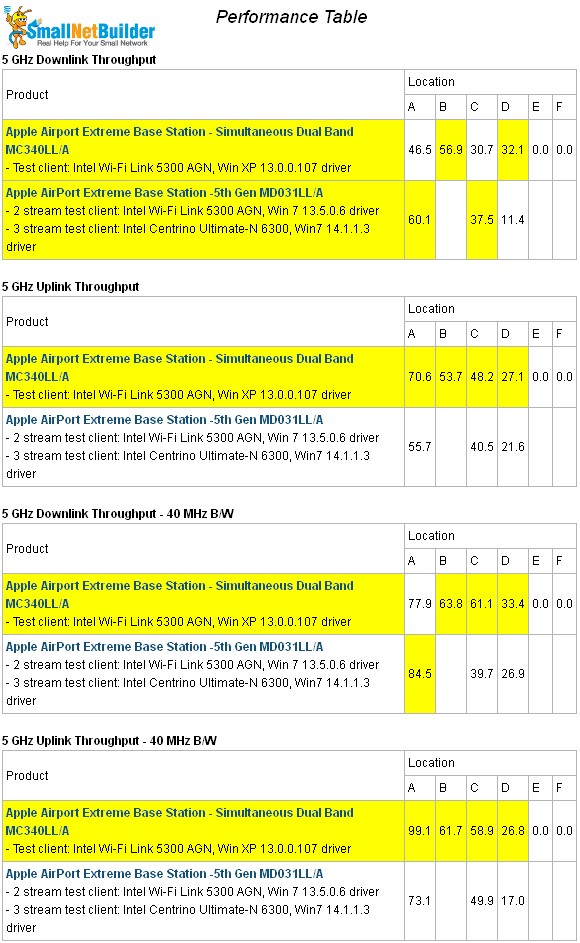
Figure 10: Apple AirPort Extreme 5th Gen performance summary – 5 GHz
The IxChariot 20 MHz mode downlink summary plot in Figure 11 shows both the ramp-up effect and some rather large throughput variation in the strongest signal location A. In general, however, thoughput was pretty steady, even with lower signal levels.
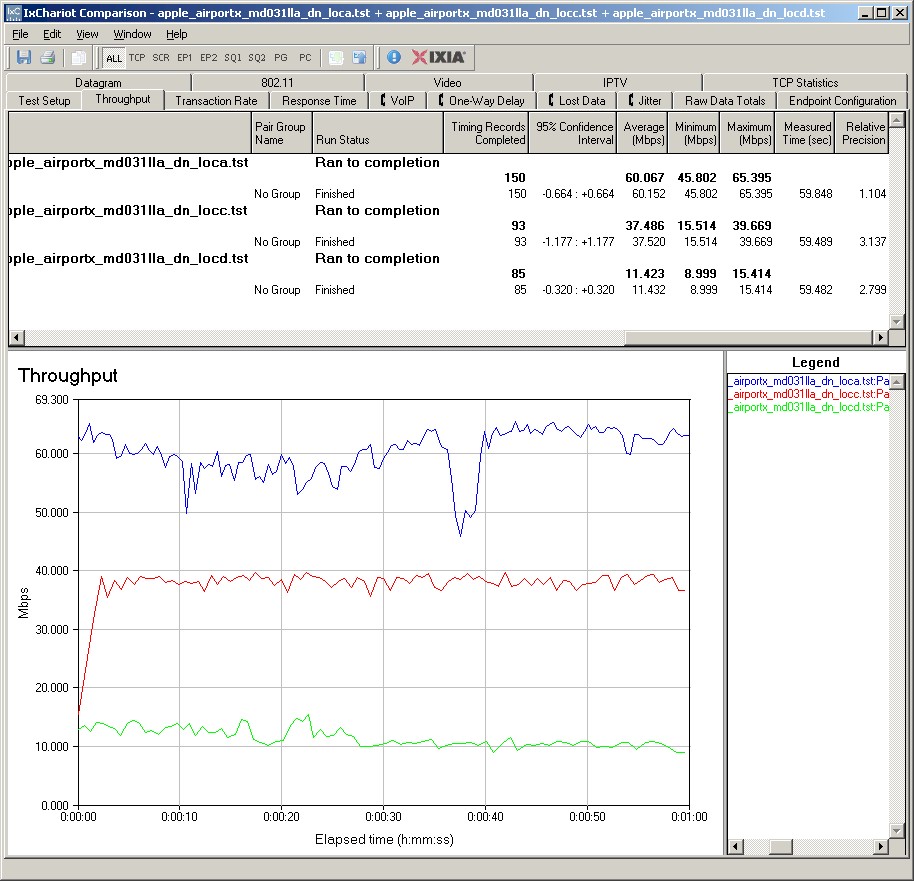
Figure 11: Apple AirPort Extreme 5th Gen IxChariot summary – 5 GHz, 20 MHz mode. downlink
Here are links to the other 5 GHz plots for your reference.
- 5 GHz / 20 MHz uplink
- 5 GHz / 20 MHz up and downlink
- 5 GHz / 40 MHz downlink
- 5 GHz / 40 MHz uplink
- 5 GHz / 40 MHz up and downlink
Wireless Performance – 3 Stream, 5 GHz
The 4th Generation AirPort Extreme didn’t officially support three-stream N and I wasn’t set up to test three-stream either. So let’s compare the Gen 5 to other current three-stream capable routers like, say, the Cisco Linksys E4200 and NETGEAR WNDR4000, both of which use also use the Broadcom BCM4331.
I haven’t been that impressed by three-stream N to date. My tests using an Intel Centrino Ultimate-N 6300 client show minor throughput gains only with in-the-same-room signal levels. Once you get down to even medium signal levels, it seems that three-stream performance gains basically disappear. Check out Three Stream N Performance: A First Look and Three Stream N Performance: Two More for the details.
Since both the competitors support three-stream N on their 5 GHz radios only, I’ll compare 5 GHz 40 MHz bandwidth mode, since that’s the way people with three-stream capable clients will tend to run anyway. The new radar plot in Figure 12 shows the Gen 5 evenly matched in Locations A and C, but significantly slower in weaker signal location D.
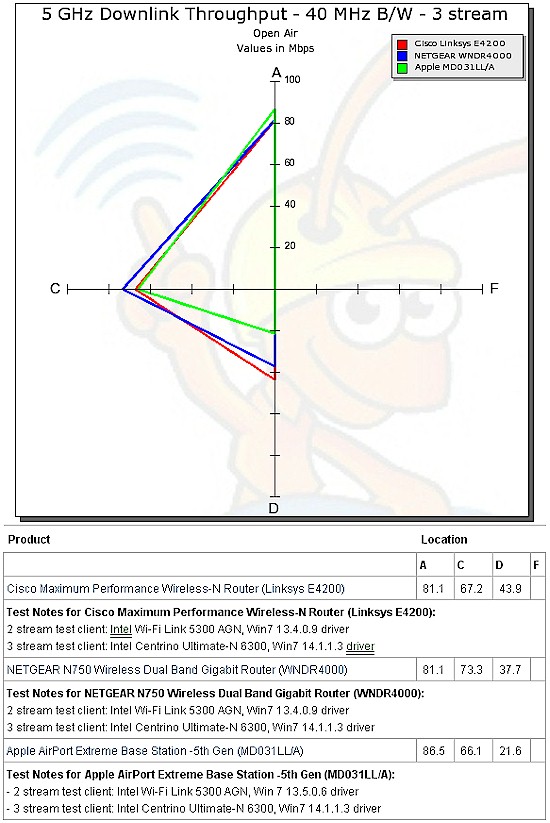
Figure 12: Radar plot comparison, 5 GHz, 3 stream, 40 MHz mode, downstream
For uplink, Figure 13 shows the Gen 5 again turning in the weakest performance, this time with single-digit Location D throughput.
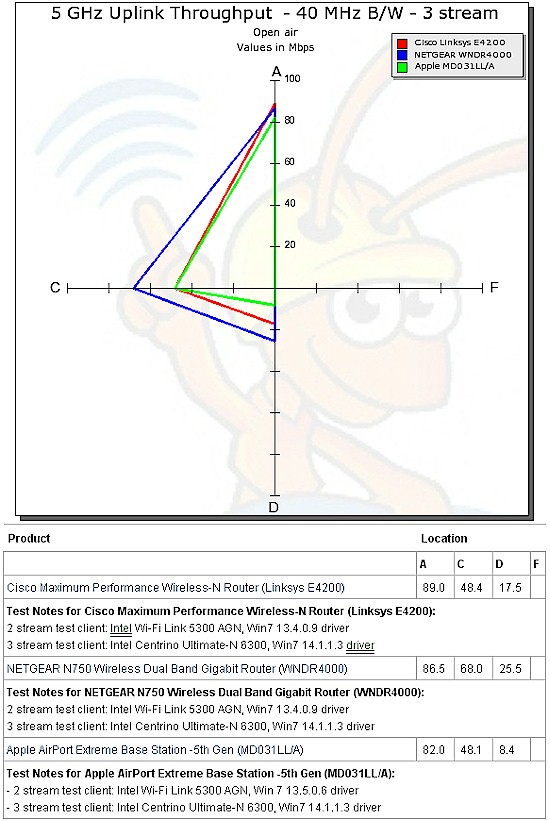
Figure 13: Radar plot comparison, 5 GHz, 3 stream, 40 MHz mode, upstream
Figure 14 provides a peek at the IxChariot plot for three-stream 5 GHz, 40 MHz mode downlink.
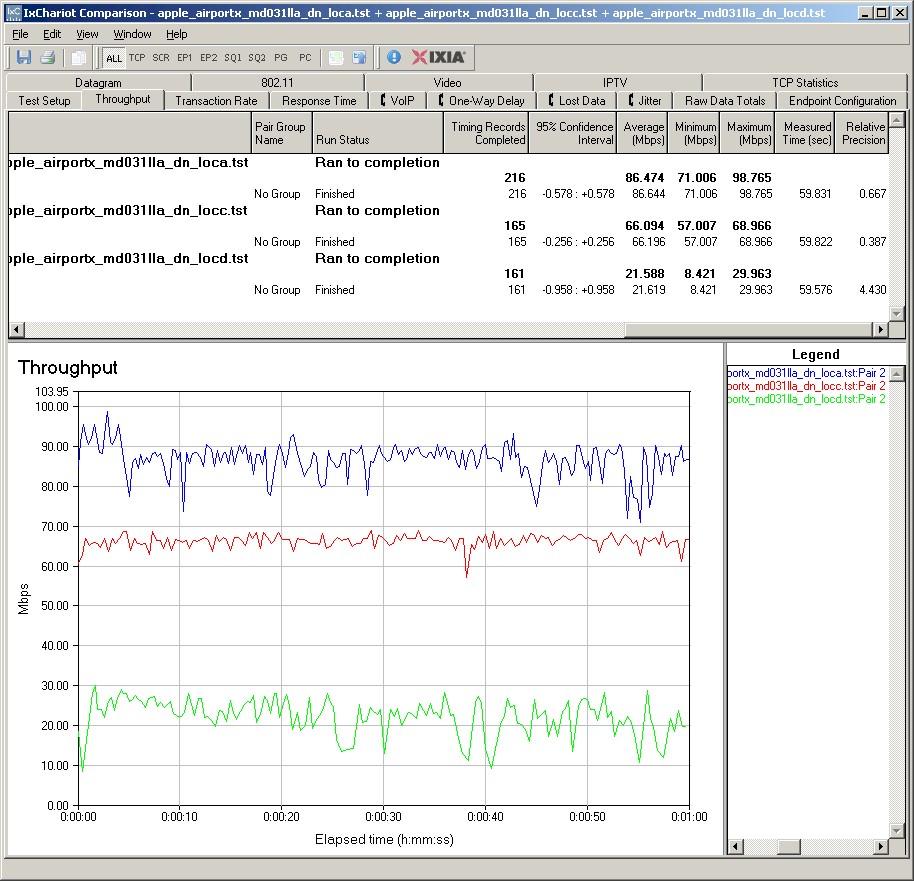
Figure 14: Apple AirPort Extreme 5th Gen IxChariot summary – 5 GHz, 20 MHz mode. downlink
Here are links to the other three-stream 5 GHz plots for your reference.
- 5 GHz / 20 MHz downlink
- 5 GHz / 20 MHz uplink
- 5 GHz / 20 MHz up and downlink
- 5 GHz / 40 MHz uplink
- 5 GHz / 40 MHz up and downlink
Wireless Performance – 3 Stream, 2.4 GHz, Closing Thoughts
To compare three-stream 2.4 GHz performance, we need to use two other routers, TRENDnet’s TEW-691GR and D-Link’s DIR-665. Figure 15 shows 20 MHz mode downlink performance with the Gen 5 falling between the other two at all test locations.
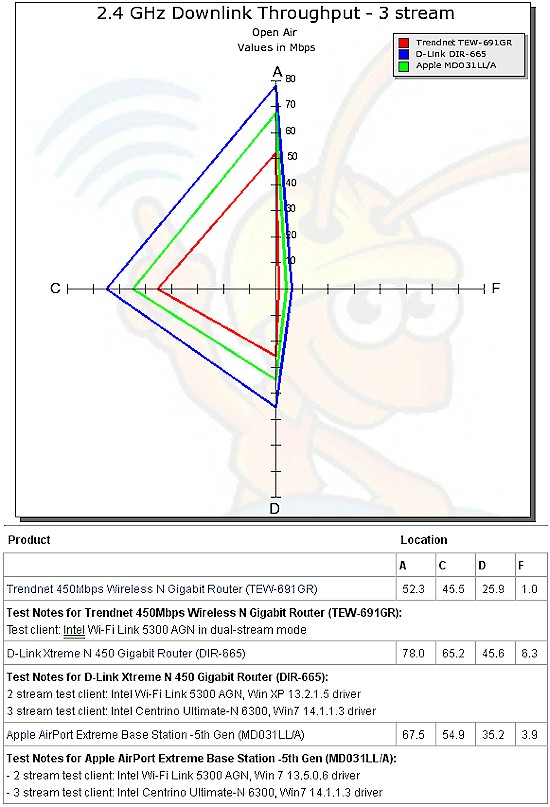
Figure 15: Radar plot comparison, 2.4 GHz, 3 stream, 20 MHz mode, downstream
As is usually the case, Figure 16 presents a different view, with the AirPort Extreme beating both the TRENDnet and D-Link at all test locations!
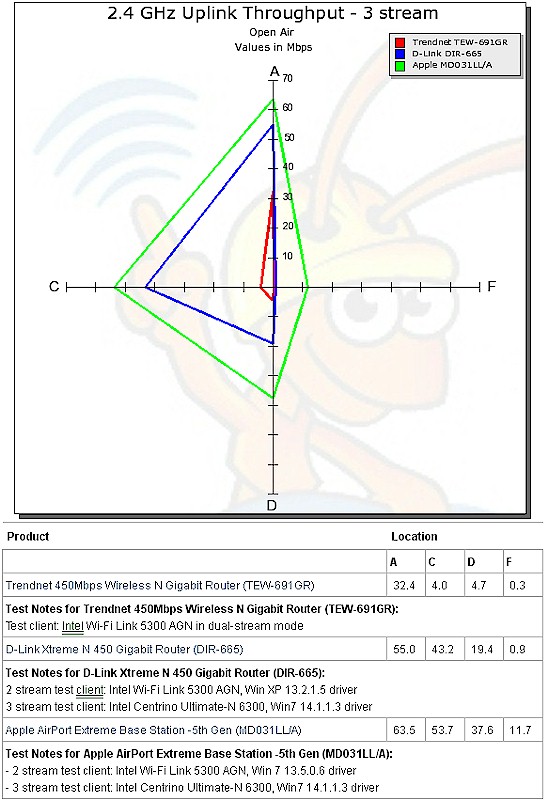
Figure 16: Radar plot comparison, 2.4 GHz, 3 stream, 20 MHz mode, upstream
Figure 17 shows the 2.4 GHz three-stream IxChariot downlink plot.
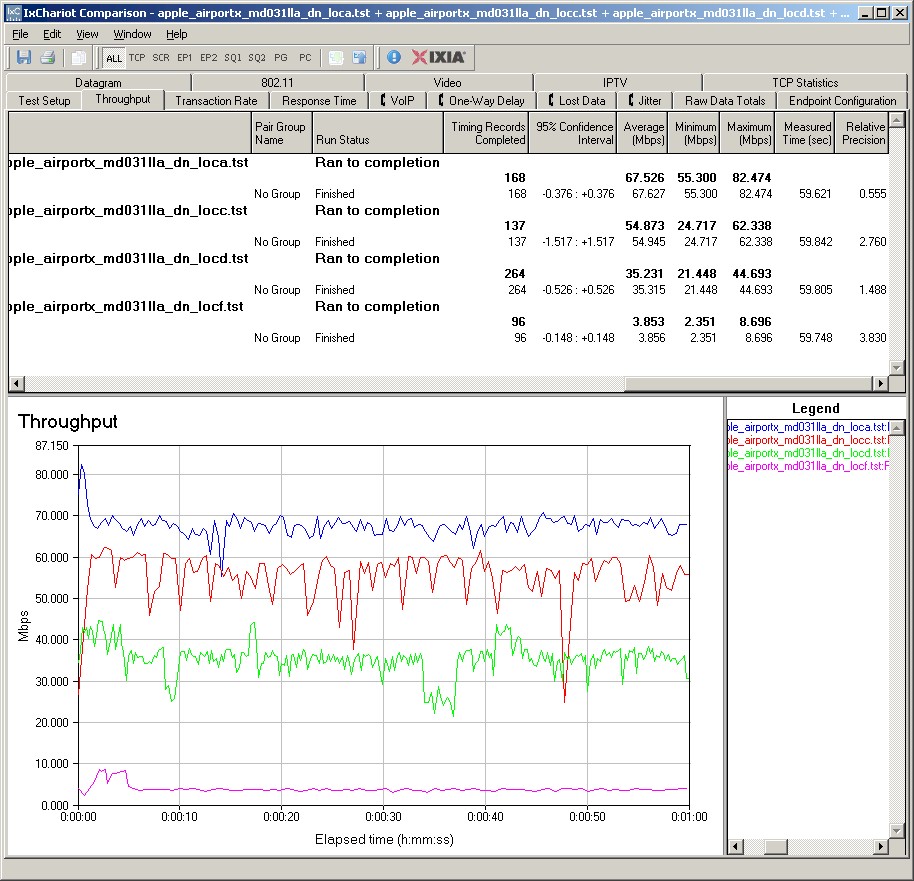
Figure 17: Apple AirPort Extreme 5th Gen IxChariot summary – 3 stream 2.4 GHz, 20 MHz mode, downlink
Here are links to the other three-stream 2.4 GHz plots for your reference:
Closing Thoughts
There has been considerable buzz around the Gen 5, mainly due to the higher transmit power that forum denizens uncovered by parsing the FCC test reports. But higher transmit power on a router or AP doesn’t really help if the client doesn’t have equivalent power to communicate back. And so it is with the AirPort Extreme Gen 5.
The bottom line is that the AirPort Extreme Gen 5 definitely has improved throughput for medium to low signal levels in 2.4 GHz. But any performance gains in the 5 GHz side are offset by losses in other test locations and directions (up / downlink).
In other words, the Gen 5 is likely to perform better in the 2.4 GHz band where the Gen 4 doesn’t. But in the 5 GHz band, you might see a slight performance improvement, but it’s just as likely you won’t.
Updated 8/25/11: Clarified cost comments
If you’ve been hoping that Apple has sprinkled the same fairy dust into AirPort Extreme Gen 5 that it uses on its tablets and phones to make it the über-router to solve all your wireless performance problems, it hasn’t. It’s just yet-another simultaneous dual-band N router that some people will rave about and others will rave at. And certainly not worth paying the top-dollar that Apple is customarily charging $30 or so extra.